
-
Hey Guest. Check out your NeoGAF Wrapped 2025 results here!
You are using an out of date browser. It may not display this or other websites correctly.
You should upgrade or use an alternative browser.
You should upgrade or use an alternative browser.
Assassin's Creed Syndicate PC Performance Thread
- Thread starter Crossing Eden
- Start date

JuanmaWL
Member
New 2.2 GB Patch Uplay + AMD drivers 15.11.1
i5 3570k 4,5GHz
Sapphire 7870 Ghz Edition OC
8 GB 2133
1680x1050
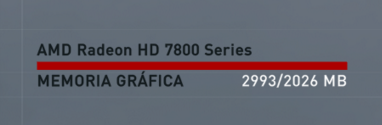
How is that possible? Look FPS :/
What a port.

http://i.imgur.com/Fgwtb2o.jpg
http://i.imgur.com/fMRdruH.jpg
http://i.imgur.com/73pMnsr.jpg
http://i.imgur.com/IfL69EA.jpg
20 FPS here.
http://i.imgur.com/DdeTd60.jpg
This is my config now

http://i.imgur.com/KOzzcz4.jpg
http://i.imgur.com/JWjMhrT.jpg
http://i.imgur.com/8PZ3txt.jpg
i5 3570k 4,5GHz
Sapphire 7870 Ghz Edition OC
8 GB 2133
1680x1050
How is that possible? Look FPS :/
What a port.
http://i.imgur.com/Fgwtb2o.jpg
http://i.imgur.com/fMRdruH.jpg
http://i.imgur.com/73pMnsr.jpg
http://i.imgur.com/IfL69EA.jpg
20 FPS here.
http://i.imgur.com/DdeTd60.jpg
This is my config now
http://i.imgur.com/KOzzcz4.jpg
http://i.imgur.com/JWjMhrT.jpg
http://i.imgur.com/8PZ3txt.jpg
paperspace
Member
I don't speak French so I don't know what any of those settings means, but I'm guessing you're out of memory.

I don't speak french so I don't know what any of those settings means, but I'm guessing you're out of memory.
I uh, don't think that's French.
But yeah, you're right, you're running it at pretty high settings for that GPU.
I don't speak french so I don't know what any of those settings means, but I'm guessing you're out of memory.
It's Spanish.
Pretty much.you have a 2GB card, recquiescat in pace
The PC version is exquisite.
2gb just does not cut it anymore, even if you are aiming for console settings.
Garrett Hawke
Member
Turn down shadow and detail settings, maybe turn off HBAO+, and use medium textures.

Not technically a performance thing, but does anyone else have their mouse cursor always snap to the center of the screen every time you open a menu or the map? I'm playing with my DS4, and it's pretty annoying since I'm not using the mouse/keyboard for anything and I keep having to move the cursor back off-screen.
Not technically a performance thing, but does anyone else have their mouse cursor always snap to the center of the screen every time you open a menu or the map? I'm playing with my DS4, and it's pretty annoying since I'm not using the mouse/keyboard for anything and I keep having to move the cursor back off-screen.
I'm not even seeing the cursor when I use my Xbox One controller, are you using any third party software to make the DS4 work with this game?
Tried capping with Rivatuner at 30 and cranking up the settings just for shits and giggles.
This game looks awful at 30 FPS. Like some games can make it work, but found it very distracting here.
If you are running on Nvidia, try vsync 1/2 refresh rate (30Hz), preferably via Nvidia Inspector, along with the frame cap. That should help. Most people only apply the cap, which is why you get complaints about how PC 30 fps doesn't feel as smooth as console 30 fps. The main reason for that, is the console is usually running at a 30Hz refresh, along with a 30 framerate/frametime cap (33.3ms).
EDIT: By the way, 1/2 refresh rate will only work in exclusive fullscreen; borderless window uses your desktop's native refresh rate.
chromatic9
Member
Do we know what's in the patch?
I seen some talk on the previous pages about DLC? I don't want to download DLC that I'm not going to buy. The free stuff is already unlocked and present pre patch is it not?
I'm really low on HDD space with these 50gb games and really don't like downloading a gig there and a gig here every time as if its nothing. It isn't nothing and adds up to a lot of useless data.
I seen some talk on the previous pages about DLC? I don't want to download DLC that I'm not going to buy. The free stuff is already unlocked and present pre patch is it not?
I'm really low on HDD space with these 50gb games and really don't like downloading a gig there and a gig here every time as if its nothing. It isn't nothing and adds up to a lot of useless data.
I'm not even seeing the cursor when I use my Xbox One controller, are you using any third party software to make the DS4 work with this game?
I tried using DS4Windows like I do with most games initially, but then stopped because the game supports the DS4 with button prompts natively.
Nvidia drivers are more lightweight hence the better performance in CPU heavy games. Not surprising in the least although AMD hardware does fine when Nvidia-optimized effects are not engaged.Also game is not well optimized for AMD GPUs, it works better on nVidia... what a surprise.
I would not say this game discriminates against AMD hardware.
2gb just does not cut it anymore, even if you are aiming for console settings.
Is that so? So then why am I still fine with 2gb? I don't think I've ever had to go below console settings.
JuanmaWL
Member
you have a 2GB card, recquiescat in pace

This is why i dont understand how i can play with +30 fps, the game must be at 10 fps with my card at this settings xD
Anyway, i go with medium textures, i need more fps.
P.D: How about 30 fps cloth? wtf
Is that so? So then why am I still fine with 2gb? I don't think I've ever had to go below console settings.
If you play Syndicate with a 2gb GPU you already are below console settings (lower quality textures).

D
Deleted member 17706
Unconfirmed Member
Yeah, what is the deal with the cloth animation in this? It wasn't like that in any previous game if I remember correctly.
I really hope they fix it. It looks terrible.Yeah, what is the deal with the cloth animation in this? It wasn't like that in any previous game if I remember correctly.
Do we know what's in the patch?
I seen some talk on the previous pages about DLC? I don't want to download DLC that I'm not going to buy. The free stuff is already unlocked and present pre patch is it not?
I'm really low on HDD space with these 50gb games and really don't like downloading a gig there and a gig here every time as if its nothing. It isn't nothing and adds up to a lot of useless data.
There is no actual patch (1.12 is still the latest) and probably won't be until after the new year, given how close Christmas is. The free steampunk outfits need to be "purchased" through either the in-game Helix Store or Steam, depending on which version you have.
Garrett Hawke
Member
Really, not even a small 30fps cloth patch? :/There is no actual patch (1.12 is still the latest) and probably won't be until after the new year, given how close Christmas is. The free Steampunk outfits need to be "purchased" through either the in-game Helix Store or Steam, depending on which version you have.
Really, not even a small 30fps cloth patch? :/
An update to correct the cloth physics is a distinct possibility, assuming of course it's an easy fix. I was speaking more about a patch that addresses a range of issues as opposed to what would essentially be a hotfix.
Garrett Hawke
Member
Ah ok. I do hope they fix it, Unity didn't have this issue so I'm not sure why this does.An update to correct the cloth physics is a distinct possibility, assuming of course it's an easy fix. I was speaking more about a patch that addresses a range of issues as opposed to what would essentially be a hotfix.
ClaptoVaughn
Member
The cloth fps issue is so jarring to me, it's actually keeping me from wanting to play for now and optimistically wait for a patch.
It's not that the game is completely unplayable because of that but with my still playing Fallout 4, Just Cause 3 coming out in about a week, and Slain after that, I can easily wait.
It's not that the game is completely unplayable because of that but with my still playing Fallout 4, Just Cause 3 coming out in about a week, and Slain after that, I can easily wait.
Tried capping with Rivatuner at 30 and cranking up the settings just for shits and giggles.
This game looks awful at 30 FPS. Like some games can make it work, but found it very distracting here.
Yea noticed the same.
The game seems to use a disproportionate amount of VRAM to what's being shown on screen. The textures are not that hi-res especially compared to a game like Shadow of Mordor that only uses the same amount of VRAM at 4k that this game uses at 1080p. I wonder if this is partly lazy coding to cover up for porting a game from consoles that have an 8gb pool of usable memory.
D
Deleted member 17706
Unconfirmed Member
The game seems to use a disproportionate amount of VRAM to what's being shown on screen. The textures are not that hi-res especially compared to a game like Shadow of Mordor that only uses the same amount of VRAM at 4k that this game uses at 1080p. I wonder if this is partly lazy coding to cover up for porting a game from consoles that have an 8gb pool of usable memory.
The consoles do not have an 8GB pool of usable memory for games, much less dedicated VRAM.
You are aware that there is a ton more of, well, everything in the open world in this game, right? The game world in Shadow of Mordor is a barren wasteland.
Garrett Hawke
Member
There's quite a lot on screen at once. And someone in the thread earlier posted that they had no issues at 30fps with high textures on a 2GB card so the slider may just be covering their asses.
The game seems to use a disproportionate amount of VRAM to what's being shown on screen. The textures are not that hi-res especially compared to a game like Shadow of Mordor that only uses the same amount of VRAM at 4k that this game uses at 1080p. I wonder if this is partly lazy coding to cover up for porting a game from consoles that have an 8gb pool of usable memory.
Consoles have about 5GB of total usable memory, not 8GB. That's 5GB of memory is shared between system and video.
paperspace
Member
Really, not even a small 30fps cloth patch? :/
Is it confirmed 30fps? It's weird because the cloth feels very choppy even if I'm playing in 30fps.
Is it confirmed 30fps? It's weird because the cloth feels very choppy even if I'm playing in 30fps.
Yeah, I think, technically, the cloth physics system is actually half-rate. I have the game capped at 30fps and Evie's cape most definitely does not bounce around in a manner that could be described as natural -- there's a perceivable slowness to it. The PC version had already been patched twice by the time the pre-load went live, so it is possible that the issue hasn't always been present in the PC version and was introduced by something Ubi did between 1.11 and 1.12.
Yeah, I think, technically, the cloth physics system is actually half-rate. I have the game capped at 30fps and Evie's cape most definitely does not bounce around in a manner that could be described as natural -- there's a perceivable slowness to it. The PC version had already been patched twice by the time the pre-load went live, so it is possible that the issue hasn't always been present in the PC version and was introduced by something Ubi did between 1.11 and 1.12.
Then it's possible it's dependent upon the refresh rate, and not the framerate. I've been playing it with both 1/2 refresh rate vsync (30Hz), and a 30 fps cap via RTSS (mostly because of the physics issue), and, I might be missing something, but Evie's cape physics seem to be the correct speed @30Hz.
Then it's possible it's dependent upon the refresh rate, and not the framerate. I've been playing it with both 1/2 refresh rate vsync (30Hz), and a 30 fps cap via RTSS (mostly because of the physics issue), and, I might be missing something, but Evie's cape physics seem to be the correct speed @30Hz.
Possibly. I just tried to run a quick test myself but my Samsung monitor doesn't like "non-optimum" modes, which means no 1080p at 30Hz.
Possibly. I just tried to run a quick test myself but my Samsung monitor doesn't like "non-optimum" modes, which means no 1080p30.
Urg, yeah, I wasn't thinking of 144Hz/120Hz and/or G-Sync monitors. I'm still gaming on a good old fashion 1080p 60Hz display ;p
What I do know, is if you're running Nvidia, you can use the 1/2 refresh rate vsync option in the Nvidia Inspector settings for a 60Hz display to achieve 30Hz, or the 1/4 refresh rate vsync option for a 120Hz display to achieve 30Hz.
If that doesn't work, I'm out of ideas.
EDIT: Forgot to mention, if you do have a 60hz display, but the Samsung just isn't keen on certain refresh rates, then the 1/2 refresh rate vsync option actually applies the 30Hz through vsync itself; it doesn't change you're monitor's actual refresh rate, so it should work, even if your monitor is fussy with certain resolutions and/or refresh rates. Again, this specific option is only available on Nvidia setups. AMD has something similar, but I don't know where it is off the top of my head.

NeoRaider
Member
Is it confirmed 30fps? It's weird because the cloth feels very choppy even if I'm playing in 30fps.
This.
It looks like 15fps to me.
Ah ok. I do hope they fix it, Unity didn't have this issue so I'm not sure why this does.
Yeah they need to fix it asap, it's really ugly. I mean, to the point of actually being distracting.
Many will think im crazy but i really cannot see the difference between FXAA and MSAA 2x, i have a 980ti and was messing with AA options and to be hint TXAA looks really blurry to me but FXAA looks exactly the same as 2x MSAA, IQ and all
Theres a large Bluring of the entire image that you wont get with MSaa
Theres a large Bluring of the entire image that you wont get with MSaa
There's a way to use MSAA in this game without FXAA?
There's a way to use MSAA in this game without FXAA?
Nope, the FXAA applied over MSAA modes is just tweaked to be a little sharper than the standalone FXAA option. That, and MSAA doesn't have the Temporal element that TXAA does, thus less perceived softness.
How come so few games allow for SSAA?
Are you talking about Full Scene AA or Super Sampling AA?
If you mean Full Scene (near identical in results to downsampling, just a different method), the same reason so many modern games offer MSAA: performance cost. That, and MSAA doesn't work easily with deferred rendering engine. However, there are SSAA slider's available in both the recent CoD Black Ops III and Star Wars Battlefront that internally scale the game's resolution.
And again, Nvidia's DSR and the AMD equivalent do something similar to SSAA, and are available in almost every game.
Are you talking about Full Scene AA or Super Sampling AA?
If you mean Full Scene (near identical in results to downsampling, just a different method), the same reason so many modern games offer MSAA: performance cost. That, and MSAA doesn't work easily with deferred rendering engine. However, there are SSAA slider's available in both the recent CoD Black Ops III and Star Wars Battlefront that internally scale the game's resolution.
And again, Nvidia's DSR and the AMD equivalent do something similar to SSAA, and are available in almost every game.
Super sampling. It's less taxing than doing DSR.
D
Deleted member 17706
Unconfirmed Member
Many will think im crazy but i really cannot see the difference between FXAA and MSAA 2x, i have a 980ti and was messing with AA options and to be hint TXAA looks really blurry to me but FXAA looks exactly the same as 2x MSAA, IQ and all
I actually prefer the look of just FXAA vs. FXAA + MSAA 2x. With MSAA activated, the player character looks abnormally sharp to me.
Super sampling. It's less taxing than doing DSR.
Oh, then you are talking about the Supersampling that is paired with MSAA to cover transparencies.
That can be used in any game that has MSAA. At least with Nvidia hardware. You simply need to go into the game's profile in Nvidia Inspector and "enhance the application settings," and select 4x Supersampling under "Transparency Supersampling."
I don't know how it will interact with this game in particular (I haven't tested it), and it will likely blur the image even more. The reason they combined FXAA with MSAA in this game was to mimic Supersampling on transparencies; MSAA can't cover transparencies, only solid geometric edges. FXAA can, but obviously blurs the entire image in the process.

dgrdsv
Member
Super sampling. It's less taxing than doing DSR.
Supersampling is the same thing as DSR generally speaking. Performance cost is the same as well.
I'm not sure if I understand what you mean by "allow for SSAA". You can use DSR with pretty much every game. You can try forcing one of NV's SSAA modes with the proper AA bit. Games can't "allow" this as all these methods are driver hacks basically.
Alright, I tested whether or not transparency Supersampling works in conjunction with MSAA in Syndicate. It looks like it does, with about a 6% performance hit over MSAA enabled alone.
It subtle, but the comparison is below. Note the brim of Jacob's hat, the fine edge detail on his metal bracer, the bush in front of Jacob, and the tree branches at the far top right of the image:
http://screenshotcomparison.com/comparison/151567
To fully achieve this (and even for in-game MSAA to properly work at all), you must have shadows set to "High" or lower. There is currently a rendering glitch in the game with PCSS shadows and MSAA or TXAA. While the shadow distance/quality is obviously better, with both enabled, MSAA appears to have diminished edge coverage (note the inner edges of the window seals in the top left house: http://screenshotcomparison.com/comparison/151571).
My Nvidia Inspector Settings (pertinent settings under "Antialiasing" section):
EDIT: This also means enhancing the in-game MSAA with SGSSAA is possible, but with a massive performance cost; I was hitting 99% GPU usage on my 980 Ti...at 30 fps ;p
It subtle, but the comparison is below. Note the brim of Jacob's hat, the fine edge detail on his metal bracer, the bush in front of Jacob, and the tree branches at the far top right of the image:
http://screenshotcomparison.com/comparison/151567
To fully achieve this (and even for in-game MSAA to properly work at all), you must have shadows set to "High" or lower. There is currently a rendering glitch in the game with PCSS shadows and MSAA or TXAA. While the shadow distance/quality is obviously better, with both enabled, MSAA appears to have diminished edge coverage (note the inner edges of the window seals in the top left house: http://screenshotcomparison.com/comparison/151571).
My Nvidia Inspector Settings (pertinent settings under "Antialiasing" section):

EDIT: This also means enhancing the in-game MSAA with SGSSAA is possible, but with a massive performance cost; I was hitting 99% GPU usage on my 980 Ti...at 30 fps ;p
chromatic9
Member
Alright, I tested whether or not transparency Supersampling works in conjunction with MSAA in Syndicate. It looks like it does, with about a 6% performance hit over MSAA enabled alone.
It subtle, but the comparison is below. Note the brim of Jacob's hat, the fine edge detail on his metal bracer, the bush in front of Jacob, and the tree branches at the far top right of the image:
http://screenshotcomparison.com/comparison/151567
To fully achieve this (and even for in-game MSAA to properly work at all), you must have shadows set to "High" or lower. There is currently a rendering glitch in the game with PCSS shadows and MSAA or TXAA. While the shadow distance/quality is obviously better, with both enabled, MSAA appears to have diminished edge coverage (note the inner edges of the window seals in the top left house: http://screenshotcomparison.com/comparison/151571).
My Nvidia Inspector Settings (pertinent settings under "Antialiasing" section):
Not really working there and you have it set to enhance. Cost is roughly the same of downsampling and greatly improves the image. Also you need to change AA compatibility.
You can try in game menu SSAA in Tomb Raider 2013, Trine 2.