• Hey Guest. Check out your NeoGAF Wrapped 2025 results here!

Best external hard drives?

Status
Not open for further replies.

goodcow

Member
First, yes, I know I'll get suggestions to just buy a hard drive and put it in an enclosure, but no, I'm not going to.

Anyway, it doesn't seem as if many well known companies really make external drives... and the reviews on externals are always so widely varying. I have two external WD drives which work fine, and have for years. In the meantime, there same drives are attacked with numerous crash reports on Amazon.com reviews.

I'm not going to get another WD external mainly because the new cases they use are ugly as sin. I wish they would just make their old damn models again.

LaCie, well, we have the 1TB drive at work, and in under a year it's had a data loss scare, and we had to send it back last week for repair because the fan started dying on it. So LaCie is probably a no.

What else does that really leave?
 
Not to beat a dead horse or anything, but is there a specific reason why you won't go the internal drive & external enclosure route?

It's just that you'll get many more choices that way and everything. Your call, but like I said, I'm just wondering why.
 
I have a Maxtor 250 external that just busted on me, but I've heard WD and Maxtor horror stories so I guess all HD companies have their deficiencies...

I think it just comes down to taking care of the drive, mine worked fine for several month as my iTunes music collection folder, but then I connected it to DC++ and had like over 500+ kb/s going in uploading and downloading and loaded the drive w/ well over 80 new gigs of stuff in a matter of a couple of days and little by little there were file system errors and eventually it's no longer read, now I want to see if I can recover what I can and then reformat and be more careful with overdoing the amount of gigs going in and out... I'm also going to back up stuff on DVD's probably, and if I have trouble from there I'm gonna exchange it for another one...
 
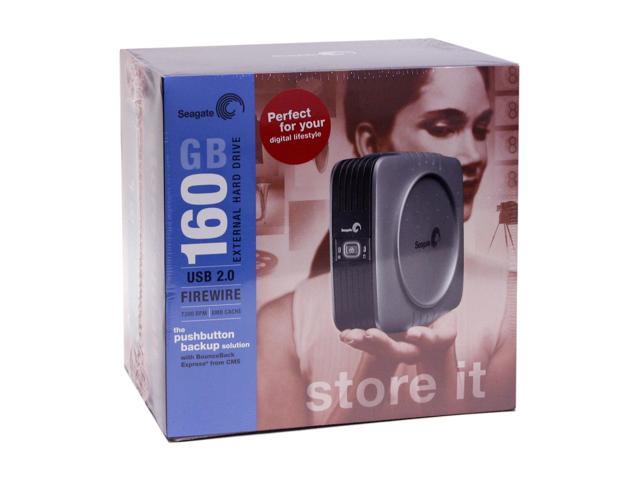
I have this:

22-154-401-06.JPG


The included backup software could be better but I got no complaints with it.
 
Defensor said:
I have this:

22-154-401-06.JPG


The included backup software could be better but I got no complaints with it.

Wow. How much was that? 160 Gigs? X_X

Also, Mac compatable? (I'm gonna get a Mac mini and wanna know if I could use this with it...)
 
I have a buffalo linkstation 160. They do 120/160/250 sizes.

The key for me was it was networkable (has an ethernet socket). Plus you can attach a printer to it via usb, and another external usb hard drive for automated backups from the linkstation (if you want double security)

Its also samba compatible, so I use it for backups from my PC,but also have my music and videos on there for streaming to Xbox media center without needing my PC on.
 
I've a pocket hammer with 40GB. Just need to plug two usb cords, and presto no need for power supply(helps when connecting at camera-less/non-permanent record public networks: Edit: it'd be too suspicious to connect it to the power/outlet, plus I can have it in my backpack/suitcase/pocket while using it.). Also if I use a laptop, and've not seriously encrypted my latest d/l files on the pocket hdd, and somehow some EVIL RIAA/MPAA protector bastard finds me(taping into vulnerable wireless networks)... it's easier to smash it badly(planning on keeping a small magnet, in a different suitcase for emergencies, just to make sure no data can be obtained out of the broken pieces.) along with all the files than to actually smash the laptop. Oopss :D There ain't a file on me, what ye want nice officers :lol .
 
i actually just got the Lacie 250. this is what the xbox 360 should look like, or any console for that matter. brushed aliminum panels, minimal, one LED. sleek as all hell.
 
Make your own with an external case you can pick up for 30 bucks.

Internal drives are so much cheaper, you are better off just doing it yourself.
 
WordAssassin said:
Wow. How much was that? 160 Gigs? X_X

Also, Mac compatable? (I'm gonna get a Mac mini and wanna know if I could use this with it...)
I got it for $160 at Newegg.com weeks ago. The 160GB non push button backup is going for $158 now on the site.
 
While we're on the subject of external hard drives, does anyone know of any external drive racks, which have space for adding multiple drives?
 
Well... although you ARE against it... I gotta throw my 2 cents in:

I'm running a 200GB LaCie (designed by FA Porsche... oh you know it) HD via FW on a PB G4... and I've been happy. I do, however, only use it for storage and backup... in other words... I plug it in when I need it and that's it. I have yet to test it for everyday use... but... I do plan on doing so within the next couple of months.

In any case... I have had no problems with th device nor their service (I had a slight problem where I couldn't mount it properly... my fault... not the HD's)

Away from LaCie... I've heard good things about the Maxtor one touch system. But I do not know enough about it to give you any real opinions. For me, though, it was between LaCie and Maxtor.

Your memory scare is, really, the first bad thing I've heard against LaCie.
 
robot said:
Can anyone recommend a good case for an external hard drive? Not really sure what I'm looking for, like if it should have a fan or not.

I saw this one, looks pretty cool:
http://www.newegg.com/Product/Product.asp?Item=N82E16817155211

I have that excat case (just not with the lights), and it works pefectly. It is all metal so some screaching when you take it apart will happen, but you know it is sturdy. I love it personally, and iit is sleek looking.
 
Regarding those Porsche LaCie drives, I know three people who had their fails within a week. Really weird.

I have a 250 LaCie drive and just last week, it started acting weird. I used to swear by them, but now I just don't know...
 
I've just got a LaCie drive and was having no problem with it and would've recommended it but after reading this thread, I now spend most of my time staring at it and waiting for it to collapse into a pile of dust, damn you GAF!
 
I have a 120 and a 160 Lacie, and I've had huge problems with the 120 (aparentally their 120 model is garbage...I bought it when it first came out (just under 400CAD) and found out the hard way).

The 120 has completely crashed twice on me, once causing me to lose thousands of hours worth of work.

Why I bought the 160 is beyond me, but so far, no problems.

Just take care of it, ALWAYS REMOVE WITH THE REMOVE HARDWARE BUTTON!

Never EVER just unplug it.
 
ocelittle said:
I have a 120 and a 160 Lacie, and I've had huge problems with the 120 (aparentally their 120 model is garbage...I bought it when it first came out (just under 400CAD) and found out the hard way).

The 120 has completely crashed twice on me, once causing me to lose thousands of hours worth of work.

Why I bought the 160 is beyond me, but so far, no problems.

Just take care of it, ALWAYS REMOVE WITH THE REMOVE HARDWARE BUTTON!

Never EVER just unplug it.

For whatever reason, my external drives are always, 24/7, "IN USE" when I try to remove them with XP, so I just make sure the access light isn't blinking and unplug them. Never had a problem.
 
Defensor said:
I have this:

22-154-401-06.JPG


The included backup software could be better but I got no complaints with it.


I am thinking of getting this one. I see Circuit City has 2 rebates to bring the price down to 100 bucks.
 
ocelittle said:
I have a 120 and a 160 Lacie, and I've had huge problems with the 120 (aparentally their 120 model is garbage...I bought it when it first came out (just under 400CAD) and found out the hard way).

The 120 has completely crashed twice on me, once causing me to lose thousands of hours worth of work.

Why I bought the 160 is beyond me, but so far, no problems.

Just take care of it, ALWAYS REMOVE WITH THE REMOVE HARDWARE BUTTON!

Never EVER just unplug it.
i just turn the power switch off, they stay connected. though i am only using my Lacie for backup, so it's hardly on. my 80 GB IBM deskstar is still kicking ass at 2+ years.
 
Status
Not open for further replies.
Top Bottom