• Hey Guest. Check out your NeoGAF Wrapped 2025 results here!

GAF Wii Homebrew thread: Homebrew, emulators, USB disc installs! Easy tutorial!

Bluemercury said:
How fast is creating the images with the usb loader?

In general, the speed you should be expecting is about 5 minutes for a 1 gig game, about 20 for a full DVD, and around 40 or so for Brawl.

The USB Loaders based on Waninkoko's loader 1.1 are this fast. USB Loaders based on Waninkoko's 1.2, 1.3, and 1.4 are slow. USB Loaders based on Waninkoko's 1.5 (like Ultimate USB Loader 7.4, recommended in my guide) restore the speed to the ballpark 1.1 had.

If you're looking for file sizes to try to ballpark the times, here's my collection. I would say I have the majority of excellent Wii games so this should be a pretty good guide.
 
JodyAnthony said:
it took me a little under 3 minutes to rip animal crossing.

granted, it's like half a gig, but still.

yep going to install this thing this weekend.....i assume you can also create the images in the pc, any specific program to do it?
 
Stumpokapow said:
In general, the speed you should be expecting is about 5 minutes for a 1 gig game, about 20 for a full DVD, and around 40 or so for Brawl.

The USB Loaders based on Waninkoko's loader 1.1 are this fast. USB Loaders based on Waninkoko's 1.2, 1.3, and 1.4 are slow. USB Loaders based on Waninkoko's 1.5 (like Ultimate USB Loader 7.4, recommended in my guide) restore the speed to the ballpark 1.1 had.


oh nice, i already installed the cios36 rev10....so i will go to the ultimate 7.4....:)
 
mrklaw said:
is there anything that can go wrong with this? I installed ultimate 7.4 and downloaded a bit titles.txt (to put parental controls on it), and a bunch of images to sd:\images\ but its not showing any images at all, and it isn't downloading any. I have internet access as I used it to install CIOS rev10

For images... well,
1) make sure the folders are created on your sd card and that the card is not write protected (duh)

2) make sure there is a config.txt in sd://apps/usbloader/--some packages include this by default, others just include config-sample.txt--if that's the case with the package you got, try renaming it. I thought the one I included in my guide had a pre-made config.txt, but it doesn't. Grumble. In that package there is a file called "config example.txt". Rename that to "config.txt".

I will make a note of that. Edit: noted in the guide. Sorry about that. The guys that make this app and distribute it keep going back and forth about whether or not to include the file by default or not :/

Bluemercury said:
yep going to install this thing this weekend.....i assume you can also create the images in the pc, any specific program to do it?

Depends on your operating system, but the preference is WBFS Manager at this point. I don't know about the speed of PC-based rips. I used my Wii to do my rips.
 
wackojackosnose said:
Homebrewwers seen this yet?

Basically says Nintendo are planning (EU so far at least) to start charging more for repairing modded Wiis at about €180 - €210 , even if your problem has nothing to do with the soft mod at all.

Motherfuck.
That email looks awful flaky...
 
wackojackosnose said:
Homebrewwers seen this yet?

Basically says Nintendo are planning (EU so far at least) to start charging more for repairing modded Wiis at about €180 - €210 , even if your problem has nothing to do with the soft mod at all.

Motherfuck.

I'd wait and see about this.

There was a tantrum a while ago about Nintendo "banning modded wiis from online games"--reality was they banned cheaters. I would wait and see whether or not this ends up applying/being a serious issue, whether this is isolated to Germany or will be a policy, etc.

That email seems pretty near guaranteed to be bogus.
 
JodyAnthony said:
how badass would it be if you could have your usb-loaded games show up as channels on the wii menu
You can. I haven't tried personally, though. Do these channels leave any ticket on your system?
 
Melhisedek said:
Using this USB Loader, is it possible to play NTSC games on a PAL Wii and vice versa?

There are two ways to do region free games:

1) Homebrew->Gecko OS
2) USB Loader.

There might be some PAL-50/TV/colour spectrum issues, but both of these methods defeat the actual Wii region lock.
 
Stumpokapow said:
There might be some PAL-50/TV/colour spectrum issues, but both of these methods defeat the actual Wii region lock.
With WiiPower's (discontinued) USB loader there aren't any. I can play US No More Heroes in full colour with an RGB cable on my PAL Wii.
 
Jocchan said:
With WiiPower's (discontinued) USB loader there aren't any. I can play US No More Heroes in full colour with an RGB cable on my PAL Wii.

I suspect it'll be the same with all USB Loaders, I just didn't want to say "it works" when I'm not in PAL territories so I don't know for sure.
 
Stumpokapow said:
I suspect it'll be the same with all USB Loaders, I just didn't want to say "it works" when I'm not in PAL territories so I don't know for sure.
While Ultimate 6.7 (I haven't updated it yet) has three different video modes, none of them works for this. I still get everything in shades of red.
This is why I'm using the other loader I mentioned before with NMH.
 
Stupid question but I'm not at home yet to try it. Does usbloader format your drive for you? Cause i'm set up an 120 gb partition for windows backup and other 120 gb for my Wii backups. Should I make the partitions in windows first or can usbloader do it all for me?
 
BrandNew said:
Everytime this thread is bumped, I get a excited thinking there's a new 4.0 hack.

le sigh

Same here :-/

I hope they are still able to release one for 4.0 ....
 
JudgeN said:
Stupid question but I'm not at home yet to try it. Does usbloader format your drive for you? Cause i'm set up an 120 gb partition for windows backup and other 120 gb for my Wii backups. Should I make the partitions in windows first or can usbloader do it all for me?
It does format your partitions, but can't create/resize/delete them. So, you can set your partitions up in Windows, and format the one you wish to keep your games on with any USB loader.
 
I wasn't very interested at first at Stumpokapow´s guide at first since I don´t have an external HDD, but there's something there that 've been looking for a while: how to Downgrade a 4.0 Wii...

Thank you kind sir!
 
Hmm, on my end everything seems to work fine except the ripping process just freezes at some point. Wonder why that is... Does anyone have a clue? I did have my disc drive changed but I don't think it should be a problem since it work perfectly anywhere else...

Edit: nm, seems stable now.
 
Is there any way for homebrew to put out DS demos for a DS to download like the Nintendo Channel does? I'm particularly thinking of the DS demos from E3 2005 (IIRC) like the Air Hockey one. IIRC, there was a way to turn your computer into a transmit station, at the time, to get the demos, but I was wondering if homebrew had a way to do it on the Wii.

Thanks!
 
so i picked up a mypassport essentials 320gb hdd, but i'm seeing that the 320gb version might have issues. anyone using this drive?

(sorry for my barrage of questions lately)

EDIT: nevermind, it looks like it might just have issues with geexbox

sorry for the bump!
 
BetterWorldz said:
Hmm, on my end everything seems to work fine except the ripping process just freezes at some point. Wonder why that is... Does anyone have a clue? I did have my disc drive changed but I don't think it should be a problem since it work perfectly anywhere else...

One thing about this; I experienced some really sketchy problems both ripping a disc... and later playing MadWorld. MadWorld would load, but the game would periodically lock up.

The problem was that my USB cord was loose on the hard drive end.

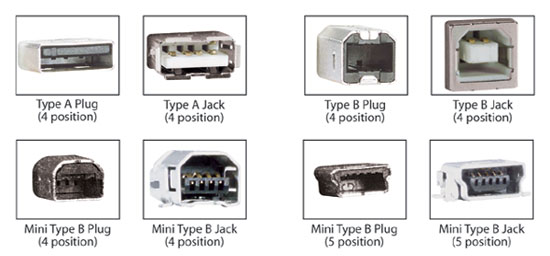
usb_connectors.jpg


The part that looks like the third image in the top row was loose.

I jiggled it back in, worked fine! Who knows, maybe your issue could be related to this?

Baiano19 said:
I wasn't very interested at first at Stumpokapow´s guide at first since I don´t have an external HDD, but there's something there that 've been looking for a while: how to Downgrade a 4.0 Wii...

Thank you kind sir!

Like my guide mentions (the guide is actually good for everything, not just USB backups), it's impossible to downgrade a non-hacked 4.0 Wii. If you've hacked your 4.0 Wii with Homebrew Channel, you'll be able to do further hacking, but if your Wii is vanilla, sucks to be you.

Sorry!

We do expect a way around this to be released soon, though.

donny2112 said:
Is there any way for homebrew to put out DS demos for a DS to download like the Nintendo Channel does? I'm particularly thinking of the DS demos from E3 2005 (IIRC) like the Air Hockey one. IIRC, there was a way to turn your computer into a transmit station, at the time, to get the demos, but I was wondering if homebrew had a way to do it on the Wii.

Thanks!

As far as I know there is no homebrew app to do this yet. It's unfortunate, because I'd love to do this as well! :D

Another app I'd like that does not exist right now is the ability to get Wii Message Board images off the Wii. Bonsai Barber is great and all, but it'd be even more great if I could do something useful with my pictures!
 
I had games freeze during install and I just installed them again after powering off the Wii. I think its my disc drive that's the issue. It had issues playing the disc version of Tales of Symphonia DotNW and is about as loud as my 360 =/ I'm trying to use that as little as possible.
 
This isn't exactly 'homebrew' related, but I'll shoot anyway:

Is anybody else having trouble accessing YouTube on the Wii now? It was working just fine up until a couple of days ago, but now I can't load videos. Everything else in the browser boots up just fine. Just not youtube videos.

Strange.
 
After 4 hours of work today, I managed to move from 3.2U with Homebrew Channel beta 8 to 4.0U, HBC 1.01, newest GeckoOS and Ultimate USB Loader 7.4.

Thanks a lot for Mejilan and his guides in this thread! I wouldn't have been able to get things done without you!

In case someone's interested, I went through the following scenarios:

(starting point: 3.2U and HBC beta 8)

- Tried to upgrade HBC via the world icon, but for some reason HBC didn't initialise network so I decided to upgrade via Twilight hack
- Deleted HBC channel and formatted 2gb SD card
- Re-downloaded Twilight hack and downloaded HBC 1.01
- Installed HBC 1.01 via Twilight hack
- Downloaded and installed Homebrew Browser 0.3
- Via HBB downloaded the newest GeckoOS (mainly for booting PAL GC games on my NTSC Wii)
- Downloaded and installed cIOS36 rev10
- Downloaded and installed IOS60 installer/patcher (crashed after IOS60 installation for me, holy shit did I sweat when I reseted my Wii after 15 minutes of nothing happening)
- Updated the firmware to 4.0U via Wii options
- Downloaded and installed IOS Downgrader 1.0
- Downloaded and installed IOS16 WAD
- Downloaded and installed Ultimate USB Loader 7.4
- Via USB Loader formatted my LaCie Porsche 250gb HDD to one single partition
- Installed all my games (8 games) and downloaded the covers. 18.7gb of 232gb used. ;_; No need to buy a bigger HDD I guess.. and here I thought that 250gb will be full in a jiffy.

Holy shit at the Brawl loading times. My Wii has started to live again! I love the USB loader, I wish every console had this kind of system, no need to insert discs again!
 
On the last page, the very helpful Stump was making some references to cIOS35. For the sake of clearing up confusions, he meant cIOS36.

Dash Kappei said:
Since a couple of weeks ago I have it installed (thanks to Mejilan as always, I wish I could properly thank him because he is a pretty fucking awesome dude... and patient!)

Cheers dude!

the Preloader, could I now delete it from the SD card?
I'm just trying to clean the HBC a bit, too much stuff in there makes the navigations a tad cluttered. But i have no idea if it's possible to do that without screwing things up.

You don't need to keep the Preloader installer on your SD card once it's properly installed.

What about the .ini hack though?

There's no harm in leaving hacks.ini in the root of your SD card. However, if you've already applied and saved the hacks, then yes, you can kill the hacks.ini file as well. When hacks are enabled/disabled and the settings saved, the new configuration is saved to the NAND, not running off the txt file.

Also, when I installed it, I used to have a .ini hack for US, I've replaced the file with an hacked EU 4.0, do I need to re-install or it's just fine the way it is?

I never heard of any dangers in using hacks for another region, but obviously they won't work if your regions don't match. Re-applying hacks is as simple as copying the new/corrected hacks to a hacks.ini file, accessing them via Preloader's menu, enabling/disabling as needed, and then saving.

Clipper said:
cIOS36: Hacked version of Nintendo's IOS that includes USB/SB boot support. Replaces a real IOS on the Wii, which can lead to bricking if not installed properly. Technically illegal due to the inclusion of Nintendo's original code.

Not quite. Waninkoko's cIOS36 rev10 installs as IOS249 with a backup on IOS250. Neither of these IOS designations were utilized by Nintendo until very recently, and even now, if a new Wii comes with IOS249, it's filled with garbage data, and is not a functional IOS. So Waninkoko's cIOS36 doesn't actually replace anything.

Bebpo said:
So again, should I just randomly out of the blue install preloader even if I'm not upgrading or changing anything? I like the idea of a safe catch-all that will restore my Wii in case something goes wrong and bricks it.

Or is there some risk in installing preloader that could actually screw something up itself?

There's always SOME risk when you're flashing shit to some hardware's NAND, but the risks are absolutely minimal when care and caution are employed. Also, the Preloader installation is straightforward and quick, so there's really only a tiny margin for error.

Now, Preloader does come with some brick-recovery features and protection, and it's nice to have it installed. But it's also powerful enough to break a Wii if you're particularly negligent. It also can't recover from a TOTAL brick.

Example: Preloader allows you to switch the IOS that the System Menu runs from. But let's say that you keep System Menu 4.0 configured to IOS60, as it normally does. Now let's say that you use tona's Any Title Deleter to uninstall IOS60.

You've just completely destroyed your Wii, and Preloader will not be able to recover from this. You won't be able to do ANYTHING, because your Wii is basically wired to run of an IOS that no longer exists. So, in essence, no IOS will run, and thus, no OS will manifest.

You should never, ever delete an IOS.
I'll occasionally see a tutorial or forum post suggesting the deletion of this IOS or that IOS. It's an extremely risky process that should almost never be considered.

 
I must not be doing something right with the game cover images. I went to the site, downloaded and unzipped the ones I wanted and then stuck the folder on the sd in the images folder.

I still have nothing. I also tried putting the folder under wimages but that didn't work either. Any suggestions?
 
comedy bomb said:
I must not be doing something right with the game cover images. I went to the site, downloaded and unzipped the ones I wanted and then stuck the folder on the sd in the images folder.

I still have nothing. I also tried putting the folder under wimages but that didn't work either. Any suggestions?
Is the images folder where it should be? Was root of the SD card for the version I'm using.
 
Wait, did you say that you stuck a folder containing images into the images folder of your SD card? That might be your problem. Different USB Loaders might handle defaults differently, but in general, the image files themselves should go into the images folder (no subfolders).

HUELEN10 said:
What DOES IOS stand for anyways.....
Input/Output System IIRC. Think of them as little mini-Operating Systems.
 
Mejilan said:
Wait, did you say that you stuck a folder containing images into the images folder of your SD card? That might be your problem. Different USB Loaders might handle defaults differently, but in general, the image files themselves should go into the images folder (no subfolders).


I tried it both ways.
 
HUELEN10 said:
What DOES IOS stand for anyways.....
IOS
Input/Output System. These programs run on the Starlet coprocessor and control access to Wii hardware and security.
See also: Starlet.
http://wiibrew.org/wiki/Glossary


Just got my My Passport in the mail. Now the question is, how hard is it for me to use 1/2-2/3 for my PS2 slim (I haven't tried anything yet since I know I have to buy some stuff) and 1/3-1/2 for my Wii?
 
can someone please do a dummy guide to this hacks.ini?

I installed preloader as a brick safety net, but then it mentions something about hacks.ini. I have no idea what that is, or why its needed. I don't want to hack my games or anything, but is it something needed for preloader to work properly?


BTW, finally got my ultimate loader working with it downloading images. Just started from scratch again using stumpakows guide and copied the files over again. Must have had a dodgy file in there somewhere

Not going to use parental controls just yet. I realised that I actually have HOTD Overkill and resident evil in their boxes in the cupboard anyway. My son knows not to play those and he doesn't - so its no different with the USB loader. I'll just tell him that if he loads one up by accident, just reset the wii
 
Fuzzy said:
Just got my My Passport in the mail. Now the question is, how hard is it for me to use 1/2-2/3 for my PS2 slim (I haven't tried anything yet since I know I have to buy some stuff) and 1/3-1/2 for my Wii?

Don't know about the PS2 stuff, but no problem to do it on the Wii end!
 
Stumpokapow said:
Don't know about the PS2 stuff, but no problem to do it on the Wii end!
I'm guessing I'll have to wait on a reply from our trusty CFW guru Mejilan since I don't think there's a PS2 thread.
 
My friend let me borrow his unused external to test out the loader and for some reason it's not being recognized when I plug it in to the Wii.

Here is the specifics.

Its a Western Digital My Book 320 GB USB External Hard Drive and here is how it looks.
2ewpojt.jpg

It was formatted using Windows XP as one big partition for now so it's completely clean atm.I'm guessing it's either not compatible or I need to format it differently. . .
 
comedy bomb said:
I tried it both ways.

Every issue I've ever encountered where images weren't showing up or the covers would download but still not show up, was due to an improperly configured config.txt file.

Keep in mind that config.txt needs to be in the same folder as the USB Loader executable.
Additionally, the images path has to be EXACTLY right in the config.txt.
Finally, make sure that the covers setting is actually enabled! Covers = 1, or some such.

mrklaw said:
can someone please do a dummy guide to this hacks.ini?

It's ridiculously easy. See below:
1) http://www.wiibrew.org/wiki/Preloader/hacks
2) Copy and paste the hacks pertaining to your System Menu version (probably 4.0U or 4.0E) into an empty text file (say, using Notepad).
3) Add a trailing carriage return such that the last line of text is the SECOND TO LAST line the cursor can rest at. In other words, make sure there's a blank line after the last line of text.
4) Save the file as hacks.ini and drop it into the ROOT of your SD card.
5) Pop the SD card into the Wii, then boot up the Wii while holding down the Reset button on the console in order to access the Preorder menu.
6) Navigate to the system hacks menu, and enable/disable those that you think you might want.
7) Don't forget to SAVE SETTINGS.

The entire process should take no more than 3 minutes, from step 1 to step 7.

I installed preloader as a brick safety net, but then it mentions something about hacks.ini. I have no idea what that is, or why its needed. I don't want to hack my games or anything, but is it something needed for preloader to work properly?

You don't need hacks to keep Preloader relevant. After all, it still provides brick protection. But by avoiding the hacks, you are neutering its functionality. These are NOT game hacks (that is, cheats). They are system-level hacks. The more common (and useful) ones allow you to kill the health screen with every boot up, kill the on-disc updates, and enable region-free disc loading, channels, and SD access. Other interesting ones allow you to drag and drop the disc loader channel (permanently stuck to the very first channel slot and normally locked), disable the Wii menu BGM, kill the "locked save" flags that prevent you from copying/backing up certain saves, allow you to conditionally auto-launch a disc, etc.

Fuzzy said:
Just got my My Passport in the mail. Now the question is, how hard is it for me to use 1/2-2/3 for my PS2 slim (I haven't tried anything yet since I know I have to buy some stuff) and 1/3-1/2 for my Wii?

HDLoader on a PS2 Slim using an external HDD? Good luck with that. Depending on the Slim model, it might be doable (newer ones are not, IIRC), but you won't get any of the benefits that PS2 Fat users enjoy. It'd be no more than a minor convenience of having the games installed, but due to the PS2's horribly speeds over USBs, you won't get any of the occasionally dramatic load time improvements.
 
So, I updated originally to 3.4U via Madworld then hacked it and downgraded to 3.2 I guess (was just called downgrader, didn't say specifically to 3.2 and it still says 3.4U in the system menu?).

What happens the next time I play Madworld since it has a required update to 3.4U? Will it still ask to update? If I say yes will it brick my system? What about when games come out that require 4.0 updates?
 
Caj814 said:
My friend let me borrow his unused external to test out the loader and for some reason it's not being recognized when I plug it in to the Wii.

Here is the specifics.

Its a Western Digital My Book 320 GB USB External Hard Drive and here is how it looks.
http://i40.tinypic.com/2ewpojt.jpg[MG]
It was formatted using Windows XP as one big partition for now so it's completely clean atm.I'm guessing it's either not compatible or I need to format it differently. . .[/QUOTE]

I have the same one but 750GB, and it works fine for me. you need to format it WBFS, I think you can it do with a PC using WBFS manager.
 
Fuzzy said:
I'm guessing I'll have to wait on a reply from our trusty CFW guru Mejilan since I don't think there's a PS2 thread.

There's no point with a Slim PS2. USB compatibility is shit, and the USB plugs on the PS2 are only 1.1 which means you're going to get the same amount of load times as if you were just playing the discs.

If you're going to go for something similar with PS2 you need a fat PS2, an IDE Harddrive and some way of exploiting your memory card.
 
The only reason I even thought of doing it was that I would have 160-200GB on this drive since 300GB is a little excessive for just the Wii. I'll just use the extra space for my PC. Thanks.
 
Are there any 3.5" External HDDs that can plug into two sources at once? I'm thinking it'd be kinda cool to share one between my Wii and something else. Bell's High Definition receivers seem to be able to use external HDDs to act as PVR storage so that'd be cool if I got one... or my laptop.
 
Firestorm said:
Are there any 3.5" External HDDs that can plug into two sources at once? I'm thinking it'd be kinda cool to share one between my Wii and something else. Bell's High Definition receivers seem to be able to use external HDDs to act as PVR storage so that'd be cool if I got one... or my laptop.

Two devices connected at once causes a lot of issues with contention and arbitration. If you just don't want to be moving cables around, you could use a USB switch to just choose which one of the devices is connected to the drive at any point in time. That system would work with any drive you wanted.
 
Top Bottom