
Oh right, I didn't think of that solution! Hm... now maybe I will make a hard drive purchase.Clipper said:Two device connected at once causes a lot of issues with contention and arbitration. If you just don't want to be moving cables around, you could use a USB switch to just choose which one of the devices is connected to the drive at any point in time. That system would work with any drive you wanted.
-
Hey Guest. Check out your NeoGAF Wrapped 2025 results here!
You are using an out of date browser. It may not display this or other websites correctly.
You should upgrade or use an alternative browser.
You should upgrade or use an alternative browser.
GAF Wii Homebrew thread: Homebrew, emulators, USB disc installs! Easy tutorial!
- Thread starter radioheadrule83
- Start date
BetterWorldz
Member
Stumpokapow said:One thing about this; I experienced some really sketchy problems both ripping a disc... and later playing MadWorld. MadWorld would load, but the game would periodically lock up.
The problem was that my USB cord was loose on the hard drive end.
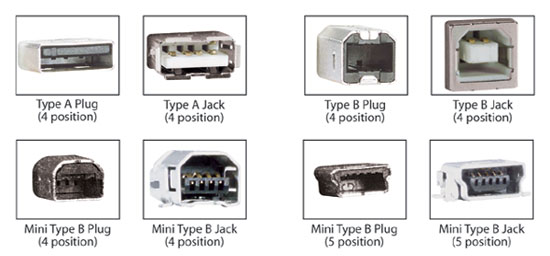
The part that looks like the third image in the top row was loose.
I jiggled it back in, worked fine! Who knows, maybe your issue could be related to this?
Actually I determined it only happens when I use my LAN internet adapter instead of a wireless connection. Hope ethernet is supported in the next update, as well as online play.

Yeah, all USB devices connected will cause it to fail. Apparently this will be fixed in cIOS rev 11 so we just have to wait for that.BetterWorldz said:Actually I determined it only happens when I use my LAN internet adapter instead of a wireless connection. Hope ethernet is supported in the next update, as well as online play.
On the online thing, I've seen several reports of people playing online with USB Loader (not by the Ethernet adapter, of course). Can somebody please confirm whether online play works or not?
Then again, even if it is working, it might be worth waiting a while before going online with USB Loader. Nintendo has already shown they're willing to ban cheaters, and they may start banning people with USB loaded disc images at any time. It's incredibly easy for them to work out you are using USB Loader (via load times), so it might be in everyone's best interests to stay disc-based for online play.
Like the hat?
Banned
the only online i tried was ExciteBots, and it wouldn't connect at all (over wi-fi)Clipper said:On the online thing, I've seen several reports of people playing online with USB Loader (not by the Ethernet adapter, of course). Can somebody please confirm whether online play works or not?
luckily, load times off the disc aren't that bad at all, so I don't mind playing that one from the dvd when i want to go online.
Bebpo said:So, I updated originally to 3.4U via Madworld then hacked it and downgraded to 3.2 I guess (was just called downgrader, didn't say specifically to 3.2 and it still says 3.4U in the system menu?).
What happens the next time I play Madworld since it has a required update to 3.4U? Will it still ask to update? If I say yes will it brick my system? What about when games come out that require 4.0 updates?
MadWorld will not require you to update again, it does not require a certain firmware it requires an IOS (IOS36 if I remember correctly) and Firmware 3.4U just happened to have that in there
JodyAnthony said:the only online i tried was ExciteBots, and it wouldn't connect at all (over wi-fi)
luckily, load times off the disc aren't that bad at all, so I don't mind playing that one from the dvd when i want to go online.
The game works just fine for me over wifi.
BetterWorldz
Member
later said:The game works just fine for me over wifi.
Did you change anything from the "config example" txt?

The Elite
BOSS
BetterWorldz said:Did you change anything from the "config example" txt?
I didn't touch that stuff and it works fine for me.
Like the hat?
Banned
i'll have to give it another shot. maybe it was just a hiccup in my network connectionDoctorWho said:I didn't touch that stuff and it works fine for me.
evilernLeGG
Member
Kind of random request, but is there some sort of homebrew hack that allows you to control the Wii menu with the GCN controller yet?
I haven't been able to find anything.
I haven't been able to find anything.
Melhisedek
Member
I have 3.3 firmware and have installed HBC and USB Loader, can I update my wii now to a higher firmware? Like when I want to buy VC games it says that I need to update. Can I just update through wifi (official FW) or do I have to get some custom one?
That comex guy who is supposed to release the 4.0 hack does he have any homebrew background ? seems like a fake now or why wouldn`t they yet release the 3.4 version since it doesn`t require tp it would still be an improvment...
ClovingWestbrook
Banned
Hey folks,
Question. I don't have a card reader for my PC but I would like to install the homebrew channel. I have a 3.2 Wii, a PS3, and a USBdrive that accepts micro sd cards. Would it be possible to download the needed files onto the USB drive, insert it into the PS3 and copy the files over to its HDD. Then copy the files from the PS3 to a SDcard? If so, I will go out and rent TP right now.
Question. I don't have a card reader for my PC but I would like to install the homebrew channel. I have a 3.2 Wii, a PS3, and a USBdrive that accepts micro sd cards. Would it be possible to download the needed files onto the USB drive, insert it into the PS3 and copy the files over to its HDD. Then copy the files from the PS3 to a SDcard? If so, I will go out and rent TP right now.
Stumpokapow
listen to the mad man
Melhisedek said:I have 3.3 firmware and have installed HBC and USB Loader, can I update my wii now to a higher firmware? Like when I want to buy VC games it says that I need to update. Can I just update through wifi (official FW) or do I have to get some custom one?
If you have USB Loader (and thus cIOS), update officially.

Doesn't your MicroSD card have an SD adapter that you can plug it into? Just put the files into the MicroSD card, stick it in the SD adapter, and stick that into the Wii.LovingSteam said:Hey folks,
Question. I don't have a card reader for my PC but I would like to install the homebrew channel. I have a 3.2 Wii, a PS3, and a USBdrive that accepts micro sd cards. Would it be possible to download the needed files onto the USB drive, insert it into the PS3 and copy the files over to its HDD. Then copy the files from the PS3 to a SDcard? If so, I will go out and rent TP right now.
Melhisedek
Member
Stumpokapow said:If you have USB Loader (and thus cIOS), update officially.
And I wont lose HBC?
ClovingWestbrook
Banned
nevermind.
Stumpokapow
listen to the mad man
Melhisedek said:And I wont lose HBC?
You won't lose anything.
Melhisedek
Member
Firestorm said:Doesn't your MicroSD card have an SD adapter that you can plug it into? Just put the files into the MicroSD card, stick it in the SD adapter, and stick that into the Wii.
That is what I did and it works

HUELEN10
Member
What about that EULA change and Nintendo Stealth Updates Scare? Any update on that? I really do not want to lose my way of playing imports!Stumpokapow said:You won't lose anything.
He's been around at least since the days when the Twilight Hack was first shown and we all thought that was a hoax.cw_sasuke said:That comex guy who is supposed to release the 4.0 hack does he have any homebrew background ?
His hack supposedly requires you to run it from the SD card. So it only works on pre-modded earlier versions (which kind of defeats the purpose for most users), or for version 4.0 (which opened up launching from the SD card).seems like a fake now or why wouldn`t they yet release the 3.4 version since it doesn`t require tp it would still be an improvment...
When it was said that his hack would be ready "in the next day or two", it supposedly referred to the first version of his hack, which was only made for pre-modded 3.x consoles. But people in the Wii hacking community convinced him not to release it prematurely because it would give end users like us the wrong idea, so he went straight to working on getting it running with 4.0.
Comex has supposedly been giving versions of his hack to a number of trustworthy people with good reputations in the Wii hacking scene, and asking them to test it for him, and supposedly they've been saying that yes, it's a solid hack that works as advertised (on earlier versions), and he's making progress on getting it working with 4.0, but he's working alone on this project, and he underestimated the level of testing and polish needed for a release this major.
People who ask scene members how it's coming along seem to be told to sit down and be patient, that it'll be ready when it's ready, but Comex has somewhat recently said that he hopes it will be ready by the end of the month.
It's healthy to be cynical, but rest assured that if Comex turns out to be a fake, the hacking scene will lynch him long before any of us needs to do it.
ClovingWestbrook
Banned
Ok, so I installed the Homebrew Channel, Gecko, Ultimate USB loader, DVDx, and the SNES emulator. Which other apps are good to install?
Homebrew Browser so you can find and install a bunch of different homebrew right from the Wii.LovingSteam said:Ok, so I installed the Homebrew Channel, Gecko, Ultimate USB loader, DVDx, and the SNES emulator. Which other apps are good to install?
http://wiibrew.org/wiki/Homebrew_Browser
Marty Chinn
Member
Finally decided to take the plunge and install HBC on to my 3.2 Wii today. Everything went smooth thanks to having a 2gb SD card, but unfortunately it looks like the Kingston 8gb SD card I bought today can't be read by the HBC. The Wii can see it from the system menu but not HBC. Guess it's going back. Anyone have recommendations on which SDHC cards can be read by HBC?
Melhisedek
Member
What is a Gecko good for?
Melhisedek said:What is a Gecko good for?
GeckoOS is used for imported game or to bypass an update on the game disc.
Marty Chinn said:Finally decided to take the plunge and install HBC on to my 3.2 Wii today. Everything went smooth thanks to having a 2gb SD card, but unfortunately it looks like the Kingston 8gb SD card I bought today can't be read by the HBC. The Wii can see it from the system menu but not HBC. Guess it's going back. Anyone have recommendations on which SDHC cards can be read by HBC?
I think you'll need to "upgrade" to 4.0 for SDHC support?
Just be careful how you upgrade your system. Follow a guide.
Like the hat?
Banned
I have a Kingston 8gb sdhc card and it works great. Also I tried excitebots online again and it worked beautifully.
Now that I'm back on 4.0 can I still install the DVD player?
Now that I'm back on 4.0 can I still install the DVD player?
ClovingWestbrook
Banned
Ok,
I need some help. I installed the backup loader, have the correct IOS, I have burned a copy of my Mario Galaxy disc and every time I try and play it I receive the 324 error. I have tried multiple discs of R-W at 2x speed. I use the backup creator and then have imgburn use the partition.iso of the Mario Galaxy iso. What am I doing wrong? BTW, the reason I am using the backup loader instead of the usb loader is because I don't have a HDD yet nor a large enough sdcard.
I need some help. I installed the backup loader, have the correct IOS, I have burned a copy of my Mario Galaxy disc and every time I try and play it I receive the 324 error. I have tried multiple discs of R-W at 2x speed. I use the backup creator and then have imgburn use the partition.iso of the Mario Galaxy iso. What am I doing wrong? BTW, the reason I am using the backup loader instead of the usb loader is because I don't have a HDD yet nor a large enough sdcard.
No idea about your problem since I've never tried backup loader.
Finally got my box art images to work after re-installing cIOS 36 rev 10. It must have had an error the first time I did it. I decided to go with the following theme for my USb Loader.

http://usob.cjb.net/
BTW Stumpokapow there's now a broken link in your guide if you try to download the box art images manually. You get the following message when you click the link.
"Not allowed link unless you come from the index page"
Finally got my box art images to work after re-installing cIOS 36 rev 10. It must have had an error the first time I did it. I decided to go with the following theme for my USb Loader.
http://usob.cjb.net/
BTW Stumpokapow there's now a broken link in your guide if you try to download the box art images manually. You get the following message when you click the link.
"Not allowed link unless you come from the index page"
A Twisty Fluken
Member
LovingSteam said:Ok,
I need some help. I installed the backup loader, have the correct IOS, I have burned a copy of my Mario Galaxy disc and every time I try and play it I receive the 324 error. I have tried multiple discs of R-W at 2x speed. I use the backup creator and then have imgburn use the partition.iso of the Mario Galaxy iso. What am I doing wrong? BTW, the reason I am using the backup loader instead of the usb loader is because I don't have a HDD yet nor a large enough sdcard.
does the backup loader load your original disc if you try that?
ClovingWestbrook
Banned
A Twisty Fluken said:does the backup loader load your original disc if you try that?
Yup, it launches it perfectly.
Marty Chinn
Member
Benedict said:I think you'll need to "upgrade" to 4.0 for SDHC support?
Just be careful how you upgrade your system. Follow a guide.
I did go to 4.0 and that's how the Wii can see it in the system menu. The Homebrew Channel can't see it which is the problem. It shows up blank instead of having apps in there. If I copy the contents to my 2gb card, which I can't remember what brand it is, things show up fine.
So again, the Wii can see it, but the Homebrew Channel can't and it sounds like other people from googling it have had problems with Kingston cards and homebrew.
Marty Chinn
Member
JodyAnthony said:I have a Kingston 8gb sdhc card and it works great. Also I tried excitebots online again and it worked beautifully.
Now that I'm back on 4.0 can I still install the DVD player?
Your Wii sees it, but can you install apps to be read from the Homebrew Channel?
Then why not use that?LovingSteam said:Yup, it launches it perfectly.

MPlayer CE combines GeeXboX and the original MPlayer Wii so maybe try that.Threi said:GeeXboX stopped working for me, It just cuts off the video signal when it loads.
http://wiibrew.org/wiki/MPlayer_CE
ClovingWestbrook
Banned
Firestorm said:Then why not use that?
MPlayer CE combines GeeXboX and the original MPlayer Wii so maybe try that.
http://wiibrew.org/wiki/MPlayer_CE
Because I would prefer to use a disc that I could easily replace to play the game rather than the game itself.
Has anyone with the HBC channel installed been experiencing any problems with SD Menu loading, specifically with Genesis titles?
I'm having rather odd problems at the moment (documented over here - http://www.neogaf.com/forum/showthread.php?p=15607670)
I'm having rather odd problems at the moment (documented over here - http://www.neogaf.com/forum/showthread.php?p=15607670)
Like the hat?
Banned
yep! i just ran the usb loader off it.Marty Chinn said:Your Wii sees it, but can you install apps to be read from the Homebrew Channel?
might not be the same type of card you have though.
I have this one:
http://www.newegg.com/Product/Product.aspx?Item=N82E16820134483
use the same type in my wii and dsi (both 8gb)

bumpkin
Member
I posted something about this previously, but figured I'd post it again since I don't think anyone responded... I've been looking into GameCube dev and have the "SD Media Launcher" device to run code on my actual 'Cube, but I'm trying to find an emulation solution.
I've tried like hell to compile Dolphin-Emu for Mac to no avail. Will Dolphin or DolWin run on a Windows install under Parallels? Can anyone vouch for its performance on an iMac with these specs:
2.66GHz Intel Core 2 Duo
4GB memory
NVIDIA GeForce 9400M graphics
I've tried like hell to compile Dolphin-Emu for Mac to no avail. Will Dolphin or DolWin run on a Windows install under Parallels? Can anyone vouch for its performance on an iMac with these specs:
2.66GHz Intel Core 2 Duo
4GB memory
NVIDIA GeForce 9400M graphics
If you have the cash I say go for one of these due to game size.JodyAnthony said:yep! i just ran the usb loader off it.
might not be the same type of card you have though.
I have this one:
http://www.newegg.com/Product/Product.aspx?Item=N82E16820134483
use the same type in my wii and dsi (both 8gb)
http://www.newegg.com/Product/Product.aspx?Item=N82E16820183241
http://www.newegg.com/Product/Product.aspx?Item=N82E16820183242

Hesemonni
Banned
There's your problem.LovingSteam said:I need some help. I installed the backup loader, have the correct IOS, I have burned a copy of my Mario Galaxy disc and every time I try and play it I receive the 324 error. I have tried multiple discs of R-W at 2x speed. I use the backup creator and then have imgburn use the partition.iso of the Mario Galaxy iso. What am I doing wrong? BTW, the reason I am using the backup loader instead of the usb loader is because I don't have a HDD yet nor a large enough sdcard.
lolBecause I would prefer to use a disc that I could easily replace to play the game rather than the game itself.
You know, this is not gbatemp or something. Even if you really own a original copy of SMG I doubt that people here want to help you with burning Wii backups. Btw. reading backups damages the lenses or your Wii afaik, so in your position I would stay with my original discs.LovingSteam said:Ok,
I need some help. I installed the backup loader, have the correct IOS, I have burned a copy of my Mario Galaxy disc and every time I try and play it I receive the 324 error. I have tried multiple discs of R-W at 2x speed. I use the backup creator and then have imgburn use the partition.iso of the Mario Galaxy iso. What am I doing wrong? BTW, the reason I am using the backup loader instead of the usb loader is because I don't have a HDD yet nor a large enough sdcard.
Sadly, MPlayer CE doesn't support the biggest advantage of GeeXboX: It does not work with external HDDs (respectively it doesn't support NTFS). :/Firestorm said:MPlayer CE combines GeeXboX and the original MPlayer Wii so maybe try that.
http://wiibrew.org/wiki/MPlayer_CE
ClovingWestbrook
Banned
wrowa said:You know, this is not gbatemp or something. Even if you really own a original copy of SMG I doubt that people here want to help you with burning Wii backups. Btw. reading backups damages the lenses or your Wii afaik, so in your position I would stay with my original discs.
Hey man, thanks. I wasn't aware of this. I will continue using my regular disc until I purchase a HDD and then its USB loader
. Again, thanks for the advice.
The Hermit
Member
So, I followed Stumkapow "tutorial for dummies", dowgraded my Wii and decided to use the system updater 4.0.
After all that ,when I tried to play Excitebots the Wii System Update icon showed up. Does that mean my system still isn´t 4.0?
I am afraid of doing everything again if I officially update, so I am a little skeptical...
After all that ,when I tried to play Excitebots the Wii System Update icon showed up. Does that mean my system still isn´t 4.0?
I am afraid of doing everything again if I officially update, so I am a little skeptical...
Most games these days want to perform an update to install the IOS they need to execute. This update will not change your Wii's firmware version, but will install the software the game needs. The most recent one of these that I know of is IOS55, which has only been around since Madworld, but I don't know whether ExciteBots has a new one.Baiano19 said:So, I followed Stumkapow "tutorial for dummies", dowgraded my Wii and decided to use the system updater 4.0.
After all that ,when I tried to play Excitebots the Wii System Update icon showed up. Does that mean my system still isn´t 4.0?
I am afraid of doing everything again if I officially update, so I am a little skeptical...
The safest course of action would be to run ExciteBots with Gecko OS 1.8 using the avoid patches option. After you do this once, you may find the update choice disappears and you can run it normally from then on. If the update icon continues to show, then it is up to you whether you keep using Gecko OS, or just let the ExciteBots update run, which should be perfectly safe as long as you didn't import ExciteBots.
Oh, and to know if your system is 4.0, just check whether you can move channels (but not the HBC of course) to the SD card and run them.
Melhisedek
Member
Anyone uses
Western Digital Extern HDD My Passport Essential 320GB
or perhaps 250 GB one? I'm afraid of spindown problem that some WD drives have (the one where drive spins down and game freezes). The one I have now (Seagate Desktop) works but uses external power supply and I have to reconnect it to wall socket every time I reboot Wii, is really annoying
Western Digital Extern HDD My Passport Essential 320GB
or perhaps 250 GB one? I'm afraid of spindown problem that some WD drives have (the one where drive spins down and game freezes). The one I have now (Seagate Desktop) works but uses external power supply and I have to reconnect it to wall socket every time I reboot Wii, is really annoying