
-
Hey Guest. Check out your NeoGAF Wrapped 2025 results here!
You are using an out of date browser. It may not display this or other websites correctly.
You should upgrade or use an alternative browser.
You should upgrade or use an alternative browser.
GAF Wii Homebrew thread: Homebrew, emulators, USB disc installs! Easy tutorial!
- Thread starter radioheadrule83
- Start date
VAIL said:Picked up The Conduit and Ghostbusters the other day, Conduit installs fine, Ghostbusters on the other hand, when I run it from the HDD I just get a Green screen...is there something I need to update?
I've been running Ghostbusters using USBGX. Pretty sure all I ended up doing was turning on the 002 fix.
Either update to IOS249 rev 13, or use the 002 fix in your loader (update your loader if it isn't there).VAIL said:Picked up The Conduit and Ghostbusters the other day, Conduit installs fine, Ghostbusters on the other hand, when I run it from the HDD I just get a Green screen...is there something I need to update?
Flash drives work fine, as long as their read speed is fast enough. You don't need to put it on your Win box to load any game, the loader itself rips the disc. Check the alternate .dol page in the GWHT for a way to get Windows to still recognise your drive.danootz said:My real question is, is it impossible to use a USB flash drive (like a Kingston Traveler USB stick) to use with a USB loader program? I've formatted it for WFSB on my WinXP box but the Wii continues to ask to format the drive after that I can't put it on my Win box and load any game.
Are hard drives the only option?
Please tell me how that one is better than mine so I can fix it up. As far as I can tell, it's exactly the same set of instructions, except the part I believe to be optional. And which clarification did you need? I'd like to add it.pubba said:I decided to try again after finding a guide for LU64/65 Fix for system menu 4 here
For some reason, I found it easier to follow. Although, I am a complete noob to any of this stuff and I found the guide posted there (and a clarification on page 4 of that thread) to be great.
Which game?grkazan12 said:So I backed up a Japanese game that I own on to configurable usb loader and whenever I try to boot it it takes me back to the wii system menu, does anyone know a possible fix for this?
Edit: Oh, wait a sec, this is you?
For Wii Sports Resort you should use Gecko OS to run your original disc once, then it should work fine. If normal Gecko OS won't run it, use this one from the base of that page.

Haunted
Member
Hm, that explains why USBLoader GX didn't d/l the new covers.Clipper said:All those using USB Loaders, take notice:
The original site for downloading game covers has gone to a new donation based service. They are still working out some problems with their new hosting arrangements. In the meantime, some new sites have shown up hosting the covers.
If you are using Configurable USB Loader, you can make it use one of those sites by adding the following options to the end of your config.txt file, depending on which setting you are using for cover_style:
There a workaround for that?
Update to the new version, that problem was fixed yesterday.Haunted said:Hm, that explains why USBLoader GX didn't d/l the new covers.
There a workaround for that?
Haunted
Member
yay!yoopoo said:Update to the new version, that problem was fixed yesterday.
Do you have GameCube stuff plugged in? If not, I can't think of a reason why it is failing (older version of HBC do have trouble updating on later system menu versions, though). You can always just download the installer and run it manually.Tenbatsu said:I tried updating the homebrew channel thru the channel itself but it always stop halfway, what is the problem?
DJmizuhara
Member
Hi guys, I need a little bit of help. I've bricked my(friends)wii...I was following this tutorial and I got to the part were I had to install cios rev10 installer via Network installation, it seemed to install just fine until it rebooted. Now all I get it some corrupted Japanese text and boot up.
What can I do? I was running 4.0J before I started the process.
What can I do? I was running 4.0J before I started the process.
I really think you guys should put in USB Loader GX as the loader to install in the wiki. Or have the two as the big options. It's soooo much easier to tweak and has a much nicer interface IMO.
Also, what's the best way to rip a Wii game onto a PC to put into the HDD? My Wii disk drive seems to be acting up and I don't think it's long for this world.
Also, what's the best way to rip a Wii game onto a PC to put into the HDD? My Wii disk drive seems to be acting up and I don't think it's long for this world.
Metal Gear?!
Member
I agree that USB Loader GX seems to be the only one you should ever need to bother with. Ever.
Well besides the original 1.1 loader for ripping discs since its so reliable at doing that.
http://www.costco.com/Browse/Produc...=3&Ntx=mode+matchallpartial&Nty=1&topnav=&s=1
Well besides the original 1.1 loader for ripping discs since its so reliable at doing that.
$70 for a 250 in-store, or $80 for a 320 online.Wario64 said:How much at Costco?
http://www.costco.com/Browse/Produc...=3&Ntx=mode+matchallpartial&Nty=1&topnav=&s=1
So 60 is the same as any of them over 36, just more forwards compatible? Or simply "hopefully" forward compatible, by which you mean we really have no idea, we just think it might be?Clipper said:I chose 60 for (hopefully) maximum forward compatibility. It probably won't ever be important, but something may eventually need that one.
I'm considering using the Homebrew channel to get my save files off of my Wii to back up my locked in save files (Animal Crossing, Smash Bros, Mario Kart, etc). I've never done anything like this so I have no clue what to do or what I'd need. 
But the main problem is that I need to send it to Nintendo to get it repaired/replaced (that's why I want my save files safe in case they get erased); so the main thing I want is to fully remove the Homebrew Channel and all history of it (game history timer in the calendar section, etc) after I copy the save files over to an SD card. Is this possible? I don't want Nintendo to refuse my repair because of me having used the Homebrew Channel.
Oh, also... what risks are involved with using the Homebrew Channel?
Thanks to anyone who can help.
But the main problem is that I need to send it to Nintendo to get it repaired/replaced (that's why I want my save files safe in case they get erased); so the main thing I want is to fully remove the Homebrew Channel and all history of it (game history timer in the calendar section, etc) after I copy the save files over to an SD card. Is this possible? I don't want Nintendo to refuse my repair because of me having used the Homebrew Channel.
Oh, also... what risks are involved with using the Homebrew Channel?
Thanks to anyone who can help.
For those saying you want USB Loader GX in the GWHT, I can say it doesn't look like it will ever be the primary one in the tutorial, due to the frequency of updates and the impossibility to keep data straight (it has so many contributors that things change daily and it's just a headache to deal with). It also has massive problems with Hermes' IOSes from what I hear, making Configurable actually a little more highly compatible. Plus I love my personal background, and the GAF themed backgrounds, which aren't as easy to do with GX as far as I gather, so I'm sticking with it.
However, I don't mind it being included as an option in the tutorial, in a similar manner to the way the Hermes' IOSes are listed. I don't know all that much about the intricacies of the loader itself, so I won't be making a page for it myself. Any of you are free to apply to the site to construct the page for it if you want it on there, though.
Edit: I just had a look at the start of the tutorial and noticed the guy has cIOScorp on there. If that was ever part of the installation, then you can pretty much guarantee it's your culprit. There's still nothing you can do to fix it, unfortunately.
Install BootMii first, make a back up, then install HBC and do all your save stuff, then use BootMii to undo your HBC installation. You can then use the BootMii uninstall option and you should be back to something virtually undetectable as hacked.
However, I don't mind it being included as an option in the tutorial, in a similar manner to the way the Hermes' IOSes are listed. I don't know all that much about the intricacies of the loader itself, so I won't be making a page for it myself. Any of you are free to apply to the site to construct the page for it if you want it on there, though.
If you didn't install BootMii, then it sounds like you are basically screwed. Sorry, but that's the risk you take.DJmizuhara said:Hi guys, I need a little bit of help. I've bricked my(friends)wii...I was following this tutorial and I got to the part were I had to install cios rev10 installer via Network installation, it seemed to install just fine until it rebooted. Now all I get it some corrupted Japanese text and boot up.
What can I do? I was running 4.0J before I started the process.
Edit: I just had a look at the start of the tutorial and noticed the guy has cIOScorp on there. If that was ever part of the installation, then you can pretty much guarantee it's your culprit. There's still nothing you can do to fix it, unfortunately.
Yaceka said:I'm considering using the Homebrew channel to get my save files off of my Wii to back up my locked in save files (Animal Crossing, Smash Bros, Mario Kart, etc). I've never done anything like this so I have no clue what to do or what I'd need.
But the main problem is that I need to send it to Nintendo to get it repaired/replaced (that's why I want my save files safe in case they get erased); so the main thing I want is to fully remove the Homebrew Channel and all history of it (game history timer in the calendar section, etc) after I copy the save files over to an SD card. Is this possible? I don't want Nintendo to refuse my repair because of me having used the Homebrew Channel.
Oh, also... what risks are involved with using the Homebrew Channel?
Thanks to anyone who can help.
Install BootMii first, make a back up, then install HBC and do all your save stuff, then use BootMii to undo your HBC installation. You can then use the BootMii uninstall option and you should be back to something virtually undetectable as hacked.
Clipper said:Install BootMii first, make a back up, then install HBC and do all your save stuff, then use BootMii to undo your HBC installation. You can then use the BootMii uninstall option and you should be back to something virtually undetectable as hacked.
Wait... Bootmii has an UNINSTALL option now? I thought that wasn't in the preview release.
It wasn't in beta1, it seems to be in beta2 (there is an option for "Uninstall from boot2"). Nobody here that has used it has replied to indicate whether it actually works or not.DavidDayton said:Wait... Bootmii has an UNINSTALL option now? I thought that wasn't in the preview release.
Don't think anyone would want to remove itClipper said:It wasn't in beta1, it seems to be in beta2 (there is an option for "Uninstall from boot2"). Nobody here that has used it has replied to indicate whether it actually works or not.

BocoDragon
or, How I Learned to Stop Worrying and Realize This Assgrab is Delicious
Clipper said:This isn't right and sounds very weird. Never heard of it happening to anybody who followed the standard procedure. If I had to put it to anything, I'd say it was the downgrading, which is often very destructive to the existing IOSes on the Wii. Why and how did you do that?
Months ago I needed to downgrade from 3.4 to 3.2... certain apps I wanted wouldn't work in 3.4 I believe.. I think I needed to install an old cIOS.... I don't even remember why anymore, but that's how it was done at the time. I don't remember the program anymore... but that was "the procedure" back then. Months later... the hacks are much simpler.
Clipper said:As for trying to fix the problem, the only thing I can suggest is installing BootMii, making a backup (just in case) and then format the Wii and start fresh. You can copy your saves and non-homebrew channels to the SD card first so that you can easily restore them later. Savegame Manager should help with the saves the Wii doesn't let you usually copy. You'll likely need to follow a 4.0 sequence to reinstall IOS249, but you can find that easily enough in our tutorial:
Thanks for the advice! I guess I'll try that if the freezing continues.
The thing about updates is that that you update from within USB Loader GX. You just click Settings -> Page 2 -> Update and it downloads the update. All the settings can be tweaked from within the folder.Clipper said:For those saying you want USB Loader GX in the GWHT, I can say it doesn't look like it will ever be the primary one in the tutorial, due to the frequency of updates and the impossibility to keep data straight (it has so many contributors that things change daily and it's just a headache to deal with). It also has massive problems with Hermes' IOSes from what I hear, making Configurable actually a little more highly compatible. Plus I love my personal background, and the GAF themed backgrounds, which aren't as easy to do with GX as far as I gather, so I'm sticking with it.
However, I don't mind it being included as an option in the tutorial, in a similar manner to the way the Hermes' IOSes are listed. I don't know all that much about the intricacies of the loader itself, so I won't be making a page for it myself. Any of you are free to apply to the site to construct the page for it if you want it on there, though.
The only problem is that the newest version isn't on gbatemp, it seems to be on google code. So I originally downloaded the wrong file which doesn't have a built-in updater.
Use rev568.Firestorm said:USB Loader GX gives a code dump after downloading the covers =/
The alternate .dol method just became a lot easier (with Configurable USB Loader at least). No more need to extract the file using a WBFS Manager, it works directly off the disc image on the hard drive. If you turn the alternate .dol Disc option in the loader on, it searches the image, finds all .dol files and lets you choose which one to boot. In the next version, it should save this to the options so you don't even have to choose it next time.
Clipper said:Please tell me how that one is better than mine so I can fix it up. As far as I can tell, it's exactly the same set of instructions, except the part I believe to be optional. And which clarification did you need? I'd like to add it.
Hi Clipper - love your work

Step 2 of the process for people on LU64+ Wii's on version 4.0 says
2. Install BootMii as an IOS and the Homebrew Channel
Now back then when I first looked at the tutorial, I was a complete noob. I didn't even know what an IOS was.
In the guide that I found, the steps are
1: Copy contents of 'SD Card 1' to SD card.
2: Put card in Wii and go to Data Management > channels > SD Card, then you will get a message saying "Load boot.elf? Select 'Yes'.
3: Install Bootmii v2 as an IOS.
4: Install the Homebrew Channel
5: Remove SD card and save the Bootmii installation to your PC.
It's the same information, it's just layed out in much more detail.
Having said that, 99% of the folks reading your tutorial won't need this level of handholding, so you probably don't need to change anything.
I've given the GAF guide link out to about 12 people and all of them have had success.
Today my mission is to go get an external USB drive and get configurable USB loader to work.
Thanks mate, it's good to hear. I've actually made some changes based on your comments. The step you had trouble with is clarified a little and I have added some "Ground Rules" to the starting page to clarify some of the assumptions the tutorial makes of the reader (such as when to switch SD cards around). I've been meaning to add that for a while, so it was good to get your comment for motivation.pubba said:Hi Clipper - love your work
And seeing as many people seem to forget this thing exists if it goes for more than a page without being linked:

SilverLunar
Member
So I FINALLY installed the USB loader, which was a LOT more work than i though, and installed three games to try it, Fire Emblem, Rune Facory and Animal Crossing(500Mb O-o??)
so I played between these three games(from the USB loader) with my sister for quite awhile, and after i had my fill i decided to finish my round by going to the Nintendo channel.
Then my sister said "why are you opening it??"
"I will submit my play time data to it"
"what data?"
*after explaining*
"thats kinda neat, where do you know how much play time you have??"
"it is there in the Wii message board"
"let me see it!"
so i opened the Wii message board, to my surprise the whole time i was playing (4+ hours) was NOT registered as game data but as the HomeBrew data.
so it was like this 'Homebrew channel 4:45'
After going "huh" for a moment i closed the console.
so I played between these three games(from the USB loader) with my sister for quite awhile, and after i had my fill i decided to finish my round by going to the Nintendo channel.
Then my sister said "why are you opening it??"
"I will submit my play time data to it"
"what data?"
*after explaining*
"thats kinda neat, where do you know how much play time you have??"
"it is there in the Wii message board"
"let me see it!"
so i opened the Wii message board, to my surprise the whole time i was playing (4+ hours) was NOT registered as game data but as the HomeBrew data.
so it was like this 'Homebrew channel 4:45'
After going "huh" for a moment i closed the console.
This was a rumour that surfaced back when Nintendo started banning cheaters. It seems to be completely unfounded. Nintendo will ban you if they detect you using cheats while playing Mario Kart Wii online, but that seems to be the only reason so far.scitek said:Has anyone else heard of Nintendo banning people just for having the HBC installed? Using a haxx ticket or something?
Yeah, that's one of the downsides to using a USB Loader. There's no real way around it.SilverLunar said:so i opened the Wii message board, to my surprise the whole time i was playing (4+ hours) was NOT registered as game data but as the HomeBrew data.
so it was like this 'Homebrew channel 4:45'
After going "huh" for a moment i closed the console.
I went on to check the message board after trying USB Loader for the first time and it logged in 40+ hours. :lolSilverLunar said:so i opened the Wii message board, to my surprise the whole time i was playing (4+ hours) was NOT registered as game data but as the HomeBrew data.
so it was like this 'Homebrew channel 4:45'
After going "huh" for a moment i closed the console.
Dash Kappei
Not actually that important
If anybody has a chance to play Tiger Woods 10 PAL please, please, look up if you can force the 60Hz mode through USB Loader or something.
It doesn't work for MadWorld but you never know because it's not clear yet how this game deals with the original code.
It doesn't work for MadWorld but you never know because it's not clear yet how this game deals with the original code.

Jme
Member
Just tried out Disaster for the first time...
Why the fuck didn't they release this in America? The only cost involved would be printing the discs, which can't be that much. Even a limited run to gauge interested would certainly bring them a return on investment.
That said, glad that I was finally able to play it. It's worth the import.
Why the fuck didn't they release this in America? The only cost involved would be printing the discs, which can't be that much. Even a limited run to gauge interested would certainly bring them a return on investment.
That said, glad that I was finally able to play it. It's worth the import.

HUELEN10
Member
How much did it end up costing you?handofg0d said:Just tried out Disaster for the first time...
Why the fuck didn't they release this in America? The only cost involved would be printing the discs, which can't be that much. Even a limited run to gauge interested would certainly bring them a return on investment.
That said, glad that I was finally able to play it. It's worth the import.
handofg0d said:Just tried out Disaster for the first time...
Why the fuck didn't they release this in America? The only cost involved would be printing the discs, which can't be that much. Even a limited run to gauge interested would certainly bring them a return on investment.
That said, glad that I was finally able to play it. It's worth the import.
My review of it.
I agree with you.
Jme
Member
HUELEN10 said:How much did it end up costing you?
With shipping to USA from Game.co.uk it was £29.94 new (used was sold out when I checked) - which at the current exchange rate came to $49.25, so basically what I'd be paying for it new in a store in America.
HUELEN10
Member
I had no fucking idea that you could buy from the USA! Thank you so much!handofg0d said:With shipping to USA from Game.co.uk it was £29.94 new (used was sold out when I checked) - which at the current exchange rate came to $49.25, so basically what I'd be paying for it new in a store in America.

ipukespiders
Member
scitek said:
Holy fuck, what a well done review!
I installed the homebrew channel a long time ago, and I feel like I'm left behind by the wii homebrew stuff now (all the USB loader stuff) - would it be better for me to upgrade my firmware and the homebrew channel, or remove it and install from scratch?
Also the IOS stuff confusing the hell out of me, I don't know what all these IOS249 and other numbered things are or why I would need them?
Also the IOS stuff confusing the hell out of me, I don't know what all these IOS249 and other numbered things are or why I would need them?
Don't upgrade your firmware, yet (you can afterwards, it's easier that way) and follow the instructions in the tutorial. You don't need to upgrade the HBC, but you might as well. The starting page shows you the sequence of steps needed, as do the links in the "What Next" sections.BitchTits said:I installed the homebrew channel a long time ago, and I feel like I'm left behind by the wii homebrew stuff now (all the USB loader stuff) - would it be better for me to upgrade my firmware and the homebrew channel, or remove it and install from scratch?
Also the IOS stuff confusing the hell out of me, I don't know what all these IOS249 and other numbered things are or why I would need them?
It is not important to understand why you need the IOSes, but just rest assured that you do. If you want to know, they are like mini operating systems (like Windows) that provide the functions the games need to run on the Wii. That is why a new one is needed to run stuff from the hard drive, you need to add additional features to the system.
EatChildren
Currently polling second in Australia's federal election (first in the Gold Coast), this feral may one day be your Bogan King.
Is there any relatively solid N64 emulator available? I've seen the video released by the guys who've made Wii64 or whatever it is, but I was wondering if a good release is available.
Thanks. Things move fast in homebrew, if you don't keep it gets difficult to figure it out.Clipper said:Don't upgrade your firmware, yet (you can afterwards, it's easier that way) and follow the instructions in the tutorial. You don't need to upgrade the HBC, but you might as well. The starting page shows you the sequence of steps needed, as do the links in the "What Next" sections.
It is not important to understand why you need the IOSes, but just rest assured that you do. If you want to know, they are like mini operating systems (like Windows) that provide the functions the games need to run on the Wii. That is why a new one is needed to run stuff from the hard drive, you need to add additional features to the system.
HisshouBuraiKen
Member
rawkSD has been released:
download - http://gbatemp.net/index.php?showtopic=165332
instructions - http://wadder.net/rawksd/
Basically, rawkSd will let you export songs from your Rock Band 1 / Track Pack discs and GHIII-based titles to your SD card for use as full-featured DLC in Rock Band 2, including online play & everything. It ALSO supports custom songs from Rock Band 1, Guitar Hero III or Frets on Fire, although support is a little iffy right now. If you have issues let them know.
Note that since RB2 is NOT compatible with SDHC you'll need to use a regular SD card.
download - http://gbatemp.net/index.php?showtopic=165332
instructions - http://wadder.net/rawksd/
Basically, rawkSd will let you export songs from your Rock Band 1 / Track Pack discs and GHIII-based titles to your SD card for use as full-featured DLC in Rock Band 2, including online play & everything. It ALSO supports custom songs from Rock Band 1, Guitar Hero III or Frets on Fire, although support is a little iffy right now. If you have issues let them know.
Note that since RB2 is NOT compatible with SDHC you'll need to use a regular SD card.
Conrad Link
Member
Is there a way to run the USB launcher straight from the Wii menu? Like make a channel for it, I'm using the GAF config from the GAF Tutorial.
Sorry if its answered in the FAQ site but I couldn't see it. ;(
Sorry if its answered in the FAQ site but I couldn't see it. ;(
HUELEN10
Member
If you are talking about installing a forwarder channel on your Wii Menu that is basically a shortcut to the USB HDD app, then yes it i possible.Conrad Link said:Is there a way to run the USB launcher straight from the Wii menu? Like make a channel for it, I'm using the GAF config from the GAF Tutorial.
Sorry if its answered in the FAQ site but I couldn't see it. ;(
I think that is all I can say without breaking our TOS though.
Conrad Link
Member
Oh sorry didn't know it was a no-no topic.
HUELEN10
Member
It may or may not be, I just like to play it safe!Conrad Link said:Oh sorry didn't know it was a no-no topic.
Conrad Link
Member
No problem, basically yeah I just wanted to know if it was possible to have a shortcut channel thing to click on then it loads up the Configurable USB Loader from the SD card (instead of going through the HBC to get to it every time).
Now I know I'll have a hunt around. Cheers.
Now I know I'll have a hunt around. Cheers.
I'm pretty sure it's safe, don't worry. These channels can be made without requiring any Nintendo code now. In any case, check out the first post in the thread for cfg UL. It has links to some of the forwarders in the first post (you'll probably be better off with a forwarder than a full channel as forwarders only need to be installed once and you can still update later). Be very careful, though. Installing channels to your Wii is a dangerous thing and can easily cause bricking if you don't follow instructions. This is why it's not mentioned in the tutorial.
BTW, Conrad Link, what do you think of the theme and when did you get it? I made some changes last night and I'm not sure whether to keep them. My GIMP skills are just not that great. Here's how it looks for those interested (the menu mode at least, I can't take screenshots of the gui mode):
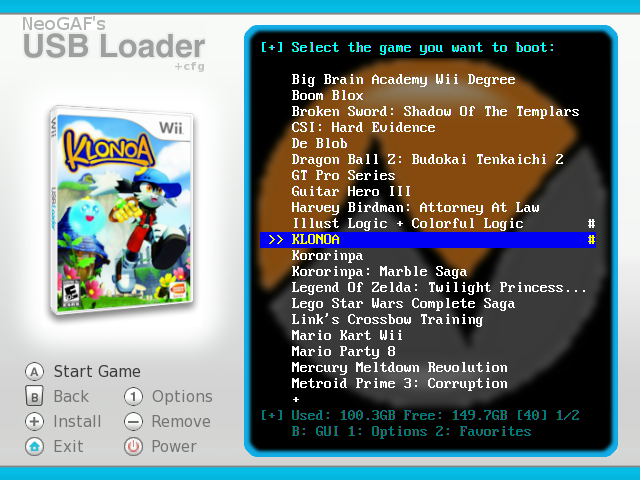
If anybody wants to take a crack at doing something better, I'd really appreciate it.
BTW, Conrad Link, what do you think of the theme and when did you get it? I made some changes last night and I'm not sure whether to keep them. My GIMP skills are just not that great. Here's how it looks for those interested (the menu mode at least, I can't take screenshots of the gui mode):
If anybody wants to take a crack at doing something better, I'd really appreciate it.