• Hey Guest. Check out your NeoGAF Wrapped 2025 results here!

GAF Wii Homebrew thread: Homebrew, emulators, USB disc installs! Easy tutorial!

I connected a "regular" hard drive (thru an enclosure) to the Wii to rip my games. However, it always freezes while ripping.

I once got a code dump when I was using a USB thumb drive but here, it simply freezes during the ripping process.

I tried using the Configurable USB Loader but I get a black screen when trying to load it. Would the Hermes IOSes help in this case?

Thanks.
 
I just installed the loader and everything (finally) a few hours ago, I like the theme. :D Very clean, not all cluttered like people sometimes make these types of things.

Hmm I still haven't updated my Wii (on 3.2), kinda tempted too so I can get stuff like Majora's Mask. Always been worried it would stuff up my ability to do the homebrew stuff so have just been leaving it how it was.
 
This might seem like a stupid question, but with Eurogamer reviewing Grand Slam Tennis again because of the problem with their Wii not having high enough debug firmware to run Motion+ I thought it best to ask:

If you use USB Loader to play a Motion+ game while you're still on a low firmware will it still recognise Motion+? I'm still on 3.3E, so I was just wondering if I need to update to 4.0 to get Motion+ functionality.
 
suikodan said:
I connected a "regular" hard drive (thru an enclosure) to the Wii to rip my games. However, it always freezes while ripping.

By any chances do you have a Lan Adapter hooked up or even the Lan type of connection between the selectable ones?
 
Dash Kappei said:
By any chances do you have a Lan Adapter hooked up or even the Lan type of connection between the selectable ones?

I'm pretty sure that I have either wireless or simply "nothing" configured but I'll give it a check. Thanks for the input!
 
Relix said:
My HDD is barely recognized =(. Sometimes it works, sometimes it doesn't. Boo.
Try using the tips I give below.

suikodan said:
I connected a "regular" hard drive (thru an enclosure) to the Wii to rip my games. However, it always freezes while ripping.

I once got a code dump when I was using a USB thumb drive but here, it simply freezes during the ripping process.

I tried using the Configurable USB Loader but I get a black screen when trying to load it. Would the Hermes IOSes help in this case?

Thanks.
Firstly, try to ensure your partition is both primary and active (can be checked in Windows Disk Management). Try changing the jumper on the drive (between Master, Slave and Cable Select).

I can't think of why Configurable doesn't work. When you tried installing cfg, was the file a .zip, or just a .dol? The .dol releases are just patches to the main releases. Try downloading v34 and then patching it to 35a5 by overwriting sd:/apps/USBLoader.

Yes, Hermes' IOSes may help. They have better compatibility with many drives. Give them a shot. If you have Configurable USB Loader going, it is easy to switch to the Hermes' ones by adding ios=222-mload or ios=223-mload to the config.txt file.

Conrad Link said:
I just installed the loader and everything (finally) a few hours ago, I like the theme. :D Very clean, not all cluttered like people sometimes make these types of things.

Hmm I still haven't updated my Wii (on 3.2), kinda tempted too so I can get stuff like Majora's Mask. Always been worried it would stuff up my ability to do the homebrew stuff so have just been leaving it how it was.
Thanks for the compliment :D. Places like GBATemp will tell you otherwise (you do jeopardise your ability to pirate), but it is safe to use the official update method. You will probably have to reinstall HBC afterwards, but that is easy.

The Alchemist Penguin said:
This might seem like a stupid question, but with Eurogamer reviewing Grand Slam Tennis again because of the problem with their Wii not having high enough debug firmware to run Motion+ I thought it best to ask:

If you use USB Loader to play a Motion+ game while you're still on a low firmware will it still recognise Motion+? I'm still on 3.3E, so I was just wondering if I need to update to 4.0 to get Motion+ functionality.
I haven't heard of this. Motion+ games don't even perform any new IOS upgrades, from what I hear (or possibly the functionality has been there since IOS55).
 
Sorry to double post, but this news deserves its own post. Configurable USB Loader now has online updates. You can apparently use it to both upgrade and downgrade (it gives you a list of recent releases). I'm off to test it out now.

If the lack of these was stopping you from using this instead of GX, then now is the time to try it out. To install (you need v35a6 executable and a previous full installation like v34), follow the instructions in the tutorial.

Edit: It works quite nicely. Nothing really to upgrade to yet, but the feature is there for future changes.
 
Question about WAD file installation. I'm trying to install my first WAD, and I'm getting error -2011. I heard that's an attempt of the firmware to stop the installation of WADs. As far as my system software, I'm running the most current version. How do I work around this?
 
And I had JUST updated to 36a5 about 10 minutes ago.
Oh well, it was easy enough to step that up to 36a6.
Tested the functionality, and it certainly is straightforward enough.
Brilliant. No more HDD swapping with each update.
It even recognizes that the loader is running off the USB HDD and not the SD card.
 
Dartastic said:
Question about WAD file installation. I'm trying to install my first WAD, and I'm getting error -2011. I heard that's an attempt of the firmware to stop the installation of WADs. As far as my system software, I'm running the most current version. How do I work around this?
What exactly are you installing and why?
 
Clipper said:
Firstly, try to ensure your partition is both primary and active (can be checked in Windows Disk Management). Try changing the jumper on the drive (between Master, Slave and Cable Select).

I can't think of why Configurable doesn't work. When you tried installing cfg, was the file a .zip, or just a .dol? The .dol releases are just patches to the main releases. Try downloading v34 and then patching it to 35a5 by overwriting sd:/apps/USBLoader.

Yes, Hermes' IOSes may help. They have better compatibility with many drives. Give them a shot. If you have Configurable USB Loader going, it is easy to switch to the Hermes' ones by adding ios=222-mload or ios=223-mload to the config.txt file.

Somehow, I got better results (including launching Configurable) after updating the HBC which also installed DVDX. Perhaps it installed an updated IOS. I was able to rip some discs of mine but some of them are still freezing in the process.

I will try the jumper thingy and the Hermes IOSes to see if I can have better results.


So I installed and did this procedure about a month ago. What has changed since then, and what do I need to keep updated to get the best performance for playing games ripped to an HDD?
 
Aw man, updated to 4.0 and now USB Loader doesn't work. ;(

Just hangs on the load screen timeout countdown thing till the 30 seconds are up like it cant find my hard disk anymore.

Do I need to redo/reinstall stuff now that its 4.0?
 
Conrad Link said:
Aw man, updated to 4.0 and now USB Loader doesn't work. ;(

Just hangs on the load screen timeout countdown thing till the 30 seconds are up like it cant find my hard disk anymore.

Do I need to redo/reinstall stuff now that its 4.0?
So HBC still worked, but USB Loader doesn't? First try power cycling your drive. If that doesn't work, reinstall IOS249.

You didn't accidentally change which USB port you were using, did you?

Mr. Wonderful said:
So I installed and did this procedure about a month ago. What has changed since then, and what do I need to keep updated to get the best performance for playing games ripped to an HDD?
The only things that have changed are Configurable USB Loader and the GAF theme for it. The tutorial mentions how to update on the USB Loader page.
 
Yeah HBC and everything else seems fine (haven't robust tested everything yet).

At first when it didn't find the HD I figured I had it in the wrong one so changed it, but have since tried both and same problem still occurs.

Can that cause problems?
 
Conrad Link said:
Yeah HBC and everything else seems fine (haven't robust tested everything yet).

At first when it didn't find the HD I figured I had it in the wrong one so changed it, but have since tried both and same problem still occurs.

Can that cause problems?
No, it can't cause problems. It will only work in the port nearest the edge, though.
 
Hmm, okay I guess I'll try and reinstall IOS249.

Now that I'm 4.0 should I follow the "I am on version 4.0 or greater and my Wii's serial number does not start with LU64 or greater." section now?

(cheers for your quick help replies btw, much appreciated!)
 
Conrad Link said:
Hmm, okay I guess I'll try and reinstall IOS249.

Now that I'm 4.0 should I follow the "I am on version 4.0 or greater and my Wii's serial number does not start with LU64 or greater." section now?

(cheers for your quick help replies btw, much appreciated!)
I assume you already went ahead, but if not, you should be able to try the direct reinstall using IOS249 as the choice. If that doesn't work, then use the method you suggested.

Hmm... just realised I didn't include a how to update section on that page...well, time to fix that.
Edit: No, I did have it there after all, just under the FAQ. Silly me.
 
I'm upto date now with HBC, IOS249, Bootmii - I'm about to update the firmware and the FAQ says:

Will I lose access to my homebrew by updating?

No. You may lose the ability to install additional IOSes needed for homebrew (e.g., IOS249 and Hermes' IOS222/223) but you should not lose access to the Homebrew Channel and the IOSes you have already installed.

So are there any other IOS I should install before updating the firmware?


Edit - Went and did it any way, everything is good :)
 
EatChildren said:
Is there any relatively solid N64 emulator available? I've seen the video released by the guys who've made Wii64 or whatever it is, but I was wondering if a good release is available.

Wii64 is in development. The people working on it don't want to release it until it's more stable.
 
Which is the best HDD for Usb Loader ?

Seagate FreeAgent Go ?
 
Conrad Link said:
Reloading IOS249 seems to have worked. Dunno what the problem was but not too worried if things work now. :lol

*shrugs*

Thanks Clipper!
Can you let me know whether you needed to do the 4.0 hacks first?
 
Mr. Wonderful said:


So I installed and did this procedure about a month ago. What has changed since then, and what do I need to keep updated to get the best performance for playing games ripped to an HDD?

Followed this and everything works but I can't download boxarts, anyone else having issues?
 
As far as HDDs go, I've convinced 5 or so people to get various versions of the Seagate FreeAgent Go, and we're all pleased as punch with it.

Tiny, quiet, cool portable external HDD that blends in rather well with the Wii (if you go with the Silver version).
Powers via USB, and if WiiConnect Standby mode is disabled, it powers off and on together with your Wii. No power switches needed.
Has worked with every single known compatible game I've thrown at it. No issues or crashes.
Spin-down/sleep mode can be disabled via the software that comes on the drive.
 
Everything Mejilan said (I'm one of the five). I got the drive about two weeks ago. It was run for at least 24 hours between last Friday night and Sunday afternoon. No issues at all.
 
JudgeN said:
why of course not, thanks so much.
Things have changed a bit since I made that post. The best sites to add to the config.txt is now:

cover_url = http://www.muntrue.nl/covers/ALL/160/225/boxart/{ID6}.png
cover_url =+ http://wiitdb.com/wiitdb/artwork/cover/US/{ID6}.png
cover_url =+ http://wiitdb.com/wiitdb/artwork/cover/EN/{ID6}.png
cover_url_3d = http://www.muntrue.nl/covers/ALL/160/225/3D/{ID6}.png
cover_url_3d =+ http://wiitdb.com/wiitdb/artwork/cover3D/{REGION}3d/{ID6}.png
cover_url_disc = http://www.muntrue.nl/covers/ALL/160/160/disc/{ID6}.png
cover_url_disc =+ http://wiitdb.com/wiitdb/artwork/disc/US/{ID6}.png
cover_url_disc =+ http://wiitdb.com/wiitdb/artwork/disc/EN/{ID6}.png

Having said that, you can still follow those previous instructions, you just get bigger 3d covers in their non-native resolution (because the source of those images were the smaller ones) is all.
 
i love my wd passport but still recommend the seagate to all my friends. being able to disable spindown is a huge plus, and eliminates any future headaches.
 
Mejilan said:
As far as HDDs go, I've convinced 5 or so people to get various versions of the Seagate FreeAgent Go, and we're all pleased as punch with it.

Tiny, quiet, cool portable external HDD that blends in rather well with the Wii (if you go with the Silver version).
Powers via USB, and if WiiConnect Standby mode is disabled, it powers off and on together with your Wii. No power switches needed.
Has worked with every single known compatible game I've thrown at it. No issues or crashes.
Spin-down/sleep mode can be disabled via the software that comes on the drive.
Nailed it. Haven't had any issues after getting my Seagate FreeAgent Go.
 
Clipper said:
Things have changed a bit since I made that post. The best sites to add to the config.txt is now:
Do you include a config.txt that people can download with a bunch of stuff most like in your tutorial?
 
Can one of you with the Go please try a little experiment or me? Try re-enabling your spindown and using rev 13 of IOS249. I've heard conflicting reports on whether it has an effect or not and would like to find out conclusively.

Fuzzy said:
Do you include a config.txt that people can download with a bunch of stuff most like in your tutorial?
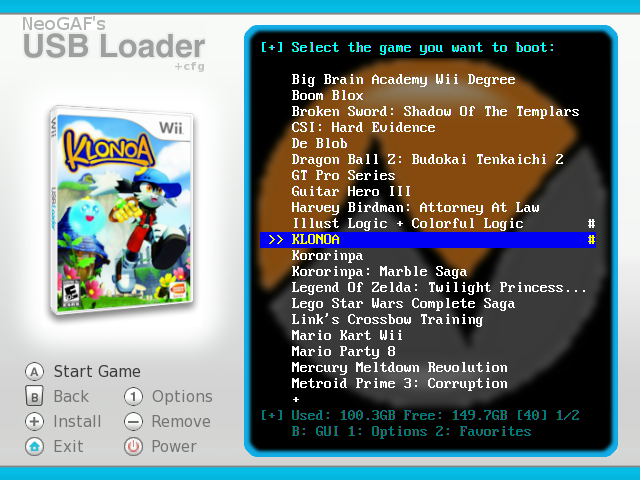
Yep, and it's even GAF themed:
screenshot10.png
 
I'm looking into trying some homebrew on my wii, if I wanna do the Homebrew channel, IOS, and the USB loader, what chance do I have of bricking my wii? I believe I read the new stuff for 4.0 is still in beta or something, would it be better to wait till things are more flushed out on 4.0? Are my fears unwarranted?

Also curious if I have a game and I wanna play a back up off USB loader will it use the same save file?

This thread is amazing, thanks for putting all this together ya'll.
 
So why won't USB loader find the box arts?

Also, when I try to switch the "skin" in USB Loader, the next time I open USB loader it doesn't keep it saved.

thanks in advance! I should have done this a long, long time ago.
 
Yeah, just saw that. Sorry about jumping the gun on that one.

I think I might just switch over to that there gaf-themed loader. I like its look alot!
 
Fidelis Hodie said:
Yeah, just saw that. Sorry about jumping the gun on that one.

I think I might just switch over to that there gaf-themed loader. I like its look alot!

Thanks. As for saving the theme, the newest version (currently only available via online updates) gives you the option to save the chosen theme in the loader. You can also just add "theme=GAF" or whatever to your config.txt file, which my sample one does for you.

Skorp said:
I'm looking into trying some homebrew on my wii, if I wanna do the Homebrew channel, IOS, and the USB loader, what chance do I have of bricking my wii? I believe I read the new stuff for 4.0 is still in beta or something, would it be better to wait till things are more flushed out on 4.0? Are my fears unwarranted?

Also curious if I have a game and I wanna play a back up off USB loader will it use the same save file?

This thread is amazing, thanks for putting all this together ya'll.
Yes it uses the same save and it's safe enough as long as you follow the right instructions:
 
Fidelis Hodie said:
Also, when I try to switch the "skin" in USB Loader, the next time I open USB loader it doesn't keep it saved.

Ya, I also have this problem with the skins. Any ideas?
 
I just recently updated to 4.0 on my wii. The wii is US. Anyway, I was able to get USB Loader working, Homebrew Channel, and some wiiware wads. The wads I cannot get to work are the majority of the VC wads. My question is, is anyone else having this problem? I'm not asking where to get wads, or how to install them, I'd just like to know if anyone has problems getting VC wads to work? They install just fine, they just reboot my wii.

Thanks, and if this question or problem has been solved and I overlooked it, I am sorry.
 
Kenobi said:
I just recently updated to 4.0 on my wii. The wii is US. Anyway, I was able to get USB Loader working, Homebrew Channel, and some wiiware wads. The wads I cannot get to work are the majority of the VC wads. My question is, is anyone else having this problem? I'm not asking where to get wads, or how to install them, I'd just like to know if anyone has problems getting VC wads to work? They install just fine, they just reboot my wii.

Thanks, and if this question or problem has been solved and I overlooked it, I am sorry.
That is piracy. No doubt about it. There is no reason to be installing VC wads unless you have bought the actual VC game (and no, owning the original game does not justify installing the VC version). Your answer is to just download the game from the Wii Shop.
 
Clipper said:
That is piracy. No doubt about it. There is no reason to be installing VC wads unless you have bought the actual VC game (and no, owning the original game does not justify installing the VC version). Your answer is to just download the game from the Wii Shop.

Eh, I guess I wasn't clear. Yes, they were in reference to games I already own. Punch Out, Star Fox, Street Fighter...just some off the top of my head. I wanted to AVOID doing the re-downloading. Well, I guess that's that.

EDIT: And anyway, we are all open about using USB Loader. I'm sure there's a nice chunk of peeps on here that are using it to d/l ISO'S but whatever.
 
Is there any limit to HDD size that causes the Wii to spazz out? I'm thinking of getting the 500GB Seagate FreeAgent Go, and partitioning 250GB for the Wii and the other 250GB for whatever other junk I need to store.

Also, does the ripping program scrub the images? If not, is there any value in scrubbing the images?
 
Top Bottom