
-
Hey Guest. Check out your NeoGAF Wrapped 2025 results here!
You are using an out of date browser. It may not display this or other websites correctly.
You should upgrade or use an alternative browser.
You should upgrade or use an alternative browser.
GAF Wii Homebrew thread: Homebrew, emulators, USB disc installs! Easy tutorial!
- Thread starter radioheadrule83
- Start date
DeathbyVolcano
Banned
Why isn't that Bannerbomb released yet :'(
Well, my favorite one includes a couple of mods that improvement HDD stability, has built in cover art support, built in Ocarina support, allows you to force certain settings, and even save your selected configuration settings on a per-game basis! Very handy.
NTFS support is not likely. The WBSF file system has innate support for compressed images, or some such, that NTFS support lacks. It's just much more efficient for Wii games, from what I've read. Your best bet would be to pair it a GUI-based manager for Windows, such as WBFS Manager and Channel Creator 3.3.
That'll allow you to manage your games via Windows instead of the Wii.
NTFS support is not likely. The WBSF file system has innate support for compressed images, or some such, that NTFS support lacks. It's just much more efficient for Wii games, from what I've read. Your best bet would be to pair it a GUI-based manager for Windows, such as WBFS Manager and Channel Creator 3.3.
That'll allow you to manage your games via Windows instead of the Wii.
Mejilan said:Well, my favorite one includes a couple of mods that improvement HDD stability, has built in cover art support, built in Ocarina support, allows you to force certain settings, and even save your selected configuration settings on a per-game basis! Very handy.
NTFS support is not likely. The WBSF file system has innate support for compressed images, or some such, that NTFS support lacks. It's just much more efficient for Wii games, from what I've read. Your best bet would be to pair it a GUI-based manager for Windows, such as WBFS Manager and Channel Creator 3.3.
That'll allow you to manage your games via Windows instead of the Wii.
I completely forgot about Ocarina and all of the boot options

That's too bad about NTFS. I don't need it to put games on the HDD. I already use Windows since my Wii DVD drive recently died (and luckily the HDD hack came along) but I was hoping I'd be able to use some of my HDD's space for file storage without having to create partitions.
I'm returning to the Wii after a bit of an absence, and I'm trying to work out how the various upgrades need to be applied.
I've already installed the HBC (Not DVDX yet, but I can easily pick that up), and I'm still back on 3.2E. I seem to recall that the upgrade to 3.3E shouldn't be done through Nintendo's stuff because it breaks something, but there's an upgrader somewhere that'll avoid breaking things? And then using the 'official' upgrade to 4.0 would do the trick?
I'm nervous to touch anything just yet, and I'd like to get the new SD loader stuff up and running.
I've already installed the HBC (Not DVDX yet, but I can easily pick that up), and I'm still back on 3.2E. I seem to recall that the upgrade to 3.3E shouldn't be done through Nintendo's stuff because it breaks something, but there's an upgrader somewhere that'll avoid breaking things? And then using the 'official' upgrade to 4.0 would do the trick?
I'm nervous to touch anything just yet, and I'd like to get the new SD loader stuff up and running.
http://www.neogaf.com/forum/showpost.php?p=15435633&postcount=1636
That's how I upgraded from 3.3U to 4.0U (skipping 3.4U entirely). I do not think you need to worry about the incremental (3.3E, 3.4E) updates at all.
That's how I upgraded from 3.3U to 4.0U (skipping 3.4U entirely). I do not think you need to worry about the incremental (3.3E, 3.4E) updates at all.


MikeE21286
Member
Mejilan said:I've only tested two loaders, but they both worked on cIOS36 rev10.
Just bear in mind that the initial rev10 installer uploaded by Waninkoko was flawed and broke USB Loader. He quickly fixed it and uploaded a new version.
yea you were spot on about those ultimate loaders, they are seriously awesome. They have Force NTSC/PAL, Ocarina, Language selections. Until they get one of these on 1.2/1.3 loaders I'm sticking at 1.1

Mithos
Member
MikeE21286 said:yea you were spot on about those ultimate loaders, they are seriously awesome. They have Force NTSC/PAL, Ocarina, Language selections. Until they get one of these on 1.2/1.3 loaders I'm sticking at 1.1
UltimateEdition v4 have everything Official 1.4 has (except SD Loading), it now even have configuration from a txt file placed on the sd-card.
MikeE21286 said:yea you were spot on about those ultimate loaders, they are seriously awesome. They have Force NTSC/PAL, Ocarina, Language selections. Until they get one of these on 1.2/1.3 loaders I'm sticking at 1.1
Yep. Ultimate USB Loader 1.1 had everything that 1.4 now has (and more), before 1.4 was even out! ;p
Except for the totally useless SD loading, of course.
Relix said:I am so lost with all this new loader and firmware stuff lately. Wow.
yeah really with all these updates, downgrades, bug fixes, downgrades from the updates etc its hard to keep track.
i just downgraded with this method to 3.2E !
Downgrading from 4.0 to x.xx - this is only possible if you have HBC already installed and a working internet connection
Now it says iam on IOS36 v4.18 at the HBC, shouldn't it be on cIOS or something?
can someone please help with what to do next so i can try out the ultimate usb loader or go back to 4.0 without risking my HBC! :/
So... I'm on firmware 3.2E right now. I can't use my shop channel because it prompts me to update, and I want to buy some WiiWare games. I don't want to update to 4.0 because supposedly it breaks emulators, and I have no need for the SD card functionality. What can I do? I tried reading Mejilan's post a bit further up but I understood maybe 1% of it. Halp! :lol
edit: nvm, found a guide complete with zip file containing all the necessary files
edit: nvm, found a guide complete with zip file containing all the necessary files
Ledsen said:So... I'm on firmware 3.2E right now. I can't use my shop channel because it prompts me to update, and I want to buy some WiiWare games. I don't want to update to 4.0 because supposedly it breaks emulators, and I have no need for the SD card functionality. What can I do? I tried reading Mejilan's post a bit further up but I understood maybe 1% of it. Halp! :lol
Updating to 4.0 does not break any emulators, at least not in my experience (as long as HBC is in place before you update, of course). I have FCEultra, GenPlus, HUGO and WiiEngine, SNESX9x, VBA GX, etc., on my Wii and all work as well today as they did before I updated to 4.0.
It's probably worth noting that some here have had problems running HBC emulators when using SDHC. I've been using a regular 'ol SD card and have had no problems whatsoever.
Mejilan said:HDD for the Wii GET!
Cracking it open and getting 'er prepped as I type this!
So what did you get?
I'll do it eventually, as of now, I'm not sure I want to use the one I already have where I store all my stuff... but I still have to decide how much I want to spend on a dedicated one for my Wii.
Ysiadmihi said:I still need to install City Folk. I stopped playing it because of the loading times and having to pop the disc in every time to play it.
I always thought it should have been a WiiWare game, and with the HDD loader it pretty much is now
Yeah, you should do it. It almost feels like the GC version
Ledsen said:btw there seems to be a cIOS rev 10 out now. I installed rev 8, then used wakinokos 4.0 updater. Can I just install rev 10 over the old rev 8?
Also yes, there shouldn't be a problem. You don't need to uninstall a cIOS first as it overwrites the old one, and the readme doesn't state you need rev9 before.
BTW rev 10 install an additional cIOS (250 i think) just in case gets 249 corrupted or something.
Gecko OS update within a week.
http://www.youtube.com/watch?v=rLBjtcMGt8o
http://www.youtube.com/watch?v=rLBjtcMGt8o
As some of you may know, Nuke, the former creator of Gecko OS, USB Gecko, and SD Gecko, has stopped developement on the popular Gecko OS for reasons unmentioned here...
Brkirch has decided to take over the Gecko OS project, since Gecko 2.0 will never be released, and there are quite a few changes since the last build (1.07b). Since this is only a preview NO download link will be provided EVER from me. You'll have to wait from brkirch himself. I will not leak it.
Some changes in this version of Gecko OS include the following SO FAR:
- New Hooks have been added such as, GXFlush, GXDraw, OSSleepThread, and AXNExtFrame. (these should fix games that didn't work before)
- Rebooter now works on 3.3v2, 3.4, and 4.0 (just patch IOS 36 for safety)
- Rebooter now works with Preloader versions (before you would get code dump)
- New codetypes have been added that allow region free coding!
- Custom backgrounds are supported, just name it "background.png" in Root of SD card (PNG-24 only)
- Gecko OS now supports "gameconfig.txt" in root of SD card that allows various configurations to be manually added (booting from specific IOS and debugging functions)
- Game Patching via ".gpf" files (gecko patch file) that allows various things, like uploading textures to a game and long lists of codes.
- Bubble Support added
- Save Config added that allows you to constantly force Pal 60 if you please
Unfortunately, This will not be open source. Brkirch is against piracy and will not give out the source to anyone. That's part of the reason Nuke abandoned Gecko 2.0. Happy Easter
EphemeralDream
Member
I first tried the softmod with a 16 meg card myself and it wasn't working. Most likely the same error that you're having, it's something to do with the type of formatting tables that a 16meg card supports compared to 32 and up. When I got a 2 GB SD Card, it worked without a hitch.bluemax said:So no one knows? I'm using like a 7 year old 16mb SD card I got with my Palm Pilot back in the day. I've formatted it using the Panasonic formater linked to by Wiibrew, and followed all the other directions from Wiibrew.
Mejilan, how long did all those steps take you? It looks like a complete PITA, especially when I barely use my Wii to begin with.
Curious as to how well thats going to work out.GaussTek said:we hope to be releasing part of BootMii ("mini") in the near future.
shouamabane
Member
I installed Homebrew Channel and updated to System Menu 4.0 today.
If I delete Homebrew Channel now will I have any problems? I have read that HBC leaves "traces" after it is deleted.
If I delete Homebrew Channel now will I have any problems? I have read that HBC leaves "traces" after it is deleted.
EphemeralDream said:Mejilan, how long did all those steps take you? It looks like a complete PITA, especially when I barely use my Wii to begin with.
For what? Updating to 4.0 + the pre-update measures? Not including the extensive research of means and applications? Probably around 15 or 20 minutes, at most.
DeathbyVolcano
Banned
So just for good measure so I can get a finite answer:
I had the HBC installed before 4.0, but when I upgraded I for some reason deleted the HBC. Don't ask me why. So because of that, I'm pretty much screwed until someone creates a new method to get the homebrew installed? I know that the Twilight hack does not work anymore.
I had the HBC installed before 4.0, but when I upgraded I for some reason deleted the HBC. Don't ask me why. So because of that, I'm pretty much screwed until someone creates a new method to get the homebrew installed? I know that the Twilight hack does not work anymore.
Gecko OS 1.8 Released
http://wiird.l0nk.org/forum/index.php/topic,3144.0.html
http://wiird.l0nk.org/forum/index.php/topic,3144.0.html
Gecko 1.8
---------
What's New:
* Multidol games work through Gecko's game loader, rebooter is no longer required for them
* To ensure games are fully functional the game loader now uses the IOS requested by the game (as a result there is no 002 error, that error is due to game loaders booting a game with the wrong IOS)
* If a game requests an IOS that you don't have, the game's update partition will be searched for the IOS and the option to install the IOS will be given if it is found (if you have a modchip, turn off update blocking!)
* It is now possible to select not to load the debugger, which increases the number of code lines allowed by Ocarina
* New hooks have been added so that most (if not all) Wii games can be hooked
* Rebooter will use the hook selected on the config menu to hook games
* Rebooter is now compatible with preloader
* The menu interface has been improved, and you can load a custom background by creating a 640x480 PNG-24 file, naming it background.png, and putting it at the root of your SD card
* The menu configuration can be saved, and the saved configuration will be loaded automatically when Gecko starts
* A configuration file can be created for game specific settings like hook type
* New code types are supported by the code handler
* GPF (gecko patch file) support
Download from:
http://www.usbgecko.com/Gecko18.zip
Yes, you are screwed, probably until BootMii launches (which could be soon).BrandNew said:So just for good measure so I can get a finite answer:
I had the HBC installed before 4.0, but when I upgraded I for some reason deleted the HBC. Don't ask me why. So because of that, I'm pretty much screwed until someone creates a new method to get the homebrew installed? I know that the Twilight hack does not work anymore.
If you delete it, you will not be able to get it back. Also, yeah, you can't delete all trace of it, so why bother?shouamabane said:I installed Homebrew Channel and updated to System Menu 4.0 today.
If I delete Homebrew Channel now will I have any problems? I have read that HBC leaves "traces" after it is deleted.

Xabora said:Gecko OS 1.8 Released
* If a game requests an IOS that you don't have, the game's update partition will be searched for the IOS and the option to install the IOS will be given if it is found (if you have a modchip, turn off update blocking!)
http://wiird.l0nk.org/forum/index.php/topic,3144.0.html
Huh what...
Modchips have update blocking functions. If you have them switched on, they'll block Gecko OS from being able to install the needed IOS (which is only IOS55 at the current time).VOOK said:Huh what...
Clipper said:Modchips have update blocking functions. If you have them switched on, they'll block Gecko OS from being able to install the needed IOS (which is only IOS55 at the current time).
Hmm I don't think mine has that or it's not switched on :/
Shit gonna have to dig up that config disk for my modchip I guess. What game has IOS55?
VOOK said:Hmm I don't think mine has that or it's not switched on :/
Shit gonna have to dig up that config disk for my modchip I guess. What game has IOS55?
Madworld, Broken Sword: Shadow of the Templars: Director's Cut, Marble Saga: Kororinpa, and a few others. Basically anything that gave the 002 error.
I already updated from Broken Sword to install IOS55 though, it kept me at 3.2 and everything, just installing IOS55 so I could play it without the 002 fix (PAL game on PAL Wii).
shouamabane
Member
Clipper said:If you delete it, you will not be able to get it back. Also, yeah, you can't delete all trace of it, so why bother?
Good point, I just wanted to be sure that I can't get rid of it totally somehow. I read all of this IOS cIOS business and it seems like more trouble than it's worth.
Wii homebrew could really use a school house rocks style music video, for people like me.
There's a mention on HackMii.com somewhere that if Nintendo ever does directly target Wiis that have had HBC installed, they will release a patch to completely remove all the traces that are targeted. That situation isn't going to happen, though, so don't worry. Just avoid the cIOS stuff and stick with plain Homebrew games/apps and region free stuff, and you should be perfectly safe.shouamabane said:Good point, I just wanted to be sure that I can't get rid of it totally somehow. I read all of this IOS cIOS business and it seems like more trouble than it's worth.
Yep, you're in exactly the same boat as meVOOK said:Ah well I have the Aussie/European Madworld and that installed the little update it did fine. Must be off and the new IOS already installed. Awesome
.shouamabane
Member
VOOK you may already know this, but a disc update from another region can brick your Wii.
You may want to turn the update blocking option on if you play imports.
You may want to turn the update blocking option on if you play imports.
Sweet, here is a snapshot of BootMii - we should see a beta release um soon I guess as they've installed it on 12 Wii's and haven't had any issues:
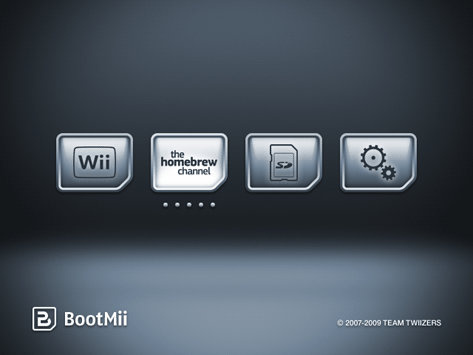
I still haven't gone through the steps Mejilan posted (my research seemed to be pretty consistent with his, heh) but I may hang out til this is complete - go Team Twiizers!
I still haven't gone through the steps Mejilan posted (my research seemed to be pretty consistent with his, heh) but I may hang out til this is complete - go Team Twiizers!
OMG, that looks great
^ Hope that's true... can't wait
bushing said:I hope that we can release a public beta within the next couple of weeks.
^ Hope that's true... can't wait

The Hermit
Member
I can´t wait for BootMii... I have a semi-bricked Wii and I coudn´t fix it in any possible way.
Here´s hopping that ExciteBots have 4.0....
Here´s hopping that ExciteBots have 4.0....
There's so much stuff being developped at the same time, i dont remember seeing a scene so active in all my years of following this kind of stuff.
I think there should be a merge of a few projects.. perhaps having usb-loader being built-in that new bootmii OS, with all those enhancements made by 3rd party hacks such as ntsc/pal convertions, on-the-fly removal and patching of original discs being copied to the usb HD. There so many random hacks of apps and etc floating around, it gets pretty annoying to be up to date.
I think there should be a merge of a few projects.. perhaps having usb-loader being built-in that new bootmii OS, with all those enhancements made by 3rd party hacks such as ntsc/pal convertions, on-the-fly removal and patching of original discs being copied to the usb HD. There so many random hacks of apps and etc floating around, it gets pretty annoying to be up to date.
shouamabane said:VOOK you may already know this, but a disc update from another region can brick your Wii.
You may want to turn the update blocking option on if you play imports.
Yep I had my cousin stick in Okami, lucky all it did was give my Dupe Channels - but I've removed them anyway.
I use Gecko to load imports anyway, the modchip is basically useless now :/
shuri said:There's so much stuff being developped at the same time, i dont remember seeing a scene so active in all my years of following this kind of stuff.
I think there should be a merge of a few projects.. perhaps having usb-loader being built-in that new bootmii OS, with all those enhancements made by 3rd party hacks such as ntsc/pal convertions, on-the-fly removal and patching of original discs being copied to the usb HD. There so many random hacks of apps and etc floating around, it gets pretty annoying to be up to date.
Yeah, but the thing is the guys behind bootmii, are against piracy... so they are only releasing it to prevent bricking and to help "normal" homebrew (non Wii-Software related) from being blocked.
So, the "scene" is divided in some way... and I agree, it's a bit hard to be up to date concerning all those hacks and apps.
Bluemercury
Member
Xabora said:Gecko OS 1.8 Released
http://wiird.l0nk.org/forum/index.php/topic,3144.0.html
I have gecko installed, how do i install the latest version?
Bluemercury
Member
Ramenman said:With the HOMEBREW BROWSER :O
well i understand, but you see i was not the one who actually put the homebrew channel up and running.....althought ive managed to install the latest scummvm version i dont even know how or when to use the geckos.....:S