
• Hey Guest. Check out your NeoGAF Wrapped 2025 results here!

GAF Wii Homebrew thread: Homebrew, emulators, USB disc installs! Easy tutorial!

Bebpo said:
Does Boomblox not work with USB Loader 1.5?

It says it's ok on here:
http://wiki.gbatemp.net/wiki/index.php/USB_Launcher_v1

But I just get a black screen that locks up the system. Mine might be a special case though because the reason I was putting it on USB Loader in the first place is my Wii has trouble reading the disc and sometimes the disc skips and the cursor goes flying, so I thought I'd remedy it by ripping it to the hard drive.

All my other games work on usb loader 1.5, but just Boomblox has a black screen. I dunno if it was a bad rip I did or if the people who said it works ok on that list were using an older loader where it did indeed work.

*edit: tried with 1.1 and same thing. It says booting game and then a black screen that locks up the Wii. Could I be missing some IOS file needed to play it? Does that even make sense if the game works normally with the disc?

Figured it out. I was trying to play this on my Japanese Wii and it was trying to run in Japanese and there was no Japanese so I just got a black screen. When I told it to force English in Gecko with the disc it worked fine.

There's no way to force English in any of the USB loaders is there?
 
autobzooty said:
I'm sending my Wii in for repairs and moved the Homebrew Channel onto SD card so Nintendo doesn't come to my house and murder me. Are there any other traces of the channel I should remove aside from the channel itself? Also, I should be able to plop the channel right back on the Wii from SD Card without any problems, right?

Yes and no. If they really wanted to, they could look at your "message board" and look to see if you've accessed a homebrew channel. It logs it in your play time for the day. And no, you can't move it back from the sd card, or at least at this point.
 
MoogPaul said:
Yes and no. If they really wanted to, they could look at your "message board" and look to see if you've accessed a homebrew channel. It logs it in your play time for the day. And no, you can't move it back from the sd card, or at least at this point.

Really? You can't move it back from the SD card? Why not, what happens when you try?

If this is out of the question, how can I get the channel back now that I'm on Wii Firmware 4.0?
 
autobzooty said:
Really? You can't move it back from the SD card? Why not, what happens when you try?

If this is out of the question, how can I get the channel back now that I'm on Wii Firmware 4.0?
Depending on your internal IOS versions, you might be able to get it back via LOZ:TP...
If its a 100% pure 4.0 then you are pretty much screwed right now.


Also, Gecko 1.9.1 is out.
 
Bebpo said:
Figured it out. I was trying to play this on my Japanese Wii and it was trying to run in Japanese and there was no Japanese so I just got a black screen. When I told it to force English in Gecko with the disc it worked fine.

There's no way to force English in any of the USB loaders is there?
Configurable USB Loader has language options.

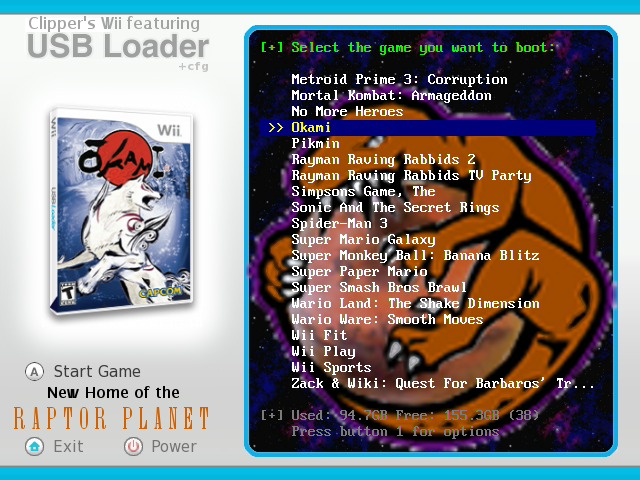
I really love Configurable actually, much more so than Ultimate. Transparent console FTW...
screenshot1-2.png
 
Xabora said:
Gecko 1.9.1 is out.
OH MY FUCKING GOD
OH MY FUCKING GOD
OH MY FUCKING GOD

No more error getting the channel list!

I CAN FINALLY, AFTER YEARS AND YEARS, PLAY MARIO'S SUPER PICROSS! I bought it a while back of the UK shop, but could not get it to run. Thank you, thank you so much for breaking the news. 1.9 did not work, but this did. Wow, I have been waiting to play this for years, I was beginning to lose hope. Thank you, thank you. It could be gecko 1.9, or it could be that, plus a fuckton of other things I tried like preloader, starfall, ETC. Regardless, damn....

Damn indeed.
 
Clipper said:
Configurable USB Loader has language options.

I really love Configurable actually, much more so than Ultimate. Transparent console FTW...
http://i299.photobucket.com/albums/mm309/Dr_Clipper/screenshot1-1.png
That's uglier than most of the iPhone themes in the iPhone thread @_@

These are the nicest USB Loader GUIs I've seen:
exmain.png

http://gbatemp.net/index.php?showtopic=148730

http://www.youtube.com/watch?v=d4OZ1iFR_fw (no screens)
http://gbatemp.net/index.php?showtopic=152074

http://www.youtube.com/watch?v=EAryYXB1wFE (no screens)
http://gbatemp.net/index.php?showtopic=149922

Not sure if any of them have Ocarina support yet though and I want that.
 
Is this period between exploits normal-length, or have Nintendo finally managed to stump the homebrew community with 4.0? I'm just really dying to play Metroid Prime 3 with no load times . :(
 
scitek said:
Is this period between exploits normal-length, or have Nintendo finally managed to stump the homebrew community with 4.0? I'm just really dying to play Metroid Prime 3 with no load times . :(


Everyone is waiting for Bootmii
 
scitek said:
What's that?

EDIT: Is it like XMBC for the Wii? Replacing the Wii OS with a homebrew one?

Bootmii is essentially a hook into the boot up system of the Wii OS. Essentially with Bootmii installed you'll be able to boot directly into HBC or other homebrew apps without having to go to the system menu...

It also makes it much harder for Nintendo to try and block homebrew. It isn't impossible, but it's far riskier than it's worth, overall.
 
scitek said:
What's that?

EDIT: Is it like XMBC for the Wii? Replacing the Wii OS with a homebrew one?

From what I understand it runs as soon as the Wii is started, meaning you can basically do what you want with the Wii.


EDIT Beaten by a superior mind.
 
Dragona Akehi said:
Bootmii is essentially a hook into the boot up system of the Wii OS. Essentially with Bootmii installed you'll be able to boot directly into HBC or other homebrew apps without having to go to the system menu...

It also makes it much harder for Nintendo to try and block homebrew. It isn't impossible, but it's far riskier than it's worth, overall.
You were talking about 2 levels or something of boot before right? If Ninty even attempted to do something with the second one, could that possibly cause Wiis to brick? I am not the most knowledgeable in that regard, but if that would be the case, would that make it impossible for all intents and purposes, to defeat homebrew?
 
From what I just read about Bootmii, you can pop in the SD card with a file on it to boot into the HBC (or anything you'd want, really), or boot without the SD card to boot regularly. Kinda like how I have my Xbox set up. If I want to run XBMC, I turn it on without a disc in the tray. If I want to play online, I turn it on with a disc in the tray and it never boots XBMC. Bad part is what I just read about Bootmii was posted last October. What progress has been made since then?
 
HUELEN10 said:
You were talking about 2 levels or something of boot before right? If Ninty even attempted to do something with the second one, could that possibly cause Wiis to brick? I am not the most knowledgeable in that regard, but if that would be the case, would that make it impossible for all intents and purposes, to defeat homebrew?
Bootmii should make it impossible to defeat homebrew on all Wiis except those made in the last couple of months. The only way it can be defeated is a very directed attack by Nintendo, something which the coders believe is possible, but completely infeasible. However, the most recent Wiis have had updates that stop Bootmii from being installed that way. They can still run Bootmii, but only in reduced capacity, and therefore won't be as robust.

You can get the full story here and here.
 
Xabora said:
Depending on your internal IOS versions, you might be able to get it back via LOZ:TP...
If its a 100% pure 4.0 then you are pretty much screwed right now.


Also, Gecko 1.9.1 is out.

I deleted HBC and updated to 4.0 as well. How would I go about trying to get it back via TP? Do I just repeat the original hack?
 
nec99 said:
I deleted HBC and updated to 4.0 as well. How would I go about trying to get it back via TP? Do I just repeat the original hack?
Balls no, it only works pre 4.0 only. I would downgrade to 3.2, then hope that when it comes back it lacks 4.0.
 
nec99 said:
I deleted HBC and updated to 4.0 as well. How would I go about trying to get it back via TP? Do I just repeat the original hack?
You can't get it back. You need to wait for Bootmii, or some other hack to come along.

HUELEN10 said:
Balls no, it only works pre 4.0 only. I would downgrade to 3.2, then hope that when it comes back it lacks 4.0.
How would you downgrade without HBC or other hacks currently installed?
 
Holy fuck. Cover flow is beautiful.

I need to get an external drive, figure this stuff out and start ripping some games.
 
ok, so im still trying to get my honster hunter 3 demo working.

I tried geckoos 1.7 with the 002 fix and that didnt work. So i went and got final fantasy cc which is supposed to use ios 55. However, it never did any kind of install that everyone keeps talking about. What is this ios install? I cant get gecko to install an ios either. Theres no option for it anywhere.

Keep in mind that im using an official 4.0u firmware with no custom cios that i know of.

Thx!
 
I get an error message when running Waninko's IOS installer.

Code:
Installing ticket...ERROR! (ret = -2011)

So I can't move on to getting the USB loader. Any help from you better haxx0rz out there would be much appreciated.
 
fahr said:
ok, so im still trying to get my honster hunter 3 demo working.

I tried geckoos 1.7 with the 002 fix and that didnt work. So i went and got final fantasy cc which is supposed to use ios 55. However, it never did any kind of install that everyone keeps talking about. What is this ios install? I cant get gecko to install an ios either. Theres no option for it anywhere.

Keep in mind that im using an official 4.0u firmware with no custom cios that i know of.

Thx!

You should just need to run it manually. Assuming you don't have any modchips that remove updates, it should work. If it's still not showing up, then maybe you could try Gecko 1.9.1 to launch it. Try forcing it to different languages too.

pakkit said:
I get an error message when running Waninko's IOS installer.
Code:

Installing ticket...ERROR! (ret = -2011)


So I can't move on to getting the USB loader. Any help from you better haxx0rz out there would be much appreciated.
What firmware version are you?
 
I was hoping somebody could help me. I looked through the thread to try an find out the answer myself, but I only succeeded in further confusing myself. My question is what do I need to do to play Japanese imports(specifically Tatsunoko vs Capcom) Do I need an SD Card? Do I have to install the homebrew channel? Any responses would be greatly appreciated.
 
SoulFist said:
I was hoping somebody could help me. I looked through the thread to try an find out the answer myself, but I only succeeded in further confusing myself. My question is what do I need to do to play Japanese imports(specifically Tatsunoko vs Capcom) Do I need an SD Card? Do I have to install the homebrew channel? Any responses would be greatly appreciated.

You need the Gecko OS app from the Homebrew channel.
 
Anony said:
does the coverflow usb loader have orcarina and video, language options
It doesn't appear to be available, yet. One of the coders had his Wii bricked by his brother, so it may be a while until there's an official release.

SoulFist said:
I was hoping somebody could help me. I looked through the thread to try an find out the answer myself, but I only succeeded in further confusing myself. My question is what do I need to do to play Japanese imports(specifically Tatsunoko vs Capcom) Do I need an SD Card? Do I have to install the homebrew channel? Any responses would be greatly appreciated.
As comedy bomb said, you need the HBC and a region free app (such as Gecko OS or Menu Loader). To install the Homebrew Channel, you will require a non-4.0 Wii, an SD card and a copy of Twilight Princess.
 
SoulFist said:
I was hoping somebody could help me. I looked through the thread to try an find out the answer myself, but I only succeeded in further confusing myself. My question is what do I need to do to play Japanese imports(specifically Tatsunoko vs Capcom) Do I need an SD Card? Do I have to install the homebrew channel? Any responses would be greatly appreciated.
Yes, follow Stump's tutorial and then download Gecko OS.
 
clipper, what do you mean by running it manually?

Install the ios 55 manually? How do i do that?

Or do you mean run mh3 manually? Ive tried gecko 1.9 with no luck. Maybe my settings are all wrong? Mhg runs fine.

Sorry for ignorance. Im new to homebrew. :)
 
pakkit said:
Hmm, that's a tricky one. I'd try downloading it again and trying a fresh install. If that fails, maybe try upgrading to 4.0 and then using the 4.0 method to install cIOS?

fahr said:
clipper, what do you mean by running it manually?

Install the ios 55 manually? How do i do that?

Or do you mean run mh3 manually? Ive tried gecko 1.9 with no luck. Maybe my settings are all wrong? Mhg runs fine.

Sorry for ignorance. Im new to homebrew. :)
I mean just running your game that will install IOS55 from the Wii menu, as you would any other Wii game.
 
I figured just running ff:cc would automatically install ios55 but it didnt seem to. No visible installation took place. And mh3 still wont run. Ill keep playing with gecko settings.

Is there a way to verify that an ios 55 install took place?
 
pakkit said:
I get an error message when running Waninko's IOS installer.

Code:
Installing ticket...ERROR! (ret = -2011)

So I can't move on to getting the USB loader. Any help from you better haxx0rz out there would be much appreciated.

I remember trying to figure out all of the error messages I had ran into while trying to install cIOS 36 rev 10 on my 3.4U Wii. I believe, what worked for me, was that I needed to install IOS16 and then CISO249 before I was able to install cIOS36. I can point you a tutorial that I used that helped me; just drop me a PM.
 
fahr said:
I figured just running ff:cc would automatically install ios55 but it didnt seem to. No visible installation took place. And mh3 still wont run. Ill keep playing with gecko settings.

Is there a way to verify that an ios 55 install took place?
Install Menu Loader and check what options it gives you for IOS. If IOS55 is there, then it has been installed on your Wii. If not, then FF:CC may not actually need IOS55. I know Marble Saga Kororinpa and Broken Sword definitely have the update. Madworld and ExciteBots also have the update apparently, although I can't vouch from experience.

SoulFist said:
Oh okay, awesome. Thanks guys. :D. That is as awesome guide. What size SD card do you all recommend?
Just to run imports? You can use any SD card smaller than 2GB (or bigger when using 4.0). I just use a 64MB card from an old mobile phone.
 
Bii said:
I remember trying to figure out all of the error messages I had ran into while trying to install cIOS 36 rev 10 on my 3.4U Wii. I believe, what worked for me, was that I needed to install IOS16 and then CISO249 before I was able to install cIOS36. I can point you a tutorial that I used that helped me; just drop me a PM.
Damn, I got frustrated and updated to 4.0U. I'll retackle my problem tomorrow, and hopefully have the USB uploader running soon.
 
HUELEN10 said:
You would downgrade WITH HBC before sending the Wii in.

How does one ACTUALLY downgrade to a prior system menu? I ask as everyone says you CAN, but they merely give examples of reinstalling older IOS files...
 
DavidDayton said:
How does one ACTUALLY downgrade to a prior system menu? I ask as everyone says you CAN, but they merely give examples of reinstalling older IOS files...
Who knows, maybe someone could help you. Some people know these things...
 
i installed the menu loader, and ios 55 is there, but the mh3 demo still wont boot. Maybe its because i have an official 4.0u firmware installed, i dunno. Has anyone with 4.0 gotten mh3 to work? Now that i know that the correct ios is installed, it could just be my gecko settings. I tried forcing japaneese and ntsc settings, but that didnt work.
 
fahr said:
i installed the menu loader, and ios 55 is there, but the mh3 demo still wont boot. Maybe its because i have an official 4.0u firmware installed, i dunno. Has anyone with 4.0 gotten mh3 to work? Now that i know that the correct ios is installed, it could just be my gecko settings. I tried forcing japaneese and ntsc settings, but that didnt work.
Hmm.. Try the video settings too. My only Japanese Wii game, Illust Logic + Colourful Logic, can only display the Japanese characters when using the VIDTV patch. I only discovered it last night while testing out the new version of Configurable USB Loader. You should probably also force the language to Japanese.

If that doesn't work, it seems some people are having success playing the game with USB Loaders. Check Stump's guide back on page 39 for help installing that, of course.
 
Tried the Ultimate USB Loader today. Really nice :) Tried it with CIOS Rev 10 first but Animal Crossing kept freezing all the time. Tried it with CIOS Rev 09 and everything was fine. It's just that USB Loader now refuses to load/show the Covers... oh well, but playing games from USB is really good :D
 
Stitch said:
Tried the Ultimate USB Loader today. Really nice :) Tried it with CIOS Rev 10 first but Animal Crossing kept freezing all the time. Tried it with CIOS Rev 09 and everything was fine. It's just that USB Loader now refuses to load/show the Covers... oh well, but playing games from USB is really good :D

How do you switch CIOS on the fly?
 
well if you have 10 and want 9 then you just need to install 9. if you need 10 again you just need to install 10. it's not really on the fly but the install is really short so it's almost on the fly :D
 
To solve the freezing on AC-CF, you need to turn off WiiConnect24 (from the system menu). It's a temporary fix for cIOS rev10 until rev11 comes out.
 
Yeah, but i want to leave it on so i decided to use rev 9. I can live without the covers, they're just eye candy.
 
Top Bottom