
• Hey Guest. Check out your NeoGAF Wrapped 2025 results here!

GAF Wii Homebrew thread: Homebrew, emulators, USB disc installs! Easy tutorial!

BrandNew said:
Wait, what's the uninstall option? Just through the Hackmii installer? I tried that and it didn't really uninstall it, because once I hit that option the uninstall feature was still popping up for it.

it's a boot2 btw
Yes that's the option I mentioned. Does your Wii's slot flash when starting the Wii? If not, then the stub of code BootMii added into boot2 is gone. I doubt the installer itself actually checks whether BootMii is installed, so the uninstall option probably comes up no matter what.
 
Hey gaf so I'm having a problem updating the USB Loader GX channel to the latest revision well the channel's website says this "Download the rXXX.dol, rename it to boot.dol and put it at "SD:/apps/usbloader_gx/" and I am doing that but I have no idea what to do after that

p.s.-forgive me for asking a lot I'm a newbie to the Wii modding scene
 
How are the emulators anyway compared to the real thing?

Also, what good homebrew games are there? I haven't really dwelved too much into their games and I have a feeling I'm missing some pretty cool stuff
 
I debated making a thread for this, but it seems this would be a more appropriate place to post it.

Those familiar with Phantasy Star IV should know about a glitch that exists if you're obsessive enough to level your party to lv99. Stats are applied incorrectly, and characters start swapping stats and forget attack skills. This bug exists in every version of the game except the jPS2 Phantasy Star Complete Collection.

...Or so it was thought, until some OCD fan decided to max out his party on the Virtual Console version. Turns out that the glitch had been eradicated from the VC version as well, and it piqued my curiosity. I had been aware of some edits made to VC games, but for the most part, these seemed to be simple graphics edits (reducing the frequency of bright flashes for those with epilepsy, removing various company logos, etc). This was the first time I had heard of actual gameplay fixes/edits being applied to a VC release, which I found really cool, so after a 10-hour endeavor to transfer, decrypt, and unpack VC files on my computer (this was my first jump into Wii homebrew), I've made a few discoveries.

First, the ROM of the US Virtual Console version of Phantasy Star IV itself seems to be identical to the original US Genesis release. Comparing it to an old binary PSIV ROM results in a byte-for-byte match. Something much more interesting, however, can be found in a file packaged along with the ROM. It's named "patch.zlib," and it contains a bunch of hex data to be written to the game when the Wii loads it.

The entire patch file is broken into 4 sections, denoted by the following lines:

Code:
>0x120 string "PHANTASY STAR The end of the millennium"
>0x180 string "GM G-5524 -00"
>0x180 string "GM MK-1307 -00"
>0x180 string "GM MK -1307 "

The first of these lines says "If the text string at 0x120 is 'PHANTASY STAR The end of the millennium', then execute this block of code." So, it's basically checking to make sure that the packaged ROM is indeed PSIV (any version), and if so, runs the code directly below this line.

The other 3 sections denote region-specific patches. They check the text string at 0x180 (serial number) to determine what region the game was released for, and the code that follows each of these lines has some more patches for region-specific versions. Most of the things that are actually patched in these sections are common between different versions of the game; they're just located at different memory addresses.

Lines that begin with a # are comments and not part of the actual code. If a # is used in the middle of a line, then the stuff that comes before it is code and the stuff that comes after it is a comment. There are a lot of assembly commands following the # signs in the first block of code, presumably just for the coder's reference. The ASM commands themselves are commented-out and nonfunctional.

A snippet of patch code:

Code:
0x2fff00:				
	beshort		0x7600			# moveq.l	#$00,d3
	beshort		0x0c78,0x0100,0xec28	# cmpi.w	#$0100,$ec28.w

This says: go to offset 0x2fff00 in the ROM, and overwrite the data in this location with 76000c780100ec28.....

  • 0x------ is a memory address.
  • "byte" is a 1-byte data type, "beshort" is a 2-byte data type in big endian order.
  • Anything that follows "byte" or "beshort" is the data to be written.
  • The stuff in the comments appear to be equivalent assembly commands for the Genesis processor itself.

As for what the code in this patch actually does...

ALL VERSIONS:
  • "Colorup limit fix" - Not sure. Seems to be a graphics edit routine that is called by other parts of the patch.
  • "Level 99 bug patch" - The bulk of the lv99 fix, common to all 3 versions. One line in particular is singled-out as "the foundation of the bug."

JP VERSION:
  • "Light-sensitive patches" - A series of graphics effects that are changed for the sake of those with epilepsy. Most of these are denoted with English comments, and the original color values are even denoted in parenthesis.
  • "Megid bug" - The JP version had a glitch where Chaz forgets Nazan when he learns Megid. This was fixed in the original USA and PAL releases, and it is fixed for the JP version here.
  • "Level 99 bug" - This is the 2nd part of the lvl99 patch, which calls the fix routine added by the earlier piece of code.
  • "Acquisition experience after combat operations for debugging" - This piece of code is entirely commented-out, which means that it isn't actually executed. Turns out that this was written for testing purposes to see if the lvl99 fix actually works. It's a massive EXP bonus that is applied to every battle.

US AND PAL VERSIONS:
  • The light-sensitive patches and the lvl99 patch code are repeated in these sections. They seem to be the same as the JP version, just located in different parts of the ROM.

It's interesting that the ROM itself is unchanged. It seems that the original, unaltered ROM is loaded into the Wii's memory, then this patch is laid down right on top of it. I just find this fascinating. Not just that the patch itself exists, but that it's formatted in such an easy to read manner, basically like fully-commented source code. I checked out the other Genesis VC games that I own, and only Alien Soldier is coupled with another patch file. Seeing as how the Alien Soldier ROM appears to be the PAL version (I'm in the US and my Wii is NTSC US), I'd guess that the AS patch back-converts Alien Soldier to a proper 60hz NTSC game. (Alien Soldier was never released via retail in the US before.)

Are there any sites that have delved into this sort of stuff? I'm wondering if there are any other significant gameplay changes made to VC games and if there's a resource out there for documenting them.
 
grkazan12 said:
Hey gaf so I'm having a problem updating the USB Loader GX channel to the latest revision well the channel's website says this "Download the rXXX.dol, rename it to boot.dol and put it at "SD:/apps/usbloader_gx/" and I am doing that but I have no idea what to do after that

p.s.-forgive me for asking a lot I'm a newbie to the Wii modding scene
There's no "updating" the loader, you just delete the old one (boot.dol) and download/copy the new one (boot.dol). From what you posted, you have the "update".
 
Clipper said:
You are saying the video plays fine through USB Loader or just on the disc?

The update is probably just an IOS install, but I was under the impression the video doesn't work because of IOS reload issues (the same reason why Indiana Jones and the Staff of Kings works except for the Fate of Atlantis bonus game).

Nope, it plays fine just on the disc.

When I try to play the Wii Motion Plus video through USB Loader the Wii still gets rebooted.
 
Dash Kappei said:
Nope, it plays fine just on the disc.

When I try to play the Wii Motion Plus video through USB Loader the Wii still gets rebooted.
This is a well known problem for all USB Loaders. To play the video, the game essentially boots another game, breaking the hooks to the USB. You can play the videos using the alternate .dol method that has been patched into the popular USB loaders (including Configurable) this week.

This method also gets Mortal Kombat Armageddon, SSX Blur, Fate of Atlantis within Staff of Kings and some other games going, but is a little complicated to do as you need to extract a file from the USB image of the game and copy it to SD in order to play them.
 
Clipper, or anyone else. Is there a complete list of games that don't work with USB loaders? I've installed all of my games on my HDD but haven't tried all of them yet. I figured I'll delete the ones that aren't completely compatible to save HDD space.
 
Bii said:
Clipper, or anyone else. Is there a complete list of games that don't work with USB loaders? I've installed all of my games on my HDD but haven't tried all of them yet. I figured I'll delete the ones that aren't completely compatible to save HDD space.

The games without a star in Problem Category 1 of this list don't work yet. The ones with a star require the alt .dol method (I'm debating whether to add this to the tutorial or not). The other problem categories should all work with Configurable USB Loader and IOS249 rev 13.

I wouldn't necessarily delete your non-working games yet, as there might be a fix for the remaining games soon.
 
Alright GAF crew, more problems...

I want to start using a USB Loader. That's great. But whenever I get to the installation of CIOS7, it ALWAYS fails. I've tried IOS249 and the Hermes method, and neither work. What am I doing wrong? I'm on 4.0 with a serial number less than LU64.
 
I'm not sure exactly what you're asking, but yes, I already installed the IOS35 wad using the method GAF's help-guide uses. IOS35 installs just fine, the other always gives me an error message like -1035
 
Are you using the newly installed IOS35 with WAD Manager to install the CIOS?

So I spent the better part of my weekending backing up all of my 61 installed games, just so that I could reformat my Wii's HDD into two partitions; one a small Fat32 partition for launching USB Loader, storing covers, etc. It took ages to get everything off the drive, then back on the drive, and I think I can honestly say that it wasn't worth the effort. But... woo!
 
BrandNew said:
Alright GAF crew, more problems...

I want to start using a USB Loader. That's great. But whenever I get to the installation of CIOS7, it ALWAYS fails. I've tried IOS249 and the Hermes method, and neither work. What am I doing wrong? I'm on 4.0 with a serial number less than LU64.

Nevermind
 
Are you using the newly installed IOS35 with WAD Manager to install the CIOS?

Trying to, yes.

If you update to 4.0 through Nintendo then you lost your trucha bug, it's necessary to firm unofficial software as official, 3.2 had not protection against trucha bug, you need downgrade some of your IOS, use IOS downgrader and to enable trucha again, or wait another method asking here. I recovered my lost trucha withthis loooong boring method

AGAIN, do IT only if you made an official upgrade through Nintendo Wii. If not wait for another reply, maybe someone knows a more short method.

Yeah, I am on the official 4.0 firmware. I guess I'll try it out.
 
BrandNew said:
Yeah, I am on the official 4.0 firmware. I guess I'll try it out.

Wait
Do you have IOS249 installed?
Because if cIOS7 -I have no idea what it's for- run off IOS 249 you will be fine, if it run off other IOS system maybe cIOS7 can't be installed due your other official IOS are blocking trucha signing.
 
I have no idea if I have IOS249 installed or not. I was just following the method that Clipper always links to, and I got to the point where CIOS7 installation would come up with an error.

That method you linked to didn't work for me either, but it's weird, because I've already DONE that method before. I downgraded IOS35 successfully once, did the Patchmii part next, but it won't let me do the third step; it always just reboots. I figured that everything worked fine though, and I just went to the next step by going into WAD Manager and installing ios35.wad, which works. But when I go to the next step for installing cios7, it gives me the error message.

I've tried moving on to the next step, which is downloading the cios38 rev 13 thing and putting it in a ios249 folder on my SD card. The Waniniko or whatever installer loads up fine, shitty music and all. And then I get to the part where it asks me to install an IOS. Should I say ios249 in this case, or IOS35 since I have a system on 4.0 with a serial number less than LU64?

I'm so confused :-/
 
BrandNew said:
I have no idea if I have IOS249 installed or not. I was just following the method that Clipper always links to, and I got to the point where CIOS7 installation would come up with an error.

That method you linked to didn't work for me either, but it's weird, because I've already DONE that method before. I downgraded IOS35 successfully once, did the Patchmii part next, but it won't let me do the third step; it always just reboots. I figured that everything worked fine though, and I just went to the next step by going into WAD Manager and installing ios35.wad, which works. But when I go to the next step for installing cios7, it gives me the error message.

I've tried moving on to the next step, which is downloading the cios38 rev 13 thing and putting it in a ios249 folder on my SD card. The Waniniko or whatever installer loads up fine, shitty music and all. And then I get to the part where it asks me to install an IOS. Should I say ios249 in this case, or IOS35 since I have a system on 4.0 with a serial number less than LU64?

I'm so confused :-/

Are you talking about WAD Manager to do the installation? Or or you talking about the cIOS38 rev13 installer?
Do you mean when it asks what IOS you should use?
 
If you were through the long method, why the hell you then upgrade through Nintendo! , that method is to enable trucha bug, but you made an official update you block your trucha again :lol

Next time make a Waninkoko 4.0 update, after the long method.

I you can use wadmanager 1.4, then you have IOS249 -aka cIOS36 rev 9, 10, 12 or 13- installed.

As I know you just need cIOS36 rev 10 or higher to run USB loader GX. Now I'm confused...
 
StopMakingSense said:
Answer the first question I edited in :D

I think I'm using both. Is WAD Manager the one that asks you to install IOS35 AND cios7? I'm using that one, and then I'm also using the cios38 rev 13 thing to choose which IOS to use, but it won't let me choose the one I think I want.

If you were through the long method, why the hell you then upgrade through Nintendo! , that method is to enable trucha bug, but you made an official update you block your trucha again

Next time make a Waninkoko 4.0 update, after the long method.

I you can use wadmanager 1.4, then you have IOS249 -aka cIOS36 rev 9, 10, 12 or 13- installed.

As I know you just need cIOS36 rev 10 or higher to run USB loader GX. Now I'm confused...

I've been on Wii firmware 4.0 way before I started playing around with the homebrew channel. Can't help that I was just going along like everyone else with the firmware upgrades.

Also, sorry, but I can't follow your english, it's hard to read.
 
I've done two separate machines now, and both have really long read times when you initially boot up Config. USB Loader and it scans the HDD. The part where it does "1 2 3 4" etc.

Sometimes it reads the HDD after only 15 seconds or so, and sometimes it takes over a minute before it hits the games list. Two different brands of HDD also. Both systems on 13b.

How long does that part take for everyone else? It makes the need to reboot when switching games a real PITA.
 
Dragona Akehi said:
You need to unpack the other patches and make a new thread about it. It's absolutely fascinating!
You mean just a general thread for all VC game patches?

Would distributing the actual patch.zlib files be okay? They don't do anything without an accompanying ROM of course, but they're still copyrighted code.
 
BrandNew said:
That's what I'm using, though

this is all just so fucked

Aren't you the dude stuck at the stage of the tutorial where you're supposed to be installing a CIOS?

If you're already using CIOS38 rev 13, why are you dicking around with patched IOS35s and CIOS7s? Or, indeed, with the tutorial at all? If you're already got CIOS38 rev13 installed, then you're good to go!
 
No. If Waninkoko's installer (with the shitty music) successfully updates/installs its CIOS, then you're set. If it fails for whatever reason, then you've still got a problem somewhere.

The HBC makes it possible to at least launch just about any homebrew. Having the right CIOS is the to key actually using much of it, however.
 
Alright, well then yes, it fails whenever I try and choose an IOS during the Waninkoko's installer. Thus where I think the problem lies during me trying to install the cios7 in WAD Manager.
 
Give me your readout, please?
Wii purchase date, System Firmware, exact homebrew you have installed, link to the tutorial you're following, and how far into it you got.

Just summarize, with as much detail as possible, where you stand right now.
 
Got my Wii during the launch period. I've been at firmware 4.0 since it released, and installed the Homebrew Channel when BannerBomb was fully usable released. I used the Hackmii Installer for the HBC, Bootmii, and DVDx, and then I've been following this entire website for installation guides. I get to the IOS249 page, and I get to around step 9 of the option "I have 4.0 and my serial number is less than LU64." The CIOS7 installation fails.
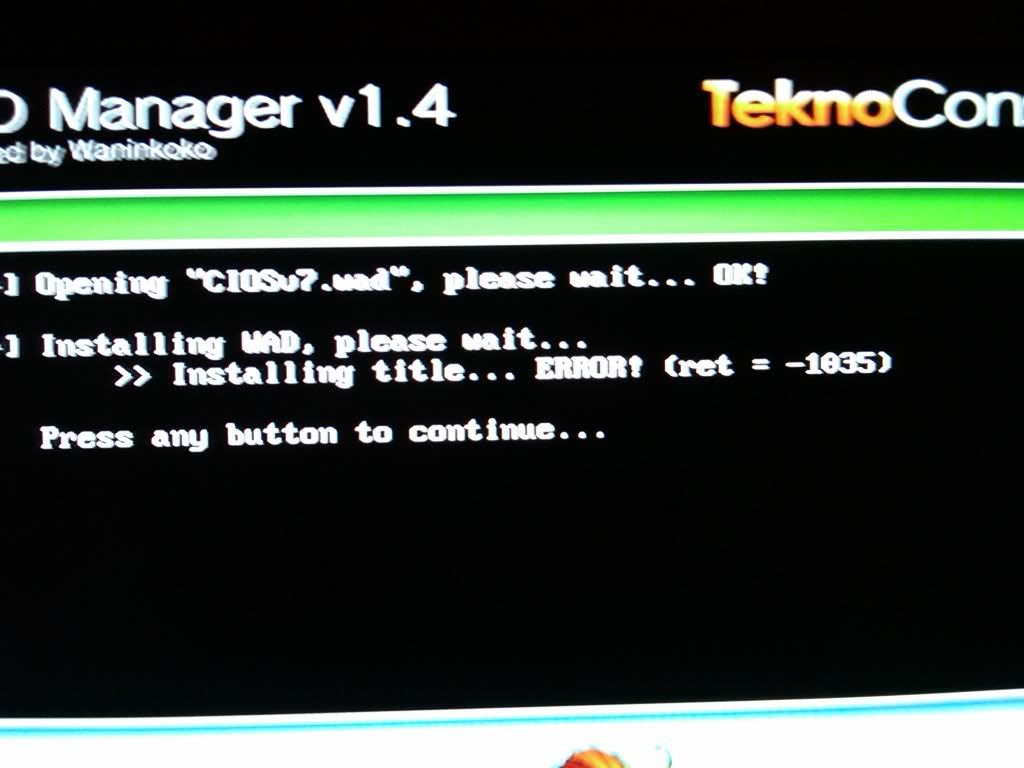
 
He says that the CIOS7 installation step fails, and has tried newer CIOS installers and they fail too. It's very likely that he has no real CIOS going at the moment.

BrandNew said:
Got my Wii during the launch period. I've been at firmware 4.0 since it released, and installed the Homebrew Channel when BannerBomb was fully usable released. I used the Hackmii Installer for the HBC, Bootmii, and DVDx, and then I've been following this entire website for installation guides. I get to the IOS249 page, and I get to around step 9 of the option "I have 4.0 and my serial number is less than LU64." The CIOS7 installation fails.

Hmmm, why not try this one (up to 4.0)?
http://www.yafaze.com/wii/tutorials.html

Some of the steps there are probably duplicative, but I was able to successfully walk someone through this tutorial and got their Wii all nice and hacked with no serious issues.
The only steps I would skip is that at the very end about using WAD Manager to install the HBC (since you already have it) and Backup Loader (since you don't need it).

It looks like the tutorial you're following now is based at least somewhat off this one.
Worth a shot, I'd say.
 
That process doesn't even work for me from the start. I try to downgrade IOS35 and it tells me it fails. What gives? It's worked for me before.

edit: Nevermind I'm dumb, I put the contents in the wrong area. Forget the above, I ran into the same problem I've been running into all day with cIOSv7. Here's the screen that comes up:

IMG00004-20090621-1742.jpg
 
Wow, sorry about all the trouble. I've had a feeling I've known your problem from the start, but you managed to post after I went to bed (lol timezones).

Firstly, is your Wii connected to the network in some manner? It needs to be to install IOS249 rev 13 via network mode, of course. If you don't have a way of connecting it to the network, you need to use NUS Downloader to get Tile "0000000100000026 v3610" which will allow you to use WAD installation rather than Network installation.

Secondly, if your Wii does have access to the Internet, try using IOS249 to install rev 13 if it shows up as an option, I'm not 100% sure that IOS35 is the right choice in this case.

Thirdly, if neither of the above help, did you buy your Wii or get it replaced by Nintendo in the last few months? In that case, try the >LU64 method. Some (very few) LU63 models actually do have the LU64 problem.
 
Sixfortyfive said:
You mean just a general thread for all VC game patches?

Yeah it'd be awesome.

Would distributing the actual patch.zlib files be okay? They don't do anything without an accompanying ROM of course, but they're still copyrighted code.

Well the best thing for that is for discussion of the contents and to maybe link to tools that'll decrypt such things for people's own VC game.
 
Alright, a few things.

I installed that AnyTitleDeleter or whatever, and yes, it says that I have IOS249 installed. *shrugs*

And yes Clipper, my issue when I get to Waninkoko's installer is that it fails in network installation mode. Don't know why, my Wii connects to the internet just fine.
 
BrandNew said:
Alright, a few things.

I installed that AnyTitleDeleter or whatever, and yes, it says that I have IOS249 installed. *shrugs*

And yes Clipper, my issue when I get to Waninkoko's installer is that it fails in network installation mode. Don't know why, my Wii connects to the internet just fine.

Do you, by chance, use a LAN adapter? Those don't have good compatibility with homebrew apps...

In any case, refresh the tutorial page ;)
 
Nope! Good ol' wifi. I'm gonna run through the ENTIRE GAF tutorial one more time to get to that point. We'll see what happens. If it fails again, I'll use that method you linked to.
 
Yay! I got it to work. My problems were, as follows:

-I already had ios249 installed. The cIOSv7 thingy? I guess I didn't need it, or maybe I had already done it before, that's why it failed on me so much.
-My internet earlier today had been acting up, perhaps that's why the installation was wonky as well.
-I used ios249 instead of ios35 in Waninkok's installer, because I checked and I already HAD ios249 installed.

Woohoo!
 
Top Bottom