
DeathbyVolcano
Banned
bump :'(
Yes that's the option I mentioned. Does your Wii's slot flash when starting the Wii? If not, then the stub of code BootMii added into boot2 is gone. I doubt the installer itself actually checks whether BootMii is installed, so the uninstall option probably comes up no matter what.BrandNew said:Wait, what's the uninstall option? Just through the Hackmii installer? I tried that and it didn't really uninstall it, because once I hit that option the uninstall feature was still popping up for it.
it's a boot2 btw
SNES9x-GXMelhisedek said:What is the best Snes emu for wii?
>0x120 string "PHANTASY STAR The end of the millennium"
>0x180 string "GM G-5524 -00"
>0x180 string "GM MK-1307 -00"
>0x180 string "GM MK -1307 "0x2fff00:
beshort 0x7600 # moveq.l #$00,d3
beshort 0x0c78,0x0100,0xec28 # cmpi.w #$0100,$ec28.wJSnake said:SNES9x-GX
There's no "updating" the loader, you just delete the old one (boot.dol) and download/copy the new one (boot.dol). From what you posted, you have the "update".grkazan12 said:Hey gaf so I'm having a problem updating the USB Loader GX channel to the latest revision well the channel's website says this "Download the rXXX.dol, rename it to boot.dol and put it at "SD:/apps/usbloader_gx/" and I am doing that but I have no idea what to do after that
p.s.-forgive me for asking a lot I'm a newbie to the Wii modding scene
Melhisedek said:How is compatibility on this one?
Clipper said:You are saying the video plays fine through USB Loader or just on the disc?
The update is probably just an IOS install, but I was under the impression the video doesn't work because of IOS reload issues (the same reason why Indiana Jones and the Staff of Kings works except for the Fate of Atlantis bonus game).
This is a well known problem for all USB Loaders. To play the video, the game essentially boots another game, breaking the hooks to the USB. You can play the videos using the alternate .dol method that has been patched into the popular USB loaders (including Configurable) this week.Dash Kappei said:Nope, it plays fine just on the disc.
When I try to play the Wii Motion Plus video through USB Loader the Wii still gets rebooted.
Bii said:Clipper, or anyone else. Is there a complete list of games that don't work with USB loaders? I've installed all of my games on my HDD but haven't tried all of them yet. I figured I'll delete the ones that aren't completely compatible to save HDD space.
Sixfortyfive said:I debated making a thread for this, but it seems this would be a more appropriate place to post it.
Sixfortyfive said:Awesomeness.
Sixfortyfive said:awesomeness
Dragona Akehi said:You need to unpack the other patches and make a new thread about it. It's absolutely fascinating!
BrandNew said:Alright GAF crew, more problems...
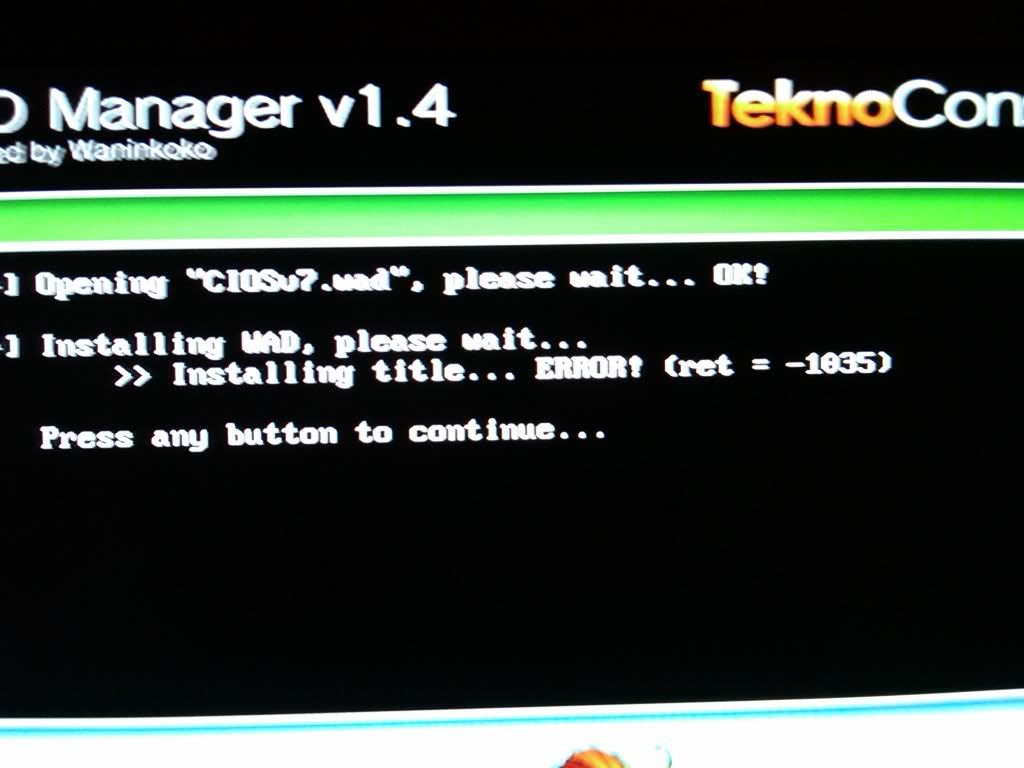
I want to start using a USB Loader. That's great. But whenever I get to the installation of CIOS7, it ALWAYS fails. I've tried IOS249 and the Hermes method, and neither work. What am I doing wrong? I'm on 4.0 with a serial number less than LU64.
Are you using the newly installed IOS35 with WAD Manager to install the CIOS?
If you update to 4.0 through Nintendo then you lost your trucha bug, it's necessary to firm unofficial software as official, 3.2 had not protection against trucha bug, you need downgrade some of your IOS, use IOS downgrader and to enable trucha again, or wait another method asking here. I recovered my lost trucha withthis loooong boring method
AGAIN, do IT only if you made an official upgrade through Nintendo Wii. If not wait for another reply, maybe someone knows a more short method.
BrandNew said:Yeah, I am on the official 4.0 firmware. I guess I'll try it out.
BrandNew said:I have no idea if I have IOS249 installed or not. I was just following the method that Clipper always links to, and I got to the point where CIOS7 installation would come up with an error.
That method you linked to didn't work for me either, but it's weird, because I've already DONE that method before. I downgraded IOS35 successfully once, did the Patchmii part next, but it won't let me do the third step; it always just reboots. I figured that everything worked fine though, and I just went to the next step by going into WAD Manager and installing ios35.wad, which works. But when I go to the next step for installing cios7, it gives me the error message.
I've tried moving on to the next step, which is downloading the cios38 rev 13 thing and putting it in a ios249 folder on my SD card. The Waniniko or whatever installer loads up fine, shitty music and all. And then I get to the part where it asks me to install an IOS. Should I say ios249 in this case, or IOS35 since I have a system on 4.0 with a serial number less than LU64?
I'm so confused :-/
BrandNew said:Er, I think so. Is that what Waninkoko's installer does?

StopMakingSense said:Answer the first question I edited in
If you were through the long method, why the hell you then upgrade through Nintendo! , that method is to enable trucha bug, but you made an official update you block your trucha again
Next time make a Waninkoko 4.0 update, after the long method.
I you can use wadmanager 1.4, then you have IOS249 -aka cIOS36 rev 9, 10, 12 or 13- installed.
As I know you just need cIOS36 rev 10 or higher to run USB loader GX. Now I'm confused...
Mejilan said:If you're using a recent Cfg USB Loader, you should be using CIOS38 rev 13a, not 13b.
You mean just a general thread for all VC game patches?Dragona Akehi said:You need to unpack the other patches and make a new thread about it. It's absolutely fascinating!
BrandNew said:That's what I'm using, though
this is all just so fucked
BrandNew said:Got my Wii during the launch period. I've been at firmware 4.0 since it released, and installed the Homebrew Channel when BannerBomb was fully usable released. I used the Hackmii Installer for the HBC, Bootmii, and DVDx, and then I've been following this entire website for installation guides. I get to the IOS249 page, and I get to around step 9 of the option "I have 4.0 and my serial number is less than LU64." The CIOS7 installation fails.
Sixfortyfive said:You mean just a general thread for all VC game patches?
Would distributing the actual patch.zlib files be okay? They don't do anything without an accompanying ROM of course, but they're still copyrighted code.
BrandNew said:Alright, a few things.
I installed that AnyTitleDeleter or whatever, and yes, it says that I have IOS249 installed. *shrugs*
And yes Clipper, my issue when I get to Waninkoko's installer is that it fails in network installation mode. Don't know why, my Wii connects to the internet just fine.

