• Hey Guest. Check out your NeoGAF Wrapped 2025 results here!

GAF Wii Homebrew thread: Homebrew, emulators, USB disc installs! Easy tutorial!

JoseJX said:
Does Boom Blox (the first one, I haven't bought the second yet) work for anyone else with the latest CIOSes and CFG loader? Thanks!

Boom Blox worked fine for me, but I haven't tested it in a while. I believe I had to set the video mode to system default rather than game default, though. I'll test again tonight.

Edit: Yep, it still works. On default settings too. Mine is a PAL game on a PAL console, but that system default thing has helped other games before that were from my region, so try it out.
 
It'd be pretty good if we could get stuff about playing Gamecube backups in the tutorial.

I had it sorted on my Wii, but I think too much tinkering has messed it up. My GC games are in really quite poor condition - poor care has left them scratched. For some reason my GC can play them, but my Wii won't read them. I'd like to back them up so I can retire my GC for good, and be able to play some F-Zero GX on my Wii.

Has anyone ever used resurfacing shops? I'd be interested in this as an alternative, if anyone has positive impressions?
 
Thanks for the help Clipper!

I tried the video options and it didn't seem to help at all, so I tried deleting the game and copying it from the disc again. I noticed that it took forever to complete, on the order of 30 minutes instead of the 5 or so it should take. Turns out that there were fingerprints on the disc. Cleaning them off made the transfer work perfectly and the game work in the USB loader.

Oops! Thanks again for the great tutorial!
 
Wario64 said:
Is there any reason why my SDHC card isn't recognized by apps? My kingston 4 GB microsdhc and 8 GB SDHC works fine with the SD channel and loading Wiiware/VC games from it, but if I try to load HBC or any homebrew app, it doesn't recognize that I even have a card anymore.

Have you recently upgraded HBC? Old versions used to allow certain kinds of elf file that the new one no longer does, so you'll need boot.dol files for everything.

If its not that, then try taking everything off your card(s) and formatting it/them with the Panasonic SD formatting application. It formats them properly, to spec. That can help a lot of compatability issues. I had issues with a regular 2GB card that were solved by that.
 
FTPii is an absolute god send. I can't believe i've only just realised it exists!

My SD card reader is gubbed, so I had no way of getting new apps on there, save the Homebrew Browser. There are of course things you can't get on HB, such as the customIOS installers, so this wasn't ideal.

One problem though, that seems to be common on the Google Code site. I can't mount my USB Drive in FTPii. Works fine in MPlayer and a brower program I'm using, just not FTPii.

Fortunately the browser (name escapes me, but it's popular on Homebrew Browser) will browse SMB, USB, and SD, so I can copy things over that way.
 
Alright...time to give this a go.

Gonna start the modding process now :D.

edit: damnit...nevermind. Mom's gone on a trip with the camera (which means the SDHC reader is gone with her). Laptop only supports regular SD. Cry. :(

edit2: memory card reader has been purchased. Onwards!
 
Ok, I'm gonna pick up a Wii today or tomorrow, and I need some advice.

I want to homebrew it, so I can load my discs off of a HDD as I've had several friends with laser problems. My question is should I get a new one, or buy a used Wii and hope for older firmware?

Also, it is possible to boot import GC + Wii games this way, yes?
 
inner-G said:
Ok, I'm gonna pick up a Wii today or tomorrow, and I need some advice.

I want to homebrew it, so I can load my discs off of a HDD as I've had several friends with laser problems. My question is should I get a new one, or buy a used Wii and hope for older firmware?

Also, it is possible to boot import GC + Wii games this way, yes?
It's not worth trying to get an older one. The only thing you can't do of any importance on a new Wii is to install BootMii as boot2. This means you are at a greater risk of bricking your Wii, but that won't happen as long as you don't install anything stupid. Just follow the tutorial and you'll be fine.

And yes, USB Loader will boot your import Wii games. There's also Gecko OS for the GameCube imports (which is another way to play import Wii games too).
 
Well everything installed fine last night.

Only thing that's a shame is that the HDD partition is a different file system, so it's unreadable by my PC. Also, my USB doesn't want to access over FTPii, which means my 60GB extra FAT32 partition I created isn't that useful.

It would have been nice if I could have networked the ISOs so I could access them both through the Wii and maybe a Wii emulator on the PC in the future. Oh well...still pretty darn sweet so far.
 
inner-G said:
Cool, thanks.

BootMii is pretty vital though, right? I might as well check and see if my GS has used ones first I suppose.
You can still install it as an IOS, so you have some protection. You just won't have full protection. This protection is only from yourself. Everything you stated you want to do is easy and has no chance of bricking your Wii if you follow the tutorial. As long as you don't try anything else (e.g., installing system menu hacks), then you'll never brick your Wii and thus won't ever need BootMii.
 
Hi GAF, I'm gonna need some help here:

- Basically I have a PAL launch Wii with System Menu 3.2E. Yesterday I decided to get around to following the GAF guide to install BootMii and cIOS38 as IOS249 (following the 3.2 instructions for cIOS).

- I already had the Homebrew Channel installed, but had to reinstalled it because it would hang on a black screen after updating to System Menu 4.1.

- I haven't tried USBLoader and that since the main reason of doing this was to get all the homebrew setup before updating the Wii to play Wii Sports Resort.

Problem:
- Now I decided to try the AnyRegion Changer to mess with that but at boot, it displays something like "...error: ES_something or other (-1017)" and other errors and I can't make any changes.

- I googled the error and found it had something to do with IOS249 and the advice was to remove it with AnyTitle Deleter and reinstall it. I tried AnyTitle Deleter, but it displays the same "(-1017)" error during boot and won't delete anything.

What should I do to get rid of this error? I've tried reinstalling IOS249 (using same method as before), and it seems to have no trouble installing, but the error persists.

The advice on the internet is to format the Wii and restart, surely there's another way to fix this problem that's not as drastic?

Should I try reinstalling IOS249 using the 3.3+ method? Surprisingly there's scarcely any useful information on this stuff on the Internet, though plenty about piracy and whatnot :/
 
So this is a problem I've made note of before, but I thought with further updates it would go away. Still hasn't. Even though I've done the official updates to 4.0 and 4.1, I still get frequent messages about how I should update to 4.1. Of course, if I try to humor it, it connects and then decides "Hey, you already have it!" Which it should already know, since that's what it says if you check the version in the menu.

Beyond putting the homebrew channel on to begin with, I haven't done a whole lot of extra tinkering. No USB loaders or Bootmii or custom starts or stuff like that. When there was some question of whether the latest update at the time (3.4 or 3.5?) would get rid of the HBC, I did go through a homebrew solution that updated the Shop Channel and Mii Channel on their own, which is where I'm guessing the problem stems from.
 
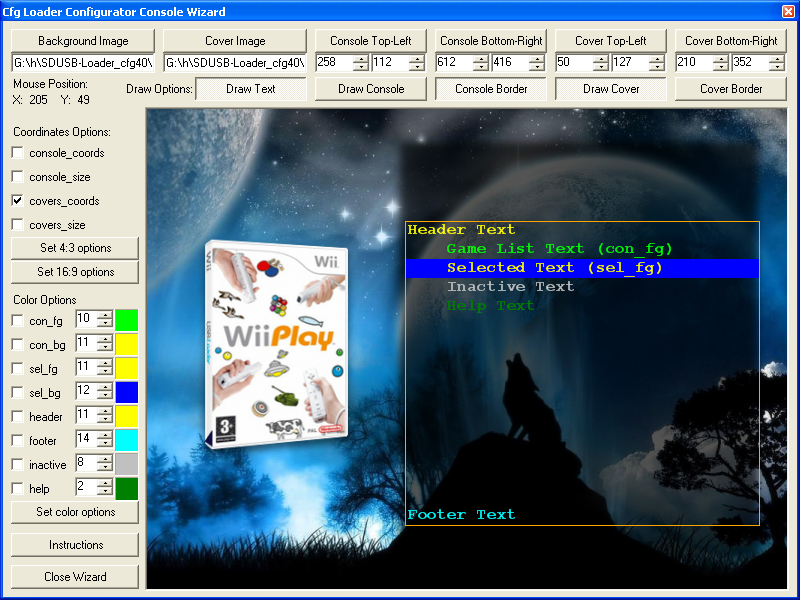
So, I've had some spare time lately and I thought I'd try something that would make Cfg Loader fans happy. Meet the Configurable USB Loader Configurator:

v40_1.0.PNG


I just finished it up and it's technically a beta right now. It will load existing files in tomorrow, and there's probably a few bugs lying around it.

Please try it out and let me know what you all think!


And now onto the questions:

hirokazu said:
Problem:
- Now I decided to try the AnyRegion Changer to mess with that but at boot, it displays something like "...error: ES_something or other (-1017)" and other errors and I can't make any changes.
Just don't bother. Using AnyRegion Changer without much of a reason is an almost sure way to brick your Wii. The only benefit I can see is changing your shop region, but Nintendo stopped that from working, apparently.
 
Duuude. You deserve my upmost respect. Awesome, awesome work.
 
Clipper said:
Just don't bother. Using AnyRegion Changer without much of a reason is an almost sure way to brick your Wii. The only benefit I can see is changing your shop region, but Nintendo stopped that from working, apparently.
Yeah, OK, but I still want to figure out why that and AnyTitle Deleter can't do some of the ES_* function calls.

I'm leaning towards both relying on IOS36 instead of a IOS249 and an update to that IOS having messed up their access.

But then it works for most other people...

I also have an IOS250 installed for some reason, I don't recall ever installing such a thing and it doesn't appear to be an official IOS number used by Nintendo...

EDIT: Nevermind about IOS250, apparently, it's a copy of IOS249 that's installed as fallback in case Nintendo puts a stop to IOS249... but they could easily put a stop to both at the same time...?

That Windows app you made looks freaking good, BTW. I'll be using it when I get around to putting my games onto a USB drive.
 
hirokazu said:
I'm leaning towards both relying on IOS36 instead of a IOS249 and an update to that IOS having messed up their access.
ES_Identify is IOS36. Back when I was on firmware 4.0 to get StartPatch to work I needed an older verison of IOS36. The 4.1 version of StartPatch (which i've yet to try) uses IOS249.

hirokazu said:
EDIT: Nevermind about IOS250, apparently, it's a copy of IOS249 that's installed as fallback in case Nintendo puts a stop to IOS249... but they could easily put a stop to both at the same time...?
How Nintendo stops them (this is based off what they did to DVDx) is they replaced the IOS used with something called a stub IOS (they also replace IOS used by old system menus/shops with these). IOS254 (DVDx) is the only IOS they've done this for so far and they took over 6 months to get there.

As for easily putting a stop to 'both', the only sure way would be replace every unused IOS with a stub IOS and I don't think Nintendo would do that.
 
Starwolf_UK said:
ES_Identify is IOS36. Back when I was on firmware 4.0 to get StartPatch to work I needed an older verison of IOS36. The 4.1 version of StartPatch (which i've yet to try) uses IOS249.
Yep, I patched IOS36 and that seemed to have made it work.

Starwolf_UK said:
How Nintendo stops them (this is based off what they did to DVDx) is they replaced the IOS used with something called a stub IOS (they also replace IOS used by old system menus/shops with these). IOS254 (DVDx) is the only IOS they've done this for so far and they took over 6 months to get there.

As for easily putting a stop to 'both', the only sure way would be replace every unused IOS with a stub IOS and I don't think Nintendo would do that.
I was thinking, if Nintendo were to break things, they'd put stubs in the numbers that currently are being used. So if they were to stop IOS249, they'd look at what the current cIOS is doing (using both 249 and 250) and installing stubs to those numbers. In that way, wouldn't it be better if the cIOS installer only installed one copy, so Nintendo would only block one number?
 
Clipper, you are putting in some amazing work and effort here. It's appreciated.

I just got Wii Sports Resort, courtesy of my my rather awesome GF!

I was on 4.0, and assumed it was safe to upgrade to 4.1, so installed the update. I realise this was probably a terrible idea - am I likely to experience any trouble?

I use USB Loader, FTPii, MPlayer CE, and Gamecube Backup Launcher.
 
updating to 4.1 is fine. it just fixes an issue w/ the annoying motion + tutorial

hey clipper, i downloaded the program and am making my own theme now :D so far so good.

it took me a while to get my pointer.png working (had to be 96x96) but now all is well.
 
Ok, got a new one, and it came with 3.4 on it.

Many thanks for the wiki!

I installed the new update, and for some reason BootMii doesn't work now. Should I be concerned? I don't use it for anything and everything else still works.
 
I've added options to read existing config files for the Configurator. I also changed the download link (and edited the post above).

Is anybody having any problems with it so far?

inner-G said:
Ok, got a new one, and it came with 3.4 on it.

Many thanks for the wiki!

I installed the new update, and for some reason BootMii doesn't work now. Should I be concerned? I don't use it for anything and everything else still works.
Congrats! The update may have installed over the IOS BootMii was using. Just reinstall it and you should be good. It might still save you some day.
 
So, I updated my cIOS to v14 yesterday and updated the Configurable Loader at the same time. They were both at the original versions from the GAF Wiki I followed a couple of months ago. I mainly wanted to get rid of the restart bug after loading a game over USB and it works great now.

Anyways, I decided to step out a little from the GAF Wiki and learned how to install a channel forwarder for Configurable Loader. It was pretty easy and everything works great, but now that I have it installed, are there any risks? Is there a reason why this isn't part of the GAF Wiki? I at least have BootMii running as boot2 so I did have a safety net.
 
inner-G said:
I installed the new update, and for some reason BootMii doesn't work now. Should I be concerned? I don't use it for anything and everything else still works.

Did you install Bootmii as boot2 or IOS, because if I am not mistaken IOS version of Bootmii is installed to IOS249?

Installing cIOS places it on 249 + 250, and thus overwriting IOS Bootmii.
 
I have a new version of the Configurator that fixes a few bugs and adds a console mock-up so you can see what the images and text look like:

Now it's easier than ever to make your own theme.

Also, it's been a while, so:


Mithos said:
Did you install Bootmii as boot2 or IOS, because if I am not mistaken IOS version of Bootmii is installed to IOS249?

Installing cIOS places it on 249 + 250, and thus overwriting IOS Bootmii.
BootMii should install to IOS254, so that can't be it.

Porthos said:
So, I updated my cIOS to v14 yesterday and updated the Configurable Loader at the same time. They were both at the original versions from the GAF Wiki I followed a couple of months ago. I mainly wanted to get rid of the restart bug after loading a game over USB and it works great now.

Anyways, I decided to step out a little from the GAF Wiki and learned how to install a channel forwarder for Configurable Loader. It was pretty easy and everything works great, but now that I have it installed, are there any risks? Is there a reason why this isn't part of the GAF Wiki? I at least have BootMii running as boot2 so I did have a safety net.
When installing a channel to your Wii, there is always a risk of bricking (albeit a very tiny one), so I minimise that risk by not describing it in the tutorial. Once it's installed, you are safe. Also, the tools you need in order to install the forwarder have other spurious uses that I don't want to introduce to the average user who doesn't know what they are doing.
 
Clipper.

I just want to say that you've been doing an excellent job helping people and with all these tutorials and guides. Thank you for your hard work; I really appreciate it.
 
Hey guys, need some help with something. My Wii has been having problems booting channels for a long time now (the other day I had to restart the system 10 times before the WiiFit Channel would load) so I decided to install the latest BootMii and make a backup of my NAND. After I did all of that though, I can't get the system to boot up at all, with or without an SD card inserted. Any ideas what would have caused this and can it be fixed?
 
Ysiadmihi said:
Hey guys, need some help with something. My Wii has been having problems booting channels for a long time now (the other day I had to restart the system 10 times before the WiiFit Channel would load) so I decided to install the latest BootMii and make a backup of my NAND. After I did all of that though, I can't get the system to boot up at all, with or without an SD card inserted. Any ideas what would have caused this and can it be fixed?
Sounds like you've somehow managed to kill your NAND. I don't think there's anything you can do besides sending it for repairs.
 
Clipper said:
Sounds like you've somehow managed to kill your NAND. I don't think there's anything you can do besides sending it for repairs.

That's what I was worried about but I assumed it would be the case. I've been having problems launching things saved on the Wii since I bought it. Is sending it to Nintendo the only option or are there other people out there who can repair it?
 
Ysiadmihi said:
That's what I was worried about but I assumed it would be the case. I've been having problems launching things saved on the Wii since I bought it. Is sending it to Nintendo the only option or are there other people out there who can repair it?
There are other people that repair Wiis, but I don't know if they can replace the NAND.
 
Ysiadmihi said:
That's what I was worried about but I assumed it would be the case. I've been having problems launching things saved on the Wii since I bought it. Is sending it to Nintendo the only option or are there other people out there who can repair it?
You're going to have to send it to Nintendo. I don't think there's anything you can do about a dead NAND.
 
Alright, one more question. If I get a moddable Wii back, can I just copy my NAND backup back over or should I even bother with that in case my backup is bad?
 
Ysiadmihi said:
Alright, one more question. If I get a moddable Wii back, can I just copy my NAND backup back over or should I even bother with that in case my backup is bad?
I believe backups are only good for their initial Wii and can't be copied between systems due to encryption.

However, there is a NAND emulation system coming out soon (currently due for September) which might give you access back to your old stuff. That still might not work in your case as you may need your initial Wii to decrypt the backup you made with BootMii. It's all a little unclear right now.
 
Nabs said:
hey clipper, the latest configurator is fantastic. now i'm wasting all my time making themes. :lol
Do you mean the one I linked before, or the real latest one (v41 beta2) which is even better. I was waiting for the full v41 of the Loader to come out before I announced it here, but it's taking too long, so I might as well announce it now.

This one adds:
  • a ton of bug fixes
  • proper 16:9 support
  • support for the new automatically stretched or cropped covers with overlays seen in v41 of the Loader
  • tooltips
  • and a lot more

For those that want to see the latest info on my Configurator, watch this thread, or check the file info and Configurator section of this page of the tutorial. I'll probably only announce the changes here when full versions come out as I don't want to spam GAF and get banned.
 
Well I finally got around to backing up my wii with bootmii installed as IOS. I updated my firmware, and everything seems to be working smoothly again! Thanks once again to clipper for the help. You da man. :D
 
Clipper said:
Current list:

Metal Slug Anthology
.

Ehmm, I'm actually playing MSA right now which it works on both CFG v40 and Ultimate :)
Dunno if there's been a new CFG release though... which would means I'd need a very good reason to update ;)
 
Dash Kappei said:
Ehmm, I'm actually playing MSA right now which it works on both CFG v40 and Ultimate :)
Dunno if there's been a new CFG release though... which would means I'd need a very good reason to update ;)
It could have just been reported incorrectly. That game has been there for ages, so it has nothing to do with new releases. I'll go and post in the thread maintaining the list.

Edit: Actually, have you tried every game in the anthology? Maybe only one or two of them don't work.
 
Clipper said:
It could have just been reported incorrectly. That game has been there for ages, so it has nothing to do with new releases. I'll go and post in the thread maintaining the list.

Could there be differences between PAL/NTSC/NTSCJ maybe? Dunno if that's ever been the case with one game though. Mine's PAL btw.

EDIT: I actually tried 'em all now just to be sure (never played much of MS4 and MS6, I really despise them!) and even MS5 while it could have been a great MS game has too much freakin' loading (even if super-fast, especially through USB loaders) that is unbearable to me... so it's crappy in the end.
And YES, Metal Slug 6 doesn't work. I guess that show just how much I hate it :lol
MS1, MS2, MSX, MS3, MS4 and MS5 all work, but it's not like I have beaten them all using CFG or whatever, so there could be indeed problems on later levels on a couple of games, dunno.
 
Dash Kappei said:
Could there be differences between PAL/NTSC/NTSCJ maybe? Dunno if that's ever been the case with one game though. Mine's PAL btw.
Could be, but almost certainly not. Looks like you missed my edit. Have you tried starting every single game in the anthology?
 
Right, I now have a external WD portable hard drive free to use USBloader, I take it you can still install this with ver 4.1 right? Hopefully this time I'll have more luck getting it to work..
 
Gagaman said:
Right, I now have a external WD portable hard drive free to use USBloader, I take it you can still install this with ver 4.1 right? Hopefully this time I'll have more luck getting it to work..

I mean, I don't even dare to say you should've just browsed the last few pages before starting to ask questions, but at least look at the fucking first post in this very same page because there's a friggin' huge ass gif which it'll direct you straight to the most comprehensive Wii homebrew tutorial ever.

yes
 
OK I've been attempting to follow the Homebrew Wiki (very nice job guys) to install USBLoader.

So I'm at this step:

GAF Homebrew Wiki said:
# Read the message, then push 1 or Start when prompted to continue.
# Choose "Downgrade IOS15".
# If you are connected to the Internet, choose "Download IOS from NUS". If not, choose "Load IOS from sd card" and push A to continue.

When I run the app I don't get an option to "Download IOS from NUS" it just says "getting ios15 revision 266..." with the "Load IOS from sd card" highlighted.

Is this normal? There's no progress bar or information telling me what it is doing. I accidently hit A and it tried to load from the SD card and said downgrade failed, and booted me back to HBC. Do I just wait for it to finish on its own?
 
I'm trying it again and it's been sitting for ten minutes and nothing has happened...

OK this calls for a DERPDERPERP moment, I didn't realise you had to press left and right to select a mode.

Here's one for me:

derpderpderp.png
 
Top Bottom