• Hey Guest. Check out your NeoGAF Wrapped 2025 results here!

[Help]: What controller to use for MacMAME on Powerbook

Dagon

Member
I've installed MacMAME on my Powerbook and it's working properly. I can play games fine with the keyboard, but that seriously blows. I'm looking to get a controller or an adaptor for one of my console controllers, but I need a nudge in the right direction.

So, what are you using to play MAME games on your Apple machine? And how did you get it working?

I was thinking of getting Sega's USB Saturn pad. Has anyone used this for MAME? Does it work properly?

(I did do a quick search and didn't notice anything immediately).
 
I could use this advice, too.

Also, anyone know of a good USB old-style stick (Wico-type-- short throw, no click, nice rigidity, DIGITAL, and if possible, with a 4-way mode)?
 
Dagon said:
I'm looking to get a controller or an adaptor for one of my console controllers, but I need a nudge in the right direction.

I bought a cheapo USB gamepad for my PC, and the Mac immediately recognized it when I tried it on that, despite no indication of Mac compatibility on the box. If your app is configurable enough (which I assume MacMAME is), you shouldn't have any problem with most modern USB pads.

Ignatz Mouse said:
Also, anyone know of a good USB old-style stick (Wico-type-- short throw, no click, nice rigidity, DIGITAL, and if possible, with a 4-way mode)?

USB. Wico-type. Digital. Hrm... have you thought of building your own?
 
Building it would be the way to go.

You could try one of those direct-to-TV joystick games. Never opened one before, so I dunno what is there. But as long as the means for accepting input is seperate from the main PCB, you could wire the buttons and stick up to whatever. Stick's gonna be cheap quality though. Also, this particular version has a twisting stick, which most likely complicates it out of consideration. I bet there's a not-twisting version that could be used.
p884h.jpg


The closest thing I know of to Ignatz's specs is the Suzo Sys 500, which does do 8-4 way switching, but only from underneath. Seems like a pain to work with for your purposes though.
eurostik.jpg


Instead try this one sold by Ultimarc , since it switches 4-8 way from the top.
t-stik_ball.jpg


Or this one, since it's a slimmer profile. 4-8 way switching is done from the bottom, though.
j-ball.jpg


Any good stick is gonna be bulkier and is going to need a case that strays from portable. Also, any good stick (that's not optical) uses microswitches and microswitches click; it's best to not let that bother you.

A Sanwa JLF is likely gonna be about the smallest joystick you can find, but it's not going to do 4-8 way switching, and it is clicky, but it is a great stick. I bet Sanwa or Seimetsu make something equally small that does switch, but I can't read their Japanese websites.

And when it comes to the USB interfacing, something like the I-Pac will fit the bill. Check out Ultimarc's website for info.
 
ArcadeStickMonk said:
And when it comes to the USB interfacing, something like the I-Pac will fit the bill. Check out Ultimarc's website for info.

Mind you, I'm still just in the planning stages of building my own, but wouldn't a controller hack be significantly cheaper? My cheapo USB pad was $10 with 14 buttons and 3 d-pads/thumbsticks. And while I'm asking stuff, anyone know of a good resource for the basics of wiring a build-you-own? I've searched the BYOAC site and a bunch of similar sites extensively, and while there's a ton of info out there, the basic wiring of the thing gets the short shrift. I've got the general idea, but I'm worried that I might not have it exactly right.
 
How you interface is dependant on what sort of controller you want and what you want to use it with.

I concern myself with arcade sticks only, so if you are looking tomake some sort of pads, then much of my advice doesn't apply.

In regards to the I-Pac, I would choose that or a similar USB interfacing device becase it will let me set what is what. Like Hotrods and X-Arcades, I want my input being fed as keyboard emulation, and that's wat the I-Pac does.

If I were to use one, and I will, eventually, I would set the I-Pac to input the same keys as the Hotrod, meaning that in most any Emu I only have to set the Hotrod config as default and the software will configure my controller for me. It's nice for Mame or Kawaks to know on a per game basis wether to use a Capcom six or SNK four layout for instance.

If you wire a USB pad the same way I wire a Playstation pad, then all you have is generic game device input, which must be configured manually, and uniquely for every Emu and usually every game.

Another point is that I have seen some Emus have trouble reading quick input from joysticks. The biggest offender in my experience is Kawaks, which has big problems reading correctly from a PSX-to-USB converter; my quarter circle input is reduced to chance. I've tried different brands of converters with the same results while my X-Arcade never misses. Or course, I use Kawaks more than any other Emu so it's a bigger deal for me.

As far as a wiring guide, every PCB is different so you have to learn how to read a PCB, This comes down to finding the point where the input physically happens (where the curcuit is closed) and figuring out how to hijack the circuit. Lesson one is how to tell the signal from the ground. Most PCBs are dark green with the trace in lighter green. A PSX pad, for instance has two black contacts on board per button, which are bridged when the button is depressed. The contact that leads to a large mass of lighter green is the ground. You can follow that trace to every input point on the board while the unique signal trace leads back to the encoder chip and terminates. Signals cannot touch each other, or you get a short.

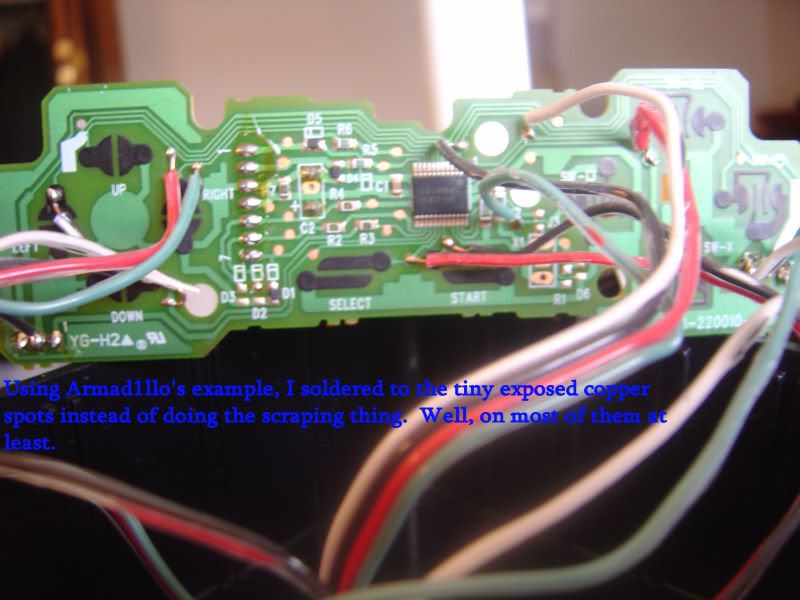
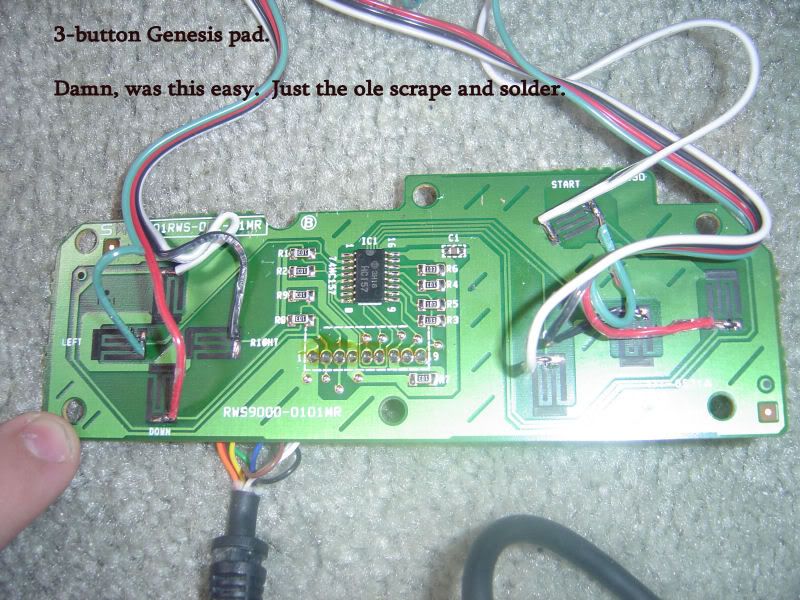
The easiest pads to "hack" are those in which the black contact can be scraped off to reveal copper, to which solder will adhere. You merely scrape off every signal contact and solder a wire from there to your microswitch, and one ground that you can share over your whole controller. Sometimes you can find small bits of copper stuck in the signals traces. You can solder to these points as well.

Also, if you were King Flux, you could just solder to the individual pins on the encoder chip, but it would be very, very tight. I used this method over the weekend for the start button on a Saturn pad and I was amazed that I pulled it off without touching the other pins.

The I-Pac won't require any of these hijack methods, BTW. It's made for wires to be hooked up to it.

Before I started doing any of this, I read J&D's Arcade Controls over and over again and used them as a reference until I had done everything they cover myself. They aren't very detailed but given what I've already explained, they demonstrate some practical examples.

Here's some pads I've done recently. Note how I used the copper spots in the traces in the first example and scraped away the black contact in the second. When you can find my grounds in those pics, you can read PCBs.

ASM-ProjectBoxes-PSX-02.jpg

ASM-ProjectBoxes-Genny-02.jpg
 
I've tried hacking sticks i the past (the NES Advantage, a decent enough stick for my purposes) to a PSX. I'm not good at it.

I can live without the 4/8 way think if I can have a good, digital, short-throw joystick I can use on old-style arcade games-- the sort that really like you to be able to push around extremely quickly, like Pac-Man or Robotron.
 
Dagon said:
I was thinking of getting Sega's USB Saturn pad. Has anyone used this for MAME? Does it work properly?.

The Sega USB Saturn pads work great with MacMAME. I had no problems and no lag with both controllers plugged into my PowerBook's two USB ports. However once you've configured them in MacMAME make sure you always start MacMAME up with the controllers plugged in already: otherwise MacMAME loses the joystick settings.
 
Ignatz Mouse said:
I've tried hacking sticks i the past (the NES Advantage, a decent enough stick for my purposes) to a PSX. I'm not good at it.
I have no idea what that PCB would look like, but if it's anything like I'm guessing, you probably would have had to hijack the signal at the encoder chip and then lead it to the PSX PCB. That's what I'd do if I wanted to make one pad work on another system. But that PCB would have been before my time at this so it could be a whole other ballpark.

I can live without the 4/8 way think if I can have a good, digital, short-throw joystick
Explain that qualifier to me. Are you just adverse to clicky microswitches? Or are you just being extra careful in your terminology to not mean an analog stick such as a flight stick of some sort? Cuz all arcade sticks are digital, in my understanding (on\off).
 
ArcadeStickMonk said:
Explain that qualifier to me. Are you just adverse to clicky microswitches? Or are you just being extra careful in your terminology to not mean an analog stick such as a flight stick of some sort? Cuz all arcade sticks are digital, in my understanding (on\off).

Just making sure nobody thinks I want an analog stick.

I'm not oppoes to clicky microswitches, per se, but it seems all those sticks are also very loose. I have Hori and Namco fighting sticks for my old PSX and they suck for classic games. It's far to easy to roll to a diagonal accidentally, the throw is fairly long for a short stick, and while it's not that important, the constant clicking is irritating.

What I really want is the kind of stick you'll find on an actual arcade shooter machine, or its functional equivilent. Those TV Games joysticks you point out would be OK in feel, at least (I'd like a better base and more buttons, but not a big deal). Ideally, there would be two of them I could stick next to each other, attached to some surface, for Robotron. Size is not as issue, I don't need it to be super portable.

Does anybody sell such a thing?
 
Dumb question time:

It appears that most project take the one ground and run it to the ground lead on all the controls in a circuit fashion (ie N, E, W, S, Button 1, Button 2, Button 3, etc...). Is that the only way to do it, or just the easist/least amount of wiring?
 
Test me:

The Genesis looked pretty simple...


but the PSX is really just a guess, the black wire on the lower left looks like it could be a good candidate too. Of course I'm probably missing the obvious...
 
Ignatz Mouse said:
Does anybody sell such a thing?
The SlikStik

And looseness is relative. What isn't relative is the amount of play in the stick before it hits the microswitch. The Hori sticks have a bit of play to them, the Sanwa's that the Hori's are kinda cloning do not. I recently made a Hori\Sanwa hybrid and I f'ing love it.

Squirrel Killer said:
Is that the only way to do it, or just the easist/least amount of wiring?
Well even if you had a separate wire for each button's ground, they all lead to the same place on the PCB. So the general procedure is to run one ground wire off the PCB and daisy-chain it from hell to breakfast.

Squirrel Killer said:
You got the Genesis right, but the PSX wasn't fair. That's not even a good picture. It is indeed the black wire in the lower left. That's another way to hijack a signal: find where one signal wire is soldered to the PCB and solder on to the existing joint. The joint in question in that pic lead the ground to a sub-PCB that the one side of the shoulder buttons are printed on.
 
ArcadeStickMonk said:
The SlikStik

And looseness is relative. What isn't relative is the amount of play in the stick before it hits the microswitch. The Hori sticks have a bit of play to them, the Sanwa's that the Hori's are kinda cloning do not. I recently made a Hori\Sanwa hybrid and I f'ing love it.

The Slikstick soounds perfect. Expensive, but perfect.
 
Top Bottom