• Hey Guest. Check out your NeoGAF Wrapped 2025 results here!

"I need a new PC!" 2010 Edition

TouchMyBox said:
How many battery cells do you have? I get like 2.5ish hours on my 6 cell battery with my 720QM. I've been looking a bit into these high density batteries for my laptop i've seen around online but I'm not sure how legit they are.

I just got the 9-cell one that ships from Dell, the length is about half when gaming, I find 4-5 hours for general use, but around 2 when gaming. Never timed it though, so I could be off a little, I definitely get way more than 2.5 hours though.

Same for my Sony camcorder from a half dozen years ago. The battery that comes with that thing is a tiny compact battery, gives it about 4 hours of recording, but you can buy the 3rd party battery that's like 3x the size, and that powers it for like 12 hours, seeing the minutes go from like 300 to the 1000s is pretty funny, it's just damn big.

The 9-cell battery does stick out the bottom a little of the Dell putting it at a 15 degree incline, it doesn't bother me personally, and in a way that's even good, it lets air pass under the laptop helping the cooling a little I'd guess.
 
autobzooty said:
Seriously considering it. Not sure what they could have done to make it get so ridiculously hot.

Still, i only get up to 60 degrees playing TF2. The likelihood of my computer ever being worked as hard as prime95 was working it is pretty slim. But at the same time, I'm trying to overclock here. :|


They probably forgot to remove the little plastic cover on the base of the heatsink (that makes contact with the CPU).


Is this a stock HSF?
 
Thinking of buying a MSI Radeon HD 5770 1GB card for my system (coming up from a GeForce G210.
Unless anyone has a similar priced recommendation otherwise?
 
Hello to Neogaf's superior gaming race!

I am looking into getting a Desktop PC in the near future. I came across this Gateway FX6831-01

http://www.compusa.com/applications/searchtools/item-details.asp?EdpNo=5625772&csid=ITD&body=MAIN

1.5TB hard drive
8GB of DDR3 memory
Multi-in-1 media card reader
ATI Radeon HD5850 graphics
Intel Core i7-860 2.8GHz processor
16X DVD+/-RW SuperMulti optical drive
Windows 7 Home Premium operating system

In my search I don't see anything else that good for the price ($1,259 from CompUSA.)

Apparently one restriction is that there is no opportunity for crossfiring graphics cards in the future which is quite unfortunate but I figure by the time I want a new one I can buy another single card. The PSU isn't the problem (750 W) though.

Any problems with Gateway customer service or build quality that I should be aware of? The design of the case looks pretty sweet imo. I dont have any experience with Gateway but the brand history that I'm aware of doesn't exactly scream high quality. Hope to get your thoughts.

Edit: Also, apparently it doesn't come with a copy of the Windows 7 disc? Wat? I'm not the most tech savvy, but I assume if I want to reformat my computer I'm going to need the disk right? I guess there are workarounds? Keep in mind my last computer is a 5 year old Dell laptop. The dell did have the option to revert to the default loadout which I assume would be similar to reformatting...so I guess that's my option? No interest in partitioning or running any other OSes or anything.
 
Hey guys, I did a search on the threads but found nothing, is the Motioninjoy software the only way to use my DS3 to play PC games?
edit nvm got it working
 
@ TheLegendary

The Desktop PC you say there looks pretty solid all in all, and my friend used Gateway once, was quite satisfied.

There's something I am not sure of, something related to triple channel RAM vs dual channel, I thought i7 860 uses ddr2 not ddr3 or if it uses ddr3 then the highest frequency memory is at 1333 MHz, in comparison an i7 920/930 (same price) uses ddr3 up to 2000 MHz or more (depends on the ram sticks), but then again, you'll have to consider their motherboard prices too, which might cost more for the 1366 socket (i7 920/930...) than the 1156 (i7 860...). Although, I think the prices are getting closer for the motherboards...

I won't push this further, I will just give my last opinion, go for an i7 920/930 option.
 
Hey,

My friend is building a PC, but not from scratch. He has a 550 watt power supply and is wondering whether it could handle the cpu and graphics card (along the other components)

The numbers add up to be below 550:
135 watts for the cpu,
190 for the graphics card,
plus whatever needed for several sata drives (say 5-6 for an upper bound), system fans and whatever external devices that may be plugged (mouse, external hard disc, camera,...)... these wouldnt be more than 90-100 watts.

totals 425

all this remains below 80% of 550 watts.

Does it make sense? Are we forgetting something? What should he do? What about overclocking?

Thanks in advance.
 
Orellio said:
Sounds like overscan.. do you have an option on your TV to change the zoom level or anything? Failing that, go into CCC, under 'Desktop and Displays' right-click the monitor icon and select 'Configure.' On the following screen, make sure 'Use centered timings" is selected. I had it set to 'Scale to full panel size' and for whatever reason my screen was rendered like 10 pixels off-center until I changed that. Hopefully it will help you as well.


If THAT doesn't work you might have to lower your resolution and use the scaling options to fill the screen. I would consider that a last resort though.

My TV actually has a "PC Monitor" setting, and once I switched to that it mostly resolved the issue.
 
I've been having some issues with artifacting on my 5850 and am considering RMAing it through sapphire. Has anybody here actually RMA'd something with sapphire in Canada before? I sent them an email and apparently I will have to pay to ship it to them, then pay an additional ~$40 to have them ship it to Hong Kong :lol , so I'm wondering if anyone here has had experience with the process before I actually send this out because so far this sounds like a really bad idea.
 
Do micro-atx motherboards fit well in mid-tower atx cases. My motherboard isn't stable and when I RMA'ed it to Gigabyte they just replaced the CPU socket and sent back the same damn motherboard. I want a quick and cheap replacement but all the cheap ones are mATX.
 
In my experience microATX boards fit just fine in standard sized cases, my last motherboard was a microATX and it fit very well in my current Antec 300, in fact it was a lot nicer than my current full sized motherboard in that there was plenty of space for cable management. The screw holes are identical sans the bottom row on a standard sized mobo due to the smaller height, so there should be no problems.
 
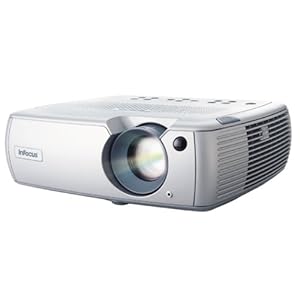
I have this projector, the INFOCUS SP 5000
41CPAPYFEAL._SL500_AA300_.jpg


and it has a native resolution of 1280x720, i want to connect it to my computer which has a GTX 260 in SLI, the problem is that it's not displaying at anything past it's native resolution with a dvi to m1-D cable. any help?

edit: i want itt to display to 1920x1080 (1080i i'm assuming here) is it possible?
 
Alright I need suggestions for a new monitor. I bought a Samsung 2053bw a little over 2 years ago, and it's slowly dying on me (backlight is going out). Not really sure I want to go with Samsung again.

Something in the 21.5" - 24" range, about $250<
 
Korranator said:
Alright I need suggestions for a new monitor. I bought a Samsung 2053bw a little over 2 years ago, and it's slowly dying on me (backlight is going out). Not really sure I want to go with Samsung again.

Something in the 21.5" - 24" range, about $250<
I'll ask once more for the new page now that someone else has a similar question: I'm also looking for a new monitor, and I'd really like to get a 25" since I'll be using it both as a regular monitor and also for movies and console games from my bed a few feet away, so 23" feel just a bit too small. Unfortunately, all of the new nice LED monitors coming out all some to be only 23". Does anyone know if Samsung, LG, or BenQ will come out with larger versions of their monitors anytime soon, or is there some reason they top out at 23"?
 
Would anyone mind doing me a favor of spec'ing out a HTPC for me that would be used for DVD rips of movies and television shows. No tuner card, gaming, general use or even blu ray playing (I'll use PS3 for that)? So I could assume I could go with low spec and the main costs would be in a slim case that looks good and 2TB+ hard drive space.
 
So tempted to order a 5850 to replace my 4870. Can afford it but not sure if it's really worth upgrading to (play at 1920x1200).
 
evil solrac v3.0 said:
I have this projector, the INFOCUS SP 5000
41CPAPYFEAL._SL500_AA300_.jpg


and it has a native resolution of 1280x720, i want to connect it to my computer which has a GTX 260 in SLI, the problem is that it's not displaying at anything past it's native resolution with a dvi to m1-D cable. any help?

edit: i want itt to display to 1920x1080 (1080i i'm assuming here) is it possible?

Nope, not gonna happen. The native resolution of a beamer is also the maximum it's capable of.
 
Ikuu said:
So tempted to order a 5850 to replace my 4870. Can afford it but not sure if it's really worth upgrading to (play at 1920x1200).

I think upgrading every generation is a huge waste of money, but that's just me.
 
Just realised I forgot to tell you guys my little story about how I almost royally fucked up changing my CPU cooler the other week. Here it goes:

I'll warn you now; the stock cooler is a bitch to take off if you used the stock thermal paste that comes pre-applied to the heatsink. That stuff is like superglue. I couldn't get it off the CPU no matter what I tried for like half an hour (hair dryer to heat the thing up normall works because it should soften the thermal paste enough but no...) and then gave it a final yank and it popped off but with the CPU itself still attached to the heatsink. At this point I didn't realise but that caused a whole 2 lines of pins on the underside of the CPU to bend out of place because the CPU was locked in by the CPU block on the motherboard.

I got the CPU itself off the heatsink with relative ease and then proceeded to try and put it back in the motherboard but obviously it wouldn't go back in. Flip the CPU over to see what the problem was and immediately saw all the pins bent out of shape all over the place. At this point I thought I was TOTALLY fucked. Decided what the hell, set the CPU down on the table, got a magnifying glass out and started try and bend the pins one by one back into their original position using a a very thin travel metal nail file I had lying around. My hands were shaking and sweating like a mofo and I had no hope in it working, it was just a last ditch attempt to stop me having no computer for a week and having to fork out for a new CPU. About an hour later having bent them all back I tryed to put it back in the motherboard and it slot right in, locked it in place and began to pray. Put the new cooler on and low and behold it booted. I was jumping with joy .

Bottom line, be careful when taking to stock cooler off, it can be difficult. Try to do it after running a stress test on your CP for about half an hour or so to make sure the thermal paste is as soft as possible because that cheap stuff they use sticks like a mofo. Oh and DON'T GET FRUSTRATED AND FORCE IT. I learnt the hard way.

http://www.neogaf.com/forum/showpost.php?p=21456509&postcount=7

CPU's are more resiliant than people like to make out, I should know :lol .
 
Ordered one in the end, should be able to sell my 4870 for around £60 and hopefully sell the CoD:MW2 voucher that came with it as well.
 
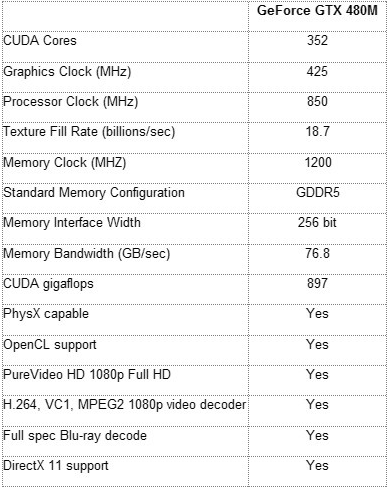
Holy shit, the GTX 480M!

Nvidia GeForce GTX 480M:

Graphics Clock – 425 MHz
Processor Clock – 850 MHz
Memory Clock – 1200 MHz

Memory Configuration – GDDR5
Memory Interface Width – 256 Bit
Memory Bandwidth – 76,8 GB/sec.

CUDA Cores – 352
Gigaflops – 897
 
GHG said:
CPU's are more resiliant than people like to make out, I should know :lol .

:lol Nice story. You're totally right, computer hardware in general is a lot tougher than people realise, I managed to hit an old motherboard with a screwdriver and it still worked fine.
 
K.Jack said:
Holy shit, the GTX 480M!

Nvidia GeForce GTX 480M:

Graphics Clock – 425 MHz
Processor Clock – 850 MHz
Memory Clock – 1200 MHz

Memory Configuration – GDDR5
Memory Interface Width – 256 Bit
Memory Bandwidth – 76,8 GB/sec.

CUDA Cores – 352
Gigaflops – 897

In english! :) How much faster than the 260M?
 
Colkate said:
:lol Nice story. You're totally right, computer hardware in general is a lot tougher than people realise, I managed to hit an old motherboard with a screwdriver and it still worked fine.

Yeh no kidding. I've dropped a HDD onto wooden floor (an internal one, so it wasn't operating when dropped) from about 6 ft before and it still woks *touches wood*.

The fragility of computer parts is massively overstated.

You have to be very unluck to fry something with static or manage to break something during installation so long as you take care.
 
Minsc said:
In english! :) How much faster than the 260M?
GTX480M.png


vs

260M.png


At least 50% faster than the 260M, even more once i overclock it.


But I'm honestly not sure what to expect. The clocks are way low, but then you have 352 cores + 256 bit + GDDR5.


I'm shocked that they took it from the GTX 465. I was predicting a GTS 430 based card.
 
Okay guys, here's what I think I'm going with. A tiny bit of background:

This computer is for my younger brother. He already has a 1TB hard drive waiting to be installed, I gave him my ATI 4850, he has a monitor, and since it worked for me, gonna get him a Windows 7 key off ebay. Here's the system we got together (his price range was $600 max):

Antec Three Hundred Illusion Black Steel ATX Mid Tower Computer Case
Model #:Three Hundred Illusi
Item #:N82E16811129066
Return Policy:Limited Replacement Only Return Policy
In Stock
$69.99 -$10.00 Instant $59.99

GIGABYTE GA-MA790GPT-UD3H AM3 AMD 790GX HDMI ATX AMD Motherboard
Model #:GA-MA790GPT-UD3H
Item #:N82E16813128398
Return Policy:Standard Return Policy
In Stock
Mail in Rebate Card
$124.99 -$5.00 Instant $119.99

Antec EarthWatts EA650 650W Continuous Power ATX12V Ver.2.2 /
Model #:EA650
Item #:N82E16817371015
Return Policy:Standard Return Policy
In Stock
$99.99 -$20.00 Instant $79.99

AMD Athlon II X3 440 Rana 3.0GHz Socket AM3 95W Triple-Core Desktop Processor Model ADX440WFGIBOX
Model #:ADX440WFGIBOX
Item #:N82E16819103843
Return Policy:CPU Replacement Only Return Policy
In Stock
$74.99 $74.99

G.SKILL Ripjaws Series 4GB (2 x 2GB) 240-Pin DDR3 SDRAM DDR3 1600 (PC3 12800) Desktop Memory Model F3-12800CL9D-4GBRL
Model #:F3-12800CL9D-4GBRL
Item #:N82E16820231277
Return Policy:Memory Standard Return Policy
In Stock
$109.99 $109.99

Logitech Internet 350 Black USB Standard Desktop - OEM
Model #:967972-0403
Item #:N82E16823126018
Return Policy:Standard Return Policy
In Stock
$25.99 $25.99

LG DVD Burner Black SATA Model GH22NS50 - OEM
Model #:GH22NS50
Item #:N82E16827136167
Return Policy:Standard Return Policy
In Stock
$19.99 $19.99

ARCTIC COOLING Freezer 64 Pro 92mm CPU Cooler
Model #:Freezer 64 Pro
Item #:N82E16835185125
Return Policy:Standard Return Policy
In Stock
$27.99 $27.99

Subtotal: $518.92

Add $30 for the windows key and who knows how much for me to safely ship it to him, and it's around $600. Thoughts? Anything I can switch out or replace with a better part?
 
My dad needs a new PC for the office. Just has to be able to browse the internet, HD video playback, a bit of Photoshop and that's it. Not for gaming at all.

What's the best option? I don't know how good are the new AMD's, please enlighten me.

Also, he wants a laptop too. I guess Intel is the best choice this time, but, again, i don't know shit about laptop cpu's.

Thanks.
 
I wanna get a new work laptop sometime this year. It's not gonna mainly be used for gaming, but I at least wanna run Left 4 Dead 2, other Source games, and StarCraft II on it.

What's the range of mobility graphics cards I'll need for that? If and when Left 4 Dead 2 hits mac what do you guys estimate I'd need to run it on a macbook (if I go that route)? Steam says the game's recommended graphics card is an NVidia 7600, ATI X1600, or better. What are the laptop equivalents to those cards?

Also, I don't fully understand Core i CPUs yet. How do you tell how many cores each model has and the other differences between them?

Lastly, what's the difference between 32bit and 64bit Windows 7? Is 64bit recommended for a laptop?
 
GHG said:
On that note, GTX 465 reviews are starting to roll in:

http://www.xbitlabs.com/articles/video/display/geforce-gtx-465.html

Bottom line: it sucks.

Nvidia really dropped the bomb this gen.
How do those benches suck though? Just from a price/performance standpoint? It does match and exceed the 5850 in a few games. I'd like to see how it performs with the new 256 Forceware.

Wow, if the 480M can be clocked back up to a stock 465, this is an incredible leap for mobile gaming.
RedSwirl said:
I wanna get a new work laptop sometime this year. It's not gonna mainly be used for gaming, but I at least wanna run Left 4 Dead 2, other Source games, and StarCraft II on it.

What's the range of mobility graphics cards I'll need for that? If and when Left 4 Dead 2 hits mac what do you guys estimate I'd need to run it on a macbook (if I go that route)? Steam says the game's recommended graphics card is an NVidia 7600, ATI X1600, or better. What are the laptop equivalents to those cards?

Also, I don't fully understand Core i CPUs yet. How do you tell how many cores each model has and the other differences between them?

Lastly, what's the difference between 32bit and 64bit Windows 7? Is 64bit recommended for a laptop?
What's your....

- budget?

- size screen you desire?

- battery life needs?

Always go 64-bit Win 7.

For mobile Core i's, if there's a Q in the name, it's a quad.
 
K.Jack said:
How do those benches suck though? Just from a price/performance standpoint? It does match and exceed the 5850 in a few games. I'd like to see how it performs with the new 256 Forceware.

Price/Pref means everything as a consumer. Consider this:

As for the price factor, the GeForce GTX 465 has a recommended price of $279. This makes it more appealing than the Radeon HD 5850 which costs $299 but the difference is too small to counterweigh any difference in performance we may see in our gaming tests.

It costs almost as much as a 5850 and it performs closer to a 5770. If thats not a failure I don't know what is.
 
Ahh I cant make up my mind. I definitely need a laptop for work but at the same time I'd like to be able to play games.

Its down to this:

DELL XPS 16
CPU: i5-520M 2.40GHz
RAM: 4GB Shared Dual Channel DDR3
GPU: ATI Mobility RADEON HD 4670 – 1GB
$1089

or

HP ENVY
CPU: i5-430M 2.26GHz
RAM: 4GB DDR3
GPU: 1GB ATI Mobility Radeon HD 5830
$1,300

I love the way the HP looks but the lack of a backlit keyboard is ridiculous. So Im not sure if the 5830 is worth about $200 more.
 
The Chef said:
Ahh I cant make up my mind. I definitely need a laptop for work but at the same time I'd like to be able to play games.

Its down to this:

DELL XPS 16
CPU: i5-520M 2.40GHz
RAM: 4GB Shared Dual Channel DDR3
GPU: ATI Mobility RADEON HD 4670 – 1GB
$1089

or

HP ENVY
CPU: i5-430M 2.26GHz
RAM: 4GB DDR3
GPU: 1GB ATI Mobility Radeon HD 5830
$1,300

I love the way the HP looks but the lack of a backlit keyboard is ridiculous. So Im not sure if the 5830 is worth about $200 more.
Maybe wait for the Envy 14? It will have the Mobility 5650 (still > 4670) and backlit keyboard.
 
SolidPain said:
@ TheLegendary

The Desktop PC you say there looks pretty solid all in all, and my friend used Gateway once, was quite satisfied.

There's something I am not sure of, something related to triple channel RAM vs dual channel, I thought i7 860 uses ddr2 not ddr3 or if it uses ddr3 then the highest frequency memory is at 1333 MHz, in comparison an i7 920/930 (same price) uses ddr3 up to 2000 MHz or more (depends on the ram sticks), but then again, you'll have to consider their motherboard prices too, which might cost more for the 1366 socket (i7 920/930...) than the 1156 (i7 860...). Although, I think the prices are getting closer for the motherboards...

I won't push this further, I will just give my last opinion, go for an i7 920/930 option.

Yea, I believe the motherboard on that Gateway is this standard Intel H57 http://www.newegg.com/Product/Produ...&cm_re=h57_motherboard-_-13-121-415-_-Product . It does accept DDR3... but 1333 max.

Sigh... I guess it just makes sense to make my own? I really didn't want to go down that road.
 
K.Jack said:
How do those benches suck though? Just from a price/performance standpoint? It does match and exceed the 5850 in a few games. I'd like to see how it performs with the new 256 Forceware.

Wow, if the 480M can be clocked back up to a stock 465, this is an incredible leap for mobile gaming.

What's your....

- budget?

- size screen you desire?

- battery life needs?

Always go 64-bit Win 7.

For mobile Core i's, if there's a Q in the name, it's a quad.

Haven't figured out a budget yet since the last time I bought a laptop was six years ago, but I'd say ideally under $2000.

Screen size: I'll settle for as small as 17" as long as the aspect ratio is 16:10.

Not sure how to gauge battery life. I probably won't use it away from an outlet often.

Again, the only crucial thing I'm worried about is the video since I'm not all that up on mobility cards.
 
K.Jack said:
Maybe wait for the Envy 14? It will have the Mobility 5650 (still > 4670) and backlit keyboard.

Just watched a quick video on the HP 14 - that thing looks PERFECT.
Thanks Jack!

Looks like I have to wait till June 27th for it though :(
 
RedSwirl said:
Screen size: I'll settle for as small as 17" as long as the aspect ratio is 16:10.
So is 16:10 a must?

If so, you're down to a Macbook Pro, the Alienware M17x, Lenovo Thinkpad W series, and MSI's GX640 (15") or GX740 (17").

16:10 is moving towards extinction. Sadly.

The GX740 is a nice machine, with its Mobility Radeon 5870 (desktop ~5770), but the colors aren't really suited for all professional environments.
 
K.Jack said:
So is 16:10 a must?
16:10 is moving towards extinction. Sadly.

Well that's just bullshit. I just don't wanna have to re-do my wallpaper collection. My current laptop (which was on its last legs months ago) is 1280 x 800 and my desktop is 1440 x 900, that's why.

Does this mean it'll be hard to eventually upgrade my desktop monitor to a 1920 x 1200?

Anyway, the main thing I just want to know is what kind of mobility graphics card is required to run Source Engine games (and StarCraft II).
 
RedSwirl said:
Well that's just bullshit. I just don't wanna have to re-do my wallpaper collection. My current laptop (which was on its last legs months ago) is 1280 x 800 and my desktop is 1440 x 900, that's why.

Does this mean it'll be hard to eventually upgrade my desktop monitor to a 1920 x 1200?

Anyway, the main thing I just want to know is what kind of mobility graphics card is required to run Source Engine games (and StarCraft II).

It means you'll be upgrading your desktop to 1920x1080, that's 16:9 and what has won.

Even StarCraft 2 runs best at 16:9, in the 16:10 resolutions you lose screen area (16:9 shows more map on the screen than 16:10).

If you buy 16:10 make damn sure it has 1:1 pixel mapping, or you could find yourself screwed when you're forced to run 1080p content (for example, The Witcher does not run right at 16:10, but it runs perfect at 16:9).

Having 1:1 pixel mapping on a 1920x1200 monitor means your native resolution is both 1920x1200 and 1920x1080! Best of both worlds.
 
Any recommendations for large hard drives for use in RAID (1-2TB)? I'd usually go with Western Digital, but they disabled TLER on their non-enterprise HDs to force people to upgrade to the more expensive enterprise versions. Was thinking about the Hitachi 2TB, but apparently those run hot.
 
Sometime next month, after my summer classes are finished, I should FINALLY be able to buy a new PC. Gaming is my #1 priority but overall it should be a good computer. It should be able to play UE3 games, Crysis, JC2, and STALKER: CoP at 30-60+ FPS all the time at high settings in DX9 mode at a 1600 x 900 resolution. I also want to future-proof it, i.e. be able to keep the parts for another upgrade except the GPU and maybe the PSU. The mobo supports Crossfire so I was thinking of buying another 4770 when all PC games start having the requirements for Metro 2033. If you can squeeze in a 5770 without gimping any parts that would be excellent. And it has to be under $600, closer to $550 after rebates. Since my max budget is about $600 I want to be able to afford accessories like a W7 key, speakers, and thermal paste.

xaagg.png
 
If gaming is your number 1 priority then you want something better than a 4770 imo. Save for another month if necessary but aim for a 5770 at least.

Or get a 500GB Samsung F3 then buy a large media drive down the road when you fill it up.

You don't need to buy a board with integrated graphics, its an unnecessary extra cost, get a 870 based mobo (just make sure it uses an SB850).
 
brain_stew said:
If gaming is your number 1 priority then you want something better than a 4770 imo. Save for another month if necessary but aim for a 5770 at least.

Or get a 500GB Samsung F3 then buy a large media drive down the road when you fill it up.

You don't need to buy a board with integrated graphics, its an unnecessary extra cost, get a 870 based mobo (just make sure it uses an SB850).


where have you been?
 
b7yibo.png


Good enough? I just wanted a big hard drive so I could install a lot of games on it. I can store my documents/pictures/videos on an external hard drive.
 
ChoklitReign said:
The mobo supports Crossfire so I was thinking of buying another 4770 when all PC games start having the requirements for Metro 2033.
It doesn't support CF. Well it does, in that you can put two cards in, but it won't scale well. Bandwidth on the secondary PCIe slot is gonna bottleneck the second card.
 
Thinking of putting this together in the next few weeks. Lifted mostly straight from TechReport's spring "Sweeter Spot" system, though I increased the RAM and added an HDD. Preliminary prices of models I have picked out also shown -

Processor:..........Intel Core i7-860 $279.99
Motherboard:......Gigabyte GA-P55A-UD4P $184.99
Memory:............2 x Crucial 4GB (2 x 2GB) DDR3-1333 $223.98 Total
Graphics:............Radeon HD 5850, haven't picked one yet
Storage:.............2 x Western Digital Caviar Black 1TB (6Gbps) $199.98 total (Probably set up in RAID)
Audio:................Asus Xonar DX $89.99
Power supply:.....Corsair TX650W $89.99

Hoping to get all my shopping done at Newegg, I'm just not interested in hitting up 4 different sites just to save a few bucks anymore. Any recommendations on a 4850 model to get? Anything obvious I could upgrade for cheap or save money on? I guess there's apparently a different HDD that's about 20 bucks cheaper that is the GAF model of choice right now? I could also use some enclosure recommendations, the Antec P183 they recommend is nice but it seems pretty huge at about 20" x 20" by 8".

Of course, I'm sure that by the time I'm actually about to buy I'll think HOLY CRAP WHY AM I SPENDING THIS MUCH and lop off a few hundred bucks. :lol

::edit::
Crap, didn't realize my current case is about 18" x 8" x 17". Didn't realize it was that big, maybe the P183 isn't as huge as I thought.

::edit2::
Also just now noticed that TR put DDR 1333 into the build instead of 1600. Any particular reason why they would do this?
 
Monroeski said:
::edit2::
Also just now noticed that TR put DDR 1333 into the build instead of 1600. Any particular reason why they would do this?

RAM speed makes almost no difference in gaming fps. Go with whatever is the cheapest is what people will say about RAM.
 
Top Bottom