
If you do, let us know how it is. It doesn't have swappable op-amps like the DS, but it does have a headphone amp.sharkmuncher said:Tech Report just did a write up on the new Asus Xonar cards vs an integrated sound system and they seemed to think quite highly of them. I might be picking up the Xonar DG, for $30, I don't see how one could go wrong.
-
Hey Guest. Check out your NeoGAF Wrapped 2025 results here!
You are using an out of date browser. It may not display this or other websites correctly.
You should upgrade or use an alternative browser.
You should upgrade or use an alternative browser.
"I need a new PC!" 2010 Edition
- Thread starter Spy
- Start date
That's crazy. I was just thinking about picking up a $30 Xonar card yesterday.sharkmuncher said:Tech Report just did a write up on the new Asus Xonar cards vs an integrated sound system and they seemed to think quite highly of them. I might be picking up the Xonar DG, for $30, I don't see how one could go wrong.
My main problem is that for some reason my volume is much lower than it has been.
I don't know if its because I'm becoming deaf or if something happened to my computer / sound card.
sharkmuncher
Member
OK, I'm thinking something like this for my parents' PC. Overkill or OK? (Ignore the 2nd hard drive, that's for something else)
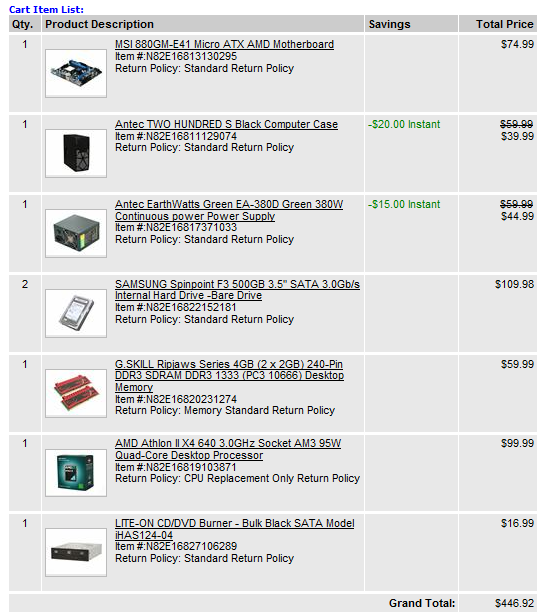
Total w/out 2nd hard drive = $391.93
Total w/out 2nd hard drive = $391.93
Mr Nightman
Banned
I would say you could even go for a phenom 2 dual core cpu, or even an athlon 2 dual core cpu, could save a bit of money there, but the rest looks great. Just figured parents are not really going to be doing much of anything cpu intensive. Also correct me if I'm wrong, but is there a reason this hdd is 109 versus others at like 55 bucks? Does this hdd have higher specs then most?sharkmuncher said:OK, I'm thinking something like this for my parents' PC. Overkill or OK? (Ignore the 2nd hard drive, that's for something else)
Total w/out 2nd hard drive = $391.93
EDIT: Oh wow I am stupid just realized thats the price for both lol well with that said, build looks great, consider the cpu though :lol
sharkmuncher
Member
Mr Nightman said:I would say you could even go for a phenom 2 dual core cpu, or even an athlon 2 dual core cpu, could save a bit of money there, but the rest looks great. Just figured parents are not really going to be doing much of anything cpu intensive. Also correct me if I'm wrong, but couldnt you get a 500gb hard drive for much cheaper then 109? Does this hdd have higher specs then most?
109 is for 2 Hard Drives, 54.99 a piece I believe.
Shambles said:Just so we can check pricing, are there certain retailers you're set on purchasing from shark?
Not set on any retailer except online I guess. I will most likely purchase while they are here this weekend, have the parts shipped to them and then build it while I am home for Christmas.
I meant which is better between the twoMikeE21286 said:There's been deals on the GTX460 for the past couple weeks. If none have enticed you to buy one I don't know if they are going to get any lower (either version that is...)
Mr Nightman
Banned
Lol just realized that :lolsharkmuncher said:109 is for 2 Hard Drives, 54.99 a piece I believe.
I was just asking because it looked like you pulled those parts from the combo but didn't take the combo itself which is about 50$ cheaper than the parts you listed above including the HDD and ODD. I noticed you did change the case though, i'm guessing you didn't like the Rosewill R519-BK?
If you wanted to save more the Athlon II X2 245 for 58$ is a possibility. I'm usually pretty bullish on the quad cores but for a bare bones browsing computer the Athlon X2 would probably still be a pretty good experience. (Would break up the combo though, might have its own combos, might be able to unlock it to a quad core too)
If you wanted to save more the Athlon II X2 245 for 58$ is a possibility. I'm usually pretty bullish on the quad cores but for a bare bones browsing computer the Athlon X2 would probably still be a pretty good experience. (Would break up the combo though, might have its own combos, might be able to unlock it to a quad core too)
I have the Xonar DX and can't say a bad thing about it. I believe the DX doesn't have a built in amp, but has a better SNR than the DG. I can't remember off-hand though.Darkatomz said:If you do, let us know how it is. It doesn't have swappable op-amps like the DS, but it does have a headphone amp.

This build is 50$ cheaper than if you used the combo with the quad core. This motherboard also has the ability to unlock additional cores but it is by no means a sure thing. I didn't take a good look at the other cases in that price range but I don't think you're going to find a decent case with a decent power supply in it for much less than 60$. Also if you really really wanted to cut the price you could bring the 4GB of memory down to 2GB.
Looks like there are some passable cases with PSU's as low as 40$. You get what you pay for but if you really wanted to save 20$ more you could. Just check the reviews and make sure the PSU in the case isn't a POS like a lot are in that price range.
Ah, I see. Thanks alot.Pimpbaa said:Sound card is only really necessary if you are still doing analog (or plugging headphones directly into your computer) since integrated sound usually has horrible DACs. But as for digital, it's completely unnecessary. And yeah sound is integrated in video cards these days. I am using the sound off my geforce 460 which is connected to my HDTV using HDMI.
The Antec 200's front bezel is not only unsightly, it has a very low quality finish and look to it. There are also clear cost-cutting measures that they took with the case.sharkmuncher said:OK, I'm thinking something like this for my parents' PC. Overkill or OK? (Ignore the 2nd hard drive, that's for something else)
Total w/out 2nd hard drive = $391.93
Fairly certain your parents won't need a hot swap bay, so for the same price, I'd go for a $40 NZXT Beta EVO (which I'd also recommend to anyone looking at those $40 Cooler Master Elite 3xx series cases. The NZXT is better than those cases in every way.)

http://www.newegg.com/Product/Produ...1146059&cm_re=nzxt_evo-_-11-146-059-_-Product
Free shipping with Amazon
http://www.amazon.com/dp/B002OEBILA/?tag=neogaf0e-20
Or a $50 Antec 300:

http://www.microcenter.com/single_product_results.phtml?product_id=0283272
Much classier look versus the 200, that they can place in any room of the house. The newer 300s have a CPU cutout, and a dedicated SSD area below the HDD cage. The 300 also has thumbscrews for everything and actual PCI brackets, as opposed to the cheap covers that the Antec 200 has. Fan wise, the 300 has 2 3-speed fans to the 200's 2 2-speed fans, if that makes a difference to you.
As for the hard drives, why are you going with 2 500GB units? If it's a matter of keeping them from bogging down the OS drive that's fine, but you can get a 1TB Samsung F3 7200rpm for the same $55 as a single 500GB F3:
http://www.newegg.com/Product/Produ...52185&cm_re=samsung_f3-_-22-152-185-_-Product
If the price goes up by the time you're ready to order, get it for $60 from Microcenter
http://www.microcenter.com/single_product_results.phtml?product_id=0340562
With the $55 you save from not buying a second 500GB, you could potentially add to it and buy them a 40-64GB SSD for $100 or less. That way, they would have a fast boot drive that wouldn't slow down over time like a HDD does, and they could save everything to the 1TB HDD.
robotzombie
Member
Wonder if you guys can help:
I had some trouble with my comp lately, when i would turn it on it would get to the point where windows would boot up and then would just stay black and nothing would happen. I kept trying til I eventually got it to come on, but my friends said I could probably screw something up if I keep turning it on. My buddy told me it was probably my hard drive going so I bought a nice new 1 terrabyte drive and we were able to get all my info off of my old drive and onto the new one after i set up the new one with windows 7.
So everything was fine for a couple days until now I seem to be having trouble with windows 7 when it is about to boot up. I got an error message that it encountered an error and seemed like it was a similar issue.
So question, does this sound like any specific piece of hardware that is the problem? Could it be possible my new hard drive already is/got screwed up somehow?
Thanks in advance if you have any ideas...
I had some trouble with my comp lately, when i would turn it on it would get to the point where windows would boot up and then would just stay black and nothing would happen. I kept trying til I eventually got it to come on, but my friends said I could probably screw something up if I keep turning it on. My buddy told me it was probably my hard drive going so I bought a nice new 1 terrabyte drive and we were able to get all my info off of my old drive and onto the new one after i set up the new one with windows 7.
So everything was fine for a couple days until now I seem to be having trouble with windows 7 when it is about to boot up. I got an error message that it encountered an error and seemed like it was a similar issue.
So question, does this sound like any specific piece of hardware that is the problem? Could it be possible my new hard drive already is/got screwed up somehow?
Thanks in advance if you have any ideas...
brain_stew
Member
I'm still not seeing why in the hell, a big tower is in anywhere necessary or desirable?
Just get them the Zino HD, seriously. Save yourself the hassle of putting the machine together, and being their tech support, give them a PC with a form factor they'll actually appreciate and can go in any room in the house, and save yourself a Windows 7 license.
The specs on the $400 model are already overkill for their needs, why spend money on a quad when its not going to ever be put to use? Saving on energy bills, and having a cool, quiet, small and aesthetically pleasing box are much more important for a build like that than having a quad core and lots of upgrade options.
Just get them the Zino HD, seriously. Save yourself the hassle of putting the machine together, and being their tech support, give them a PC with a form factor they'll actually appreciate and can go in any room in the house, and save yourself a Windows 7 license.
The specs on the $400 model are already overkill for their needs, why spend money on a quad when its not going to ever be put to use? Saving on energy bills, and having a cool, quiet, small and aesthetically pleasing box are much more important for a build like that than having a quad core and lots of upgrade options.
Angelus Errare
Banned
brain_stew said:I'm still not seeing why in the hell, a big tower is in anywhere necessary or desirable?
Just get them the Zino HD, seriously. Save yourself the hassle of putting the machine together, and being their tech support, give them a PC with a form factor they'll actually appreciate and can go in any room in the house, and save yourself a Windows 7 license.
The specs on the $400 model are already overkill for their needs, why spend money on a quad when its not going to ever be put to use? Saving on energy bills, and having a cool, quiet, small and aesthetically pleasing box are much more important for a build like that than having a quad core and lots of upgrade options.
Going to have to agree. If your parents are like 90% of parents, they don't give a fuck whats in the box, how many jiggawatts it has and if it can run X game on max.
Zino would be a perfect fit for them.
I kind of agree with stew on this front. I mean, the custom built machine is definitely better, but certainly pretty overkill.
I'd only go with the custom build if you foresee ever upgrading it, or adding to it in the future (videocard, blu-ray, etc...). If your parents are just email and browsing, there's definitely no need for it.
I'd only go with the custom build if you foresee ever upgrading it, or adding to it in the future (videocard, blu-ray, etc...). If your parents are just email and browsing, there's definitely no need for it.
Oh I know the DX and DS are good cards, I have the Essence ST, which is pretty much the same thing as the Xense (aka, as high end as you can go). I'm just curious as to how the DG is since it's a relatively new product. That, and if the op-amp swap tradeoff is worth the headphone amp, among other features. Not really a fan of audio reviews from hardware enthusiasts.teiresias said:I have the Xonar DX and can't say a bad thing about it. I believe the DX doesn't have a built in amp, but has a better SNR than the DG. I can't remember off-hand though.
brain_stew said:I'm still not seeing why in the hell, a big tower is in anywhere necessary or desirable?
Just get them the Zino HD, seriously. Save yourself the hassle of putting the machine together, and being their tech support, give them a PC with a form factor they'll actually appreciate and can go in any room in the house, and save yourself a Windows 7 license.
The specs on the $400 model are already overkill for their needs, why spend money on a quad when its not going to ever be put to use? Saving on energy bills, and having a cool, quiet, small and aesthetically pleasing box are much more important for a build like that than having a quad core and lots of upgrade options.
Well you could get the Zino or you could spend less money, have a better spec'd computer (more memory, larger faster HDD, chance at turning the X2 into an X4), not pay for another Windows 7 licence (No it's not free, it's in the Zino price) when you have 2 sitting on your shelf, not deal with the bullshit bloatware on the Dell Windows Install, be able to easily reinstall Windows at will, have a mATX case of very similar size, have far more reliable components that can be used down the road and have a far longer warranty on the components than what Dell gives you on the prebuilt itself, and have the ability to unlock extra cores and overclock if you wish.
The Zino is for people like his parents who know absolutely nothing about computers and the thought of getting a new computer scares them. Building it yourself makes far more sense in every way. Why would you spend 100-120$ more for an inferior product?
sharkmuncher
Member
brain_stew said:I'm still not seeing why in the hell, a big tower is in anywhere necessary or desirable?
Just get them the Zino HD, seriously. Save yourself the hassle of putting the machine together, and being their tech support, give them a PC with a form factor they'll actually appreciate and can go in any room in the house, and save yourself a Windows 7 license.
The specs on the $400 model are already overkill for their needs, why spend money on a quad when its not going to ever be put to use? Saving on energy bills, and having a cool, quiet, small and aesthetically pleasing box are much more important for a build like that than having a quad core and lots of upgrade options.
I do appreciate the advice, however, I don't see any huge improvement between the Dell and building my own. Seeing as whatever I get will be significantly more applicable to my parent's needs than whatever the Dell rep or Best Buy guy try to sell them and also most likely cheaper. I definitely see the advantage in a smaller case as well as getting something pre-built, but unless there is a significant advantage in not doing so, I would rather build the PC. It'll give me something to do for an afternoon while I'm at home, as well as result in a completely fresh install w/ no unnecessary programs.
As far as the case goes, it will be hidden so all I am looking for is something inexpensive. That NZXT does look like a nicer case so I'll probably just grab that.·feist· said:*Lots of suggestions*
This build will only have 1x500 GB hard drive I should have taken the other one out of the screenshot as that is for a different machine.
Thanks again to everyone for the advice
Shambles said:Well you could get the Zino or you could spend less money, have a better spec'd computer (more memory, larger faster HDD, chance at turning the X2 into an X4), not pay for another Windows 7 licence (No it's not free, it's in the Zino price) when you have 2 sitting on your shelf, not deal with the bullshit bloatware on the Dell Windows Install, be able to easily reinstall Windows at will, have a mATX case of very similar size, have far more reliable components that can be used down the road and have a far longer warranty on the components than what Dell gives you on the prebuilt itself, and have the ability to unlock extra cores and overclock if you wish.
The Zino is for people like his parents who know absolutely nothing about computers and the thought of getting a new computer scares them. Building it yourself makes far more sense in every way. Why would you spend 100-120$ more for an inferior product?
Just a note, but he wouldn't be spending more.
If he wants to build the PC and offer full support for them though, all the power to him. It will be a better machine in the end.
Vaporak said:Hey Gaffers, I recently decided to get a new Keyboard/Mouse/Headset for gaming, anyone got any recommendations? Only real qualifiers are that the headset needs a mic.
Plantronics Closed and Open models, respectively:
http://www.amazon.com/dp/B001E45XT4/?tag=neogaf0e-20
http://www.amazon.com/dp/B001KUSXXU/?tag=neogaf0e-20
I like Plantronics headsets. Usually pretty comfortable, and they've got decent sound and mic quality for the price. You can move higher up to better Sennheiser headphones, but you'll be spending a lot more for small improvements. In the end, it just depends on how much of an audiophile you are. Avoid Logitech and Creative...they make some of the worst headphones I have had the displeasure of listening to.
I've also been very interested in trying out this headset:
http://www.amazon.com/dp/B0041RRNLC/?tag=neogaf0e-20
More expensive, of course, but Corsair has been on a roll with all of their products lately, so I wouldn't be surprised if it's decent. Maybe check out reviews for that one if you're looking to go a little higher end. Looks supremely comfortable (which is the most important attribute to gaming headphones, tbh).
As for mouse, I'll go ahead and recommend the MX 518:
http://www.amazon.com/dp/B0007Z1M50/?tag=neogaf0e-20
The G500 is an option as well if you rather get a laser mouse:
http://www.amazon.com/dp/B002J9GDXI/?tag=neogaf0e-20
Some people will undoubtedly recommend the Razer Deathadder:
http://www.amazon.com/dp/B002Q4U5DK/?tag=neogaf0e-20
I have the Mamba, the wireless version of the Deathadder. While the form and performance are incredible, the build quality is rather lacking, IMO. By forward thumb button has gotten loose, my mouse wheel squeaks a bit, and it loses connection sometimes (where I have to reconnect it to get it working again).
As for keyboard, it's mostly personal preference. I'll go ahead and recommend my favorite:
http://www.amazon.com/dp/B001F51G16/?tag=neogaf0e-20
Very elegant look, supremely quiet, and extremely comfortable to use. The backlight is also fantastic, with very little bleed around the keys. The keys are like larger laptop keys, but with a more refined and longer throw. The action is so quiet, and yet the tactile feedback is fantastic. There's a very decisive rubbery 'click' when you press the keys. Razer has a similar keyboard (Lycosis), but again, I'm not convinced of their build/driver quality.
Other keyboards to consider would be the Logitech G11 if you want macro keys and a more traditional keyboard, and something like a Steelseries keyboard if you want a plane jane mechanical keyboard (which produces a very mechanical clicky sound).
Megadrive said:I have had this exact problem with my GTX460 Gigabyte. Is it the overclocked version as well? I sent my card to my suppliers and they had no problems with it so I have sent my mobo, ram and cpu back along with it and I'm hoping they figure it out. If it's not too much hassle can you please keep me or the thread up to date with your issue? I'd be happy to PM you my resolution (if there is one).
I have an RMA request in to Gigabyte. Just waiting for a number and then I'll send it off. What happens determines my next move. If they say they find nothing wrong with it, I'll eat the cost and get a different card - might spend the money and step up to a 6900 AMD card after this experience with Nvidia.
If they send me back a new card, I'll give it a month and see if it repeats. I can't imagine this being anything to do with my hardware configuration, and I have no intention of shipping my entire rig to Gigabyte for testing (especially since my motherboard is a Gigabyte motherboard, so they should have plenty around to use themselves). If the knew card works, great. It has put on hold any plans I had on buying another 460 for SLI purposes though. I'll just wait for the next refresh or architecture and spend the money on the highest end part next time around.
Given the amount of talk about this issue online I'm convinced there was a fabrication error or failure of some kind resulting in a run of failing GPUs. If that's the case, Nvidia should be able to track down when and where the fabrication failure was and what lots of silicon were affected - allowing them to either do a discrete notice to their manufacturers or an actual recall. That they haven't done any such thing makes them look bad in my eyes.
Darkatomz said:Oh I know the DX and DS are good cards, I have the Essence ST, which is pretty much the same thing as the Xense (aka, as high end as you can go). I'm just curious as to how the DG is since it's a relatively new product. That, and if the op-amp swap tradeoff is worth the headphone amp, among other features. Not really a fan of audio reviews from hardware enthusiasts.
My mobo layout forces my soundcard to within 1mm of my GPU's fan, so I'm not expecting any miracles! :lol I can't hear any obvious noise in the floor over my AD700s, something I could not say for the onboard audio on the motherboard. The Dolby Headphone being in the card is also nice. I'm far from an audiophile, so I'm easy to please in most regards.
TheExodu5 said:Just a note, but he wouldn't be spending more.
If he wants to build the PC and offer full support for them though, all the power to him. It will be a better machine in the end.
Building himself will cost him <300$ with more HDD space and memory compared to the 400$ Zino. I don't understand where this 'support' is coming from. You put a computer together and one you get it working it works. It's not like individual components have kill switches on them that Dell removes.
Shambles said:Building himself will cost him <300$ with more HDD space and memory compared to the 400$ Zino. I don't understand where this 'support' is coming from. You put a computer together and one you get it working it works. It's not like individual components have kill switches on them that Dell removes.
Are we looking at different builds or something? His build is $400, and he has to use up one of his Windows 7 licenses.
Darkatomz said:It's not a requirement, just a compliment.
That said, just a $50 sound card can get you pretty far if you have some decent sound gear to support it.
The 400$ build is the one that was with the quad core and other more expensive parts. The 300$ is the one in this post.. Also the Zino is using a mobile Athlon II X2 which is a much slower part (albeit lower power consumption). As much as the X2 255 scores 50% higher on the passmark CPU test. By going to a smaller mATX case w/ PSU he could be 20$ cheaper than that build. I assume he bought his Windows licences to actually use as well. Buying prebuild means instead of using the licences he already bought, he's paying extra in the cost of the machine to buy Windows 7 a third time.
TheExodu5 said:Plantronics Closed and Open models, respectively:
http://www.amazon.com/dp/B001E45XT4/?tag=neogaf0e-20
http://www.amazon.com/dp/B001KUSXXU/?tag=neogaf0e-20
I like Plantronics headsets. Usually pretty comfortable, and they've got decent sound and mic quality for the price. You can move higher up to better Sennheiser headphones, but you'll be spending a lot more for small improvements. In the end, it just depends on how much of an audiophile you are. Avoid Logitech and Creative...they make some of the worst headphones I have had the displeasure of listening to.
I've also been very interested in trying out this headset:
http://www.amazon.com/dp/B0041RRNLC/?tag=neogaf0e-20
More expensive, of course, but Corsair has been on a roll with all of their products lately, so I wouldn't be surprised if it's decent. Maybe check out reviews for that one if you're looking to go a little higher end. Looks supremely comfortable (which is the most important attribute to gaming headphones, tbh).
As for mouse, I'll go ahead and recommend the MX 518:
http://www.amazon.com/dp/B0007Z1M50/?tag=neogaf0e-20
The G500 is an option as well if you rather get a laser mouse:
http://www.amazon.com/dp/B002J9GDXI/?tag=neogaf0e-20
Some people will undoubtedly recommend the Razer Deathadder:
http://www.amazon.com/dp/B002Q4U5DK/?tag=neogaf0e-20
I have the Mamba, the wireless version of the Deathadder. While the form and performance are incredible, the build quality is rather lacking, IMO. By forward thumb button has gotten loose, my mouse wheel squeaks a bit, and it loses connection sometimes (where I have to reconnect it to get it working again).
As for keyboard, it's mostly personal preference. I'll go ahead and recommend my favorite:
http://www.amazon.com/dp/B001F51G16/?tag=neogaf0e-20
Very elegant look, supremely quiet, and extremely comfortable to use. The backlight is also fantastic, with very little bleed around the keys. The keys are like larger laptop keys, but with a more refined and longer throw. The action is so quiet, and yet the tactile feedback is fantastic. There's a very decisive rubbery 'click' when you press the keys. Razer has a similar keyboard (Lycosis), but again, I'm not convinced of their build/driver quality.
Other keyboards to consider would be the Logitech G11 if you want macro keys and a more traditional keyboard, and something like a Steelseries keyboard if you want a plane jane mechanical keyboard (which produces a very mechanical clicky sound).
Thanks for the recommendations
 . How long are the wires are on those plantronic headphones, they look nice and are nice and cheap. Also, are there any wireless headsets you recommend? The ones I have now are wireless and it's something I like a lot, comfortable and allows me to get up and walk around without having to take them off.
Vaporak said:Thanks for the recommendations
The only wireless headphones I tried were the Turtle Beaches (X41 I think?), and they were awful. I don't know anything beyond that.
The plantronics cord is uhhh...10 feet maybe?
I was shopping on ebay for the 360 wireless gaming receiver for PC but in one of the listings it says it's not compatible with Win 7 64 bit which I think is a mistake but just want to make sure from one of you guys that has it if it works with 7 64bit.
Edit: Some Google-Fu says you need a simple workaround but still want gaffers input.
Edit: Some Google-Fu says you need a simple workaround but still want gaffers input.
AbortedWalrusFetus
Member
So I was thinking of upgrading my CPU. I have an ATI 4850 in my machine right now, and if I run most games on max settings at 1440x900 (my monitors max) I get around 30-45fps. Right now I have a Core 2 Quad 2.5 GHz (Q9300) in my machine, with 6GB of RAM. I'm fairly confident that my machine is bottlenecking on the CPU and not the GPU. I had a few questions if anyone would happen to know the answers...
How big a jump is a Core i7 from the Core 2 Quad? Also, since I have a Q9300 in my machine right now, would the motherboard be compatible with any Core 2 Quad? If I have to replace the motherboard no matter what, it's not really worth getting a Core 2 Quad over the i7 as they're similar in price. But if I can just upgrade to like a 3.0GHz Core 2 Quad, not change the motherboard, and if the Core i7 isn't a huge improvement over it, that seems like the best way to go.
Any thoughts?
How big a jump is a Core i7 from the Core 2 Quad? Also, since I have a Q9300 in my machine right now, would the motherboard be compatible with any Core 2 Quad? If I have to replace the motherboard no matter what, it's not really worth getting a Core 2 Quad over the i7 as they're similar in price. But if I can just upgrade to like a 3.0GHz Core 2 Quad, not change the motherboard, and if the Core i7 isn't a huge improvement over it, that seems like the best way to go.
Any thoughts?
Works fine for me. Never had to use a workaround.Jin34 said:I was shopping on ebay for the 360 wireless gaming receiver for PC but in one of the listings it says it's not compatible with Win 7 64 bit which I think is a mistake but just want to make sure from one of you guys that has it if it works with 7 64bit.
Edit: Some Google-Fu says you need a simple workaround but still want gaffers input.
Overclock your quad. If you want to upgrade, do so after Sandy Bridge comes out.AbortedWalrusFetus said:So I was thinking of upgrading my CPU. I have an ATI 4850 in my machine right now, and if I run most games on max settings at 1440x900 (my monitors max) I get around 30-45fps. Right now I have a Core 2 Quad 2.5 GHz (Q9300) in my machine, with 6GB of RAM. I'm fairly confident that my machine is bottlenecking on the CPU and not the GPU. I had a few questions if anyone would happen to know the answers...
How big a jump is a Core i7 from the Core 2 Quad? Also, since I have a Q9300 in my machine right now, would the motherboard be compatible with any Core 2 Quad? If I have to replace the motherboard no matter what, it's not really worth getting a Core 2 Quad over the i7 as they're similar in price. But if I can just upgrade to like a 3.0GHz Core 2 Quad, not change the motherboard, and if the Core i7 isn't a huge improvement over it, that seems like the best way to go.
Any thoughts?
AbortedWalrusFetus
Member
TheExodu5 said:Overclock your quad. If you want to upgrade, do so after Sandy Bridge comes out.
Hmm. I sort of doubt my BIOS will let me overclock it, but I'll look into it. I got the PC from HP in July of 2008 for like $800 (it was a pretty amazing deal at the time, cheaper than you could build it yourself).
Are there any optimal settings for overclocking Q9300s?
If it's a prebuilt, then yeah you probably can't overclock. I wouldn't upgrade...$200-300 is not worth it for just a 20% performance boost. Save up for your next build instead.AbortedWalrusFetus said:Hmm. I sort of doubt my BIOS will let me overclock it, but I'll look into it. I got the PC from HP in July of 2008 for like $800 (it was a pretty amazing deal at the time, cheaper than you could build it yourself).
Are there any optimal settings for overclocking Q9300s?
PhoenixDark
Banned
Ok bros, need some update advice. I have this Radeon HD 3870 card
http://www.newegg.com/Product/Product.aspx?Item=N82E16814131095
Got it a couple years ago when I built my computer. Everything is working fine but I'm thinking about getting a better card; currently I mainly play stuff like WoW, SC2, and TF2 so the card runs all that well. What would be a good card to get without breaking the bank? I'm thinking $100-200
http://www.newegg.com/Product/Product.aspx?Item=N82E16814131095
Got it a couple years ago when I built my computer. Everything is working fine but I'm thinking about getting a better card; currently I mainly play stuff like WoW, SC2, and TF2 so the card runs all that well. What would be a good card to get without breaking the bank? I'm thinking $100-200
PhoenixDark said:Ok bros, need some update advice. I have this Radeon HD 3870 card
http://www.newegg.com/Product/Product.aspx?Item=N82E16814131095
Got it a couple years ago when I built my computer. Everything is working fine but I'm thinking about getting a better card; currently I mainly play stuff like WoW, SC2, and TF2 so the card runs all that well. What would be a good card to get without breaking the bank? I'm thinking $100-200
GTX 460
TheExodu5 said:Works fine for me. Never had to use a workaround.
Thanks, maybe just a problem at launch, I assume you just plug n played it.


Preach on, brother!Corky said:just wanted to pop in and say that the SSD has shattered my perception of everything that has to do with pc-using xD.
I will never ever in my life buy/own a pc/laptop without SSD. The change is ludicrous
Could anyone recommend any deals from Newegg's Black Friday sale? I'm looking to build a new PC from the ground up and would love to score some sweet deals. However, it's been so long since I've built a rig that I have no clue what the average price of components cost these days, and spotting a great deal will be difficult.
So far, this Gigabyte mobo is they only thing that's caught my eye.
http://www.newegg.com/Product/Product.aspx?Item=N82E16813128425
Would I be better off waiting for Cyber Monday?
So far, this Gigabyte mobo is they only thing that's caught my eye.
http://www.newegg.com/Product/Product.aspx?Item=N82E16813128425
Would I be better off waiting for Cyber Monday?
Krauser Kat
Member
There is a 64 gig ssd for 85 with mir. Alsi saw the xt1050 for 179 and the i5 760 for 175.