• Hey Guest. Check out your NeoGAF Wrapped 2025 results here!

"I need a new PC!" 2010 Edition

Thanks for the advice so far in this thread! For now I've settled on the following components:

Intel Core i5-750, 4x 2.67GHz, boxed (BX80605I5750)
MSI P55-CD53, P55 (dual PC3-10667U DDR3)
G.Skill RipJaws DIMM Kit 4GB PC3-10667U CL7-7-7-21 (DDR3-1333) (F3-10666CL7D-4GBRH)
PowerColor AX5770 1GBD5-H, Radeon HD 5770, 1024MB GDDR5, VGA, DVI, HDMI, PCIe 2.1 (R84FH-TI3)
LG Electronics GH22NS50, SATA
Western Digital Caviar Blue 640GB, SATA II (WD6400AAKS)
Cooler Master Silent Pro M500, 500W ATX 2.3 (RS-500-AMBA)
Scythe Mugen 2 Rev. B (Sockel 478/775/1156/1366/754/939/940/AM2/AM2+/AM3) (SCMG-2100)
Antec Three Hundred black (0761345-08300-3)

Can anyone spot any incompatibilities or bottlenecks? As I said before, I want to use this primarily for gaming (including emulators).

The one thing I'm still concerned about is cooling. Will the Mugen 2 fit into the Antec Three Hundred case? Should I get an additional case fan if I want to OC?
 
Schlomo said:
Thanks for the advice so far in this thread! For now I've settled on the following components:

Intel Core i5-750, 4x 2.67GHz, boxed (BX80605I5750)
MSI P55-CD53, P55 (dual PC3-10667U DDR3)
G.Skill RipJaws DIMM Kit 4GB PC3-10667U CL7-7-7-21 (DDR3-1333) (F3-10666CL7D-4GBRH)
PowerColor AX5770 1GBD5-H, Radeon HD 5770, 1024MB GDDR5, VGA, DVI, HDMI, PCIe 2.1 (R84FH-TI3)
LG Electronics GH22NS50, SATA
Western Digital Caviar Blue 640GB, SATA II (WD6400AAKS)
Cooler Master Silent Pro M500, 500W ATX 2.3 (RS-500-AMBA)
Scythe Mugen 2 Rev. B (Sockel 478/775/1156/1366/754/939/940/AM2/AM2+/AM3) (SCMG-2100)
Antec Three Hundred black (0761345-08300-3)

Can anyone spot any incompatibilities or bottlenecks? As I said before, I want to use this primarily for gaming (including emulators).

The one thing I'm still concerned about is cooling. Will the Mugen 2 fit into the Antec Three Hundred case? Should I get an additional case fan if I want to OC?

For gaming you've got your priorities wrong. Go with an Phenom ii or even an i3 so that you can afford a 5850, that'll net you much better gaming performance.

The Caviar Blue drives aren't too fast, wouldn't use one as an OS drive.
 
brain_stew said:
For gaming you've got your priorities wrong. Go with an Phenom ii or even an i3 so that you can afford a 5850, that'll net you much better gaming performance.

The Caviar Blue drives aren't too fast, wouldn't use one as an OS drive.

Well, the 5850 is 120 Euro more expensive than the 5770. That's kind of hard to swallow.

I figured I'd upgrade once the price has dropped a little, or an even better card is out. Or is that unlikely to happen anytime soon? As a console gamer I haven't followed the PC gaming market at all, so I'm clueless in that regard.

Also, people always stress how important a fast CPU is for the dolphin emulator. Would a 5850+weaker CPU still perform better than my suggested setup?
 
I have to flash my BIOS to get rid of some annoying errors, as my PC crashes when I play HD videos (gigabyte P55 MB + HD5850). Updating the bios should fix it. However, I don't have any experience with it and I'm not too experienced with computers in general.

I know I can use Q-Flash to update it. I already found this guide. http://forums.tweaktown.com/f69/bios-flashing-how-qflash-guide-27576/
As I don't have a floppy drive, I will make a FAT32 partition on my HDD.

As I have said earlier, I'm a bit inexperienced and I know updating your BIOS can go wrong, leading to a bricked motherboard. Is it advisable to do it myself (looking at the guide, it seems pretty straight forward to me)? Is there anyhting I should be aware of that's not in the guide? And if the flashing goes wrong, what are my options then?

Thanks in advance!
 
The building itself is done, now I need to d/l W7 and create a bootable DVD or get it on an USB stick. Sigh.

Only hardware I still need is kb/mouse. Are wireless setups playable today? I had one years ago and it sucked, but having 3 metre cables to my couch isn´t ideal, either.

So, with my problems out of the way now my brother wants to upgrade.

He had a pre-build pc for a few years now, running Vista 32 bit with a Q6600, a GeForce 9500 GS 512 MB, 3 gigs of RAM, no name PSU.

A search reveals that the cpu might be easy to overclock and still usable, but the gpu and psu have to go. I just bought a OCZ 500 Watt and the price isn´t much more than a 400 watt one, so I´d just tell him to get that.

Would you recommend a 4850 (~100€), 4870 (~130€), 4890Plus (~160€), 5750 (~115€) OR 5770 512/1024 MB (~115/125 €) for 1050p gaming. Without maxed settings and tons of AA, of course.
 
Binabik15 said:
The building itself is done, now I need to d/l W7 and create a bootable DVD or get it on an USB stick. Sigh.

Only hardware I still need is kb/mouse. Are wireless setups playable today? I had one years ago and it sucked, but having 3 metre cables to my couch isn´t ideal, either.

So, with my problems out of the way now my brother wants to upgrade.

He had a pre-build pc for a few years now, running Vista 32 bit with a Q6600, a GeForce 9500 GS 512 MB, 3 gigs of RAM, no name PSU.

A search reveals that the cpu might be easy to overclock and still usable, but the gpu and psu have to go. I just bought a OCZ 500 Watt and the price isn´t much more than a 400 watt one, so I´d just tell him to get that.

Would you recommend a 4850 (~100€), 4870 (~130€), 4890Plus (~160€), 5750 (~115€) OR 5770 512/1024 MB (~115/125 €) for 1050p gaming. Without maxed settings and tons of AA, of course.

4890 is the strongest out of that selection of cards. The prices on it will continue to increase as supplies dwindle.

5770 1GB version is also a good choice. Similar performance to a 4870 but with DX11 support - although I am not too sure it would perform great using it. On the plus side it does use less power than the earlier 4xxx series cards and so could probably be fairly easily overclocked to get yourself a few bonus frames per second.

There is a new card on the horizon also. The 5830. Rumours are placing it around 4890 performance levels and will also use less power. Due out Febuary 5th so i'd advice waiting until it is released to see the benchmarks and prices before buying any cards.
 
Spiko said:
Im sorry if this is a bit off topic but I just had an amazing experience with my new computer and I wanted to share it.
/TLDR = Holy Shit i7's are fast

So recently I built a pretty solid core i7 machine. I've been really happy playing crysis maxed out and all that but something just happened that really floored me. I encoded Apocalypse Now, a 3 hour movie, in under 2 minuets. Now, I've been encoding DVDs for some time. I've always preferred to have a HTPC over a typical disk based system. The first DVD I encoded was The Fifth Element. I remember because I was very excited to have figured it out and gotten it to work correctly. Keep in mind it wasn't as easy and straight forward as it is today. Anyway, this was done on a Comaq P2 266 and it took, I shit you not, almost two weeks per disk. So again, I just encoded a three hour movie in under two minutes.
Oh
My
GOD!

When it finished I was in shock. The report said it was encoding at an average of 4000 frames per second. I did the math and that checks out.

30 fps X 60 second per minute = 1,800 frames per minute x 60 minutes = 108,000 frames per hour x 3 hours = 324,000 / 4000fps encoding = about 81 seconds or under 2 min.
Amazing.


uhm, what resolution did you enocde too?

i haveALL components now but gotta save up for the cpu and gpu hahaha

waiting on the core i7 930
 
Spiko said:
Im sorry if this is a bit off topic but I just had an amazing experience with my new computer and I wanted to share it.
/TLDR = Holy Shit i7's are fast

So recently I built a pretty solid core i7 machine. I've been really happy playing crysis maxed out and all that but something just happened that really floored me. I encoded Apocalypse Now, a 3 hour movie, in under 2 minuets. Now, I've been encoding DVDs for some time. I've always preferred to have a HTPC over a typical disk based system. The first DVD I encoded was The Fifth Element. I remember because I was very excited to have figured it out and gotten it to work correctly. Keep in mind it wasn't as easy and straight forward as it is today. Anyway, this was done on a Comaq P2 266 and it took, I shit you not, almost two weeks per disk. So again, I just encoded a three hour movie in under two minutes.
Oh
My
GOD!

When it finished I was in shock. The report said it was encoding at an average of 4000 frames per second. I did the math and that checks out.

30 fps X 60 second per minute = 1,800 frames per minute x 60 minutes = 108,000 frames per hour x 3 hours = 324,000 / 4000fps encoding = about 81 seconds or under 2 min.
Amazing.


Agreed :D Ive been encoding for a long time and when recently moving from an AMD X2 4800+ Dual core to an i7 920 the improvement in encode speeds was outrageous.
 
I'm pretty sure my sound card is dead. It stopped working awhile back on my last build and I just put it back in the box because I was too busy to even deal with it. Thought I would give it a shot again on my new PC and again completely unresponsive. Windows doesnt see it at all.

Any chance there is a good price out there on a sound card. This one was an Audigy 4 but I'm really just looking for something that will be better than my on board without costing too much. Just moved + Windows 7 so I'm pretty damn broke.
 
JRW said:
Agreed :D Ive been encoding for a long time and when recently moving from an AMD X2 4800+ Dual core to an i7 920 the improvement in encode speeds was outrageous.

What software are the kids using these days to rip DVDs? I might wanna take my i7 lappy for a spin come monday.
 
Looking for advice (Budget of $550/650) for a PC with Intel Chip and Nvidia GPU...

I have monitor, want to play Modern Warfare 2 and some newer games (StarCraft 2 :D ).

Thanks!
 
DaFish said:
Looking for advice (Budget of $550/650) for a PC with Intel Chip and Nvidia GPU...

I have monitor, want to play Modern Warfare 2 and some newer games (StarCraft 2 :D ).

Thanks!
Any reason why Intel+Nvidia? AMD has the GPU and budget CPU market pretty much cornered. Check the second post if you change your mind. It's got a $600 build.
 
TouchMyBox said:
What software are the kids using these days to rip DVDs? I might wanna take my i7 lappy for a spin come monday.

It hasn't changed much in years. According to lifehacker handbrake is the most popular. That article in particular is specifically about ripping and not necessarily encoding.
 
Schlomo said:
Thanks for the advice so far in this thread! For now I've settled on the following components:

Intel Core i5-750, 4x 2.67GHz, boxed (BX80605I5750)
MSI P55-CD53, P55 (dual PC3-10667U DDR3)
G.Skill RipJaws DIMM Kit 4GB PC3-10667U CL7-7-7-21 (DDR3-1333) (F3-10666CL7D-4GBRH)
PowerColor AX5770 1GBD5-H, Radeon HD 5770, 1024MB GDDR5, VGA, DVI, HDMI, PCIe 2.1 (R84FH-TI3)
LG Electronics GH22NS50, SATA
Western Digital Caviar Blue 640GB, SATA II (WD6400AAKS)
Cooler Master Silent Pro M500, 500W ATX 2.3 (RS-500-AMBA)
Scythe Mugen 2 Rev. B (Sockel 478/775/1156/1366/754/939/940/AM2/AM2+/AM3) (SCMG-2100)
Antec Three Hundred black (0761345-08300-3)

Can anyone spot any incompatibilities or bottlenecks? As I said before, I want to use this primarily for gaming (including emulators).

The one thing I'm still concerned about is cooling. Will the Mugen 2 fit into the Antec Three Hundred case? Should I get an additional case fan if I want to OC?

Not sure if it'll fit or not...might want to double check that to be safe.

I don't think you'll need an extra case fan if you're looking at just CPU overclocking, but IMO, you should always run an intake fan to greatly improve the airflow. It'll only cost you about $10 anyways. The Mugen's fan should give you tons of OC headroom regardless.
 
Man, this has just been a disaster so far. HDMI audio is screwed up and black borders all around my picture. If I hook up both HDMI and DVI out and switch between the two, sometimes the "DVI" option will pop up in the Catalyst Control Center, but not always. Then sometimes it'll forget my settings and I have to fight to get the option up again to turn overscan off. Annoying.
 
So from Novatech I'm gonna get
G.Skill Ripjaw 4GB (2x2GB) DDR3 PC3-12800C9 1600MHz Dual Channel Kit
Novatech ATI Radeon 5850 1024MB GDDR5 PCI-Express Graphics Card
Which comes to £320
And from Ebuyer
Coolermaster Sileo Quiet Case With 500W Extreme Power Plus PSU *Special Offer Bundle*
ASUS P7P55D iP55 Socket LGA 1156 8 channel audio ATX Motherboard
Samsung SH-S223 22X DVD±RW/RAM/DL Serial ATA Black Bare Drive - OEM
Samsung HD103SJ Spinpoint F3 1TB Hard Drive SATAII 7200rpm 32MB Cache - OEM
Intel Core i7 860 2.8GHz Socket LGA 1156 8MB L3 Cache Retail Boxed Processor
Which comes to £504 inc shipping

so £824 altogether Do you think I should change anything is the MOBO and Case +PSU good enough?
 
Spiko said:
Im sorry if this is a bit off topic but I just had an amazing experience with my new computer and I wanted to share it.
/TLDR = Holy Shit i7's are fast

So recently I built a pretty solid core i7 machine. I've been really happy playing crysis maxed out and all that but something just happened that really floored me. I encoded Apocalypse Now, a 3 hour movie, in under 2 minuets. Now, I've been encoding DVDs for some time. I've always preferred to have a HTPC over a typical disk based system. The first DVD I encoded was The Fifth Element. I remember because I was very excited to have figured it out and gotten it to work correctly. Keep in mind it wasn't as easy and straight forward as it is today. Anyway, this was done on a Comaq P2 266 and it took, I shit you not, almost two weeks per disk. So again, I just encoded a three hour movie in under two minutes.
Oh
My
GOD!

When it finished I was in shock. The report said it was encoding at an average of 4000 frames per second. I did the math and that checks out.

30 fps X 60 second per minute = 1,800 frames per minute x 60 minutes = 108,000 frames per hour x 3 hours = 324,000 / 4000fps encoding = about 81 seconds or under 2 min.
Amazing.
See, this is what I should be doing with my 4GHz i7.. I mean, gaming its probably not much different than a lot lower class chips, but encoding is where they really shine.

What did you encode and what settings? I'd like to give it a whirl just to be amazed. Anyone else have any stories or ideas on how I can stress my i7 and be blown away by the speed?

One thing I find pretty awesome is 60fps Dolphin emulation at HD resolutions.
 
pestul said:
See, this is what I should be doing with my 4GHz i7.. I mean, gaming its probably not much different than a lot lower class chips, but encoding is where they really shine.

What did you encode and what settings? I'd like to give it a whirl just to be amazed. Anyone else have any stories or ideas on how I can stress my i7 and be blown away by the speed?

One thing I find pretty awesome is 60fps Dolphin emulation at HD resolutions.

I was using avidemux 2.5 going from ripped vobs to xvid at 704×480@29.97FPS

So yeah, not HD. But Still if I can encode SD at 4000FPS I'd imagine encoding a Bluray disk is going to be pretty reasonable. I couldn't justify a $140 bluray drive for my build when I already had a PS3 but it's defiantly on my list now. :D

EDIT: Mine is completely stock btw. I considered overclocking, I've got the cooling for it (Corsair H50 in push/pull config), but honestly I've never seen my CPU monitor go over like 30% so what's the point?
 
Any cheap recommendations for what appears to be an overheating laptop? The situation: I play the games fine, then the framerate totally bombs for like 5-10 minutes, then it goes stable, than bombs again. I don't mean I am going into more intense parts of the games either...I can just stand still and after awhile(does depend on game ofc) it goes to shit.

I think whats happening is the GPU is overheating and 'resting' itself resulting in the crap framerate(?).
 
NeoUltima said:
Any cheap recommendations for what appears to be an overheating laptop? The situation: I play the games fine, then the framerate totally bombs for like 5-10 minutes, then it goes stable, than bombs again. I don't mean I am going into more intense parts of the games either...I can just stand still and after awhile(does depend on game ofc) it goes to shit.

I think whats happening is the GPU is overheating and 'resting' itself resulting in the crap framerate(?).

Open it up and clean it. if your fans are binding or slowing it will cause major heat issues. Failing that or in addition to buy a laptop cooler. In the meantime take a look at the bottom of the laptop. Note where it has vents. Take a book (or whatever) and prop the laptop up in such a way so it does not block vents but gives it room to breathe.

EDIT: Another idea, boot into your bios. If you can manually control your fan speeds set them to 100% all the time.
 
Spiko said:
Open it up and clean it. if your fans are binding or slowing it will cause major heat issues. Failing that or in addition to buy a laptop cooler. In the meantime take a look at the bottom of the laptop. Note where it has vents. Take a book (or whatever) and prop the laptop up in such a way so it does not block vents but gives it room to breathe.

EDIT: Another idea, boot into your bios. If you can manually control your fan speeds set them to 100% all the time.
Yeah, I built a rig for overclocking. I don't need to run it at 4GHz, in fact I let Windows Power Options run it down to 2.5GHz. I realized the other day that I've overclocked every setup I've ever purchased, back to the Pentium III 450MHz (oc'd to 540).

NeoUltima said:
Mainly just want to make sure that it is indeed an overheating issue. The GPU was at like 90c and CPU at like 80c.
Yeah, both are quite high.
 
This is going to be the first time I build a PC. Could you guys give me some tips or things I should look out for when assembling the parts? Here's a quick overview of the parts I ordered:-

Asus P6T Motherboard
i7-920 2.66GHz
Sapphire 5870
OCZ Platinum Edition 6GB RAM DDR3 1600
1TB WD HDD x2
Thermaltake 1000w PSU
Cooler Master V8 CPU Cooler
HAF 922M Case
 
Heyo PC-GAF! I woke up to find my PSU died in it's sleep last night. So now I am looking for a replacement. My previous PSU was 500W, and just about handled everything I needed ( 4x SATA, 1x PCI-E, MoBo & Fans ). However, I've been considering upgrading at some point in the future, so I figured I'd get a slightly stronger PSU this time around in preparation. So, without further ado, here are a few of the possibilities I've found on NewEgg.

http://www.newegg.com/Product/Product.aspx?Item=N82E16817341019
http://www.newegg.com/Product/Product.aspx?Item=N82E16817139005
http://www.newegg.com/Product/Product.aspx?Item=N82E16817371015

They've all within the price range and power I'm looking for, plus they've got respectable ratings. Do any in particular stick out to you guys? Any experience with any of these? I'd like some input before making my final decision, if you've got any. Thanks!
 
AgentWhiskersX said:
This is going to be the first time I build a PC. Could you guys give me some tips or things I should look out for when assembling the parts? Here's a quick overview of the parts I ordered:-

I assume you know how to put it together on a basic level. Just take your time. It might help to lay out the parts first and visualize assembling it before you start. Give yourself enough work space. Go step by step and double check everything when you think you've finished and it should work.
 
AgentWhiskersX said:
This is going to be the first time I build a PC. Could you guys give me some tips or things I should look out for when assembling the parts? Here's a quick overview of the parts I ordered:-
Don't forget to put the little guard panel thingy on the case before you put the motherboard in. I did that my first time, and had to completely remove the motherboard. What a pain in the butt. :lol
 
SuperEnemyCrab said:
I assume you know how to put it together on a basic level. Just take your time. It might help to lay out the parts first and visualize assembling it before you start. Give yourself enough work space. Go step by step and double check everything when you think you've finished and it should work.
Thanks. What I'm worried about most is the wiring and connecting.

RocketDarkness said:
Don't forget to put the little guard panel thingy on the case before you put the motherboard in. I did that my first time, and had to completely remove the motherboard. What a pain in the butt. :lol
Elaborate please. I'm not sure what you're referring to.
 
AgentWhiskersX said:
Thanks. What I'm worried about most is the wiring and connecting.


Elaborate please. I'm not sure what you're referring to.
The little metal plating that comes with your motherboard. It provides a nice cover for any connections going into the motherboard, such as any USB ports, audio ports, etc.
 
I am extremely happy with my upgrade to the Q8300 and Scythe Mugen 2.

PC is the quietest it's ever been. Runs super cool. The speed increase is much higher than I expected. Really, I thought games were only optimized for dual-core, but I've found that I've gotten great performance increases in the following games:

Battlefield Bad Company 2
Mass Effect 2
Dragon Age
GTA IV

Loving it in Mass Effect 2 especially. I ran at mostly 60fps before (maxed, 16x AA), but had a few dips here and there (mostly on the Normandy). Smooth as silk now...drops below 60fps are nearly undetectable and very rare. The game feels so incredibly polished now.

I wonder what other games will show a big increase thanks to quad-core utilization.
 
RocketDarkness said:
The little metal plating that comes with your motherboard. It provides a nice cover for any connections going into the motherboard, such as any USB ports, audio ports, etc.
Ah! Noted, thanks.

Is it worth it to get one of those 10,000RPM 300GB drives or should I just stick with the 7200RPM 1TB?
 
AgentWhiskersX said:
Ah! Noted, thanks.

Is it worth it to get one of those 10,000RPM 300GB drives or should I just stick with the 7200RPM 1TB?

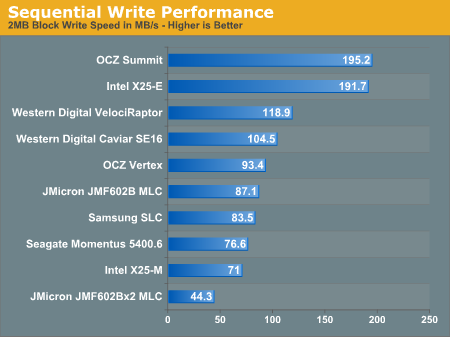
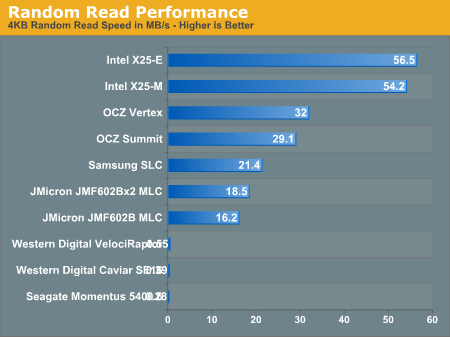
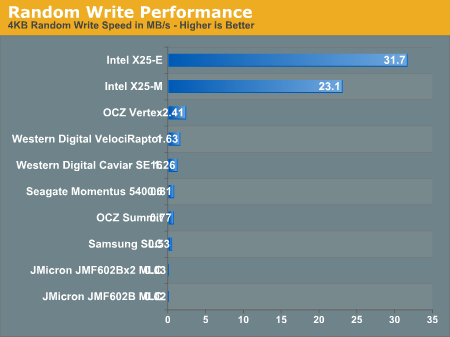
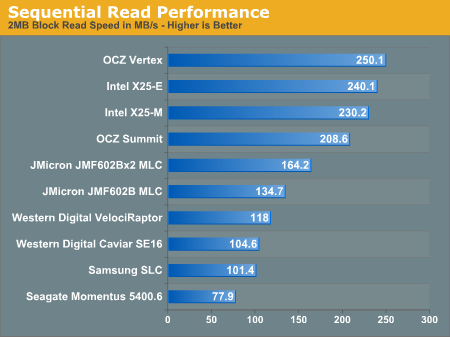
10K RPM drives are not worth it at all anymore. An SSD is a far better investment for an OS drive.

18639.png


18640.png


18641.png


18643.png
 
Yes just put the disc in the drive and boot. Your PC's should look at the optical drive for an operating system first then harddrive second. Your bios should have the boot priority set that way by default.
 
DaFish said:
Looking for advice (Budget of $550/650) for a PC with Intel Chip and Nvidia GPU...

I have monitor, want to play Modern Warfare 2 and some newer games (StarCraft 2 :D ).

Thanks!

Don't get an Intel CPU or Nvidia GPU with that budget.

There's a ~$600 build in the op, get that.
 
sillymonkey321 said:
How exactly do you install windows with a completely new...everything? Just put the windows disc in the new dvd drive?

That should work. You might have to mess with the device boot order in your BIOS to make sure it tries to read the optical media drive first, but you probably won't have to if the HDD is brand new and empty.
 
I'm running HDMI through a receiver and I can't seem to get the "DTV" tab to show up in Catalyst Control Center. I had an old Radeon 9550 hooked up to this same receiver with DVI before and always had the "DTV" tab with it, any clue what I could try?

EDIT: http://i50.tinypic.com/pqamf.jpg

Here's what I'm seeing. The window that usually shows a monitor icon for your main display is just blank. Never had that problem before.
 
Just replaced my broken motherboard, an old LGA 775 board, and decided to upgrade from my lowly 8600GT to the HD5770 recommended in the OP.

Anyone have some benchmarks or an idea of how big a jump up in quality and framerate that'll be? Excited, in any case, and thanks for keeping this thread running.
 
LaneDS said:
Just replaced my broken motherboard, an old LGA 775 board, and decided to upgrade from my lowly 8600GT to the HD5770 recommended in the OP.

Anyone have some benchmarks or an idea of how big a jump up in quality and framerate that'll be? Excited, in any case, and thanks for keeping this thread running.


http://www.tomshardware.com/charts/graphics-cards,1.html

Tom's Hardware Graphics Cards Charts to the rescue.


http://www.tomshardware.com/charts/...date-3/Sum-of-FPS-Benchmarks-Totals,1698.html

Comparison:

http://www.tomshardware.com/charts/...compare,1698.html?prod[3253]=on&prod[3243]=on
 
Wow, thank you. That's the GTS too, which is better than what I have been using. That's quite a jump. Can't wait to fire up Mass Effect 2 on it next weekend.
 
I want to get a new processor, but don't want to buy a new motherboard because I know they i7's will get get cheaper as time goes on. I could spend <$200 and get a C2D or C2Q faster than what I have now. Should I wait another 6 months and do a complete system upgrade or just go for a C2Q q9400 or something? Still seems like quad cores are a waste and the C2D e8400 would be a better bet.

My system has enough power (650watt ThermalTake), running a GTX260 216Core, have 4GB of 800 Mhz DDR2. I would upgrade the RAM too but it always has felt like such a waste and even OC'ing I saw minimal gains for the temp gain.

Asking here because I need a nudge in either direction (wait or get a temporary upgrade). I'm mostly impartial due to pretty much everything I play running fine, but then I get stuff like in ME2 where the frame rate will dip below 30 with 4xAA on in certain scenes and it irritates me.

scitek said:
When overclocking, what temp do I need to keep things at in order to be safe?

If it's intel I can tell you that running at 90c won't kill the thing. Not taht you want to be there, but I've had a few people bring me their mac book's with the cpu running that hot under load.

Personally my C2D E6400 (2.16) is clocked at 3.2 and while playing ME2 (which puts my CPU between 75% and 100%, usually closer to the 100) the temps range between 58-60c. It's hot surely, but it won't kill it instantly (but I'm sure it will knock a few years off it's life).
 
Psy-Phi said:
If it's intel I can tell you that running at 90c won't kill the thing. Not taht you want to be there, but I've had a few people bring me their mac book's with the cpu running that hot under load.

Personally my C2D E6400 (2.16) is clocked at 3.2 and while playing ME2 (which puts my CPU between 75% and 100%, usually closer to the 100) the temps range between 58-60c. It's hot surely, but it won't kill it instantly (but I'm sure it will knock a few years off it's life).

Those are mobile chips, that's completely different. You can find the thermal specification for your chip using Intel's processor finder, stay within it.
 
Top Bottom