• Hey Guest. Check out your NeoGAF Wrapped 2025 results here!

"I need a new PC!" 2010 Edition

brain_stew said:
Those are mobile chips, that's completely different. You can find the thermal specification for your chip using Intel's processor finder, stay within it.
My bad. I just looked it up on their website. Link below for anyone who wants to look up their specific chip.

http://processorfinder.intel.com/Default.aspx

Hazaro said:
For a desktop you'll want your CPU under 60C load as a general rule.


Hazaro's suggestion is a good one. My e6400 is at 61.4 for example.
 
TheExodu5 said:
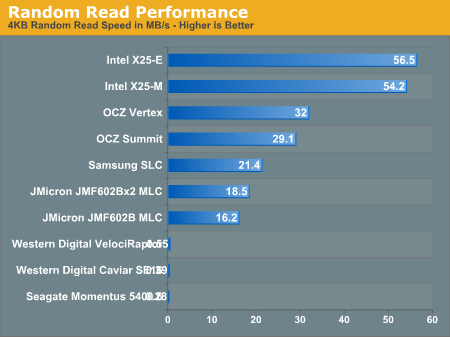
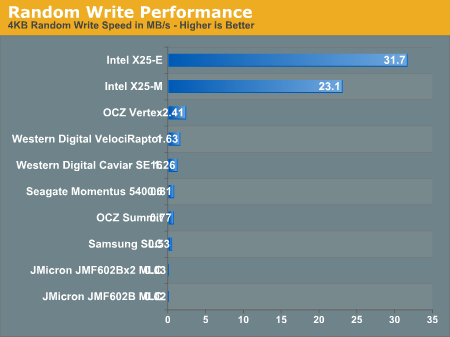
10K RPM drives are not worth it at all anymore. An SSD is a far better investment for an OS drive.

[]http://images.anandtech.com/graphs/thessdanthology_031809001858/18639.png[/IMG]

[]http://images.anandtech.com/graphs/thessdanthology_031809001858/18640.png[/IMG]

18641.png


18643.png

Those first two charts (which I turned off) hardly matter for a system drive, it's those last two (shown) that are holding your computer's speed back, so the above paints a better picture of the difference in speed.

I can do a search (non-indexed) of every single file on my C: in about 3 seconds, 150,000 files @ 30GB, means the average file is 200KB, so you throw in a few few near GB files and the average file quickly becomes under 100KB, the thing you need for a system drive is fast 4KB read/write, you're always reading random cookie/ini files from program to program. It's not uncommon for a 50-100 meg program to use a couple thousand files (which I am not a fan of, I hate it when a 1-2GB game uses like 50,000 files on your HDD, but what can you do).
 
So with any luck I should be building a new computer soon. Prob using the $600 one in the OP.

But for now, I need to get a new monitor. Any brands to check out, any to avoid? Im looking at around 22"
 
Anton668 said:
So with any luck I should be building a new computer soon. Prob using the $600 one in the OP.

But for now, I need to get a new monitor. Any brands to check out, any to avoid? Im looking at around 22"

I am using a 24" BenQ 1080p monitor. I was really cheap and I find no faults with it.
 
Well I changed my mind again. I'm opting for a i5 system now since it's like only 200 Skr or approximately $30 more expensive.

I'm not going to overclock for now, maybe later on, so I got this motherboard recommended to me: Gigabyte GA-P55M-UD2, micro-ATX. But I was thinking that I could pay a little bit more to get a proper motherboard while I'm at it so I thought I'll get the one that's recommended in the second post of this thread the Gigabyte GA-P55A-UD3. But in the online store that I'm going to order this all for it says that the board is a revision 1.0 one. Does it matter what revision it is?

So just a final check before I order: XFX 5770, i5 750, Corsair XMS3 4GB CL9, Samsung F3 500GB, Antec Three Hundred, Corsair VX550 and the GA-P55A-UD3 with a new NEC EA231WMI. This should be a good computer for CAD-work, Photoshop, Illustrator and maybe even some gaming on a 1920x1080 resolution?
 
Help PC gaf, should I get the ATI 5870? I really want to play BFBC 2 at max with AF and AA @ 1920 x 1080


My current specs are:
windows 7 64bit
4 gig ram
ati 4870 1 gig
i7 920
(some slow down at times with all at high and no AF and AA).
Does HBAO really makes it look even better?
 
Would someone kindly direct me to a decent AM2+ socket quad core? I really don't know too much about what I should be looking for.
 
bigswords said:
Help PC gaf, should I get the ATI 5870? I really want to play BFBC 2 at max with AF and AA @ 1920 x 1080


My current specs are:
windows 7 64bit
4 gig ram
ati 4870 1 gig
i7 920
(some slow down at times with all at high and no AF and AA).
Does HBAO really makes it look even better?

Whatever you get, keep in mind the new nVidia cards are due out in about 2 months and could drive ATI's price way down (maybe 40%+ who knows).
 
I know some people have been having issues with the gray screen crashes for GDDR5 ATI cards (some 5000 cards). There "should" be a hotfix by next week.
 
rossonero said:
Well I changed my mind again. I'm opting for a i5 system now since it's like only 200 Skr or approximately $30 more expensive.

I'm not going to overclock for now, maybe later on, so I got this motherboard recommended to me: Gigabyte GA-P55M-UD2, micro-ATX. But I was thinking that I could pay a little bit more to get a proper motherboard while I'm at it so I thought I'll get the one that's recommended in the second post of this thread the Gigabyte GA-P55A-UD3. But in the online store that I'm going to order this all for it says that the board is a revision 1.0 one. Does it matter what revision it is?

So just a final check before I order: XFX 5770, i5 750, Corsair XMS3 4GB CL9, Samsung F3 500GB, Antec Three Hundred, Corsair VX550 and the GA-P55A-UD3 with a new NEC EA231WMI. This should be a good computer for CAD-work, Photoshop, Illustrator and maybe even some gaming on a 1920x1080 resolution?

If you're buying an Intel processor, do so with the intention of overclocking. Otherwise, you may as well just stick with a Phenom 965.
 
Doytch said:
I know some people have been having issues with the gray screen crashes for GDDR5 ATI cards (some 5000 cards). There "should" be a hotfix by next week.

Thats what the word is. I cant wait. Im not affected by the error too much (played 7 hours of ME1 this weeked wth no crashes) but I just hate the mere idea of knowing that theres something wrong. A fix cant get here soon enough.
 
PCGAF, a question. Not completely related to hardware, but I'm not too sure where else to ask:

Subwoofer placement. If my subwoofer is magnetically shielded, is there any problem placing it ~4" behind my monitor?
 
Lyphen said:
PCGAF, a question. Not completely related to hardware, but I'm not too sure where else to ask:

Subwoofer placement. If my subwoofer is magnetically shielded, is there any problem placing it ~4" behind my monitor?
Hmm... Try asking head-fi.org
 
Anyone have experience ordering from SuperBiiz/ewiz.com? Looks like their prices are a bit lower than newegg for the parts I'm looking at with their 14% off sale. Only thing I hear is that they take significantly longer to ship.
 
NeoUltima said:
Any cheap recommendations for what appears to be an overheating laptop? The situation: I play the games fine, then the framerate totally bombs for like 5-10 minutes, then it goes stable, than bombs again. I don't mean I am going into more intense parts of the games either...I can just stand still and after awhile(does depend on game ofc) it goes to shit.

I think whats happening is the GPU is overheating and 'resting' itself resulting in the crap framerate(?).
You might want to undervolt your CPU. Here's a guide. It's easy to do and there are no negative consequences, no change in performance, nothing. It just takes a bit of time. I managed to get my CPU to drop 20 degrees when playing games.

I also use I8kfan (Dell only) to manually set my fan speeds for different temperatures.

Not sure why your GPU is going to 90 degrees though. I presume you're not overclocking. As said before, you might want to just clean it out. It is possible to force your GPU to not downclock itself, but I wouldn't recommend it if it's running that hot.
 
TheExodu5 said:
If you're buying an Intel processor, do so with the intention of overclocking. Otherwise, you may as well just stick with a Phenom 965.

Hmm is that so? Damn now I have one more thing to think about :lol
 
dynamitejim said:
Ok, so I'm thinking of pulling the trigger on this system:


$604 after rebates.

Any comments?

Looks pretty solid to me. What sort of monitor do you plan on pairing it up with? If you plan on gaming at 1920x1080 or above then I would consider stepping up to the HD5850, otherwise that 5770 will suffice.
 
Had to RMA my 4890, sent it to the company 1.5 weeks ago with overnight UPS, had to call them today to see if they got it. They send me back an e-mail that they got it today and it'll take 2-4 weeks to get it back to me.

I RAGED, ugh I'm never purchasing from HIS again. They fucken suck at customer service. Debating whether to just purchase another card in my downtime or wait for one to be flown in from China. Fuck I'm pissed.
 
rossonero said:
Hmm is that so? Damn now I have one more thing to think about :lol

I was in error. Don't get the Phenom 965! i5 750 even beats it at stock speeds...I was under the impression that it did not.
 
Lyphen said:
PCGAF, a question. Not completely related to hardware, but I'm not too sure where else to ask:

Subwoofer placement. If my subwoofer is magnetically shielded, is there any problem placing it ~4" behind my monitor?

Not a problem.
 
CcrooK said:
So I'm using a ATI Radeon HD 4879 512MB card. What's out there that I can get to upgrade?

I assume you mean 4870. At this moment in time, I think the best card to get is the 5870 (or the 5850 if the 5870 is too expensive. The 5970 is too hot and crossfire still has issues, but it is the single fastest card you can buy. If you're not in a hurry, the Nvidia "GF100" (GTX 3xx) will launch in March, I would guess, and even if you want an ATI card, will most likely cause a slight decline in older card prices.
 
Minsc said:
Those first two charts (which I turned off) hardly matter for a system drive, it's those last two (shown) that are holding your computer's speed back, so the above paints a better picture of the difference in speed.

I can do a search (non-indexed) of every single file on my C: in about 3 seconds, 150,000 files @ 30GB, means the average file is 200KB, so you throw in a few few near GB files and the average file quickly becomes under 100KB, the thing you need for a system drive is fast 4KB read/write, you're always reading random cookie/ini files from program to program. It's not uncommon for a 50-100 meg program to use a couple thousand files (which I am not a fan of, I hate it when a 1-2GB game uses like 50,000 files on your HDD, but what can you do).
It is important to remember how these are different from a standard HD. This article gives some tips on how to get the most out of your investment.

http://www.guru3d.com/article/gskill-falcon-128gb-ssd-review/2
 
Hey PC GAF, I came in here earlier asking for help with an upgrade, but I didn't end up going through with that and things have sort of changed. I've been given the offer (as a rather generous gift) for a Laptop around $900-$1000 to aid me in my study. So naturally I'm looking for something that will at least run current games with middling performance. I'm wondering if you guys have any suggestions?

Right now I'm looking at this: http://www.toshibadirect.com/td/b2c/pdet.to?poid=464434
but honestly I don't know if the i5-430M or GMA HD are any good or not. I'm not expecting awe-inspiring performance. I'd basically just like to be able to play FFXIV when it comes out. No specs on that game yet, but I'm sure it'll be right up there with most games coming out in 2010. My other concern with this laptop is that there's no DVI or HDMI out. It'd be nice to be able to plug into my monitor, but I can go without that function if that's what it takes for a decent performance laptop under $1k.

I'd also like to stay Toshiba, as I've seen excellent hardware reliability in their laptops, whereas other companies who claim to have great hardware reliability
(Apple)
have had something vital crap out within less than 12 months of purchase. I guess you could challenge my anecdotal-evidence-based assertion if you have a really good suggestion, but Toshiba is what I'm thinking at the moment.

EDIT: does this one stack up a bit better? http://www.newegg.com/Product/Product.aspx?Item=N82E16834114743 how about this one? http://www.newegg.com/Product/Product.aspx?Item=N82E16834146613

TL;DR: Looking for a laptop under $1000 decent for running 2010-2011 release games. I'm thinking Toshiba, but I'm open to any suggestions.

 
Alright, I was able to get all of my issues worked out through various means, but a new one has arisen. My display seems to be stuck at 30Hz even though it's capable of 60. Even at 1280x720, it's stuck at 30Hz, making the picture interlaced. Ever heard of this with HDTVs?
 
Can't seem to find this information. USB 3.0 is easy to locate how much current the cables will carry. How much current will SATA 3.0 be able to push to external devices?
 
I just wanted to ask a question, and see some opinions. I have a GTS 250 ... and of course my mobo doesn't have S-PDIF Pass-through for my card, which means when I connect to my TV via HDMI I get no sound.

This wouldn't be a problem if the NVIDIA drivers weren't a pain in the ass. It sends an audio signal even when I set it to disabled, so it blocks analog audio.

I've been trying to think of options, whether or not to buy a sound card, or just a sound system/receiver that I can connect to the built in generic Realtek outputs.

So, I'm wondering should I get something like this: AuzenTech X-Raider (or something similar, but inexpensive) to get audio through HDMI.
 
HappyBivouac said:
Looking for a laptop under $1000 decent for running 2010-2011 release games. I'm thinking Toshiba, but I'm open to any suggestions.

lenovo IdeaPad Y550P should do the trick

it has a i7 cpu and a decent GPU.
 
dynamitejim said:
Ok, so I'm thinking of pulling the trigger on this system:


$604 after rebates.

Any comments?

Please don't buy the G.Skill RAM. I dont' care if it saves you 100 dollars to do so, it's not worth the headache. I've had two friends get that stuff, both had faulty chips, errors, and crashing due to the RAM.
 
Psy-Phi said:
Please don't buy the G.Skill RAM. I dont' care if it saves you 100 dollars to do so, it's not worth the headache. I've had two friends get that stuff, both had faulty chips, errors, and crashing due to the RAM.

Purely anectodal. Luck of the draw. I've had faulty OCZ sticks, but I wouldn't use that as evidence to say that OCZ RAM is bad.

G.Skill has been one of the better RAM manufacturers for a few years now.

Crucial and Mushkin are good as well.

Also, the fact that you use the statement "faulty chips, errors, and crashing" just says it: you have no clue what was wrong.
 
Of course I have no clue, wasn't my system. I just know what they told me, crashing until they replaced the ram. RAM that didnt' work together (both worked without errors alone but not together, while a different brand like Kingston worked in two slots). Blue screen's of death in Vista.

All problems that went away when they replaced it. Both got it from newegg because of the reviews, about 2 months apart from one another for their new i7 systems.

I'm not trying to say anything other than it being anecdotal (which is why I gave the reference of my friends). If I wanted to make a blanket statement about them I would have. If I can steer people clear of a brand that's failed for people I know from a vendor that had the same issue (end of last year), I will try.
 
nah, G.Skill is fine.
edit: although i will be honest, i did have a set fail on me. but while they worked, they worked fine. i guess thats why i always go for corsair.
 
Yup RAM is pretty much luck of the draw, same goes for GPUs. I don't think there's any hard proof that one brand has higher failure rates than the other. You can go by Newegg reviews to get a general idea, but that still only represents a small amount of users.
 
well it looks like the core i7 930 comes out end of this month, i can get that but i have to save up for the 5870 which is four hundred euros here, what does pc gaf say, use the new core i7 with my old hd 4850 till nvidia comes out the gates and prices could drop or wait with building the system till i get a new gpu? i got everything except for a gpu ssd and cpu.
 
Tiduz said:
well it looks like the core i7 930 comes out end of this month, i can get that but i have to save up for the 5870 which is four hundred euros here, what does pc gaf say, use the new core i7 with my old hd 4850 till nvidia comes out the gates and prices could drop or wait with building the system till i get a new gpu? i got everything except for a gpu ssd and cpu.

Wait for nVidia to release their cards so the prices of the ATI models go down. It's your money, so it's best you save it. That's what I'm doing.
 
HappyBivouac said:
Hey PC GAF, I came in here earlier asking for help with an upgrade, but I didn't end up going through with that and things have sort of changed. I've been given the offer (as a rather generous gift) for a Laptop around $900-$1000 to aid me in my study. So naturally I'm looking for something that will at least run current games with middling performance. I'm wondering if you guys have any suggestions?

Right now I'm looking at this: http://www.toshibadirect.com/td/b2c/pdet.to?poid=464434
but honestly I don't know if the i5-430M or GMA HD are any good or not. I'm not expecting awe-inspiring performance. I'd basically just like to be able to play FFXIV when it comes out. No specs on that game yet, but I'm sure it'll be right up there with most games coming out in 2010. My other concern with this laptop is that there's no DVI or HDMI out. It'd be nice to be able to plug into my monitor, but I can go without that function if that's what it takes for a decent performance laptop under $1k.

I'd also like to stay Toshiba, as I've seen excellent hardware reliability in their laptops, whereas other companies who claim to have great hardware reliability
(Apple)
have had something vital crap out within less than 12 months of purchase. I guess you could challenge my anecdotal-evidence-based assertion if you have a really good suggestion, but Toshiba is what I'm thinking at the moment.

EDIT: does this one stack up a bit better? http://www.newegg.com/Product/Product.aspx?Item=N82E16834114743 how about this one? http://www.newegg.com/Product/Product.aspx?Item=N82E16834146613

TL;DR: Looking for a laptop under $1000 decent for running 2010-2011 release games. I'm thinking Toshiba, but I'm open to any suggestions.


This is significantly better than any of those machines and comes from a better brand as well:

http://www.newegg.com/Product/Product.aspx?Item=N82E16834220696

Fast DX 11 graphics, quad core, turbo boost, LED display, HDMI out, you're not going to do better than that imo.
 
Tiduz said:
well it looks like the core i7 930 comes out end of this month, i can get that but i have to save up for the 5870 which is four hundred euros here, what does pc gaf say, use the new core i7 with my old hd 4850 till nvidia comes out the gates and prices could drop or wait with building the system till i get a new gpu? i got everything except for a gpu ssd and cpu.
Motherboard and Processor are the things I don't want to chanage if possible when I build a system (so I look for mobo's that have some legs) usually. You'll definitley benefit from holding out with your older GPU, what's another 30 days? Not like the 4850 is trash...
 
Top Bottom