• Hey Guest. Check out your NeoGAF Wrapped 2025 results here!

"I need a new PC!" 2010 Edition

Are there any great sub $250 3d cards out right now that are worth upgrading from a GTS250?

It's only been 10 months since I built my rig and bought that card (because it was a great sub $250 3d card at the time) and normally I like to go 2-3 years per videocard upgrade...but when I built the rig I was playing tv-out on a 720p tv and since then I've gotten a 1080p monitor and switched my gaming to that. I can usually maintain 60fps in most games (not Crysis) when not much is going on, but I always get dips in heavy action and wouldn't mind upgrading to smooth my pc gaming out. But obviously since it hasn't even been a year I don't want to spend a lot. So I'm just looking to see if there are any cards that will give a BIG performance boost for a not BIG price?
 
Slo said:
So is there any reason to go 64-bit Windows7 over 32 bit if I just plan on gaming?

You should be asking yourself the opposite. 64-bit is better, plain and simple. If your worried about compatibility issues, don't be. I have no issues over hundreds and hundreds of games.
 
Bebpo said:
Are there any great sub $250 3d cards out right now that are worth upgrading from a GTS250?

It's only been 10 months since I built my rig and bought that card (because it was a great sub $250 3d card at the time) and normally I like to go 2-3 years per videocard upgrade...but when I built the rig I was playing tv-out on a 720p tv and since then I've gotten a 1080p monitor and switched my gaming to that. I can usually maintain 60fps in most games (not Crysis) when not much is going on, but I always get dips in heavy action and wouldn't mind upgrading to smooth my pc gaming out. But obviously since it hasn't even been a year I don't want to spend a lot. So I'm just looking to see if there are any cards that will give a BIG performance boost for a not BIG price?

5850s aren't far off that now and its a pretty big step up especially at resolutions like 1080p.
 
TheExodu5 said:
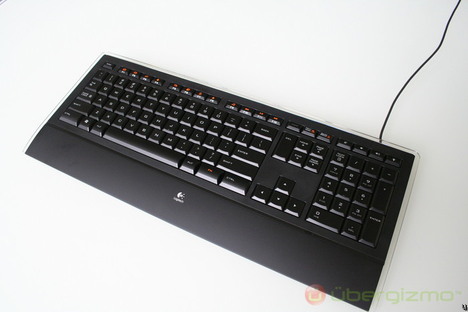
My favorite keyboard ever:

Logitech Illuminated
logitech-illuminated_468.jpg


So you can see the quality of the illumination (this is at one of the lower levels):
logitech-illuminated-keyboard-13.jpg


It's also very thin:
logitech-illuminated-keyboard-3.jpg


The keyboard is also extremely quiet. The keys are like full-sized laptop keys with longer depression. Extremely comfortable to use. The design of the keyboard is also the most elegant I've seen. It's pricey though, for what you get.


thanks for the suggestion on this :)
picked one up today and its about as sexy as you can get for a keyboard, highly recommended for anyone else looking for a new keyboard
 
mr stroke said:
thanks for the suggestion on this :)
picked one up today and its about as sexy as you can get for a keyboard, highly recommended for anyone else looking for a new keyboard

I just ordered my pc parts for a new build. Consider this keyboard bought.
 
I always get the $10 cheap-o keyboards because I break them so much. I've gotten a lot better than I used to be, but I still go through 3-4 keyboards a year.
 
Planning on getting a laptop soon for school.
Here's what I'm looking for:

- 13 to 15 inches (13 preferably)
- Run Starcraft II and Diablo III stable
- Good battery life

Looking for something around 800$ (US).
Anyone have recommendations, Thanks.

Another question, can most laptops run just on the power cord without the battery?
 
BravoSuperStar said:
I always get the $10 cheap-o keyboards because I break them so much. I've gotten a lot better than I used to be, but I still go through 3-4 keyboards a year.
3-4 keyboards a year? <wow>
I keep each keyboard 3-4 years :lol
 
I honestly want to buy that thin logitech keyboard but I feel like I'm addicted to having a screen on the logitech g15 keyboard now even though it's the lamest shit ever. I load up winamp behind games I'm playing and can manage all that through the keyboard screen, which is nice. I don't even use any other features on this. It has a macro recorder or some shit that I don't need. The only nice thing is a switch to disable the windows key.
 
Just slapped a Q9550 into my Gigabyte EP43-DS3L, sorted out a few odd memory blue screens by upping the voltage to my RAM to 2.0v instead of the mobo's default 1.8v (the ram is rated at 2.1v). Anyway, just thought I'd ask what temp ranges my chip should be within at default with a Zalman copper fan on top. Forgot the model of the fan but it looks like

210674694.jpg


Temp idle is in the upper 30's centigrade. While playing Stalker and Lost Planet it hit 53 centigrade. Seems a little high to me. Just wondering if I should try to apply the thermal paste again. Followed Arctic Silver's guide for the quad by making the single line across the top of the heat spreader. Up until now I've always just spread it evenly with a card and then put the heat-sink on top.

Asking because I will be OC'ing it after I know everything's running stable and fine for at least a week.

Pretty impressed with the difference in PoP (2008), Lost Planet and Stalker so far (upgraded from an e6400 which I had clocked at a mild OC of 2.6).
 
Lkr said:
is there any reason for me to get a 'gaming' mouse, if i play at low res and don't need extra buttons?
DPI buttons can be super handy for certain games. I have a Microsoft X5 which is fairly cheap for a "gaming" mouse.
 
Okay, so I need to decide between these two mobos.

The Gigabyte one I can get for about $30 cheaper due to a combo special they have going on and free shipping. http://www.newegg.com/Product/Product.aspx?Item=N82E16813128392

The ASUS one seems to be more recommended overall, but it's about $30 more expensive. http://www.newegg.com/Product/Product.aspx?Item=N82E16813131603

The complaints on the Gigabyte one tend to be that there's only one PCI-e x16 slot, but I don't care so much about that. Also, some are saying that it's really a micro-ATX. Several mention that it didn't recognize the right setting for their RAM (defaulting to 1333 when it should have been 1600), but that this was correctable in the BIOS. Finally, someone mentioned that the CPU was too close to the memory, creating issues with overheating.

Should I spend the extra $30 and go with the better reviewed product? Or are some of these complaints really not that big a deal?

Thanks in advance!
 
I think the Gigabyte mobo is a fine choice. Don't sweat it!

Edit: And that Asus mobo is out of stock so looks like that takes care of that.
 
Orellio said:
I think the Gigabyte mobo is a fine choice. Don't sweat it!

Edit: And that Asus mobo is out of stock so looks like that takes care of that.
Sure, but I can get it from Tiger Direct for about the same price. :)
 
CPU being too close to the RAM could be a problem if ever you put in a 3rd party cooler. I might spend the extra $30 just because you don't really want to be changing motherboards down the road.
 
Linkzg said:
I honestly want to buy that thin logitech keyboard but I feel like I'm addicted to having a screen on the logitech g15 keyboard now even though it's the lamest shit ever. I load up winamp behind games I'm playing and can manage all that through the keyboard screen, which is nice. I don't even use any other features on this. It has a macro recorder or some shit that I don't need. The only nice thing is a switch to disable the windows key.


good to know, I was close to getting the G15 but was wondering what I would ever use that little screen for, I guess it doesn't sound like there is any real use for it?
 
Lkr said:
is there any reason for me to get a 'gaming' mouse, if i play at low res and don't need extra buttons?

I use a $20 Microsoft corded mouse. 2 buttons and a wheel, about as simple as it gets. Y'know what, it works absolutely fine.
 
Lkr said:
is there any reason for me to get a 'gaming' mouse, if i play at low res and don't need extra buttons?

DPI switcher is nice at times. In terms of performance, I'd recommend anything with 800DPI or more and you have a decent mouse. Thumb buttons are great. I use them for grenades or knifing in FPS, and as my push-to-talk key in Ventrilo.

MX518 is an awesome mouse.
http://www.newegg.com/Product/Product.aspx?Item=N82E16826104178&Tpk=mx518

I'm sure you can find it for cheaper than that.

edit: I also always recommend that people use a good plastic mouse pad. Much lower friction and makes a huge difference in FPS.
 
Argh... so I came up with what made sense to me as a config:

spec3.png


But just for comparison I went to the HP site (I have a discount their through my employer) and I was able to put the following together for just about the same price (ignoring the monitor, of course):

hpspec.png


And then I went and compared the processors at cpubenchmark.net and got this:

benchmark.png


Am I missing something? I feel like I'd be getting 2 GB more DDR3 RAM at a slightly slower speed, slightly better processor, and a poorer graphics card, without the hassle of assembling the thing.

Am I missing something? Does this make sense?
 
Lkr said:
is there any reason for me to get a 'gaming' mouse, if i play at low res and don't need extra buttons?

Well you'll never truly be a cool kid PC gamer without one. Seriously though the good ones are worth it. I love my Logitech G5.
 
crisdecuba said:
Am I missing something? I feel like I'd be getting 2 GB more DDR3 RAM at a slightly slower speed, slightly better processor, and a poorer graphics card, without the hassle of assembling the thing.

Am I missing something? Does this make sense?
4350 is to 4850 what rollerskates are to the space shuttle. 4350 is in the "do I really need this over an integrated card?" territory. http://www.anandtech.com/video/showdoc.aspx?i=3420&p=4
 
Hate to ask these types of questions, but would now be a good time to sell my xfx gtx 260, before nvidia's new arrivals? It would reduce me to using a x1950xt, until the 58xx drops to msrp.
 
mr stroke said:
good to know, I was close to getting the G15 but was wondering what I would ever use that little screen for, I guess it doesn't sound like there is any real use for it?
I have a G15, and 97% of my use of the screen is to see the time :lol. The other 3% is the media display for seeing the time remaining on any sort of video I'm watching. There are hardcore people who use it for custom stuff in individual games, but I really don't care about that. If I could find something to show my fps and ping in any game that'd be good, but I can't be bothered really. I probably would have just bought something like that thin Logitech one if I knew how useless the G15 screen would be for me.
 
mr stroke said:
good to know, I was close to getting the G15 but was wondering what I would ever use that little screen for, I guess it doesn't sound like there is any real use for it?

There are uses, I just don't use most of them...

The only two I use are the clock and media screen (tells song/video info, time, etc on screen). Some games support it but I have no idea what purpose it serves. Like, in Crysis it shows ammo, current selected power and other things already on the hud on this small screen; why would you look at a little orange screen for this info. There is an RSS reader, thing to tell you if you have email, performance monitor (says % of ram/cpu used), and if you do want to use the macro buttons, it makes it easy to set those up.

It's a fine keyboard and all, that thin logitech one just looks really nice except for the F buttons and no dedicated media buttons.
 
I have a G13 and G15; I use both screens for different monitors. In one is my FRAPS, I don't like the yellow text on screen and it has a nice (for an LED screen of it's quality) line graph history. The other is for Ventrilo information (see who's talking if I don't recognize a voice for example). If I'm offline, I usually use it for CPU/RAM usage reported from Lavalys.

When I played WoW it had some useless info up there that showed your stats. Nice I guess but too much crap crammed into one space.

I use one or the other to navigate playlists but generally I don't leave it on the music screen. The clock is handy though too as I have no clock in eyesight from my PC. But I have a phone next to me always so...not too hard to check.

Overall it's nothing but a novelty that might save you an eyesore on screen or reference something quickly instead of alt-tabbing out. But I bought it more for the ability to hold a bajillion keys down at once because I was sick of my previous keyboard running into that odd problem with 3/4 keys being held down not registering.
 
Anyone got any mouse replacement suggestions? I've had the logitech G5 for a few years now and all of a sudden it started freezing sporadically. Some quick googling confirms that this is a common problem and unless I'm able to get logitech to RMA it, I'm going to have to buy something new. I don't want the latest greatest wired-only gaming mouse. Just something with above average wireless functionality.
 
crisdecuba said:
Am I missing something? Does this make sense?

You're also missing the fact that OC'ing the AMD chip will raise it's performance past any C2Q and that an OEM machine won't let you do any overclocking. Not to mention the shit PSU's that come with OEMs and all the other garbage components they throw in there. The last thing you're missing is you can't look at a single benchmark as a representation of the whole. Certain architectures will excel at certain tasks. From memory the two CPU's should be fairly close in performance.
 
unagisensei said:
Anyone got any mouse replacement suggestions? I've had the logitech G5 for a few years now and all of a sudden it started freezing sporadically. Some quick googling confirms that this is a common problem and unless I'm able to get logitech to RMA it, I'm going to have to buy something new. I don't want the latest greatest wired-only gaming mouse. Just something with above average wireless functionality.

I really am digging my MS Sidewinder X8. First wireless mouse I've had since the MX900. it's a bit on the homely side as mice go, and it's thumb button layout is different from the norm, but it fits my hand so well (it's a got a bit larger ass than the Razer's I've been using). Feels ergonomically designed for comfort, even those odd thumb buttons are just more simple to use. Hope more mice go that route.

But anyway, take a look at it. As wireless mice go, it really doesn't seem like it can be topped for it's price and performance (up to 4000 dpi, 3 dpi buttons for different settings, a tilt wheel, a charge wire that's thin/flexible and magnetic). Got it about a month ago now, and haven't even thought about using my Habu, Lachesis, or Diamondback.
 
So, I'm looking for a set up to work with this case. LIAN LI PC-V351B Black Aluminum MicroATX Desktop Computer Case Budget is around $400-600 or so. Probably on the higher end since I need a copy of Win 7.

Here's what I see so far.

AMD Athlon II X4 620 Propus 2.6GHz Socket AM3 95W Quad-Core Processor
GIGABYTE GA-MA785GM-US2H AM3/AM2+/AM2 AMD 785G HDMI Micro ATX AMD Motherboard

Combo deal for $155.98

If this mobo is good, I have an extra 4 GB of DDR2 ram to use with it. If DDR3 Ram is that much of a step up, I'm open for options for better mobo/ram.

Throw in a 5770 HD (usually around $170 or so?) as well.

I have a HDD and DVD drive of my own of course.

Thoughts? Improvements?
 
mr stroke said:
good to know, I was close to getting the G15 but was wondering what I would ever use that little screen for, I guess it doesn't sound like there is any real use for it?

You can basically put any information you want on it. I had my G15 almost 4 years when the keys stopped working, then I took logitechs offer for 50% off a new keyboard and got the G19.

The screen can basically be used to display any information you want, and sometimes interact with it too. On the g15 I used the LCDSirreal plugin, which I loved. Basically it showed me my CPU usage, RAM usage, volume control, NET in, NET out, date and time. I used the screen buttons to switch my sound output (surround or headset) and very important, when a process was hanging it would display the process and allowed it to be killed with a single button press.

After that I didn't want to be without a screen but didn't like the looks of the new g15. For the g19 there aren't that many plugins, and most games that support it show the information on the resolution of the g15 screen(small). I now use the "Total customizable applet" which allows you to do almost everything with the screen but has by far the worst user interface I've ever seen. This made it quite a lot of work, but I now have a very pretty screen that shows whatever I want to see.
 
Psy-Phi said:
Just slapped a Q9550 into my Gigabyte EP43-DS3L, sorted out a few odd memory blue screens by upping the voltage to my RAM to 2.0v instead of the mobo's default 1.8v (the ram is rated at 2.1v). Anyway, just thought I'd ask what temp ranges my chip should be within at default with a Zalman copper fan on top. Forgot the model of the fan but it looks like

210674694.jpg


Temp idle is in the upper 30's centigrade. While playing Stalker and Lost Planet it hit 53 centigrade. Seems a little high to me. Just wondering if I should try to apply the thermal paste again. Followed Arctic Silver's guide for the quad by making the single line across the top of the heat spreader. Up until now I've always just spread it evenly with a card and then put the heat-sink on top.
Zalman's fans look nice and are usually quiet enough but they don't cool as well as others in the price range. Your temps are fine right now so I wouldn't bother reapplying or getting a new HS.
 
You guys must be rough on keyboards. I was using one so old it was not USB until the puppy decided to eat the cord.
Lkr said:
is there any reason for me to get a 'gaming' mouse, if i play at low res and don't need extra buttons?
people playing quake and cs at minimal resolutions on CRT are using them. The entry level ones are cheap enough that you may as well get one that you are comfortable with unless you are going for the cheapest of oem mice.
 
BravoSuperStar said:
It's true I do verbally and physically abuse them. But it's their own fault for making me die in games.:D

Heh, get an Arvo.

"The Arvo is as good as indestructible thanks to the integrated metal plate. It forgives those little temper tantrums during gaming, and the thump on the edge of the desk that frequently ensues, without so much as a murmur. The rugged metal plate also means it’s perfectly weighted and therefore exceptionally stable."
 
Pics of my new baby. Built by CyberPowerPC.com. They did a good job putting it together. It just took forever to assemble the parts over there. They were waiting on the 80 GB Intel SSD. Almost a month between ordering and receiving.

SPECS:
CPU: Intel(R) CoreT i7-920 2.66 GHz 8M L3 Cache LGA1366
POWERSUPPLY: #635 Watts Power Supplies (Sigma Shark SP-635W PSU - SLI Ready)
MOTHERBOARD: (3-Way SLI Support) GigaByte GA-X58A-UD3R Intel X58 Chipset SLI/CrossFireX Ultra DurableT3 Mainboard Triple-Channel DDR3/1600 ATX Mainboard w/ 7.1 Dobly Audio, eSATA, GbLAN, USB3.0, 2 x SATA-III RAID, IEEE1394a, 4 Gen2 PCIe, 2 PCIe X1 & 1 PCI
VIDEO: ATI Radeon HD 5870 PCI-E 16X 1GB DDR5
MEMORY: 6GB (2GBx3) DDR3/1600MHz Triple Channel Memory Module
CD: Lite-On IHOS 104 4X Blu-Ray Player
CD2: LG 22X DVD+/-R/+/-RW + CD-R/RW Dual Layer Drive
CAS: Apevia X-Dreamer 3 Mid-Tower Gaming Case w/ Side-Panel Window & Temperature Display (Black Color with Black Ring & Blue LED Fan)
FAN: #Asetek LCLC 120 Liquid Cooling System 120MM Radiator & Fan (Extreme Cooling Performance + Extreme Silent at 20dBA)
HDD: Single Hard Drive (80 GB Intel X25-M 2.5 inch SATA Gaming MLC Solid State Disk
HDD2: Single Hard Drive (1.5TB (1.5TBx1) SATA-II 3.0Gb/s 32MB Cache 7200RPM HDD)
MONITOR: ToC Samsung 22" LCD HDTV
OS: Microsoft(R) Windows(R) 7 Home Premium (64-bit Edition)
FLASHMEDIA: INTERNAL 12in1 Flash Media Reader/Writer (BLACK COLOR)
NETWORK: Onboard Gigabit LAN Network
SOUND: HIGH DEFINITION ON-BOARD 7.1 AUDIO

2a65qoh.jpg


34znn1s.jpg


mx1z06.jpg


ruqmut.jpg


117edsh.jpg


28l3l8z.jpg
 
Oni Jazar said:
No I did not.
Are you going to rework those wires?

Mine from a page back.
mvjn6g.jpg


I was going to get one from Ibuypower, then decided to build myself.
How is the liquid cooling on your pc?
What are your temps like?
 
Violater said:
Are you going to rework those wires?
I was going to get one from Ibuypower, then decided to build myself.
How is the liquid cooling on your pc?
What are your temps like?

No the wires are OK where they are for now. You've got your cables hidden away nicely, but I've got a smaller case. I haven't played with it much but so far the cooling has been excellent and the temps haven't really gone above 32 degrees.
 
Oni Jazar said:
No the wires are OK where they are for now. You've got your cables hidden away nicely, but I've got a smaller case. I haven't played with it much but so far the cooling has been excellent and the temps haven't really gone above 32 degrees.
Ok cook, when you run prime I would be curious to see the temps
 
The Logitech G5 has on-the-fly DPI switching and has a good feel to it.

Also, the Razer Deathadder is what I use primarily and I have yet to find a more comfortable mouse. It's only drawback, for me, is that it doesn't have on-the-fly DPI switching.
 
Oni Jazar said:
Pics of my new baby. Built by CyberPowerPC.com. They did a good job putting it together. It just took forever to assemble the parts over there. They were waiting on the 80 GB Intel SSD. Almost a month between ordering and receiving.

SPECS:
CPU: Intel(R) CoreT i7-920 2.66 GHz 8M L3 Cache LGA1366
POWERSUPPLY: #635 Watts Power Supplies (Sigma Shark SP-635W PSU - SLI Ready)
MOTHERBOARD: (3-Way SLI Support) GigaByte GA-X58A-UD3R Intel X58 Chipset SLI/CrossFireX Ultra DurableT3 Mainboard Triple-Channel DDR3/1600 ATX Mainboard w/ 7.1 Dobly Audio, eSATA, GbLAN, USB3.0, 2 x SATA-III RAID, IEEE1394a, 4 Gen2 PCIe, 2 PCIe X1 & 1 PCI
VIDEO: ATI Radeon HD 5870 PCI-E 16X 1GB DDR5
MEMORY: 6GB (2GBx3) DDR3/1600MHz Triple Channel Memory Module
CD: Lite-On IHOS 104 4X Blu-Ray Player
CD2: LG 22X DVD+/-R/+/-RW + CD-R/RW Dual Layer Drive
CAS: Apevia X-Dreamer 3 Mid-Tower Gaming Case w/ Side-Panel Window & Temperature Display (Black Color with Black Ring & Blue LED Fan)
FAN: #Asetek LCLC 120 Liquid Cooling System 120MM Radiator & Fan (Extreme Cooling Performance + Extreme Silent at 20dBA)
HDD: Single Hard Drive (80 GB Intel X25-M 2.5 inch SATA Gaming MLC Solid State Disk
HDD2: Single Hard Drive (1.5TB (1.5TBx1) SATA-II 3.0Gb/s 32MB Cache 7200RPM HDD)
MONITOR: ToC Samsung 22" LCD HDTV
OS: Microsoft(R) Windows(R) 7 Home Premium (64-bit Edition)
FLASHMEDIA: INTERNAL 12in1 Flash Media Reader/Writer (BLACK COLOR)
NETWORK: Onboard Gigabit LAN Network
SOUND: HIGH DEFINITION ON-BOARD 7.1 AUDIO
Nice rig :D
 
GAF PLZ HELP!

Need a new PC (duh).. Would like something that's as cheap as possible as I'm only looking to play LOTRO on my 32" LCD. Max resolution can be 720p and I would be fine with that, but I would like to max out the graphics options - DX10, etc..

On the lotro site, their recommended specs are:

OS: Windows® XP / Vista
Processor: Intel Pentium® 4 2.8 GHz or equivalent
RAM: 1 GB
Video: 128 MB NVIDIA® GeForce® FX 6800 or ATI® Radeon® X850
Disk Space: 10 GB available
DirectX: DirectX® 9.0c
Optical Drive: 2x DVD-ROM
Internet: Broadband DSL/Cable


I was able to do a custom search on NCIX.com and found an equivalent PC for about $850, but I may not need that powerful of a PC if I'm going to have the max output at 720p - so I need a tech's help here. :(

Any recommendations on what GPU/CPU combo I should go with that would maintain that output and also allow for all the DX10 goodness?
 
mr stroke said:
thanks for the suggestion on this :)
picked one up today and its about as sexy as you can get for a keyboard, highly recommended for anyone else looking for a new keyboard

In a Dutch comparison article, I read that the Illuminated keyboard tended to flex a bit in the middle. Did you notice this?
 
mentalfloss said:
GAF PLZ HELP!

Need a new PC (duh).. Would like something that's as cheap as possible as I'm only looking to play LOTRO on my 32" LCD. Max resolution can be 720p and I would be fine with that, but I would like to max out the graphics options - DX10, etc..

On the lotro site, their recommended specs are:

OS: Windows® XP / Vista
Processor: Intel Pentium® 4 2.8 GHz or equivalent
RAM: 1 GB
Video: 128 MB NVIDIA® GeForce® FX 6800 or ATI® Radeon® X850
Disk Space: 10 GB available
DirectX: DirectX® 9.0c
Optical Drive: 2x DVD-ROM
Internet: Broadband DSL/Cable


I was able to do a custom search on NCIX.com and found an equivalent PC for about $850, but I may not need that powerful of a PC if I'm going to have the max output at 720p - so I need a tech's help here. :(

Any recommendations on what GPU/CPU combo I should go with that would maintain that output and also allow for all the DX10 goodness?

Not sure about the exchange rate, but those specs are so old even the cheapest computer should exceed those specs by a large margin, except in the graphics card. And only because they will have integrated graphics instead of a dedicated card.
 
Top Bottom