• Hey Guest. Check out your NeoGAF Wrapped 2025 results here!

"I need a new PC!" 2010 Edition

Mystery said:
Almost done building this monster.


i7 980x (hex-core with hyperthreading)
eVGA Classified 3-Way SLI motherboard
3x2GB Corsair Dominator 2000mhz DDR3 RAM
2 GTX 480 Hydro Copper FTW video cards
Silverstone 1500W Strider Series PSU
160GB Intel X-25M G2 MLC II boot drive
3x 1.5 TB Seagate Barracuda capture/storage drive

Shitload of water cooling stuffs.

That's insane. If only I could afford a machine like that; water cooling terrifies me though. Good luck with your overclocking.
 
0O2Lw.jpg


Good, Bad or Ugly? (Canadian dollar by the way. Taxes/shipping included in Grand Total).

I can lower the price by $50 or so if I buy a few of the items locally but yeah, $700 is what I can aim for with this build.

Haven't purchased it yet, just looking at various options.
 
shagg_187 said:
0O2Lw.jpg


Good, Bad or Ugly? (Canadian dollar by the way. Taxes/shipping included in Grand Total).

I can lower the price by $50 or so if I buy a few of the items locally but yeah, $700 is what I can aim for with this build.

Haven't purchased it yet, just looking at various options.

What, can that card fit in Antec 300?
 
Zaraki_Kenpachi said:
Does it find it in the bios?
I have no idea. How would I find that out? I tried going through the "Advanced BIOS Options" or w/e but to no luck.

EDIT: My other HDD apparently uses an IDE cable. Is that really dated and that's why my mobo doesn't have a slot for it? My mobo also doesn't have a standard green mouse port (which prevents me from using my wireless Logitech kb/m combo -_-).
 
Kenak said:
I have no idea. How would I find that out? I tried going through the "Advanced BIOS Options" or w/e but to no luck.

EDIT: My other HDD apparently uses an IDE cable. Is that really dated and that's why my mobo doesn't have a slot for it? My mobo also doesn't have a standard green mouse port (which prevents me from using my wireless Logitech kb/m combo -_-).

You can pick up a PS/2 to USB convertor for cheap at Radio Shack.

Every mobo should have an IDE slot. If not, you can get an IDE to SATA convertor online for a few dollars as well.
 
Mystery said:
You can pick up a PS/2 to USB convertor for cheap at Radio Shack.

Every mobo should have an IDE slot. If not, you can get an IDE to SATA convertor online for a few dollars as well.
Woo thanks.
 
I have a Corsair 800D case and I want to add 3 additional fans to the top mounting area. My question is which direction should they be pushing the air? Should they be intake fans or exhaust fans?
800dfans.jpg


The top 3 120s in the above image are the ones I am thinking of installing. The bottom fan is intake, the back fan is exhaust. Do the top three fans need to be intake or exhaust?
 
Calm Killer said:
I have a Corsair 800D case and I want to add 3 additional fans to the top mounting area. My question is which direction should they be pushing the air? Should they be intake fans or exhaust fans?

The top 3 120s in the above image are the ones I am thinking of installing. The bottom fan is intake, the back fan is exhaust. Do the top three fans need to be intake or exhaust?

You want them blowing the hot air out of your case. It will also stop a big dust build up.
The bottom fan is more then sufficient as an intake.
 
Felix Lighter said:
That's insane. If only I could afford a machine like that; water cooling terrifies me though. Good luck with your overclocking.


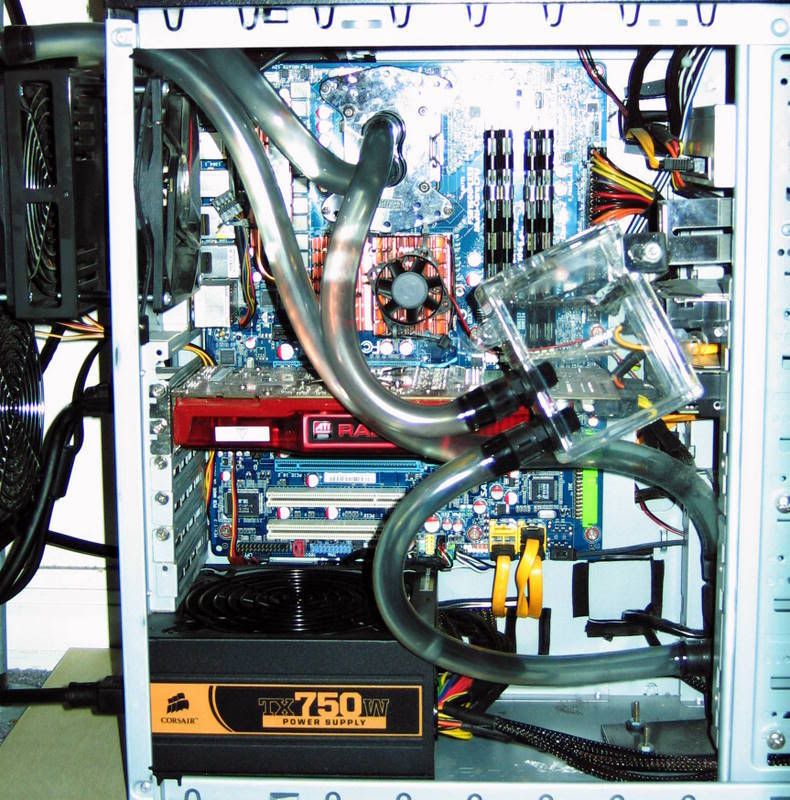
No need to be terrified of water cooling. It's relevantly easy to set up, especially if you're only doing a single loop for a cpu. As long as you have everything hooked together properly you shouldn't have to worry about leaks (I did have one leak early on, but I caught it and dried out my parts before any damage was done). The most trouble is getting it to fit in a mid sized case. I have a single loop set up in my antec 900, and things are pretty snug.

interior.jpg


If you like to tinker around with your computer water cooling can really add another layer of things to do; I'd really recommend it for the added fun of that, alone.


Mystery said:
Shitload of water cooling stuffs.

I'm jealous of all your tubes.
 
Kenak said:
So I started to put Windows onto my system, but ran into an error. Apparently the computer isn't reading my HDD, because when I try and choose a storage device, the menu shows no option to choose. I have a 500GB WD HDD hooked up via one SATA power cable and one SATA cable running to the mobo.

I have another HDD, but the mobo doesn't support the cable that runs from the HDD to it, so I cannot hook it up.

Halp D:

I had a similar problem with installing windows 7 on my tablet pc. I ended up having to download a driver for my HDD/Mobo and put that on a USB key and select it at the install screen.
or
You may need to go into the BIOS and change how SATA is set up. Like if it has AHCI enabled but you can select something like Compatibility Mode you could try that.
or
You may just need a Bios update.
 
GAF,

I've got a OC'ed Q6600 and an old-ass 640 MB 8800GTS in my machine. From what I've gathered the CPU is decent enough for most modern games, but the GPU is getting outdated. What cards should I be looking at if I want to upgrade? I don't have a set budget, but I try to avoid paying too much money for only marginal increases.
 
hey guys, back again! I've shifted my thoughts on my gaming PC, and I wanted to get some opinions on the matter. I'm thinking about connecting my future gaming PC to my 42" 720p plasma, and using an Xbox 360 controller to play the games (FPS, 3rd-person, action-adventure, etc.). I know using a kb/m is how PC games are supposed to be played, but I'd rather play on a larger screen with better sound, a more comfortable interface, and lounging on my couch surrounded by comfy pillows rather than confined to my 23" LCD monitor at my computer chair.

So, first off, would games like Fallout 3, Bioshock 2, MW2, Metro 2033, etc. look better than the console counterparts if they're played on a PC with a decent GPU (5770) on a 720p monitor, or will they look worse since PC's generally aren't supposed to be played in said resolution? I'm hoping to get a build for as cheap as possible that will look and perform better than a PS3/Xbox 360 on my 720p TV.

Would it feel the same as playing on an Xbox 360, using the Xbox 360 controller w/ RF adapter? Mainly concerned with game compatibility and controller lag and the like.

Thanks for the help guys, hopefully I'll have a better idea of what I'm getting into before the Steam sales are up heh.

 
fushi said:
GAF,

I've got a OC'ed Q6600 and an old-ass 640 MB 8800GTS in my machine. From what I've gathered the CPU is decent enough for most modern games, but the GPU is getting outdated. What cards should I be looking at if I want to upgrade? I don't have a set budget, but I try to avoid paying too much money for only marginal increases.


The GTX 295 plays nice with a Q6600. Prices should've dropped on them after Fermi was introduced. I'll be selling a BFG manufactured one for about 300USD next week. Let me know if you're interested.

MoreCraiger said:
hey guys, back again! I've shifted my thoughts on my gaming PC, and I wanted to get some opinions on the matter. I'm thinking about connecting my future gaming PC to my 42" 720p plasma, and using an Xbox 360 controller to play the games (FPS, 3rd-person, action-adventure, etc.). I know using a kb/m is how PC games are supposed to be played, but I'd rather play on a larger screen with better sound, a more comfortable interface, and lounging on my couch surrounded by comfy pillows rather than confined to my 23" LCD monitor at my computer chair.

So, first off, would games like Fallout 3, Bioshock 2, MW2, Metro 2033, etc. look better than the console counterparts if they're played on a PC with a decent GPU (5770) on a 720p monitor, or will they look worse since PC's generally aren't supposed to be played in said resolution? I'm hoping to get a build for as cheap as possible that will look and perform better than a PS3/Xbox 360 on my 720p TV.

Would it feel the same as playing on an Xbox 360, using the Xbox 360 controller w/ RF adapter? Mainly concerned with game compatibility and controller lag and the like.

Thanks for the help guys, hopefully I'll have a better idea of what I'm getting into before the Steam sales are up heh.

The games will look/perform better than their console counterparts. However, you might have a hard time playing, due to the fact that PC shooters don't generally have aim-assist, and console shooters do. 720p is a standard resolution for PC games, so there shouldn't be any issue there.

Edit: Bioshock 2 doesn't support the 360 pad. You'd have to use software like XPadder in order to play it, and in my experience those types of software can be buggy at times.
 
Ahh okay, thanks Mystery! Is there a good solution with a kb/m when you want to lounge on the couch? I'd love to play StarCraft 2 on my plasma, and it obviously won't work with the controller, but I'm not sure how I would play apart from being hunched over my coffee table!
 
Mystery said:
The GTX 295 plays nice with a Q6600. Prices should've dropped on them after Fermi was introduced. I'll be selling a BFG manufactured one for about 300USD next week. Let me know if you're interested.
I'd be interested, but you'd have to ship it across the pond, which is a nogo for most sellers.

I tried looking up some local prices here and the only one I found asked $500+ for a new one, which is rather steep.
 
MoreCraiger said:
Ahh okay, thanks Mystery! Is there a good solution with a kb/m when you want to lounge on the couch? I'd love to play StarCraft 2 on my plasma, and it obviously won't work with the controller, but I'm not sure how I would play apart from being hunched over my coffee table!


Though fairly low tech, I just sit on the couch with the keyboard on my lap and the mouse on the armrest (with a large book and a mouse pad). I like to have my mouse up a little as when I play with it down beside me my hand cramps up.

The other option, and I've done this before, is just use a board, maybe 3' by 1', set on your lap, with keyboard and mouse on that.
 
My payment didn't go through because I forgot I have a bill to pay (on vacation, have to wait to get back) and, of course, I started reading things.

Is this MoBo really enough for my system?

*Recommend me better Ram.

0u9Zz.png


Hoping to make this my final build and forget about it until I get back.
 
1)Basic Desktop Questions

Budget: up to $800 preferably around $700 (from U.S.)
Main Use: Gaming, college, and autocad
Monitor Resolution: 1920 x 1080 (I think..)
List SPECIFIC games that you MUST be able to play: the witcher, ff 14, far cry 2, possibly crysis warhead ??

Sorry but i am very computer literate. Is it better for me to buy a case with a psu already or buy them separately. Also i was looking at a AMD phenom II X type processor but I am not sure which one. Will I be over my head if I try to build my own and is this a bad deal?

http://www.newegg.com/Product/Product.aspx?Item=N82E16883147258

Thanks in advance!
 
I need some advice on these parts I have in mind. This PC will mainly be for gaming and nothing else, so I plan to overclock the CPU to around 3.6 GHz. For now I'm gonna gut another PC and use it's PSU and GPU, a Corsair 620W and a Radeon 4870. I do plan on upgrading the GPU somewhere down the line, like a GTX 480 for example. Or should I just buy a new GPU now? My reference game for this PC will be FFXIV.

The CPU cooler (seems kinda pricey, can I get away with less?) and memory I'm not too sure about for what I plan to do with this thing.

mloyef.jpg

16grgi.jpg
 
filipe said:
My payment didn't go through because I forgot I have a bill to pay (on vacation, have to wait to get back) and, of course, I started reading things.

Is this MoBo really enough for my system?

*Recommend me better Ram.

0u9Zz.png


Hoping to make this my final build and forget about it until I get back.
Get 4GB or 8GB. 6GB will have 1 stick not running dual channel and in addition most 6GB packs are for i7 which uses a different voltage than i5 / AM3. Just nab 4GB now and 4GB later if you need it.

**Why did you go back down to a Quad? The whole point of going AMD for AM3 is the hexacore for you because I though you wanted to be more future proof? Otherwise I would have gone with the i5...
Why must you keep changing components :[

Mobo prices work something like this:
$100 base board
+$10 USB 3.0
+$30 extra PCI-E lane
+$10 more USB slots
+$5 external SATA ports
+$30 addition PCI-E lane
+$10 better power and voltage regulation
+$__ for other features and so on.


shagg_187 said:
Good, Bad or Ugly? (Canadian dollar by the way. Taxes/shipping included in Grand Total).

I can lower the price by $50 or so if I buy a few of the items locally but yeah, $700 is what I can aim for with this build.

Haven't purchased it yet, just looking at various options.
Very good choices. Try swapping RAM for ones that have a heatsink at the same price. G.skill or Corsair preferred.

Also upgrade to a 500GB Samsung or 640GB WD Black.
Seiki said:
I need some advice on these parts I have in mind. This PC will mainly be for gaming and nothing else, so I plan to overclock the CPU to around 3.6 GHz. For now I'm gonna gut another PC and use it's PSU and GPU, a Corsair 620W and a Radeon 4870. I do plan on upgrading the GPU somewhere down the line, like a GTX 480 for example. Or should I just buy a new GPU now? My reference game for this PC will be FFXIV.

The CPU cooler (seems kinda pricey, can I get away with less?) and memory I'm not too sure about for what I plan to do with this thing.

mloyef.jpg

16grgi.jpg
Grab a CM Hyper TX3 like filipe has. Zalman coolers don't cool as well for the price and they will cut you when you install them.
 
Hazaro said:
Grab a CM Hyper TX3 like filipe has. Zalman coolers don't cool as well for the price and they will cut you when you install them.

:lol :lol :lol :lol :lol

I cut the hell out of myself installing the first (and last) Zalman I ever bought. Those fins are goddamn sharp.
 
Wallach said:
:lol :lol :lol :lol :lol

I cut the hell out of myself installing the first (and last) Zalman I ever bought. Those fins are goddamn sharp.
:lol
Try sanding a 9500 without realizing that the fins are making 20 cuts across your hand :lol
 
Kenichi said:
1)Basic Desktop Questions

Budget: up to $800 preferably around $700 (from U.S.)
Main Use: Gaming, college, and autocad
Monitor Resolution: 1920 x 1080 (I think..)
List SPECIFIC games that you MUST be able to play: the witcher, ff 14, far cry 2, possibly crysis warhead ??

Sorry but i am very computer literate. Is it better for me to buy a case with a psu already or buy them separately. Also i was looking at a AMD phenom II X type processor but I am not sure which one. Will I be over my head if I try to build my own and is this a bad deal?

http://www.newegg.com/Product/Product.aspx?Item=N82E16883147258

Thanks in advance!

Don't get the case with the Power supply. The power supply that comes with it usually aim for higher power than it can handle. I bought a case with a 500W power supply and it wouldn't handle my graphic card. Had to swap it with another build of mine (basic PC. Didn't need the massive power supply) that had a power supply that I bought separately and it worked like a charm.
 
Where's a good i7 860 overclocking guide?

Mine's currently at stock running prime95 at 55C. Idle is at around 28C. Seems like I have quite a bit of headroom..
 
Kenichi said:
1)Basic Desktop Questions

Budget: up to $800 preferably around $700 (from U.S.)
Main Use: Gaming, college, and autocad
Monitor Resolution: 1920 x 1080 (I think..)
List SPECIFIC games that you MUST be able to play: the witcher, ff 14, far cry 2, possibly crysis warhead ??

Sorry but i am very computer literate. Is it better for me to buy a case with a psu already or buy them separately. Also i was looking at a AMD phenom II X type processor but I am not sure which one. Will I be over my head if I try to build my own and is this a bad deal?

http://www.newegg.com/Product/Product.aspx?Item=N82E16883147258

Thanks in advance!
http://techreport.com/articles.x/19159/2
-I'm unsure how much AutoCAD benefits from 6 cores vs 4 but if it uses them upgrade to a 1055 (+$100)
-Swap in a 4870/4890/5770 (this will fit your budget and currently handle those games decently) The next step up is a 5850/GTX 470 but those are in the $300 range currently. In ~September there will be the nVidia refresh with a GTX 460 hopefully ending the price gouging and lack of a card between $150 and $300 (hopefully retails $200-$220)

Putting together a PC is quite easy, just follow instructions and you are good to go. Everything only fits in 1 place and you only have 8 parts. There are the 15 and 40 minute vids in my post.
fugimax said:
Where's a good i7 860 overclocking guide?

Mine's currently at stock running prime95 at 55C. Idle is at around 28C. Seems like I have quite a bit of headroom..
Not sure about 'good' but this one is simple and cuts to the chase
http://www.overclock.net/intel-cpus/605848-i5-i7-lga-1156-overclocking-guide.html

I'd suggest starting down 3 notches on your BIOS from the voltages he provided and working your way up by 100Mhz each boot.

His way is how I used to OC though, just ram the thing to what you want :lol
I'm too impatient for increasing FSB by 5 or 10.

For a much more comprehensive guide here is one: http://www.xbitlabs.com/articles/mainboards/display/asus-p7p55d-deluxe.html
When it comes to clocks and voltages you can start on this page: http://www.xbitlabs.com/articles/mainboards/display/asus-p7p55d-deluxe_11.html#sect0
 
Hazaro said:
http://techreport.com/articles.x/19159/2
-I'm unsure how much AutoCAD benefits from 6 cores vs 4 but if it uses them upgrade to a 1055 (+$100)
-Swap in a 4870/4890/5770 (this will fit your budget and currently handle those games decently) The next step up is a 5850/GTX 470 but those are in the $300 range currently. In ~September there will be the nVidia refresh with a GTX 460 hopefully ending the price gouging and lack of a card between $150 and $300 (hopefully retails $200-$220)

Putting together a PC is quite easy, just follow instructions and you are good to go. Everything only fits in 1 place and you only have 8 parts. There are the 15 and 40 minute vids in my post.

Thank Hazaro. Oh a couple more quick questions if you don't mind... So I should stick with the econobox and just upgrade the video card (I don't think 6 cores is necessary to run Autocad well). Also, would I get much benefit upping to 4 gigs of ram instead of 2?
 
of4yva.jpg

$587.91

I'm thinking of ways to cut a few corners and drop down below 500. Any ideas without really hurting performance?
 
fushi said:
GAF,

I've got a OC'ed Q6600 and an old-ass 640 MB 8800GTS in my machine. From what I've gathered the CPU is decent enough for most modern games, but the GPU is getting outdated. What cards should I be looking at if I want to upgrade? I don't have a set budget, but I try to avoid paying too much money for only marginal increases.
I'm in the same boat as fushi. I got a Q6600 overclocked to 3.2 GHz; I might be able to push it further, but my cooler isn't all that great. Zalman 9700 NT =/ My Asus ATI Radeon HD 4650 is outdated as his, I think. I'm not looking to drop a lot on a new graphics card, just enough get better FPS. Here are my other specs, if it helps:
Memory: Corsair XMS3 DHX 1066 2GBx4
Mobo: Asus P5E3 Premium
 
_Bro said:
$587.91
I'm thinking of ways to cut a few corners and drop down below 500. Any ideas without really hurting performance?


Honestly, you would probably be better off saving a little bit more. But...

But...if you want to do this, for sure go for this processor..
http://www.newegg.com/Product/Produ...03843&cm_re=athlong_x3-_-19-103-843-_-Product
It is a tri-core, for cheaper then what you are paying for your dual core.

Get this monitor - Widescreen, 19":
http://www.newegg.com/Product/Product.aspx?Item=N82E16824254023

I would also get this power supply:
http://www.newegg.com/Product/Product.aspx?Item=N82E16817371029

This case:
http://www.newegg.com/Product/Product.aspx?Item=N82E16811233061
 
BrassMonkey1010 said:
Honestly, you would probably be better off saving a little bit more. But...

But...if you want to do this, for sure go for this processor..
http://www.newegg.com/Product/Produ...03843&cm_re=athlong_x3-_-19-103-843-_-Product
It is a tri-core, for cheaper then what you are paying for your dual core.

Get this monitor - Widescreen, 19":
http://www.newegg.com/Product/Product.aspx?Item=N82E16824254023

I would also get this power supply:
http://www.newegg.com/Product/Product.aspx?Item=N82E16817371029

This case:
http://www.newegg.com/Product/Product.aspx?Item=N82E16811233061
What ended up costing more was the power supply since what I had was a combo deal with the harddrive. It only costs $10 more, though.

Just realized I'm also going to need an OS. Well, I can't really think about any of this until my next paycheck anyways so maybe there will be some price drops and new combo deals.
 
Hazaro, that X4 wasn't suppose to be in there. Only JUST noticed it after you mentioned it. I was just comparing prices and stuff. Silly me.

This is suppose to be the final build. I technically have $100 bucks playing ground right here as my budget was $1500 after taxe. I might splurge on an SSD (though that would be a "at the moment" purchase). Luckily I can pick all of these things up from the Canada Computers in my city.

With that extra $100-ish box, should I put it towards anything? Better RAM, MoBo, fans, the like?

Also, I have a soundcard at home ready to install and possibly a wireless network card, does that change anything up or am I still good?

And either than that, does everything finally look ok? lol.

VBuJc.png
 
Mystery, congrats on you new super-awesome rig. Great overclocks, too.

For the benchmarking, do you take requests? As in you mention what games you have for benchmarking, and we (I :lol ) could suggest want we would like to see.

Also, you should get an avatar - makes it easier to ID you when scrolling quickly through a thread.
 
Boonoo said:
What sort of temps are you getting on your CPU at load?

Max temps are about 62c at load, which is still about 40c from TJMax.

DennisK4 said:
Mystery, congrats on you new super-awesome rig. Great overclocks, too.

For the benchmarking, do you take requests? As in you mention what games you have for benchmarking, and we (I ) could suggest want we would like to see.

Also, you should get an avatar - makes it easier to ID you when scrolling quickly through a thread.

Thanks. If I have the game, I'll bench it. I have Assassin's Creed, Batman: AA, CoD4, Crysis, Crysis Warhead, Crysis Wars, L4d, The Orange Box, Bioshock 2, Dead Space, Mass Effect 2, Prototype, Star Wars The Force Unleashed, and Rainbow Six Vegas 2.
 
I've just upgraded my pc, just need a good gpu to put the cherry on top but I'm so pleased at what I've got. Phenom x4 965 is a little beast. So easy to build a pc, first time I did it yesterday.

I just want a meaty graphics card now.
 
filipe said:
Hazaro, that X4 wasn't suppose to be in there. Only JUST noticed it after you mentioned it. I was just comparing prices and stuff. Silly me.

This is suppose to be the final build. I technically have $100 bucks playing ground right here as my budget was $1500 after taxe. I might splurge on an SSD (though that would be a "at the moment" purchase). Luckily I can pick all of these things up from the Canada Computers in my city.

With that extra $100-ish box, should I put it towards anything? Better RAM, MoBo, fans, the like?
Like I said before an SSD will be one of the biggest impacts you can have right now. Otherwise you are good. I'd get an Intel 40GB V personally, however an 80GB version should come out a similar price within 5 months (If you can wait that long).
Heavy's Sandvich said:
I've just upgraded my pc, just need a good gpu to put the cherry on top but I'm so pleased at what I've got. Phenom x4 965 is a little beast. So easy to build a pc, first time I did it yesterday.
Grats! :D
Kenichi said:
Thank Hazaro. Oh a couple more quick questions if you don't mind... So I should stick with the econobox and just upgrade the video card (I don't think 6 cores is necessary to run Autocad well). Also, would I get much benefit upping to 4 gigs of ram instead of 2?
I would really think so. It is rather memory intensive yes? Not enough RAM would cause your program to write to the HDD instead of the RAM and that would make it chug.
I only mention 6 core just because if AutoCAD did use 6 cores you'd get a ~50% performance boost. The quad core listed there is a fine CPU however.
liltony822 said:
I'm in the same boat as fushi. I got a Q6600 overclocked to 3.2 GHz; I might be able to push it further, but my cooler isn't all that great. Zalman 9700 NT =/ My Asus ATI Radeon HD 4650 is outdated as his, I think. I'm not looking to drop a lot on a new graphics card, just enough get better FPS. Here are my other specs, if it helps:
Memory: Corsair XMS3 DHX 1066 2GBx4
Mobo: Asus P5E3 Premium
Here's the deal on Single GPUs worth buying listed by lowest performance ->> highest: (Off the top of my head)
~$90: 5670 -> 9800GTX+ -> 4850 -> used 4870/4890
~$130: 5750 512MB
~$150: 5770-GTX 260
~$200: NOTHING
~$250: NOTHING
~$300: 5850/GTX470
~More: 5870-GTX480

As you can see there's a big gap in the middle. nVidia should be releasing a GTX460 at the $200 and $220 price points (Most likely $230 and $250 after shipping + markup). Problem is that is 2-3 months from now, maybe later.
If you want $100 value I'd nab a used 4870. Other than that it's not a great time to buy a GPU unless you are spending $300.
 
Mystery said:
Thanks. If I have the game, I'll bench it. I have Assassin's Creed, Batman: AA, CoD4, Crysis, Crysis Warhead, Crysis Wars, L4d, The Orange Box, Bioshock 2, Dead Space, Mass Effect 2, Prototype, Star Wars The Force Unleashed, and Rainbow Six Vegas 2.
I would love to see some Crysis/Crysis Warhead benches with lots of AA. 4xAA and 8xAA (Not that edge AA).
 
Top Bottom