• Hey Guest. Check out your NeoGAF Wrapped 2025 results here!

"I need a new PC!" 2010 Edition

Okay, I'm setting up my computer now.

I have the Hyper 212+ with the MSI 870A-G54 AM3 motherboard.

The illustration on the heatsink instructions say to install standoffs around the CPU, but those holes are already used by screws holding a black thing that surrounds the cpu.

There are no other screws nearby to put standoffs.

EDIT: Okay, I'm reading online that you need to remove the black plastic plate.
 
Has anyone tried putting a GTX 460 in an Antec Three Hundred case? I was just wondering if it fit in nicely or if it was too long.
 
demosthenes said:
This may be a stupid question.

But if you have a case w/ the PSU slot at the bottom, do you just invert the PSU?
It depends on the case. If it has a vent with a dust guard on the bottom, you can run the PSU with the intake coming from underneath. The PSU should be able to be mounted either way and it ends up simply being a matter of preference.
 
demosthenes said:
Hmm, alright. Just wondering, if they were to slip and fall, would they fall into the fan due ot the domed shape cover? Based on your view/look/installation of them?

Probably not. Dude, don't worry! If you see what it looks like I doubt youll be worried. :P
 
Toki767 said:
Has anyone tried putting a GTX 460 in an Antec Three Hundred case? I was just wondering if it fit in nicely or if it was too long.

I don't want to read a manual or website right now but I can definitely say that when installed, the GTX 460 is almost 2 inches shorter than my mATX motherboard which in itself is a little shorter than others as it does not use or even reach the right most set of standoffs. It really is a nice small card
 
How much pressure should I be putting on the screws of the 212+? There is way too much room between the screws and the standoffs. I can tighten two on one side down, but then if I apply pressure to the other side, I'm afraid I'll hurt the CPU.
 
Hazaro said:
Looks excellent.
As for PSUs you should check REAL reviews (jonnyguru, [H], or the other site with a PSU load tester) and go on a model by model basis. For example one of the Rosewill 500w revisions was actually a good buy. But in general Rosewill is not what you really want.

Corsair is about the only real exception since it outsources a limited range of PSU's (With 400w being the minimum) to CWT and Seasonic, two fairly good companies that are following Corsair's decision to not really skimp on anything important.
It's really easy to recommend since I know all their units are good, rated at 100,000 hours @ 50C, and have a 5 year warranty with good service.

Antec and Seasonic are also good, but don't nearly have the market presence or brand that Corsair does. They usually regulate themselves to lower wattages as well.

Thanks for the info.
 
FleckSplat said:
How much pressure should I be putting on the screws of the 212+? There is way too much room between the screws and the standoffs. I can tighten two on one side down, but then if I apply pressure to the other side, I'm afraid I'll hurt the CPU.

i turn my screw driver 5 times for diagonally opposite screws. dont try to screw down on one, just a tiny bit, then even out with opposite screws. Oh and, if you have a tight case, you may want to wire your motherboard before installing that :P Don't know what case youre using and if it has a cutout back plate or removable mobo tray though.
 
I got the SSD installed and reinstalled Win7. I love it but Im having an issue. I have an i5 750 CPU and am only getting 6.9 in processor speed on the Windows Experience Index. Prior to this, I was getting a 7.6 I think.

Did I not download something? I cant seem to find what I need.
 
ghostmind said:
What is an affordable (sub $150) quality case, that has great cooling and lots of internal space for GTX460 SLI cards?

Currently looking at:

http://www.newegg.ca/Product/Product.aspx?Item=N82E16811103011


http://www.newegg.ca/Product/Product.aspx?Item=N82E16811119160


Recommendations?

HAF-X is the latest in the HAF line and can have no less than FOUR 200mm fans!

http://www.newegg.com/Product/Product.aspx?Item=N82E16811119225&Tpk=HAF-X

If it is available in your country the fractal design R2 is a great silent case, but you will have to buy an extra 140mm fan for the top. However I would recommend filling both top fan slots with 140mm fans, both front 120mm front slots and the 140mm in the floor of the case for great air flow. The fractal fans are quiet but are slow spinning at 600rpm, which is the reason you need so many. I love the look of the R2, even if it is a rip off of the Antec P180.
 
Looking for a bit of advise on ATI cards. My buds card is dead and he's looking at ordering another, I figured it's easiest to stay with ATI as he's not a computer guy and dealing with conflicts or anything that may arise will not be a good situation. Long story short, best ATI card for the buck? Non-gamer but learning photo editing.
 
Fixed1979 said:
Looking for a bit of advise on ATI cards. My buds card is dead and he's looking at ordering another, I figured it's easiest to stay with ATI as he's not a computer guy and dealing with conflicts or anything that may arise will not be a good situation. Long story short, best ATI card for the buck? Non-gamer but learning photo editing.

I loved my ATIs but for the non-gamer who doesn't care about running benchmarks and just needs to get work done then maybe this might be good: http://www.newegg.com/Product/Produ...t-_-DesktopGraphicsVideoCards-_-14127368-L04D

its a $30 card with a $20 rebate so that's 9.99 bucks just to drive your monitor
 
Toki767 said:
Has anyone tried putting a GTX 460 in an Antec Three Hundred case? I was just wondering if it fit in nicely or if it was too long.

I have an 8800GT in my case on a micro ATX mobo, and while it's a tricky fit with wires run amok, it fits fine. The GTX 460 is .75" shorter, so there'll be no issues. THe 8800 somewhat conflicted with one HDD slot, though, so just a warning if you actually plan to use all 6(?) HDD slots--the longer card kinda got in the way. The shorter 460 may not have that issue though.
 
The recent Steam sales and variety of PC games coming out has motivated me to get back into PC gaming, but it's been so long since I worried about CPUs and video cards I might need a bit of advice on what to avoid if I can help it.

Basically the sort of games I'm looking to play are things like Battlefield BC2, Arma II, Dragon Age etc. I'm not after a super computer, but something that will run those games without spending silly money.

So what sort of CPU and video card should I be starting with? I'm in NZ btw, so I'm sure the prices will be a bit different down here.
 
Fixed1979 said:
So I don't know anything about photo editing, but from your suggestion the video card has no baring over the quality of the display of photos?
Not unless you use the d-sub. Sometimes the cheap cards have shitty analog output.
 
Fixed1979 said:
So I don't know anything about photo editing, but from your suggestion the video card has no baring over the quality of the display of photos?

If he's just editing photos and not doing actual video transcoding stuff then yeah, any card that has the DVI or HDMI output his monitor needs will do.
 
Okay, I'm trying to make an HTPC for my ma. Needs to have HDMI out for video/audio, do 1080p and I'm looking at a budget of about $500 and I'd basically be ordering everything from Newegg. Suggestions for builds? Kinda wanna do an i5 build...
 
lastplayed said:
The recent Steam sales and variety of PC games coming out has motivated me to get back into PC gaming, but it's been so long since I worried about CPUs and video cards I might need a bit of advice on what to avoid if I can help it.

Basically the sort of games I'm looking to play are things like Battlefield BC2, Arma II, Dragon Age etc. I'm not after a super computer, but something that will run those games without spending silly money.

So what sort of CPU and video card should I be starting with? I'm in NZ btw, so I'm sure the prices will be a bit different down here.

If you're looking to get a decent computer without spending a ton of money, I'd recommend going over the OP of this thread and the one on somethingawful here http://forums.somethingawful.com/showthread.php?threadid=3241890

Both should give you a solid foundation upon which to start out. Just go over the different recommended value/performance builds in each and see which mish mash of compatible parts gives you the most value.
 
Can someone tell me if this is right?

http://i29.tinypic.com/2n20kty.jpg


Prior to today, I was getting a 7.4 or 5 in processor speed in WEI and now Im getting a 6.9 after reinstalling Windows 7 to an SSD. I changed no settings in the BIOS except to set the SATA controller to AHCI.

I also went to my motherboards website and got the latest chipset. That did absolutely nothing.
 
My build:

281x9pk.jpg


A bit expensive - roughly $2,200 all total, but there are multiple places I can cut back if need be.

Thoughts? Suggestions?


Now to ponder...
 
Dammit!

I booted up for the first time and everything seems to be working. All fans on, mobo lights on, HDD and DVD drives light up/eject. But no display.

The graphics card fan activates, but nothing displays. Weird.
 
ghostmind said:
My build:

A bit expensive - roughly $2,200 all total, but there are multiple places I can cut back if need be.

Thoughts? Suggestions?


Now to ponder...

HAF 932 seems kind of overkill for your build. I would get the 922 and save 30-40$. The 922 is a huge mid-tower case that will even fit a 5970. You can then re-invest that savings into a P6X58D-E which has USB 3.0 and SATA 6 for future proofing. just a thought.
 
Salaadin said:
Can someone tell me if this is right?

http://i29.tinypic.com/2n20kty.jpg


Prior to today, I was getting a 7.4 or 5 in processor speed in WEI and now Im getting a 6.9 after reinstalling Windows 7 to an SSD. I changed no settings in the BIOS except to set the SATA controller to AHCI.

I also went to my motherboards website and got the latest chipset. That did absolutely nothing.

Is it possible that you accidentally locked your multiplier at 15 when you were in the bios? That's what appears to be the problem.

Edit: Here check this out. http://www.overclockers.com/forums/showthread.php?t=635614

Same symptoms and it looks like loading "optimized defaults" solved the issue.
 
FleckSplat said:
Dammit!

I booted up for the first time and everything seems to be working. All fans on, mobo lights on, HDD and DVD drives light up/eject. But no display.

The graphics card fan activates, but nothing displays. Weird.

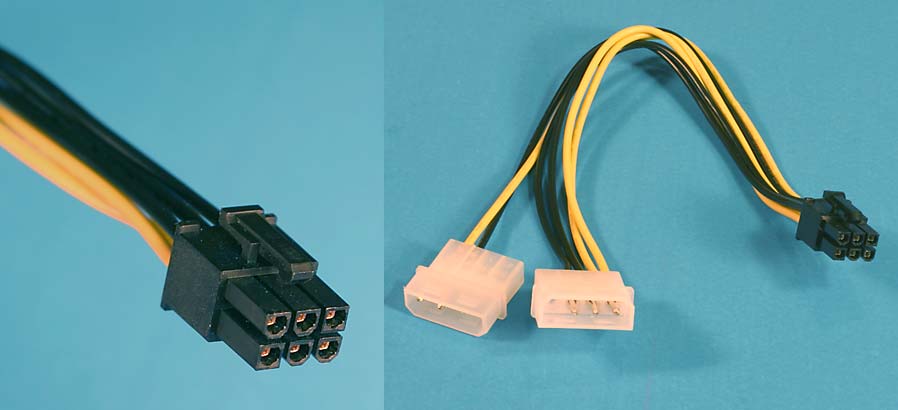
Do you have both 6-pin connectors plugged in to the power supply?
 
FleckSplat said:
There is a two-pin connector that was bundled with the two PCI x16 power connectors. Do I need to plug that in to get the display working?

Your power supply will have one of these on th left. plug it in to the card
pcie6.jpg


If your power supply has a second one just like it, plug it in as well. Make sure they're from separate rails/cables if you can. If your power supply only has one of the above, use this thing on the right that came with your card
 
Hmm looks like i'm late in replying... Are you using DVI? Use the one up top beside the VGA and HDMI ports instead of the one by itself. Or vice versa
 
Where do I plug the ends of the molex connecters? I plugged it into the cables that also lead to my power supply and still no video.

Yes, I'm using DVI.
 
FleckSplat said:
Where do I plug the ends of the molex connecters? I plugged it into the cables that also lead to my power supply and still no video.

Yes, I'm using DVI.

Okay, so you have both these plugged in with power right? My 6-pin PCIe power connector also has a little 2-pin sticking out at the end of it which I did not plug in.
14_thumb.jpg


I just removed my DVI cable from the middle DVI slot and put it on the one that was sitting by itself and it didn't work. So maybe try moving your cable to a different port?
15_thumb.jpg
 
Okay let me try.

EDIT: Nope.

Does it matter that the molex adapter feels really loose and the top middle pin is empty?

EDIT: Well, I'm going to bed. I'll try again in the morning.
 
ghostmind said:
My build:

http://i31.tinypic.com/281x9pk.jpg[/IMG

A bit expensive - roughly $2,200 all total, but there are multiple places I can cut back if need be.

Thoughts? Suggestions?


Now to ponder...[/QUOTE]

I find the keyboard a bit tacky. I'd get something generic with media keys because I personally couldn't care less if my keyboard had an LCD tacked on it.

If you really want to be special just get something basic with backlighting.

Looks like you got a beast there.
 
demosthenes said:
I hate to be a noob, but I've never done it, would you just put them where I cricled?

http://tinypic.com/r/25urxh4/3
An alternate solution to adhering small heatsinks is to use a mix of thermal paste and super glue. That's what I did for my 8800GT.
Monroeski said:
Slowly, slowly getting closer. How does this build look?

jt19xz.jpg


I do have a Microcenter nearby, so I could get the processor there for a bit cheaper. May also switch to this RAM, as it looks more or less the same to me, is a bit cheaper, and is red. Also thinking about adding a 212+ cooler.
Grab a 212+ from microcenter. Grab a 1GB GTX460.
Look at: Antec 300/900, CoolerMaster HAF cases, CM 690/692. See if you like any of those.

Think about nabbing an AMD x6 1055T (Wait for the 95W version to come out soon if you can) and this ASUS mobo: http://www.newegg.com/Product/Product.aspx?Item=N82E16813131631
Even though you can save $100 on the i7, you still pay $100 more for the motherboard. In addition for most I think the upgrade path and respectable performance of the x6 is great. I've been on the fence for quite a while and unless one needs heavy CS4/5 usage and emulation... the x6 is the CPU to get. The 95W version is what finally tipped me over. Both CPUs are great, but I think the x6 now is a slightly better choice.
leroidys said:
Hey pc gaf... so I bit the bullet and started building a computer. Here's what I have so far. If anybody could confirm that all the parts are compatible, and anywhere I could cut costs, that would be great.

34j8z2v.jpg


I still need a case though. I would like to get whatever is cheapest that doesn't look like ubergamer dogshit.
Grab a 500GB Samsung drive. More space, faster, costs the same.
CPU wise nab a 1055T if you

Think about nabbing an AMD x6 1055T (Wait for the 95W version to come out soon if you can) and this GB mobo: http://www.newegg.com/Product/Product.aspx?Item=N82E16813128443
I've been on the fence for quite a while and unless one needs heavy CS4/5 usage and emulation... the x6 is the CPU to get. The 95W version is what finally tipped me over. Both CPUs are great, but I think the x6 now is a slightly better choice.

Case wise look at: Antec 300/900, CoolerMaster HAF cases, CM 690/692. See if you like any of those.
Monroeski said:
I just noticed on the main page for this Gigabyte x58A-ud3r mobo, which seems pretty popular, it lists the memory standard as "DDR3 2200/1333/1066/800," but people seem to be pairing it with 1600 and 2000. How does that work? Moving down to that mobo instead of the ASUS would save me about $30, so I'm curious.
Memory chips are overclocked and there's some certification nonsense you need to do. All boards short of possibly dirt cheap mobos from Intel should support overclocked memory. Some boards can run into max FSB problems, but I don't think this is a problem as it's not as harshly linked to FSB? I could be wrong on that.
demosthenes said:
This may be a stupid question.

But if you have a case w/ the PSU slot at the bottom, do you just invert the PSU?
You can if you want and the screws still line up. Usually the PSU will have enough space to draw in air and its no problem to have the fan facing down.
FleckSplat said:
How much pressure should I be putting on the screws of the 212+? There is way too much room between the screws and the standoffs. I can tighten two on one side down, but then if I apply pressure to the other side, I'm afraid I'll hurt the CPU.
Don't worry about it. My CPU has 95 lbs of force on it. You'll be fine.
grap3fruitman said:
Okay, I'm trying to make an HTPC for my ma. Needs to have HDMI out for video/audio, do 1080p and I'm looking at a budget of about $500 and I'd basically be ordering everything from Newegg. Suggestions for builds? Kinda wanna do an i5 build...
Dedicated HTPC? If so you can realllllllly cut back on what you need.
http://www.newegg.com/Product/Product.aspx?Item=N82E16813135233
http://www.newegg.com/Product/Product.aspx?Item=N82E16819103698

I'm not the best person to ask, but for solely video playback you need a bare minimum since there are mobos (like the one I linked) that have onboard video specifically for just that. You really don't have to spend much at all.
ghostmind said:
My build:

281x9pk.jpg


A bit expensive - roughly $2,200 all total, but there are multiple places I can cut back if need be.

Thoughts? Suggestions?
Make sure you have the new Intel 80GB (Hope that's the right one): http://www.newegg.com/Product/Product.aspx?Item=N82E16820167027
I won't tell you to nab an x6 since you are going SLi.

I will tell you to get a Hyper 212+ from Amazon / Microcenter for $30 though.
And swap RAM to 6GB of G.Skill 1600 for a little bit less.

*Also if you don't have a Microcenter near you check out some forums like Anandtech Buy/Sell and look up a 930 there to save some money, or try to get someone else to buy it for you. There's also someone on GAF selling it for $220, but I can't vouch for them.
http://www.neogaf.com/forum/showpost.php?p=22426048&postcount=245
You could also try to have someone here nab it for you.
FleckSplat said:
Dammit!

I booted up for the first time and everything seems to be working. All fans on, mobo lights on, HDD and DVD drives light up/eject. But no display.

The graphics card fan activates, but nothing displays. Weird.
Double check all your connections (Mobo 4/8 pin power, GPU secure, RAM secure, all connections, etc. Then check them again. Make sure they are snug.)

Try to boot again. If that doesn't work then unplug the PC and hold down the power button for 20 seconds. Replug and try to boot. If that doesn't work try it 2 more times holding the power button for 1 minute / having the PSU turned on / off.
projekt84 said:
I find the keyboard a bit tacky. I'd get something generic with media keys because I personally couldn't care less if my keyboard had an LCD tacked on it.
The G15 is a really nice keyboard. Even if you don't use any of its 90 features it's still very nice.

 
Can someone help me customize a $400-$600 dollar gaming computer? I don't even know where to start. This will be mainly used for playing FFXIV.
 
Just finished building/setting up my new PC.
So impressed with it. Especially compared to what I was running.

Can't wait for some games to finish downloading on Steam :lol

Click for full size


:D

Only one minor hiccup when building.

The connectors said the orange was power switch, but the cables said red was power switch. So when I first tried to power on it wasn't connected right, 30 second fix. Aside from that no issues. Not bad for a first time builder.
 
WEGGLES said:
Just finished building/setting up my new PC.
So impressed with it. Especially compared to what I was running.

Can't wait for some games to finish downloading on Steam :lol

http://imgur.com/IIsJal.jpg

:D
Wow, that looks very spacious. I'm jealous. :lol Enjoy the new machine!

So I have to ask, what's a good LED fan? I'm not even sure why I want one, but everyone else seems to always put them in like it's how you know you have a gaming pc. :lol
 
MCX said:
Can someone help me customize a $400-$600 dollar gaming computer? I don't even know where to start. This will be mainly used for playing FFXIV.
Toki767 said:
http://i28.tinypic.com/2nu6pgn.jpg
That's the build I'm currently using courtesy of Hazaro and putting a few tweaks on.
I've 'slightly' updated and combined both lists. What are you changing?

As for $600 today this is what I would get.
http://secure.newegg.com/WishList/PublicWishDetail.aspx?WishListNumber=19717308
Use "HDDSAMSUNG1" for $15 off the 1TB.

FFXIV is surprisingly intensive so if possible I'd stretch your GPU to a 5770 (or used 4870/GTX 260) and grab a 212+ to overclock the quad. It also seems to have an odd issue or two with ATi cards.

For general I made this...
A55hA.jpg


*Reposting*
1)Basic Desktop Questions
Budget: Price Range + Country
Main Use: Gaming, Video editing, or just general usage
Monitor Resolution: What resolution will you be playing your games at? Are you going to upgrade later?
List SPECIFIC games that you MUST be able to play: Self Explanatory

2)General Guide on what to buy (Summer)
Hazaro's buying guide (July, 2010)
De facto internet standard. Accept no substitutes :D
Tech Report Builders Guide!
A very good basic guide that has been updated for Summer. Has alternative options and many price points.

3) 15 minute video how-to
http://vimeo.com/5685229
40 minute how-to
http://www.tested.com/news/video-how-to-build-the-best-1500-gaming-pc-step-by-step/152/

4) Prospective laptop buyers please fill this out and ask their forum as well.
http://forum.notebookreview.com/wha...ould-i-buy-form-must-read-before-posting.html
 
Hazaro said:
I've 'slightly' updated and combined both lists. What are you changing?
You know what I just noticed...I started with your budget build, but wanted to "future-proof" it a little more and ended up almost the same as your high end build. :lol

I'm actually trying to decide between a 1055t and a 965. My gut tells me to go for the 1055t just because you never know when those two extra cores will come in handy and I'd rather pay a little more now than pay a lot more later.
 
Toki767 said:
You know what I just noticed...I started with your budget build, but wanted to "future-proof" it a little more and ended up almost the same as your high end build. :lol

I'm actually trying to decide between a 1055t and a 965. My gut tells me to go for the 1055t just because you never know when those two extra cores will come in handy and I'd rather pay a little more now than pay a lot more later.
I'd wait for the 95W 1055T. A few sites are taking pre-orders so it should hopefully be out in 1-3 weeks.
 
Top Bottom