
-
Hey Guest. Check out your NeoGAF Wrapped 2025 results here!
You are using an out of date browser. It may not display this or other websites correctly.
You should upgrade or use an alternative browser.
You should upgrade or use an alternative browser.
"I need a new PC!" 2010 Edition
- Thread starter Spy
- Start date
Hazaro said:
That's very specific. Nice link. Thanks.
So, yeah. From what I can see, for gaming, Moore's law has been beaten to a bloody corpse. Guess I will pick up a 460 GTX. Still gonna give Newegg at least one more week to include JC 2 with either the Gigabyte or MSI though.
Would something like this be good? Also, is 4GB of memory enough? and does upgrading to the Radeon 5870 create any bottlenecks anywhere else? would 650w still be enough for that card? ThanksHazaro said:MC seems awesome :[
RTS games are actually taxing since they push the CPU very hard.
And because you say RTS I have to say to go with an i5-750. Overclock it to 4+Ghz.
Add on this mobo: http://www.newegg.com/Product/Product.aspx?Item=N82E16813131621
and upgrade the PSU to a Corsair 750w (SLi GTX 460 later)
http://i.imgur.com/m1nHQ.jpg
Value wise a 1GB GTX460 will run most games at 4xAA, high/max settings/60FPS @ 1080p. Is that acceptable for $230? IF not you can upgrade now, but value wise it's not the best thing you can do. If you only want to run 1 card you can save a bit on the mobo also and get something like this: http://www.newegg.com/Product/Product.aspx?Item=N82E16813128412
You can also keep the PSU down to the 650W version.
If you have some spare money you can toss in a 80 or 128GB SSD (Intel,C300, or WD Blue), or can wait for the prices to come down near the end of this year.
Something to note is that Socket 1156 is probably going to see a refresh of current hardware, but not entirely new CPU's. However for pure gaming and especially RTS I don't expect AMD to have a more powerful 4 core solution soon.
*Also the GTX460 can output video and audio via HDMI so playing on your HDTV is entirely possible if you like. Monitor wise a 22-24" 1080p will run you about $150-$180 for a TN panel from ASUS/ACER/Samsung
Processor Intel Core i5-750 Lynnfield 2.66GHz 8MB L3 Cache LGA 1156 95W Quad-Core Processor BX80605I5750 $200
MotherBoard ASUS P7P55D-E LGA 1156 Intel P55 SATA 6Gb/s USB 3.0 ATX Intel Motherboard $150
Memory G.SKILL Ripjaws Series 4GB (2 x 2GB) 240-Pin DDR3 SDRAM DDR3 1600 (PC3 12800) Desktop Memory Model F3-12800CL9D-4GBRL $99
Graphics XFX HD-587X-ZNFV Radeon HD 5870 (Cypress XT) 1GB 256-bit DDR5 PCI Express 2.1 x16 HDCP Ready CrossFireX Support Video Card $380
Sound Creative 70SB073A00000 7.1 Channels 24-bit 96KHz PCI Interface Sound Blaster X-Fi XtremeGamer $100
Storage SAMSUNG Spinpoint F3 HD103SJ 1TB 7200 RPM 32MB Cache SATA 3.0Gb/s 3.5" Internal Hard Drive -Bare Drive $75
Optical SAMSUNG Black 22X DVD+R 8X DVD+RW 16X DVD+R DL 22X DVD-R 6X DVD-RW 12X DVD-RAM 16X DVD-ROM 48X CD-R 32X CD-RW 48X CD-ROM 2MB Cache SATA DVD Burner LightScribe Support - OEM $23
Cooling COOLER MASTER Hyper 212 Plus Intel Core i5 & Intel Core i7 compatible RR-B10-212P-G1 120mm "heatpipe direct contact" Long life sleeve CPU Cooler $50
Case Rosewill CRUISER Black Gaming ATX Mid Tower Computer Case with Side Panel Window, comes with Four Fans-1x Front Blue LED 120mm Fan, 1x Top Blue LED 120mm Fan, 1x Rear 120mm Fan, 1x Side Blue LED 190mm Fan $70
Power Supply CORSAIR CMPSU-650TX 650W ATX12V / EPS12V SLI Ready CrossFire Ready 80 PLUS Certified Active PFC Compatible with Core i7 Power Supply $90
Wireless D-Link DWA-552 IEEE 802.11g, IEEE802.11n Draft 2.0 32-bit PCI Xtreme Desktop Adapter Up to 300Mbps Wireless Data Rates Wi-Fi Protected Access (WPA, WPA2) $45
Thermal Paste Tuniq TX-2 Cooling Thermal Compound $5
Windows 7 Microsoft Windows 7 Home Premium 64-bit 1-Pack for System Builders - OEM $100
Total $1,387
REV 09 said:Would something like this be good? Also, is 4GB of memory enough? and does upgrading to the Radeon 5870 create any bottlenecks anywhere else? would 650w still be enough for that card? Thanks
Processor Intel Core i5-750 Lynnfield 2.66GHz 8MB L3 Cache LGA 1156 95W Quad-Core Processor BX80605I5750 $200
MotherBoard ASUS P7P55D-E LGA 1156 Intel P55 SATA 6Gb/s USB 3.0 ATX Intel Motherboard $150
Memory G.SKILL Ripjaws Series 4GB (2 x 2GB) 240-Pin DDR3 SDRAM DDR3 1600 (PC3 12800) Desktop Memory Model F3-12800CL9D-4GBRL $99
Graphics XFX HD-587X-ZNFV Radeon HD 5870 (Cypress XT) 1GB 256-bit DDR5 PCI Express 2.1 x16 HDCP Ready CrossFireX Support Video Card $380
Sound Creative 70SB073A00000 7.1 Channels 24-bit 96KHz PCI Interface Sound Blaster X-Fi XtremeGamer $100
Storage SAMSUNG Spinpoint F3 HD103SJ 1TB 7200 RPM 32MB Cache SATA 3.0Gb/s 3.5" Internal Hard Drive -Bare Drive $75
Optical SAMSUNG Black 22X DVD+R 8X DVD+RW 16X DVD+R DL 22X DVD-R 6X DVD-RW 12X DVD-RAM 16X DVD-ROM 48X CD-R 32X CD-RW 48X CD-ROM 2MB Cache SATA DVD Burner LightScribe Support - OEM $23
Cooling COOLER MASTER Hyper 212 Plus Intel Core i5 & Intel Core i7 compatible RR-B10-212P-G1 120mm "heatpipe direct contact" Long life sleeve CPU Cooler $50
Case Rosewill CRUISER Black Gaming ATX Mid Tower Computer Case with Side Panel Window, comes with Four Fans-1x Front Blue LED 120mm Fan, 1x Top Blue LED 120mm Fan, 1x Rear 120mm Fan, 1x Side Blue LED 190mm Fan $70
Power Supply CORSAIR CMPSU-650TX 650W ATX12V / EPS12V SLI Ready CrossFire Ready 80 PLUS Certified Active PFC Compatible with Core i7 Power Supply $90
Wireless D-Link DWA-552 IEEE 802.11g, IEEE802.11n Draft 2.0 32-bit PCI Xtreme Desktop Adapter Up to 300Mbps Wireless Data Rates Wi-Fi Protected Access (WPA, WPA2) $45
Thermal Paste Tuniq TX-2 Cooling Thermal Compound $5
Windows 7 Microsoft Windows 7 Home Premium 64-bit 1-Pack for System Builders - OEM $100
Total $1,387
I have no experience with soundcards so I dunno about spending 100 on that. I mean, do you have a fancy receiver and speaker setup you're hooking this up to? In the same price range and budget I'd think about putting that money towards an SSD instead, but that's just me.
The Rosewill cases are "budget" cases and they're very polarizing... Some people swear by them while others hate them. There's a ton of great Antec and Coolermaster cases that sometimes drop to that price range during sales so it might be an option. Rosewill have only recently been releasing their better cases so not a lot of sites will have detailed, un-biased reviews of them whereas the other brands will have reviews/user impressions all over the web.
Maybe someone that just bought intel could comment on your other parts. Otherwise I think it's great and if I had that same budget I'd probably buy 90% the same parts
Salaadin said:How much does overclocking improve FPS when gaming? Is it worth it when the majority of my PC time is spent gaming?
Most game titles at 1680 x 1050 & higher resolutions with high graphical settings are GPU bound. Overclocking your video card helps, but overclocking your CPU does diddly squat in those situations.
thanks for the input. i'm actually planning on using headphones most of the time, so i wasn't sure if i needed a dedicated soundcard or not. I may swap the case out then, i wasn't aware that Rosewill was a budget brand.kagete said:I have no experience with soundcards so I dunno about spending 100 on that. I mean, do you have a fancy receiver and speaker setup you're hooking this up to? In the same price range and budget I'd think about putting that money towards an SSD instead, but that's just me.
The Rosewill cases are "budget" cases and they're very polarizing... Some people swear by them while others hate them. There's a ton of great Antec and Coolermaster cases that sometimes drop to that price range during sales so it might be an option. Rosewill have only recently been releasing their better cases so not a lot of sites will have detailed, un-biased reviews of them whereas the other brands will have reviews/user impressions all over the web.
Maybe someone that just bought intel could comment on your other parts. Otherwise I think it's great and if I had that same budget I'd probably buy 90% the same parts
REV 09 said:thanks for the input. i'm actually planning on using headphones most of the time, so i wasn't sure if i needed a dedicated soundcard or not. I may swap the case out then, i wasn't aware that Rosewill was a budget brand.
Have you heard of headphone-GAF? They can be BRUTAL! They have all that stuff going on about buying amps and arguing about whether 5.1 headphones really work or are worth your money. Search for the thread if you're interested in geeking out on that.
As for Rosewill, well they supposedly use slightly cheaper materials compared to the other brands (more plastic for the little things, slightly thinner metal) but I was torn for the longest time between the Antec 300 Illusion and the Rosewill Destroyer (which supposedly compares well against the pricier Antec 900). Do your research and try to see if there are detailed reviews that mention any difficulties people encountered during installation.
Destroyer I almost bought: http://www.newegg.com/Product/Product.aspx?Item=N82E16811147144&Tpk=rosewill destroyer
Case I finally did buy (since I need to lug it around): http://www.newegg.com/Product/Product.aspx?Item=N82E16811146065
Hazaro said:865MHz stock volts?
I'd overvolt that GTX460. Probably get 930Mhz out of it.
*3.8 on 1.25V? Or is it set on auto in BIOS? I'd double check with CPU-Z to make sure unless you already have of course.
Honestly, I'm not sure about the voltage on the CPU. I never changed it, so whatever it was set to by default. I'll check it when I get home.
This is from the 460 thread:

Classic_Gs
Member
I know for me, part of the appeal was the sale price of $1149.manngc said:I don't think Dell has this system at that price anymore. I was spec-ing it out yesterday and it's at least $200 more now (due mainly to the Blu-ray drive, Wireless N and extra .5TB HDD).
Classic_Gs said:I know for me, part of the appeal was the sale price of $1149.
It's still at 1149.
John said:So what's the most probably cause of a computer getting progressively louder? I put in a Coolermaster 212+ seven months ago and my rig was incredibly quiet, but the noise has been coming back :/
Bad bearing in a fan or a loose screw allowing something to rattle. Open your case and lightly touch your fans to see if the sound changes to rule them out.
I am moving to China for a year soon and will not be able to take my desktop with me for obvious reasons so I need some advice. I think I am going to need a full on powerful notebook as my Asus EEE 1000H isn't going to do me any good for that period of time. Was looking at this laptop as it is probably at the upper end of my spending limit. Anyone else have any suggestions for a desktop replacement at that price range that will allow me to keep up with gaming?
Felix Lighter
Member
Amneisac said:Honestly, I'm not sure about the voltage on the CPU. I never changed it, so whatever it was set to by default. I'll check it when I get home.
It's likely set to Auto, which will most likely overcompensate to higher than necessary voltages when overclocking. If it is set to auto, I think you'll really want to set them manually.
brain_stew
Member
Big-E said:I am moving to China for a year soon and will not be able to take my desktop with me for obvious reasons so I need some advice. I think I am going to need a full on powerful notebook as my Asus EEE 1000H isn't going to do me any good for that period of time. Was looking at this laptop as it is probably at the upper end of my spending limit. Anyone else have any suggestions for a desktop replacement at that price range that will allow me to keep up with gaming?
The ASUS G73 is a fantastic machine, Anand gave it a glowing review.
Personally I'd save myself $350 and get this config:
http://www.bestbuy.com/site/olspage...p?type=product&id=1218165344675&ref=39&loc=01
The HDD is easily upgraded if need be (and its already spacious) and you're never going to notice the difference between 6GB and 8GB.
The ever so slihtly lower resolution screen is a bonus imo anyway. The pixel pitch is still insanely good but your games will run much faster at native resolution this way. Its the best compromise.
Felix Lighter said:I actually think I lucked out with a kick ass chip. I can keep the voltages quite low, even at 4.0 ghz, it was stable under 1.30v but my max core temps went just past 80C while running stress tests and I just didn't think 150 Mhz was worth the an extra 7-8C.
Holy...80C at 4.0??
I ran 4.0 on my X6 and I was under full load for 6 hours, only hit 49C once, usually stayed around 46-48....80 is insane. I wouldn't want to push it much past 55C but thats just me...
Big-E said:I am moving to China for a year soon and will not be able to take my desktop with me for obvious reasons so I need some advice. I think I am going to need a full on powerful notebook as my Asus EEE 1000H isn't going to do me any good for that period of time. Was looking at this laptop as it is probably at the upper end of my spending limit. Anyone else have any suggestions for a desktop replacement at that price range that will allow me to keep up with gaming?
Oh but you can bring your desktop
 My brothers and I have done it a few times. It's really not a big deal, just be prepared to spend that extra 2-3 minutes at TSA security if they think your PC is worth dusting for "explosive residue"
Plan for a mid tower case that fits the carry-on requirements for the airline you plan on riding. Nearly all US airlines have 45 inches but I'm not sure if you're flying a different carrier. Note that this is a CARRY-ON. NEVER EVER CHECK-IN A COMPUTER! I can't stress that enough, they will do evil things to your baggage. For some ground crew, seeing a sticker designating a bag as "Fragile" is almost a challenge to them and they're not going to blink when they toss it on a truck or belt.
My current computer is a microATX mobo with a small-ish case precisely for travel. It saves some money as I had previously been buying overpriced "gaming" laptops that have to be replaced every 2 years anyway. It's something to think about as you are only making one trip to China, staying in one place for a year, and then flying back. Also, who knows if you can actually upgrade a few parts while you're there.
Again this is just my experience but for most people I will recommend the Asus laptop as it is much less hassle overall.
Delta's requirements for carrying on your baggage:
Carry-on Baggage Size Restrictions
When oversized bags do not fit in the overhead bins, delays occur. Fees will be applied to the oversized bag if it has to be checked at the gate. To avoid delays as well as fees, follow these size requirements:
Baggage may not exceed 45 linear inches (or 115 cm) in combined length, width, and height.
Baggage must fit easily in the Carry-on Baggage Check, which is located near the check-in counters and at the gate and is approximately 22" x 14" x 9" or 56 x 36 x 23 centimeters.
SapientWolf
Trucker Sexologist
I would swap the Creative out for a Asus Xonar DX if you use headphones. It supports Dolby Headphone, which is the real deal when it comes to simulating 5.1. You won't miss speakers at all.REV 09 said:thanks for the input. i'm actually planning on using headphones most of the time, so i wasn't sure if i needed a dedicated soundcard or not. I may swap the case out then, i wasn't aware that Rosewill was a budget brand.
Shao Kahn Brewing a Stew
Banned
Greatest news of all for Ontarians! NCIX.com - Showroom & Warehouse Now Open in Markham w/ Local Pickup Option!‏
http://source.ncix.com/eblast/eblast-ncix-markham/index.html
30 minutes from my home! I have a feeling my PC shopping will suddenly increase drastically!
http://source.ncix.com/eblast/eblast-ncix-markham/index.html
30 minutes from my home!
I have a feeling my PC shopping will suddenly increase drastically!Felix Lighter
Member
Gritesh said:Holy...80C at 4.0??
I ran 4.0 on my X6 and I was under full load for 6 hours, only hit 49C once, usually stayed around 46-48....80 is insane. I wouldn't want to push it much past 55C but thats just me...
I wouldn't say 80C is insane but it's higher than I'd like to see. A processor overclocked to 4.0 Ghz running below 50C under full load is quite amazing, especially if it's air cooled.
Thanks for the info guys. Another question I would like to ask is whether or not Steam will run in China. Will I be able to play all my single player games there? I assume most multiplayer games won't work but am I ok with single player? How would purchasing work? Could I get someone back home to log in for me and buy new games in North America so when I log into my account in China, the games will be there?
SapientWolf
Trucker Sexologist
If you think that's hot, I have a Pentium D that idles at 70, at stock clocks. It hits 90 at load. Intel really failed with that one.Felix Lighter said:I wouldn't say 80C is insane but it's higher than I'd like to see. A processor overclocked to 4.0 Ghz running below 50C under full load is quite amazing, especially if it's air cooled.
So here's my idea, GAF--I have a lot of thrown together parts in this computer which the guts are actually from a Dell Inspiron 530. I'm going to throw everything back into the Dell case and buy what I need to make this into an i7 rig, while also upgrading my video. (8800GT is out for RMA)
i7 930 from Microcenter for $212.50 (factoring in tax)
Hyper 212 Plus + additional Fan for around $30, Microcenter
EVGA X58 SLI Refurb from EVGA's B-List - $100
G.Skill 6GB DDR3-1600) - $150, newegg
Gigabyte 1GB GTX 460 - $230, newegg [Just went out of stock, ACK! MSI maybe?]
I have a couple of 320GB drives I can use in here (back up everything on one, leave the other in the machine, and use my OTHER 320 in the new one for data). I have a good PSU, will swap a cheaper one for the Dell. Got the case. Got Win7 Ultimate. Got a sound card. Got a monitor (2 actually), although I'd be interested in increasing resolution from 1650 x 1050 at some point.
I would actually love to throw Win7, the page file, and maybe an MMO of the moment (WoW, FFXIV, ToR, whatever I end up playing) onto an SSD--thinking at least 60GB because I'm terrible with my data. [I'd be moving my user profile to my data drive though almost certainly] Not sure what SSD I'd want, or if I'd rather just wait until a nice solid one hits a good price.
My only regrets with this build would be no USB 3, no SATA 6.0 Gbps, and the refurb mobo as a whole being a bit iffy...but I'm really digging the i7 930 for its virtualization capabilities (I love to tinker with Virtual boxes) and how well it can overclock, I'd plan to try and bring it to at least 3.4Ghz, maybe even higher. Still an overclock nub.
BUT, my current upgrades assuming no SSD only cost $700, due to the investments I've put toward my current rig. And then I can give the Dell to the 'rents or maybe even sell some of the parts--it has a Q6600 which is still considered a pretty solid processor.
I have no idea how long I have left until that refurb mobo is gone (again) and I want my parts in for the weekend, so I may order tonight. Any thoughts, GAFfers?
i7 930 from Microcenter for $212.50 (factoring in tax)
Hyper 212 Plus + additional Fan for around $30, Microcenter
EVGA X58 SLI Refurb from EVGA's B-List - $100
G.Skill 6GB DDR3-1600) - $150, newegg
Gigabyte 1GB GTX 460 - $230, newegg [Just went out of stock, ACK! MSI maybe?]
I have a couple of 320GB drives I can use in here (back up everything on one, leave the other in the machine, and use my OTHER 320 in the new one for data). I have a good PSU, will swap a cheaper one for the Dell. Got the case. Got Win7 Ultimate. Got a sound card. Got a monitor (2 actually), although I'd be interested in increasing resolution from 1650 x 1050 at some point.
I would actually love to throw Win7, the page file, and maybe an MMO of the moment (WoW, FFXIV, ToR, whatever I end up playing) onto an SSD--thinking at least 60GB because I'm terrible with my data. [I'd be moving my user profile to my data drive though almost certainly] Not sure what SSD I'd want, or if I'd rather just wait until a nice solid one hits a good price.
My only regrets with this build would be no USB 3, no SATA 6.0 Gbps, and the refurb mobo as a whole being a bit iffy...but I'm really digging the i7 930 for its virtualization capabilities (I love to tinker with Virtual boxes) and how well it can overclock, I'd plan to try and bring it to at least 3.4Ghz, maybe even higher. Still an overclock nub.
BUT, my current upgrades assuming no SSD only cost $700, due to the investments I've put toward my current rig. And then I can give the Dell to the 'rents or maybe even sell some of the parts--it has a Q6600 which is still considered a pretty solid processor.
I have no idea how long I have left until that refurb mobo is gone (again) and I want my parts in for the weekend, so I may order tonight. Any thoughts, GAFfers?
Where is it then, because can't get that price on a similar system and the anandtech article gives me an error.kagete said:It's still at 1149.
demosthenes
Member
So my H212+ arrived today...a second fan is completely optional on it right? Especially if my overclocking isn't going to be that high? I have a back fan and top fan... Going to have the airflow on it going upwards , this makes sense right?
manngc said:Where is it then, because can't get that price on a similar system and the anandtech article gives me an error.
http://www.dell.com/content/products/productdetails.aspx/studio-xps-7100?c=us&l=en&s=bsd&cs=04
Rightmost option. I assume you're US?

Felix Lighter
Member
Amneisac said:Okay, I got home and I tuned down the OC a little bit and set a regular voltage (I just put it on normal, which is 1.2) and ran a few stress tests at 3.675ghz. Here's what it looked like in the last test at peak temps
Does everything seem about right with that?
Everything looks great actually.
For starters, I'd increase the airflow in that case. Where are the rest of your fans? Molex? Fan controller? Unless you're using an SFF build of some sort that is limiting you, I'd add some more fans. Even with a stock cooler you should be doing better than those temps.Extollere said:While we're talking voltage I need some advice
http://i28.tinypic.com/bjbihv.jpg
I am trying to get these temps down... I think (but don't know) that lowering the voltage may help? If so, which setting do I change, and how much should it be changed?
I've bothered people in here about this before, but I always get nervous before purchases like this.
Anyway, I ordered a GTX 460. Now it's time to choose a monitor. I'm planning on getting this 24" ASUS at the moment. It seems to have very good reviews, but I have a few questions.
1. Is it worth getting a 24" to do 1920x1080? I really can't go any larger. It's both a size and money issue.
2. There's also this 23.6" ASUS. It's slightly smaller and has a 5 ms response time instead of 2ms, but it's cheaper (after shipping and the rebate it would be about $30 cheaper).
3. Should I get an LED LCD instead?
I'm sorry if I'm being annoying and asking about the same stuff, it's just that I'm so excited (and really nervous) about finally upgrading from a 17" CRT.
Anyway, I ordered a GTX 460. Now it's time to choose a monitor. I'm planning on getting this 24" ASUS at the moment. It seems to have very good reviews, but I have a few questions.
1. Is it worth getting a 24" to do 1920x1080? I really can't go any larger. It's both a size and money issue.
2. There's also this 23.6" ASUS. It's slightly smaller and has a 5 ms response time instead of 2ms, but it's cheaper (after shipping and the rebate it would be about $30 cheaper).
3. Should I get an LED LCD instead?
I'm sorry if I'm being annoying and asking about the same stuff, it's just that I'm so excited (and really nervous) about finally upgrading from a 17" CRT.
Well that's why, it was buried under the business section..kagete said:http://www.dell.com/content/products/productdetails.aspx/studio-xps-7100?c=us&l=en&s=bsd&cs=04
Rightmost option. I assume you're US?

Inkwell said:I've bothered people in here about this before, but I always get nervous before purchases like this.
Anyway, I ordered a GTX 460. Now it's time to choose a monitor. I'm planning on getting this 24" ASUS at the moment. It seems to have very good reviews, but I have a few questions.
1. Is it worth getting a 24" to do 1920x1080? I really can't go any larger. It's both a size and money issue.
2. There's also this 23.6" ASUS. It's slightly smaller and has a 5 ms response time instead of 2ms, but it's cheaper (after shipping and the rebate it would be about $30 cheaper).
3. Should I get an LED LCD instead?
I'm sorry if I'm being annoying and asking about the same stuff, it's just that I'm so excited (and really nervous) about finally upgrading from a 17" CRT.
You missed this one. 23.6 Asus, 2ms but cheaper/same price as the 5ms one you saw
http://www.newegg.com/Product/Product.aspx?Item=N82E16824236059&cm_re=vh236h-_-24-236-059-_-Product
Yeah, that one seems like a nice choice as well, but it says 23", not 23.6". I'm not quite sure how much difference there is between 24", 23.6", and 23". I think I'll remove the 23.6" one from my choices and leave it between the 23" and the 24" for now. That is unless people have some other recommendations.kagete said:You missed this one. 23.6 Asus, 2ms but cheaper/same price as the 5ms one you saw
http://www.newegg.com/Product/Product.aspx?Item=N82E16824236059&cm_re=vh236h-_-24-236-059-_-Product
Inkwell said:Yeah, that one seems like a nice choice as well, but it says 23", not 23.6". I'm not quite sure how much difference there is between 24", 23.6", and 23". I think I'll remove the 23.6" one from my choices and leave it between the 23" and the 24" for now. That is unless people have some other recommendations.
Hmm true. But without seeing those 3 side by side would you ever know?
For what it's worth i have the VH236HL-P, which is the same as the one i linked but $30 more expensive because it allows height adjustment. Which is invaluable for certain computer related... activities...All Asus 2ms monitors are highly rated, especially those 2 so I don't think you can go wrong with them if you're just gaming and not editing pics/video and primarily using it to watch video
Rodney McKay
Member
I'm looking to make a cheap($600-$700), decently powered PC for myself. My monitor only goes up to 1680x1050, so I don't really need to push the resolution too high. If it's possible with my price point, I would be interested in running the Dolphin emulator.
What I'm looking at right now are:
SAPPHIRE 100284L Radeon HD 5750 1GB 128-bit GDDR5 PCI Express 2.0 x16 HDCP Ready CrossFireX Support Video Card $140
OCZ ModXStream Pro OCZ500MXSP 500W Power Supply compatible with core i7 AMD Athlon II X4 640 3.0GHz Socket AM3 95W Quad-Core Desktop Processor(COMBO) $155.98
ASUS M4A77TD AM3 AMD 770 ATX $85 free shipping
G.SKILL Ripjaws Series 4GB $99 free shipping
ASUS DRW-24B1ST/BLK/B/AS Black SATA 24X DVD Burner - Bulk - OEM $24
COOLER MASTER Elite RC-310-SWN1-GP Black SECC / ABS ATX Mid Tower Computer Case $40
Western Digital Caviar Blue WD6400AAKS 640GB 7200 RPM SATA 3.0Gb/s 3.5" Internal Hard Drive -Bare Drive $70 free shipping
I think that all comes out to be around $614 or so. I would be interested in getting a smaller case if that is advisable. Rosewill has a few MicroATX Mid Tower cases that I really like the look of. I don't plan on doing much, if any overclocking. Would heat be something to worry about with the above innards?
Any help on how I could shave a few $ off would be much appreciated as well!
What I'm looking at right now are:
SAPPHIRE 100284L Radeon HD 5750 1GB 128-bit GDDR5 PCI Express 2.0 x16 HDCP Ready CrossFireX Support Video Card $140
OCZ ModXStream Pro OCZ500MXSP 500W Power Supply compatible with core i7 AMD Athlon II X4 640 3.0GHz Socket AM3 95W Quad-Core Desktop Processor(COMBO) $155.98
ASUS M4A77TD AM3 AMD 770 ATX $85 free shipping
G.SKILL Ripjaws Series 4GB $99 free shipping
ASUS DRW-24B1ST/BLK/B/AS Black SATA 24X DVD Burner - Bulk - OEM $24
COOLER MASTER Elite RC-310-SWN1-GP Black SECC / ABS ATX Mid Tower Computer Case $40
Western Digital Caviar Blue WD6400AAKS 640GB 7200 RPM SATA 3.0Gb/s 3.5" Internal Hard Drive -Bare Drive $70 free shipping
I think that all comes out to be around $614 or so. I would be interested in getting a smaller case if that is advisable. Rosewill has a few MicroATX Mid Tower cases that I really like the look of. I don't plan on doing much, if any overclocking. Would heat be something to worry about with the above innards?
Any help on how I could shave a few $ off would be much appreciated as well!

demosthenes
Member
Hyper 212+ took me WAY too long to install >_<
:lol Me too, my friend, me too.demosthenes said:Hyper 212+ took me WAY too long to install >_<
Same deal for me when i installed it a few months ago.demosthenes said:Hyper 212+ took me WAY too long to install >_<
Hi guy, thanks to all for the super informative thread. I wanted you guys opinion on what DVR/TV tuner card I should get for my build. This is the MB below that I'm getting along with an I5 760 cpu and and a gtx 460 ( which I think is overkill for my needs so a cheaper alternative will be welcome). Thanks guys again for the help.
ASUS P7P55D-E Pro LGA 1156 Intel P55 SATA 6Gb/s USB 3.0 ATX Intel Motherboard
ASUS P7P55D-E Pro LGA 1156 Intel P55 SATA 6Gb/s USB 3.0 ATX Intel Motherboard
demosthenes
Member
Ugh, going bowling tomorrow. Going to read up on over clocking tomorrow b/c I've never done it while @ work :lol...then hopefully overclock sometime tomorrow or on Friday b/c I have off. Can't wait!
demosthenes
Member
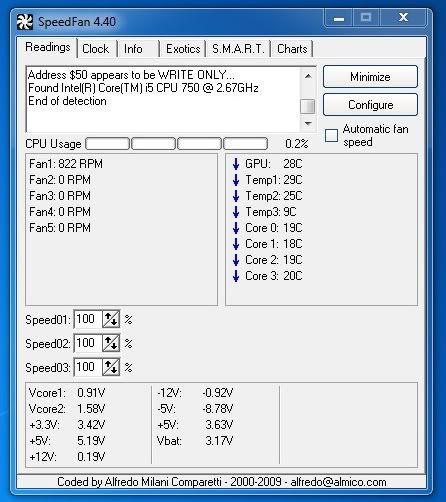
Everything is stock except the GPU which is OC'ed.
Temp 1, Temp 2, Temp 3 = what? Assuming Temp 1 and Temp 2 are the HDs, but I'm new to this program :lol
And it's only picking up 1 fan?
demosthenes, SpeedFan's readings can be wonky at times. Try running it as admin to see your HDD temps (or use Speccy). Temps #1-3 there should be your aux, cpu and system readings. For just pure temp purposes, Real Temp and Core Temp tend to be more consistent than SpeedFan.
http://www.geeks.com/woot/

If a GTX 460 is more than you need, how about a GTX 260 for $99? Still a very capable gaming card and it's half the price of the card you're currently looking at.SaintR said:Hi guy, thanks to all for the super informative thread. I wanted you guys opinion on what DVR/TV tuner card I should get for my build. This is the MB below that I'm getting along with an I5 760 cpu and and a gtx 460 ( which I think is overkill for my needs so a cheaper alternative will be welcome). Thanks guys again for the help.
ASUS P7P55D-E Pro LGA 1156 Intel P55 SATA 6Gb/s USB 3.0 ATX Intel Motherboard
http://www.geeks.com/woot/
I've been boasting my X6 clock's here is a screen:
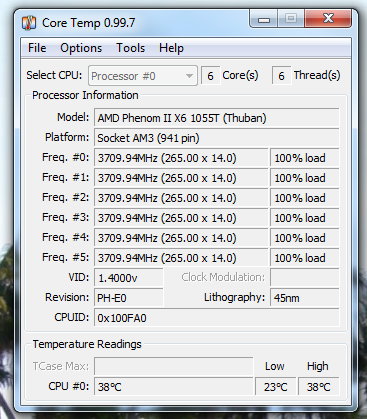
I switched out my 212 for a Zalman CPN9900LED, I had it laying around to see the difference on temps, will post back after I get a chance to run the 6 hour full load test.
Although the cost difference for these two coolers is significantly high....
*Edit: While I am happy with my new setup, I cannot however help but feel like I made the wrong decision, seeing the benchmarks of the i7's and even the i5's pushing past the AMD solution has made me feel bad about the choice I made.
I really feel like right now is the worst time to be buying a new machine.
AMD not supporting triple channel yet, intel's sockets already being discontinued (at least I was told this by my local computer store), even the fact that I bought a 5850 a month ago, and then the 460 1gig hits the market, cheaper and just as good if not better than the 5850.
I wish I would have waited, however I was also in a situation where my computer was completely f-d and I had no choice but to build...
I have a feeling this build will only last me at most 6-8 months before I am looking to rebuild again.
I switched out my 212 for a Zalman CPN9900LED, I had it laying around to see the difference on temps, will post back after I get a chance to run the 6 hour full load test.
Although the cost difference for these two coolers is significantly high....
*Edit: While I am happy with my new setup, I cannot however help but feel like I made the wrong decision, seeing the benchmarks of the i7's and even the i5's pushing past the AMD solution has made me feel bad about the choice I made.
I really feel like right now is the worst time to be buying a new machine.
AMD not supporting triple channel yet, intel's sockets already being discontinued (at least I was told this by my local computer store), even the fact that I bought a 5850 a month ago, and then the 460 1gig hits the market, cheaper and just as good if not better than the 5850.
I wish I would have waited, however I was also in a situation where my computer was completely f-d and I had no choice but to build...
I have a feeling this build will only last me at most 6-8 months before I am looking to rebuild again.
Anyone care to double check my build? It's just an upgrade for my parents. Email, word processing, pictures of grandbabies, etc. so I'm going with onboard graphics. I could save a little on ram, but my dad wants 4 gigs of that "new fast ram." lolparents.
LITE-ON CD/DVD Burner - Bulk Black SATA Model iHAS124-04 - OEM
$17.99
COOLER MASTER ELITE 335 RC-335-KKN1-GP Black SECC Steel ATX Mid Tower Computer Case
$49.99
SAMSUNG Spinpoint F3 HD103SJ 1TB 7200 RPM SATA 3.0Gb/s 3.5" Internal Hard Drive -Bare Drive
$74.99
Antec EarthWatts Green EA-380D Green 380W Continuous power ATX12V v2.3 / EPS12V 80 PLUS BRONZE Certified Active PFC Power ...
-$20.00 Instant
$59.99
$39.99
G.SKILL 4GB (2 x 2GB) 240-Pin DDR3 SDRAM DDR3 1333 (PC3 10600) Dual Channel Kit Desktop Memory Model F3-10600CL8D-4GBHK
$93.99
Microsoft Windows 7 Home Premium 64-bit 1-Pack for System Builders - OEM
$99.99
combo:
ASUS M4A785TD-M EVO AM3 AMD 785G HDMI Micro ATX AMD Motherboard
AMD Athlon II X3 440 Rana 3.0GHz Socket AM3 95W Triple-Core Desktop Processor ADX440WFGIBOX
$137.98
Total ~520
LITE-ON CD/DVD Burner - Bulk Black SATA Model iHAS124-04 - OEM
$17.99
COOLER MASTER ELITE 335 RC-335-KKN1-GP Black SECC Steel ATX Mid Tower Computer Case
$49.99
SAMSUNG Spinpoint F3 HD103SJ 1TB 7200 RPM SATA 3.0Gb/s 3.5" Internal Hard Drive -Bare Drive
$74.99
Antec EarthWatts Green EA-380D Green 380W Continuous power ATX12V v2.3 / EPS12V 80 PLUS BRONZE Certified Active PFC Power ...
-$20.00 Instant
$59.99
$39.99
G.SKILL 4GB (2 x 2GB) 240-Pin DDR3 SDRAM DDR3 1333 (PC3 10600) Dual Channel Kit Desktop Memory Model F3-10600CL8D-4GBHK
$93.99
Microsoft Windows 7 Home Premium 64-bit 1-Pack for System Builders - OEM
$99.99
combo:
ASUS M4A785TD-M EVO AM3 AMD 785G HDMI Micro ATX AMD Motherboard
AMD Athlon II X3 440 Rana 3.0GHz Socket AM3 95W Triple-Core Desktop Processor ADX440WFGIBOX
$137.98
Total ~520
cramcakes said:Computer for parents priced at:
Total ~520
I think everything looks good man, there isn't many routes to cut the cost any really...I was thinking you could probably get them a 500gig HD but they aren't really any cheaper.
I'd get a Xonar over an X-Fi.REV 09 said:Would something like this be good? Also, is 4GB of memory enough? and does upgrading to the Radeon 5870 create any bottlenecks anywhere else? would 650w still be enough for that card? Thanks
Sound Creative 70SB073A00000 7.1 Channels 24-bit 96KHz PCI Interface Sound Blaster X-Fi XtremeGamer $100
Case Rosewill CRUISER Black Gaming ATX Mid Tower Computer Case with Side Panel Window, comes with Four Fans-1x Front Blue LED 120mm Fan, 1x Top Blue LED 120mm Fan, 1x Rear 120mm Fan, 1x Side Blue LED 190mm Fan $70
Also take a look at the list of cases in the image I had before. I personally am a fan of the CM 690/692.
650w is enough, no real bottle necks.
Nice. I'd definitely overvolt that.Amneisac said:This is from the 460 thread:
Dust build up / fan wear. Cleaning the heatsink and GPU is probably where most of the noise is coming from.John said:So what's the most probably cause of a computer getting progressively louder? I put in a Coolermaster 212+ seven months ago and my rig was incredibly quiet, but the noise has been coming back :/
That seems quite low. Are you using an updated Core/RealTemp and a program like ORTHOS/Prime95/OCCT?Gritesh said:I ran 4.0 on my X6 and I was under full load for 6 hours, only hit 49C once, usually stayed around 46-48....80 is insane. I wouldn't want to push it much past 55C but thats just me...
Something is very wrong with temps. Doublecheck with Core/RealTemp and if it is still that high remount your heatsink.Extollere said:While we're talking voltage I need some advice

I am trying to get these temps down... I think (but don't know) that lowering the voltage may help? If so, which setting do I change, and how much should it be changed?
CPU has a wide range but around 40-80CXamdou said:What are regular/safe temperatures at idle and gaming mode for gaming laptops?
GPU is more like 60-95C
Looks quite good to me.Lexxon said:So here's my idea, GAF--I have a lot of thrown together parts in this computer which the guts are actually from a Dell Inspiron 530. I'm going to throw everything back into the Dell case and buy what I need to make this into an i7 rig, while also upgrading my video. (8800GT is out for RMA)
i7 930 from Microcenter for $212.50 (factoring in tax)
Hyper 212 Plus + additional Fan for around $30, Microcenter
EVGA X58 SLI Refurb from EVGA's B-List - $100
G.Skill 6GB DDR3-1600) - $150, newegg
Gigabyte 1GB GTX 460 - $230, newegg [Just went out of stock, ACK! MSI maybe?]
I have no idea how long I have left until that refurb mobo is gone (again) and I want my parts in for the weekend, so I may order tonight. Any thoughts, GAFfers?
Top is usually more ideal if you can do it.demosthenes said:So my H212+ arrived today...a second fan is completely optional on it right? Especially if my overclocking isn't going to be that high? I have a back fan and top fan... Going to have the airflow on it going upwards , this makes sense right?
Dang that is a nice chip.Amneisac said:Okay, I got home and I tuned down the OC a little bit and set a regular voltage (I just put it on normal, which is 1.2) and ran a few stress tests at 3.675ghz. Here's what it looked like in the last test at peak temps:
Does everything seem about right with that?
http://i31.tinypic.com/inva5x.jpgRodney McKay said:I'm looking to make a cheap($600-$700), decently powered PC for myself. My monitor only goes up to 1680x1050, so I don't really need to push the resolution too high. If it's possible with my price point, I would be interested in running the Dolphin emulator.
Or this mobo if you feel iffy about buying a mobo with no reviews (no SATA 6gbps though) http://www.newegg.com/Product/Product.aspx?Item=N82E16813128425
Dolphin is very CPU intensive and you need an overclocked Intel if you want most things to run full speed. If this has changed, let me know.
Need load temps. Those are some really nice idle numbers though.demosthenes said:http://i858.photobucket.com/albums/ab145/mpmaley0/computer.jpg
Everything is stock except the GPU which is OC'ed.
Do you really think that they'll come anywhere close to filling up a 1TB drive? If so, get that same 1TB Samsung F3 for $65 from here:cramcakes said:Anyone care to double check my build? It's just an upgrade for my parents. Email, word processing, pictures of grandbabies, etc. so I'm going with onboard graphics. I could save a little on ram, but my dad wants 4 gigs of that "new fast ram." lolparents.
LITE-ON CD/DVD Burner - Bulk Black SATA Model iHAS124-04 - OEM
$17.99
COOLER MASTER ELITE 335 RC-335-KKN1-GP Black SECC Steel ATX Mid Tower Computer Case
$49.99
SAMSUNG Spinpoint F3 HD103SJ 1TB 7200 RPM SATA 3.0Gb/s 3.5" Internal Hard Drive -Bare Drive
$74.99
Antec EarthWatts Green EA-380D Green 380W Continuous power ATX12V v2.3 / EPS12V 80 PLUS BRONZE Certified Active PFC Power ...
-$20.00 Instant
$59.99
$39.99
G.SKILL 4GB (2 x 2GB) 240-Pin DDR3 SDRAM DDR3 1333 (PC3 10600) Dual Channel Kit Desktop Memory Model F3-10600CL8D-4GBHK
$93.99
Microsoft Windows 7 Home Premium 64-bit 1-Pack for System Builders - OEM
$99.99
combo:
ASUS M4A785TD-M EVO AM3 AMD 785G HDMI Micro ATX AMD Motherboard
AMD Athlon II X3 440 Rana 3.0GHz Socket AM3 95W Triple-Core Desktop Processor ADX440WFGIBOX
$137.98
Total ~520
http://www.microcenter.com/single_product_results.phtml?product_id=0340562
Sounds like a smaller HDD should more than meet all of their needs. The Samsung F3 500GB is $45 here:
http://www.microcenter.com/single_product_results.phtml?product_id=0340804
As for CPU/mobo, you can try what this what this member mentioned:
The X4 630 is one of three combo deals that they're running. Theses are the rest:asdad123 said:How would this MB do?
Microcenter has a deal where you buy a X4 630 for $89.99 and get the Mobo for free.
http://www.microcenter.com/specials/promotions/0720_AMDbundle.html
The board that comes free with the CPU doesn't have HDMI like the Asus that you're considering, though. For pics and reviews check out:
http://www.newegg.com/Product/Product.aspx?Item=N82E16813138182