• Hey Guest. Check out your NeoGAF Wrapped 2025 results here!

"I need a new PC!" 2010 Edition

Flying_Phoenix said:
Having a six-core CPU is overkill for 99% of games out there. Hell, having a quad-core CPU is even overkill for most games if you aren't playing those of the very high end. Unless you're doing media work like intense Photoshopping, animation, or modeling, there really isn't a reason for you to get a six core CPU right now.


To be fair, if he buys the i5-750, when he upgrades he'll have to buy both a new CPU AND a new motherboard. So significantly more $$$$ as the end result.

i agree with both of these points. so i think ill go with the x4 955 BE. using that link minsc sprovided, it actually seems to be more on par with the i5 750 than i originally thought.
 
I'm definitely happy with my setup so far. I can play Left 4 Dead 2 on high and Mass Effect on medium with just using the onboard video. I think I can hold off on getting a video card for at least a couple months. :lol
 
Please help me out. I'm building a new PC. I have everything put together but I can't install Windows 7.

I have this motherboard. GIGABYTE GA-H55-USB3 LGA 1156

http://www.newegg.com/Product/Product.aspx?Item=N82E16813128437

And this HDD. Western Digital Caviar Black WD1001FALS 1TB

http://www.newegg.com/Product/Product.aspx?Item=N82E16822136284

Can you point me to a guide that shows how to install windows 7 onto a sata drive. When I boot from the DVD drive the windows installer doesn't show any HDD installed. I read in the MB manual that Sata drives aren't detected by windows because of lack of AHCI drivers. I tried following the steps to load the drivers but it still doesn't detect the HDD.

I'm pretty sure it's not a hardware problem because bios boot up fine and the motherboard detects the HDD and DVD fine. lol I thought this would be easy. :lol
 
Just checking to make sure temps are good with my X4 -

2010-08-20-01h01-cpu1d6ti.png


Pretty much identical across all cores.
 
Thanks to Brain_Stew and few others, I decided to return my Dual SLI 460's in exchange for a Single 480. While I was hesistent at first, early testing seems to prove that certain benchmarks/games prefer a single GPU rather than an SLI/Crossfire setup. I just installed the card and d/l the new drivers etc. and started with the Lost Planet 2 Benchmark.

New System Specs:
AMD Phenom II X4 965 BE 3.4
8 Gigs Rip Ram
Windows 64 Ultimate
Evge G-Force 480

Old Specs:
Same for everything, except it had 2x460 1G Superclocked GPU's in SLI

Lost Planet 2 Results:

LP= Lost Planet 2, BM # = Benchmark 1/2 - The LP Bench gives the user a Letter Rank at the end of each BM run and the final FPS. All tests done at 1080p, No Vsync, NO AA everything else at max. Tests also ran in both DX11 and DX9:

Dual Nvidia 460's in SLI
LP2 - BM 1 Rank B 43.7 FPS in DX 11 Mode
LP2 - BM 2 Rank C 28.7 FPS in DX 11 Mode

LP2 - BM 1 Rank B 55.3 FPS DX9 Mode
LP2 - BM 2 Rank B 44.2 FPS DX9 Mode


Gforce 480
LP2 - BM 1 Rank A 61.2 FPS DX11 Mode
LP2 - BM 2 Rank B 45.7 FPS DX11 Mode

LP2 - BM 1 Rank A 85.6 FPS DX9 Mode
LP2 - BM 2 Rank B 50.0 FPS DX9 Mode

Pretty good improvement for and extra $30.00 I had to put into getting the 480. I will do some more testing and post those results.
 
My new PC arrived today from NCIXUS. Looks/runs great! Thanks, of course, to you Gaffers who helped me out.

I am now in the market for a new monitor. Still browsing, but I saw this and wanted to get some impressions on it:
http://www.newegg.com/Product/Product.aspx?Item=N82E16824001414
I'll be using it mainly for video editing and gaming. I'm fairly clueless on monitors, past the ratio and connectivity, so any and all opinions would be great.
 
Flying_Phoenix said:
As long as this and the Hexacore AMD 1055t can work on a 550W powersupply. Which I assume they should be fine?
450W would be fine if it was a good brand.
Toki767 said:
I'm definitely happy with my setup so far. I can play Left 4 Dead 2 on high and Mass Effect on medium with just using the onboard video. I think I can hold off on getting a video card for at least a couple months. :lol
:lol
Ogs said:
Just checking to make sure temps are good with my X4 -

[55C]
You are quite good.
Chaser said:
My new PC arrived today from NCIXUS. Looks/runs great! Thanks, of course, to you Gaffers who helped me out.

I am now in the market for a new monitor. Still browsing, but I saw this and wanted to get some impressions on it:
http://www.newegg.com/Product/Product.aspx?Item=N82E16824001414
I'll be using it mainly for video editing and gaming. I'm fairly clueless on monitors, past the ratio and connectivity, so any and all opinions would be great.
Pics!

Also if color reproduction is not super important to you you can just grab a 22-24" TN 1920x1080(or 1200) monitor. Should be around $150-$180.

Just sorting by newegg reviews and making sure the monitor was made within the past year is a good enough review. If you find 4 or so similar ones, google for a review.

Like this LG (LED backlit) for $152
http://www.newegg.com/Product/Product.aspx?Item=N82E16824005155
 
I'm thinking about building a rig sometime before the release of Portal 2 and all the talk about using an Intel CPU on a mobo made me kind of scared.My bad if I'm sounding like a complete idiot. Is it just the upgrade paths that arise after using an Intel CPU instead of using an AMD CPU that makes AMD the better choice.

What's wrong with using an Intel CPU on a mobo???
 
Nothing wrong with using an Intel CPU. In fact, I'm pretty sure Intel CPUs usually perform better for games. The problem is with future upgradability. Intel sockets change fairly frequently compared to AMD so chances are the next time you buy a new Intel CPU, you'd need a new motherboard to go along with it whereas with AMD, the AM3 socket is going to be around a bit longer so you have better upgrade choices down the line without having to buy a new motherboard. Hope that helps.
 
Hi guys just need some help and deciding on a monitor :D

I'm looking at these Samsung or BenQ models.

The Samsung has a 2ms response time in contrast to BenQ's 5ms, however the BenQ is slightly bigger.

They are the same price so I'm leaning towards the Samsung but would like some more opinions.

Thanks guys :D
 
I'd go for Samsung, though that's mostly cause I've never heard of BenQ. :lol I've never been disappointed with a Samsung monitor though.
 
Im looking for a micro atx mid tower case that has a lot of room internally(for a 9 inch 9800gt) and has great airflow, preferably under $100, any suggestions?
 
Mr Nightman said:
Im looking for a micro atx mid tower case that has a lot of room internally(for a 9 inch 9800gt) and has great airflow, preferably under $100, any suggestions?

I got this a month ago:
http://www.amazon.com/dp/B003IPOYGK/?tag=neogaf0e-20

mATX with handle, one of the largest CPU backplate cutouts in a case, 2 built in fan controllers, and space for most of the longest cards out there. Not everyone likes the look though. I love it and its nice and small enough to fit in an airplane's overhead compartment so it's relatively travel friendly.
 
My parents old LCD screen blew up last night after about 9 years of use, we are buying a £150 LG 22" LED monitor which I will take and give my 17" 16:10 LCD tv screen to my parents as the replacement, it's still a great screen and works a treat with my 360 but I would love a better pc screen to do my 3D work on (and 360 using VGA when I want to play consoel games)

Is there anything I should know about LED screens outside of them being 40% better with energy, cooler running and slimmer? it has 5ms refresh and I would presume it's 60hz but I can take it back if it sucks.
 
I finally upgraded my monitor from an old 17inch to a sexy 23inch (1080p).

Playing F-Zero and Super Mario Galaxy @ 1080p and 60fps = worth every.single.dime. I can barely play anything because my jaw won't stop knocking the controller out of my hand.
 
Nabs said:
I finally upgraded my monitor from an old 17inch to a sexy 23inch (1080p).

Playing F-Zero and Super Mario Galaxy @ 1080p and 60fps = worth every.single.dime. I can barely play anything because my jaw won't stop knocking the controller out of my hand.
Awesome, it will be the same for me later today as i'm going from my old 17" 1440x900 16:10 setup to a 22" 1080p LED, i'm rather excited lol.
 
hey brain stew, thinking of upgrading this ol' c2d e6850

would like new: mobo/ram/cpu for under 500 if possible

would still keep my 280 gtx and psu etc

any ideas? Im guessing amd is the way to go this round?
 
ZombieSupaStar said:
hey brain stew, thinking of upgrading this ol' c2d e6850

would like new: mobo/ram/cpu for under 500 if possible

would still keep my 280 gtx and psu etc

any ideas? Im guessing amd is the way to go this round?

You can most liekly get a AMD 1055t, 4 gigs of ram, and a nice AMD board with USB3 and SATA 3 for a smidge under 500. If you want to go intel i5 you may have to bump up the cost of the motherboard to get USB3 and SATA 3, but can still likely stay under 550 overall. Everyone here is recommending the AM3 boards for future upgrade options, so the 1055t should be a great fit, and within your budget.
 
grkazan12 said:
I'm thinking about building a rig sometime before the release of Portal 2 and all the talk about using an Intel CPU on a mobo made me kind of scared.My bad if I'm sounding like a complete idiot. Is it just the upgrade paths that arise after using an Intel CPU instead of using an AMD CPU that makes AMD the better choice.

What's wrong with using an Intel CPU on a mobo???

There's nothing wrong with going Intel. There are trade offs when going either way.

With an i5/i7 you will currently get the best performance right now, in most cases, especially if you overclock your CPU. When people talk about not having an upgrade path they mean your motherboard will not be compatible with Intel's next generation of CPU's. Intel's next generation CPUs will be using a new socket type and if you want to make a worthwhile upgrade to your CPU in the future you will need to buy a new motherboard as well.

If you go with a 6 core AMD processor you may see better performance in the future when developers take better advantage of the multiple cores. Also, AMD's next generation CPUs will be compatible with the current AM3 socket, which means there will be CPU upgrade options in the future without having to purchase a new motherboard.

Short and sweet:
  • An Intel i5/i7 will give you the best performance today in most cases
  • AMD 6 core CPUs could potential gain significant performance in the future as developers take better advantage of the extra cores
  • Intel is moving to a new socket type next generation so you will not have an upgrade path with any Intel motherboard you buy today
  • The next generation AMD processors will be compatible with current AM3 sockets, so you will have a good upgrade path with any AM3 motherboard you buy today
  • Typically, you can save some money if you go AMD but that depends on deals and the particular components you decide to go with
 
kagete said:
I got this a month ago:
http://www.amazon.com/dp/B003IPOYGK/?tag=neogaf0e-20

mATX with handle, one of the largest CPU backplate cutouts in a case, 2 built in fan controllers, and space for most of the longest cards out there. Not everyone likes the look though. I love it and its nice and small enough to fit in an airplane's overhead compartment so it's relatively travel friendly.

Damn that case is cool, really like the usb and power/reset buttons on the top (In a wheelchair so its hard to use mid to bottom usb/power) Definitely will look into this one
 
I have the new screen now, amazing that Dirt 2 still runs at 60fps a good 80% of the time in 1080p with 4xmsaa, I was expecting it to start chugging more since I was use to it on 1440x900.

The LED screen is amazing, such rich colour and brightness, only problem is that everything seems to have a slight yellow tint when you look straight on, lowering my head makes things more yellow and raising my head will make things whiter like I expect things to look. Will tweak with the colours a little bit to try and clear off some of that nasty yellow.

I tested my 360 on vga also and it looked amazing, i'm seriously improved with this screen for £150, shame it only has one vga port.
 
Diablohead said:
I have the new screen now, amazing that Dirt 2 still runs at 60fps a good 80% of the time in 1080p with 4xmsaa, I was expecting it to start chugging more since I was use to it on 1440x900.

The LED screen is amazing, such rich colour and brightness, only problem is that everything seems to have a slight yellow tint when you look straight on, lowering my head makes things more yellow and raising my head will make things whiter like I expect things to look. Will tweak with the colours a little bit to try and clear off some of that nasty yellow.

I tested my 360 on vga also and it looked amazing, i'm seriously improved with this screen for £150, shame it only has one vga port.

You know led screens are still lcd screens right?;)
 
PjotrStroganov said:
You know led screens are still lcd screens right?;)
Yeah it says on the side of my box, it's still an improvement though, rather big one. It's also super thin and about as light as my cat :lol

I fixed the yellow by bumping up the blue to 60 instead of 50, doesn't seem to wash out any other colours but it removes that tint.
 
Diablohead said:
I have the new screen now, amazing that Dirt 2 still runs at 60fps a good 80% of the time in 1080p with 4xmsaa, I was expecting it to start chugging more since I was use to it on 1440x900.

The LED screen is amazing, such rich colour and brightness, only problem is that everything seems to have a slight yellow tint when you look straight on, lowering my head makes things more yellow and raising my head will make things whiter like I expect things to look. Will tweak with the colours a little bit to try and clear off some of that nasty yellow.

I tested my 360 on vga also and it looked amazing, i'm seriously improved with this screen for £150, shame it only has one vga port.

which monitor did you get?
 
Smokey said:
which monitor did you get?
LG E2240S 21.5" (thought I am sure it said 22" in the argos book :lol ) only downside to it is that there is only a vga connection on the back, no dvi or hdmi but then I only paid £150 for it, nearly went for a £180 model but we decided that it was a waste of cash since we don't really have anything which uses those ports, old 360 without HDMI included.

The 360 looks great on this screen also using vga set to 1080p, forza 3 for me has a new wind of life because it looks great after playing it on my old samsung.

Need to buy a cheap switch box from ebay so I can split my only vga socket into two.
 
Diablohead said:
LG E2240S 21.5" (thought I am sure it said 22" in the argos book :lol ) only downside to it is that there is only a vga connection on the back, no dvi or hdmi but then I only paid £150 for it, nearly went for a £180 model but we decided that it was a waste of cash since we don't really have anything which uses those ports, old 360 without HDMI included.

The 360 looks great on this screen also using vga set to 1080p, forza 3 for me has a new wind of life because it looks great after playing it on my old samsung.

Need to buy a cheap switch box from ebay so I can split my only vga socket into two.
For that price you could have got something a lotttttttttttttt better. I'd return it and get something else.
 
Hawk269 said:
Thanks to Brain_Stew and few others, I decided to return my Dual SLI 460's in exchange for a Single 480. While I was hesistent at first, early testing seems to prove that certain benchmarks/games prefer a single GPU rather than an SLI/Crossfire setup. I just installed the card and d/l the new drivers etc. and started with the Lost Planet 2 Benchmark.

New System Specs:
AMD Phenom II X4 965 BE 3.4
8 Gigs Rip Ram
Windows 64 Ultimate
Evge G-Force 480

Old Specs:
Same for everything, except it had 2x460 1G Superclocked GPU's in SLI

Lost Planet 2 Results:

LP= Lost Planet 2, BM # = Benchmark 1/2 - The LP Bench gives the user a Letter Rank at the end of each BM run and the final FPS. All tests done at 1080p, No Vsync, NO AA everything else at max. Tests also ran in both DX11 and DX9:

Dual Nvidia 460's in SLI
LP2 - BM 1 Rank B 43.7 FPS in DX 11 Mode
LP2 - BM 2 Rank C 28.7 FPS in DX 11 Mode

LP2 - BM 1 Rank B 55.3 FPS DX9 Mode
LP2 - BM 2 Rank B 44.2 FPS DX9 Mode


Gforce 480
LP2 - BM 1 Rank A 61.2 FPS DX11 Mode
LP2 - BM 2 Rank B 45.7 FPS DX11 Mode

LP2 - BM 1 Rank A 85.6 FPS DX9 Mode
LP2 - BM 2 Rank B 50.0 FPS DX9 Mode

Pretty good improvement for and extra $30.00 I had to put into getting the 480. I will do some more testing and post those results.

that's a pretty big improvement man. sounds like you made the right choice. i'll definitely keep this in mind when it's my time to shine.
 
Smokey said:
that's a pretty big improvement man. sounds like you made the right choice. i'll definitely keep this in mind when it's my time to shine.

Hey I thought you wanted a PC before school starts? You have godly patience waiting for a PC man. If you wait any longer then you'll be looking at radeon 6000s instead of 480s
 
excoise moi...or whatever it´s supposed to be, no DVI and no HDMI! take that shit back and get something better...and for 150p? How much costs SyncMaster P2450H in your country?
 
hhmm...is there any way for me to get 3D gaming when using nVidia as a secondary adapter?

It keeps saying:
"Primary display´s adapter does not support 3D Vision"

though, I am trying to get stereoscopic 3d.
 
Smokey said:
that's a pretty big improvement man. sounds like you made the right choice. i'll definitely keep this in mind when it's my time to shine.

SLI wasn't working, a GTX 480 should normally be a decrease in framerate from a 460 x2. I checked a bench and his SLI #s are similar to a single card.

If he tested Metro 2033, he'd have found the GTX 480 performed slightly worse, or any other game that uses the SLI properly. But that's the joys of SLI for you, sometimes it isn't even worth it's own weight.
 
I posted something a few pages back explaining that I need a new PC, and hopefully this could give an insight. I'm computer literate, but when it comes to the parts of the PC, I don't know anything about it. I'm in a bit of a time crunch, so I'm going to buy a PC off of AVA Direct (or another website if anyone has recommendations.. this is just one I pulled off the OP) instead of building it myself. I understand I won't get it fully customized to the way I want it, but it's more convenient I guess.

Basic Desktop Questions
Budget: $1000ish.. give or take a couple hundred
Main Use: Gaming, Video editing, general usage
Monitor Resolution: Doesn't matter too much to me. I haven't decided if I'll get a nice monitor in the beginning or a cheaper one at first
List SPECIFIC games that you MUST be able to play: Diablo 3, everything Source, etc. Haven't played PC games in a while but I'm looking to get back into it.

I know that no one wants to just send me links to specific parts to build me a computer if I'm not putting any effort into the search, so to start me off, does anyone have any experience with websites like AVA Direct where I can build a decent custom computer? I want to get started on the hunt for a PC but I would love some insight on a starting point.

Thanks!
 
apocalidiot said:
Basic Desktop Questions
Budget: $1000ish.. give or take a couple hundred
Main Use: Gaming, Video editing, general usage
Monitor Resolution: Doesn't matter too much to me. I haven't decided if I'll get a nice monitor in the beginning or a cheaper one at first
List SPECIFIC games that you MUST be able to play: Diablo 3, everything Source, etc. Haven't played PC games in a while but I'm looking to get back into it.

Hi,

I bought my brother's PC for him using AVAdirect (based on a Gaffer's recommendation) back in late 2007 or early 2008 since flying there to build it for him would have cost me around $400 when his budget for the PC was only $800. They're pretty professional, you can ask for updates and webcam pics of your build. Unfortunately they took their sweet time with assembly (1.5 weeks I think) but my brother got it up and running on first boot with no trouble. When I had to put in another HDD for my brother 2 months ago I got a chance to peek inside and the cable management for his cheap-o case amazed me. Very well done and it made me feel bad since I just slapped the new HDD in there without caring about zip-ties and keeping it tidy.

At around $1150 the current pre-built darling is still the Dell XPS 7100. Of course its not an Intel/Nvidia combo but it has good parts for its price. At least 2 Gaffers have already bought this, maybe more.

http://www.anandtech.com/show/3798/dell-studio-xps-7100
 
Adent said:
Please help me out. I'm building a new PC. I have everything put together but I can't install Windows 7.

I have this motherboard. GIGABYTE GA-H55-USB3 LGA 1156

http://www.newegg.com/Product/Product.aspx?Item=N82E16813128437

And this HDD. Western Digital Caviar Black WD1001FALS 1TB

http://www.newegg.com/Product/Product.aspx?Item=N82E16822136284

Can you point me to a guide that shows how to install windows 7 onto a sata drive. When I boot from the DVD drive the windows installer doesn't show any HDD installed. I read in the MB manual that Sata drives aren't detected by windows because of lack of AHCI drivers. I tried following the steps to load the drivers but it still doesn't detect the HDD.

I'm pretty sure it's not a hardware problem because bios boot up fine and the motherboard detects the HDD and DVD fine. lol I thought this would be easy. :lol


I've had a problem similar to this trying to install windows XP and it was driving me crazy.. Turns out the problem was one little setting in the BIOS under SATA Compatibility mode or something.

Definitely check all the hard drive settings in your BIOS. You can access this normally by pressing F1 when your computer first starts up. Google "BIOS Setup sata compatibility" etc.
 
kagete said:
Hi,

I bought my brother's PC for him using AVAdirect (based on a Gaffer's recommendation) back in late 2007 or early 2008 since flying there to build it for him would have cost me around $400 when his budget for the PC was only $800. They're pretty professional, you can ask for updates and webcam pics of your build. Unfortunately they took their sweet time with assembly (1.5 weeks I think) but my brother got it up and running on first boot with no trouble. When I had to put in another HDD for my brother 2 months ago I got a chance to peek inside and the cable management for his cheap-o case amazed me. Very well done and it made me feel bad since I just slapped the new HDD in there without caring about zip-ties and keeping it tidy.

At around $1150 the current pre-built darling is still the Dell XPS 7100. Of course its not an Intel/Nvidia combo but it has good parts for its price. At least 2 Gaffers have already bought this, maybe more.

http://www.anandtech.com/show/3798/dell-studio-xps-7100


That's great to hear. I think I'm going to stick with AVAdirect... unless the Dell XPS 7100 is 100% the rig for me. edit: read the review and I'm actually pretty satisfied with it. I guess I was kind of against it because "it's a Dell" but that attitude seems to be more reserved for a standard Dell. I might still want to go AVAdirect, but if I can't figure out what I want, I might just go with the Dell

I'll be looking at this category... probably the first two. I don't want anything flashy (the red tower is all extra money thankfully, I guess it won't look like that if I get that customization haha).

So basically now, it's a matter of choosing the parts that are right for me. Which is where I'm fucked on. I'm going to research different parts, but I honestly don't have a starting point.. haha. All I know is that I want a good amount of RAM for video editing.. I think.
 
apocalidiot said:
That's great to hear. I think I'm going to stick with AVAdirect... unless the Dell XPS 7100 is 100% the rig for me.

I'll be looking at this category... probably the first two. I don't want anything flashy (the red tower is all extra money thankfully, I guess it won't look like that if I get that customization haha).

So basically now, it's a matter of choosing the parts that are right for me. Which is where I'm fucked on. I'm going to research different parts, but I honestly don't have a starting point.. haha. All I know is that I want a good amount of RAM for video editing.. I think.

If you're in that category then you have money to spend... way more than just $1000. Probably stay around here and choose whether you want to go i5 or a bit cheaper with AMD http://desktop-computers.avadirect.com/Custom_Desktop_Computers
 
So my brother put together his computer today, the standard build linked on this thread often, and he got a TV with an HDMI cable to be the monitor. He said that he tried plugging it into the motherboard and the video card and nothing comes up on the TV. Does he have to configure something before a tv will work with his computer or would the problem probably be that he didn't put the computer together correctly?
 
kagete said:
If you're in that category then you have money to spend... way more than just $1000. Probably stay around here and choose whether you want to go i5 or a bit cheaper with AMD http://desktop-computers.avadirect.com/Custom_Desktop_Computers

Gotcha.. Could I even float around this one? This is the cheapest default custom rig for gaming... so I'm guessing I could go a little over a grand on this - http://www.avadirect.com/product_details_configurator.asp?PRID=11023. Or should I stay on the desktop computers?

Also, check out my edit.. the Dell XPS might be a good fit, haha
 
Tensai said:
Diablohead said:
LG E2240S 21.5" (thought I am sure it said 22" in the argos book :lol ) only downside to it is that there is only a vga connection on the back, no dvi or hdmi but then I only paid £150 for it, nearly went for a £180 model but we decided that it was a waste of cash since we don't really have anything which uses those ports, old 360 without HDMI included.

The 360 looks great on this screen also using vga set to 1080p, forza 3 for me has a new wind of life because it looks great after playing it on my old samsung.

Need to buy a cheap switch box from ebay so I can split my only vga socket into two.
For that price you could have got something a lotttttttttttttt better. I'd return it and get something else.
That and the fact there's absolutely no reason to get an HD-capable display device these days that doesn't have at least one DVI/HDMI/DisplayPort input. Hell, every single HD display I've had over the last 7-8 years has at least had DVI.
 
apocalidiot said:
Gotcha.. Could I even float around this one? This is the cheapest default custom rig for gaming... so I'm guessing I could go a little over a grand on this - http://www.avadirect.com/product_details_configurator.asp?PRID=11023. Or should I stay on the desktop computers?

Also, check out my edit.. the Dell XPS might be a good fit, haha

Woah that's old Core 2 Duo stuff. Don't do that man! Go for the socket 1156 stuff instead of that if you want to go intel. You don't need to click the "Gaming PC" links, as you can just customize any loadout they have with the graphics card of your choice. I'm not a pro with Intel stuff but I think the P55 chipset is the current recommendation for them right now

http://desktop-computers.avadirect.com/Socket_1156_Core_i3_i5_i7_Desktop_PC

Hmm i'll have to edit my recommendation. Looks like AVAdirect isn't stocking GTX460s that have 1 GB, only 768 MB ones... Well their prices aren't crazy for their GPUs, and you can get a core i5-750 with a 1TB Samsung F3 HDD, Asus GTX470, and a coolermaster 212 CPU cooler at around $990. It's an okay value for a pre-built but note that it doesn't include Windows (~$100 on Newegg).
 
I'd say when video editing is concerned, AMD is the way to go because you get more cores for a cheaper price. The Phenom X6 tears through video encoding like nothing from what I've tried so far. :lol
 
Placed my order today, parts are shipping ... new PC incoming, I'm exited :D

Intel Core i5 760
Gigabyte GA-P55A-UD4
Gigabyte GeForce GTX 460 OC 1024MB
2x2048MB Kit G.SKILL DDR3-12800 1600 CL7 Kit
60GB OCZ Agility 2 Series SSD
Noctua NH-U12P
Antec Three Hundred
BeQuiet! Dark Power Pro (P8) 750W 80+

I also need a new display. I'm currently looking at:

NEC EA231WMi
Dell U2410
HP ZR24w

I'm open for suggestions.
 
kagete said:
Woah that's old Core 2 Duo stuff. Don't do that man! Go for the socket 1156 stuff instead of that if you want to go intel. You don't need to click the "Gaming PC" links, as you can just customize any loadout they have with the graphics card of your choice. I'm not a pro with Intel stuff but I think the P55 chipset is the comment recommendation for them right now

http://desktop-computers.avadirect.com/Socket_1156_Core_i3_i5_i7_Desktop_PC

Great! Good catch, thanks for the heads up. Again, I've been around this stuff for a while, but I sure as hell don't know much about it haha.

Toki767 said:
I'd say when video editing is concerned, AMD is the way to go because you get more cores for a cheaper price. The Phenom X6 tears through video encoding like nothing from what I've tried so far. :lol

It seems that AVAdirect only has Intel.. or I might be looking in the wrong spots. Would the difference be a big deal between Intel vs AMD?

edit: d'oh - http://desktop-computers.avadirect.com/Socket_AM3_Desktop_PC

So I guess now would be to decide between AMD vs Intel, then to find a mobo that's good.. RAM and a video card and I should be good?
 
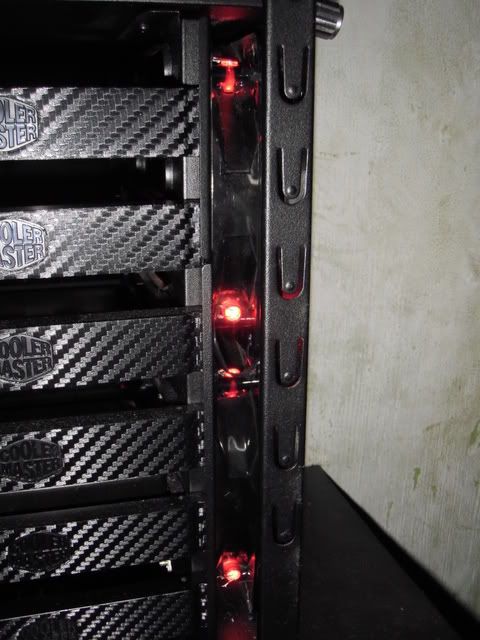
If any of the Cooler Master CM690 II owners here are like me and need to get more air into their cases, these photos below may give you some ideas (these are not mine):


2vjab8j.jpg


pic374.jpg


P8150207.jpg
P8150206.jpg


Dual 120mm fans. I've been considering doing this for some time now as the front 140mm intake isn't enough to cover all six HDDs in the primary drive cage. Either that, or I may work in a 180/200mm single intake.
 
apocalidiot said:
Great! Good catch, thanks for the heads up. Again, I've been around this stuff for a while, but I sure as hell don't know much about it haha.


It seems that AVAdirect only has Intel.. or I might be looking in the wrong spots. Would the difference be a big deal between Intel vs AMD?

edit: d'oh - http://desktop-computers.avadirect.com/Socket_AM3_Desktop_PC

So I guess now would be to decide between AMD vs Intel, then to find a mobo that's good.. RAM and a video card and I should be good?

AVAdirect isn't truly customizable as they don't allow you to select Nvidia cards if the board is a Crossfire board (or vice-versa) in certain config pages. From trying a few builds on their site I'd really just recommend going with the i5-750 and a GTX 470 with 64-bit Windows 7 included, maybe a nice CoolerMaster 690 II or similar case, a 212 cpu cooler, and Samsung F3 1TB. *IF I WAS BUYING FROM AVADIRECT, AND ONLY AVADIRECT, AND HAD ~$1200 to spend*

Another option is NCIXUS.com where you can pay $50 (i think) to have then assemble everything for you. Please don't look only at my advice and search around and see if people with similar builds to the one you're targetting have good results with them and try to see how much it cost them as well.
 
Top Bottom