
Deus Ex Machina
Member
LOL, people tell me I should Overclock.msv said:Dude, that's cheating!
LOL, people tell me I should Overclock.msv said:Dude, that's cheating!
Well as long as the heat load is less than what the AC can do you can get some nice OC's...Deus Ex Machina said:LOL, people tell me I should Overclock.
If he doesn't mind rebates maybe something like this? Tried to utlize a bunch of combo deals when I can.MisterAnderson said:A friend of mine wants a computer at around $500. I told him I'd help him build one since I built mine last summer, but I'm a bit out of the loop as far as what costs what nowadays and what's the best bang for the buck. If anyone has any suggestions as to what might be good to get for him, I'm all ears.
Sounds about right.Mikhal said:If he doesn't mind rebates maybe something like this? Tried to utlize a bunch of combo deals when I can.
-Asus Radeon 5750
-MSI 870A-G54 Motherboard + AMD Athlon II X4 630
-Corsair 650TX PSU + Samsung Spinpoint F3 HDD
-4GB (2x2GB) DDR3 Patriot RAM (Use code EMCYXZR56 for a $15 discount)
-NZXT M59 Case + Samsung DVD Burner
Total comes to $580.84 including shipping with like $90 worth of rebates. Making it a little under $500 in the end. :lol

It'll be fine. Also are you sure it wasn't just a half connector? Some cards have those.kirbybreezy said:I know I'm being super anal but - I've just built my first pc and everything went relatively smoothly. I have two 460s.
First one went in no problem, second one was a bit of a tight fit. I pulled it back out and noticed one of the gold interconnect (teeth) was about half gone.
All told, I put the card back in and everything appears to work fine. Both cards are recognized and are set to SLI. My question is, so the way PCIe functions, is it possible that the damaged card would not operate at full capacity or was missing data or would it be all or nothing and it either worked or wouldn't show up at all?
VibratingDonkey said:Is the installation procedure basically the same for all third party 775 coolers? You have to remove the motherboard and attach a backplate? Because I'd rather not.
Also I've had the Arctic Cooling Freezer 7 Pro suggested to me. Is that equivalent to, or at least not significantly worse than the Hyper 212? Because it comes with thermal paste pre-applied, which means one less thing for me to worry about.
Hazaro said:Well as long as the heat load is less than what the AC can do you can get some nice OC's...
I mean if you aren't at at least 3.8Ghz how can you live with yourself?
Thanks. I think I'm all set.Dina said:AFAIK most 775s use a screw on system, not a backplate. At least my Arctic Cooling one does, but I forgot the model. It could very well be the 7 Pro, though. As for the 212, check the manufacturer, as I have no experience with the cooler myself.
I believe the 212 is twice the price of the 7 Pro, but the 212 is a better cooler, no doubt. IMO the 7 Pro is the best cooler when you need a cheap aftermarket cooler that is average to good. Mild overclocking is still perfectly doable on that cooler. The 212, though, is a very good cooler, pretty silent too when not overclocking. I would go for the 212 for any serious gaming/overclocking, but it is a tad more expensive.
Also, check www.frostytech.com for all your cooler tests and questions.
Jim Stark said:Hoping brain_stew or someone else can shed some light on this so I'm going to post it again on the new page.
Will a 9800GT and a 3.0 GHz dual core be able to run Diablo 3 and Alice 2 or will I need to upgrade other parts of my rig? I run games on 1280x800 and I don't mind Low or Medium. My PSU is only 420w so I can't get anything more powerful without replacing that as well. I've seen a few people make judgments on games based on lighting, poly counts etc in videos and screenshots so I'm hoping someone can do that here.
Thanks!

tomei said:Dell has 25% of their ultrasharp ips monitors if anyone is looking for a monitor. Going to get a u2311H today.
http://www.dell.com/content/topics/segtopic.aspx/monitor-ultra-sharp-coupon?c=us&cs=04&l=en&s=bsd
No taxes if you're not from Texas. I am so that sucks.
tomei said:Dell has 25% of their ultrasharp ips monitors if anyone is looking for a monitor. Going to get a u2311H today.
http://www.dell.com/content/topics/segtopic.aspx/monitor-ultra-sharp-coupon?c=us&cs=04&l=en&s=bsd
No taxes if you're not from Texas. I am so that sucks.


Shambles said:Sadly they are both 16:9 displays
Hazaro said:It'll be fine. Also are you sure it wasn't just a half connector? Some cards have those.
e.g. http://www.hardwareoverclock.com/Grafikkarte/Asus_ENGTX260-007.jpg
Minsc said:16:10 with 1:1 pixel mapping is pretty great, you get the best of both worlds. My 1900x1200 Westinghouse does it and you don't even notice the black bars after a few minutes when running 16:9, if I was buying a new monitor and saw a 16:10 I liked with 1:1 I'd definitely consider it...
Edit: misread your post a bit, tweaked reply
Shambles said:The H70 is a waste of money and has worse noise than the cheaper but still as effective H50. Even the H50 at 80$ I wouldn't bother with but that is to each his own. I'd just as soon get a 30$ aftermarket cooler, strap another fan onto it and get the same performance as the 100$ coolers.
Blizzard makes their games scale very well and I doubt you will have any trouble running it at that resolution on those settings with your hardware.Jim Stark said:Will a 9800GT and a 3.0 GHz dual core be able to run Diablo 3 and Alice 2 or will I need to upgrade other parts of my rig? I run games on 1280x800 and I don't mind Low or Medium. My PSU is only 420w so I can't get anything more powerful without replacing that as well. I've seen a few people make judgments on games based on lighting, poly counts etc in videos and screenshots so I'm hoping someone can do that here.
Thanks!
If your PSU is a solid 450W you can reuse that.teebs33 said:My old motherboard ASUS p5n-e SLI died on me and I'm looking to get the best bang for my buck on the replacement.
Current config: E7500 CPU, Powercolor 5770 1 GB video card, 4 gigs DDR2, Antec 900 case, Caviar Black 1 TB Hard drive, Windows 7 ultimate, 450 W power supply.
Requirements: Good performance + as quiet as possible because it will be in my Living room and I want to keep the wife aggro to a minimum while she's watching TV. Use as many parts as I can salvage at least video card, HD + Case.
As with any reviews, check around on multiple sites. Frostytech is alright with getting ballparks, but many other websites have reviews as well.Smash88 said:http://www.frostytech.com/
The best site for any heatsink comparison. Near the top right of the article you can select intel, amd, or quiet cooling.

Exactly. Very little of the HD material I watch is 16x9. I'd much rather have the added real estate, but the options are steadily dwindling.Shambles said:The funny part about all these 16:9 monitors out now is that almost nothing has 16:9 source material. The only thing that comes to mind I believe is IMAX film. Why they would make that ratio for workspace is silly.

evil solrac v3.0 said:you won't get the same performance doing that than an h50. basically the H70 is doing what i'm doing with my h50 right now. and it's a far quieter solution if you care about noise.
Yup through d3doverrider.Hazaro said:No vsync? Hope you are enabling triple buffering!
It's a case, it's fine.DarkUSS said:PC-GAF, I need your advice again as I'm currently looking to buy a new affordable PC case.
What do you think of the CoolerMaster Elite 430 Case?
http://www.coolermaster.com/product.php?product_id=6654
http://www.youtube.com/watch?v=b1BEpnvn26A
Dash Kappei said:So, I'm still trying to figure out my new rig
(here's my first post with the pics of the HTPC's room).
You guys have obviously forgot so a little reminder:
Main use:1080@24p movies/blu rays & Music player on a 110" screen (ratio 1.85:1).
Requisites: as silent as possible (like a PS3 would be awesome), hopefully not pushing out too much hot air (not much more than an old X360)
Gaming: solid 60fps@1080p (or at the very least 720p with lots of AA effects) with HIGH details on graphically "heavy" racing games (like F1 2010 or others there are going to come out in 2011/2012 (if possible). 95% of games I'll play on it will be racing games, my main gaming platforms will still be X360 and PS3, but I want to really push racing games with my G27 Logitech wheel and soon to be racing cockpit.
Budget: initially it was $750(and when I say $ I mean Euros, eheh) for everything bar the case and sound card, now I kinda know I need a bit more money ($/900?), damn.
This is my case:
- Thermaltaake DH 101
http://i55.tinypic.com/xatqav.jpg
http://i51.tinypic.com/35jvvj4.jpg
This is the build I've figured out with my buddy:
Components:
TOTAL (19% Italian IVA TAX INCLUDED): 1.229,14 <-- too much!!
- INTEL CPU Core i7 930 (Bloomfield) Quad Core 2,8 Ghz socket LGA1366 Boxed
291,99- GIGABYTE Motherboard GA-X58A-UD5 socket LGA1366 chipset Intel X58 ATX
304,99- ANTEC PSU CP-1000 Modular 1000 Watt steady ATX 12V version 2.3 and EPS version 2.91
126,49- SEAGATE Surveillance SV35.5 1 Tb Sata 300 Buffer 32 Mb 7200 Rpm
79,69- CORSAIR Dimm Dominator 6Gb (3x2Gb) DDR3 Triple Channel 1600 Mhz Unbuffered CL 8-8-8-24
165,99- SAPPHIRE Radeon HD 5850 1Gb ddr5 Pci-E Dual DVI HDMI Display Port Sapphire Design
259,99
So, yeah I'd go waaaaay overbudget with this.
Is there a way to maintain similar performance (and how would you rate this custom build compared to the one you'll be -hopefully!- suggesting) but keeping it at 900 total?
Note that I have a side budget for the case and audio card (which, I'll stress it again so to not have replies focusing about that, I do actually need).
cartoon_soldier said:Ok, long post. I configured 4 different systems, 1 at CyberpowerPC, 2 at ava direct, 1 at NCIX (damn 100$ shipping at NCIXUS too):
CYBERPOWER:
CASE: CoolerMaster Elite 310 Mid-Tower Case with See-Thru Side Panel [-6] (Red Color)
CD: Sony 24X Double Layer Dual Format DVD+-R/+-RW + CD-R/RW Drive [+3] (BLACK COLOR)
CPU: [Special] Intel® Core i7-950 3.06 GHz 8M Intel Smart Cache LGA1366
CS_FAN: Maximum 120MM Case Cooling Fans for your selected case [+9]
FA_HDD: Vigor iSURF II Hard Disk Drive Cooling System [+21] (1 x System)
FAN: NZXT Liquid Cooling System 120MM Radiator & Fan (Enhanced Cooling Performance + Extreme Silent at 20dBA)
FLASHMEDIA: INTERNAL 12in1 Flash Media Reader/Writer (BLACK COLOR)
HDD: 1TB SATA-III 6.0Gb/s 64MB Cache 7200RPM HDD (Single Hard Drive)
MEMORY: 6GB (2GBx3) DDR3/1600MHz Triple Channel Memory Module (Corsair or Major Brand)
MOTHERBOARD: (3-Way SLI Support) MSI X58A-GD65 Intel X58 Chipset SLI/CrossFireX Triple-Channel DDR3 ATX Mainboard w/ 7.1 Audio, eSATA, GbLAN, USB3.0, SATA-III, RAID, IEEE1394a, 3 Gen2 PCIe, 2 PCIe X1 & 2 PCI [-10]
NETWORK: Intel Pro Gigabite 10/100/1000 Network Card [+34]
NOISEREDUCE1: Sound Absorbing Foam on Side, Top And Bottom panels [+29]
POWERSUPPLY: * 800 Watts - XtremeGear Gaming Power Supply - Quad SLI Ready
SOUND: Creative Labs SB Audigy SE [+30]
VIDEO: NVIDIA GeForce GTX 460 1GB 16X PCIe Video Card [-15] (EVGA Powered by NVIDIA [+10])
$1350
-------------------------------------------------
AVADIRECT:
COOLER MASTER Centurion 5 II Black Mid-Tower Computer Case w/ Window, ATX, No PSU, Steel/Aluminum/Plastic
COOLER MASTER eXtreme Power Plus 600W, 600W Power Supply, ATX12V 2.3 EPS12V, Two 8/6-pin PCIe, Retail
ASUS P7H57D-V EVO, LGA1156, Intel® H57, DDR3-2133 (O.C.) 16GB /4, PCIe x16 SLI CF /2, SATA 3 Gb/s RAID 5 /6, 6 Gb/s /2, VGA+DVI, HDMI, HDA, GbLAN, FW /2, ATX, Retail
INTEL Core i5-760 Quad-Core 2.8GHz, LGA1156, 2.5 GT/s, 8MB L3 Cache, 45nm, 95W, EM64T EIST VT XD, Retail
COOLER MASTER Hyper 101i CPU Cooler, Socket 775/1156, Copper/Aluminum
CORSAIR 8GB (4 x 2GB) XMS3 PC3-12800 DDR3 1600MHz CL9 (9-9-9-24) 1.65V SDRAM DIMM, Non-ECC
EVGA GeForce® GTX 470 (AR) 607MHz, 1280MB GDDR5 3348MHz, PCIe x16 SLI, DVI /2, mini-HDMI, Retail
SEAGATE 1TB Barracuda® 7200.12, SATA 3 Gb/s, 7200 RPM, 32MB cache
LITE-ON iHAS124 Black 24x DVD±RW Dual-Layer Burner, SATA, OEM
CREATIVE Sound Blaster® Audigy® SE, 7.1 channels, 24-bit, 96KHz, PCI, OEM
$1236
COOLER MASTER Centurion 5 II Black/Silver Mid-Tower Computer Case w/ Window, ATX, No PSU, Steel/Aluminum/Plastic
HEC Orion HP 585D 585W Power Supply, 24-pin ATX, ATX12V, Dual 80mm Fans, OEM
ASUS P6T, LGA1366, Intel® X58, 6400 MT/s QPI, DDR3-2000 (O.C.) 12GB /6, PCIe x16 SLI CF /3, SATA 3.0 Gb/s RAID 5 /8, HDA, GbLAN, FW /2, ATX, Retail
INTEL Core i7-930 Quad-Core 2.8GHz, LGA1366, 4.8 GT/s QPI, 8MB L3 Cache, 45nm, 130W, EM64T EIST VT XD, Retail
COOLER MASTER Hyper 212 Plus CPU Cooler, Socket 1366/1156/775/AM3/AM2, Copper/Aluminum, Retail
CORSAIR 6GB (3 x 2GB) XMS3 PC3-12800 DDR3 1600MHz CL9 (9-9-9-24) 1.65V SDRAM DIMM, Non-ECC
EVGA GeForce® GTX 470 (AR) 607MHz, 1280MB GDDR5 3348MHz, PCIe x16 SLI, DVI /2, mini-HDMI, Retail
SEAGATE 1TB Barracuda® 7200.12, SATA 3 Gb/s, 7200 RPM, 32MB cache
LITE-ON iHAS124 Black 24x DVD±RW Dual-Layer Burner, SATA, OEM
CREATIVE Sound Blaster® Audigy® SE, 7.1 channels, 24-bit, 96KHz, PCI, OEM
$1311
-----------------------------------
NCIX:
1 x Intel Core i5 760 Quad Core Processor Lynnfield LGA1156 2.8GHZ 8MB Cache Retail Box
1 x Coolermaster Hyper 212 Plus Direct Touch 4 Heatpipe Heatsink AM2 AM3 LGA1366 LGA775 LGA1156 120MM
1 x MSI P55A-G55 P55 ATX LGA1156 DDR3 2PCI-E16 2PCI-E1 3PCI SLI CrossFireX SATA3 USB3.0 Motherboard
2 x G.SKILL F3-12800CL7D-4GBRH Ripjaws PC3-12800 4GB 2X2GB DDR3-1600 CL7-7-7-24 Core i5 Memory Kit
1 x GeForce GTX 460 675MHZ 1024MB PCI-E Dual DVI Mini HDMI
This video card is available only as part of a custom-built NCIX PC system.
1 x Coolermaster CM 690 II Advanced ATX Mid Tower Case Black 4X5.25 1X3.5EXT 6X3.5INT *No PSU*
1 x Seasonic S12II 620W EPS12V 20/24PIN ATX Power Supply Active PFC 80+ Bronze 6+8PIN PCI-E W/ 120MM Fan
1 x Western Digital Caviar Black 1TB SATA3 6GB/S 7200RPM 64MB Cache 3.5IN Dual Proc Hard Drive OEM
1 x LG GH22NS50 Black 22X SATA DVD Writer OEM
1 x Creative Sound Blaster X-FI Xtreme Audio 24BIT Sound Card 7.1 PCI OEM
1 x Please Use The Onboard Network Ethernet Card Integrated On My Motherboard
1 x PC Assembly and Testing With 1 Year Limited NCIX System Warranty (PRE-CONFIG WIN. OS If Purchased)
$1285 (+100 Shipping)
Any suggestions which one is good and what I should replace/use in those?
Hazaro said:You can buy a GTX 460 1GB for $205 after rebate, so I'd say not to get that.

Well it certainly isn't 50% faster in most practical applications if that is what you are askingevil solrac v3.0 said:is the GTX 470 far ahead performance wise or is it negligible.

See post above yours.Unknown Soldier said:What, so no one has anything to say about my build proposal? Is it that boring and generic and made of components that everyone else buys on Newegg too that there's nothing to say about it? :lol
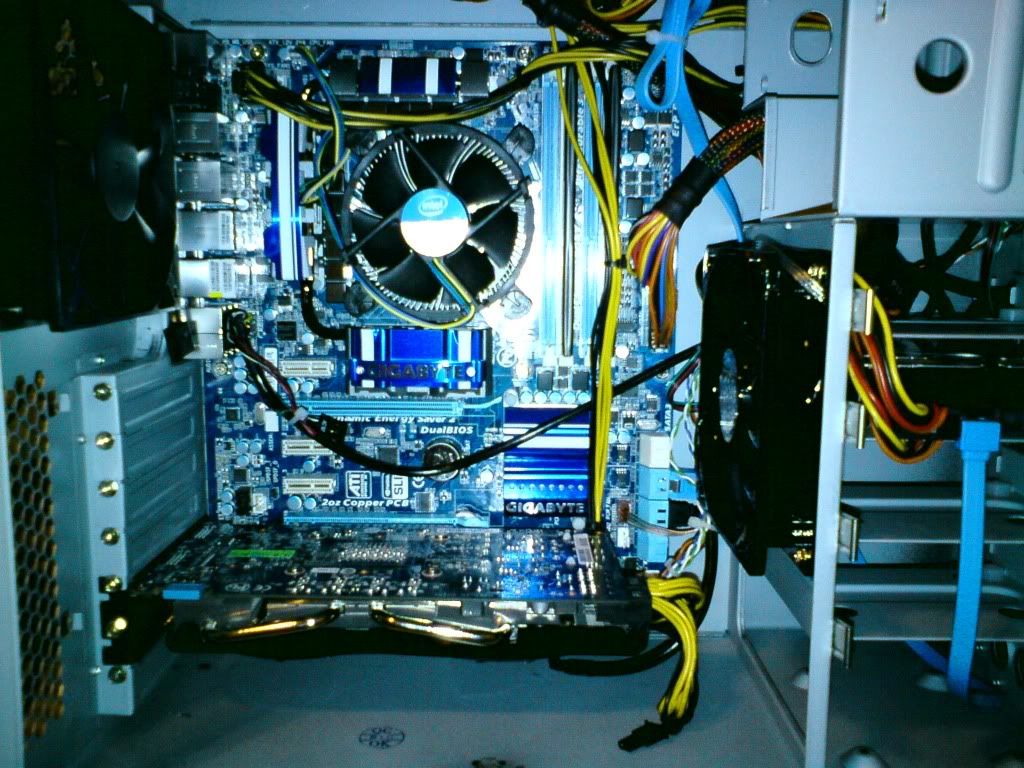
Remount the HS, make sure all 4 pegs are shoved in alllllllll the way. (Don't twist to install, only to remove)-COOLIO- said:an i5 760 shouldnt be at 60 degrees celsius on idle right?
would could be causing the heat?
looks good to me.Unknown Soldier said:Cross-posted from this thread.
Is this an appropriate bang for buck upgrade? My paramount goal is a 4 ghz overclock or higher. Apparently to get the best performance out of FFXIV you need 4 ghz (no joke). :lol
Hazaro said:Remount the HS, make sure all 4 pegs are shoved in alllllllll the way. (Don't twist to install, only to remove)
And move your GPU to the top slot :/
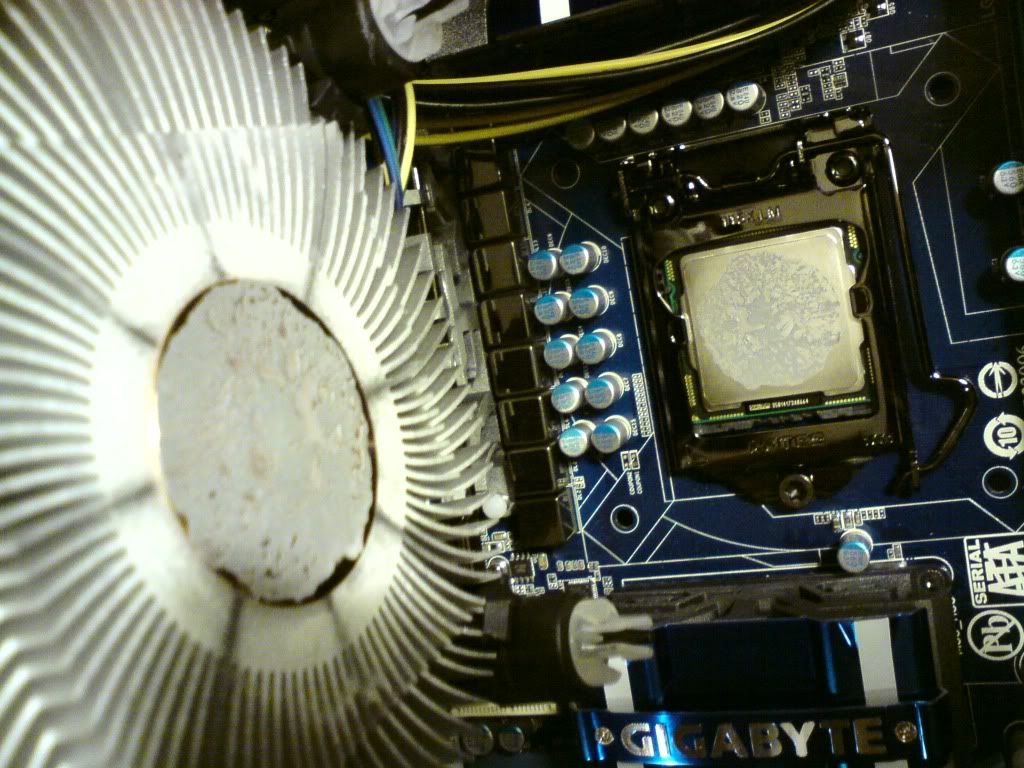

hmm :[Clevinger said:That's what thermal paste looks like when it's stuck together and then taken apart. It may be a good idea to clean it off and put some new paste on there. They didn't fuck up.
Bjern Fita said:For those with a little loose change lying around, you can snag this beauty from a Norwegian etailer....
google '95000 nok in usd' and hold onto your socks....