• Hey Guest. Check out your NeoGAF Wrapped 2025 results here!

"I need a new PC!" 2010 Edition

Not a major thing, but I'd probably get this GTX 460 instead:

http://www.newegg.com/Product/Produ...7518&cm_re=gtx_460_1gb-_-14-127-518-_-Product

If you care about noise, that card would be better.

http://www.guru3d.com/article/msi-geforce-gtx-460-hawk-review/9

With both cards running at 43/44 dBA noise, the MSI one is 57C as opposed to 72C. That means you can bring fan speed down significantly and have it run at the same temperature.

Of course, the EVGA gives you a lifetime warranty instead of 3 years, so if that's more important to you, there's no problem going EVGA. The Gigabyte card is an option as well...but I've heard of a few people with Gigabyte cards having issues (though that could be bad luck and completely unrelated to the manufacturer).

I believe the Samsung Spinpoint F3 is better than that WD drive, and cheaper to boot:

http://www.newegg.com/Product/Produ...52185&cm_re=samsung_f3-_-22-152-185-_-Product

edit: nvm don't get an aftermarket cooler...looks like the 970 actually comes with a good one.
 
@Shambles: Any reason you're going with a tri-core over a quadcore? for the same price you can get a Athlon II X4, or if you add another $30 you can get a Phenom II X4 810. I just see little reason to grab a tri-core.
 
TheExodu5 said:
Not a major thing, but I'd probably get this GTX 460 instead:

http://www.newegg.com/Product/Produ...7518&cm_re=gtx_460_1gb-_-14-127-518-_-Product

If you care about noise, that card would be better.

http://www.guru3d.com/article/msi-geforce-gtx-460-hawk-review/9

With both cards running at 43/44 dBA noise, the MSI one is 57C as opposed to 72C. That means you can bring fan speed down significantly and have it run at the same temperature.

Of course, the EVGA gives you a lifetime warranty instead of 3 years, so if that's more important to you, there's no problem going EVGA. The Gigabyte card is an option as well...but I've heard of a few people with Gigabyte cards having issues (though that could be bad luck and completely unrelated to the manufacturer).

I believe the Samsung Spinpoint F3 is better than that WD drive, and cheaper to boot:

http://www.newegg.com/Product/Produ...52185&cm_re=samsung_f3-_-22-152-185-_-Product

edit: nvm don't get an aftermarket cooler...looks like the 970 actually comes with a good one.

good stuff added it to my list, so I can see which one is cheaper when I purchase. Mail in Rebates go until 11/30 so I'm hoping for some good sales, and then use the MIR's on top of that.
 
Hazaro said:
The $550 build is a few posts above you man. That's the best you are going to get for $550.
(HAF, 5770, etc.)
Everything comes with the case / mobo.


1)Basic Desktop Questions
Budget: Price Range + Country
Main Use: Light Gaming, Gaming, Video editing, 3D work, general usage (Word, Web, 1080p playback)
Monitor Resolution: What resolution will you be looking to play your games at? Are you going to upgrade later?
List SPECIFIC games that you MUST be able to play: Self Explanatory

2)General Guide on what to buy
$500-$600 Budget build: http://imgur.com/gdc1C.png
1k build: To be updated

3)15 minute video how-to
http://vimeo.com/5685229
40 minute how-to
http://www.tested.com/news/video-how-to-build-the-best-1500-gaming-pc-step-by-step/152/

4)Prospective laptop buyers please fill this out and ask their forum as well.
http://forum.notebookreview.com/wha...ould-i-buy-form-must-read-before-posting.html
GAF notebook / laptop thread: http://www.neogaf.com/forum/showthread.php?t=386622
I bought everything on your $500-600 link and I have one question. Do I have to buy a CPU heatsink separately?
 
TheExodu5 said:

I believe the Samsung Spinpoint F3 is better than that WD drive, and cheaper to boot:

Samsung is 3gb/s

WD is 6gb/s

:D

Was given the suggestion that a XFX HD-585X-ZAFC Radeon HD 5850 1GB is better than a GTX 460, and wanted to see what you guys think of it..

And maybe a 550w power supply would work with the i7-970 and the 460.
 
Angelus Errare said:
@Shambles: Any reason you're going with a tri-core over a quadcore? for the same price you can get a Athlon II X4, or if you add another $30 you can get a Phenom II X4 810. I just see little reason to grab a tri-core.

Trying to keep things priced as low as possible a 30$ price increase is quite substantial. The X4 810 also is not a black edition chip which makes things more difficult to overclock. As an overclocker that matters to me. I also see it as a>90% chance to unlock it to an X4 with the unlocked multiplier anyways. But even if it doesn't I won't feel bad. I'd even try the unlock with an X2 but the BE X2's are actually more expensive right now than the slightly older X3 so that's an easy choice. If I was going to bump up the next step up I'd probably just go right up to the X4 955 over the 810. The sweet spots for price/performance in my mind is the X3 740 at <100$, X4 955 at 150$, and the i5 760 at 200$ (Depending on what you're doing the Phenom X6 can be the better choice at 200$ as well). There are many chips in between, and while most aren't worth it some are but that is how I see the major price points in my mind. Also for gaming the Phenom X3 is the much better choice than the Athlon X4 because of the L3 cache.

caliblue15 said:
Samsung is 3gb/s

WD is 6gb/s

:D

Was given the suggestion that a XFX HD-585X-ZAFC Radeon HD 5850 1GB is better than a GTX 460, and wanted to see what you guys think of it..

And maybe a 550w power supply would work with the i7-970 and the 460.

Sata 3Gb is just the spec for the connector, it doesn't always translate into faster performance. In fact no HDD can come close to saturating Sata 3Gbps throughput so it's a null point for these drives as even if the HDD has a huge cache for a slightly higher burst rate it 's not doing much for you. I'm pretty sure the F3 is noticeably faster but you'll want to look up reviews of the drives to get real numbers.
 
Le-mo said:
I bought everything on your $500-600 link and I have one question. Do I have to buy a CPU heatsink separately?
While that build is still quite solid, I'd take a look at what was posted maybe 15 posts back. That build is slightly better at around the same price. The RAM can be had for $10 cheaper as well. Just some minor stuff.

A stock heatsink is provided. If you want an aftermarker cooler the Hyper 212 Plus is the one to get ($30).
caliblue15 said:
Samsung is 3gb/s

WD is 6gb/s

:D

Was given the suggestion that a XFX HD-585X-ZAFC Radeon HD 5850 1GB is better than a GTX 460, and wanted to see what you guys think of it..

And maybe a 550w power supply would work with the i7-970 and the 460.
The F3 is better. Normal HDD's will never have sustained reads of over 300MB/s for a long time. SATA 6gbps is only applicable for the high end read SSD's like the C300.

The XFX 6850 is what you should be looking at instead imo. Vapor chamber and double lifetime warranty for $199.
 
Hazaro said:
While that build is still quite solid, I'd take a look at what was posted maybe 15 posts back. That build is slightly better at around the same price. The RAM can be had for $10 cheaper as well. Just some minor stuff.

A stock heatsink is provided. If you want an aftermarker cooler the Hyper 212 Plus is the one to get ($30).

The F3 is better. Normal HDD's will never have sustained reads of over 300MB/s for a long time. SATA 6gbps is only applicable for the high end read SSD's like the C300.

The XFX 6850 is what you should be looking at instead imo. Vapor chamber and double lifetime warranty for $199.

Hmm, then why does it state it does 6gb/s...

And why is the 6850 cheaper than the 5850, and what the hell is a double lifetime warranty, and why is it better than the 460? :D

(I ask alot of questions, i just want the best possible configuration.)
 
Think of it like a highway. The speed limit might be 300km/h, but that doesn't mean everyone is actually going 300km/h. HDDs are slow crappy cars that can't even come close to hitting 300 so saying that crappy car A can drive on the fast highway doesn't mean anything as it would top out on at the same slow speed on the normal highway as the fast highway.

This metaphor really sucks if you start to look too deeply into it

The 6850 is slower than the 5850. AMD has changed their naming scheme so think of what is now called the 6850 as what you assume should be called the 6750.

The GTX 460 1GB and 6850 trade blows depending on the model you choose and what prices happen to be week to week. The 460 seems like it's a much better overclocker though.
 
Hazaro said:
The XFX 6850 is what you should be looking at instead imo. Vapor chamber and double lifetime warranty for $199.

I disagree. For a newbie, I'd go NVidia for less driver hassle. They're comparable in terms of performance, and the MSI GTX has a great cooler.

Now, in Canada, I'd say the situation is a little different, since the 6850 ends up being like $50 cheaper. But at equal price, I'd go NVidia.
 
TheExodu5 said:
I disagree. For a newbie, I'd go NVidia for less driver hassle. They're comparable in terms of performance, and the MSI GTX has a great cooler.

Now, in Canada, I'd say the situation is a little different, since the 6850 ends up being like $50 cheaper. But at equal price, I'd go NVidia.

What about the 5850, it's only like $20 more than the 6850 right now...

AMD changed their stuff, so it used to be the higher stuff was faster, it's not like that anymore. lol

on benchmarks the 5850 destroys the 460..
 
http://www.hexus.net/content/item.php?item=27616

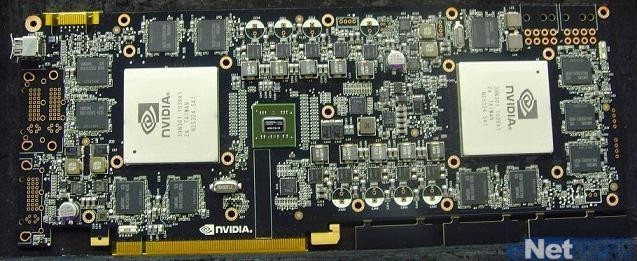
NVIDIA's dual-GPU GeForce GTX 595 poses for the camera

pcb-3.jpg
 
It's nice to see that it's going to have 1920 shaders opposed to the rumoured 15something shaders people were saying before. But i've gotta say, the increase in memory bandwidth is pretty disappointing. Not really making me regret my GTX 580 purchase.
 
Heres the deal I used to be a big PC gamer and into all the hardware news.

But, I haven't paid attention for a few years, I am thinking of selling my iMac and building a PC for programming, media, and some gaming (have a macbook pro & ipad anyway)

I don't really want to go any higher in price, just wondering if this looks decent, or if I could make some changes. Cheaper would be even better.


Antec Three Hundred Black Steel ATX Mid Tower Computer Case

Total $652.87

5198826045_0968076d8e_b.jpg
 
Swap the 5770 for the cheaper and faster 4870.
You can also shave 15$ off the memory by going with some cheap Geil RAM.
You can cut corners with the case as low as taking it down to some budget 25$ mATX case.

It all depends how low you want your budget. An mATX would work, but personally I'd rather have the space in my case to work in and for the better cooling than saving 30$.
 
ZZMitch said:
Don't go duel core! You will regret it, maybe save a little more and go quad core?

From what I read you can unlock the other two cores on the CPU... that is my hope at least.


Shambles said:
Swap the 5770 for the cheaper and faster 4870.
You can also shave 15$ off the memory by going with some cheap Geil RAM.
You can cut corners with the case as low as taking it down to some budget 25$ mATX case.

It all depends how low you want your budget. An mATX would work, but personally I'd rather have the space in my case to work in and for the better cooling than saving 30$.

Thanks for the recommendations, not sure if I want to change the case, I don't see much else for less that doesn't look god awful.
 
So after some checking around...

http://www.newegg.com/Product/Product.aspx?Item=N82E16813128425
GIGABYTE GA-P55-USB3 LGA 1156 Intel P55 USB 3.0 ATX Intel Motherboard

http://www.newegg.com/Product/Product.aspx?Item=N82E16819116368&cm_re=i7-_-19-116-368-_-Product
Intel Core i7-875K Lynnfield 2.93GHz 8MB L3 Cache LGA 1156 95W Quad-Core Unlocked Desktop Processor BX80605I7875K

Plus 4GB of DDR3 RAM.
1TB Seagate HDD
Re using my 750W PSU and my Radeon HD4870 512MB for now. Will probably do a second upgrade for the GPU

That should be a nice rig. Right?

(yes I went from a Phenom 965 to a i7 :lol )
 
Relix said:
So after some checking around...

http://www.newegg.com/Product/Product.aspx?Item=N82E16813128425
GIGABYTE GA-P55-USB3 LGA 1156 Intel P55 USB 3.0 ATX Intel Motherboard

http://www.newegg.com/Product/Product.aspx?Item=N82E16819116368&cm_re=i7-_-19-116-368-_-Product
Intel Core i7-875K Lynnfield 2.93GHz 8MB L3 Cache LGA 1156 95W Quad-Core Unlocked Desktop Processor BX80605I7875K

Plus 4GB of DDR3 RAM.
1TB Seagate HDD
Re using my 750W PSU and my Radeon HD4870 512MB for now. Will probably do a second upgrade for the GPU

That should be a nice rig. Right?

(yes I went from a Phenom 965 to a i7 :lol )

I would say the 965 is a nice rig, that upgrading a PII to an i7 is silly especially with just a 4870 512Mb, and that you'd be far better off using that money instead to upgrade your GPU, and buy an SSD, but it sounds like you know what you want and probably have good reason for it.

Or I'd say wait until Sandy Bridge comes out instead and then upgrade then if you're looking to do a lot of CPU intensive tasks that really shine more with the i7's than the PII's..
 
Shambles said:
I would say the 965 is a nice rig, that upgrading a PII to an i7 is silly especially with just a 4870 512Mb, and that you'd be far better off using that money instead to upgrade your GPU, and buy an SSD, but it sounds like you know what you want and probably have good reason for it.

Or I'd say wait until Sandy Bridge comes out instead and then upgrade then if you're looking to do a lot of CPU intensive tasks that really shine more with the i7's than the PII's..

Yes I know I might have an overload of CPU power with an i7, but I am upgrading by Spring/Summer the GPU. Waiting to see how things pan out with nVidia and ATI to make a choice then.

Still, I am always hearing conflicting reports. i7s should be relatively a nice boost from Phenom 2's right? And would be a little more time-proof? What irks me about Intel is the higher prices and the current mess with Sockets they have, kinda makes me wary of future upgrades. At least with AMD I have an assurance they constantly reuse their sockets for a long time and that they offer a much cheaper price. I am still honestly debating, but that i7 really caught my Eye, and Exodu evangelizes it a lot :lol
 
caliblue15 said:
What about the 5850, it's only like $20 more than the 6850 right now...

AMD changed their stuff, so it used to be the higher stuff was faster, it's not like that anymore. lol

on benchmarks the 5850 destroys the 460..
I'd go with the 6850. If you want possibly less driver hassle then the 460 is also a good choice. Both are fantastic cards and worth it.
Mr Nightman said:
so how quick is asus on video card rebates??
Almost all services use something like 4myrebates. In general anywhere from 4-12 weeks.
Omiee said:
so what is faster 6850 or 6870 in crossfire
or a 470 in sli
guru3d.com
HBP said:
Heres the deal I used to be a big PC gamer and into all the hardware news.

But, I haven't paid attention for a few years, I am thinking of selling my iMac and building a PC for programming, media, and some gaming (have a macbook pro & ipad anyway)

I don't really want to go any higher in price, just wondering if this looks decent, or if I could make some changes. Cheaper would be even better.


Antec Three Hundred Black Steel ATX Mid Tower Computer Case

Total $652.87

5198826045_0968076d8e_b.jpg
Swap in an x4 640. Quads or nothing.
Swap in a GTX 460 768MB. Same price and considerably faster.
You can also downgrade the case to a Cooler Master 310/330/360.
Relix said:
So after some checking around...

http://www.newegg.com/Product/Product.aspx?Item=N82E16813128425
GIGABYTE GA-P55-USB3 LGA 1156 Intel P55 USB 3.0 ATX Intel Motherboard

http://www.newegg.com/Product/Product.aspx?Item=N82E16819116368&cm_re=i7-_-19-116-368-_-Product
Intel Core i7-875K Lynnfield 2.93GHz 8MB L3 Cache LGA 1156 95W Quad-Core Unlocked Desktop Processor BX80605I7875K
No way would I drop that much upgrading from a Phenom right now. It's not that long until we see AM3+ info and Sandy Bridge is releasing Q1 2011. For the same price you are getting a socket with a future and a ton of improvements.
 
Just came back from vacation and got the last few components of my system: the case (HAF 922), video card (Asus 6850), and keyboard (Razer Lycosa). Going to be building my computer when I find the time over the next few days. Planning on overclocking the CPU and video card in the first few weeks.

Just two questions:

1) In terms of the position of the heatsink, with the HAF 922, would it be better to orient it to blow the air to the back exhaust or so that it's blowing up to the top exhaust? I think I read that you can do both with my cooler (Hyper 212+). Is it also worth getting a heatsink paste other than the one included in the 212+ (I heard it's decent)? I'll be trying for at least 3.6 GHZ, if it goes smoothly enough, maybe I'll even go all out to 4 GHZ.

2) For overclocking the video card, will I need any extra cooling past my case's stock? I guess I could just wait and find out, I have the option of installing a side fan which I'm not doing just yet, but the 922 is supposed to have pretty good airflow already.
 
Hazaro said:
While that build is still quite solid, I'd take a look at what was posted maybe 15 posts back. That build is slightly better at around the same price. The RAM can be had for $10 cheaper as well. Just some minor stuff.

A stock heatsink is provided. If you want an aftermarker cooler the Hyper 212 Plus is the one to get ($30).
Ok, thank you. I swapped the parts to match that post you were referring to. Much appreciated. Can't wait to build my first computer!
 
Kurashima said:
Just came back from vacation and got the last few components of my system: the case (HAF 922), video card (Asus 6850), and keyboard (Razer Lycosa). Going to be building my computer when I find the time over the next few days. Planning on overclocking the CPU and video card in the first few weeks.

Just two questions:

1) In terms of the position of the heatsink, with the HAF 922, would it be better to orient it to blow the air to the back exhaust or so that it's blowing up to the top exhaust? I think I read that you can do both with my cooler (Hyper 212+). Is it also worth getting a heatsink paste other than the one included in the 212+ (I heard it's decent)? I'll be trying for at least 3.6 GHZ, if it goes smoothly enough, maybe I'll even go all out to 4 GHZ.

2) For overclocking the video card, will I need any extra cooling past my case's stock? I guess I could just wait and find out, I have the option of installing a side fan which I'm not doing just yet, but the 922 is supposed to have pretty good airflow already.
2) Even with an overclock you'll have enough airflow for the GPU to remain at a comfortable temp level. Of course, if you load up the entire HDD cage and/or have really poor cable management that will make for warmer internals.

1) Case layout permitting, that type of HSF performs best when arranged like this:

done_thumb.jpg


The thing with the cases like the HAF 922 (and especially the Corsair 600T) is that the top fan is placed fairly far forward in the chassis so it pulls some of the cooler air out of the case before it has a chance to reach your HSF. If you had something like an H50 acting as a rear intake, that would be a perfect setup, but it can pose problems with certain air coolers, depending on size, type and arrangement. One thing I'd recommend to other 922 owners is to try and tweak the setup of your particular cooler and case fans. For instance, if you were thinking of arranging your Hyper 212 like this:

212-2.jpg


you could also try it with the top fan acting as an intake. That would turn your case into a positive pressure one, and with the top fan so far forward, it would also be feeding cool air directly into your HSF's intake. An added benefit to positive pressure like that is that your GPU and CPU compete less for the same intake air. The effect would be more pronounced with a longer card like a 5970, as opposed to a shorter card like a GTX 460.
 
Relix said:
Yes I know I might have an overload of CPU power with an i7, but I am upgrading by Spring/Summer the GPU. Waiting to see how things pan out with nVidia and ATI to make a choice then.

Still, I am always hearing conflicting reports. i7s should be relatively a nice boost from Phenom 2's right? And would be a little more time-proof? What irks me about Intel is the higher prices and the current mess with Sockets they have, kinda makes me wary of future upgrades. At least with AMD I have an assurance they constantly reuse their sockets for a long time and that they offer a much cheaper price. I am still honestly debating, but that i7 really caught my Eye, and Exodu evangelizes it a lot :lol

Think of it as spending 450$ to upgrade from an i5 to an i7. There's a performance increase but it's simply not worth it unless you're using this machine for CPU bound workstation type applications for your job that your income relies on. For general use/gaming the PII X4 should last you several more years.
 
A bit OT, but...

I followed the suggestions in here a few months ago and built a system around a GA-870A-UD3 with a quad-core AMD CPU. I've been getting crazy amounts of BSODs lately. Replacing the hard drive only fixed some of the problems. One of the ram slots causes errors in memtest. The other slots seem to be okay. While booting yesterday, the system froze and gave me this screen:

8zYI1l.jpg


Anyone else do that build and have problems like this? After all of the testing I've done, I'm thinking it's the memory or motherboard. Plugging in the front panel's USB ports into the motherboard also prevents the computer from turning on, so...

I'ts gotta' be the motherboard, right?
 
What is the difference between an Athlon II X4 640 and a AMD Phenom II X4 940.


Same price, clock speed, some specs seem better on the Athlon but I thought the Athlon was a lower product line than the Phenom?

Sorry for the stupid questions, either should work fine with the GIGABYTE GA-MA785GM-US2H I assume?
 
OatmealMu said:
A bit OT, but...

I followed the suggestions in here a few months ago and built a system around a GA-870A-UD3 with a quad-core AMD CPU. I've been getting crazy amounts of BSODs lately. Replacing the hard drive only fixed some of the problems. One of the ram slots causes errors in memtest. The other slots seem to be okay. While booting yesterday, the system froze and gave me this screen:

8zYI1l.jpg


Anyone else do that build and have problems like this? After all of the testing I've done, I'm thinking it's the memory or motherboard. Plugging in the front panel's USB ports into the motherboard also prevents the computer from turning on, so...

I'ts gotta' be the motherboard, right?
Run memtest with a single stick in the slot each time. Usually memory is the culprit, much more so than a bad motherboard. See if running with 1 stick solves the problem. Make sure they they are running up to spec and at the correct voltages.
HBP said:
What is the difference between an Athlon II X4 640 and a AMD Phenom II X4 940.

Same price, clock speed, some specs seem better on the Athlon but I thought the Athlon was a lower product line than the Phenom?

Sorry for the stupid questions, either should work fine with the GIGABYTE GA-MA785GM-US2H I assume?
One has L3 cache, one doesn't.
http://www.anandtech.com/bench/CPU/2
 
·feist· said:
2) Even with an overclock you'll have enough airflow for the GPU to remain at a comfortable temp level. Of course, if you load up the entire HDD cage and/or have really poor cable management that will make for warmer internals.

1) Case layout permitting, that type of HSF performs best when arranged like this:

http://www.overclockersclub.com/siteimages/articles/coolermaster_hyper_212_plus/done_thumb.jpg

The thing with the cases like the HAF 922 (and especially the Corsair 600T) is that the top fan is placed fairly far forward in the chassis so it pulls some of the cooler air out of the case before it has a chance to reach your HSF. If you had something like an H50 acting as a rear intake, that would be a perfect setup, but it can pose problems with certain air coolers, depending on size, type and arrangement. One thing I'd recommend to other 922 owners is to try and tweak the setup of your particular cooler and case fans. For instance, if you were thinking of arranging your Hyper 212 like this:

http://i683.photobucket.com/albums/vv199/OvrClkr/212-2.jpg

you could also try it with the top fan acting as an intake. That would turn your case into a positive pressure one, and with the top fan so far forward, it would also be feeding cool air directly into your HSF's intake. An added benefit to positive pressure like that is that your GPU and CPU compete less for the same intake air. The effect would be more pronounced with a longer card like a 5970, as opposed to a shorter card like a GTX 460.

Thanks for the info! I looked into it more, and it looks like the Asus video card expels some air into the case as the cover doesn't go all the way to the back, so I think I'll play it safe and go east-west for the cooler to avoid sucking up any hot air from the card.

Your idea of reversing the top fan to make it an intake is intriguing though. I may give that a shot, maybe not right off the bat, but if I'm ever curious or want to see if I can lower temps a bit more. It seems like it should work well.
 
Hazaro said:
Run memtest with a single stick in the slot each time. Usually memory is the culprit, much more so than a bad motherboard. See if running with 1 stick solves the problem. Make sure they they are running up to spec and at the correct voltages.

Both sticks get errors when tested alone on slot 3 (the bad slot). I moved from slots 3 and 4, to 1 and 2, then tested with memtest over night. No errors. Right now, the memory is underclocked to 666. Running it at rated speeds (800) leads to instability, a problem I've had long before these BSODs started happening. Once I set up the new hard drive, I attempted to achieve 800 again, but the BSODs got worse. I've stress tested the GPU with Furmark, and the temperature never exceeded 50C with no artifacts to be found. Prime95, on the other hand, absolutely wrecks my system. Not even 10 seconds in and it blue screens.

I'm having a lot of trouble narrowing things down, since these recent BSODs are all "ntoskrnl.exe" errors. Previously, these blue screens were more specific, but this generic stuff isn't pointing me in any direction. And as far as the motherboard goes, since one of the memory slots gives errors, and plugging in the front panel USB ports prevents the system from starting... Well, maybe you can see why I'm suspecting the mobo now. The Prime95 results confuse me, though. I've done the tests that both stress and don't stress the memory, and still get blue screens.

The memory has been accepted for an RMA, and I'm waiting on the motherboard. I'm going to laugh (cry) if my CPU is the culprit.
 
OatmealMu said:
Both sticks get errors when tested alone on slot 3 (the bad slot). I moved from slots 3 and 4, to 1 and 2, then tested with memtest over night. No errors. Right now, the memory is underclocked to 666. Running it at rated speeds (800) leads to instability, a problem I've had long before these BSODs started happening. Once I set up the new hard drive, I attempted to achieve 800 again, but the BSODs got worse. I've stress tested the GPU with Furmark, and the temperature never exceeded 50C with no artifacts to be found. Prime95, on the other hand, absolutely wrecks my system. Not even 10 seconds in and it blue screens.

I'm having a lot of trouble narrowing things down, since these recent BSODs are all "ntoskrnl.exe" errors. Previously, these blue screens were more specific, but this generic stuff isn't pointing me in any direction. And as far as the motherboard goes, since one of the memory slots gives errors, and plugging in the front panel USB ports prevents the system from starting... Well, maybe you can see why I'm suspecting the mobo now. The Prime95 results confuse me, though. I've done the tests that both stress and don't stress the memory, and still get blue screens.

The memory has been accepted for an RMA, and I'm waiting on the motherboard. I'm going to laugh (cry) if my CPU is the culprit.
Have you tried upping the RAM voltage?
Updating the BIOS?

What about your PSU voltages?
 
Hazaro said:
Have you tried upping the RAM voltage?
Updating the BIOS?

What about your PSU voltages?

BIOS is updated. What voltages would I be looking at? Since I'm underclocked on the memory I left things stock. IIRC, it's running at 1.5v right now, as per the packaging.

And I'm not sure what you're asking about the PSU.
 
OatmealMu said:
BIOS is updated. What voltages would I be looking at? Since I'm underclocked on the memory I left things stock. IIRC, it's running at 1.5v right now, as per the packaging.

And I'm not sure what you're asking about the PSU.
Manually set the RAM timings if you haven't. Bump voltage up to 1.6V.

PSU rail voltage:
12V
5V
3.3V

See if those are within 5% of their values. Many programs will report wrongly, but it can help see if something is way off. You can find this in the BIOS, it won't be load values but it's probably the most accurate you'll get.
 
Upped the DRAM voltage to 1.6v. Left everything else at auto, since it looks to be detected correctly -- 9, 9, 9, 24. Memory left at 666. Voltage looks okay, as I see nothing too alarming, although my knowledge there is limited. Here's some BIOS pictures so you can see for yourself:

rOQgn.jpg


2g3TD.jpg


Wg72e.jpg
 
If you are trouble shooting I'd set the timing manually anyway.
Have you unisntalled drivers, swept them (make sure they are gone), and reinstalled as well?
 
Hazaro said:
If you are trouble shooting I'd set the timing manually anyway.
Have you unisntalled drivers, swept them (make sure they are gone), and reinstalled as well?

Fresh install on a new hard drive that's a few days old. Updated the drivers that I could. I'll try playing with the timings some more, but at this point RMAing seems like it'll give me less of a headache.
 
OatmealMu said:
Fresh install on a new hard drive that's a few days old. Updated the drivers that I could. I'll try playing with the timings some more, but at this point RMAing seems like it'll give me less of a headache.
Tough break.
 
T-Matt said:
Hey feist do you know if this is true for the HAF 912 as well?
Not really.
1. Some 912s come with a top fan, some don't.

2. The downside of having less room inside a case (your 912 vs a 922), can also benefit you since there is less dead space inside the chassis. Less dead space usually means it's easier for air to get in and out. Each case + build has its own variables, though.

3. Say the 912 and 922 both have the same diameter top fan. Because of their designs, the radius of that fan in relation to the CPU socket location is different. The 912 is the closest, the 922 is further apart, and the Corsair 600T is further still. Each case's length plays a part in this, but it's mostly down to where each company decided to place the standard and optional fan vents.

A HAF X potentially has more dead space than any of those cases, although the included top fan is pushed all the way to the rear, so the airflow is different.


Kurashima said:
Thanks for the info! I looked into it more, and it looks like the Asus video card expels some air into the case as the cover doesn't go all the way to the back, so I think I'll play it safe and go east-west for the cooler to avoid sucking up any hot air from the card.

Your idea of reversing the top fan to make it an intake is intriguing though. I may give that a shot, maybe not right off the bat, but if I'm ever curious or want to see if I can lower temps a bit more. It seems like it should work well.
Yeah, it's all just trial and error to see what works best for each user even if two people have just about the same build. If you do get around to toiling with the fans, let us know how it works out for you. Keep in mind that with your side panel, you have different options that can change your airflow in a big way.

Stock: some cool air may escape, but it could also help your GPU remove warm air since it is an internal exhaust card. Or, it could be that more air (and dust) will flow in than out, so you'd have a passive intake.

Fan: Small/large, single or dual acting as intakes (usually the best route if you're using side fans), or as exhausts.

Closed: side panel sealed off. You can test it quickly with a thin sheet of cardboard (like a cereal box) and some tape. Whether or not this makes sense in your case depends on your airflow, and whether or not it's better to have air going in/out of the side, or closed so that it all flows front to back with less turbulence.

If you're the plug and play type, you may not want to be bothered with any of this. However, if you like to tweak a little bit in the interest of optimizing your PC, then it's definitely worth doing. Just find some free time in the future and try any of the above setups. You can run CPU and GPU stressing programs to see what works best for you.
 
Meh... I'll let GAF decide...

I am upgrading from a Intel Core 2 Duo 1.86GHZ, 2GB RAM to:


a) Phenom II 965 Black

or

b) Intel Core i7-875K Lynnfield 2.93GHz

Choose GAF. Choose for me!! Will probably be a mid-range Gaming PC with an optional upgrade in the next few months to a much better GPU than the 4870 I have.
 
i7 875k, easily.

I'd definitely consider that a little more than midrange. Very fast processor, if overclocked. Get yourself a cheap air cooler like the Cooler Master Hyper 212, and get that baby up to 4.0GHz. You'll be laughing.
 
My CPU fan was running 100% all the time for some reason. Installed SpeedFan and knocked it down to around 60%. Sounds silent now and no change in temperature :lol
 
·feist· said:
Not really.
1. Some 912s come with a top fan, some don't.

2. The downside of having less room inside a case (your 912 vs a 922), can also benefit you since there is less dead space inside the chassis. Less dead space usually means it's easier for air to get in and out. Each case + build has its own variables, though.

3. Say the 912 and 922 both have the same diameter top fan. Because of their designs, the radius of that fan in relation to the CPU socket location is different. The 912 is the closest, the 922 is further apart, and the Corsair 600T is further still. Each case's length plays a part in this, but it's mostly down to where each company decided to place the standard and optional fan vents.

A HAF X potentially has more dead space than any of those cases, although the included top fan is pushed all the way to the rear, so the airflow is different.
Ah, makes sense. Thank you for the information.
 
·feist· said:
The thing with the cases like the HAF 922 (and especially the Corsair 600T) is that the top fan is placed fairly far forward in the chassis so it pulls some of the cooler air out of the case before it has a chance to reach your HSF. If you had something like an H50 acting as a rear intake, that would be a perfect setup, but it can pose problems with certain air coolers, depending on size, type and arrangement. One thing I'd recommend to other 922 owners is to try and tweak the setup of your particular cooler and case fans. For instance, if you were thinking of arranging your Hyper 212 like this:

212-2.jpg


you could also try it with the top fan acting as an intake. That would turn your case into a positive pressure one, and with the top fan so far forward, it would also be feeding cool air directly into your HSF's intake. An added benefit to positive pressure like that is that your GPU and CPU compete less for the same intake air. The effect would be more pronounced with a longer card like a 5970, as opposed to a shorter card like a GTX 460.

Honestly, the airflow in the HAF 922 is so high that it really won't matter. With the fans spinning at 700RPM, I ran a few different tests.

1) Furmark
2) Prime 95
3) Furmark + Prime 95

The GPU temp in 1 was the same as the GPU temp in 3, and the CPU temp in 2 was the same as the CPU temp in 3 (give or take 1 degree). That means that airflow is basically optimal at that point. I think you'd need to be cranking heat out from a really high end video card or SLI setup to really have to start tweaking.

This was with a midly overclocked (~10%) 6850 and an i5 760 @ 3.6GHz.
 
TheExodu5 said:
i7 875k, easily.

I'd definitely consider that a little more than midrange. Very fast processor, if overclocked. Get yourself a cheap air cooler like the Cooler Master Hyper 212, and get that baby up to 4.0GHz. You'll be laughing.

If you are going to spend that kind of money might as well wait 45 days or so for Sandy Bridge.
 
Top Bottom