• Hey Guest. Check out your NeoGAF Wrapped 2025 results here!

"I need a new PC!" 2010 Edition

Ashhong said:
Alright shambles, how does this look?

http://i55.tinypic.com/v4qvly.png

Is that Antec PSU good enough you think? Save me 10 bucks
The $25 Cooler Master Elite 430 is better and costs less.

For you and anyone else that may be overclocking:
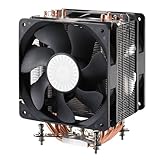
51czGKRyQZL._AA160_.jpg


Hyper 212 Plus $15 ($30 - $15 rebate)
http://www.newegg.com/Product/Product.aspx?Item=N82E16835103065

Or for better cooling with larger heatpipes and dual fans:

0335877_674655.jpg


Corsair A70 $30 ($45 - $15 rebate)
http://www.newegg.com/Product/Product.aspx?Item=N82E16835181011&cm_re=a70-_-35-181-011-_-Product


Drkirby said:
Well, seems I have less money then I expected due to some last minute expenses, so I decided to build my self a cheap PC that should be easily upgradeable in the upcoming months. Other then the Video Card being pretty meh (But its still a step up from what I have... In fact, Intel Integrated is a step up from the Radeon X1200), any major problems you see? Since Intel is going to be getting a whole new slot soon, I decided to go with a Mother Board/CPU Combo that is less then on of the Intel i5 Newegg has on sale (Plus, it comes with the AMD Mother Board I wanted).

tobuy.jpg


Like I said above, the idea is to upgrade it over the next few months and such. How good is the CPU?
Drkirby said:
Yep. At least my Case/PSU combo comes to $25 after MIR, so as long as it works I'll be happy.
You're going to need to cancel or modify that order because your motherboard will not fit in that case. You paired up a mATX enclosure with an ATX motherboard. While unfortunate, it's probably for the best so that you can get a better quality case/PSU than that Apevia. Right now, you are not going to find a better $25 enclosure than that Elite 430.

http://www.newegg.com/Product/Product.aspx?Item=N82E16811119227&cm_re=430-_-11-119-227-_-Product
 
I need some quick laptop advice since I don't follow laptop tech. How good is an Intel Celeron 2.2Ghz these days for web/office type stuff and is there a big difference in build quality between a Lenovo and an eMachine laptop (they both have the same specs but the Lenovo is $30 more, which I assume is worth paying but maybe I'm giving eMachines a bum rap).
 
TheExodu5 said:
Antec PSU is plenty unless you plan on putting a high end GPU in there.

Cool thanks. I'm just sticking in a 4350 or something :lol so definitely not high end.

·feist· said:
The $25 Cooler Master Elite 430 is better and costs less.

I agree. However it's like an inch too big. This lame looking Rosewill is 16.09" when I need something 16" or less. Hopefully this one still fits
 
Jin34 said:
I need some quick laptop advice since I don't follow laptop tech. How good is an Intel Celeron 2.2Ghz these days for web/office type stuff and is there a big difference in build quality between a Lenovo and an eMachine laptop (they both have the same specs but the Lenovo is $30 more, which I assume is worth paying but maybe I'm giving eMachines a bum rap).

whats your requirements for size and the office work envolved? are we talking microsoft office and email, or are you also going to be doing things like youtube/hulu HD videos, downloading, itunes and so on?

you should look into i3 processors. they are low budget but much efficent than celerons.
 
Vigilant Walrus said:
whats your requirements for size and the office work envolved? are we talking microsoft office and email, or are you also going to be doing things like youtube/hulu HD videos, downloading, itunes and so on?

you should look into i3 processors. they are low budget but much efficent than celerons.

Its just for an aunt, most intensive thing is probably skype. Basically the cheapest thing after a netbook but just making sure bloatware wont slow it down too much.
 
Drkirby said:
Uh, how do I just cancel one item :/
Call their customer service first thing in the morning and explain that you had a minor oversight. You should be able to have them rectify it for you, prior to shipping.


Ashhong said:
Cool thanks. I'm just sticking in a 4350 or something :lol so definitely not high end.


I agree. However it's like an inch too big. This lame looking Rosewill is 16.09" when I need something 16" or less. Hopefully this one still fits
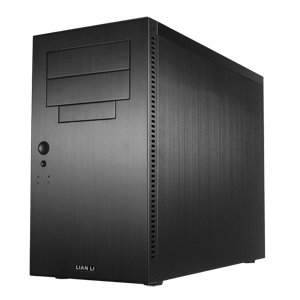
I didn't catch what your use for the PC was, and while I'm assuming that cost was as much a concern as size, I'm going to throw this out there anyway.

31hFTBuNHAL._SL500_AA300_.jpg


Lian Li PC-A05NB $90 (free shipping)
http://www.newegg.com/Product/Product.aspx?Item=N82E16811112218

~15" in height and it fits full ATX boards. Great for modding, watercooling, or just having a nicely styled, quality enclosure in stock form.
 
dragonlife29 said:
This whole post has been very informative. Thanks. I was going to buy this but since I'm buying a retail CPU (Athlon II X4) and am not going to overclock anything, the stock cooler is good enough? (Just to make sure, cooler = fan, right? -_-) I should only replace it if I find it's too loud or I want to overclock?

Yeah the stock cooler will be fine under stock settings. Man even the 212+ is better down there. Up here it only comes with 1 fan where that amazon link has 2 fans on it. Being in Canada really sucks when it comes to computer parts. That 600$ build is a really nice build for that price. I'd call it the definitive mid-range build at least until the sales this weekend stop.

Jin34 said:
I need some quick laptop advice since I don't follow laptop tech. How good is an Intel Celeron 2.2Ghz these days for web/office type stuff and is there a big difference in build quality between a Lenovo and an eMachine laptop (they both have the same specs but the Lenovo is $30 more, which I assume is worth paying but maybe I'm giving eMachines a bum rap).

Should easily be able to find a 400$ i3 laptop this weekend.
 
I'm new to the whole computer gaming scene and I'm looking to build my first gaming computer. My budget is from $500-$700. I would like the machine to be fairly flexible when it comes to upgrading. I want it to play fairly modern games such as Oblivion, Fallout 3/New Vegas, Resident Evil 5, etc, on high quality settings (also with mods). If it costs out of my budget, I can go slightly more in price. What would be the best parts for me to purchase to create my type of machine? I am also curious about the cost of shipping of all these parts would be.
 
joseph1594 said:
I'm new to the whole computer gaming scene and I'm looking to build my first gaming computer. My budget is from $500-$700. I would like the machine to be fairly flexible when it comes to upgrading. I want it to play fairly modern games such as Oblivion, Fallout 3/New Vegas, Resident Evil 5, etc, on high quality settings (also with mods). If it costs out of my budget, I can go slightly more in price. What would be the best parts for me to purchase to create my type of machine? I am also curious about the cost of shipping of all these parts would be.
Do you have a monitor? If so what resolution? Do you have any other parts already (keyboard, mouse, speakers, etc)?
 
opticalmace said:
Do you have a monitor? If so what resolution? Do you have any other parts already (keyboard, mouse, speakers, etc)?

I do have a monitor, keyboard, mouse, speakers, etc. I'm not sure if they would be compatible with a potential newly built computer. The monitor's resolution is 1600 x 1024. Feel free to ask any more info, I will provide it.
 
Unless that processor is nothing more than a temporary solution, get something else. At $0-100 it's very hard to justify Intel over AMD. The i3s are so not worth it from a price/performance standpoint.
 
Angelus Errare said:
Unless that processor is nothing more than a temporary solution, get something else. At $0-100 it's very hard to justify Intel over AMD. The i3s are so not worth it from a price/performance standpoint.

Not really familiar w/ the AMD line, could you suggest something around the same price range for CPU and MOBO? I really don't think my dad needs a i5 :lol
 
Ashhong said:
Yea I was looking at that Ripclaw. The Mushkin ram, while slower, is actually going to be 30$ when the sale starts. The computer is for my parents, so it's just youtube, email, picture stuff. Is the Ripclaw necessary? I'm not familiar with either Gskill or Mushkin as a brand
I see with $20 MIR, then it really doesn't matter if you're looking to cut cost, especially with the purpose of the computer.
 
joseph1594 said:
I do have a monitor, keyboard, mouse, speakers, etc. I'm not sure if they would be compatible with a potential newly built computer. The monitor's resolution is 1600 x 1024. Feel free to ask any more info, I will provide it.
Intel is unveiling Sandy Bridge on January 4 or 5 I think. Someone would have to check a roadmap to see which CPUs they're releasing first, but it's probably worth holding out for if you have the time.
 
Corky said:
Hmm, so if I have a trim-supported ssd ; will that keep the performance from degrading over time? Because I can't find anything about any performance-tools for the vertex 2 ssd.


You may not need one with trim. I was worried about getting a drive that didn't have trim, but the garbage collection system that crucial uses on their sata 6 drives keeps them screaming just fine. No trim needed. Basically anytime your drive is idling, this GC kind of mimics the effects of trim and makes sure your drive doesn't degrade in performance over time. I hate to post a picture because I haven't bothered to do any of the tweaks to my SSD to get the absolute most speed out of it (especially the 4k read tweaks that everyone claims is so important, I personally just don't care, every things so fast, I don't think I'm enough of a power user to bother tweaking for more speed)

however:

rA6C1.png


Thats on a 128GB crucial real ssd. And its been constant like that ever since I bought it, the speeds don't change. I can run test after test week after week and there's next to no variance. And this drive does not support trim. Dont be worried if the drive you get doesnt support it, IMO the newer drives out running trim alternatives are doing just fine.


Edit: Wow, neweggs secret deal has 120GB intel ssds for 199, after the rebate its 164.99 and it comes with Lost Planet 2. Anyone who doesnt have an ssd needs to hop on that shit.....seriously.

Oh shit. 27 inch 1ms LCD montor for 259. Man, makes me wish I had waited another month to build.
 
Puncture said:
Edit: Wow, neweggs secret deal has 120GB intel ssds for 199, after the rebate its 164.99 and it comes with Lost Planet 2. Anyone who doesnt have an ssd needs to hop on that shit.....seriously.
Currently debating within my mind whether I want to grab that SSD or not. It's such a good deal :(
 
Puncture said:
You may not need one with trim. I was worried about getting a drive that didn't have trim, but the garbage collection system that crucial uses on their sata 6 drives keeps them screaming just fine. No trim needed. Basically anytime your drive is idling, this GC kind of mimics the effects of trim and makes sure your drive doesn't degrade in performance over time. I hate to post a picture because I haven't bothered to do any of the tweaks to my SSD to get the absolute most speed out of it (especially the 4k read tweaks that everyone claims is so important, I personally just don't care, every things so fast, I don't think I'm enough of a power user to bother tweaking for more speed)

however:

rA6C1.png


Thats on a 128GB crucial real ssd. And its been constant like that ever since I bought it, the speeds don't change. I can run test after test week after week and there's next to no variance. And this drive does not support trim. Dont be worried if the drive you get doesnt support it, IMO the newer drives out running trim alternatives are doing just fine.

Actually the Crucial drives keep space on the side, so they don't need trim.

Basically, these drives move files around to even the wear on the flash cells. To move files around, they need temporary space. With most SSDs, once space is used once, it's flagged and never used again as temporary space. Trim just unflags it. Now, since the Crucial has dedicated temporary space for this, it doesn't need to worry about trim.
 
TheExodu5 said:
Actually the Crucial drives keep space on the side, so they don't need trim.

Basically, these drives move files around to even the wear on the flash cells. To move files around, they need temporary space. With most SSDs, once space is used once, it's flagged and never used again as temporary space. Trim just unflags it. Now, since the Crucial has dedicated temporary space for this, it doesn't need to worry about trim.


Oh.....well hell. What was all that stuff I reach about this garbage collection then :lol :lol :lol I stressed for weeks on that before buying.
 
Shambles said:
Where is this SSD listed at this price? I can't find it.

http://promotions.newegg.com/neemail/nov-0-2010/24hoursalen26/index-landing.html?nm_mc=EMC-IGNEFL112610&cm_mmc=EMC-IGNEFL112610-_-EMC-112610-Index-_-E0-_-elec#EL


sales go live at 12:01AM PDT

Is the SSD really that great?

My SSD question are:
- can I install games to a 2nd hard drive? (because 120GB is not enough for my games)
- can I move my current windows installation over to the SSD w/o reinstalling?
 
Puncture said:
Oh.....well hell. What was all that stuff I reach about this garbage collection then :lol :lol :lol I stressed for weeks on that before buying.

Well I mean essentially trim is garbage collection. The Crucial drives just don't need to do any garbage collection (unless I'm confusing them with other drives).
 
TheExodu5 said:
Well I mean essentially trim is garbage collection. The Crucial drives just don't need to do any garbage collection (unless I'm confusing them with other drives).
...They don't need garbage collection?? Are you sure you're not thinking about hybrid drives or something man. I'm no SSD master, but I think you're wrong here.
 
TheExodu5 said:
'
Using a TV as a PC monitor is great. However, go for a 60Hz, non LED model. It will be better and faster for PC usage.

damn :lol those were the two things I wanted (120hz and LED)

Gary Whitta said:
It's fine if you don't ever plan on gaming at resolutions above 1080, which is pretty low for PC.

Right now I'm at 1680x1050, so this would be nice. I don't know if I would even wanna go much higher than 1080p with my GTX460
 
Darkatomz said:
...They don't need garbage collection?? Are you sure you're not thinking about hybrid drives or something man. I'm no SSD master, but I think you're wrong here.

Apparently I'm misinformed. I think I confused it with another drive that keeps swap space...maybe the Sandforce drives?

MikeE21286 said:
damn :lol those were the two things I wanted (120hz and LED)

Console yourself in the fact that you wanted those features because marketing has made you believe they are good.

120Hz simply interpolates a slower signal. This is useless for gaming since games will be running at 60Hz anyways. For movies, it's distracting. It also adds an incredible amount of input lag, making it extremely undesirable for any interactive media.

LED will make the TV thinner and use less power, but colors and black levels are much worse. LED is only worth getting if you go to the high end local dimming LED sets.

Now, you can find a 32" 1080p that does everything you need for less than $500. I'm using a Sony EX400. Certain LG and Panasonic models are reportedly great as well.

tv.jpg
 
It's a shame there's no such SSD deal up here. The best I'm seeing is the Intel G2 or Vertex 2 for 199$ after MIR for the 120GB models.

For those in Canada the Memory Express sale just went up. There's a 22 inch 1080P monitor up for 99$, the Corsair CX430 is 10$ after MIR and a bunch of other stuff, worth checking out. Free ground shipping on orders over 39$ and under 50lbs.

@Exodus

You can't run games at 120FPS with the 3D monitors? That would be the only reason i'd want one.
 
Fredescu said:
Really? I've heard of people running stuff at 120fps and loving it.

On a 120Hz monitor, perhaps. 120Hz TVs don't accept a 120Hz signal, with the exception of 3D TVs (which will only do 120Hz at 720p).
 
TheExodu5 said:
On a 120Hz monitor, perhaps. 120Hz TVs don't accept a 120Hz signal, with the exception of 3D TVs (which will only do 120Hz at 720p).
Oh, I see. I didn't realise monitors and TVs handled it differently.
 
opticalmace said:
Intel is unveiling Sandy Bridge on January 4 or 5 I think. Someone would have to check a roadmap to see which CPUs they're releasing first, but it's probably worth holding out for if you have the time.

How big of a difference is Sandy Bridge and the current processors on the market? I was kind of hoping to be able to build this computer very soon.
 
Fredescu said:
Oh, I see. I didn't realise monitors and TVs handled it differently.

Also note, there are very few 120 monitors, and they're pretty expensive right now ($400-500 for a 22"). HDMI doesn't have enough bandwidth to do 1080p @ 120Hz. Monitors get around this by using dual-link DVI.
 
Top Bottom