• Hey Guest. Check out your NeoGAF Wrapped 2025 results here!

Microsoft introduces "Native NVMe" driver stack

And this also occurs with Windows Server. Those idiots at Microsoft didn't plan this thing through....
Yep. It's also missing an interface to performance counters and I don't think that BypassIO is supported by that new driver.
Mind boggling that a company as big as MS would produce a new driver which would just miss half of features of the current one.
 
Yep. It's also missing an interface to performance counters and I don't think that BypassIO is supported by that new driver.
Mind boggling that a company as big as MS would produce a new driver which would just miss half of features of the current one.

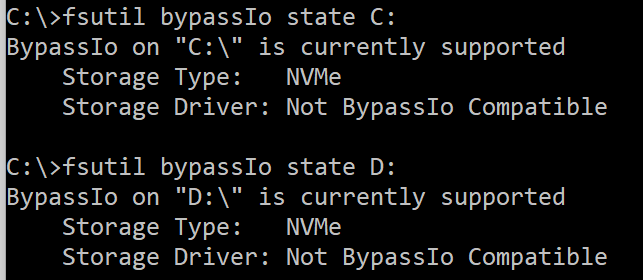
No. BypassIO is not supported fully by this driver.

This is Microsoft, even when they do something right for once, they somehow manage to screw it up.
I swear Microsoft is by the biggest idiots in the industry.
 
No. BypassIO is not supported fully by this driver.
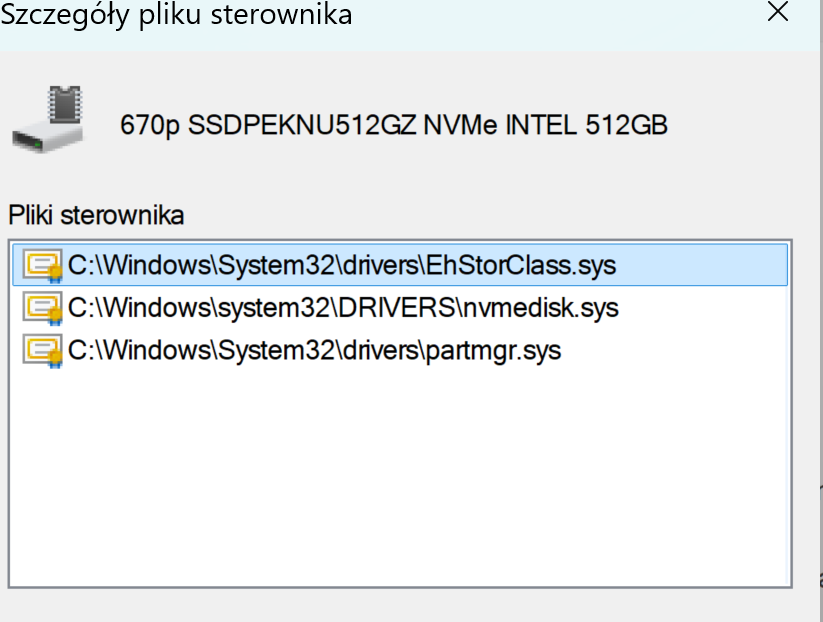
o5f2i5f6.png
 
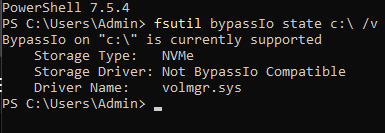
I have that too. Though mine shows it's using volmgr.sys
What it seems to mean is that we get half of the benefits of BypassIO. It is skipping the filters but travelling in the volume stack.
Well coupled with the fact that BypassIO isn't working on BitLocker encrypted drives and that Windows 11 22H2+ is encrypting all drives on installation on all PCs now I'd say that BypassIO as a feature is essentially dead now.
 
Well coupled with the fact that BypassIO isn't working on BitLocker encrypted drives and that Windows 11 22H2+ is encrypting all drives on installation on all PCs now I'd say that BypassIO as a feature is essentially dead now.

That is true. BypassIO seems to get disabled by everything. Not only Bitlocker. But also, split volumes. Indexing service. EFI partitions with only 100MB. Etc.
And it's also very limited, as it's a feature for Direct Storage. And with so limited adoption, it doesn't matter.
Also, this new driver also bypasses a ton of legacy layers, so it makes BypassIO a bit redundant.
And Direct Storage still works, it just doesn't do all of the BypassIO stuff.

With the stornvme.sys driver, BypassIO was working on my PC.

BTW, I prefer to have Bitlocker service disabled. After seeing Windows encrypt one of my drives without any input or authorization from me. Fortunately it was still waiting for me for the final go.
But after I saw several people only getting their drives encrypted by Bitlocker, and then not being able to decrypt the data and losing all of it. I prefer to have this service disabled.
Microsoft is too incompetent and untrustworthy for me to allow them to automatically start encrypting everything on my PC.
 
BTW, I prefer to have Bitlocker service disabled. After seeing Windows encrypt one of my drives without any input or authorization from me.
I got that during 22H2 installation and then again after 24H2 installation.
TBF I've done some benchmarks with BL and w/o it and overall I'd say that I would prefer BL to be on. Will probably just leave it on after the next clean Windows install.
 
That is true. BypassIO seems to get disabled by everything. Not only Bitlocker. But also, split volumes. Indexing service. EFI partitions with only 100MB. Etc.
And it's also very limited, as it's a feature for Direct Storage. And with so limited adoption, it doesn't matter.
Also, this new driver also bypasses a ton of legacy layers, so it makes BypassIO a bit redundant.
And Direct Storage still works, it just doesn't do all of the BypassIO stuff.

With the stornvme.sys driver, BypassIO was working on my PC.

BTW, I prefer to have Bitlocker service disabled. After seeing Windows encrypt one of my drives without any input or authorization from me. Fortunately it was still waiting for me for the final go.
But after I saw several people only getting their drives encrypted by Bitlocker, and then not being able to decrypt the data and losing all of it. I prefer to have this service disabled.
Microsoft is too incompetent and untrustworthy for me to allow them to automatically start encrypting everything on my PC.
When I had an issue which my Bitlocker and needed the key, I was pleasantly surprised that MS hold it on your Microsoft online account. It could be considered a security flaw to be fair, but it got me out of a big issue at the time.
 
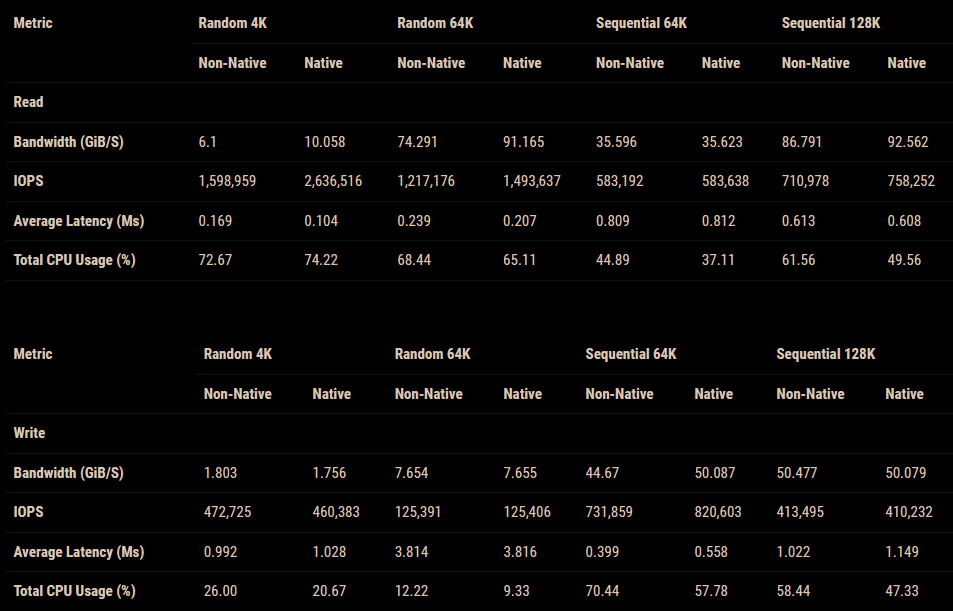
I have tested the directstorage benchmark, and the difference is only marginal for games that use it. It should benefit games that don't use it, although further testing would be needed to confirm this. Initially, it does not appear to have a negative impact on games that use DS.

New stack enable
enable.png


DIsable
disable.png
 
In real life I think overall performance increase is not that large. However if you work with storage more heavily, it's pretty good improvement.

So for gaming - generally meh. Doing large video exports, DB work, some LLM activities, etc… this should all help.

It still brings a decent improvement for games. Slightly lower CPU usage and higher SSD throughput. It also depends on the SSD.
I have seen on some doing almost nothing. But in others doing some nice improvements.

Still, this is a beta feature on Windows Home and Pro, so there can be issues. Because of that, it's only recommended for more advanced users and not to be used on critical systems.
 
I am not sure if i did it correctly. I went YOLO and went to CMD under admin and copy paste the commands winjer winjer posted

reg add HKEY_LOCAL_MACHINE\SYSTEM\CurrentControlSet\Policies\Microsoft\FeatureManagement\Overrides /v 1853569164 /t REG_DWORD /d 1 /f
reg add HKEY_LOCAL_MACHINE\SYSTEM\CurrentControlSet\Policies\Microsoft\FeatureManagement\Overrides /v 156965516 /t REG_DWORD /d 1 /f
reg add HKEY_LOCAL_MACHINE\SYSTEM\CurrentControlSet\Policies\Microsoft\FeatureManagement\Overrides /v 735209102 /t REG_DWORD /d 1 /f

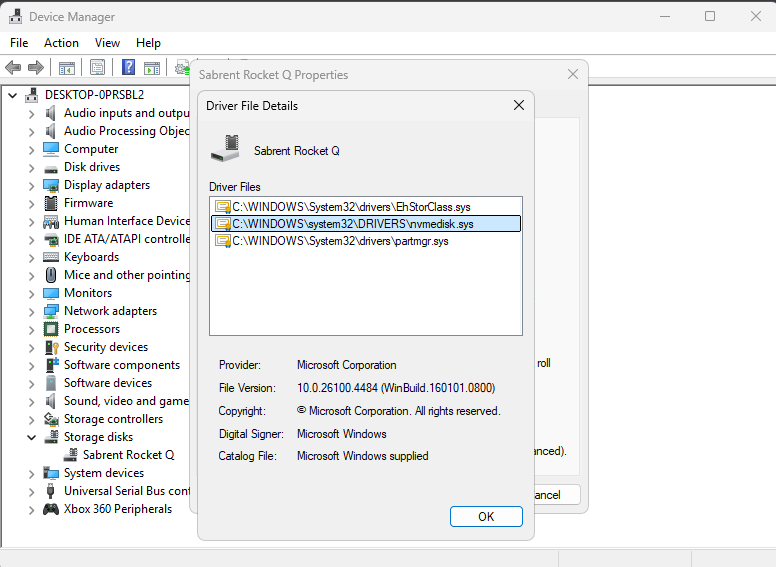
it told me it did successfully. but I am not seeing any changed in device manager. using windows 11 pro here
 
I am not sure if i did it correctly. I went YOLO and went to CMD under admin and copy paste the commands winjer winjer posted

reg add HKEY_LOCAL_MACHINE\SYSTEM\CurrentControlSet\Policies\Microsoft\FeatureManagement\Overrides /v 1853569164 /t REG_DWORD /d 1 /f
reg add HKEY_LOCAL_MACHINE\SYSTEM\CurrentControlSet\Policies\Microsoft\FeatureManagement\Overrides /v 156965516 /t REG_DWORD /d 1 /f
reg add HKEY_LOCAL_MACHINE\SYSTEM\CurrentControlSet\Policies\Microsoft\FeatureManagement\Overrides /v 735209102 /t REG_DWORD /d 1 /f

it told me it did successfully. but I am not seeing any changed in device manager. using windows 11 pro here

I did everything based on this post:


And then keys that fix safe mode - posted by winjer winjer
 
I am not sure if i did it correctly. I went YOLO and went to CMD under admin and copy paste the commands winjer winjer posted

reg add HKEY_LOCAL_MACHINE\SYSTEM\CurrentControlSet\Policies\Microsoft\FeatureManagement\Overrides /v 1853569164 /t REG_DWORD /d 1 /f
reg add HKEY_LOCAL_MACHINE\SYSTEM\CurrentControlSet\Policies\Microsoft\FeatureManagement\Overrides /v 156965516 /t REG_DWORD /d 1 /f
reg add HKEY_LOCAL_MACHINE\SYSTEM\CurrentControlSet\Policies\Microsoft\FeatureManagement\Overrides /v 735209102 /t REG_DWORD /d 1 /f

it told me it did successfully. but I am not seeing any changed in device manager. using windows 11 pro here

Did you restart the PC?
 
Ok i managed to get it working

So the steps are

Update W11 to 25H2, it should come with the KB thing
Create a restore point
Run as admin powershell
Copy, paste enter the 3 lines one after another :

reg add HKEY_LOCAL_MACHINE\SYSTEM\CurrentControlSet\Policies\Microsoft\FeatureManagement\Overrides /v 1853569164 /t REG_DWORD /d 1 /f
reg add HKEY_LOCAL_MACHINE\SYSTEM\CurrentControlSet\Policies\Microsoft\FeatureManagement\Overrides /v 156965516 /t REG_DWORD /d 1 /f
reg add HKEY_LOCAL_MACHINE\SYSTEM\CurrentControlSet\Policies\Microsoft\FeatureManagement\Overrides /v 735209102 /t REG_DWORD /d 1 /f

Download run the .msi policy file from M$ https://download.microsoft.com/download/123547b0-bff7-419d-96ba-d1cfee92f442/Windows 11 24H2, Windows 11 25H2 and Windows Server 2025 KB5066835 251014_21251 Feature Preview.msi
Reboot PC, go to local group policy editor - computer configuration - administrative templates - kb5066835 251014_21251 Feature Preview. Enable

So far, nothing usual happened or changes to the settings.

Hwinfo is still able to readout the temps and such

I run a quick CDM9 benchmark, before and after, the Rnd4K Q32T16 RW results a bit higher >30%, but im not sure if the before was correctly done, i just did it once :goog_lol:
i followed these. Enabled it I will do a reboot. but how do i tell if its actually working ?

Also thank you and winjer winjer for this.
 
Does this work on SSD also because i changed everything but the drives are not displayed under Storage disks?
Edit: oh man it doesn't work with normal SSDs.
 
Last edited:
Fourteen years since NVMe was created and only now this piece of crap from Microsoft has started working natively? Without being a workaround for an old protocol? What a filthy and worthless company.
Windows' ubiquity is its biggest curse. They don't have the luxury of slamming every new thing into the OS and end up breaking a 30 year old piece of software that a Fortune 50 or government agency uses. That's billions of dollars of risk. No other company has that burden on top of having to run on every combination of crap PC parts you can think of.
 
Between these improvements and the latest metrics for Win 10 vs. Win 11 gaming performance, maybe it's finally time to upgrade my gaming PC to Win11?

I'm still a little gunshy about it, if I'm being honest.
 
Windows' ubiquity is its biggest curse. They don't have the luxury of slamming every new thing into the OS and end up breaking a 30 year old piece of software that a Fortune 50 or government agency uses. That's billions of dollars of risk. No other company has that burden on top of having to run on every combination of crap PC parts you can think of.
That's why Microsoft makes new versions of Windows.

The old version continues running on the old hardware that ALREADY runs it.

The new version has new software for new hardware.

It's curious that they loved to force PAID upgrades to the new version of Windows, so the user could access the new version of DirectX that was only "possible" in the new version of Windows.

Nobody here is an idiot; Microsoft is just incompetent and only exists because it has two monopolies.
 
Been dailying this for 3 months and every thing has been fine. From windows update to driver chipset updates. No ssd degradation seen, still at 99%
 
Top Bottom