• Hey Guest. Check out your NeoGAF Wrapped 2025 results here!

Watch Dogs 2 PC performance thread

TXAA removes all that. That or downsample from 4k with SMAA

It does on a 1080p tv, at least if you're not sitting close. Was watching my friend play it on his TV and I didn't notice any shimmering.

Maybe DSR smoothing when downsampling plus + 1080p set and playing far away from the TV makes it more pleasing to the eye. In my case, tried on a native 1440p display and on a 4K TV, and jaggies were definitely visible.
 
Maybe DSR smoothing when downsampling plus + 1080p set and playing far away from the TV makes it more pleasing to the eye. In my case, tried on a native 1440p display and on a 4K TV, and jaggies were definitely visible.
Oh yeah definitely with a 1440p monitor and 4K tv there will obviously be shimmering.
 

I understand disappointment in IQ. I couldn't stand how R6 or The Division looked with their blurry TF implementations. But in this case the temporal filtering solution is leagues above what has come before, however they did it.
Temporal filtering + SMAA looks only marginally worse than straight MSAAx2 + SMAA. That is an outstanding result that comes with an amazing performance boost. It leaves tons of extra performance to go for higher render resolutions to further increase performance.
Which is not saying much, in my opinion.

Anyway, the issue is that we're focusing on different things, you value performance and extra features (which I also do). But heck, I tried to use temporal filtering with a 5K DSR resolution and I could STILL see aliasing and shimmering in the fences, powerlines and servers racks when playing the first mission.

Now, I can't see absolutely nothing jagged when using TAA @ 1440p in Fallout 4. This is the kind of IQ I'd love to have in WD2.
 
does this temporal filtering actually look good? i find it strange that it renders the game at 720p (if 1440p). what does it do to fill in 50% of the pixels? i don't fully understand how it works.
 
So ... the elephant in the room here is that Nvidia is calling Checkerboard Rendering an upscaling technique.

Our resident "Oracle" assured us it wasn't. Who to believe?

Any technique that renders from a lower base resolution is an upscaling technique. Onq's issue with the term is that he considers it a dirty word that refers exclusively to there being no nuance in the process and would prefer that people refrain from grouping checkerboard rendering with the likes of nearest-neighbour interpolation as he believes it to be particularly special -- that it isn't upscaling but rather its own, separate thing.
 
does this temporal filtering actually look good? i find it strange that it renders the game at 720p (if 1440p). what does it do to fill in 50% of the pixels? i don't fully understand how it works.

Looks better than Quantum Break but the IQ is in my opinion heavily affected in any case. Tiny details just get blurry and/or disappear and there is shimmering every time the camera is still. I don't like it.
 
So ... the elephant in the room here is that Nvidia is calling Checkerboard Rendering an upscaling technique.

Our resident "Oracle" assured us it wasn't. Who to believe?


RG0BS1U.gif
 
So ... the elephant in the room here is that Nvidia is calling Checkerboard Rendering an upscaling technique.

Our resident "Oracle" assured us it wasn't. Who to believe?

Unless I am confused at the amount of MSAA samples (is it 2x or 4x guys?), I even think "temporal filtering" as per Ubisoft's technique uses more "real" samples (as in, actually shaded... not reprojected / interpolated / accumulated samples) than standard checkerboard.
 
Opps, I forgot Uplay had a FPS counter, was wondering how people measured it since I couldn't get EVGA Precision X or Nvidia shadowplay to show anything.

I think I'm getting a solid 30 FPS (I'll check to make sure) at 4k using a 1070 with Temporal settings and everything maxed out in ultra. Doing an EVGA step-up sometime soon (at stage 2) to a 1080 GTX to handle 4k better.
 
what if i don't want to use the temporal filtering at play 1440p native with the smaa/fxaa and downsample to 1080p? will it look bad and will i manage 60fps with a 6700k/16gb/1070? i don't mind if i need to go down to high/very high settings as long as the differences arent huge.
 
1440p (temporal) performance on a 1070.
Recorded with shadowplay, performance is slightly better when not recording obviously. Also the stutter in there is probably due to an unlocked framerate and recording. Frame Pacing seems to be fine when locked.

Overall the game looks very nice despite not running at a native resolution (increasing pixel density helps a lot though).

https://www.youtube.com/watch?v=F0yOF6aH1J0
 
does this temporal filtering actually look good? i find it strange that it renders the game at 720p (if 1440p). what does it do to fill in 50% of the pixels? i don't fully understand how it works.

3D scenes are made up of many layers that combine to create the final image. This temporal filtering feature just renders some elements of the scene at 1/4 your chosen resolution.

This will have consequences, but they may have to pointed out to some people.

Compromises like this have been used since the beginning of real-time 3d graphics to improve performance. The cleverest ones are only noticable by developers or other experts.
Some people won't notice, some people will think it's an acceptable compromise and some people will disable it. You'll have to see it to decide.
 
Unless I am confused at the amount of MSAA samples (is it 2x or 4x guys?), I even think "temporal filtering" as per Ubisoft's technique uses more "real" samples (as in, actually shaded... not reprojected / interpolated / accumulated samples) than standard checkerboard.

http://twvideo01.ubm-us.net/o1/vaul...s/El_Mansouri_Jalal_Rendering_Rainbow_Six.pdf

most up to date presentation im aware of

what if i don't want to use the temporal filtering at play 1440p native with the smaa/fxaa and downsample to 1080p? will it look bad and will i manage 60fps with a 6700k/16gb/1070? i don't mind if i need to go down to high/very high settings as long as the differences arent huge.

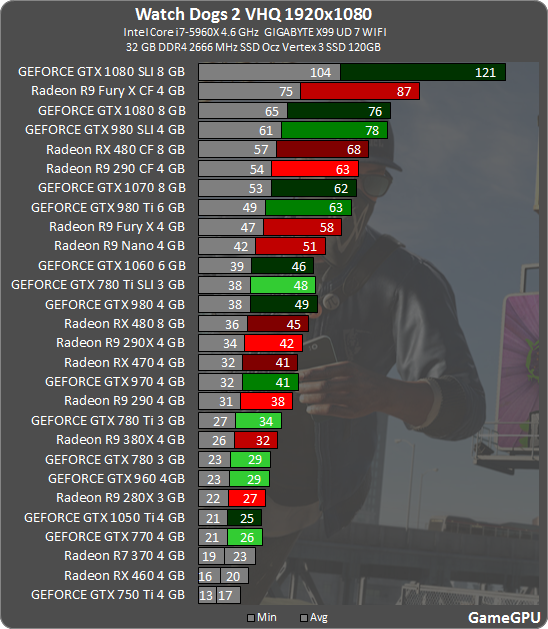
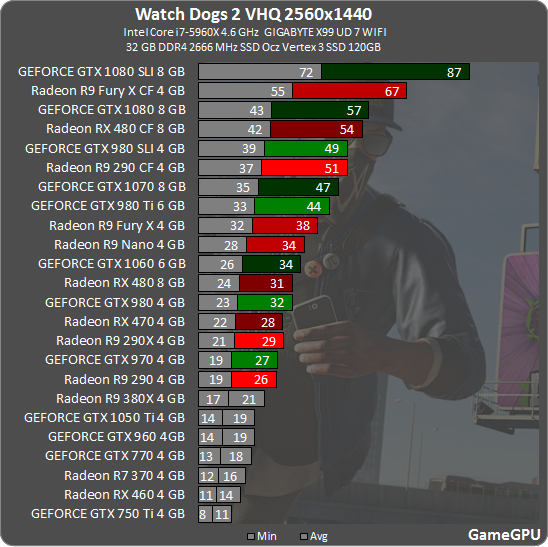
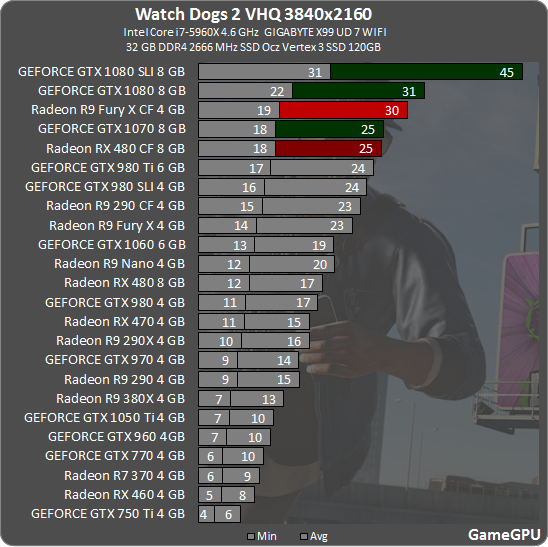
http://images.nvidia.com/geforce-co...ce-gtx-performance-temporal-filtering-off.png

i dont think its gonna happen. native 1440p is avg 35 fps without any aa/extra lod/advanced shadow effects
 
1080, i5-4690k, W10 and running on an SSD at 1440p.

Seems to be 70+ at default Ultra indoors, 40-50 (usually the latter) when driving. Feels weirdly smooth despite being under 60. It's rare that going sub-60 doesn't annoy me. I still notice it but it controls/looks just fine.

This was with the old drivers, going to update when I get home.
 
You can't run the game at 1080p on ultra with AA at 60 FPS. Once you exit the city, the FPS dips gets worse.

The port has performance issues.

I agree. When you can't even get solid 60FPS with a 1080SLI (OC) at 1440P resolution, performance issues simply cannot be denied.
 
Anyone else playing at 4K?

It's not letting me increase pixel density past 1.

Other than that, it runs great. Playing at all max with temporal filtering and extra details set to 0%. Will have to play around with that to find the right balance. I know 100% was causing slowdowns.

5820k at 4.4Ghz
16GB 2666Mhz DDR4
Titan XP at 1950mhz
850 Pro SSD
Windows 10 with latest Nvidia drivers.
 
Oh wow, I finished downloading the texture pack, started the game and after it installed some DX update it launched me right into a BSOD.

First time that's ever happened to me.
 
Which is not saying much, in my opinion.

Anyway, the issue is that we're focusing on different things, you value performance and extra features (which I also do). But heck, I tried to use temporal filtering with a 5K DSR resolution and I could STILL see aliasing and shimmering in the fences, powerlines and servers racks when playing the first mission.

Now, I can't see absolutely nothing jagged when using TAA @ 1440p in Fallout 4. This is the kind of IQ I'd love to have in WD2.

I just find the comparison to the console version irrelevant. It seems you have really high expectations. You want a complete extinction of jaggies to classify something as good image quality. I come from an experience where jaggies can always be found to some extent no matter what you do, even when rendering at absurd resolutions.

I feel that Watch Dogs 2 has done a good job. Yes, jaggies are still visible in some objects as you mentioned. But it seems like nitpicking when the majority of the image is clean and shimmer free. Is it perfect? No. There are games with better IQ. But in my opinion this game is setting a new standard for temporal solutions. It's the first time I've considered one a viable solution that somehow comes close to the far more taxing MSAAx2.
 
Anyone else playing at 4K?

It's not letting me increase pixel density past 1.

Other than that, it runs great. Playing at all max with temporal filtering and extra details set to 0%. Will have to play around with that to find the right balance. I know 100% was causing slowdowns.

5820k at 4.4Ghz
16GB 2666Mhz DDR4
Titan XP at 1950mhz
850 Pro SSD
Windows 10 with latest Nvidia drivers.

I can't either.. playing on my 4k OLED. (also on a Titan XP)
 
Unless I am confused at the amount of MSAA samples (is it 2x or 4x guys?), I even think "temporal filtering" as per Ubisoft's technique uses more "real" samples (as in, actually shaded... not reprojected / interpolated / accumulated samples) than standard checkerboard.

Well, if it's using MSAA 2x then it's the same number of shaded pixels if we're looking at 4K output and if it's using 4x then it's half of what checkerboarding is supposed to use.

There's still a lot of strange information flying around about the checkerboarding technique as I personally very much doubt that it's upsampling 1080p to 4K as that would make little sense.
 
Is the game supposed to have black bars in cutscenes and in the main menu? I'm running at 3840x2160 so the aspect ratio shouldn't cause any issues.
Gameplay is fine, it's just the cutscenes and the black/white console style menu.

E: Doesn't seem like it judging from youtube footage of the same cutscenes.
 
Well, if it's using MSAA 2x then it's the same number of shaded pixels if we're looking at 4K output and if it's using 4x then it's half of what checkerboarding is supposed to use.

There's still a lot of strange information flying around about the checkerboarding technique as I personally very much doubt that it's upsampling 1080p to 4K as that would make little sense.

checkerboarding on ps4pro cuts the horizontal res in half and samples alternate each frame. i dont think msaa is used? the ubi paper says their temporal filtering results in half the samples of native res which makes sense with msaa2x
 
Okay, loaded fine the second time and this time after installing everything it wanted to.

BTW for those who haven't noticed yet, to get the Private Eye pack it seems you have to check the "Premium Content" section on the menu and it'll be there for free. My key is also a Samsung key. The Twitch Prime key was a little annoying with the extra hoop to go through in redeeming the code for the key.
 
just finished downloading. gonna play a while and will probably post my results in here. i have an i7-6700K @ 4.5, 16GB @ 2666, GTX 1070 8GB and hope to get something like 1440p 60fps even if it means using the temporal settings.
 
Guys what's this global installation progress? I'm stuck at 82% and this was installed on a ssd. I am downloading the high res textures thou.
 
So good port is good?

Picked it up on PS4, but will probably double dip once it gets cheap on steam in a year or so.
 
Top Bottom