I remember earlier I mentioned in this thread (and others too) about switching PhysX duties to the CPU in the NCP and were basically laughed at and ignored saying it didn't do anything. Funny how this is coming up again and the meta is changing.
There are 4gb versions of the 680... he didn't state which he had.
I can't speak for 2 680s, but I have 3, and at 1080p with mostly ultra settings (foliage distance on high), I get 80-90 FPS in the most graphic-intensive area I've discovered so far. Probably would be higher if I offloaded PhysX to my CPU which I'll be trying when I get home! So yeah, the scaling seems pretty great. Not sure about double, but I'd wager at least an 80% increase.
Weird, I just dedicated one of my 780s to PhysX and I get 14-16% usage on it. Although I dunno if that is PhysX usage, I've never actually dedicated a card to PhysX before. It could just be standard usage.
There are PhysX libraries for stuff like volumetric fog, but I don't think this game uses it.
I remember earlier I mentioned in this thread (and others too) about switching PhysX duties to the CPU in the NCP and were basically laughed at and ignored saying it didn't do anything. Funny how this is coming up again and the meta is changing.
I got 2 GB
Do I really need more than 2 GB for witcher 3@1080p? What happens if I buy another card but its 4 GB? Will it only count 2 GB?
I got 2 GB
Do I really need more than 2 GB for witcher 3@1080p? What happens if I buy another card but its 4 GB? Will it only count 2 GB?
Well Apex clothing can run on either the CPU or GPU and the name of this file is 'Apex_ClothingGPU' presumably meaning they're running it on the GPU when available.
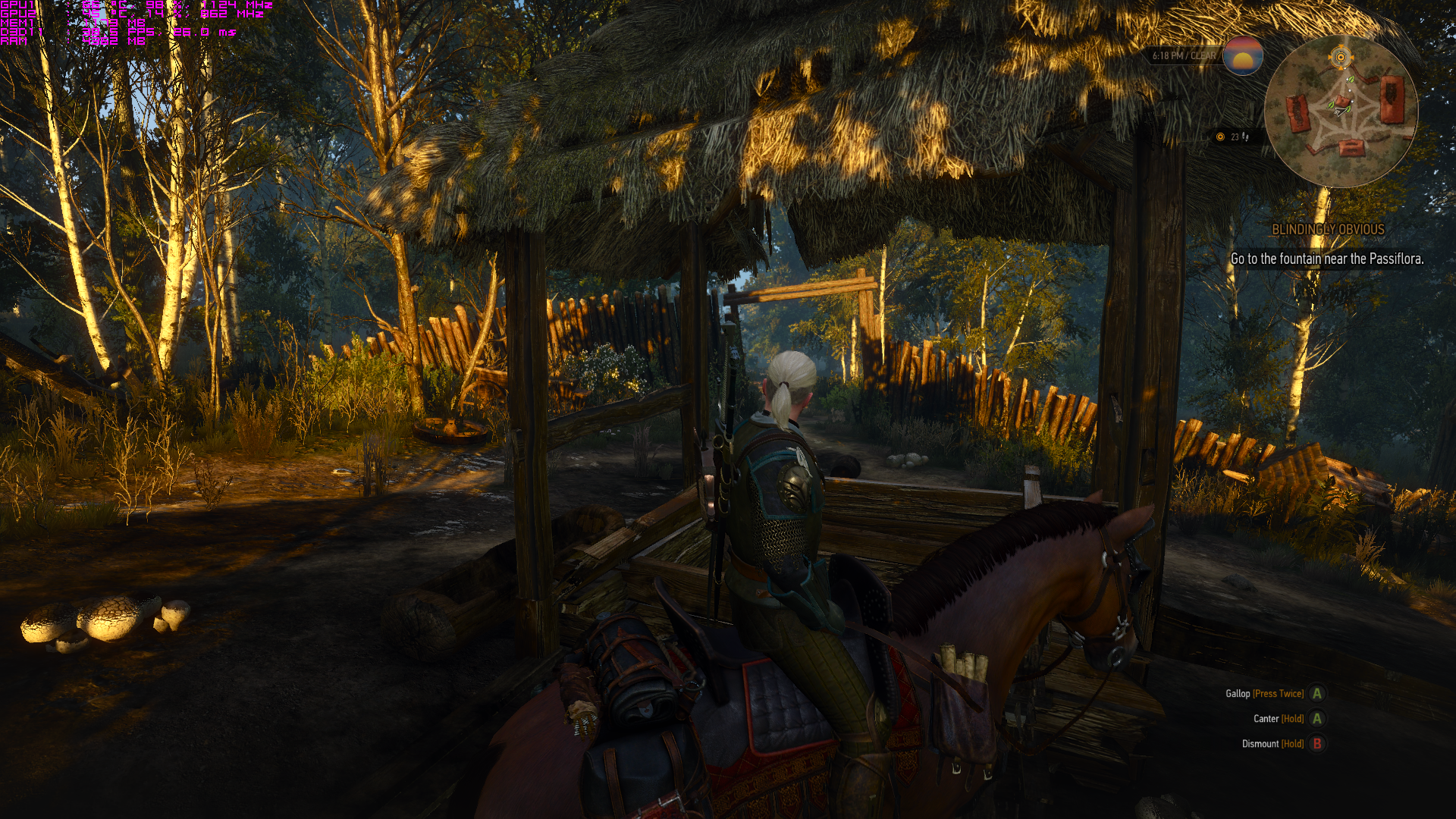
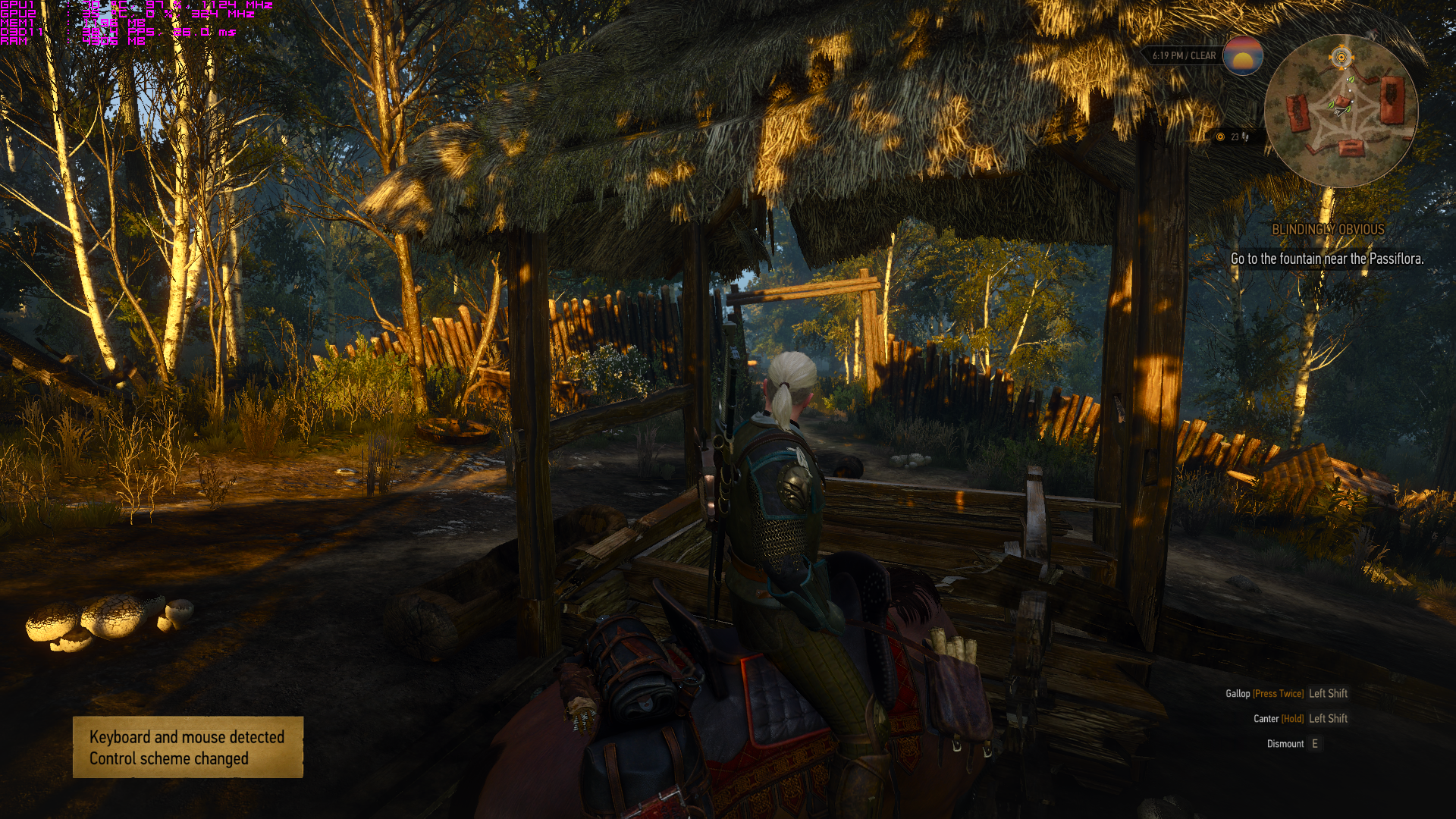
If you look at my GPU usage on the screenshots, when PhysX is set to the CPU - both GPUs running at 98%. Whereas when I set it back to the GPU, the second GPU (which is the selected PhysX processor) is 98% whereas the first GPU is now 84%, presumably bottlenecked by the additional workload on the second GPU?
That is indeed odd..though maybe my factory oc'd 980 is enough for graphics and physx?
Anyway, I will test some more later tonight when I get home from work.
You can't pair a 2gb and 4gb version of the same card in sli. If you have a 2gb you need to get another 2gb.
Don't do it just for this one game because it happens to be ok with 2gb GPU's at 1080p.... You will encounter issues with other games in the future and quite a few that are already out now in fact.
Save your money till you can get a 970 or similar.
You can't pair a 2gb and 4gb version of the same card in sli. If you have a 2gb you need to get another 2gb.
Don't do it just for this one game because it happens to be ok with 2gb GPU's at 1080p.... You will encounter issues with other games in the future and quite a few that are already out now in fact.
Save your money till you can get a 970 or similar.
I'm tempted to change Shadows to low. Can't tell any difference from Ultra.
So, I tried both methods on a 970, and could not observe any statistically significant difference in frametimes.
Absolutely. I just wanted to test whether there is any impact on a Maxwell card, since someone asked earlier and I was curious myself.Is it possible it's because you are using a Maxwell card?
Is it possible it's because you are using a Maxwell card? Would using a Kepler card be better here?
So, I tried both methods on a 970, and could not observe any statistically significant difference in frametimes.
Absolutely. I just wanted to test whether there is any impact on a Maxwell card, since someone asked earlier and I was curious myself.
Interestingly, with the ~5-10% performance improvement reported Kepler cards would slot in much closer to where you'd expect them both compared to Maxwell and compared to AMD results.
Well this started off as a 'fix' for Kepler performance. So getting data points from Maxwell cards is useful to see if this is something unique to Kepler (or all non-Maxwell cards) or a general issue with the game that also affects Maxwell, looks like it doesn't affect Maxwell though.
As in... maxwell uses the CPU for these things already (that would be odd)? Or is it that offloading it to the CPU on Maxwell garners no performance increase? (which I would doubt).
What is the area with the largest amount of Apex Cloth physics going on? I did not notice any difference when just walking around the bog.
I'm not sure, maybe it is supposed to run on the GPU and indeed does on Maxwell, but the performance impact is marginal? Whereas on Kepler be it a bug or otherwise, GPU library for it isn't working properly resulting in worse performance?
Although I would maybe expect, if that was case, that for Maxwell owners they'd see a decrease in their framerate if they put PhysX on the CPU.
Eh. I don't know, it's a weird situation.
It's probably just a case of Kepler overriding (for some reason) the program offloading PhysX to the CPU. So whereas Maxwell just lets the CPU handle it, Kepler probably has some flag mistakenly enabled where it steps in and does all the work itself. That would be my layman's guess, but who knows really.
why in the blue hell did the game revert to low textures? I didnt even notice until checked the settings for whatever reason (I did notice when I bumped it up to ultra tho). game still runs at 60 too so big fat shrug
did the entire of white orchid at 1080p all maxed (except for however long I was with low textures lol), so if its holding up during that, I should be in the clear for the rest?
why in the blue hell did the game revert to low textures? I didnt even notice until checked the settings for whatever reason (I did notice when I bumped it up to ultra tho). game still runs at 60 too so big fat shrug
did the entire of white orchid at 1080p all maxed (except for however long I was with low textures lol), so if its holding up during that, I should be in the clear for the rest?
So...Ive been having weird crashes lately basically it goes like this:
1. Play Game
2. 10 -20 minutes in crashes (freeze black screen, audio still plays, game is still controllable but screen is black even when alt tabbing back to desktop)
3. Hard reboot
4. Play Game fine for hours and then quit
5. start up game again and play for ten to 20 minutes until it crashes the same way
6. repeat
Ive now just started doing a full reboot before I play the Witcher 3 and it seems to not crash during a play session not immediately followed by a reboot.
if you can't tell, theres no reason to have it on max. isn't pc gaming beautiful? you are the creator........(of things already created)
Can't tell the difference in image quality. Performance gets much better.![]()
I've just started seeing the same issues today, too. Worked perfectly fine after unlocking the frame cap and for much longer play sessions. My system:
i7 2600k at stock
16 GB RAM at stock
Asus Strix GTX 970, no overclock on my part
Forgot to mention Im using the Witcher Game ready driver from NVidia on my GTX 970 SSC ACX 2.0+
Ill try unlocking my framerate to see if that helps.
Seems odd that there would be a library for 'Apex_ClothingGPU' if it wasn't meant to run on the GPU - of course that's an analysis purely based on the name of a file. Unless of course it was supposed to be a feature but it was cut, yet the library was left in and it is as you're describing.
Terrible screen tearing at all times cutscenes and in-game in the same spot on my screen. The V-sync, it does nothing! Anyone post fixes, the OP has nothing about it but I think I remember there being a fix.
i7 3770k @3.5gHz
8gb RAM
eVGA GTX 970 AC
borderless windowed mode!
I'm not sure why this isn't more of a thing. Not only that, but you get to keep your ICC profile if you have any sort of calibration going on.
Okay, unless I'm being stupid, I think it has to do with GPU PhysX. I reverted change of the file back to default (so the game loads it) and then went to the NVIDIA control panel and set PhysX processing to CPU.
Screenshot (PhysX - CPU) 71fps:
Screenshot (PhysX - Automatic (auto-selected my 2nd 780)) 62fps:
fps counter on the second is a bit hard to see, especially with imgur compression, but I've double checked, it's 62fps. Keep in mind, I'm running SLI also, so I'm not sure if that'll change anything in relation to your testing - but the guy in the video is running a single card.

I'm not sure why this isn't more of a thing. Not only that, but you get to keep your ICC profile if you have any sort of calibration going on.