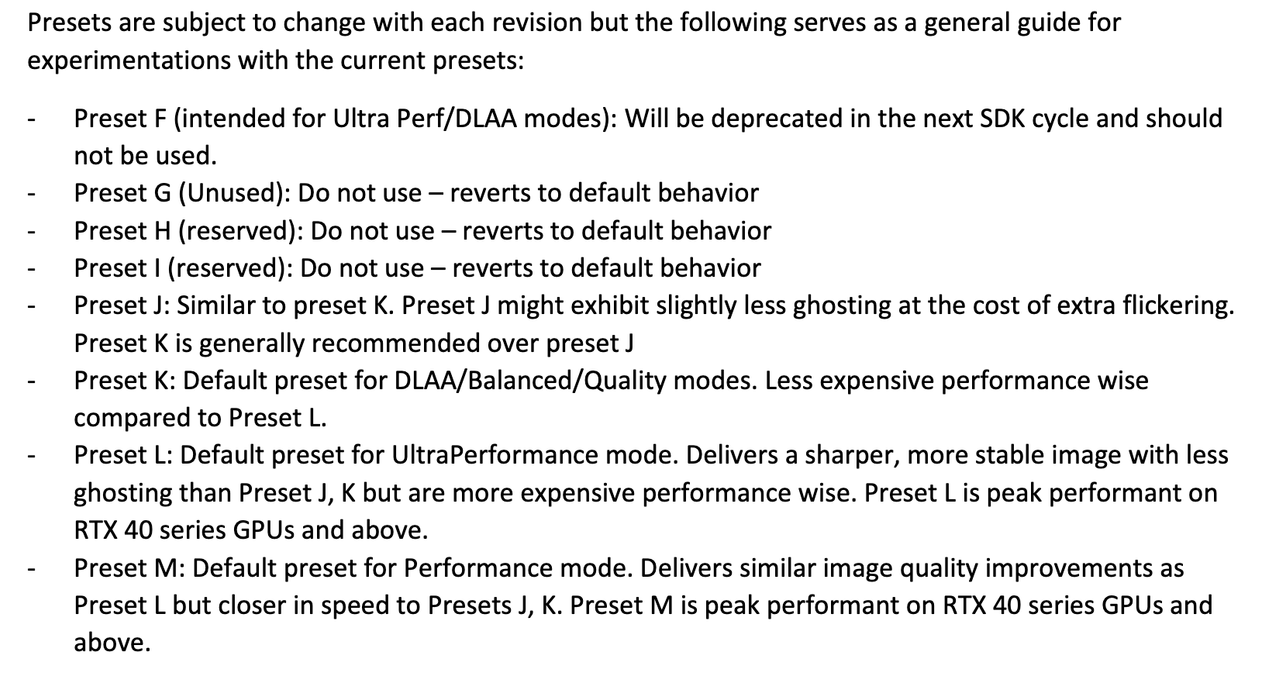
I just tested with a global override and I got preset M, even though I was using DLAA and Quality, respectively across 2 games. It looked insanely sharp - for me this is a good thing as it provides ridiculous amounts of 'lean in' detail.
So 4.5 currently only have 2 presets for performance and ultra performance. Why tho? I want the benefit of the less ghosting but without that awful sharpening
So 4.5 currently only have 2 presets for performance and ultra performance. Why tho? I want the benefit of the less ghosting but without that awful sharpening
sharpening is that not that noticeable in expedition and alan wake for me
i think horizon comparisons were a bit unfair as that game already has a weird sharpening behavior when using upscalers that you cannot disable.
sharpening is that not that noticeable in expedition and alan wake for me
i think horizon comparisons were a bit unfair as that game already has a weird sharpening behavior when using upscalers that you cannot disable.
The only game I tried so far. Preset M in performance mode with 4k output resolution. My subjective impression is that it is indeed very crisp. I turned off the sharpening filter completely and it is still super sharp. But yeah, looking forward to more in-depth comparisons.
So the other post was bs about M only being for performance. Its recommend for all quality modes, assuming you're ok with the 10 fps hit or so. For a sec I thought K was also getting updated and would remain for quality/balanced/dlaa, m perf, l ultraperf, but I guess its clear now.
You can check through the nvidia overlay (alt+z for me), just go to statistics and itll be right there once you select custom info, press show more and scroll all the way down.
You can check through the nvidia overlay (alt+z for me), just go to statistics and itll be right there once you select custom info, press show more and scroll all the way down.
The bubble is not about the quality and usefulness of AI, but rather the investments into companies purporting to leverage AI but are nothing burgers. The DOT COM bust didn't happen because the Internet was a bad idea, but companies being overleveraged while promising the world. Looking into the financials of the various layers of AI companies today, something smells. A lot of borrowing from Peter to pay Paul.
And how is the internet now?
It's still here, much more widespread and full of fees, subscriptions and ads.
If you are comparing AI to the Dot-com bubble, do the full picture. All of the tech bubble bursts (social media, rail road, mobile apps, renewable energy, etc.) came back much more widespread, so if you hate AI now, something that is in high demand, just imagine how bad it will be after the AI bubble bursts when a few companies monopolize in industry.
Wishing for a AI bubble burst that would fuck us up even more is so stupid.
Yeah sorry about that, it has since been clarified that L is just for ultra performance mode and M is for all - which was the original understanding this morning but some incorrect information was bubbling to the top about it by midday which has since been invalidated.
And how is the internet now?
It's still here, much more widespread and full of fees, subscriptions and ads.
If you are comparing AI to the Dot-com bubble, do the full picture. All of the tech bubble bursts (social media, rail road, mobile apps, renewable energy, etc.) came back much more widespread, so if you hate AI now, something that is in high demand, just imagine how bad it will be after the AI bubble bursts when a few companies monopolize in industry.
Wishing for a AI bubble burst that would fuck us up even more is so stupid.
Well that settles it for me - DLSS4.5 (v310.5.0 preset L) is leaps and bounds more temporally stable compared to the first gen transformer model (v310.4.0 preset K). Booted up Jedi: Survivor where the issue was especially egregious in the Fogged Expanse (light-saber trail leaves artifacts that almost looks like horrible gray-banding and/or low-resolution fog volumes) and it's been all but eliminated.
Looking incredibly promising so far, and the boost to visual fidelity means I might finally bump things down from Quality for Performance to offset some of the potential performance loss. Gonna give Ghost of Tsushima try later after work since the issues with the transformer model were immediately obvious on the title screen with wind trails and pampas grass leaving artifacts.
You can check through the nvidia overlay (alt+z for me), just go to statistics and itll be right there once you select custom info, press show more and scroll all the way down.
I was testing with this during the afternoon quite a bit and got pretty confused why it was not working in Indana Jones, DOOM DA or SW Outlaws
Well as it turns out if you have Ray Reconstruction enabled it will replace the basic DLSS and I couldn't test the new stuff. Not sure though if this is intended or not that they can't work together.
So the other post was bs about M only being for performance. Its recommend for all quality modes, assuming you're ok with the 10 fps hit or so. For a sec I thought K was also getting updated and would remain for quality/balanced/dlaa, m perf, l ultraperf, but I guess its clear now.
I dont think it was ever said that preset M can only be used for performance mode just that it was clear that performance mode was the best thing to match it with. From everything ive read it seems Performance (M) is superior in image quality to Quality/Balanced (Preset K) So using (M) with Quality/Balanced/DLAA seems to be a waste of performance.
Also this image shows that performance mode has the least % loss (Avatar 5060 Ti 1440p)
I just upgraded from a 3080. You are insane to think thats viable unless an unstable 60 is your happy place. Which means you should just be playing on a console.
RTX 20 and 30 have relatively poor FP8 performance and should stick with CNN or Transformer v1
RTX 40 and 50 have good FP8 performance and should use Transformer v2
I dont think it was ever said that preset M can only be used for performance mode just that it was clear that performance mode was the best thing to match it with. From everything ive read it seems Performance (M) is superior in image quality to Quality/Balanced (Preset K) So using (M) with Quality/Balanced/DLAA seems to be a waste of performance.
Also this image shows that performance mode has the least % loss (Avatar 5060 Ti 1440p)
Based on the performance losses, this is more of a quality upgrade for the people who have some framerate headroom to spare. A less heavy DLAA imo. The remit of DLSS is to be able to run games at lower resolution and therefore higher framerates. So in that sense what we already had with DLSS4 was better if performance was the main consideration.
I just upgraded from a 3080. You are insane to think thats viable unless an unstable 60 is your happy place. Which means you should just be playing on a console.
If you have 20 or 30 Series you have to drop DLSS to Perfomance mode instead of DLAA or Quality mode to avoid the performance penalty, basically negating the advantages of DLSS 4.5
But great marketing scam NVIDIA
This way they won't get the backlash that AMD got with FSR4 RDNA 2/3 support
I dont think it was ever said that preset M can only be used for performance mode just that it was clear that performance mode was the best thing to match it with. From everything ive read it seems Performance (M) is superior in image quality to Quality/Balanced (Preset K) So using (M) with Quality/Balanced/DLAA seems to be a waste of performance.
Also this image shows that performance mode has the least % loss (Avatar 5060 Ti 1440p)
If you have 20 or 30 Series you have to drop DLSS to Perfomance mode instead of DLAA or Quality mode to avoid the performance penalty, basically negating the advantages of DLSS 4.5
But great marketing scam NVIDIA
This way they won't get the backlash that AMD got with FSR4 RDNA 2/3 support
So the other post was bs about M only being for performance. Its recommend for all quality modes, assuming you're ok with the 10 fps hit or so. For a sec I thought K was also getting updated and would remain for quality/balanced/dlaa, m perf, l ultraperf, but I guess its clear now.
I was testing with this during the afternoon quite a bit and got pretty confused why it was not working in Indana Jones, DOOM DA or SW Outlaws
Well as it turns out if you have Ray Reconstruction enabled it will replace the basic DLSS and I couldn't test the new stuff. Not sure though if this is intended or not that they can't work together.
IDK if thats right, but it makes sense based on what the on-screen indicators report when using it say. They did upgrade RR dll too tho, but god knows what that actually entails and if the changes include the antialiasing(upscaling) model and how the logic there works.
(btw if you use DLSS swapper to change the files it wont show up in the nvidia overlay too since theres nothing to override, but thats obvious)
I did try it out in Expedition 33 while keeping RR on 4.5 version and only changing fg+upscaling, couldnt really find a difference in image quality.
Then i did try it out in Doom Dark Ages (i dont use RR there) and Anno 117, there i could tell a difference with M override working, so i think youre right and RR does indeed invalidates upscaling, but not framegen.
1 game has ray recon enabled, the other doesnt, so i think youre right, unless the new D model has the same AA as M or L, pretty big deal that potentially invalidates every comparison of games with RR.
Well that settles it for me - DLSS4.5 (v310.5.0 preset L) is leaps and bounds more temporally stable compared to the first gen transformer model (v310.4.0 preset K). Booted up Jedi: Survivor where the issue was especially egregious in the Fogged Expanse (light-saber trail leaves artifacts that almost looks like horrible gray-banding and/or low-resolution fog volumes) and it's been all but eliminated.
Looking incredibly promising so far, and the boost to visual fidelity means I might finally bump things down from Quality for Performance to offset some of the potential performance loss. Gonna give Ghost of Tsushima try later after work since the issues with the transformer model were immediately obvious on the title screen with wind trails and pampas grass leaving artifacts.
Looks like 4.5 balanced is the same fps as 4.0 quality and its not that oversharpened as 4.5 quality, so if i want to use 4.5 at 1440p, i should use balanced instead of quality here
IDK if thats right, but it makes sense based on what the on-screen indicators report when using it say. They did upgrade RR dll too tho, but god knows what that actually entails.
(btw if you use DLSS swapper to change the files it wont show up in the nvidia overlay too since theres nothing to override, but thats obvious)
I did try it out in Expedition 33 while keeping RR on 4.5 version and only changing fg+upscaling, couldnt really find a difference in image quality.
Then i did try it out in Doom Dark Ages (i dont use RR there) and Anno 117, there i could tell a difference with M override working, so i think youre right and RR does indeed invalidates upscaling, but not framegen.
Yes the other games I've tried worked no problem with the basic NV app override, maybe I had to reset the override for one game to save it correctly in the app but if there is no RR they all show that M profile is working.
Ray Reconstruction has to be off right now with DLSS 4.5, as the RR dll hasn't been updated to 4.5 yet. So ignore the water differences as that's where RR kicks in.
Outside of that, DLSS 4.5 is definitely noticeably clearer and a marked improvement over DLSS 4.0.
Quick comparison I did with Avatar. Ray Reconstruction has to be off right now with DLSS 4.5, as the RR dll hasn't been updated to 4.5 yet. So ignore the water differences as that's where RR kicks in.
Outside of that, DLSS 4.5 is definitely noticeably clearer and a marked improvement over DLSS 4.0.
Which GPU are you on? Typical, I've just recently honed in on my preferred optimised settings for this game just as they updated the RR, which have enabled. But I dread to think what the performance hit will be after they update 4.5 to work with it. I think I'll probably end up staying with the already excellent 4.0 in that game especially.
RTX 20 and 30 have relatively poor FP8 performance and should stick with CNN or Transformer v1
RTX 40 and 50 have good FP8 performance and should use Transformer v2
Which GPU are you on? Typical, I've just recently honed in on my preferred optimised settings for this game just as they updated the RR, which have enabled. But I dread to think what the performance hit will be after they update 4.5 to work with it. I think I'll probably end up staying with the already excellent 4.0 in that game especially.
i get all the AI hate but i like DLSS. people just want to hate on anything with AI in it.
it used to suck but you can easily get away playing at performance level now and the frame gen doesn't look or feel any different from frames being rendered.
If you have 20 or 30 Series you have to drop DLSS to Perfomance mode instead of DLAA or Quality mode to avoid the performance penalty, basically negating the advantages of DLSS 4.5
But great marketing scam NVIDIA
This way they won't get the backlash that AMD got with FSR4 RDNA 2/3 support
At least you have a choice, it's up to you to look at each game individually to see if it's worth using. AMD simply took that freedom away from gamers with older graphics cards. It's already been proven that the leaked FSR4 model works very well on RDNA 2 and 3, especially on high-end cards.
lmao. Just give me the same image quality and sharpness as DLSS4 right now at 1440p quality, but without the ghosting. Im gonna avoid this for now, because K model looks much better to me minus the ghosting ofc as far as image quality and motion clarity goes
The sharpening is stronger and there's less ghosting, but the performance cost on my RTX 4080S is quite significant with DLAA (21.8%), and also DLSSQ (12%). However, the DLSSP (50% res scale) is worth using, as it has the same framerate.