

nemiroff
Gold Member
No worries, i like you, i can take itI erased that part because i though i was coming out too confrontational
No worries, i like you, i can take itI erased that part because i though i was coming out too confrontational

How did the RTX 2070 perform?


Is that a mod? Might have to reinstall it.DLSS 4.5 is awesome for Star Citizen in VR. I don't have any screenshots to share here because it's VR but it is noticeably sharper in the headset with less artifacts and better performance with DLAA.

This is kind of a shit show at the moment. Setting Nvidia App to latest version as a "set it and forget it" setting no longer seems viable.
Think I'm going to stick with Preset K (DLSS 4) for now, as I either run Quality or DLAA. L and M (DLSS 4.5) are Ultra Performance and Performance settings.
For anyone wondering what each preset does:
- Preset F (intended for Ultra Perf/DLAA modes): Will be deprecated in the next SDK cycle and should
not be used.
- Preset G (Unused): Do not use – reverts to default behavior
- Preset H (reserved): Do not use – reverts to default behavior
- Preset I (reserved): Do not use – reverts to default behavior
- Preset J: Similar to preset K. Preset J might exhibit slightly less ghosting at the cost of extra flickering.
Preset K is generally recommended over preset J
- Preset K: Default preset for DLAA/Balanced/Quality modes. Less expensive performance wise
compared to Preset L.
- Preset L: Default preset for UltraPerformance mode. Delivers a sharper, more stable image with less
ghosting than Preset J, K but are more expensive performance wise. Preset L is peak performant on
RTX 40 series GPUs and above.
- Preset M: Default preset for Performance mode. Delivers similar image quality improvements as
Preset L but closer in speed to Presets J, K. Preset M is peak performant on RTX 40 series GPUs and
above.
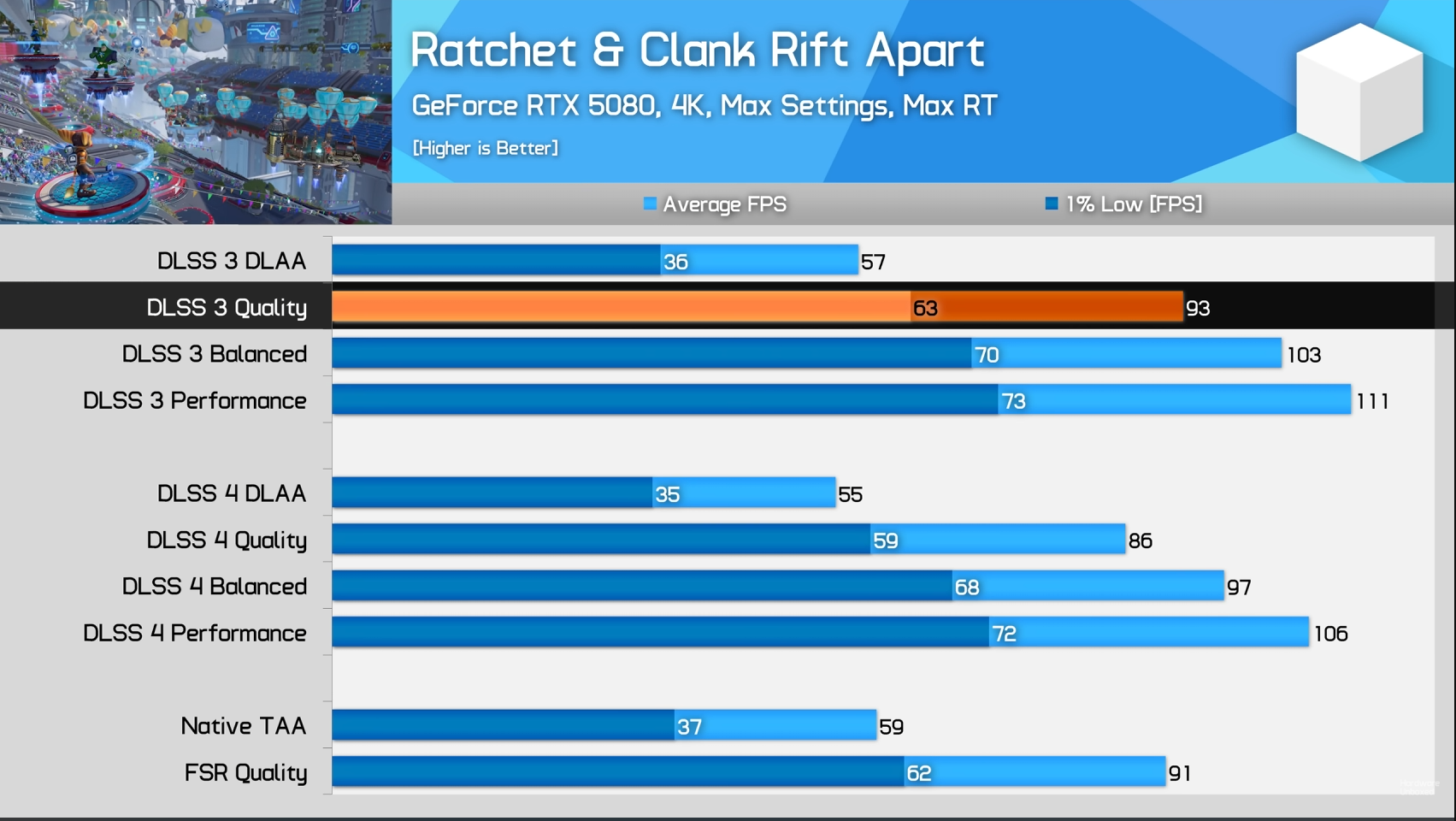
M Performance looks sharper than K Quality here. And has more fps. Is this witchcraft?

Based on Nvidia's own numbers, M having more fps than K should not be possible. So I'm going to guess that this dude made a mistake in his settings.


Just use k profile if you want 4.0.I'm considering downgrading to the previous GE so that whenever I select latest it can only go as high as 4.0.
I feel like there's a bit of good ol planned obsolescence being filtered through to us with these DLSS updates.
Just use k profile if you want 4.0.

It's more that I can't be bothered having to keep checking to see what the latest letter recommendation is to make sure 4.0 is selected.

Just force K as global profile and that's it.
I heard this sometimes does not work for specific games.
Yeah, it's awesome. But you might want to hold on a patch first. As usual CIG left for christmas vacation with the game in shambles after pushing a new big patch. The patch will probably arrive shortly.Is that a mod? Might have to reinstall it.
1440p dlss performance ghosting and shimmering comparison
in this order,
preset D (ray reconstruction)
preset E
preset K
preset M
preset K introduces ghosting in the katana and preset M fixes it
both preset E and preset K has shimmering in road barriers and preset M fixes it
overall preset M looks the cleanest


If I install the new driver and keep the global settings to "use later version of DLSS" this will force 4.5?

Kind of a wasted video imo. Maybe Tim can make a better one later.
Quality vs quality is not what peoples are looking for. Talking about image quality, what it improves, performance 4.5 vs quality 4.0? Quality 4.5 vs DLLA 4.0?
Yes, Tim is already doing the quality comparison tests.
But the performance tests are also very important.

similar comparison
1440p dlss quality preset E
1440p dlss quality preset K
1440p dlss balanced preset M
1440p dlss performance preset M
shimmering still happens with preset E and preset K at 1440p dlss quality
i will try ac shadows. that game had a lot of big problems with dlss 4.
I didn't notice much of a difference compared to preset M with performance modeHave you tried preset L in quality/balanced/perf res scales to see how the image quality fares against M and K?

No it's not a mod. Star Citizen Alpha 4.5 has official native VR support now and it's really good.Is that a mod? Might have to reinstall it.

winjer I see NVIDIA emphasizing how 4.5 uses the FP8 accelerators in the 40/50 series fully, does that mean 4.0 wasn't fully FP8? I was under the impression that it was.


 wccftech.com

'This Really Puts a Nail in AMD FSR Redstone's Coffin': Clair Obscur: Expedition 33 NVIDIA DLSS 4.5 Performance Mode Stuns With Image Quality Close To Native 4K
Even in its early state, NVIDIA DLSS 4.5 stuns by delivering image quality better than native resolution, as in Clair Obscur: Expedition 33

Was Ada using FP8 with 4.0?Ampere and Turing used Int8 and Int4. And FP16.
This is why FSR4.5 is so slow, as it has to use FP16 for one calculation, while Ada can do 2 calculations of FP8.
Was Ada using FP8 with 4.0?
Oh shit, I swear I thought Alex DF implied FP8 was being used. I thought the perf penalty for the older cards on 4.0 was bc of FP8I think it was using Int8. Which is quite impressive, as it still looked better than FSR4 FP8. And way better than FSR4 Int8.


I always thought there was not such a doubling benefit on Nvidia CUDA cores and that on Ada it was the same FLOP count for FP16 as FP32 - and assumed that also was the same for FP8, and I'm sure it was mentioned as a downside for UE5 nanite on Nvidia versus AMD.Ampere and Turing used Int8 and Int4. And FP16.
This is why FSR4.5 is so slow, as it has to use FP16 for one calculation, while Ada can do 2 calculations of FP8.

Rushed out to get initial hype views, foshoKind of a wasted video imo. Maybe Tim can make a better one later.
Quality vs quality is not what peoples are looking for. Talking about image quality, what it improves, performance 4.5 vs quality 4.0? Quality 4.5 vs DLLA 4.0?


damn, it looks the new model improves ac shadows a lot as well
preset M does not reduce rain particle density
preset M does not exhibit the weird ghosting that happens at the corner of the screen when you move the camera in specific direction
preset M does not exhibit the ghosting in flying particles and leaves
preset M does not seem to exhibit this weird artifacting that ruined some of my screenshots
performance figures and static comparisons
quality mode
balanced mode
performance mode
matched performance comparison on an rtx 3070 (preset K quality vs. preset M balanced)
moving comparisons (focus on tree branches)
none of the presets can fix the tree branches when using upscaling sadly, only native fixes it. preset M seems to reduce the subtle ghosting that happens in tree branches though (this doesn't happen with TAA and preset E)
overall preset M provide great improvements and I'd prefer it over preset K on my system (by dropping from quality to balanced, I get roughly the same performance. but performance mode also looks decent).
On the Last of Us, preset M performance mode seems to look on par with native 4K and sometimes appears more sharper to my eyes. Performance mode may be the best way moving forward for me. I mean the picture quality is excellent and you get that boost in fps. This is so cool and will no doubt extend the life of these cards. Hadn't tried it yet on LoU, but I turned on smooth motion in the nvidia app since it doesn't have DLSS frame gen (only FSR) and it seems to work well.

Anyone done any 4.5 vs PSSR comparisons yet?

Anyone done any 4.5 vs PSSR comparisons yet?
Oh wait, no point.
4.5 performance looks better than K quality? For real?
On my 5070 Preset M 4.5 performance at 4K is not only sharper and cleaner looking than Preset K 4.0 quality, also 4.5 fixes most of the ghosting problem of 4.0. And a 10 fps increase
I'll take it
You have to update the app aswell.If I install the new driver and keep the global settings to "use later version of DLSS" this will force 4.5?


