• Hey Guest. Check out your NeoGAF Wrapped 2025 results here!

NVIDIA DLSS 4.5 to feature 2nd Gen Transformer model and Dynamic 6x Frame Generation

On the Last of Us, preset M performance mode seems to look on par with native 4K and sometimes appears more sharper to my eyes. Performance mode may be the best way moving forward for me. I mean the picture quality is excellent and you get that boost in fps. This is so cool and will no doubt extend the life of these cards. Hadn't tried it yet on LoU, but I turned on smooth motion in the nvidia app since it doesn't have DLSS frame gen (only FSR) and it seems to work well.
Ironically, I just stopped playing TLoU1 and it indeed looks better with performance M. I've literally never used anything but Quality or DLAA and now I'm using Performance. It's crazy how good 4.5 is. I'm actually excited for when they update RR so that I can use this with Cyberpunk.
4.5 performance looks better than K quality? For real?
Every game I've tested (4090) looks better with 4.5 Performance M than 4.0 Quality K, with a performance increase to boot. I'm starting to understand why Nvidia didn't include a new preset for the higher tiers, because if things keep moving in this direction we won't be needing them anymore. It wouldn't surprise me at all if the naming scheme changes in the future because of this. Before today when I thought "performance DLSS" I thought "shit tier" and now I'm stunned at how good it looks scaling 1080p to 4k.
 
Pretty sure DLSS 4.0 always used FP8. Just that the new model is so heavy the lack of native FP8 on 2000 and 3000 series cards are more apparent. The old CNN model was INT8 I believe.

Nvidia mentions it here:


We got some questions from the community on DLSS 4.5 Super Resolution and wanted to provide a few points of clarification.

DLSS 4.5 Super Resolution features a 2nd generation Transformer model that improves lighting accuracy, reduces ghosting, and improves temporal stability. The new model delivers this image quality improvement via expanded training, algorithmic enhancements, and 5x raw compute. DLSS 4.5 Super Res uses FP8 precision, accelerated on RTX 40 and 50 series, to minimize the performance impact of the heavier model. Since RTX 20 and 30 Series don't support FP8, these cards will see a larger performance impact compared to newer hardware and those users may prefer remaining on the existing Model K (DLSS 4.0) preset for higher FPS.

DLSS 4.5 Super Resolution adds support for 2 new presets:

  • Model M: optimized and recommended for DLSS Super Resolution Performance mode.
  • Model L: optimized and recommended for 4K DLSS Super Resolution Ultra Performance mode.

While Model M and L are supported across DLSS Super Resolution Quality, Balanced modes, and DLAA mode, users will see the best quality vs. performance benefits in Performance and Ultra Performance modes. Additionally, Ray Reconstruction is not updated to the 2nd gen transformer architecture – benefits are seen using Super Resolution only.


To verify that the intended model is enabled, turn on the NVIDIA app overlay statistics view via Alt+Z > Statistics > Statistics View > DLSS.


We look forward to hearing your feedback on the new updates!

 
Ironically, I just stopped playing TLoU1 and it indeed looks better with performance M. I've literally never used anything but Quality or DLAA and now I'm using Performance. It's crazy how good 4.5 is. I'm actually excited for when they update RR so that I can use this with Cyberpunk.

Every game I've tested (4090) looks better with 4.5 Performance M than 4.0 Quality K, with a performance increase to boot. I'm starting to understand why Nvidia didn't include a new preset for the higher tiers, because if things keep moving in this direction we won't be needing them anymore. It wouldn't surprise me at all if the naming scheme changes in the future because of this. Before today when I thought "performance DLSS" I thought "shit tier" and now I'm stunned at how good it looks scaling 1080p to 4k.
Have you tried 4.5 performance vs 4.5 quality? Is quality a sensible upgrade in iq?

P.s. do i need to disable ray reconstruction on cyberpunk if i use preset M?
 
Last edited:
People are talking about the yt comparisons being wrong because they are not using profile m in performance mode and my question is...what is the problem with using profile M outside of perf mode? Is it because it's too heavy or because it looks bad on any mode other than performance?
 
RR currently disables DLSS 4.5 Super Resolution (uses K or J probably).
So if i wanna play cyberpunk with 4.5 i should turn rr off right?

Strange that they didn't upgraded rr with the release of 4.5, they knew people were about to try stuff like avatar or cyberpunk...
 
People are talking about the yt comparisons being wrong because they are not using profile m in performance mode and my question is...what is the problem with using profile M outside of perf mode? Is it because it's too heavy or because it looks bad on any mode other than performance?

It may end up too sharp. And maybe there is no need for more resolution when it already can look better than old Quality mode. Of course nothing stops you from using it :)

So if i wanna play cyberpunk with 4.5 i should turn rr off right?

Strange that they didn't upgraded rr with the release of 4.5, they knew people were about to try stuff like avatar or cyberpunk...

Yeah, there was no need to rush that release. Turn off RR to see full glory of M or L models.
 
Last edited:
So if i wanna play cyberpunk with 4.5 i should turn rr off right?

Strange that they didn't upgraded rr with the release of 4.5, they knew people were about to try stuff like avatar or cyberpunk...

Yes, if using ray reconstruction it normally uses Preset D, although you also can force E.

RR always "overwrites" the standard super resolution presets.
 
no Performance benefit for me sadly

screenshot-260110-141156.jpg


screenshot-260110-140644.jpg
 
It may end up too sharp. And maybe there is no need for more resolution when it already can look better than old Quality mode. Of course nothing stops you from using it :)


Yeah, there was no need to rush that release. Turn off RR to see full glory of M or L models.
I just can't wrap my head about perf mode looking better than quality mode, my brain think "well then quality and dlaa are gonna look even better, why using perf mode if you have a capable gpu?"

I guess that since this is a beta, in the final version quality is actually gonna look better than perf mode or what is the fucking point of having dlaa\quality\balanced mode anymore?

Also i have the sneaky suspect that people say that it looks better because it looks almost the same but you get 30 frames more so they just say it looks better overall when it actually doesn't...i guess i need to check by myself.

If they actually managed to make perf mode REALLY look better than quality with no caveats or asterisks or footnotes, then jensen deserve all the fucking money :lollipop_squinting:
 
Last edited:
Yeah, 2000 and 3000 don't have native FP8 so since 4.5 uses 5x the compute vs 4 the performance impact on those GPUs is far higher. DLSS 4 and 4.5 still both use FP8. 4 is just much lighter to run.

Not only you have nVidia explaining why performance drops so much with DLSS 4.5 in Ampere and Turing, but also consider how performance drops.
Here is an example, the RTX 3090 has 285 TOPs Int8. The RTX 4070 has 233 TOPs Int8. Both in dense matrix. No sparsity.
Yet going from DLSS 4.0 to 4.5, the 3090 can lose around 20% performance. While the RTX 4070 only loses around 5%.
Considering that the 3090 has a lot more TOPs than the 4070, one would expect it would maintain performance better. But that is not the case.
Like nvidia said, DLSS 4.5 now uses FP8, that older cards don't have. With DLSS 4.0 it used Int8, which Ampere and Turing do have.
This means that Ampere and Turing have to use FP16 to calculate one FP8 operation. Causing the bigger drop in performance.
While Ada Lovelace has FP8 support, so when DLSS 4.5 switches to FP8, it loses only 5%.
And yes, this new model is 5 times heavier. But when a GPU has no support for FP8, and has to do those operations in FP16, then it becomes 10 times heavier.
 
Have you tried 4.5 performance vs 4.5 quality? Is quality a sensible upgrade in iq?

P.s. do i need to disable ray reconstruction on cyberpunk if i use preset M?
Yeah, they don't currently work together. I'm hoping they have it working come the 13th when it's fully released.

As for using higher DLSS settings with preset M, it depends on the game. It's noticeably sharper so certain games will over sharpen when using M. It will all depend on the game. Dragon's Dogma, for instance, has no issues with over sharpening, although testing it made me feel like going higher than Balanced wasn't even worth it and I've been playing that game forcing DLAA the entire time up to now. Someone on Reddit mentioned that the sweet spot for M is below 50% native and after that it becomes too sharp on some games.

I just can't wrap my head about perf mode looking better than quality mode, my brain think "well then quality and dlaa are gonna look even better, why using perf mode if you have a capable gpu?"

I guess that since this is a beta, in the final version quality is actually gonna look better than perf mode or what is the fucking point of dlaa\quality\balanced mode anymore?

I'm with you, which is why I think they are going to do away with the current settings or at least rename them. There is little point in the current Quality setting, when Performance is looking this good. And like you I think a lot of people think "performance" and automatically think it will be bad. Right now 4.5 Performance is sitting between 4.0 Quality and DLAA on a lot of games that I've tested.

When I saw the initial benchmarks I was disappointed with the performance hit, but now that I've actually tested it, all of these people were comparing apples to oranges. Now that I'm testing like for like in terms of IQ it's actual a performance increase,at least on the 50 and 40 series cards, you just have to drop down from what you are used to using.
 
no Performance benefit for me sadly

screenshot-260110-141156.jpg


screenshot-260110-140644.jpg
When you zoom in a bit you can see that oversharpened "oil painting" look on the 4.5. Looks disgusting. AC shadows looked the same when i tested it. That is what i hate about 4.5. 4.0 performance looks a lot better and much more natural to me
 
Last edited:
Not only you have nVidia explaining why performance drops so much with DLSS 4.5 in Ampere and Turing, but also consider how performance drops.
Here is an example, the RTX 3090 has 285 TOPs Int8. The RTX 4070 has 233 TOPs Int8. Both in dense matrix. No sparsity.
Yet going from DLSS 4.0 to 4.5, the 3090 can lose around 20% performance. While the RTX 4070 only loses around 5%.
Considering that the 3090 has a lot more TOPs than the 4070, one would expect it would maintain performance better. But that is not the case.
Like nvidia said, DLSS 4.5 now uses FP8, that older cards don't have. With DLSS 4.0 it used Int8, which Ampere and Turing do have.
This means that Ampere and Turing have to use FP16 to calculate one FP8 operation. Causing the bigger drop in performance.
While Ada Lovelace has FP8 support, so when DLSS 4.5 switches to FP8, it loses only 5%.
And yes, this new model is 5 times heavier. But when a GPU has no support for FP8, and has to do those operations in FP16, then it becomes 10 times heavier.
DLSS 4 uses FP8, this is clear in the documentation I linked directly from Nvidia:


By co-designing our transformer network with highly efficient CUDA kernels and optimizing data flow to make full use of on-chip memory and FP8 precision, we minimized latency and computational overhead while preserving the high fidelity of our output.
To further optimize performance, we ensured that both training and inference are conducted in FP8 precision, which is directly accelerated by the next-generation tensor cores available on Blackwell GPUs.
Finally, by training our network with FP8 Tensor Core formats and adapting associated non-Tensor Core logic, we dramatically increased throughput while preserving accuracy.

Nvidia didn't say anywhere that DLSS 4.5 is now using FP8 and DLSS 4 did not. They have said from the start DLSS 4 uses FP8. The only language they have used is that 4.5 uses FP8, which it does, as 4 uses it as well. Nowhere did they state it switched from INT8.

The reason why the 3090 looses so much more performance vs a 4070 is not because the model switched from INT to FP. It's because, as you said, Ampere and Turing dont have native FP8 and thus 4.5, which requires 5x more compute, hits those older cards harder:


The new model delivers this image quality improvement via expanded training, algorithmic enhancements, and 5x raw compute.

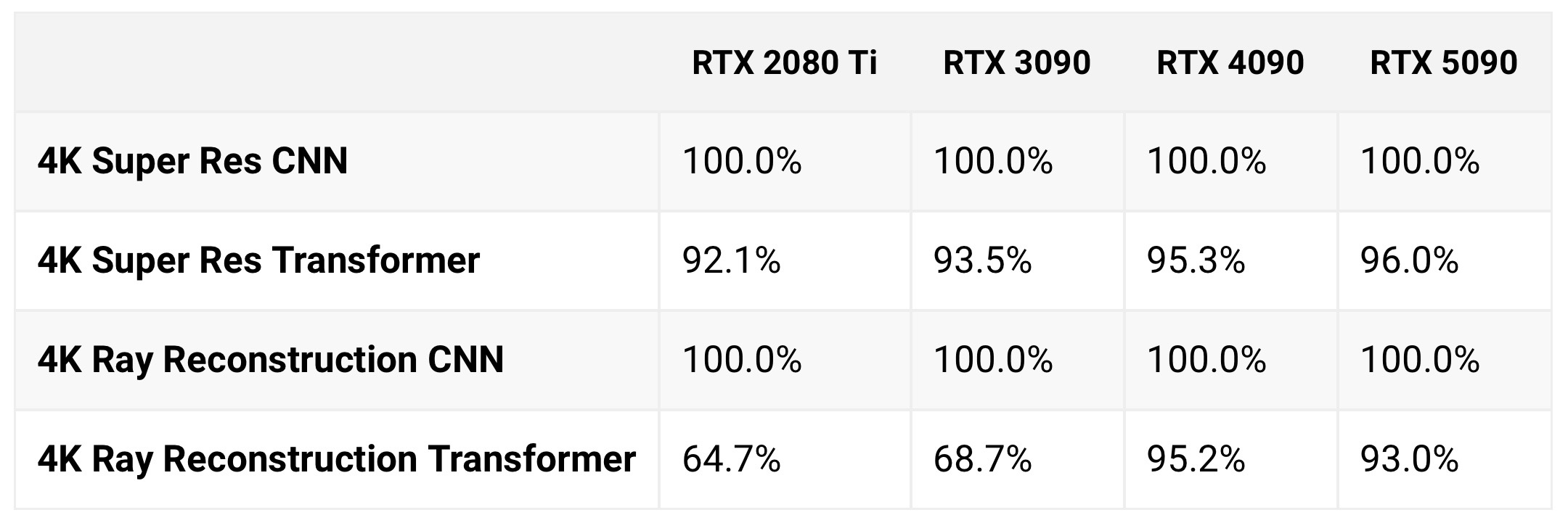
The 3000/2000 series has already a greater performance penalty for enabling DLSS 4 when compared to 4000/5000 series card. Just that 4 was comparatively so light that it was minor. It was way more apparent when enabling Ray Reconstruction, which again uses way more compute for the model:


95MCnF411v8Pb3Rr.jpeg
 
Last edited:
DLSS 4 uses FP8, this is clear in the documentation I linked directly from Nvidia:


Nvidia didn't say anywhere that DLSS 4.5 is now using FP8 and DLSS 4 did not. They have said from the start DLSS 4 uses FP8. The only language they have used is that 4.5 uses FP8, which it does, as 4 uses it as well. Nowhere did they state it switched from INT8.

The reason why the 3090 looses so much more performance vs a 4070 is not because the model switched from INT to FP. It's because, as you said, Ampere and Turing dont have native FP8 and thus 4.5, which requires 5x more compute, hits those older cards harder:


The 3000/2000 series has already a greater performance penalty for enabling DLSS 4 when compared to 4000/5000 series card. Just that 4 was comparatively so light that it was minor. It was way more apparent when enabling Ray Reconstruction, which again uses way more compute for the model:


95MCnF411v8Pb3Rr.jpeg

Have you considered that DLSS 4.0 was using only a part of it's calculations in FP8. And now it's using most, if not all of it in FP8.
For Nvidia to state that the FP8 precision is the reason for the Ampere and Turing to perform so badly, means they were not using FP8 as much in DLSS4.0

Also consider that when nvidia says they trained a model using FP8, does not mean it will then run on FP8. A model can be distilled to use lower precision at runtime.
For example, you can find several LLMs to use on your PC, that use different levels of precision and number of parameters.
 
Have you considered that DLSS 4.0 was using only a part of it's calculations in FP8. And now it's using most, if not all of it in FP8.
For Nvidia to state that the FP8 precision is the reason for the Ampere and Turing to perform so badly, means they were not using FP8 as much in DLSS4.0

Also consider that when nvidia says they trained a model using FP8, does not mean it will then run on FP8. A model can be distilled to use lower precision at runtime.
For example, you can find several LLMs to use on your PC, that use different levels of precision and number of parameters.
The language "FP8 precision, which is directly accelerated by the next-generation tensor cores available on Blackwell GPUs" seems pretty clear cut it's being accelerated by FP8.

It's possible 4 used a mixture. But Nvidia certainly didn't mention it anywhere, nor have they said anything about 4.5 using more FP8 vs 4, just that 4.5 uses FP8. And all the performance drops on older hardware is easily explained by 4.5 requiring 5x the amount of compute. Which 2000/3000 cards will need to run in FP16, but 4000/5000 runs natively, hence a much lower hit to performance. It also explains why even the 4000/5000 get a performance hit, not because it switched some from INT8, but because the model is just far more demanding.
 
Last edited:
The language "FP8 precision, which is directly accelerated by the next-generation tensor cores available on Blackwell GPUs" seems pretty clear cut it's being accelerated by FP8.

It's possible 4 used a mixture. But Nvidia certainly didn't mention it anywhere, nor have they said anything about 4.5 using more FP8 vs 4, just that 4.5 uses FP8. And all the performance drops on older hardware is easily explained by 4.5 requiring 5x the amount of compute. Which 2000/3000 cards will need to run in FP16, but 4000/5000 runs natively, hence a much lower hit to performance. It also explains why even the 4000/5000 get a performance hit, not because it switched some from INT8, but because the model is just far more demanding.

The accelerated part means Ada and Blackwell can operate 4 operations of FP8, while Turing and Ampere can only do 2, because it has to use FP16.
 
The accelerated part means Ada and Blackwell can operate 4 operations of FP8, while Turing and Ampere can only do 2, because it has to use FP16.
Yes, which is why 4.5 and RR hit them harder. Because they have to run very heavy FP8 models via FP16.
 
I feel like Cyberpunk examples are poor anyway, mostly because it's best played with ray reconstruction which uses its own version separate from dlss, aka no M. I also saw some stalker 2 comparisons and the shimmering on grass was massive on M performance, more than K quality, but I guess thats UE5 for ya.
 
I feel like Cyberpunk examples are poor anyway, mostly because it's best played with ray reconstruction which uses its own version separate from dlss, aka no M. I also saw some stalker 2 comparisons and the shimmering on grass was massive on M performance, more than K quality, but I guess thats UE5 for ya.
People on reee were saying that using rr on cyberpunk or raytracing heavy games is more useful than any new dlss version...
Like yeah you get more clarity but rtx are gonna look bad so what is the point?

For people like me that usually disable rtx entirely maybe more clarity is better but for anyone else...
 
People on reee were saying that using rr on cyberpunk or raytracing heavy games is more useful than any new dlss version...
Like yeah you get more clarity but rtx are gonna look bad so what is the point?

For people like me that usually disable rtx entirely maybe more clarity is better but for anyone else...

Yeah RR is pretty good, but also very demanding. Surprised they didnt focus on its tech more than dlss. RR also fixes ghosting in some cases.
 
That's speculation. We have no statement from Nvidia on that. Nor do have any hard evidence on it. It may be true, but it's certainly not a fact.

Nvidia already stated that it's the FP8 that is causing the performance drop in DLSS 4.5 for Ampere and Turing.
 
Nvidia already stated that it's the FP8 that is causing the performance drop in DLSS 4.5 for Ampere and Turing.
But you're inferring a lot from that comment. DLSS 4 RR has an even bigger performance drop on Ampere and Turing! Because it's a heavy FP8 compute model just like 4.5 is.

You're assuming the higher hit to performance on Ampere and Turing is because of a switch to FP8, ignoring the direct statement from Nvidia that the model requires 5x more compute. Which GPU will have a larger hit to performance? The one able to execute FP8 natively? Or the one that needs to fall back to FP16? Small FP8 models (like DLSS 4) fall back to FP16 cheaply on Ampere/Turing, large FP8 models (like 4.5, or RR) fall back to FP16 with a huge hit to performance, because transformers scale superlinearly in stuff like memory, cache, and attention cost.

Now all of that might also be due to some switch over from INT8, but it's certainly not a fact, because the only facts we have are:

DLSS 4 uses FP8 as directly stated by Nvidia.
DLSS 4.5 uses FP8 as directly stated by Nvidia.
DLSS 4.5 uses 5x more compute as directly stated by Nvidia.
DLSS RR uses more compute (the amount is not stated anywhere, just that it is more), as directly stated by Nvidia.
DLSS 4 is heavier to run on Ampere/Turing relative to Ada/Blackwell (difference is slight), as DF and others have tested.
DLSS 4.5 is much heavier to run on Ampere/Turing relative to Ada/Blackwell (big difference), as directly stated by Nvidia and tested by basically everyone.
DLSS RR is much heavier to run on Ampere/Turing relative to Ada/Blackwell (big difference), no statement from Nvidia, but testing from DF and others confirm this.

Those are the facts. Nothing more.
 
But you're inferring a lot from that comment. DLSS 4 RR has an even bigger performance drop on Ampere and Turing! Because it's a heavy FP8 compute model just like 4.5 is.

You're assuming the higher hit to performance on Ampere and Turing is because of a switch to FP8, ignoring the direct statement from Nvidia that the model requires 5x more compute. Which GPU will have a larger hit to performance? The one able to execute FP8 natively? Or the one that needs to fall back to FP16? Small FP8 models (like DLSS 4) fall back to FP16 cheaply on Ampere/Turing, large FP8 models (like 4.5, or RR) fall back to FP16 with a huge hit to performance, because transformers scale superlinearly in stuff like memory, cache, and attention cost.

Now all of that might also be due to some switch over from INT8, but it's certainly not a fact, because the only facts we have are:

DLSS 4 uses FP8 as directly stated by Nvidia.
DLSS 4.5 uses FP8 as directly stated by Nvidia.
DLSS 4.5 uses 5x more compute as directly stated by Nvidia.
DLSS RR uses more compute (the amount is not stated anywhere, just that it is more), as directly stated by Nvidia.
DLSS 4 is heavier to run on Ampere/Turing relative to Ada/Blackwell (difference is slight), as DF and others have tested.
DLSS 4.5 is much heavier to run on Ampere/Turing relative to Ada/Blackwell (big difference), as directly stated by Nvidia and tested by basically everyone.
DLSS RR is much heavier to run on Ampere/Turing relative to Ada/Blackwell (big difference), no statement from Nvidia, but testing from DF and others confirm this.

Those are the facts. Nothing more.

You do realize that we can infer facts from accurate premises.
Nvidia stating that the reason for low performance on Turing and Ampere is the lack of FP8 support, means DLSS 4.5 is using a lot more FP8 than any previous model.
 
You do realize that we can infer facts from accurate premises.
Nvidia stating that the reason for low performance on Turing and Ampere is the lack of FP8 support, means DLSS 4.5 is using a lot more FP8 than any previous model.
Yes, I agree it uses a lot more FP8. We don't have to infer that, Nvidia directly states it uses 5x the amount of compute vs 4.
 
What's the tldr on how we should be managing DLSS 4.5 if we update drivers?

Are games going to automatically assume that version or is it a manual change we'll need to make to presets in the Nvidia app?
 
What's the tldr on how we should be managing DLSS 4.5 if we update drivers?

Are games going to automatically assume that version or is it a manual change we'll need to make to presets in the Nvidia app?
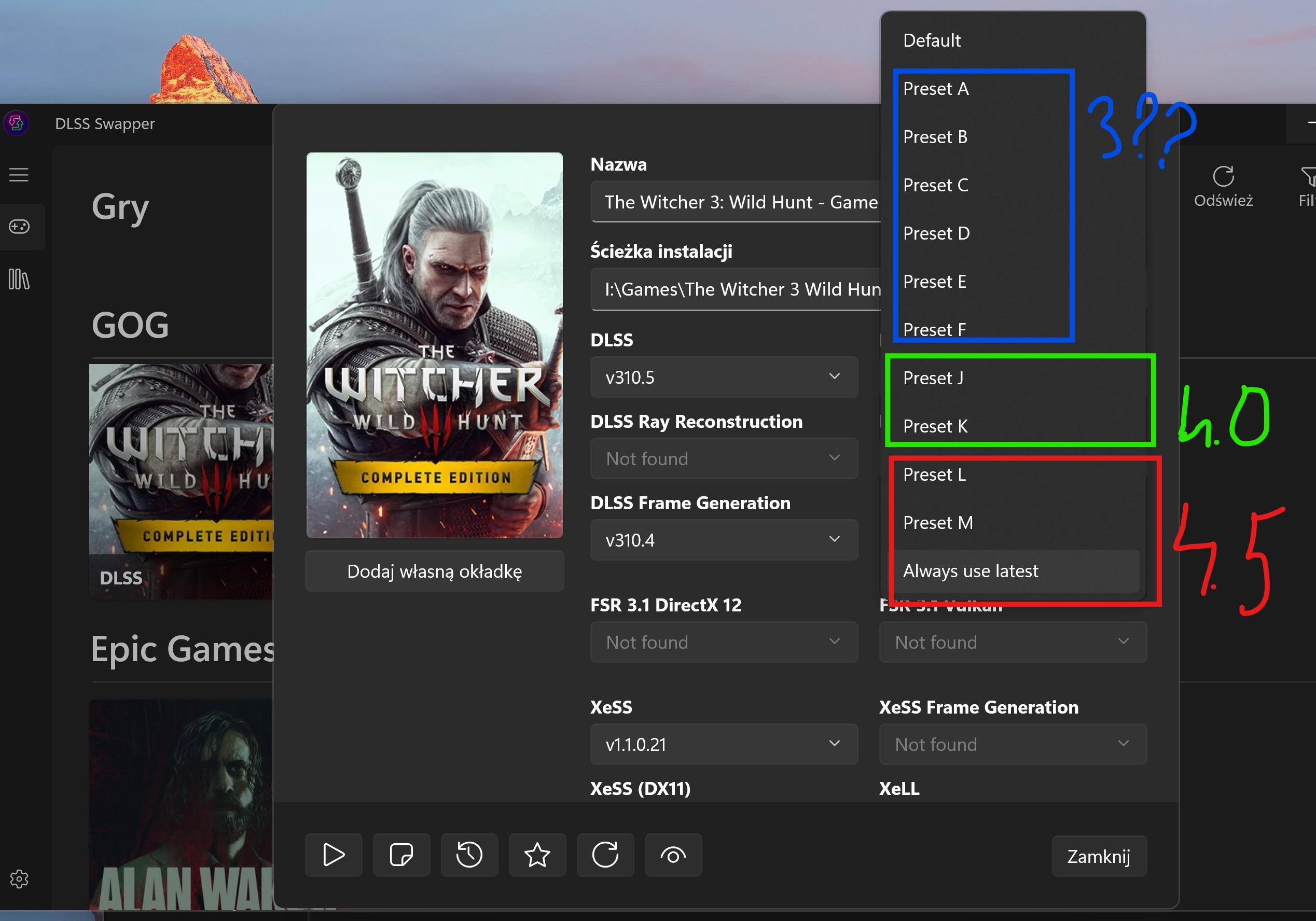
You'll need to manually change it thru NVPI or the NVIDIA app to preset M or L unless the game is updated by the dev for 4.5 which I wouldn't expect them to do this soon
 
Last edited:
Ironically, I just stopped playing TLoU1 and it indeed looks better with performance M. I've literally never used anything but Quality or DLAA and now I'm using Performance. It's crazy how good 4.5 is. I'm actually excited for when they update RR so that I can use this with Cyberpunk.

Every game I've tested (4090) looks better with 4.5 Performance M than 4.0 Quality K, with a performance increase to boot. I'm starting to understand why Nvidia didn't include a new preset for the higher tiers, because if things keep moving in this direction we won't be needing them anymore. It wouldn't surprise me at all if the naming scheme changes in the future because of this. Before today when I thought "performance DLSS" I thought "shit tier" and now I'm stunned at how good it looks scaling 1080p to 4k.
Same here. I was only a quality/dlaa user. It's super impressive what they've done. 120fps is now the target for me and performance mode easily offers that with amazing picture quality on pretty much most games now. I tried it on with Silent Hill F (with smooth motion) and it was impressive on there as well.

that's how I am playing the game, Smooth motion for older games without native frame gen support works almost like native DLSS 3 FG which it kind of it since it repurpose the optical flow accelerator for that task. Input lag is barely noticeable in 100+ fps. I use it for all fighting games even and 120fps fighting games are smoooooth.
The first game I played with it on was Silent Hill F and it worked so dang good. I haven't used it a whole lot cause I was able to get good/satisfying native fps on most games or was able to use frame gen, but I'm now going to start using it with more games. It indeed works really well in Last of Us.
 
Did you used profile M and perf mode wth rdr2?

I had enough performance to lock balanced M mode to 100FPS so I used that, didn't try P mode in that game.

Honestly PSS4 has potential, but yeah, right now it sits somewhere between DLSS 3 and DLSS 4, IQ wise. Miles behind what we're getting from modern DLSS options today.

PSSR is below DLSS2. PSS2 with rumored quality similar to FSR4 should be above DLSS3.

PS5 Pro has ML power to do it, software is just shit.
 
Last edited:
I had enough performance to lock balanced M mode to 100FPS so I used that, didn't try P mode in that game.


PSSR is below DLSS2. PSS2 with rumored quality similar to FSR4 should be above DLSS3.

PS5 Pro has ML power to do it, software is just shit.
SO in rdr2 M balanced is feasible but in some games M balanced is too sharp and perf is the way?

I'm about to try Cyberpunk, should i go for M perf or M bal?

I kinda wanna try M perf to see if i can play with maxed out path tracing with at least 60 frames...

P.s. remind me this, with dlss swapper can you see the different profiles (m,k,l) or you just see the dlss version you are installing?
 
SO in rdr2 M balanced is feasible but in some games M balanced is too sharp and perf is the way?

I'm about to try Cyberpunk, should i go for M perf or M bal?

I kinda wanna try M perf to see if i can play with maxed out path tracing with at least 60 frames...

P.s. remind me this, with dlss swapper can you see the different profiles (m,k,l) or you just see the dlss version you are installing?

With RDR2 it was just my laziness, I didn't change DLSS setting used previously with 4.0 lol.

Try DLSS Performance and see how it suits you, nothing stopping you from going up in modes if you have performance to spare. Other than maybe that oversharpen mentioned with higher pixel counts.

With that "DLSS OSD HUD" you see active profile, base resolution etc. But when you switch on Ray Reconstruction it will show RR profile instead (D or E).
 
Just tested CP 2077:

4090
3440x1440
DLSS Q latest model wit res scaling @85%

It definitely further improves over the older model in many areas where the version 4 was still lacking. Ghosting got better, in particular on those little screens all around the city with some scrolling text visible (like on the sidewalks). In the previous versions staring at those without moving the camera for a while started making the text all blurry, now the issue is completely gone on my end. Aliasing got also better and overall distant objects are much sharper. It almost makes sharpening superfluous. I am impressed.

I also tested it on Jedi Survivor which I bough recently due to the Steam sales, but unfortunately any model different from the original DLSS 3 causes some very annoying bugs on the vegetation in the shadows which "boils" and shimmers. Pity!
So in cyberpunk 4.5 quality is not too sharp and can be used?

Did you used profile M or L??
 
With RDR2 it was just my laziness, I didn't change DLSS setting used previously with 4.0 lol.

Try DLSS Performance and see how it suits you, nothing stopping you from going up in modes if you have performance to spare. Other than maybe that oversharpen mentioned with higher pixel counts.

With that "DLSS OSD HUD" you see active profile, base resolution etc. But when you switch on Ray Reconstruction it will show RR profile instead (D or E).
No no i was asking if when you are inside dlss swapper, and you are about to change the dlss version, does it show the profile with letters or like 310.05 version so i need to know what version correspond to a precise profile? like 310.10 is M and 310.15 is L etc.

Do i need to study to know to what version i'm switching or does it use the easy letters?

I didn't upgraded my drivers but i heard that with dlss swapper it is not necessary like it is with the nvidia app, mine are pretty recent tho.
 
Last edited:
No no i was asking if when you are inside dlss swapper, and you are about to change the dlss version, does it show the profile with letters or like 310.05 version so i need to know what version correspond to a precise profile? like 310.10 is M and 310.15 is L etc.

Do i need to study to know to what version i'm switching or does it use the easy letters?

I didn't upgraded my drivers but i heard that with dlss swapper it is not necessary like it is with the nvidia app, mine are pretty recent tho.

You use the newest .dll file (right now it's 310.5...) and then within that change preset. Newest .dll's of DLSS contain all versions of upscaling.

ztTeza0UxERHtWHd.jpg


I would recommend that driver update, I'm not sure it's needed for 4.5 to work but it probably optimizes some things.
 
Last edited:
Same here. I was only a quality/dlaa user. It's super impressive what they've done. 120fps is now the target for me and performance mode easily offers that with amazing picture quality on pretty much most games now. I tried it on with Silent Hill F (with smooth motion) and it was impressive on there as well.


The first game I played with it on was Silent Hill F and it worked so dang good. I haven't used it a whole lot cause I was able to get good/satisfying native fps on most games or was able to use frame gen, but I'm now going to start using it with more games. It indeed works really well in Last of Us.
The amazing part is it can be even better than games with native FG support in some cases like games with 30 or 60fps cap in cut scenes. Smooth motion just double everything in any scenario even UI. Also games with FMV cut scenes like gears reloaded were all recorded in 4k 30fps but with smooth motion they are all playing back at 60fps transition much smoother into gameplay. It also doesn't mess up any game logic or physics. If Nvidia can get it to work dynamically like LSFG adaptive FG, that's next level, but that might not happen because optical flow accelerators are not fast enough that's why MFG are moved away from it.

Wanted to add a couple more example.

Engine that doesn't like any frame rate but 60 and 120 like the team ninja katana engine and they also cap the cut scenes at 30fps. ie wo long where I can hit 60-90fps but not 120fps and cut scenes are capped at 30fps. I just turn on the 60fps cap in game and turn on smooth motion and now I am getting 60fps cut scenes and gameplay at locked 120fps.

And games that locked DRS out when you turn on FG like Ratchet. With native FG I get 90-130fps, the fluctuation is very bad, I can lock it to 100fps but instead I turn on DLAA+DRS targeting 60fos and use Smooth motion and now the game is always above 120fps.
 
Last edited:
So in cyberpunk 4.5 quality is not too sharp and can be used?

Did you used profile M or L??
IMO the DLSS 4.5 in Cyberpunk offers the perfect amount of sharpening. The image is razor sharp with DLSS Ultra Quality (77% resolution scaling) without appearing oversharpened. However, I found games that were oversharpened with the latest DLSS. I guess developers used sharpening masks before to counterbalance the blur caused by older DLSS (2.0, 3.0), but now the DLSS image is much sharper, so the picture ends up oversharpened.
 
Last edited:
IMO the DLSS 4.5 in Cyberpunk offers the perfect amount of sharpening. The image is razor sharp with DLSS Ultra Quality (77% resolution scaling) without appearing oversharpened. However, I found games that were oversharpened with the latest DLSS. I guess developers used sharpening masks before to counterbalance the blur caused by older DLSS (2.0, 3.0), but now the DLSS image is much sharper, so the picture ends up oversharpened.
Even in games where you can adjust sharpening, dlss 4.5 offers an oversharpened image most of the time.
 
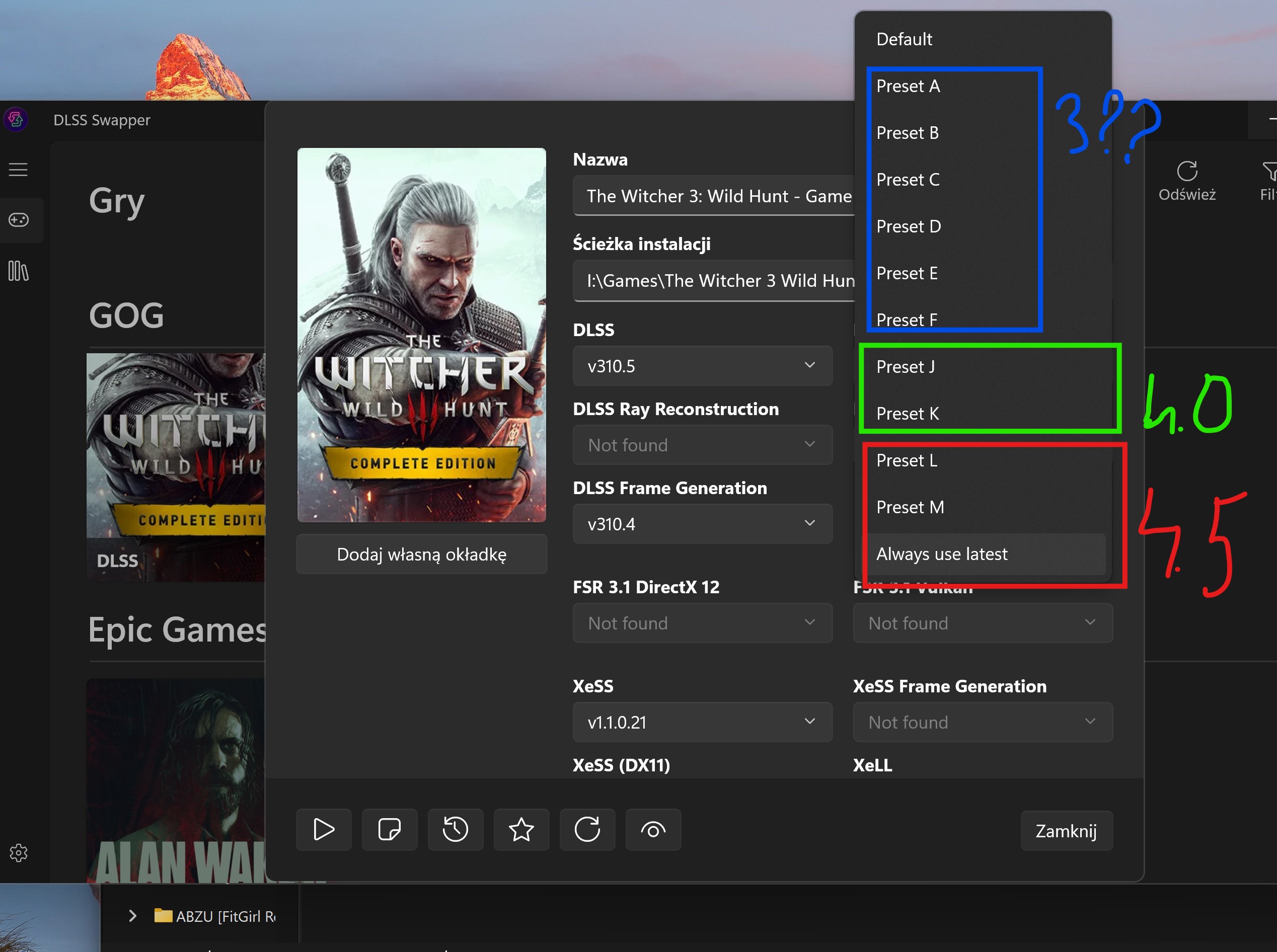
You use the newest .dll file (right now it's 310.5...) and then within that change preset. Newest .dll's of DLSS contain all versions of upscaling.

ZLUfyiTsU8OYQchl.jpg


I would recommend that driver update, I'm not sure it's needed for 4.5 to work but it probably optimizes some things.
Thanks bro.

DO you usually update the framegen version aswell?
 
Last edited:
Top Bottom