• Hey Guest. Check out your NeoGAF Wrapped 2025 results here!

NVIDIA DLSS 4.5 to feature 2nd Gen Transformer model and Dynamic 6x Frame Generation

black myth wukong observations

preset M is much better than native TSR and native preset E when it comes to handling these particles from a distance


however preset M exhibits a weird shimmering issue with certain types of foliage in this game. to rule out 1440p, I tested 4K DLSS performance and it still happened. I first show 1440p dlss quality with preset E and then 4K dlss performance with preset M


Lower internal resolutions in black myth wukong result in fewer rays, which causes GI noise that is especially visible around foliage. I can't see that noise with DLAA and DLSS Ultra Quality (77% resolution scaling), but it starts to become visible with Standard DLSS Quality (67%), and becomes particularly noticeable with DLSS Performance. Lowering full RT to medium also increase that GI noise. This game would benefit greatly from RR.
 
Last edited:
Lower internal resolutions in black myth wukong result in fewer rays, which causes GI noise that is especially visible around foliage. I can't see that noise with DLAA and DLSS Ultra Quality (77% resolution scaling), but it starts to become visible with Standard DLSS Quality (67%), and becomes particularly noticeable with DLSS Performance. Lowering full RT to medium also increase that GI noise. This game would benefit greatly from RR.
this is not path tracing. this specific issue does not happen with preset E and high settings (no path tracing). it still happens with high internal resolutions when using preset M. it doesn't even happen with TSR which I show here

 
Last edited:
...

The games you mentioned were already pristine way before PSSR was a thing. You aren't impressed with the PSSR in those games, you're just impressed at how ridiculously good they have looked since launch because they are first party titles. And as a PS5 Pro owner myself, when you compare like for like, PSSR gets beaten by DLSS 3.5 overall, and in every aspect by 4.0 and now 4.5. This is on a 77" OLED, not on a 32" monitor, and the difference between the two in most cases is substantial. Go test games that actually need really good scaling, like Silent Hill or Dragons Dogma 2 or Alan Wake 2, where I can literally run Ultra Performance DLSS 4.5 (720p) and have it look better than the higher base resolutions on PS5 Pro with PSSR. The problem with PSSR and FSR, in general, is that it only really looks good on games that need it the least, mostly first party titles already running at higher resolutions. Once games start really needing it to clean up the image or to scale from significantly lower resolution than native it kind of falls apart. As of today it's two generations behind and by the time PSSR 2.0 releases it might be even more. And if that wasn't bad enough, they literally have to go back in and patch it for every game, which isn't going to happen for most titles, which means 99% of our catalogue won't improve along with it.
So you are saying that those games wouldn't look any different if you displayed them at the resolution fed to PSSR? No, I didn't think so, so the source feeding PSSR is not pristine. That's a slight of hand that PSSR can only be commended when it improves games beyond their native flaws, and be criticised when anything in non-pristine or pristine games has more noise than another AI model regardless of comparison of overall composition?

The fact that not one definitive choice of model is used by everyone for DLSS4.x across modes surely tells us something. In fact thinking about your comment in regards to DLSS - improving games beyond super sampling that are not pristine at any resolution - and the situation of people switching out models. From a purely ML AI analytical view of the neural networks effectiveness, those models enhancing non-pristine sources are most likely in places overfitting their training dataset and replacing source flaws wholesale rather than reconstructing from the lower resolution noisy image, which people then understandably claim they prefer because it looks clean and nice.

Anyway, your comment has clarified for me that PSSR (and eventually PSSR2) aren't trying to achieve the same as DLSS no matter how much people want to frame PSSR that way. PSSR is designed for console to borrow as little of a frame time (<1.5ms) and allow a game to drop native resolution, free up resources for higher FPS or higher FX and restore the image back to the pristine higher resolution. DLSS running on random system with a RTX 2060 to a RTX 5090 GPU with random frame-rate, resolution and graphics features and PC agnostic games has no such <1.5ms overhead or intention to just restore the clarity of the original higher native resolution the model was trained on.
 
So you are saying that those games wouldn't look any different if you displayed them at the resolution fed to PSSR?
He is saying that if the games is upscaling from a high resolution, like 1440p-4K then PSSR works really well. Games like Demon Souls, Astro Bot, GT7 or Spider-Man. All upscaling from a really high resolution. So of course PSSR would look great.

Upscaling from low resolutions or dealing with denoising is where games struggle with PSSR. Games like Alan Wake 2, or Silent Hill 2 (in Quality mode, performance mode doesn't use PSSR), or a lot of other UE5 titles. You can test in games where you can actually change the base rendering resolution. Like Dragons Dogma 2, dropping the setting really makes PSSR struggle.

Another easy example, GT7. Set RT to on and PSSR enabled and drive through a tunnel with a shiny car. The noise is disgusting (haven't played GT7 in about a year so maybe they patched this). Which, to be fair, DLSS struggled with as well. Hence the development of ray reconstruction, but even before then it didn't struggle quite that bad.

Thankfully some of the games had issues resolved, like Avatar, before the latest update FSR looked better.

PSSR2 should ideally resolve all of these issues.

PSSR is designed for console to borrow as little of a frame time (<1.5ms) and allow a game to drop native resolution, free up resources for higher FPS or higher FX and restore the image back to the pristine higher resolution.
That describes any ML temporal upscaler.
 
Last edited:
So about DLSS Swapper. I just downloaded it. There are some games that have DLSS, but in the NVIDIA app it says it's unsupported to swap to the newest version(s)/presets. You're basically stuck with what the game has. Uncharted 4 being an example. I select the newest version of DLSS and preset M in DLSS Swapper, but when I pull up the NVIDIA overlay to see if it's registering it shows N/A on everything. I just want to know is it still forcing the new version of DLSS and the new preset (M) via the DLSS Swapper, but the overlay is just not going to show it cause it doesn't support it through the official NVIDIA App? I'm a little confused.
 
He is saying that if the games is upscaling from a high resolution, like 1440p-4K then PSSR works really well. Games like Demon Souls, Astro Bot, GT7 or Spider-Man. All upscaling from a really high resolution. So of course PSSR would look great.
Pretty sure they are lower resolution than that in terms of filled pixel count - because it is a sparse native renderer feeding PSSR according to patents - even if the effective high frequency detail is effectively 1440p, so were still talking around 720p-900p in actual pixel counts being ML reconstructed to 4K, which if comparing those games at 720p-900p as non-sparse renders to the PSSR 4K would you describe that linear scaled image as a pristine source?
Upscaling from low resolutions or dealing with denoising is where games struggle with PSSR. Games like Alan Wake 2, or Silent Hill 2 (in Quality mode, performance mode doesn't use PSSR), or a lot of other UE5 titles. You can test in games where you can actually change the base rendering resolution. Like Dragons Dogma 2, dropping the setting really makes PSSR struggle.
It isn't about denoising, and we saw this in the maximum furthest distant sections of the frustum with DLSS on Rachet, where DLSS is filling in stuff with no group of points because its non-sparse native resolution loses all high frequency detail at that projected minified range on small items, unlike PSSR which was reconstructing smaller items all the way to the back plane because of the higher frequency source detail that remained.

So denoising isn't equal to substituting with something credible by some positional rational. It still needs to be reconstructed and cleaning the signal of what was actually there, DLSS in bad looking games that it improves is doing more of the former, than straight reconstruction and denoising, and PSSR in those same games reconstructs but doesn't have run time time to denoise and doesn't try to replace it.
Another easy example, GT7. Set RT to on and PSSR enabled and drive through a tunnel with a shiny car. The noise is disgusting (haven't played GT7 in about a year so maybe they patched this). Which, to be fair, DLSS struggled with as well. Hence the development of ray reconstruction, but even before then it didn't struggle quite that bad.

...
I haven't seen those issues in GT7, but will look for them on a tunnel track the next time I play, but is the same as I already said PSSR is doing its job, and RT denoising from lower resolution is arguably not afforded enough runtime - assuming it isn't fixed - or outside its remit in PSSR1, and done inadequately in the lighting pass - like it is done in Lumen.
 
Last edited:
So about DLSS Swapper. I just downloaded it. There are some games that have DLSS, but in the NVIDIA app it says it's unsupported to swap to the newest version(s)/presets. You're basically stuck with what the game has. Uncharted 4 being an example. I select the newest version of DLSS and preset M in DLSS Swapper, but when I pull up the NVIDIA overlay to see if it's registering it shows N/A on everything. I just want to know is it still forcing the new version of DLSS and the new preset (M) via the DLSS Swapper, but the overlay is just not going to show it cause it doesn't support it through the official NVIDIA App? I'm a little confused.

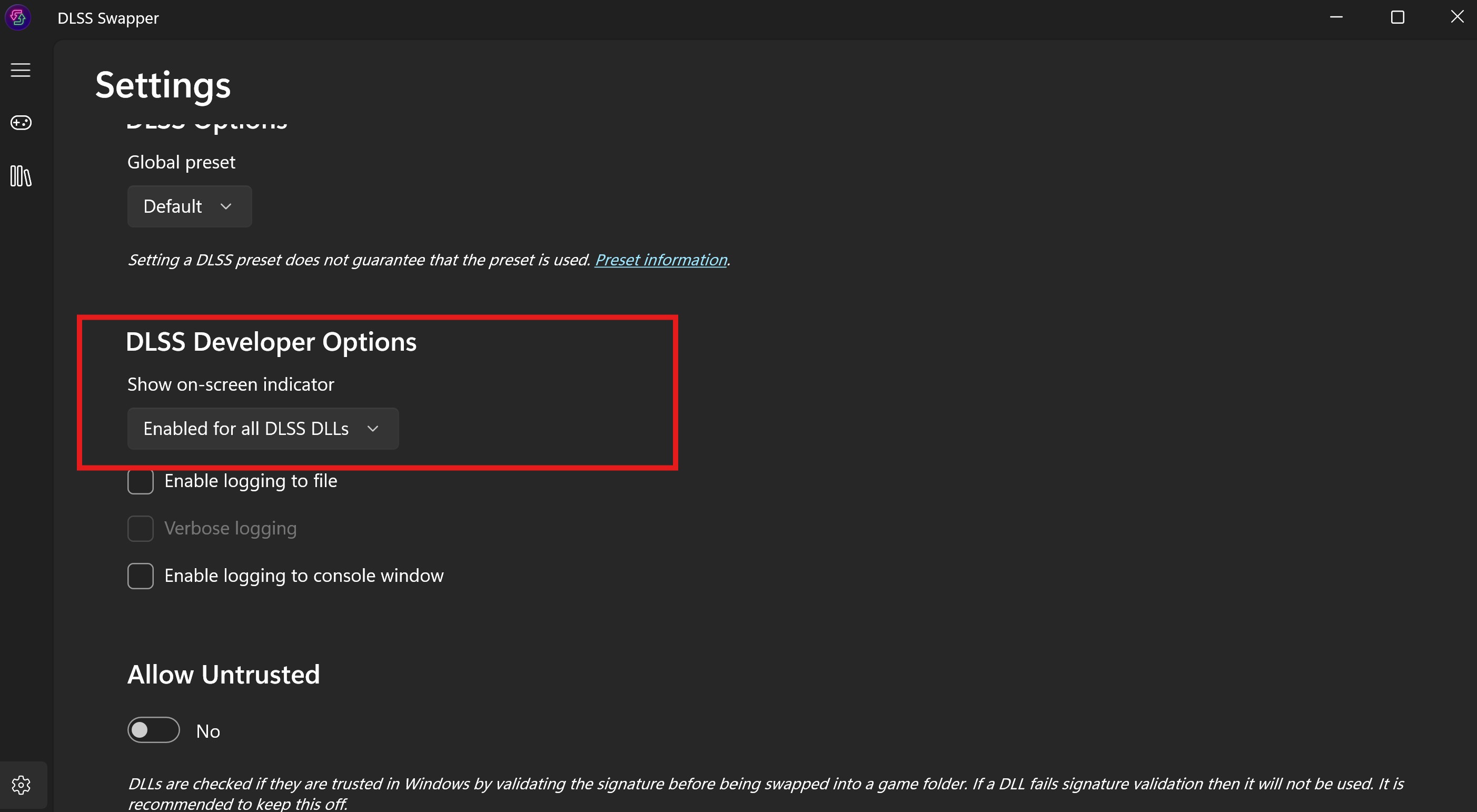
Overlay probably only shows override via Nvidia app. Use dlss dev info available in dlss swapper.

MvukRkPERh18JW1r.jpg


Final Fantasy XVI:

8p6761x.jpeg
ZQwRnIp.jpeg
 
So about DLSS Swapper. I just downloaded it. There are some games that have DLSS, but in the NVIDIA app it says it's unsupported to swap to the newest version(s)/presets. You're basically stuck with what the game has. Uncharted 4 being an example. I select the newest version of DLSS and preset M in DLSS Swapper, but when I pull up the NVIDIA overlay to see if it's registering it shows N/A on everything. I just want to know is it still forcing the new version of DLSS and the new preset (M) via the DLSS Swapper, but the overlay is just not going to show it cause it doesn't support it through the official NVIDIA App? I'm a little confused.

So that's one of the best things about DLSS Swapper, is that it allows you to apply the new DLSS versions to any DLSS supported games, not just the ones Nvidia decided to include in the Nvidia app.


DLSS Swapper also has a built in option to show an overlay that will tell you what DLSS version the game is running. Find it in the DLSS app and it'll show you if you're using preset M when you start your game.


EDIT - oops, I was slow I guess. But yeah, what Bojji Bojji said.
 
Last edited:
Just getting back from vaca. Have to learn how to mess with the presets in nvidia app again.

What is the general consensus on using this with a 5090? Should I just shoot for 4.5 quality or ultra perf? HALP
 
I've been testing a little bit on my setup, in particular with Cyberpunk all settings to the highest (including path tracing). My setup is a 13600k, 32gb ram and a 5070ti with a little uv and oc. I'm playing on a 34 inch OLED monitor like 20 cm from my face.

I'm using MFG.

In my tests with RR or without RR I'm getting 55-60 fps on the benchmark and pretty much the same during gameplay. However I'm not seeing a big mitigation of MFG related artifacts. It looks good for the most part but there are certain things that cause very noticeable ghosting like the aim marker of some weapons or the indicators in Jackie's motorcycle.

Don't think it makes a difference but I'm playing Phantom Liberty missions.
 
Pretty sure they are lower resolution than that in terms of filled pixel count - because it is a sparse native renderer feeding PSSR according to patents - even if the effective high frequency detail is effectively 1440p, so were still talking around 720p-900p in actual pixel counts being ML reconstructed to 4K, which if comparing those games at 720p-900p as non-sparse renders to the PSSR 4K would you describe that linear scaled image as a pristine source?
The games have been pixel counted at 1440p or higher. Dragons Dogma 2 and Path of Exile 2 allows you to select the resolution you're upscaling from. Developers like Capcom have also confirmed resolutions. Like MH Wilds upscaled from 1404p.

It isn't about denoising, and we saw this in the maximum furthest distant sections of the frustum with DLSS on Rachet, where DLSS is filling in stuff with no group of points because its non-sparse native resolution loses all high frequency detail at that projected minified range on small items, unlike PSSR which was reconstructing smaller items all the way to the back plane because of the higher frequency source detail that remained.

So denoising isn't equal to substituting with something credible by some positional rational. It still needs to be reconstructed and cleaning the signal of what was actually there, DLSS in bad looking games that it improves is doing more of the former, than straight reconstruction and denoising, and PSSR in those same games reconstructs but doesn't have run time time to denoise and doesn't try to replace it.

I haven't seen those issues in GT7, but will look for them on a tunnel track the next time I play, but is the same as I already said PSSR is doing its job, and RT denoising from lower resolution is arguably not afforded enough runtime - assuming it isn't fixed - or outside its remit in PSSR1, and done inadequately in the lighting pass - like it is done in Lumen.
It's not all games. Play any of the games I mentioned. PSSR struggles with noise. And denoising. Like a lot. Silent Hill 2 Quality mode looks dreadful due to PSSR. Silent Hill F as well. MGS3 has issues. Control with the PS5 Pro patch. Star Wars Outlaws is another example. Visual noise is a major, major problem with PSSR in some titles. Not all though, some genuinely look great. But if PSSR didn't have problems. developers wouldn't be going back to remove it, or make it optional, remove it outright, or why Sony is updating it with the work being done on FSR4.
 
Crazy how good upscaling has come the past couple years with DLSS. Playing at 540P > 1440P and 720P > 4K and looking actually decent is pretty insane.

And the thing is its accessible to all RTX cards. Its no wonder AMD/Radeon users are getting fed up with the lack of support of their GPU's. AMD are not even on the same playing field, not even close.
 
Last edited:
this is not path tracing. this specific issue does not happen with preset E and high settings. it still happens with high internal resolutions when using preset M. it doesn't even happen with TSR which I show here


The latest DLSS 4.5 with "M" preset definitely causes a noise problem around the grass in your video. Your video made me test all the available anti-aliasing (AA) methods in this game and rethink my opinion about DLSS.

Here's my own test. I used path tracing at low settings because it shows noise around vegetaion more easily compared to lumen.


-DLSSP (50% resolution scale) using "E" DLSS preset shows noise / white splashes around the vegetation, particularly in dimly lit areas.
-DLSSP (50%) the latest "M" DLSS4.5 preset has even stronger noise.
-TSR (50%) has no noise. I also tested the FSR3, and there was no noise as well.

For some strange reason the DLSSP (50% resolution scale) introduces noise around the vegetation when path tracing is employed. Other anti-aliasing (AA) methods use the same internal resolution and number of rays, yet I don't see similar noise. TSR and FSR3 have other problems though. The image isn't as sharp and clean, and it breaks up during motion, so still DLSS offers the best results overall. It's also possible to eliminate DLSS noise around the grass if I increase the internal resolution to 67% (DLSS Q) and maximize the path tracing settings. This results in a clean, artifact-free image.

I also tested Black Myth: Wukong with Lumen and High settings but I was too lazy to record another video, so I will just describe my observations. I found that the DLSS "E" preset works well with Lumen lighting, so it's just PT in this game that cause DLSS problems. The latest DLSS 4.5 with "M" preset caused shimmering / noise even with lumen lighting. I think the "K" DLSS 4.0 preset offers the best image quality in this game. The image is sharper than the "E" preset and does not have the noise that can be seen in the "M" preset.

While testing Lumen at the high settings, I realized that the game cun run with locked 60fps even at 4K DLAA 4.0 on my RTX4080S. Black Myth Wukong is extremely demanding with maxed out settings, but it's also very scalable. However, the latest 4.5 DLAA comes at a significant cost.

DLAA 4.0 (100% res scale) "K" preset, high settings preset, lumen lighting - 71 fps


DLAA 4.5 (100%) "M" preset with the same settings. I think "M" preset is not worth using on my card at 4K 100% resolution, the cost is too high (26% relative difference).


With DLSSP (50% res scale) and FGx2 on top of that the game runs at 178fps and I think the graphics still looks good. I think the PS5 version uses similar settings (1080p internally + FGx2 and high settings), so it appears that my RTX 4080 is exactly three times faster. The PS6 should offer similar GPU power, which gives an idea of how big the difference will be between the PS5 and PS6.


Using the same settings (50% res scale) with the latest DLSS 4.5 "M" preset, the performance difference compared to 4.0 is just 2%. That's acceptable. It seems that tensor cores on my RTX4080 are powerful enough to use 50% resolution scale DLSS 4.5 without worrying about performance.


PT decreases performance significantly, but even at low settings, PT improves the lighting quality a lot and I think 37% performance cost is justified.

DLSSP K preset, 50% res scale + FGx2, high settings, lumen lighting


Maxed out PT with Epic settings is much more demanding though. My framerate went from 178 fps (lumen, high settings) to 87 fps. It's still playable with a gamepad, but the maximum settings in this game clearly require much stronger GPU (RTX 5090), even with DLSS.

 
Last edited:
Anyway, your comment has clarified for me that PSSR (and eventually PSSR2) aren't trying to achieve the same as DLSS no matter how much people want to frame PSSR that way. PSSR is designed for console to borrow as little of a frame time (<1.5ms) and allow a game to drop native resolution, free up resources for higher FPS or higher FX and restore the image back to the pristine higher resolution. DLSS running on random system with a RTX 2060 to a RTX 5090 GPU with random frame-rate, resolution and graphics features and PC agnostic games has no such <1.5ms overhead or intention to just restore the clarity of the original higher native resolution the model was trained on.
The bolded literally describes every upscaling solution. You want to distance it from the rest and make it seem different, for whatever reason, but it's not.

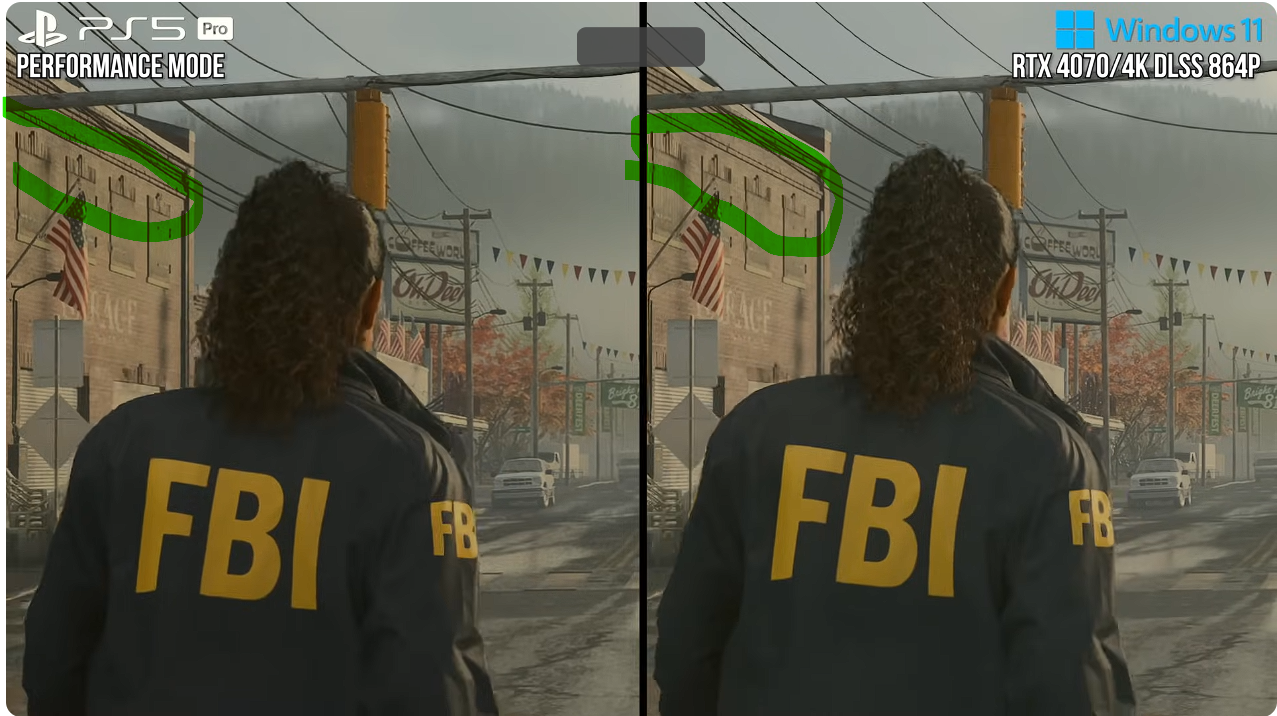
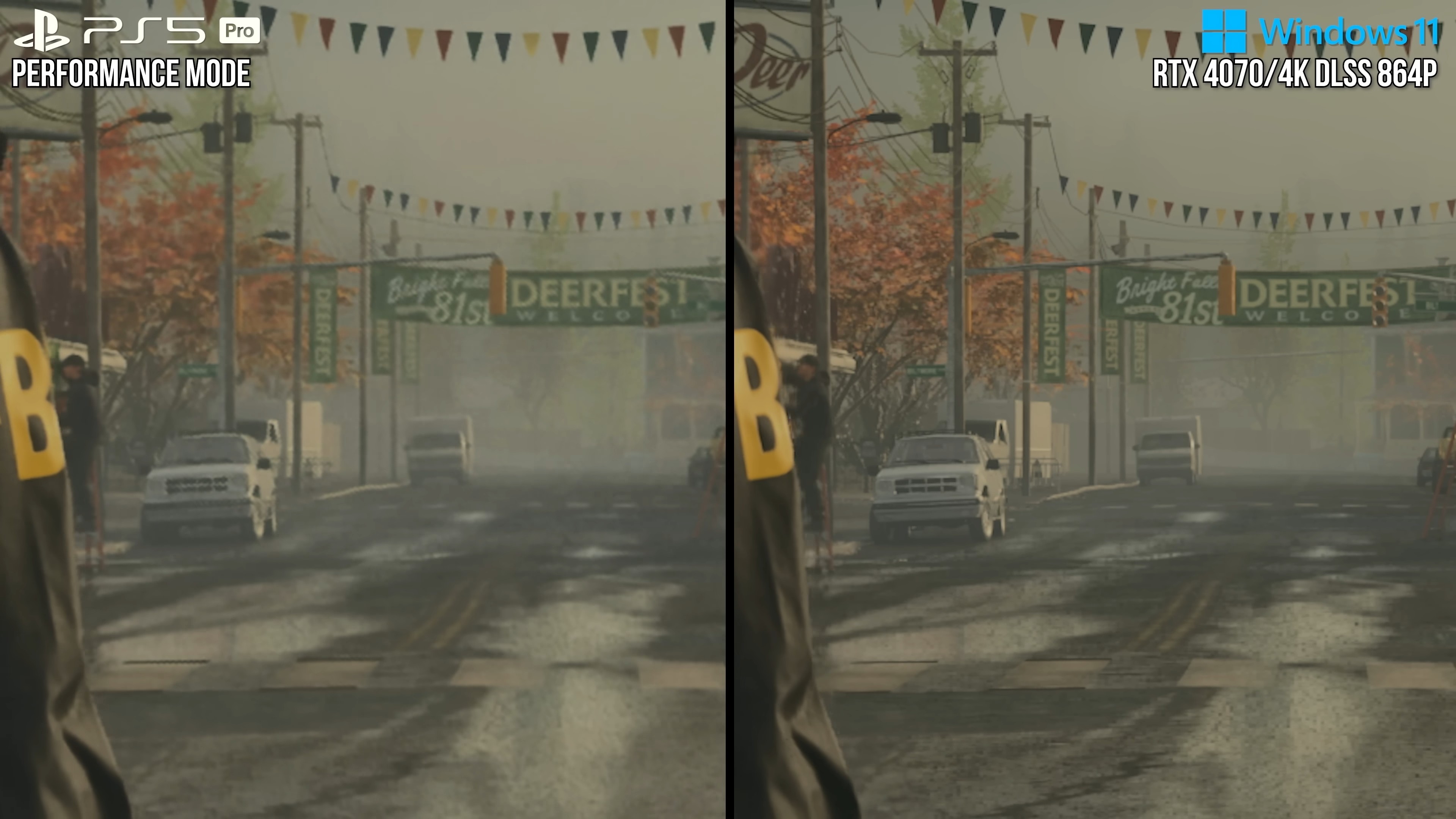
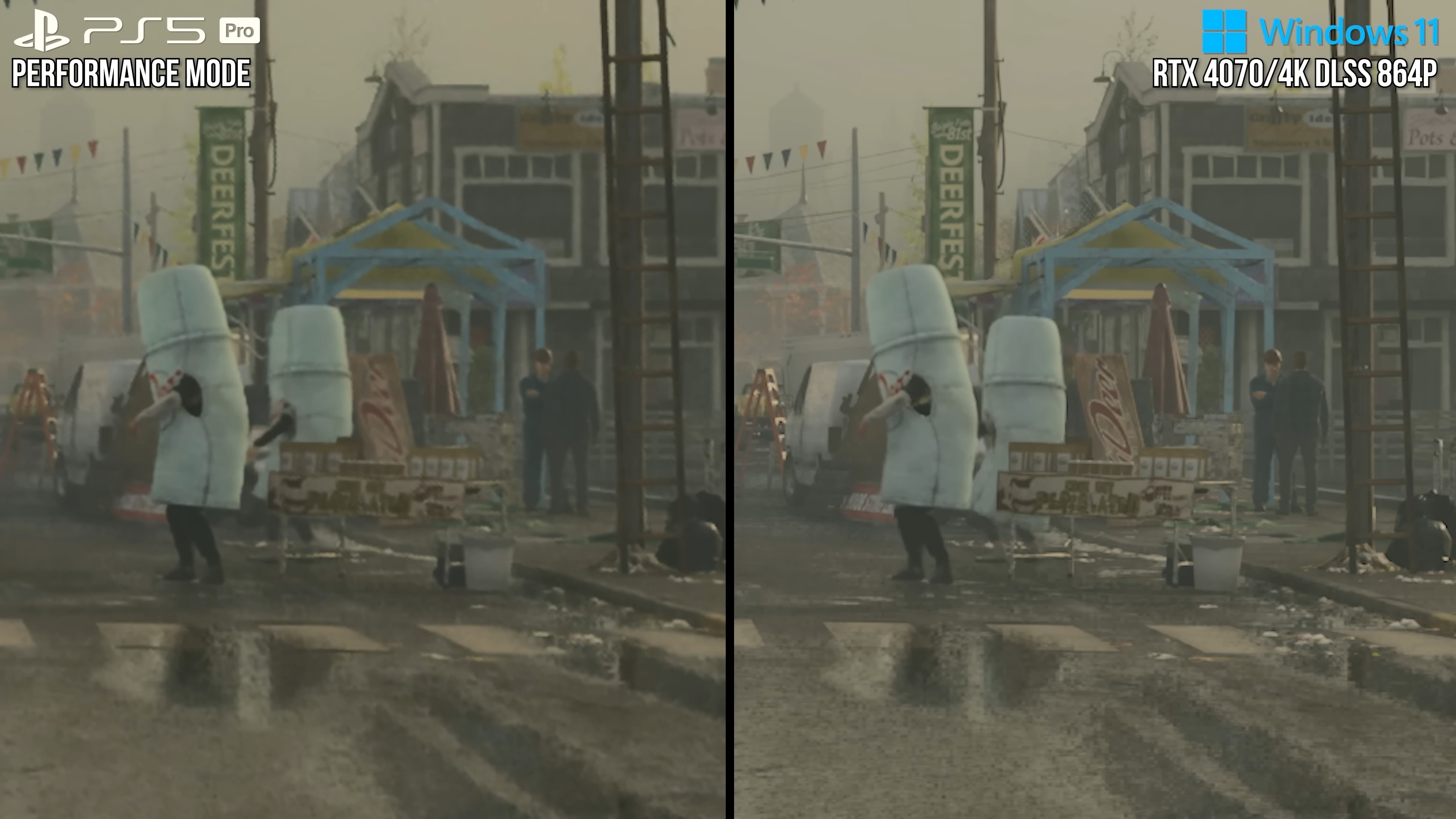
Here is like for like PSSR vs DLSS in a game that actually needs upscaling help, this was also two generations of DLSS ago, btw:


For the record, upscaling from 720p with 4.0 looks better than either of these at 864p, and 4.5 is dramatically better, like not even in the same ballpark better. And you can get the same results with every game that has to upscale from a lower base resolutions. And even when they patched this game they put in a PSSR on/off toggle because FSR looked better and did a better job of resolving the lower resolution source material, which again, goes back to the fact that PSSR does a really great job of making great looking games look better, but it falls on it's face when dealing with games that aren't already mostly there in terms of graphics and performance.
The games have been pixel counted at 1440p or higher. Dragons Dogma 2 and Path of Exile 2 allows you to select the resolution you're upscaling from. Developers like Capcom have also confirmed resolutions. Like MH Wilds upscaled from 1404p.


It's not all games. Play any of the games I mentioned. PSSR struggles with noise. And denoising. Like a lot. Silent Hill 2 Quality mode looks dreadful due to PSSR. Silent Hill F as well. MGS3 has issues. Control with the PS5 Pro patch. Star Wars Outlaws is another example. Visual noise is a major, major problem with PSSR in some titles. Not all though, some genuinely look great. But if PSSR didn't have problems. developers wouldn't be going back to remove it, or make it optional, remove it outright, or why Sony is updating it with the work being done on FSR4.
Facts. It seems we still have people buying into the pre-release hype of PSSR that has been hit or miss at best. When you take games that were already incredible looking, PSSR looks great, but toss it some actual problem games and the issues crop up significantly compared to DLSS. The more game needs PSSR the worse it performs and that's where this new DLSS shines. Any upscaler can look great when you are running with high resolution assets and stable framerates, it's when the shit hits the fan that they separate themselves and boy did DLSS 4.5 separate itself in that department.
 
Provided you have a 40 or 50 series GPU, Preset M seems to offer the greatest benefit in the Performance Preset, visually, whilst Preset L does the same for the Ultra Performance one. Ultra Performance actually looks usable @ 4K if you're really struggling to hit the FPS targets you want.

The visual improvements on Preset M on Quality/DLAA just don't warrant the performance hit to switch over from K right now. At least not for me on a 4090.
 
Last edited:
Just getting back from vaca. Have to learn how to mess with the presets in nvidia app again.

What is the general consensus on using this with a 5090? Should I just shoot for 4.5 quality or ultra perf? HALP
Anyone? I've been out of the country and barely been on the PC.
 
So I have a 5080, what should I do? im confused. I usually use DLSS QUALITY on a 1440p+ resolution.
 
Last edited:
The bolded literally describes every upscaling solution. You want to distance it from the rest and make it seem different, for whatever reason, but it's not.

Here is like for like PSSR vs DLSS in a game that actually needs upscaling help, this was also two generations of DLSS ago, btw:


For the record, upscaling from 720p with 4.0 looks better than either of these at 864p, and 4.5 is dramatically better, like not even in the same ballpark better. And you can get the same results with every game that has to upscale from a lower base resolutions. And even when they patched this game they put in a PSSR on/off toggle because FSR looked better and did a better job of resolving the lower resolution source material, which again, goes back to the fact that PSSR does a really great job of making great looking games look better, but it falls on it's face when dealing with games that aren't already mostly there in terms of graphics and performance.

Facts. It seems we still have people buying into the pre-release hype of PSSR that has been hit or miss at best. When you take games that were already incredible looking, PSSR looks great, but toss it some actual problem games and the issues crop up significantly compared to DLSS. The more game needs PSSR the worse it performs and that's where this new DLSS shines. Any upscaler can look great when you are running with high resolution assets and stable framerates, it's when the shit hits the fan that they separate themselves and boy did DLSS 4.5 separate itself in that department.

As I said already it is pixel peeping in rough games with specific fx while ignoring composition overall.

A lot of what Alex is saying isn't backed up by the momentary clips of full screen side by side, where both look bad for stability, because it is effectively a AA presentation. There's no winner in that faceoff.

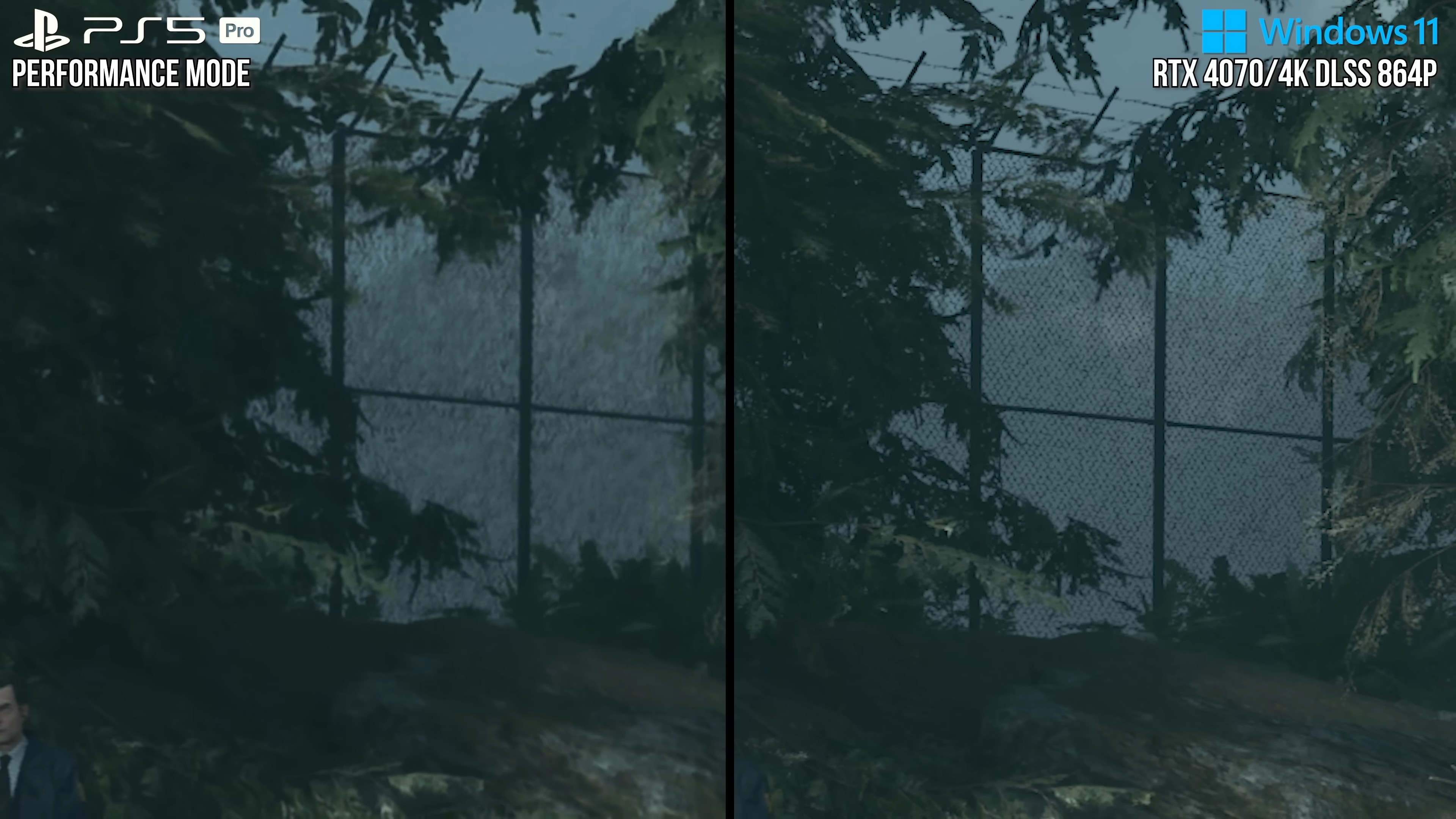
As for the supposed superior denoising in DLSS for this specific title, the pixel peeping fence shot is also a dubious example, as they never provide full screen A then B clips for comparison of identical camera setups. But even assuming they are, on Pro the fence looks like it is a planar quad with a fence texture patterns breaking down on reconstruction because of the far plane draw distance and on the PC DLSS side closeup it looks like the fence is made of geometry that is being reconstructed with the same stippling errors seen at that distance on thicker geometry on both the Pro and PC images, as though the PC settings are higher for LoD than Pro.

If games that look AA rough regardless of settings using native or any ML AI upscaled is the proof PSSR isn't good enough, then I don't know what to tell you? Maybe consider the old maxim of "garbage in garbage out". That isn't PSSR at fault for not fixing a bad composition to be better or equal to one equally unacceptable IMO.
 
My DLSS4.5 vs TAA native comparison in Cyberpunk.

4K TAA native for reference with ultra settings preset + RT Ultra


4K with the latest DLSS 4.5 (M preset) in performance mode (50% resolution scale) + DLSS FGx2


In this comparison, the DLSS image quality looks inferior to the TAA native quality. Textures appear blurry, and small letters are illegible. Some of the blurring is caused by the Ray Reconstruction filtering. It also seems that the "M" preset has been disabled, so it's probably just old "D" preset.

Now, let's address these issues. I disabled RR to be sure that 'M' preset was enabled. I also used the correct mip maps (negative -3.0000 LOD bias) to load textures in full resolution even with DLSS.


The 'M' preset now works correctly, and textures load correctly making the small text in the distant texture readable. TAA native no longer looks better.

Old DLSS 4.0 ("K" preset) also wins with TAA native.


DLSS not only improved the image quality compared to TAA native, but also the gameplay experience. On my GPU, performance increased from 28 fps with TAA native to 88 fps with DLSSP 4.0 (a 3x improvement) and 133 fps with FGx2 (a 4.75x improvement). DLSS makes a significant difference, regardless of the version used. Without it, Cyberpunk wouldn't run well at 4K on my RTX4080S.
 
Last edited:
A 5080 should be able to chew anything up at 1440p.
This applies to most games, but not every single one, especially those with Path Tracing, because they are designed with future GPUs in mind. The RTX 5090 can run PT in Cyberpunk at 1440p with DLAA at 60 fps, whereas the RTX 5080 requires DLSSQ to achieve similar result. With the RTX 4080 Super, I get slightly worse results, but still fully playable.

1440p DLSSQ ultra settings preset 70 fps with PT. With DLSSx2, I get 122 fps.

PT-67-DLSSQ.jpg


Even standard hybrid "RT ultra" also needs DLSSQ at 1440p to stay above 60fps all the time on my card. With DLSSQ I get 112fps and 184fps with FGx2.

1440p-DLSSQ-RT-ultra.jpg


Even 80% resolution scale is still fully playable. The RTX5090 would allow me to use DLAA, but I cant even tell a difference between 80% resolution scale DLSS and 100% resolution scale DLAA, so I think 4080S and faster 5080 offers amazing results at 1440p.

80-RT-ultra-FG.jpg


80-scale-RT-Ultra.jpg
 
Last edited:
As I said already it is pixel peeping in rough games with specific fx while ignoring composition overall.

A lot of what Alex is saying isn't backed up by the momentary clips of full screen side by side, where both look bad for stability, because it is effectively a AA presentation. There's no winner in that faceoff.

As for the supposed superior denoising in DLSS for this specific title, the pixel peeping fence shot is also a dubious example, as they never provide full screen A then B clips for comparison of identical camera setups. But even assuming they are, on Pro the fence looks like it is a planar quad with a fence texture patterns breaking down on reconstruction because of the far plane draw distance and on the PC DLSS side closeup it looks like the fence is made of geometry that is being reconstructed with the same stippling errors seen at that distance on thicker geometry on both the Pro and PC images, as though the PC settings are higher for LoD than Pro.

If games that look AA rough regardless of settings using native or any ML AI upscaled is the proof PSSR isn't good enough, then I don't know what to tell you? Maybe consider the old maxim of "garbage in garbage out". That isn't PSSR at fault for not fixing a bad composition to be better or equal to one equally unacceptable IMO.
Christ you're still going.

Your last man standing defence of pssr in https://www.neogaf.com/threads/ps5-...tion-than-dlss-running-on-a-4090-gpu.1674846/ was legendary.
 
I still see minor ghosting with 4.5 in cyberpunk, is it the absence of ray reconstruction?

Also some text (not texture, the stuff you read) are not as clear as they should be but i don't know if they are supposed to look like this because they are unimportant.
 
Last edited:
As I said already it is pixel peeping in rough games with specific fx while ignoring composition overall.

A lot of what Alex is saying isn't backed up by the momentary clips of full screen side by side, where both look bad for stability, because it is effectively a AA presentation. There's no winner in that faceoff.

As for the supposed superior denoising in DLSS for this specific title, the pixel peeping fence shot is also a dubious example, as they never provide full screen A then B clips for comparison of identical camera setups. But even assuming they are, on Pro the fence looks like it is a planar quad with a fence texture patterns breaking down on reconstruction because of the far plane draw distance and on the PC DLSS side closeup it looks like the fence is made of geometry that is being reconstructed with the same stippling errors seen at that distance on thicker geometry on both the Pro and PC images, as though the PC settings are higher for LoD than Pro.

If games that look AA rough regardless of settings using native or any ML AI upscaled is the proof PSSR isn't good enough, then I don't know what to tell you? Maybe consider the old maxim of "garbage in garbage out". That isn't PSSR at fault for not fixing a bad composition to be better or equal to one equally unacceptable IMO.
Anyone who has played both versions of ANY of these games like AW2, Silent Hill, etc. knows how full of shit you sound right now. There is a clear winner, it's just not the one you want. And as for "garbage in garbage out" that's the entire point of upscaling, to turn something unacceptable into something usable, so yes, it's 100% a fault of PSSR if it can't do that, and even Sony knows this which is why they are working to make it better. The fact that a PSSR toggle now exists in these games says it all.

Your stance was bad enough before PSSR was released and we had all the PS fanboys gushing over how much better PSSR was, but now we have years of objective evidence proving you wrong and you're still pretending otherwise. It'd be laughable if it weren't so sad.

Christ you're still going.

Your last man standing defence of pssr in https://www.neogaf.com/threads/ps5-...tion-than-dlss-running-on-a-4090-gpu.1674846/ was legendary.
Oh, Jesus. I didn't realize he was one of the inmates or I wouldn't even have bothered.
 
Christ you're still going.

Your last man standing defence of pssr in https://www.neogaf.com/threads/ps5-...tion-than-dlss-running-on-a-4090-gpu.1674846/ was legendary.
I'm more than happy to have my view challenged if you can do better than reply with such a low effort drive by post like yours

But I'm guessing your post is of that ilk because you can't defend the visuals of Alan Wake 2 with DLSS, either when the video shows crazy instability in both PSSR and the PC version in contradiction to the narrative Alex sets in the video - regardless of if he should have been comparing using hardware of the same age like a 30xx series?

Even Alex mentioning that he has to pick a different model in DLSS manually because the model choice changes by the level of upscale shows that PSSR isn't being compared to another turn key solution, but multiple solutions under one umbrella name- falsely as one - and that all those models have issues/advantages because Nvidia is unable to provide one model that generically does all situations without overfitting its training data to get the results it wants, which is ironically the test conditions that PSSR is already operating in, and being criticised for doing a job with rough game visuals - that are equally a mess with DLSS for anyone that cares to actually look at what is presented.
 
Anyone who has played both versions of ANY of these games like AW2, Silent Hill, etc. knows how full of shit you sound right now. There is a clear winner, it's just not the one you want. And as for "garbage in garbage out" that's the entire point of upscaling, to turn something unacceptable into something usable, so yes, it's 100% a fault of PSSR if it can't do that, and even Sony knows this which is why they are working to make it better. The fact that a PSSR toggle now exists in these games says it all.
What played 864p native with DLSS ultra performance like he tested , and used Pro level hardware like RTX 30xx card? No, and I'm sure the most vocal people playing aren't on a card anything like that and probably still using MFG and much higher native.

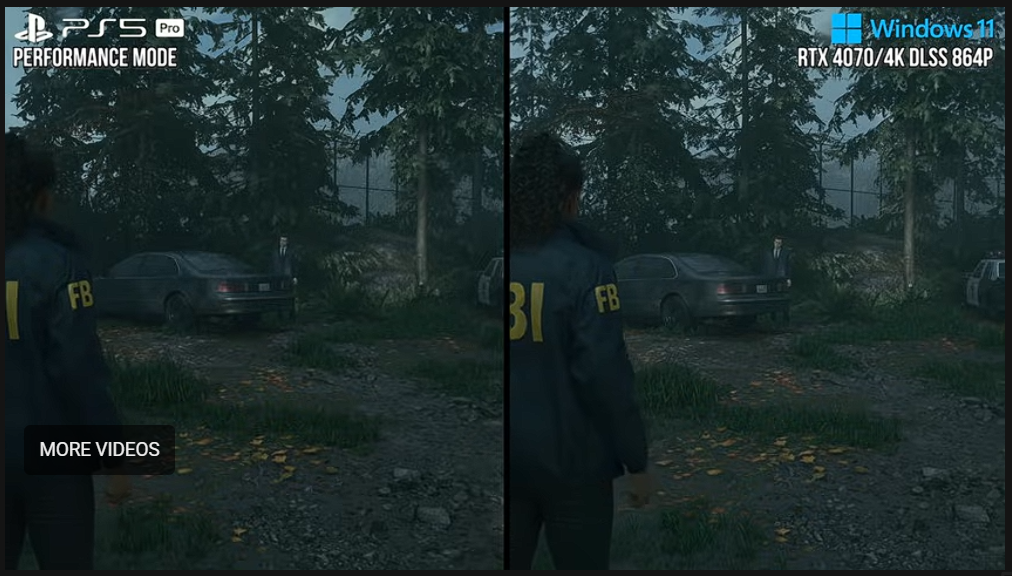
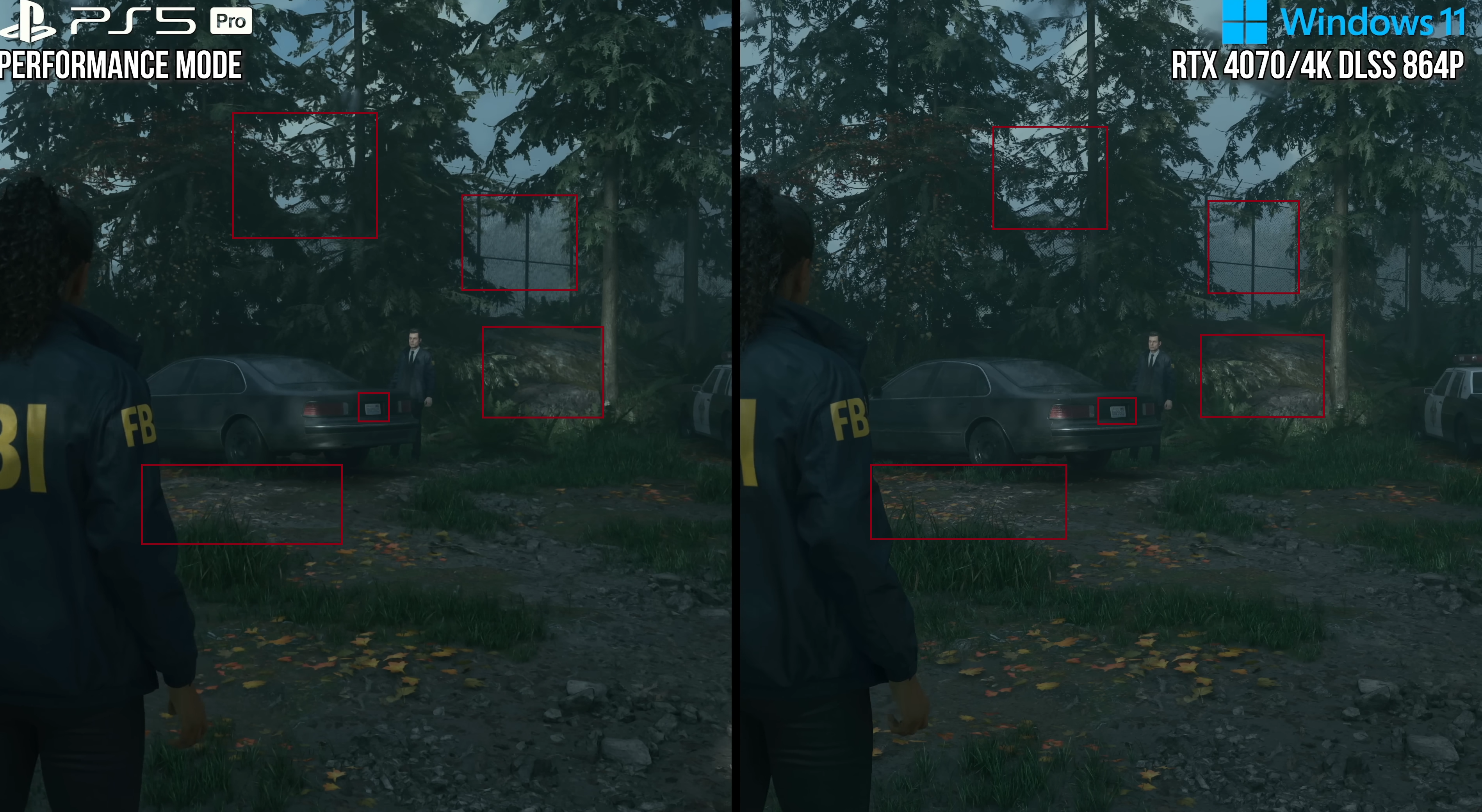
Anyway I've time stamped a section clearly showing an example of the same instability, strobing, flicker noise in both solutions- best seen shown played back at minimum speed as the full scene A and B shots are brief but easily visible at normal speed too. If it was a straight fullscene A then B video


And provided a screen grab highlighting, where to pay attention for this example's instability on both
tO114OfL4krELlCS.png


Can you really not see that same issue? Or even see the trees transition in an ugly way on both - marginally worse with PSSR - 6secs earlier, etc, etc?
 
Last edited:
What played 864p native with DLSS ultra performance like he tested , and used Pro level hardware like RTX 30xx card? No, and I'm sure the most vocal people playing aren't on a card anything like that and probably still using MFG and much higher native.

Anyway I've time stamped a section clearly showing an example of the same instability, strobing, flicker noise in both solutions- best seen shown played back at minimum speed as the full scene A and B shots are brief but easily visible at normal speed too. If it was a straight fullscene A then B video


And provided a screen grab highlighting, where to pay attention for this example's instability on both
tO114OfL4krELlCS.png


Can you really not see that same issue? Or even see the trees transition in an ugly way on both - marginally worse with PSSR - 6secs earlier, etc, etc?


cU6TtJAk2UqTKnS6.jpg
eL7ghXN5YTcamKDz.jpg
ynyMXf4daIEGFa06.jpg


sorpresa.gif
 
So all the selective pixel peeping that is different from the full scene composition context of what people actually see/experience when they play negates that both are ugly unstable messes in contradiction to what Alex is saying in the video?

Or is that last gif because you are so close to your screen that's genuinely how you experience games in pixelpeep vision?

edit: sorry if this hurts your eyes, but this is the full composition of the fence shot, and foreground/background wins and losses look more like a draw to me, especially when the trees are softer more tree like than alpha card look via DLSS, as does the light bleeding in DLSS onto the car that should be shadowed like the PSSR shot, but YMMD :)
dKoaA4IEft6didej.png
 
Last edited:
Just use the Nvidia app? Haven't come across any issues with 4.5 from what I've played and tried.
When I opened DLSS swapper it indicated that that game and a handful of others just didnt update to 4.5. So I used the swapper to do it. I havent had a chance to try it back at what it was.
 
So all the selective pixel peeping that is different from the full scene composition context of what people actually see/experience when they play negates that both are ugly unstable messes in contradiction to what Alex is saying in the video?

Or is that last gif because you are so close to your screen that's genuinely how you experience games in pixelpeep vision?

edit: sorry if this hurts your eyes, but this is the full composition of the fence shot, and foreground/background wins and losses look more like a draw to me, especially when the trees are softer more tree like than alpha card look via DLSS, as does the light bleeding in DLSS onto the car that should be shadowed like the PSSR shot, but YMMD :)
dKoaA4IEft6didej.png
krxTZizL41fiGsiW.png


You need to take higher resolution screenshots.

I'm not sure what to say, DLSS clearly does better details, like the number plate, preserves texture resolution better, such as the rocks and ground clutter, handles fine geometry better as the already mentioned fence, and has less (but still some) of the issues that PSSR occasionally has like noise and flickering. Especially noise, which plagues a lot of titles.

You can say PSSR perhaps does tree foliage better, although even that is up in the air. DLSS once again better with the fine detail preservation, but PSSR is doing a much better job of cleaning up the aliasing. So it's not a 100% DLSS win, but certainly not anything like 50/50.

That being said, all this is comparing DLSS 3.5 which got superseded by 3.7, then 4, and now 4.5.

Remedy patched PS5 Pro version of the game so that users can switch back to FSR because so many people were complaining. And again, Sony is heavily investing in PSSR2 with the work done on FSR4, because they are well aware that the first version simply doesn't hold up.
 
Last edited:
Top Bottom