Kupfer
Member
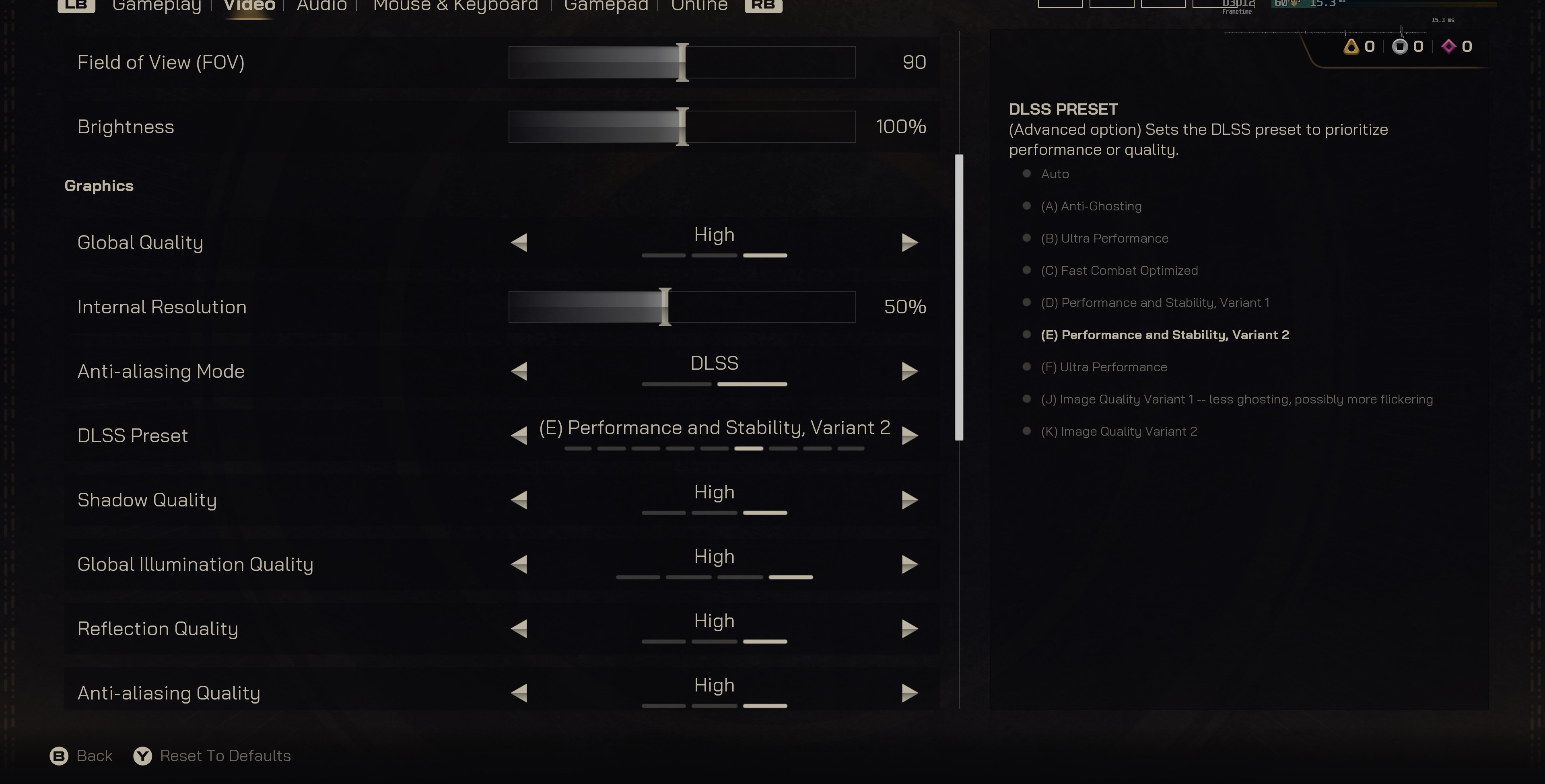
3:11 Here why preset K and E quality mode still recommend over preset L / M performance.
M/L are a bit flickery, I get that, but it's also 91 FPS vs. 175 FPS - that's a 92% gain in FPS.
3:11 Here why preset K and E quality mode still recommend over preset L / M performance.

I'm talking about the original game on preset M.director's cut is fine on my end, preset K, forced DLAA + smooth motion for 120fps cut scenes.

if preset M introduces problems in a game, chances are they will be there even in quality modeWhat if you use M quality if your system can handle it? Is it better than K quality?

Been using "recommended" on 1440p. I set it to Performance mode (M) initially but if I see any fuckery I switch to balanced (K) that way i dont need to quit out the game to change shit.So, what's the overall conclusion? Seems 4.5 is a bit of a flop. Not only is it even more demanding than 4, but it's not even universally superior and is a regression in several ways?
It doesn't sound like it should have come out of beta so soon.

I had some image quality issues with M, but they are gone when using L. I dont measure performance since i use framegen anyway, but ive just switched to using L globally @67-75% res and overall feels like an improvement across the board in every game i play to me, except the games that have ray recon that is, which definitely isnt worth disabling as it does a lot more stuff.So, what's the overall conclusion? Seems 4.5 is a bit of a flop. Not only is it even more demanding than 4, but it's not even universally superior and is a regression in several ways?
It doesn't sound like it should have come out of beta so soon.

There is no "oversharpening" in the models, their output does not have any artifacts which you would expect from oversharpening.Tried 4.5 profile M quality mode in 4 games and none of them is even close to be oversharpened.
Do you people keep the sharp slider in your monitor\tv to the max or something?
If anything the difference between perf and quality is now super low so there is almost no reason to play quality, but not because of the sharpness.
I'd argue that it is universally better but is also more demanding to the pre-upscaled image in how well it is denoised and how well the pixel grid jitter is implemented. Hence the per game results where sometimes it shines and sometimes a more forgiving K could be better.So, what's the overall conclusion? Seems 4.5 is a bit of a flop. Not only is it even more demanding than 4, but it's not even universally superior and is a regression in several ways?
It doesn't sound like it should have come out of beta so soon.


So after that DF video and some discussion from PSSR thread I wanted to check out if DLSS 4.5 is a regress when it comes to stability in UE5/RT games. And yeah, that's the case, at least partially...
SHf: in game DLSS3, DLSS4, DLSS4.5 M, DLSS 4.5 L:
SH2: in game DLSS3, DLSS4 changed to DLSS4.5 M (mid video), DLSS 4.5 L:
So indeed, preset M can show similar artifacts to what was seen in some games with PSSR, big regress over DLSS4 (that is super stable) in this aspect. But preset L (that is omitted from most comparisons so far) is far more stable than M, not on par with K maybe but better than DLSS3.
This is not a DLSS issue, it's the issue of games which are being upscaled.So indeed, preset M can show similar artifacts to what was seen in some games with PSSR, big regress over DLSS4 (that is super stable) in this aspect.
Preset L is less aggressive in discarding frame history and is thus better at handling temporal instabilities of the original frame. I've done a number of tests, and in almost all of them the flickering/noise issues of M were reduced with L.But preset L (that is omitted from most comparisons so far) is far more stable than M, not on par with K maybe but better than DLSS3.
DLSS4 (model J) was not a slam dunk over model E.DLSS4 was a slam dunk over 3.7. 4.5 came out half-baked.
There are no changes stated for SR in .3, only for RR, and it's not about models.Any one tested 310.5.3 yet ?

DLSS4 was a slam dunk over 3.7. 4.5 came out half-baked.
M/L are a bit flickery, I get that, but it's also 91 FPS vs. 175 FPS - that's a 92% gain in FPS.
Then I don't really understand the direct comparison of image quality.Thats because he's comparing quality vs ultraperformance/perfomance, the internal resolution is abysmal, ofc ull get more frames. You can lower dlss 4 to performance as well and ull gain the same amount of performance/even more.
Then I don't really understand the direct comparison of image quality.
If you want more frames, you have to make compromises somewhere.
And if you want less flickering, you inevitably have to give up 'a few' frames.
Nothing new

Have you ever considered the the people praising it and calling it a massive difference are using 4k screens? Like, why would I care what 4.5 looks like on a 1080p screen or a 1440p screen? At 4k it's very impressive.On the bigger picture there is no difference between the same levels of 4 vs 4.5 especially when you play normally and dont stand still to stare at certain stuff. The difference is that 4.5 makes certain sfx such as specular effects slightly more bright(but again not in all cases), fixes some shimmering and ghosting for certain effects and it has a more aggressive sharpness at the cost of around 15% frames in some cases. If you did not care about said things or you never noticed them, and you play at resolutions at or lower than 1440p, I see no benefit of 4.5 especially since most games will be using UE5 with lumen, and lumen scales horribly with internal resolutions. If you're at 4k, you can certainly use the new model. Other than that, it's not a generational leap or a massive difference, or anything hyperbolic as some users called it on this thread a few pages back. You have to remember, just as there are console fanboys, so are there nvidia/amd ones, who will praise the living shit out of their features. tl;dr stick with K at 1440p or lower(quality/balanced) and M for 4k(balanced/performance) or L(ultraperformance) at 4k only if you really need to have a boost of frames.
This is not a DLSS issue, it's the issue of games which are being upscaled.
When a game is badly denoised/filtered than any upscaler which is skewed towards current frame data (PSSR 1.0 in a prime example) will "reconstruct" the noise which is present in the original lower resolution.
A model which is doing multiframe history blending will "denoise" such cases but it will also produce ghosting and detail loss on camera movements and objects disocclusion.
So this is a no win scenario - either option will produce issues in case of such games, and the problem must be fixed in the original renderer, not in the upscaler.
Preset L is less aggressive in discarding frame history and is thus better at handling temporal instabilities of the original frame. I've done a number of tests, and in almost all of them the flickering/noise issues of M were reduced with L.
It is still not as "accumulative" as K though so the issues will remain, they'll just be less visible. Sometimes it's also producing a somewhat softer image which still has "sharpening" like elements in it. So not really a solution, just a bit of a band aid for bad original renderers.
DLSS4 (model J) was not a slam dunk over model E.
Model J is also skewed towards current frame data and it also produced flickering which Nvidia had to solve by releasing a more "accumulative" model K which in turn produced ghosting in areas where model E didn't.
There are no changes stated for SR in .3, only for RR, and it's not about models.
calling it a massive difference are using 4k screens?
You can always not bother and just leave it by default which will use what the devs implemented for each game. The majority of gamers will do that anyway. Most never even noticed the ghosting/shimmering. The only thing you should keep your eyes on is ray reconstruction, whenever they decide to update that. That feature is in fact an actual massive difference unlike 4 vs 4.5.I'm on 1440p, so can I ignore all of this stuff? Gives me headaches.
I'm on 1440p, so can I ignore all of this stuff? Gives me headaches.
Theres not a "massive" difference at 4k either. The Lumen issues apply there as well, on a minor scale, but still obvious when compared to 4.
You can always not bother and just leave it by default which will use what the devs implemented for each game. The majority of gamers will do that anyway. Most never even noticed the ghosting/shimmering. The only thing you should keep your eyes on is ray reconstruction, whenever they decide to update that. That feature is in fact an actual massive difference unlike 4 vs 4.5.
Of course, or try it and see if you like it.
For most games 4.5 produces better results. I tested many games with it and only saw bigger problems in SH2/SHf and GOW2018 for some reason (camera stuttering, image quality is excellent).
I've tested 3 games, cp2077, avatar, and outer worlds 2 and aside from less ghosting, I saw no benefits. The shaper imager can be increased with K as well, no idea why some would call M's sharpness "clearer picture", they're exactly the same when their sharpness levels are equal.
You'd have to squint really hard to maybe notice something.
DLSS 4.5 don't add any artificial sharpness to the image

Model M is more skewed towards current frame data and is considerably more aggressive at discarding frame history.
The result is a sharper and more coherent in motion but noisier, less temporally stable resolve.
It is the same in all presets, the reason why Nvidia "recommends" using K with B/Q/DLAA is performance.
Do you have a source for the claim that DLSS4.5 presets M & L are focused on current frame info? Seems to completely contradict the entire point of the transformer architecture used in DLSS4 and above, which accounts for temporal dependencies across multiple frames for resolving detail. The old convolutional architecture (CNN) used in DLSS3 and below was only focused on current frame detail for upscaling.This is not a DLSS issue, it's the issue of games which are being upscaled.
When a game is badly denoised/filtered than any upscaler which is skewed towards current frame data (PSSR 1.0 in a prime example) will "reconstruct" the noise which is present in the original lower resolution.
A model which is doing multiframe history blending will "denoise" such cases but it will also produce ghosting and detail loss on camera movements and objects disocclusion.
So this is a no win scenario - either option will produce issues in case of such games, and the problem must be fixed in the original renderer, not in the upscaler.
Preset L is less aggressive in discarding frame history and is thus better at handling temporal instabilities of the original frame. I've done a number of tests, and in almost all of them the flickering/noise issues of M were reduced with L.
It is still not as "accumulative" as K though so the issues will remain, they'll just be less visible. Sometimes it's also producing a somewhat softer image which still has "sharpening" like elements in it. So not really a solution, just a bit of a band aid for bad original renderers.
So indeed, preset M can show similar artifacts to what was seen in some games with PSSR, big regress over DLSS4 (that is super stable) in this aspect. But preset L (that is omitted from most comparisons so far) is far more stable than M, not on par with K maybe but better than DLSS3.

Don't worry. Once Nvidia buys enough amount of RAM for AI, DLSS 4.5 will be saved.
Because it's not a solution. You're exchanging one set of artifacts for another set of artifacts. Ideally you'd want a separate model to be trained specifically for each game but this isn't financially feasible or realistic - although console platforms may attempt it at some point.Makes you wonder why they didn't create PSSR version with more accumulation for UE5 and games with noisy RTGI.
The source is the results you're getting. Less ghosting and disocclusion means higher weight of the latest rendered frame in final resolve.Do you have a source for the claim that DLSS4.5 presets M & L are focused on current frame info?
Both are TAAUs where NNs are used to choose which pixel from which of the set of frames in history should be used in the final reconstructed frame. The difference between CNN and TNN is in the NN's architecture; the latter allows for more complex "analysis" and can thus "guess" better which pixel should have what color in the final image.Seems to completely contradict the entire point of the transformer architecture used in DLSS4 and above, which accounts for temporal dependencies across multiple frames for resolving detail. The old convolutional architecture (CNN) used in DLSS3 and below was only focused on current frame detail for upscaling.
Yeah, exactly. The basics are the same in every TAAU, the difference is in how the pixels from low res frames in history are being selected for the final full resolution frame. And this difference determines whether a NN model (or an algorithm in case of FSR2/3) is trying to maintain the details in motion, avoid ghosting and blurring or it tries to hide the noise and use the history to create more detailed static image, etc.Maybe I'm misunderstanding what you're saying, and instead you're arguing that there's more weight/priority given to the current frame in DLSS4.5 presets M & L and less weight is given to temporal dependencies than what we saw with DLSS4 preset K.

I have issue with dlss 4 in 3rd person game . It have that weird trail-ghosting over the character . Happen if you stand on grass/water background .DLSS4 was a slam dunk over 3.7. 4.5 came out half-baked.
NVIDIA DLSS SDK 310.5.3 is now available for all developers:
- Added CUDA application support to DLSS Ray Reconstruction
- Bug Fixes & Stability Improvements
Is it safe to use for non-developers?

From what i understand, Performance gets a visual boost, everything else is secondary, minus the new presets. I don't particularly have problems with ghosting.DLSS4 was a slam dunk over 3.7. 4.5 came out half-baked.

Its not a flop, but definitely didn't move the needle that much.So, what's the overall conclusion? Seems 4.5 is a bit of a flop. Not only is it even more demanding than 4, but it's not even universally superior and is a regression in several ways?
It doesn't sound like it should have come out of beta so soon.

Its great if you have 4060ti 5060ti 16gb and try to play 4k, or 4060 5060 1440p work too I guess.
if you already have great perf then dlss4 quality mode still superior in most case . Or 200fps goes brrrr .


I just messed around a little bit with Preset M vs. K (DLAA vs. Quality vs. Performance) in Stellar Blade. From what I have read NVIDIA is recommending to stick to Preset K while using DLAA or Preset K.
In the case of Stellar Blade, however, I see a significant leap in image quality between M vs K. Especially with Eve's hair, I always see artefacts in her ponytail under Preset K. This happens with DLAA, Quality and, of course, Performance Preset. Preset M fixes this almost completely. Overall, the image appears much clearer (but not oversharpened). In some parts of the image K DLAA might have a small advantage, but overall M is just better if you ask me.
Preset K DLAA:

Preset M DLAA:

Yes, Nvidia recommends 4.0 for Quality/DLAA because there's a significant performance hit with 4.5 at those presets unless you're running a 5090.
There is a performance hit regardless. As for how significant it is depends on the architecture. 20 and 30 series get -10 to -20%, 40 and 50 series are in -5 to -10% ranges.unless you're running a 5090

3:11 Here why preset K and E quality mode still recommend over preset L / M performance.
The short version answer is "it depends on a game". Some will do better with M, some with K. L is a mid point between M and K but it is closer to M than K.if I want the best image quality, which one is it ?
M could be a downgrade if the game has shimmering and aliasing w/o DLSS or TAA.I also hate shimmering and anti alaising lines. in preset K I don't see any of that shit. but in every video I am looking at, M looks like a downgrade.
There is a performance hit regardless. As for how significant it is depends on the architecture. 20 and 30 series get -10 to -20%, 40 and 50 series are in -5 to -10% ranges.
i dont get this. why no video show preset M in quality mode to actually compare between M and K ?
why M is always in performance and K in quality ?
or is preset M for Performance only ?
honestly I was doing fine before in understanding how this works till M and L came. now I am confused as fuck and I am a PC gamer.
can someone explain this to me ? if I want the best image quality, which one is it ?
I also hate shimmering and anti alaising lines. in preset K I don't see any of that shit. but in every video I am looking at, M looks like a downgrade.
is there a video showing M on quality to K on quality ? i don't do performance unless I am playing COD so I can hit 4k 240.Preset M can look worse than K, depends on the game.
They compare quality to performance probably because those are the presets nvidia recommends. Nothing stopping you from using Quality M profile...
Performance hit of M Performance is very similar to K Balanced and depending on the game it can look better or worse.
is there a video showing M on quality to K on quality ? i don't do performance unless I am playing COD so I can hit 4k 240.
and is M performance better than K performance ?
On a 5090 the hit is generally negligible 2% or 4%. Sometimes there is even a positive impact on 50 series cards so not strictly always true.There is a performance hit regardless. As for how significant it is depends on the architecture. 20 and 30 series get -10 to -20%, 40 and 50 series are in -5 to -10% ranges.