• Hey Guest. Check out your NeoGAF Wrapped 2025 results here!

Apple iPad 2 |OT|

Status
Not open for further replies.
I have Air Video but don't you need to be connected to wifi to watch those videos? I wanted to put some videos on it to watch on a plane as I won't be connected to a network.

I also have AVMediaPlayer but I've heard it drains batteries more than just using the standard video app.

There's the VLC player and Azul video player. Both applications need to use iTunes to add the videos, but it's still way easier because you don't have to convert any of them. You just add them to the application from the application tab.

It does drain the batteries slightly faster than the regular player, but you can still watch for many, many hours on a single charge. (and these apps will drain less than streaming through wifi using airvideo)

Airvideo is better for times when you are at a friend's house with your TV-out cables. It's really handy then. Especially using 3G to stream your entire media collection wherever you want.
 
There's the VLC player and Azul video player. Both applications need to use iTunes to add the videos, but it's still way easier because you don't have to convert any of them. You just add them to the application from the application tab.

It does drain the batteries slightly faster than the regular player, but you can still watch for many, many hours on a single charge. (and these apps will drain less than streaming through wifi using airvideo)

Airvideo is better for times when you are at a friend's house with your TV-out cables. It's really handy then. Especially using 3G to stream your entire media collection wherever you want.

Isn't the VLC Media player gone from the App store or did they put it back up?
 
AVPlayer HD has HTTP/FTP Server to load files through Wifi and FTP Client through Wifi. Works great and AVPlayer supports tons of file formats.
 
As I understand it, it wouldn't take as much processor muscle to use pixel doubling to achieve the 2048 x 1536 resolution, which is why they're choosing that exact resolution (i.e. twice the current 1024 × 768 res).

Don't Xbox & PS3 games do that all the time? Internally render at a lower resolution that doesn't kill the cpu and then pixel interpolate to 1080p or whatever. It's a pretty common technique.
They do pixel doubling for development simplicity and compatibility (like if you take a 1 pixel bitmap or precisely laid out app and scaling to a resolution that's 1.5x it can get ugly), it doesn't make it need any less horsepower. But yeah for anything not updated and running at the lower resolution (like pixel doubling iPhone apps and old apps on iPhone 4), they can scale up with a negligible performance hit (but may look like shit once compared to native resolution stuff).

For anything running at the new full resolution it'll take more power...but it'll also depend on what's being displayed. Like games will need more juice of course, but something like Safari or iBooks or whatever it's not a huge deal. It's like in desktop computing, you need a fancy GPU to run games nicely at high res, but shitboxes can run most regular desktop stuff at 1080p no problem, or 2560x1600 if the output supports it.
I'm sure for print/media consumption it'll be fantastic, just not sure for games. Feels like it'll need to be iPad 4 to get an actual performance increase, with the natural performance increase this time being absorbed by the higher res.

Interesting to hear that there aren't that many games that take advantage of the iPad 2's increased power. So might try and hang on until next year.
I'd just buy now. Worst case you really really like the next iPad and flip it. Might take a hit but for that you ultimately got x months of use out of it (vs none), and even more if you're patient.
I also have AVMediaPlayer but I've heard it drains batteries more than just using the standard video app.
This applies for any of the alternative format players, but it might not be a big deal. I think someone tested it out way back (maybe the first iPad?) and they got something like 7 or 8 hours. It's definitely a hit (compared to 10+ hours) but depending on the situation it may or may not matter.
 
just got an ipad 2 and downloaded a bunch of apps.

but what are some of the free content you can get on news stand?
because most of the things i want have a subscription.
 
just got an ipad 2 and downloaded a bunch of apps.

but what are some of the free content you can get on news stand?
because most of the things i want have a subscription.

Where did you hear about free stuff?
Most - if not all - magazines on the Newsstand has subscriptions. Many of them are free to download, but the subscriptions will cost you of course. Currently EDGE is giving away the October issue for free, but that's all I know.
 
i've held off on buying an ipad since it was originally announced. it never appealed to me as i was always hoping for something more prior to the announcement. but the more i play with them the more i want one. plus, i told myself ipad 3 would be when i finally dive in, no matter what the specs/features are, but i am finding myself REALLY wanting one now.

I have waited this long, should i continue to wait for 3's release or buy a 2 now and flip it when 3 comes out?

the way I see it, there's no better time than today. plus iPad resale value is fuckin great.
 
I'm probably buying an iPad 2 for my father as a Christmas present, and buying the iPad 3 for myself next year, so my mother can get her iPad 1. Though, if my sister only has a 3G connection through a dongle on her Windows laptop at home, can she tether that connection to a Wi-Fi iPad 2?

Because, it wouldn't be much fun, if they can't go onto the Internet on an iPad, mind you they don't have Wi-Fi.
 
just got an ipad 2 and downloaded a bunch of apps.

but what are some of the free content you can get on news stand?
because most of the things i want have a subscription.

The Guardian and The Daily offer a couple months of free issues when you download them.
 
AVPlayer HD has HTTP/FTP Server to load files through Wifi and FTP Client through Wifi. Works great and AVPlayer supports tons of file formats.
Guys, if you're going to be loading movies wirelessly, just get BuzzPlayer HD and stream them. It can also copy them and play locally off the iPad for when you're traveling.

You can have a ton of movies in a folder on your computer, way more than you could ever store on an iPad, and then mount your computer wirelessly and stream any format to the iPad. Works with a NAS too. No need to have a helper app running like AirVideo.

BuzzPlayer is the only app to offer streaming of any format movie to the iPad as far as I know, shame more people aren't aware of it.
 
thanks for the rec teddman! been looking for an app that I could use via NAS so I could finally ditch airvideo.
 
Guys, if you're going to be loading movies wirelessly, just get BuzzPlayer HD and stream them. It can also copy them and play locally off the iPad for when you're traveling.

You can have a ton of movies in a folder on your computer, way more than you could ever store on an iPad, and then mount your computer wirelessly and stream any format to the iPad. Works with a NAS too. No need to have a helper app running like AirVideo.

BuzzPlayer is the only app to offer streaming of any format movie to the iPad as far as I know, shame more people aren't aware of it.
Is the transcoding done on the iPad itself? If so, isn't that a bit taxing on the battery, and can the iPad even handle it properly when it comes to high bitrates? (at least the iPad 1)
 
Thank you to whoever recommended that Operation Ajax app. I can't believe it's free. If anyone hasn't heard about it, it's an interactive graphic novel (200+ pages) with animation, music, sound effects, all about the CIA-backed coup in Iran in 1953. Simply fantastic.
 
what is the best site to visit if i want to jailbreak my ipad 2?

also question, can i ever go back to settings without jailbreak?
 
I'm about to go crazy :(
I was looking through iCloud.com today and noticed none of the Pages files from my iPad were backed up there. iCloud is set up fully on my iPad and the documents had all been stored online previously, ready to download.
I opened Pages on the iPad and all my files are in place, though none of them have thumbnails. They are all silhouettes with the 'uploading' arrow in the top corner of each one and I can't open any of them. Not a single one!
I have tried toggling iCloud on and off through the iPad menu, both turning it off for the individual Pages app, turning it off throughout the entire system and even deleting and restating the entire iCloud profile. No good.
I've also restored the iPad back to factory default and restored it twice, both using iTunes and iCloud back-ups. Both lead me back to the same scenario. All of the documents are on the device, none can be opened.
What can I do???
I have some very important stuff on my iPad that I thought was back-up twice (through iTunes back-up and stored on iCloud) so I hadn't bothered saving any of them in an external location :(
 
So my nearly computer-illiterate mom is getting an iPad 2 for Christmas because she "needs one." I guess that's Apple marketing for you, huh? :P

Anyway, I have a 4S and i know all the must have apps for myself, but what apps would you guys recommend for this situation beyond Bejeweled and other similar casual games?
 
So my nearly computer-illiterate mom is getting an iPad 2 for Christmas because she "needs one." I guess that's Apple marketing for you, huh? :P

Anyway, I have a 4S and i know all the must have apps for myself, but what apps would you guys recommend for this situation beyond Bejeweled and other similar casual games?

Stuff like Flipboard or Pulse that makes finding stories online easier and more visually oriented.

Guardian unlimited photos app is great.

Maybe Pages if she wants a formatted writing app. something like Plaintext if she could use a plaintext writing app.

Possibly iBooks, amazon kindle for reading.

maybe an “oh shit, that’s cool” demo app/ book like Solar System or The Elements. (I still love those.)

Maybe a radio app like Radiobox for streaming radio.

Make sure she’s set up with FaceTime and an email address.
 
Do you have more apps that do notifications now?

Nope, not a whole lot. I get notifications from maybe three different apps a few times. Once a week from Hitpad, once a month when a new Edge releases and sometimes when I am chatting on IM+ but that's only for a few hours at night.

I hear Apple will fix the battery issues in the next firmware update.
 
Stuff like Flipboard or Pulse that makes finding stories online easier and more visually oriented.

Guardian unlimited photos app is great.

Maybe Pages if she wants a formatted writing app. something like Plaintext if she could use a plaintext writing app.

Possibly iBooks, amazon kindle for reading.

maybe an “oh shit, that’s cool” demo app/ book like Solar System or The Elements. (I still love those.)

Maybe a radio app like Radiobox for streaming radio.

Make sure she’s set up with FaceTime and an email address.

That's definitely enough to help me get started, thanks!
 
I would recommend Real Solitaire as well, my mother loves it, as there's also high-scores and different rules you can apply. Try those simple games. TuneIn Radio is the best radio app in my opinion, while Reeder (news feeds) is the better one out of those mentioned, though not as visually compelling as the others, it's simple and easy. Show her Our World or 7 Billion People, so she can see what a state-of-the-art magazine looks like. They integrate video, touching, rotating and even blowing into the microphone to get the windmill to move. IM+ Pro for chatting on all kinds of messenger services. Oh, and get AppStart while you're at it; it's an app that introduces you to a lot of different kind of app for the beginner. Day One is great for diary writing, and it puts your entries up on a calendar, they will update it with tagging and other stuff as well.
 
I would recommend Real Solitaire as well, my mother loves it, as there's also high-scores and different rules you can apply. Try those simple games. TuneIn Radio is the best radio app in my opinion, while Reeder (news feeds) is the better one out of those mentioned, though not as visually compelling as the others, it's simple and easy. Show her Our World or 7 Billion People, so she can see what a state-of-the-art magazine looks like. They integrate video, touching, rotating and even blowing into the microphone to get the windmill to move. IM+ Pro for chatting on all kinds of messenger services. Oh, and get AppStart while you're at it; it's an app that introduces you to a lot of different kind of app for the beginner.

I just want to mention that I didn’t suggest Reeder because it requires a Google reader account and can’t manage feeds on its own. You need to get on a desktop computer to do it.

It’s about two steps up in complexity compared to those other apps that already have content ready to use.

and I looooove Reeder. Use it every day. But i’d say it’s better for someone who’s more comfortable with computers because of it’s need for a PC for feeds.
 
But couldn't he help his mother set up the Google Reeder account? I would do it for my mother and no trouble. =)
Else there's Zite as well, which I still prefer over Pulse and FlipBoard. The thing with those two are, that they are too busy in interface and design, flipboard ain't easy to set up either, at least I have had trouble getting a RSS to work, it couldn't find it rather.
 
My intention with flipboard was to skip the setup entirely. just look at their selections of sources and browse. stuff she likes she can put on her main pages. zero config.

and, yeah, zite is nice, too.
 
Cleaning tips?

My 6 year old nephew was playing with my iPad and now the screen is a bit too dirty for my microfiber rag to take care of.

I'm assuming Windex is a bad idea, but I need to do wet wiping of the screen.
 
My intention with clipboard was to skip the setup entirely. just look at their selections of sources and browse. stuff she likes she can put on her main pages. zero config.

and, yeah, zite is nice, too.

I have to say I didn't take in mind that he's English. Here in Denmark many prefer the local news and Flipboard were no good for adding those sources. But if she knows her English, then they have a great selection no doubt. But now him and his mother have a couple to try out, at least their all free: Flipboard, Pulse, Reeder and Zite.

Good to know others are having battery worries with their iPads as well, let's hope for a fix in the next update. It's weird, that I have to charge it every day, I'm not used to that.
 
I said after a while of use, I'd review it:

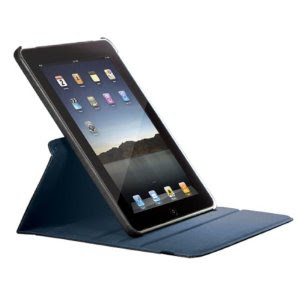
Targus 360 iPad 2 Case


targus-360-ipad-2-keyboard3.jpg


Targus-Rotating-Stand-ipad2-Case.jpg


targusversavu360rotatingipad2case4.jpg


Works as intended, and it's not bulky at all, either. We love it. The case makes it very easy to put the iPad 2 into "display" mode, like shown in the first 2 pics above. Very convenient.

Highly recommended. Bought it for $35 on Amazon.
 
Ok so need some advice:
I'm leaning towards an iPad2 for my dad's Christmas present, he wanted a tablet for quite some time so why not.
Thing is his computer skills are low at best, all he uses my pc for is to edit xls spreadsheets and surf the web. He can't distinguish between a legit site and a bad site, so he basically clicks on everything and infects my computer once in a while even with antivirus installed.

I'm leaning towards an Ipad2 because it's so restricted he can't do much wrong(certainly not jailbreaking it) and I think it's more user friendly for someone like my dad.
All he wants the tablet for is to show pictures to his friends but as I have learned there is no USB adapter for the iPad and you have to get lucky with camera adapter so you basically need iTunes to do the transferring and iTunes would end up on my PC, which I'm hell no!
Second thing is he probably wants to edit xls files and transfer them back and forth. No problems with the galaxy tab as an office suite comes preinstalled, what's the verdict here?
My guess is that it will be not as smooth if at all.

So it basically boils down to this:
iPad: easier to use, media connectivity sucks or not existent
Galaxy Tab: not that user friendly, excellent media connectivity
The iPad and Galaxy Tab both have its flaws and I'm literally 50:50 on which device to buy for my dad, need some more input, thanks.
 
Bollocks make me think now as well.
My dad is the same, he uses spreadsheets a lot, he would probably want to show his photos to friends and he surfs the web very little. He'll use it for the exact same things as your dad.
But I always planned getting him an iPad 2 for Christmas, but only as a consuming device. He can always get the photos up in iCloud I assumed, and then he could save me from there onto iPad.
 
I know I'm a tight git, but I'd never buy an iPad for someone that doesn't use their computer much. The thing is, you could buy them an absolute bottom of the range tablet and they'll still only use 1% of what it can do. IMO, iPad is an expert-level device. You can do seriously amazingly mind blowing stuff with it (just this weekend I used it as a synth at band practice, read books and comics and magazines, watched TV in the bath, spent a few hours playing games and did a bit of writing, as well as the usual internet and email). But if someone's not in the market to do all the awesome stuff, then just get them a bog standard cheap tab that they can use once a week for the internet.

But as I said, I am a cheap git who convinced my wife not to get one since she already has an old netbook. Meanwhile I rinse the shit out of mine and am still concerned that I need to get my money's worth...
 
I know I'm a tight git, but I'd never buy an iPad for someone that doesn't use their computer much. The thing is, you could buy them an absolute bottom of the range tablet and they'll still only use 1% of what it can do. IMO, iPad is an expert-level device. You can do seriously amazingly mind blowing stuff with it (just this weekend I used it as a synth at band practice, read books and comics and magazines, watched TV in the bath, spent a few hours playing games and did a bit of writing, as well as the usual internet and email). But if someone's not in the market to do all the awesome stuff, then just get them a bog standard cheap tab that they can use once a week for the internet.

But as I said, I am a cheap git who convinced my wife not to get one since she already has an old netbook. Meanwhile I rinse the shit out of mine and am still concerned that I need to get my money's worth...

Those cheap tabs are crap. I wouldn't wish them on an enemy. The iPad is easier to use as anything on the market, which is what matters to me when making a recommendation to a friend or family member.
 
Would you guys buy an iPad for someone who don't have WiFi in their house?
I mean, they can't check out the web, mail, use iCloud or the App Store.

But they could still get apps and games onto it, movies, songs and content. A child would be able to draw on it, watch videos in the car and have it along on trips. In my sisters case, they have a 3G dongle which they plug into their laptop, but it can't be used for iPad, but I would guess the iPad could connect to that network, they just have to have the laptop turned on.

What say you?
 
I would consider a 3G iPad, depending on usage. it might be enough for some people, but it’s limiting for larger apps.

but I don’t think that’s the best solution. Having a faster, less restricted wifi is important. (at least iPads with iOS 5 can set up airport routers without need of a desktop computer)
 
Why doesn't my iPad charge on certain outlets? I'm at school and I've tried 3 different outlets, it's all getting the charge symbol..but it's been at 19% for 20 mins now

Works fine with the wall outlet at my house

jeveD.jpg


e/ now it has this symbol and it apparently went down to 18% lol

Hhx3Q.jpg
 
Ok so need some advice:
All he wants the tablet for is to show pictures to his friends but as I have learned there is no USB adapter for the iPad and you have to get lucky with camera adapter so you basically need iTunes to do the transferring and iTunes would end up on my PC, which I'm hell no!
Second thing is he probably wants to edit xls files and transfer them back and forth. No problems with the galaxy tab as an office suite comes preinstalled, what's the verdict here?
My guess is that it will be not as smooth if at all.

So it basically boils down to this:
iPad: easier to use, media connectivity sucks or not existent
Galaxy Tab: not that user friendly, excellent media connectivity
The iPad and Galaxy Tab both have its flaws and I'm literally 50:50 on which device to buy for my dad, need some more input, thanks.
For the pictures, do you mean just hooking up a digital camera and copying pictures off of it? If so the camera connection kit has a USB adapter for that along with the SD card one. (I'm not sure what you mean by "get lucky with camera adapter")

For the Excel files, which office suite does the Galaxy Tab have? Cause it might be available for iPad, $10-20 if it's one of the ones I'm thinking of. If the app has Dropbox support that'll take care of the syncing issue for the most part. It's the compatibility I'd be worried about, and that goes for the Tab as well...pretty much anything that isn't MS Office itself really. There's some story going around today that MS is working on a version for iPad, although who knows when that may actually turn up.

And one note about malware, even if he may not get any with the iPad, you still have to watch out for phishing, like entering whatever password into a legitimate looking but fake form.
I would consider a 3G iPad, depending on usage. it might be enough for some people, but it’s limiting for larger apps.

but I don’t think that’s the best solution. Having a faster, less restricted wifi is important. (at least iPads with iOS 5 can set up airport routers without need of a desktop computer)
Yeah using the iPad without a connection can be annoying, but it really depends on the user and what they're doing with it.
Why doesn't my iPad charge on certain outlets? I'm at school and I've tried 3 different outlets, it's all getting the charge symbol..but it's been at 19% for 20 mins now
What power adapter are you using? You might be getting the slow charge. Or if you have USB charger outlets they might be supplying that.
 
Kickstarter finds: A better iPad stylus and an iPad mount with double the suck
GigaOM said:
Kickstarter isn't slowing down all that much for the holidays, and in fact some of its iPhone and iPad accessories are positively on fire right now as online spending goes through the roof. Here's a look at one cool project nearing the end of its Kickstarter funding, and one just making a promising start.

Twice the suck makes for a very versatile iPad mount

The MobileMount is almost done with its funding efforts — there's less than 24 hours to go before it becomes funded. But it's already met and exceeded its goal, with more than $97,000 pledged as of this writing. For $25, you can still get in on the ground floor and receive one of the first devices, which is designed to stick to any smooth surface via two attached suction cup mounts.

n92jA.jpg


So basically, one end could be attached to the back of your iPhone, while the other is attached to your counter, or to a window, for example. You can also use the included vinyl stickers to make it work with surfaces that have a rubberized back or textured surface, like the Samsung Galaxy Nexus.

The suction cup uses a twist-to-lock design, which amps up the suction power and makes it possible for the mount to remain attached for "weeks," according to its creator. The MobileMount comes in black and white, looks pretty cool, and is expected to ship in January 2012.

A stylus that goes the extra mile

A stylus may not be the most necessary of iPad accessories according to Steve Jobs, but doodlers and fans of handwritten notes might disagree. The iPen is a project that aims to cater to those individuals, tackling the deficiencies inherent in current iPad drawing utensils.

WjfYC.png


The iPen achieves this by working with an active digitizer accessory that plugs into your iPad's dock connector port and "talks" to the stylus itself via ultrasonic and infrared transmissions. The added dongle allows for proximity sensitivity, precise drawing and writing, and palm input rejection, which is a really big sore spot when it comes to using the iPad as a notepad currently. It'll launch with two apps at least that support the hardware, and the iPen's creator is hard at work convincing other apps to introduce support, too.

The iPen so far has achieved just $8,680 of its $35,000 funding goal, but you can help by pledging $50 to pre-order your own kit via the early bird special, which is reserved for 250 early backers. After that, it'll be $79 for one, which still seems like a bargain for those interested in being able to use a pen with their iPad without oddly contorting their wrist or sacrificing legibility.

Got an exciting Kickstarter project? Send it to us for consideration in our regular roundup of promising accessories.

 
I just want to mention that I didn’t suggest Reeder because it requires a Google reader account and can’t manage feeds on its own. You need to get on a desktop computer to do it.

It’s about two steps up in complexity compared to those other apps that already have content ready to use.

and I looooove Reeder. Use it every day. But i’d say it’s better for someone who’s more comfortable with computers because of it’s need for a PC for feeds.
You can manage feeds in Google Reader from Safari on the iPad. No desktop is needed. It's still complicated, yes, but can be a PC free experience without issue.
 
Beenlooking to buy a stylus for my ipad (because writing with your fingers is like the most awkward thing ever), and been eyeing the Bamboo one. Any experiences?
 
touchfire-the-screen-top-keyboard-for-ipad as seen on TESTED.COM

31985-touchfire_ipad_teaser_super.jpg


The transparent silicone keyboard attaches to the iPad 2's magnets and lays atop the on-screen keys. TouchFire's thin enough to fold up inside the smart cover (it weighs less than an ounce) but offers enough resistance to hold restive fingers without triggering accidental keystrokes.

TouchFire still works on the iPad 1 but doesn't offer the convenience of sliding and locking into place like it does with the iPad 2's bezel magnets. Designers Steve Isaac and Brad Melmon have been whipping up tech products for years, and the TouchFire is definitely the slickest way to add a keyboard to the tablet
 
All he wants the tablet for is to show pictures to his friends but as I have learned there is no USB adapter for the iPad and you have to get lucky with camera adapter so you basically need iTunes to do the transferring and iTunes would end up on my PC, which I'm hell no!
Second thing is he probably wants to edit xls files and transfer them back and forth. No problems with the galaxy tab as an office suite comes preinstalled, what's the verdict?
You don't need iTunes to transfer files. FileBrowser or FilesConnect apps will let you browse any PC/Mac or network drive over wifi, even an SD card inserted into your PC. You can look at photos within those apps or transfer them locally to the iPad for viewing in Photos.

And supposedly Microsoft is putting out their office suite for iOS next year...
 
And supposedly Microsoft is putting out their office suite for iOS next year...

The irony here is great.

One of the reasons why Microsoft's first tablet efforts turned to shit, was because the Office team hated it. The only tablet specific office application was the awesome OneNote, and I think that came from the MS Research division.
 
Status
Not open for further replies.
Top Bottom