• Hey Guest. Check out your NeoGAF Wrapped 2025 results here!

PSVita firmware update 2.10 to add folders, and in browser video streaming

do yall think this would allow for java/Flash/html5 games in the browser? Sure controls would be the last burden, but it is one step closer.

Could be either or. I suspect it will be HTML5. I hope.

Does it still delete your saves if you delete a game?

I believe so but you can not back up even card based saves via the CMA app. And it works wireless.
 
Folders don't mean anything to me since I only have 1 full page of games and only 2 games on page 2. Cool for 4 years from now if I'm able to get 100 games at once by then on my $300 120gb stick.
 
Folders don't mean anything to me since I only have 1 full page of games and only 2 games on page 2. Cool for 4 years from now if I'm able to get 100 games at once by then on my $300 120gb stick.

Time to buy more games

Fake edit: Oh i forgot you don't like games ;)

I have wayyy too many icons, will be good to get some more order going on. Would prefer if it saves icon placement though so i can switch memory cards.
 
Lets hope we can set custom backgrounds to the folders too
Would make customiSATION fun!
And the location of icons in folder is saved too on the card too
 
Awesome!

I wasn't even aware that the Vita's browser couldn't stream videos. I don't use any of my gaming devices for browsing the internet, really.

But I'm glad folders are finally coming. Took them long enough, but better late than never.

Memory card price cut next please.
 
FOLDERS

GET EXICTE

LMAO. It's sad but I'm excited. I hate the way every single game I have on a card is kept on screen. The icon should only appear when I actually have THAT game's card inserted. Now I have 30 games taking up space.

I'll definitely be using folders.
 
Fuck yeah! Watching videos in browser is something I really miss on my PS Vita.

I use my Vita every day in my bed for browsing the internet. I don't even play games on this thing. Hehehe.


Be careful of burn from icons on edges of browser window. Happened to my 3g launch Vita. Still use it to browse at work.
 
Be careful of burn from icons on edges of browser window. Happened to my 3g launch Vita. Still use it to browse at work.

Yeah, we need pop in icons instead of fixed bars. That would allow for full-screen browsing and little chance of burn in.
 
I don't really care about folders - it's the 100 icon limit. I've already deleted some apps and removed all the PSM/Minis that I don't play often to make room for new games.
 
10 icons per folder is ok I guess when you consider that iphone has a limit of 12 per folder IIRC.
not sure if this has been corrected in this thread, but the latest iphone allows 16 apps in one folder. i believe the ipad is a different number as well. like vita, it is obviously a created limitation based on the amount of icons visible on one page (although it works differently on ios where a folder allows one less row than a full page of apps). they would have to allow more apps on a vita page for the folders to allow more than 10 apps.
 
hum folders are needed for me.

FOLDERS OMG !!!

A way to se media content without having to open the apps would be nice too.

oh and a better save management ... ( they are on the good path for this one )
 
That limitation in iOS wasn't even okay then so I'm not sure how it makes the limitation on the Vita okay now.

At a max of 32GBs and plenty of apps over 100MBs, you won't be able to reach the 1000 limit even if you tried. Maybe if/when they bring out the 64/128GB MCs they will up the folder/icons/page limits.

not sure if this has been corrected in this thread, but the latest iphone allows 16 apps in one folder. i believe the ipad is a different number as well. like vita, it is obviously a created limitation based on the amount of icons visible on one page. they would have to allow more apps on a page for the folders to allow more than 10 apps.

I just tried on my iphone 5 (on the latest FW, 6.1.3) and it did not allow me to add an icon after I had 12 in one folder. I think you're confusing that with android, which is 16 apps per folder or ipad, which I believe is 20 apps per folder. Or maybe you're confusing number of possible icons/folders per page? Which is 16 on iphone 5.
 
I just tried on my iphone 5 (on the latest FW, 6.1.3) and it did not allow me to add an icon after I had 12 in one folder. I think you're confusing that with android, which is 16 apps per folder or ipad, which I believe is 20 apps per folder. Or maybe you're confusing number of possible icons/folders per page? Which is 16 on iphone 5.

uhh you should count again ;)

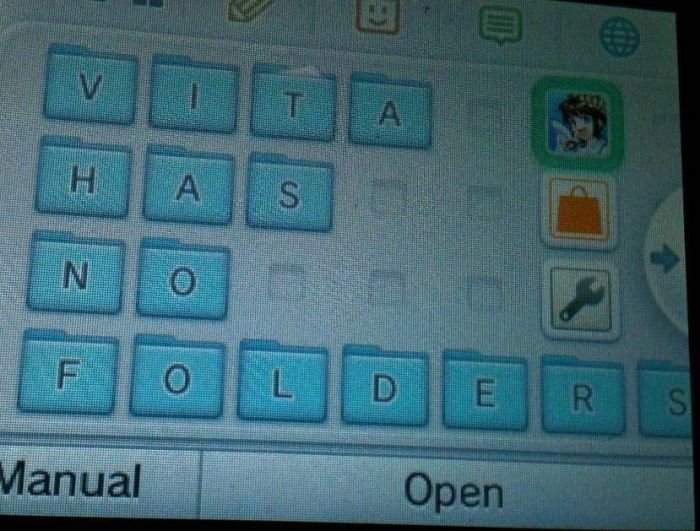
MReynZn.jpg
 
Finally the browser supports video. Hope there are some other stealth browser updates. Don't care much about folders but many others seem so. Both features should have arrived sooner but at least now we got them.

Now bring on some apps.
 
Like others have said, the folders addition is going to be an awesome way to clear my screen of all the shit that I don't ever want to look at. Will also be cool to have a Final Fantasy folder since that's what the majority of my downloaded games are.
 
The solution now is to not separate by game types or platforms. Simply list all games A-Z and have different folders like "A-D", E-H", "I-L", etc. You'll be able to put all your games on one page and know exactly where they are at all times. This will also encourage you to play more than what's just on your front page.
 
I can't believe I'm getting excited for something as basic as folders (but I am so damn excited).

The next thing would be to be able to skin the UI so I can do away with the ugly bubbles and get it looking more streamlined.

I've been using the vita for youtube app occasionally, but never for browsing. I didn't know there was an issue with video support in the browser. I'm glad they are at least addressing these problems even if it's seriously delayed.
 
Wait what does video streaming in browser mean? Does that mean it will support flash? Couldn't I already stream videos in browser if it wasn't flash (i.e. gametrailers)?
 
Time to buy more games

Fake edit: Oh i forgot you don't like games ;)

I have wayyy too many icons, will be good to get some more order going on. Would prefer if it saves icon placement though so i can switch memory cards.

You're good people Carl.

I'm one of those guys with a PSone screen, PSP screen, 2x Vita screens, and an apps screen. Maybe I'll take advantage of the folders, but I've been ok with the pages layout so far.
 
Glad folders are finally going to be available. Now I can hide all those useless Vita apps for good!

I wonder if folder contents will be kept when account switching...
 
Folders are a good start. At least I can hide those hideous kiddy bubbles. I wish they would just get rid of them.
 
I just want Hulu for vita! I wonder what happened to it, it was announced last year at e3 and we've heard nothing since. Even wii u has it already, odd.
 
Wait what does video streaming in browser mean? Does that mean it will support flash? Couldn't I already stream videos in browser if it wasn't flash (i.e. gametrailers)?

Browser doesn't support html5 video right now. Guess this will change. Don't think they will bring flash though.
 
i wonder how were gonna be able to label the folders?

i have 19 retail games, 12 psn games, etc

Its gonna look REALLY dumb to have "vita games 1" and "Vita games 2" folder names, etc etc

would have like to fit all games of each type into a folder
 
Wait what does video streaming in browser mean? Does that mean it will support flash? Couldn't I already stream videos in browser if it wasn't flash (i.e. gametrailers)?

I hope at the very least it means that if you open a YouTube video on the web browser, it directly plays the video via the browser instead of launching the YouTube app.
 
Glad I didn't sell my vita. Folders are worth buying a vita for...I mean, its fucking folders!!! What more could you want?

Also, fuck you welcome park!!!!!
 
Blog post: http://blog.us.playstation.com/2013/04/09/ps-vita-system-software-update-v-2-10/

  • Create folders to more easily manage your favorite application icons on the home screen, with up to 10 icons in each folder and a maximum of 100 on the home screen (including icons inside the folders).
  • Verify which PS Vita card you are using by looking at the home screen’s info bar. You can also save the layout of your home screen icons in the memory card.
  • Added video support allows you to play videos within the browser (memory card required; some videos are not supported).
  • New email enhancements allows you to view HTML messages, add multiple email addresses to your contacts, and easily search your messages using the new search feature.
  • PlayStation Plus members will be able to automatically update PlayStation Mobile format software and upload game save data onto online storage using 3G connection.
  • New “Mute Automatically” option will mute your PS Vita speakers when your headset is unplugged and pause your music when using the music app.
They didn't raise the 100 limit? Am I reading that right?
 
Top Bottom