
-
Hey Guest. Check out your NeoGAF Wrapped 2025 results here!
You are using an out of date browser. It may not display this or other websites correctly.
You should upgrade or use an alternative browser.
You should upgrade or use an alternative browser.
Apple iPad 2 |OT|
- Thread starter giga
- Start date
- Status
- Not open for further replies.
Jugendstil
Member
I have to say, the thing I love the most so far is using my iPad to reread some of my favorite comic book series. Using Comic Zeal to reread Sandman in its entirety, and even though it seems like a relatively simple thing to be using it for, I love it. No more trade paper backs or individual comics for this guy!
krypt0nian
Banned
Jugendstil said:I have to say, the thing I love the most so far is using my iPad to reread some of my favorite comic book series. Using Comic Zeal to reread Sandman in its entirety, and even though it seems like a relatively simple thing to be using it for, I love it. No more trade paper backs or individual comics for this guy!
Comic Zeal 4 is another killer fucking app.
wayward archer
Member
Anastacio said:I want to scan in all of my important papers like receipts and bank papers etc. But how do I collect them all into one single PDF file? And should I just put them in iBooks or do you guys prefer having papers in another app?
I'd use drop box, it opens PDFs just fine, and as a bonus you can move them around from computer to computer easily.
You can probably try using Evernote and organizing them by notebook.Anastacio said:I want to scan in all of my important papers like receipts and bank papers etc. But how do I collect them all into one single PDF file? And should I just put them in iBooks or do you guys prefer having papers in another app?
Jugendstil said:I have to say, the thing I love the most so far is using my iPad to reread some of my favorite comic book series. Using Comic Zeal to reread Sandman in its entirety, and even though it seems like a relatively simple thing to be using it for, I love it. No more trade paper backs or individual comics for this guy!
comic zeal is my number 1 most used app and is the only thing in my quicklaunch next to my browser (icab)
i've been plowing through grant morrison's batman (finished ra's resurrection & RIP - am now on to the RIP tie ins)
fucking loveeee it
Suburban_Nooblet
Banned
Jugendstil said:I have to say, the thing I love the most so far is using my iPad to reread some of my favorite comic book series. Using Comic Zeal to reread Sandman in its entirety, and even though it seems like a relatively simple thing to be using it for, I love it. No more trade paper backs or individual comics for this guy!
I totally agree. I have always loved reading comics but the convenience and experience on the ipad are amazing. I was in Minneapolis last week and walked into a comic store and all I could think about was how I didn't want to lug around a tpb when I could just download it.
The music companies are probably the ones that make them do it (possibly cause they may have licensing restrictions themselves).Rez said:I really hate that Vimeo Youtube content is inaccessible on iPad unless you live in the US. I'm surprised music companies are ok with all those missed hits.
If you have a Mac you can put them together in Preview (just drag them into the sidebar of one document), or script something with Automator to do it. Not sure about Windows, but with a quick search, it seems like there's a few free ways to do it, like this app.Anastacio said:I want to scan in all of my important papers like receipts and bank papers etc. But how do I collect them all into one single PDF file? And should I just put them in iBooks or do you guys prefer having papers in another app?
As for storing them I use Dropbox and/or GoodReader. Dropbox makes it easy since if you have the file in your DB folder on your computer, it'll be on the iPad...if you have a network connection (once you do you can star stuff to save it offline at least). I just use GoodReader as an offline document storage app, and since it can connect to pretty much anything, it works as a decent file transfer utility. I'm not a huge fan of the way it views documents (it has some custom PDF viewer) but it works quicker for bigger complex files, and gives you some extra options like cropping pages (to view the content bigger) which is nice.
Yaboosh said:Discovr is pretty damn awesome and free right now. Highly recommended for finding/sampling new music. A good app for those just getting their Ipads.
Thanks for the suggestion, dude. I've been playing around with if for a while, and it's gorgeous.
I checked out videos on this app and it seems really cool. Looks interesting.Yaboosh said:Discovr is pretty damn awesome and free right now. Highly recommended for finding/sampling new music. A good app for those just getting their Ipads.
let me know how it is, this is my top contender for a case.HenryGale said:FINALLY! Miniot just let me know my Wooden iPad ships the 12th. So I should have it within a week of that. So the 19th or 20th. YAY! Only took close to two months.
Mmmm so close...
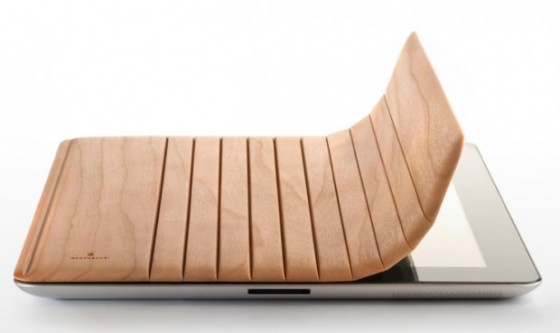

Here's a review for it: http://www.youtube.com/watch?v=mSkNescjcH8captive said:let me know how it is, this is my top contender for a case.
A bunch of people on Macrumors canceled their orders after seeing this. =X
Nightz said:Here's a review for it: http://www.youtube.com/watch?v=mSkNescjcH8
A bunch of people on Macrumors canceled their orders after seeing this. =X
Wow that doesn't look good.
Jugendstil
Member
Discovr is super cool. Thanks for the recommendation.
BuggyDClown
Member
Nightz said:Here's a review for it: http://www.youtube.com/watch?v=mSkNescjcH8
A bunch of people on Macrumors canceled their orders after seeing this. =X
Yaboosh said:Wow that doesn't look good.
First off the only thing that looked bad was the magnets and how well it clicked together. Other than that it looked perfect. I don't want the cover to be on, I have a sleeve to put the cover in when not in use.
I don't quite trust this review, he didn't try and place the top down, he just kept hitting it hoping it would stick, where in the Miniot video, he places it down and slides it into the spot. This guy didn't bother to try and do that, which it looks like is the correct way to do it. he also didn't even show the other way to stand it.
Also he doesn't like that you have to bend it back, but you have to bend back the smart cover.
I HATE the magnetic side attachment on the smart cover because they aren't reliable. As I said before, the rubber on mine wore through and the magnets scratched the shit out of my iPad.
I'll make a review once I get mine in, this one wasn't really that good, I hope it's awesome, but the only thing Is aw int hat was the magnetic fasteners weren't perfect, which is a slight trade off for not worrying about scratching my iPad thanks to the Apple smart cover.
HenryGale said:First off the only thing that looked bad was the magnets and how well it clicked together. Other than that it looked perfect. I don't want the cover to be on, I have a sleeve to put the cover in when not in use.
I don't quite trust this review, he didn't try and place the top down, he just kept hitting it hoping it would stick, where in the Miniot video, he places it down and slides it into the spot. This guy didn't bother to try and do that, which it looks like is the correct way to do it. he also didn't even show the other way to stand it.
Also he doesn't like that you have to bend it back, but you have to bend back the smart cover.
I HATE the magnetic side attachment on the smart cover because they aren't reliable. As I said before, the rubber on mine wore through and the magnets scratched the shit out of my iPad.
I'll make a review once I get mine in, this one wasn't really that good, I hope it's awesome, but the only thing Is aw int hat was the magnetic fasteners weren't perfect, which is a slight trade off for not worrying about scratching my iPad thanks to the Apple smart cover.
The review looked fine. He was just pointing out what he didn't like about it. People want different things out of their products, and I guess that product didn't meet his needs.
brotkasten
Member
Discovr is a really great app. Thank you for mentioning it.Yaboosh said:Discovr is pretty damn awesome and free right now. Highly recommended for finding/sampling new music. A good app for those just getting their Ipads.
Pristine_Condition
Member
It's nice to see a guy like this, who avoids "narrow specialization" going to a company where he can probably do some cool things that we'll actually see in home/consumer products. Improving the sound quality of iTunes offerings, improving audio in their mobile consumer products, all welcome. Will be very helpful in the Apple TV/home theater puzzle too.
http://gigaom.com/apple/apple-said-to-have-hired-the-audio-genius-behind-thx/
Apple has reportedly hired Tomlinson Holman as its new audio chief, according to a tweet by Leo Laporte Wednesday morning. Laporte said he had it on good authority that Holman is joining Apple to run audio. Holman is the brain behind Lucasfilms THX sound, and the worlds first 10.2 surround sound system. Apple had yet to respond to a request for confirmation as of this writing.
Holman is currently a film sound professor at the University of Southern California, and he has received an Academy Award for Technical Achievement. He spent 15 years as the corporate technical director for Lucasfilm, and all of the companys THX patents stem from his work and research. Holman also has experience designing loudspeakers and amplifiers in addition to his work in the film industry. His experience covers all aspects of audio, according to Holman himself in a 1996 interview. He says that his ability to avoid narrow specialization is what got him his earliest jobs.
If Apple has indeed brought Holman on board, it could signify big things in store for Mac, iOS and even iTunes audio. Apple already builds optical audio out into all new Macs, via the headphone port (it works with optical TOSLINK cables using an adapter), which can provide true surround sound from your computer to your home theatre system, but it could stand to improve the quality of its built-in Mac and iOS device speakers and headphones. There have also been rumors that Apple may be looking to improve the sound quality of iTunes audio files, which is definitely something Holman could assist with.
Isnt it time we got good (not just okay or passable) sound from our computers and iOS devices? Admittedly, weve come a long way since the days of the first speakerphone, but considering the advancements in display and video quality (a game Apples already winning with its Retina Display), I think its about time we saw similar investments made in sound quality, too.
http://gigaom.com/apple/apple-said-to-have-hired-the-audio-genius-behind-thx/
BuggyDClown
Member
mrkgoo said:The review looked fine. He was just pointing out what he didn't like about it. People want different things out of their products, and I guess that product didn't meet his needs.
Right, but his review wasn't good.
Like I said, he didn't exactly show what the issue was. he just slapped the wood against the magnets a few times. He didn't factor that they weight or construction may need a different action to be taken than apples smart cover.
In fact, he didn't treat it as a separate cover in it's own right, he just showed how it's not Apple's smart cover.
He complains that you have to bend the cover back as a drawback, to use it as a stand, well once you fold the smart cover you have to do the same thing, so that doesn't even add up. Also the magnets seemed to hold fine once he bent it back, so it seemed more of a matter of his careless handling.
He also said this is the only orientation and dint show off how it can stand the same way the iPad with smart cover can for video viewing.
I wouldn't call a review that doesn't go over how or why a product works, good. It was more of a here's some brief thoughts on how it's different from Apple's smart cover.
He was annoyed that it has to be disconnected from the iPad to move it into position. I can see that being annoying. It also looks like it's pretty useless when you want to just hold the iPad in the hand (you need to take it off and put it to the side).HenryGale said:First off the only thing that looked bad was the magnets and how well it clicked together. Other than that it looked perfect. I don't want the cover to be on, I have a sleeve to put the cover in when not in use.
I don't quite trust this review, he didn't try and place the top down, he just kept hitting it hoping it would stick, where in the Miniot video, he places it down and slides it into the spot. This guy didn't bother to try and do that, which it looks like is the correct way to do it. he also didn't even show the other way to stand it.
Also he doesn't like that you have to bend it back, but you have to bend back the smart cover.
I HATE the magnetic side attachment on the smart cover because they aren't reliable. As I said before, the rubber on mine wore through and the magnets scratched the shit out of my iPad.
I'll make a review once I get mine in, this one wasn't really that good, I hope it's awesome, but the only thing Is aw int hat was the magnetic fasteners weren't perfect, which is a slight trade off for not worrying about scratching my iPad thanks to the Apple smart cover.
HenryGale said:Right, but his review wasn't good.
Like I said, he didn't exactly show what the issue was. he just slapped the wood against the magnets a few times. He didn't factor that they weight or construction may need a different action to be taken than apples smart cover.
In fact, he didn't treat it as a separate cover in it's own right, he just showed how it's not Apple's smart cover.
He complains that you have to bend the cover back as a drawback, to use it as a stand, well once you fold the smart cover you have to do the same thing, so that doesn't even add up. Also the magnets seemed to hold fine once he bent it back, so it seemed more of a matter of his careless handling.
He also said this is the only orientation and dint show off how it can stand the same way the iPad with smart cover can for video viewing.
I wouldn't call a review that doesn't go over how or why a product works, good. It was more of a here's some brief thoughts on how it's different from Apple's smart cover.
Fair enough. I would say that he can say whatever he wants, and he wasn't particularly wrong in what he said - I just understood the main point was that there is slightly more 'effort' into setting it up, whereas the smart cover is pretty freeform.
That said, I don't even know why I'm discussing this, seeing as I don't have either cover, or indeed, an iPad 2

I was just curious to see what the fuss was about.
Tobor said:I still don't understand how you wore the plastic nubs off the smart cover. Mine is still great. What were you doing to it?
I'm sure we don't want to know


Spiderjericho
Member
I finally got in my ipad. It got here a day early than the initial estimation.
I grabbed an apps card from Walmart while returning my Nook Color (sorry bro, but you're not a full-fledged tablet).
I purchased Infinity Blade, Rage HD, Good Reader, Weather HD and air video and downloaded a few free apps like ibook, life, netflix, etc.
The only thing I can say now is it feels light. Seems a little lighter than the Nook Color (probably because of the size and how the weight is distributed).
I grabbed an apps card from Walmart while returning my Nook Color (sorry bro, but you're not a full-fledged tablet).
I purchased Infinity Blade, Rage HD, Good Reader, Weather HD and air video and downloaded a few free apps like ibook, life, netflix, etc.
The only thing I can say now is it feels light. Seems a little lighter than the Nook Color (probably because of the size and how the weight is distributed).

Bboy AJ
My dog was murdered by a 3.5mm audio port and I will not rest until the standard is dead
Sent an email to the dev:Bboy AJ said:Someone explain swipe to change tabs on iCab to me. I drag the window all the way to the side and all it is is a gray, blank screen.
"Unfortunately the "swipe to change tabs" gesture only works when the Tabs
toolbar is visible. This is a bug and will be fixed in the next release."
I also asked about why video play now makes websites stutter when scrolling:
"Yes, I know. Unfortunately I was forced to make this change because Apple
has requested this. There's a big issue with the "Web View" object of the
iOS we need to use to display web pages (Apple doesn't allow other web
engines than their own), and this is issue is that the scrolling is very
jerky, especially on more complex web pages. This is a well know issue
from the beginning. Writing bugreports to Apple didn't help, the scrolling
issue did never get fixed. But because Safari doesn't have an issue with
the scrolling though it uses the same web engine, it seems that there's a
hidden (private) call in the iOS which enabled the smooth scrolling.
So because Apple has obviously no intention in fixing this issue,
developers started to "fix" this by themselves by using this private
(but forbidden) call. All other web browser in the App store are doing
this, and iCab did this as well. But now Apple has detected this in iCab
and demanded that I remove this private call. It is possible that Apple
will be more strict in general now, so maybe in the future you'll see
more and more Apps getting jerky scrolling, when Apple is asking the
developers to remove this special call from their Apps as well.
I'll try to do my best to convice Apple to finally fix this scrolling
issue in the iOS."

NYR
Member
Wow. Terrible. Glad I didn't buy into the hype.Nightz said:Here's a review for it: http://www.youtube.com/watch?v=mSkNescjcH8
A bunch of people on Macrumors canceled their orders after seeing this. =X
Devin Olsen
Member
You got stocks in this company or something?HenryGale said:Right, but his review wasn't good.
Like I said, he didn't exactly show what the issue was. he just slapped the wood against the magnets a few times. He didn't factor that they weight or construction may need a different action to be taken than apples smart cover.
In fact, he didn't treat it as a separate cover in it's own right, he just showed how it's not Apple's smart cover.
He complains that you have to bend the cover back as a drawback, to use it as a stand, well once you fold the smart cover you have to do the same thing, so that doesn't even add up. Also the magnets seemed to hold fine once he bent it back, so it seemed more of a matter of his careless handling.
He also said this is the only orientation and dint show off how it can stand the same way the iPad with smart cover can for video viewing.
I wouldn't call a review that doesn't go over how or why a product works, good. It was more of a here's some brief thoughts on how it's different from Apple's smart cover.
I don't know man, why didn't safari have this issue?Bboy AJ said:Sent an email to the dev:
"Unfortunately the "swipe to change tabs" gesture only works when the Tabs
toolbar is visible. This is a bug and will be fixed in the next release."
I also asked about why video play now makes websites stutter when scrolling:
"Yes, I know. Unfortunately I was forced to make this change because Apple
has requested this. There's a big issue with the "Web View" object of the
iOS we need to use to display web pages (Apple doesn't allow other web
engines than their own), and this is issue is that the scrolling is very
jerky, especially on more complex web pages. This is a well know issue
from the beginning. Writing bugreports to Apple didn't help, the scrolling
issue did never get fixed. But because Safari doesn't have an issue with
the scrolling though it uses the same web engine, it seems that there's a
hidden (private) call in the iOS which enabled the smooth scrolling.
So because Apple has obviously no intention in fixing this issue,
developers started to "fix" this by themselves by using this private
(but forbidden) call. All other web browser in the App store are doing
this, and iCab did this as well. But now Apple has detected this in iCab
and demanded that I remove this private call. It is possible that Apple
will be more strict in general now, so maybe in the future you'll see
more and more Apps getting jerky scrolling, when Apple is asking the
developers to remove this special call from their Apps as well.
I'll try to do my best to convice Apple to finally fix this scrolling
issue in the iOS."
rezuth said:I don't know man, why didn't safari have this issue?
Have you read the post?
It's specifically said in it. :/
Ah, apparently in my dizziness from just woking up I missed a few lines. I could think that Apple is just going to wait it out until iOS 5 to introduce it to others.FerranMG said:Have you read the post?
It's specifically said in it. :/
Well I think he ordered one already, so he probably just doesn't want it to suck for his own sake.Devin Olsen said:You got stocks in this company or something?
Perhaps, they've done it before with other APIs. I'm sure there will be improvements and bug fixes, but I wouldn't be surprised if they don't do much else to help other browsers, like make it so third parties wouldn't have to go through all the JavaScript tricks for their features.rezuth said:Ah, apparently in my dizziness from just woking up I missed a few lines. I could think that Apple is just going to wait it out until iOS 5 to introduce it to others.
Deadly Cyclone
Pride of Iowa State
What would you all suggest for a messenger bag for my iPad 2 and some other random items (notepads, 3DS, whatever)?
I have a big Timbuk2 messenger bag now, but sometimes I don't want to lug around something that big just for my iPad. I want something that looks good and is not too pricey.
I have a big Timbuk2 messenger bag now, but sometimes I don't want to lug around something that big just for my iPad. I want something that looks good and is not too pricey.
"just for my iPad... looks good... not too pricey..."Deadly Cyclone said:What would you all suggest for a messenger bag for my iPad 2 and some other random items (notepads, 3DS, whatever)?
I have a big Timbuk2 messenger bag now, but sometimes I don't want to lug around something that big just for my iPad. I want something that looks good and is not too pricey.
pick two out of three choices
Deadly Cyclone
Pride of Iowa State
Charred Greyface said:"just for my iPad... looks good... not too pricey..."
pick two out of three choices
There aren't any bags that fit all of those?
Basically, I want something smaller than my full size laptop messenger bag that will hold my iPad 2 and some other random stuff and looks good.
Buy a Ben Sherman Murse.Deadly Cyclone said:There aren't any bags that fit all of those?
Basically, I want something smaller than my full size laptop messenger bag that will hold my iPad 2 and some other random stuff and looks good.
APZonerunner
Member
Are these still difficult to get hold of? Thinking of picking one up before E3.
Deadly Cyclone
Pride of Iowa State
Talon- said:Buy a Ben Sherman Murse.
Kind of wanted more of a smaller messenger bag and less of a man purse though.

cuevas. PhD.
Member
My order said yesterday it would be here Monday and I just got an email saying it wont be here till the 12th...
http://www.padster.net/ ?Deadly Cyclone said:Kind of wanted more of a smaller messenger bag and less of a man purse though.
I have this one and it's smaller than my 15" laptop bag and my iPad 2 fits in it great (while in a sleeve). I dunno if it could fit my laptop (probably a tight fight), but I can fit my padfolio and calculators just fine.Deadly Cyclone said:Kind of wanted more of a smaller messenger bag and less of a man purse though.
http://www.ebags.com/product/kennet...GOOGFEED&couponid=40959822&CAWELAID=334456456
Display Link is free just now on the app store. It allows you to use your iPad as a second monitor. It works pretty well, and it shows up in Windows properties as though it was a real monitor attached.
I think it's been free for a while now, so it's probably going to go back up in price pretty soon, so grab it quickly!
http://itunes.apple.com/us/app/displaylink/id411678720?mt=8
I think it's been free for a while now, so it's probably going to go back up in price pretty soon, so grab it quickly!
http://itunes.apple.com/us/app/displaylink/id411678720?mt=8
Keyser Soze
Member
0OoO0 said:Did not read the topic...can someone please tell me what is the best internet browser for ipad 2 that supports flash? Are there any free ones?
Non of them support flash. Skyfire cheats around it, but the browser itself is not up to much. However, most of the sites you think you might need Flash for could already work without it anyway (particularly if it is Flash video). 100's of sites moved to iPad compatible video in the past year.
iCab is my favorite browser. It does not supports Flash, although like I said, you may not need it unless the site you are loading up is niche.
I don't think there are any on the App Store. The closest is Skyfire which just converts Flash video serverside to an iOS compatible video stream. It works in a pinch but the quality isn't great, it takes a while to buffer, compatibility isn't 100% and you can't scrub through videos. I'd still recommend it but keep those limitations in mind.0OoO0 said:Did not read the topic...can someone please tell me what is the best internet browser for ipad 2 that supports flash? Are there any free ones?
I'll have to try it. How fast is it? Does it respond just as quickly as an actual monitor or is it more akin to remote desktop?CRD90 said:Display Link is free just now on the app store. It allows you to use your iPad as a second monitor. It works pretty well, and it shows up in Windows properties as though it was a real monitor attached.
I think it's been free for a while now, so it's probably going to go back up in price pretty soon, so grab it quickly!
http://itunes.apple.com/us/app/displaylink/id411678720?mt=8
iSwifter. It's free but asks for a $3 in-app purchase for the web browser, which is what you want. It does server-side rendering of all content, including flash, and works about as well as you could hope for given the constraints.0OoO0 said:Did not read the topic...can someone please tell me what is the best internet browser for ipad 2 that supports flash? Are there any free ones?
CrunchinJelly
formerly cjelly
There is definitely lag... not quite remote desktop lag, but definitely lag.dark10x said:I'll have to try it. How fast is it? Does it respond just as quickly as an actual monitor or is it more akin to remote desktop?
It also makes me appreciate how damn good the iPad screen is, and just how shitty my monitor is.
Reviews seems to be really bad... I especially like this one.CRD90 said:Display Link is free just now on the app store. It allows you to use your iPad as a second monitor. It works pretty well, and it shows up in Windows properties as though it was a real monitor attached.
I think it's been free for a while now, so it's probably going to go back up in price pretty soon, so grab it quickly!
http://itunes.apple.com/us/app/displaylink/id411678720?mt=8
ADAM BRENNER said:Really?
You designed an app for an Apple product but didn't think to give the option for Mac users to use your app? I mean really, where is the Mac compatibility??
- Status
- Not open for further replies.