Dark Souls 3 PC performance thread

Aww OK that's what I figured. Doesn't it kill the purpose of Gsync tho? Having Vsync on and all input lags it brings.

Enabling V-sync at driver level with a G-sync monitor has a very different effect from what you'd normally expect. The short answer is no it's fine to have enabled at driver level.
 
Fairly stable 55-60fps at 1440p (outside of the intermittent stutters when saving or streaming in areas), but I just had my first driver crash (latest drivers) around 20 hours into the game, after getting up from the
Irithyll Dungeon
bonfire.

980ti
4670k
16gb memory
 
*rubs face tiredly* Alright. I'm having a very bizarre black crush issue with Dark Souls 3 and I have no idea how to fix it, nor have I encountered anything like this in the many years I've been a PC gamer. I've tried to fix it within the 2.5 hours I've played the game to no avail. This will require a little bit of imagination on everyone's part, but bare with me, as I should've also taken an offscreen photo via smartphone or something, and I can get long winded.

I'm running an AMD R9 390 (using latest AMD drivers 16.4.1 - hotfix) using a BenQ XL2730Z 1440p/144hz/Freesync monitor, which I have calibrated to correct gamma/brightness/contrast/color settings. I do not have this black crush issue with any other game that I've played on this monitor (which I bought in January) - Rise of the Tomb Raider was fine, I've gone through Darkest Dungeon (which you can imagine is naturally dark), Hyper Light Drifter, Shadowrun: Hong Kong, and Ryse. All of those games gave me the correct blackness levels with no difference between what's on my monitor and what my Steam screenshots show me when I was playing through them.

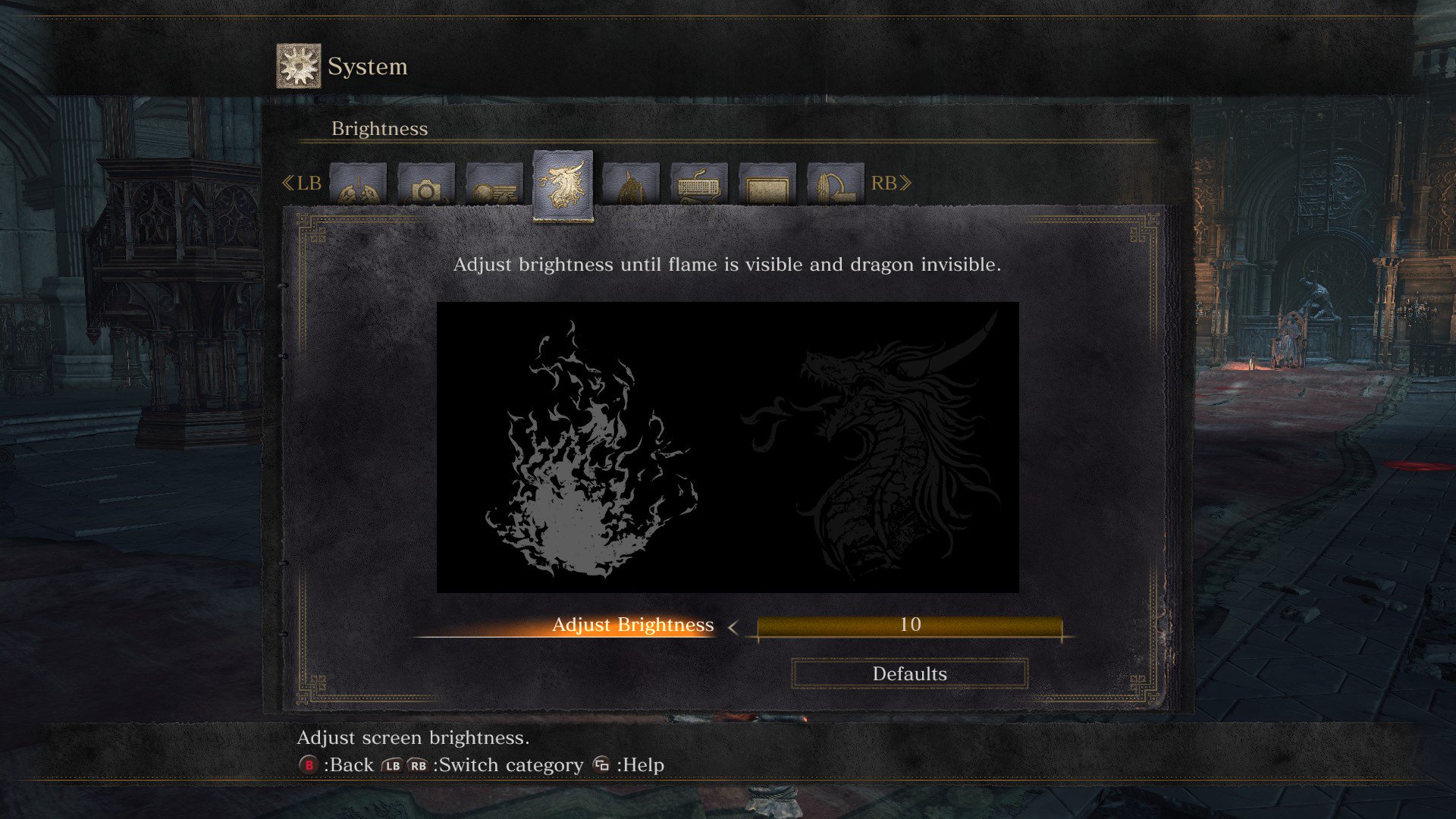
However, Dark Souls 3 is a whole 'nother story. Here's a Steam screenshot of the brightness settings on Dark Souls 3:

CgFoIjeUMAAHlhx.jpg:large


Now, in the screenshot you can semi-see the dragon on the right. The reason I have the brightness turned alllll the way up is because I can't see it all when I'm actually in the game on my monitor. Even if I max out my contrast and brightness settings on my monitor, it stays a pitch black square where the dragon head should pop up. The odd thing is, when I started my New Game, and it asks you to adjust the brightness, I could see the dragon head, set it to a good brightness level and started the game. When I got into the game proper, however, and I started checking out the settings, I noticed my brightness was all fucked up and the dragon head was just...gone.

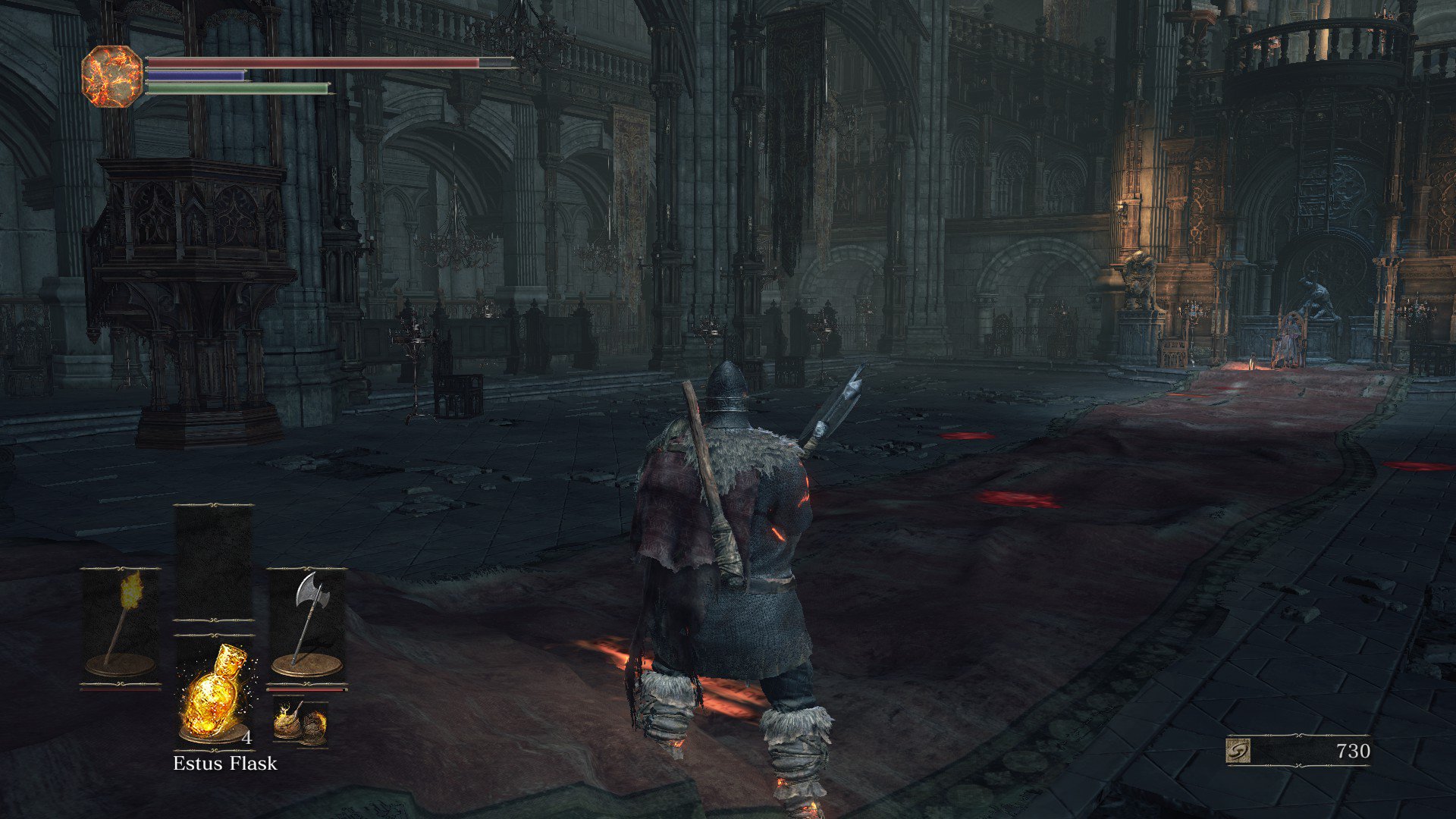
Here's another screenshot:

CgFoIMiUsAAW6Dc.jpg:large


That's the Way of the Blue covenant room. In my screenshot, it looks fine. You can actually see every bit of the room. However, on my monitor, it's just one big black blob basically. The pillars are obscured by darkness, I can barely see the chairs, and I can't make out any of the intricate details. I have to use a torch just to see in that room if I'm not near the other light sources. In most of the darker parts of the early game, I also had to use a torch just to see.

So that's what I'm dealing with. I have absolutely no idea why Dark Souls 3 is giving me this black crush issue that looks just fine in the screenshots I take (and want the game to look like) but looks absolutely atrocious in game. It's not unplayable, but it is IQ destroying, and giving me a bit of a headache when I play for too long. I've tried adjusting my monitor settings within game to high brightness/contrast/gamma, adjusting blackness levels, etc to absolutely no avail. It just won't lighten up in the game no matter what I do.

Thoughts? Edit: One thing I didn't try to do is turn off Freesync. I can't imagine Freesync is messing with the game like this, but I suppose I can try it.

 
What's the deal with up-close textures on your character? They look like ass compared to the character creation screen. Even on the max texture setting.
 
Okay. So

If anyone happens to have an unlocked cpu, for example mine is an i7 6820HK, that finding your stable overclock will give you MUCH more performance.
(my gpu is a 980m 4gb for what that's worth)
So that is my cpu. And when I got to the pretty winter city area. My framerate dipped too much. So . Found my overclocks, which are as follows for anyone who has this cpu:

40
40
40
40

100000
100000


https://www.youtube.com/watch?v=-7w9KdXWbcE

This guy explains perfectly and logically how it works and how to do it without fucking yourself.


I can vouch that, at 4k, with textures, lighting, shaders max, ssao medium, and everything else low, with motion blur off and dof low, you'll get a MUCH more solid/stable 30fps at 4k.
Have it up on a 50inch samsung ju6400 (isokay) and just....beautiful.

So there.

The only thing to note is that the fan will run like louder than a box fan almost. But worth it. As I was getting like 20s before (30 everywhere else but lots of dips).
 
6700k , 32GB ram, 390x CF 290 chiming in , I have everything maxed out at 1080p with no stutter , looks locked at 60fps. I haven't left the high wall yet though so maybe the next area won't run as smooth ?
 
6700k , 32GB ram, 390x CF 290 chiming in , I have everything maxed out at 1080p with no stutter , looks locked at 60fps. I haven't left the high wall yet though so maybe the next area won't run as smooth ?
Nope you should be good all the way through. Every area I've encountered so far (I'm 20 hours in) has run with about the same performance. It's not like ROTTR where the first 2 hours run like butter and then the open areas hit the CPU way harder. DS3 performance is very consistent overall.
 
What's the deal with up-close textures on your character? They look like ass compared to the character creation screen. Even on the max texture setting.

Bloodborne also had some funky facial lighting, but the difference between the character creator screen and in-game is much more stark in this game (at least with the characters I've been creating).

I started the game with 15+ different faces, including beating the first boss 4 times, before I was satisfied (not kidding). I still like the face I made originally, but it just looks terrible in-game.
 
Me and my roomie have the same hardware, or close to it. Yet his game stutters and mine runs flawlessly.

Both GTX 970 and i7 3770.
 
Bloodborne also had some funky facial lighting, but the difference between the character creator screen and in-game is much more stark in this game (at least with the characters I've been creating).

I started the game with 15+ different faces, including beating the first boss 4 times, before I was satisfied (not kidding). I still like the face I made originally, but it just looks terrible in-game.

i agree my guys looked cool in BB and just like they did in the creator. my guy in DS3 looked ok, wasnt my best work, but in game i needs that helmet yo lol

hopefully a fix is coming in that first patch for the stuttering, i've had it happen a few times now, but alot like some are experiencing would bug me.
 
Bloodborne also had some funky facial lighting, but the difference between the character creator screen and in-game is much more stark in this game (at least with the characters I've been creating).

I started the game with 15+ different faces, including beating the first boss 4 times, before I was satisfied (not kidding). I still like the face I made originally, but it just looks terrible in-game.
Unlike Bloodborne however, in this game you may or may not be locked into the appearance you chose at the character creation screen...
 
*rubs face tiredly* Alright. I'm having a very bizarre black crush issue with Dark Souls 3 and I have no idea how to fix it, nor have I encountered anything like this in the many years I've been a PC gamer. I've tried to fix it within the 2.5 hours I've played the game to no avail. This will require a little bit of imagination on everyone's part, but bare with me, as I should've also taken an offscreen photo via smartphone or something, and I can get long winded.

I'm running an AMD R9 390 (using latest AMD drivers 16.4.1 - hotfix) using a BenQ XL2730Z 1440p/144hz/Freesync monitor, which I have calibrated to correct gamma/brightness/contrast/color settings. I do not have this black crush issue with any other game that I've played on this monitor (which I bought in January) - Rise of the Tomb Raider was fine, I've gone through Darkest Dungeon (which you can imagine is naturally dark), Hyper Light Drifter, Shadowrun: Hong Kong, and Ryse. All of those games gave me the correct blackness levels with no difference between what's on my monitor and what my Steam screenshots show me when I was playing through them.

However, Dark Souls 3 is a whole 'nother story. Here's a Steam screenshot of the brightness settings on Dark Souls 3:

CgFoIjeUMAAHlhx.jpg:large


Now, in the screenshot you can semi-see the dragon on the right. The reason I have the brightness turned alllll the way up is because I can't see it all when I'm actually in the game on my monitor. Even if I max out my contrast and brightness settings on my monitor, it stays a pitch black square where the dragon head should pop up. The odd thing is, when I started my New Game, and it asks you to adjust the brightness, I could see the dragon head, set it to a good brightness level and started the game. When I got into the game proper, however, and I started checking out the settings, I noticed my brightness was all fucked up and the dragon head was just...gone.

Here's another screenshot:

CgFoIMiUsAAW6Dc.jpg:large


That's the Way of the Blue covenant room. In my screenshot, it looks fine. You can actually see every bit of the room. However, on my monitor, it's just one big black blob basically. The pillars are obscured by darkness, I can barely see the chairs, and I can't make out any of the intricate details. I have to use a torch just to see in that room if I'm not near the other light sources. In most of the darker parts of the early game, I also had to use a torch just to see.

So that's what I'm dealing with. I have absolutely no idea why Dark Souls 3 is giving me this black crush issue that looks just fine in the screenshots I take (and want the game to look like) but looks absolutely atrocious in game. It's not unplayable, but it is IQ destroying, and giving me a bit of a headache when I play for too long. I've tried adjusting my monitor settings within game to high brightness/contrast/gamma, adjusting blackness levels, etc to absolutely no avail. It just won't lighten up in the game no matter what I do.

Thoughts? Edit: One thing I didn't try to do is turn off Freesync. I can't imagine Freesync is messing with the game like this, but I suppose I can try it.

Sounds to me that your color range isn't matching, for whatever reason. You want it to be Limited - Limited or Full - Full.
 
I am seriously frustrated with this game's performance.

When plaing on SLI, no matter the resolution i get constant framedrops.
In
Irithyll
it even drops to the 40s
As soon as I change to single gpu i am having constant smooth 60fps.
I am using the new "hotfix drivers"

2x GTX980
i7 4790
 
Been playing for a few hrs today with NO crashes at all (havent had a single crash so far)

-3570k @ 3,4
-8g ram
-Evga gtx 970 ssc 4g
-Ssd
-Windows 10
-Latest Nvidia drivers
-Vsync enabled in Nvidia Control panel
-Disabled Intel speedstep and turbo boost
-Motion blur and dept of field disabled
-Everything else on max settings in game
- Wireless Xbox 360 controller

Solid 60fps at 1080p
 
Played it only one session so far. I have the autosave stutter but otherwise it seems to run fine.

Playing at 1440p with a 970 and 6700k. I think everything was on high or ultra (can't remember which) except for lighting which I set to low.
 
GTX 970 here, Win 10, intel core i5 and 8GB RAM.

Game is an almost constant 60 fps with no crashes, but occasionally I will get a slight stutter (everything freezes in place) when a message pops up or I take a fatal blow.

Any available fixes for that?
 
970
i5-3570k
8GB RAM

got to smouldering lake and my fps in this area is all over the place. 40-55. rarely at 60

feels god damn terrible. first area to give me any trouble
 
970
i5-3570k
8GB RAM

got to smouldering lake and my fps in this area is all over the place. 40-55. rarely at 60

feels god damn terrible. first area to give me any trouble

Same system and I'm at 60fps 99%, what's your CPU at?
 
glad I postponed my purchase, I'll play this after the summer with the god patch
Same, I'm glad I waited as my system seems a prime candidate to have these issues. Hopefully patches will come. I'm also paranoid about GPU driver updates at the moment too :/

I'm not going to have much gaming time in May anyway so I'll at least wait and see what things are like in June I think.
 
I'm playing at 1440p with my 970 and it runs at 45-60. 50% of the time it's 45-50, 35% of the time 50-55 and 15% of the time (usually interiors) it stays at 60. I'm not noticing anything weird so it's very playable to me, and I don't even have a gsync monitor. Image quality is just so much better at 1440p.
 
I am seriously frustrated with this game's performance.

When plaing on SLI, no matter the resolution i get constant framedrops.
In
Irithyll
it even drops to the 40s
As soon as I change to single gpu i am having constant smooth 60fps.
I am using the new "hotfix drivers"

2x GTX980
i7 4790

Man, spoiler tag that shit :/

I'm still at the High Wall, only yesterday I beat the boss there, this place is already talked about in the lore
when you're reading the face presets, it's a surprise that we actually go there, especially given the kind of shit that happens to them.
 
You can see what appears to be the patch notes in the server news tab in the game.
No mention of pc crash or performance fixes sadly.
 

Ah, mine is at 4.4GHz which is a huge difference. I would advise buying a decent after market cooler and overclocking, 4.0 - 4.2GHz is pretty much a given with our CPU.
 
Man, spoiler tag that shit :/

I'm still at the High Wall, only yesterday I beat the boss there, this place is already talked about in the lore
when you're reading the face presets, it's a surprise that we actually go there, especially given the kind of shit that happens to them.

I had one major "wow, I didn't expect that" area spoiled for me through one of these performance-related comments, though it might have had to do with the PS4 or X1 version of the game.

By the way, you seem to be taking your time with the game. ;-)
 
I had one major "wow, I didn't expect that" area spoiled for me through one of these performance-related comments, though it might have had to do with the PS4 or X1 version of the game.

By the way, you seem to be taking your time with the game. ;-)

A little bit, haha. Steam says I've played for a bit more than 17 hours.

I really enjoy taking it slow on my first playthrough. The bad side is that I can only keep up with the community and discuss the game while playing on the first day. After that, most people are way ahead of me.
 
However, Dark Souls 3 is a whole 'nother story. Here's a Steam screenshot of the brightness settings on Dark Souls 3:

CgFoIjeUMAAHlhx.jpg:large
These types of calibration screen which tell you to make something invisible make absolutely no sense to me. If you're using 'Full' video levels, you don't want just-above-black to be invisible. Unless the image contains black-than-black portions, which wouldn't work at all for full levels. I'd suggest the text was a mistranslation but I've seen quite a few now suggesting this.
 
*rubs face tiredly* Alright. I'm having a very bizarre black crush issue with Dark Souls 3 and I have no idea how to fix it, nor have I encountered anything like this in the many years I've been a PC gamer. I've tried to fix it within the 2.5 hours I've played the game to no avail. This will require a little bit of imagination on everyone's part, but bare with me, as I should've also taken an offscreen photo via smartphone or something, and I can get long winded.

I'm running an AMD R9 390 (using latest AMD drivers 16.4.1 - hotfix) using a BenQ XL2730Z 1440p/144hz/Freesync monitor, which I have calibrated to correct gamma/brightness/contrast/color settings. I do not have this black crush issue with any other game that I've played on this monitor (which I bought in January) - Rise of the Tomb Raider was fine, I've gone through Darkest Dungeon (which you can imagine is naturally dark), Hyper Light Drifter, Shadowrun: Hong Kong, and Ryse. All of those games gave me the correct blackness levels with no difference between what's on my monitor and what my Steam screenshots show me when I was playing through them.

However, Dark Souls 3 is a whole 'nother story. Here's a Steam screenshot of the brightness settings on Dark Souls 3:

CgFoIjeUMAAHlhx.jpg:large


Now, in the screenshot you can semi-see the dragon on the right. The reason I have the brightness turned alllll the way up is because I can't see it all when I'm actually in the game on my monitor. Even if I max out my contrast and brightness settings on my monitor, it stays a pitch black square where the dragon head should pop up. The odd thing is, when I started my New Game, and it asks you to adjust the brightness, I could see the dragon head, set it to a good brightness level and started the game. When I got into the game proper, however, and I started checking out the settings, I noticed my brightness was all fucked up and the dragon head was just...gone.

Here's another screenshot:

CgFoIMiUsAAW6Dc.jpg:large


That's the Way of the Blue covenant room. In my screenshot, it looks fine. You can actually see every bit of the room. However, on my monitor, it's just one big black blob basically. The pillars are obscured by darkness, I can barely see the chairs, and I can't make out any of the intricate details. I have to use a torch just to see in that room if I'm not near the other light sources. In most of the darker parts of the early game, I also had to use a torch just to see.

So that's what I'm dealing with. I have absolutely no idea why Dark Souls 3 is giving me this black crush issue that looks just fine in the screenshots I take (and want the game to look like) but looks absolutely atrocious in game. It's not unplayable, but it is IQ destroying, and giving me a bit of a headache when I play for too long. I've tried adjusting my monitor settings within game to high brightness/contrast/gamma, adjusting blackness levels, etc to absolutely no avail. It just won't lighten up in the game no matter what I do.

Thoughts? Edit: One thing I didn't try to do is turn off Freesync. I can't imagine Freesync is messing with the game like this, but I suppose I can try it.

I think I know what is up, I'll test to confirm when I get home.

Did you mess with the brightness settings PRE starting a new game? I ask, because when I launched the game for the first time, I went into settings, fucked with all my video stuff, and set the brightness at that time. HOWEVER, upon starting a new game, the brightness window pops up AGAIN (at least on initial first new game creation) and seems to work on top of your previous settings. I suspect that's what happened to you too.
 
JaseC, thanks to this thread, suggested I update my Realtek audio drivers to fix the "ambient dialog drop" issue and it seems to have worked. Previously, moving around in the menu would cause the sound to drop for a split second, but since I've updated I have yet to see the issue reoccur at any point.

So make you y'all have your audio drivers up to date or otherwise the Dark Souls of audio errors might happen.
 
Gtx 970M 3GB
2.6GHZ intel i7 4270HQ
16GB RAM

Not running the latest Nvidia drivers (im a bit wary about updating unless I have to. My current drivers haven't crashed on me for awhile) do the latest drivers make a big difference?

I'm getting mid 40s to mid 50s fps with it sitting mostly in 50s with all settings on high. Should I risk it for a biscuit?!
 
Sounds to me that your color range isn't matching, for whatever reason. You want it to be Limited - Limited or Full - Full.

This particular monitor doesn't have Limited/Full settings for RGB. Just Normal, Bluish, Reddish, and custom RGB.

These types of calibration screen which tell you to make something invisible make absolutely no sense to me. If you're using 'Full' video levels, you don't want just-above-black to be invisible. Unless the image contains black-than-black portions, which wouldn't work at all for full levels. I'd suggest the text was a mistranslation but I've seen quite a few now suggesting this.

Could be. But I think this guy nailed it:

I think I know what is up, I'll test to confirm when I get home.

Did you mess with the brightness settings PRE starting a new game? I ask, because when I launched the game for the first time, I went into settings, fucked with all my video stuff, and set the brightness at that time. HOWEVER, upon starting a new game, the brightness window pops up AGAIN (at least on initial first new game creation) and seems to work on top of your previous settings. I suspect that's what happened to you too.

That is exactly what I did. I messed with the brightness and video settings before even booting up a new game, and set the brightness level again when it asked me to while creating a new game. Like I said, I actually could see the dragon head while setting the brightness during the creation of a new game, and actually before to. Perhaps I should set up a new character and see what happens. If that's the issue, then I'll just start over. I'm not too far into the game.
 
I'm using a 780ti and lightning on High. Playing a Knight, but using several different armor sets (non starter). No crash so far, even when activating bonfires. I always use DDU when updating drivers, and my card is also downclocked (-200 memory, -105 core). The Gigabyte 780ti's are known to be unstable, and i used to have several TDR's (driver crashes) before clocking it down.

Worth a try for people who are crashing, i'd start with using DDU and reinstalling the latest driver.

Just to follow up on this, i just had my first Display Driver crash (after beating Abyss Watchers first try!). Guess i'm not safe even with 100% clean driver installs.
 
Dragon Barracks
is dropping me to 49fps lowest, this area shouldn't be that taxing but it's dropping me from the holy grail. So far this area and
Irithyll
are the only ones to dip me under 60fps.
 
This particular monitor doesn't have Limited/Full settings for RGB. Just Normal, Bluish, Reddish, and custom RGB.


Could be. But I think this guy nailed it:


That is exactly what I did. I messed with the brightness and video settings before even booting up a new game, and set the brightness level again when it asked me to while creating a new game. Like I said, I actually could see the dragon head while setting the brightness during the creation of a new game, and actually before to. Perhaps I should set up a new character and see what happens. If that's the issue, then I'll just start over. I'm not too far into the game.

Yep, when I initially did it, I could just barely see the head, and when I did it *again*, I could drag the slider even darker (but didn't).
 
This asset & alpha effects pop-in is some of the very worst I've seen in recent memory.
How the hell is it worse than Bloodbourne? Isn't it using the Bloodbourne engine?
 
Overclocking is not that complicated. Easy even. Especially if you only do some basic and not hardcore overclocking.

You can take a look at these guides here and here.

Generally, there are 3 things to look at, the base clock, the multiplier, and the vcore. It should be as easy as setting the base clock to 200mhz, multiplier to 20, and VCORE at around 1.3 or sth. Test for stability, if stable, lower VCORE by 0.05v and test again. Until not stable then go back up 0.05v. You can go up or down with smaller step like 0.025 for example, but it will take more time and effort to test.

Study your bios and you should be able to know which setting is which and set them correctly. Those links I linked seem to be enough for you to understand everything.

For cooler, which one do you have? If it sucks then even a cheap 212 evo is fine.

In my opinion, overclocking is really worth it as it can extend the capability of the CPU by quite a large margin in the case of the 760.

Thanks! I bought a 212, and OCd as you suggested, and the game seems to run at 60 at all time now :D
 
Top Bottom