Dark Souls 3 PC performance thread

You think after all these years, developers would figure out how to program something to work on a computer that *gasp* has more than one type of controller plugged in at any given time. I played some Elite:Dangerous this morning and left my HOTAS plugged in, and sure enough, DS3 refuses to see anything except the keyboard. Gotta exit all the way out, physically unplug the HOTAS, then restart.

Fucking Truck Simulator can handle this, why can't this AAA release?!? FFS...
 
You think after all these years, developers would figure out how to program something to work on a computer that *gasp* has more than one type of controller plugged in at any given time. I played some Elite:Dangerous this morning and left my HOTAS plugged in, and sure enough, DS3 refuses to see anything except the keyboard. Gotta exit all the way out, physically unplug the HOTAS, then restart.

Fucking Truck Simulator can handle this, why can't this AAA release?!? FFS...

This problem was already in Dark Souls 2. :(
 
So, PC or ps4 version? I'm away from both but I have an opportunity to buy the ps4 collectors version for $100.
 
So, PC or ps4 version? I'm away from both but I have an opportunity to buy the ps4 collectors version for $100.

PC is the definitive version if you have a good PC, hell even if you don't you'll get console frame rate and settings just without the frame pacing issue.
 
PC is the definitive version if you have a good PC.
Thanks for answering. I have a 3770k, r9 290 and 16gb of ram. Am I going to tear my hair out with crashes or has everyone figured out what's going on?
 
Thanks for answering. I have a 3770k, r9 299 and 16gb of ram. Am I going to tear my hair out with crashes or has everyone figured out what's going on?

Some people are crashing, but personally I'm about 35 hours in with zero crashes and I'm getting 60fps 99% of the time at 1080p/max settings. It runs, looks, sounds and plays beautifully on my PC. 3570k @ 4.4GHz, GTX 970, 8GB DDR3. The only issue I have is the stuttering when the game autosaves, but that seems to be pretty common and it doesn't hurt the game really.
 
Alright well I guess I'll forego the goodies that come with the collectors edition for better FPS. Thanks!
 
Holy fuck this stutter when the saving flame appears is fucking annoying and immersion breaking as all hell. Tried literally about 25+ "fixes" I have found online that people have said stops it, but nothing fucking works at all. God damn great game ruined by all these dumb problems.
 
god even 55 fps feels off in this game. its terrible.

Yeah it's very weird. The first Dark Souls felt fine at 30 FPS on PC. Wasn't ideal but it was very smooth feeling. This feels very poor at the same FPS. Without any rigorous testing, I'd guess it feels worse than PS4. I played the PS4 version for a day and it didn't bother me at all, but on PC that framerate feels off.

Either way, it's a moot point if you can manage 60 FPS, but yeah it's weird.
 
I messed around with DS3's settings. The framerate drops sometimes. Not often enough to where I'm not enjoying the game but it's still noticeable - especially in bigger areas.

I have a AMD Radeon HD 7870 with an Intel i5-4570. 8GB Ram.

If it's time to upgrade, then what should I go for? It's been since 2013 since I last upgraded my PC. Anyone have any advice?
 
That patch cannot come out soon enough. Getting really tired of that heavy full face Knight helmet I have to wear in order to prevent the game from crashing. Can't even use my beloved torch and enjoy the improved lighting in this game, due to the constant crashes it causes.

Aside from that, the game runs fantastic on pc. 10h in so far and I'm having a blast with it.
 
That patch cannot come out soon enough. Getting really tired of that heavy full face Knight helmet I have to wear in order to prevent the game from crashing. Can't even use my beloved torch and enjoy the improved lighting in this game, due to the constant crashes it causes.

Aside from that, the game runs fantastic on pc. 10h in so far and I'm having a blast with it.

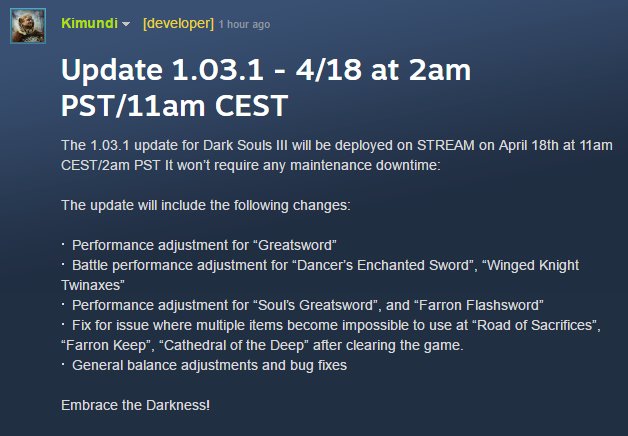
Will the patch even address these crash/performance issues?
They don't mention it on their post.

CgFutZnVIAEJ0Bh.jpg:large
 
Will the patch even address these crash/performance issues?
They don't mention it on their post.

CgFutZnVIAEJ0Bh.jpg:large

There seems to be some confusion regarding the next patch. According to Fromsoft's Twitter and the Japanese DS3 site, the changes mentioned in that picture are coming with regulation 1.04, not patch 1.03.1. 1.03.1 is a PC-only patch that will be released at the same time as regulation 1.04, and it's unclear what's in it. I can only assume it will attempt to address the issues people are having.
 
This might be as good as a place as any to ask.

Is there a DSR setting that could end up ruining the IQ if it's too close to the native res? Like I'm using a 1440p monitor and I move it to 1577?

Also what's the best smoothness setting? I stuck it to 15%.
 
Does anyone else get frame hitching when walking into new areas?

The best place to test it is to stand at the firelink bonfire and walk towards the blacksmith. Every time I enter the blacksmith tunnel, I get a half-second frame hitch where if I'm locked at 30fps it drops to 27, or if I'm locked at 60 fps it drops to 55.

This happens all over throughout the game as I'm walking around... like it's hitching as it streams in new data. Extremely annoying, and I've tried so many things to fix it but it still happens.

This isn't the bonfire icon hitching (which I also have)... this is just general walk through a specific area and always get a hitch.

The most obnoxious part about it is that it drops to 27 fps if I'm locked at 30. But if I'm locked at 60, it SHOULD drop to 27 fps if the area is that taxing... but no, it just drops to 57.
 
I messed around with DS3's settings. The framerate drops sometimes. Not often enough to where I'm not enjoying the game but it's still noticeable - especially in bigger areas.

I have a AMD Radeon HD 7870 with an Intel i5-4570. 8GB Ram.

If it's time to upgrade, then what should I go for? It's been since 2013 since I last upgraded my PC. Anyone have any advice?

Search up the brilliant PC gaf thread (search for 2500k and hbm). Heaps of helpful folk in there.
 
Does anyone else get frame hitching when walking into new areas?

The best place to test it is to stand at the firelink bonfire and walk towards the blacksmith. Every time I enter the blacksmith tunnel, I get a half-second frame hitch where if I'm locked at 30fps it drops to 27, or if I'm locked at 60 fps it drops to 55.

This happens all over throughout the game as I'm walking around... like it's hitching as it streams in new data. Extremely annoying, and I've tried so many things to fix it but it still happens.

This isn't the bonfire icon hitching (which I also have)... this is just general walk through a specific area and always get a hitch.

The most obnoxious part about it is that it drops to 27 fps if I'm locked at 30. But if I'm locked at 60, it SHOULD drop to 27 fps if the area is that taxing... but no, it just drops to 57.
That sounds sort of like what I'm getting now and again. I noticed it twice today, when warping into a bonfire, the game runs at sub-30 for a few seconds, and then suddenly snaps up to near-60. The first time it happened this morning, it stayed there for several minutes. I attempted to alt-Tab out of the game, but it didn't for some reason... although that somehow made the framerate jump back up to where it should be. In general, I think it's some sort of loading issue, but I'm not sure what causes it to get "stuck" like that.
 
Fucking crashed 4 times today and I have no idea why. Up until now my game was running fine (by which I mean it frame hitched and hiccuped and dropped in some places, but this wasn't unexpected cause my PC isn't a spring chicken) but today for some damn reason my game has crashed four times when it hit an area where it frame-dropped/hiccuped. What's stupid is 2 of those times were in areas I have been to dozens of times without a single issue! This is insanely annoying. I even lowered all my settings to the lowest they could go and it still happens as if it's unrelated to any of that stuff. Checked my PC's memory use and some other stuff and nothing is out of the ordinary. Super damn annoying.

Edit: 5 times. My game is unplayable. I can't walk 4 steps from my current spot without the game crashing.
 
So you almost get 60fps.. meaning you get 30fps easily with those specs + low settings?

Sorry I missed your question in this thread earlier. Yes, with those specs, everything set to low or off and 720p (or the 16:10 aspect version of it), I get a comfortable 60fps in most areas.

I have just hit an area in the game where it really chugs, but aside from that area, it's been quite excellent, given the age of the hardware!
 
The only "issue" I have is the slight lag when autosaving when I pickup an item.

Is there an easy fix for that?

2500k
16gb ram
980gtx
xbox 360 wired pad
 
Yes, I'm completely hollow. How do I revert? I want my shadow dammit. :(

There's a Peter Pan joke here somewhere. Probably not a good one, though.

I never knew about the no shadow thing in Demon's Souls, although I haven't played it much. That's pretty neat. Was it like that in the previous games?
 
I'm having a bug. The shadow of my character doesn't show up anymore. Anyone had this? Any fix?

Does that happen even when you're outside in the sun? As far as I've observed so far, the only light source that casts shadows other than the torch, and bonfires, is the sun. I find it extremely odd that those candles everywhere don't cast shadows, nor do sconces, or any of the many other indoor light sources. Sunlight seeping into indoor areas through cracks or windows does not cast shadows either.
 
Crisis averted. Bought a purging stone, reverted the hollowing and now the shadow is back.

But if I keep dying I'll lose my shadow again. Curse you Yoel! Curse you a million times!
 
There seems to be some confusion regarding the next patch. According to Fromsoft's Twitter and the Japanese DS3 site, the changes mentioned in that picture are coming with regulation 1.04, not patch 1.03.1. 1.03.1 is a PC-only patch that will be released at the same time as regulation 1.04, and it's unclear what's in it. I can only assume it will attempt to address the issues people are having.
Thanks for the info, I'm still waiting on 1.04 before digging in.
 
I'm getting some weird glitches tonight in a certain area. A certain enemy would start moving and then disappear for awhile then reappear and at first I thought is it my computer but all the other enemies around were moving and reacting fine. Some times they would reappear stuck in a wall.

Also does anyone get a quick chug when entering some new areas? I've tried restarting a few times and I doubt it's my PC because other than these issues the game runs flawless and I've also tried dropping the settings all the way down to see and this stuff still happens. It only started happening when I reached this certain are and wasn't an issue before.
 
Crisis averted. Bought a purging stone, reverted the hollowing and now the shadow is back.

But if I keep dying I'll lose my shadow again. Curse you Yoel! Curse you a million times!
obv gameplay spoiler

Buy the tower key for 20k, go up, get the firekeeper soul, bring it to firekeeper and now she can cure the dark sigil.
 
Apparently my computer just cannot handle the Brigand Helmet. Tested and my game crashed in the same spots every time with it on, did not when off. Is my face just too beautiful for the game to handle?
 
How well does it run 970m max settings 1080p?

I'm only at the start and getting 40s to 50s. On 970m 3GB. I went from high to max and saw pretty much no fps change.

Seems pretty good so far but I'm only at the start.

Edit* also not on latest nvidia drivers does it really make a huge difference?
 
What is it that causes the insane slowdown when running too fast into a new area? Lack of SSD, low VRAM? It's really gross. This by no means is an outright awful port, but I personally feel like the visual and scale improvements are not good enough to warrant how it runs. I really hated this engine in Bloodborne too. That said it still runs not terrible, just kind of inconsistent on cards that can't brute force it.
 
What is it that causes the insane slowdown when running too fast into a new area? Lack of SSD, low VRAM? It's really gross. This by no means is an outright awful port, but I personally feel like the visual and scale improvements are not good enough to warrant how it runs. I really hated this engine in Bloodborne too. That said it still runs not bad, just kind of inconsistent on cards that can't brute force it.
Hm it hasn't happened to me.

i5-4690
16GB 1600 RAM
290X 4GB
Samsung 850 EVO
 
Hm it hasn't happened to me.

i5-4690
16GB 1600 RAM
290X 4GB
Samsung 850 EVO
I have 8GB of system RAM and 2GB of VRAM (670). It runs ok most of the time with absolutely expected dips on this card, but it's fucking appalling in the scenario described. I have a 3570K at 4.4ghz. I'm not 100% what would cause this behaviour. Wondering what setups are like. I've actually had it lock up for seconds at a time.
 
I have 8GB of system RAM and 2GB of VRAM (670). It runs ok most of the time with absolutely expected dips on this card, but it's fucking appalling in the scenario described. I have a 3570K at 4.4ghz. I'm not 100% what would cause this behaviour. Wondering what setups are like. I've actually had it lock up for seconds at a time.
Hmm I wonder if it is the VRAM,
 
So after trial and error, I've found that wearing any helmet that shows off your whole face FUCKS MY COMPUTER UP for no reason. High settings, low settings, whatever does not matter but if I have a full face going and the game has to stutter to load objects/textures/whatever then the game crashes.

That makes no sense.
 
amd 965x4 @ 3.8ghz
gtx 960 2gb driver 364.51 (haven't tried the game ready driver yet)
16gb ram

I have to say that I was expecting worse, in that, my cpu would be too much of a bottle neck. It definitely is a bottle neck as at even 720p low settings it still doesn't stay at a rock solid 60.

Usually play with DoF, motion blur, AA off, shadows low, textures MAX. There is stuttering when loading, but otherwise for the most part it is definitely playable. It definitely could be better but it could be a lot worse.

Haven't tried the game ready driver as I saw others in this thread were having issues with it.

Shame this game doesn't support forced HBAO+, although the high SSAO setting is a decent implementation that isn't that taxing compared to HBAO+.
 
Top Bottom