
-
Hey Guest. Check out your NeoGAF Wrapped 2025 results here!
You are using an out of date browser. It may not display this or other websites correctly.
You should upgrade or use an alternative browser.
You should upgrade or use an alternative browser.
GAF Wii Homebrew thread: Homebrew, emulators, USB disc installs! Easy tutorial!
- Thread starter radioheadrule83
- Start date
Good work, mate.Dragona Akehi said:I'm trying it again and it's been sitting for ten minutes and nothing has happened...
OK this calls for a DERPDERPERP moment, I didn't realise you had to press left and right to select a mode.
Here's one for me:
http://gcforums.ript.net/images/derpderpderp.png
And congratulations, you are now the reason for an edit to the Wiki:
If you are connected to the Internet, choose "Download IOS from NUS" with the D-Pad and Push A to select. If not, choose "Load IOS from sd card" with the D-Pad and push A to select.
I can't wait to see the guy who stuffs that one up
 .
.Dragona Akehi
Retired
Clipper said:Good work, mate.
And congratulations, you are now the reason for an edit to the Wiki:
I can't wait to see the guy who stuffs that one up
Make sure you edit it to say "choose download from NUS by pressing left or right until you find the option".
Today was not a good day for me.
Apart from the fact that it won't get rid of anything except Preloader, no.Varna said:Would there be any implications if I were to update my Wii (as a means to just get rid of everything)?
You mean to edit it again? Saying to choose it with the D-Pad is not enough?Dragona Akehi said:Make sure you edit it to say "choose download from NUS by pressing left or right until you find the option".
Today was not a good day for me.
Dragona Akehi
Retired
Clipper said:You mean to edit it again? Saying to choose it with the D-Pad is not enough?
Most of the other homebrew applications I've used for Wii or PSP have the entire menu available and you press up and down. The combination of it saying "getting IOS" whatever it was, and there being no drop down menu was confusing. I mean you really want to make it idiot proof, right?
Also, do I use Hermes 222 or 223 for Smash Bros.?
I bought a Wii a few weeks ago and have been looking into homebrew for one reason; playing the Mother 3 fan translation. I have a few VC games and could care less about the emulators, just want to play this in English. I'm not asking how to set up homebrew as there is clearly a tutorial a few posts up, but rather how, after following that tutorial, would I go about getting Mother 3 to work, and does it still have the problems mentioned earlier in this thread?
Dragona Akehi
Retired
This is kind of a silly question but I'll ask anyway: where can I see the size of my partition and the amount used on the latest Configurable USBLoader? My friend's older USB loader had it on the main page, but I've been looking through everything and I can't find it on the Global Settings or anything.

Use the Homebrew Browser to download a GBA emulator. Follow the instructions in its readme.ngower said:I bought a Wii a few weeks ago and have been looking into homebrew for one reason; playing the Mother 3 fan translation. I have a few VC games and could care less about the emulators, just want to play this in English. I'm not asking how to set up homebrew as there is clearly a tutorial a few posts up, but rather how, after following that tutorial, would I go about getting Mother 3 to work, and does it still have the problems mentioned earlier in this thread?
Yes. And if you were asking which you should use, it doesn't matter. They are exactly the same thing, just with different IOS functionalities merged in. SSBB doesn't need anything special.Dragona Akehi said:Also, do I use Hermes 222 or 223 for Smash Bros.?
As Nabs said, use a theme that does not have "simple=1" or "hide_hddinfo=1" set and it will appear at the bottom of the menu. To get to the menu, push B from the GUI screen.Dragona Akehi said:This is kind of a silly question but I'll ask anyway: where can I see the size of my partition and the amount used on the latest Configurable USBLoader? My friend's older USB loader had it on the main page, but I've been looking through everything and I can't find it on the Global Settings or anything.

tass0 said:Anybody wanna play Shenmue on their Wii?
Well, yes, but you'll need to do a bit more explaining... IS there some sort of Dreamcast work being done at the moment, or ...?
DavidDayton said:Well, yes, but you'll need to do a bit more explaining... IS there some sort of Dreamcast work being done at the moment, or ...?
Yup, that's what my screenshot implies. First build I just received from a friend

He's only got about two and a half weeks to finish before the deadline!tass0 said:Yup, that's what my screenshot implies. First build I just received from a friend
09/09/09, right?
tass0 said:Yup, that's what my screenshot implies. First build I just received from a friend
This could be interesting, if it works well... although I am skeptical with regards to speed and all that.
Do I need to finally go purchase an external hard drive for the Wii?
Got the Homebrew Channel, Homebrew Browser, and Gecko installed. Was much easier than I thought. Also did a backup with BootMii to be on the safe side. Got the Mother 3 translation working fine as well. All in all a harmless set-up.
Any must-haves as far as apps and services go?
Also, though I know it's on the first page, is discussion of the Mother 3 translation still considered a bannable offense?
Any must-haves as far as apps and services go?
Also, though I know it's on the first page, is discussion of the Mother 3 translation still considered a bannable offense?
AndyMoogle
Member
DC emulator for Wii? Talk about a waste of time... It's nowhere near powerful enough to run Shenmue emulated at decent speed.
AndyMoogle said:DC emulator for Wii? Talk about a waste of time... It's nowhere near powerful enough to run Shenmue emulated at decent speed.
Oh rly? PSP version has games running 14 fps without even proper working dynarec, and Wii is not powerful enough?
Dragona Akehi
Retired
Clipper said:As Nabs said, use a theme that does not have "simple=1" or "hide_hddinfo=1" set and it will appear at the bottom of the menu. To get to the menu, push B from the GUI screen.
Yea that's what it was. Thanks!
Thirty-one Wii games installed taking up 71.03 GB! Whee!
I think the rule is that discussion of the emulator and the game itself is fine, discussing how to get the game, except for importing it, and how to use the patch is not. I xould be vwry wrong on this, though.ngower said:Also, though I know it's on the first page, is discussion of the Mother 3 translation still considered a bannable offense?
AndyMoogle
Member
When I say decent speed I mean pretty much full speed. 14 fps is unplayable, and I'm assuming that's without sound as well?tass0 said:Oh rly? PSP version has games running 14 fps without even proper working dynarec, and Wii is not powerful enough?
http://www.youtube.com/watch?v=1NkBtX_2Hdo&fmt=
here is a poc video, sorry for the terrible quality, but it gets the message across.
this is the second build now, input is in and running at 4 fps menu, and 15 fps disc insert, on intepreter. expect it to be full speed when/if released
here is a poc video, sorry for the terrible quality, but it gets the message across.
this is the second build now, input is in and running at 4 fps menu, and 15 fps disc insert, on intepreter. expect it to be full speed when/if released
Dash Kappei
Not actually that important
HOLY FUCKING SHIT... not really.
Could I finally reclame a bit of my TV set space and unplug my Dreamcast and yet still be able to play Under Defeat, Mars Matrix and Zero Gunner 2? Mmmmmhh
Hopefully this one doesn't end up like Yabause Wii, PCSX Wii, MAME Wii.. etc etc.
LOOOOOONG way to go mate.
Could I finally reclame a bit of my TV set space and unplug my Dreamcast and yet still be able to play Under Defeat, Mars Matrix and Zero Gunner 2? Mmmmmhh
Hopefully this one doesn't end up like Yabause Wii, PCSX Wii, MAME Wii.. etc etc.
LOOOOOONG way to go mate.
v41v4 of my Configurable USB Loader Configurator is out
download here
This one includes an all new overlay wizard for creation of overlay images. The overlay wizard allows you to turn any desktop background image (from common image formats) into a theme for Configurable in only a few minutes. The tool will resize your background image to the size Configurable needs and then lets you change the colours and move overlay elements to match your theme and save straight to an overlay file. Here's a look at the new wizard interface:
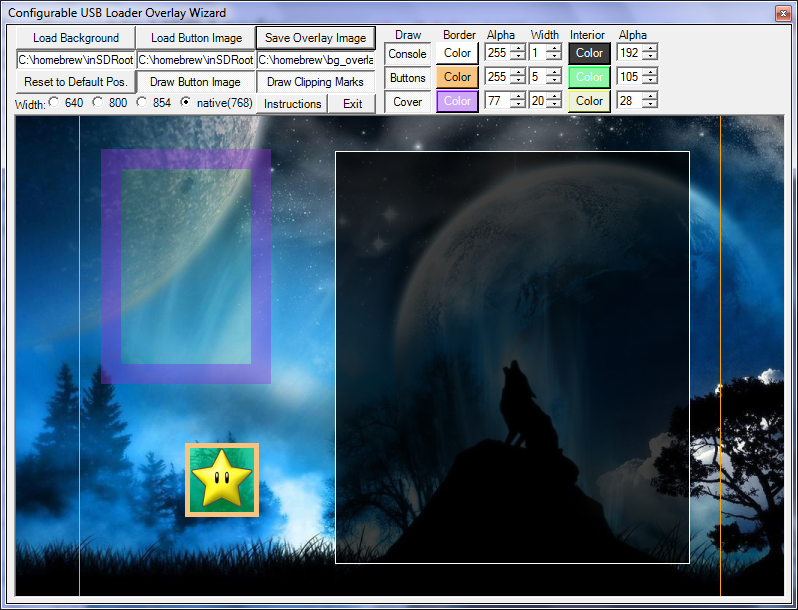
That was v3, but v4 also supports corner rounding of the boxes. Simple instructions are available via the Instructions button, but I hope most of it is intuitive. If you have questions, ask away.
download here
This one includes an all new overlay wizard for creation of overlay images. The overlay wizard allows you to turn any desktop background image (from common image formats) into a theme for Configurable in only a few minutes. The tool will resize your background image to the size Configurable needs and then lets you change the colours and move overlay elements to match your theme and save straight to an overlay file. Here's a look at the new wizard interface:
That was v3, but v4 also supports corner rounding of the boxes. Simple instructions are available via the Instructions button, but I hope most of it is intuitive. If you have questions, ask away.
tass0 said:http://www.youtube.com/watch?v=1NkBtX_2Hdo&fmt=
here is a poc video, sorry for the terrible quality, but it gets the message across.
this is the second build now, input is in and running at 4 fps menu, and 15 fps disc insert, on intepreter. expect it to be full speed when/if released
:/
Needs to be compatible with the progressive scan mode of the Wii also

I have about that many games and they only take up about 53 GB of my drive @_@Dragona Akehi said:Yea that's what it was. Thanks!
Thirty-one Wii games installed taking up 71.03 GB! Whee!

Dwight Schrute
Member
impressivetass0 said:progress


I've seen PSX emulation is getting more and more likely too. BTW : Is there any progres done on the saturn emu ?
Yeah, I really would love some people to start using it. I also put up a new version (I'll edit the previous post to reflect it) that accepts any common image format rather than just .png and it saves it to a .png for the theme. The overlay boxes now have an adjustable rounding on the corners too.Nabs said:that is incredible dude. in a few days i'm sure we'll begin to see some real great themes. this opens up a world of possibilities.
Dragona Akehi
Retired
Someone needs to port Clipper's app to OSX. 

Most newer Wii games come out at about 3.5GB, but some are as low as 100MB! I'd put the average somewhere around 2.75GB. A regular flash drive or even an SDHC will let you get it working, but yeah, you want an external drive to make best use of it.DanteFox said:Hey Clipper, is there any danger in trying out this USB loader thing? I'd like to see what the hubbub is about with this app.
Oh and how much memory do you need for the average wii game? I assume a regular flash drive won't do. :lol
There is very little danger as long as you follow the tutorial, and just cause people (not you) are lazy:
 .
.Boot Camp?Dragona Akehi said:Someone needs to port Clipper's app to OSX.
MikeE21286
Member
man, every time I update my to rev14 my Wii does not recognize my USB hdd.....is this a known bug?
What version are you using otherwise? Do you have the drive plugged into the correct USB port?MikeE21286 said:man, every time I update my to rev14 my Wii does not recognize my USB hdd.....is this a known bug?
MikeE21286
Member
Clipper said:What version are you using otherwise? Do you have the drive plugged into the correct USB port?
hmm...well I was using rev10 and it was working fine on the port I was using. Maybe I should try the other port and see what happens.
That's your problem. I'm 99% sure of it. Rev 12 and up only work on the port closer to the edge of the Wii (and it needs to be that way to get other devices going). It's well documented in my tutorial, but not in many others.MikeE21286 said:hmm...well I was using rev10 and it was working fine on the port I was using. Maybe I should try the other port and see what happens.
MikeE21286
Member
Clipper said:That's your problem. I'm 99% sure of it. Rev 12 and up only work on the port closer to the edge of the Wii (and it needs to be that way to get other devices going). It's well documented in my tutorial, but not in many others.
wow...thanks so much. I had been having the problem for a couple weeks and had just resigned myself to sticking with rev10. I probably would have never thought about that at all.
Clipper said:Apart from the fact that it won't get rid of anything except Preloader, no.
Should have asked that a lot better. What I really meant to say, would I have any problems? Playing new games and accessing the new features from firmware updates.
Is there a program I can use to backup my GC save game, especially the ones that are "protected", or couldn't be copied, like Pokemon ?
I heard about this program called gamecube saver, but it seems that this program is not perfect, and it couldn't be used for backup (GC MC to SD Card), it can only be used for upload (SD Card to GC MC).
Anyone have experience with this program or know better program for my purpose (backing up save game, just in case my Memory Card 1019 got corrupted).
I heard about this program called gamecube saver, but it seems that this program is not perfect, and it couldn't be used for backup (GC MC to SD Card), it can only be used for upload (SD Card to GC MC).
Anyone have experience with this program or know better program for my purpose (backing up save game, just in case my Memory Card 1019 got corrupted).
My god Clipper, awesome work. I need to get myself a nice background and use that asap. The default USB loader background is really ugly.
BTW, is there any similar tool for making channel shortcuts to Homebrew apps?
Also, currently installing Metroid Trilogy. 7.60GB. Let's see if it works.
BTW, is there any similar tool for making channel shortcuts to Homebrew apps?
Also, currently installing Metroid Trilogy. 7.60GB. Let's see if it works.
For those that don't know, I just discovered my Configurator almost fully works in OSX and Linux! You need to install Mono and then just use it to run my app.
It doesn't draw the box borders in the overlay Wizard quite right and it will break if you try to drag something outside the window boundaries, but otherwise it seems to work just fine. I'll try to fix those other bugs soon
Wow, Wii's second dual layer game. It probably needs alternative .dol stuff to work given the way compilations usually go. Rev 14 might also have trouble with it given it's Brawl problems, so make sure you try Hermes' 222/223 or rev13 if it crashes mid-game in rev 14.
It doesn't draw the box borders in the overlay Wizard quite right and it will break if you try to drag something outside the window boundaries, but otherwise it seems to work just fine. I'll try to fix those other bugs soon
TheExodu5 said:My god Clipper, awesome work. I need to get myself a nice background and use that asap. The default USB loader background is really ugly.
BTW, is there any similar tool for making channel shortcuts to Homebrew apps?
Also, currently installing Metroid Trilogy. 7.60GB. Let's see if it works.
Wow, Wii's second dual layer game. It probably needs alternative .dol stuff to work given the way compilations usually go. Rev 14 might also have trouble with it given it's Brawl problems, so make sure you try Hermes' 222/223 or rev13 if it crashes mid-game in rev 14.
No.Varna said:Should have asked that a lot better. What I really meant to say, would I have any problems? Playing new games and accessing the new features from firmware updates.
Clipper said:Wow, Wii's second dual layer game. It probably needs alternative .dol stuff to work given the way compilations usually go. Rev 14 might also have trouble with it given it's Brawl problems, so make sure you try Hermes' 222/223 or rev13 if it crashes mid-game in rev 14.
Yep. Screen goes half green when I try to start MP1, and it reboots the Wii.
I haven't installed Hermes 222/223 yet, so I'll have to give it a shot.
TheExodu5 said:Yep. Screen goes half green when I try to start MP1, and it reboots the Wii.
I haven't installed Hermes 222/223 yet, so I'll have to give it a shot.
That sounds more like it will be an error fixed by using the alternative.dol method.