
• Hey Guest. Check out your NeoGAF Wrapped 2025 results here!

"I need a new PC!" 2010 Edition

B33 said:
Not very up to date. Majority of what I know has come from browsing this thread and Google ostensibly.

So Intel is the more expensive brand of the two, but offers more performace while AMD is more or less for those on a budget? How do the more expensive AMD processors stand up to Intel's line-up?

Could you tell me the jist of Quad Core vs. Dual Core? Is it strictly a matter of performace or are there other factors that come in to play?

More and more programs are being made to take advantage of quad cores, so it's kind of the "hotness" at the moment.

AMD's current flagship is the Phenom II x6 1100T. It's a great processor, but for the price you can get much better on Intel. Most people don't see a reason to spend that much when there is much better out there. The only reason I can think of (and is smart) is how AMD keeps backwards compatibility with their mobos and processors. In the case of the x6, it'll work in a AM3+ mobo (whenever they touchdown.) and then much later down the line you can just grab a AM3+ processor and drop it in said mobo and be on your way.

Long post made simple. AMD's upgrade paths are clear and concise. Intel....shit they could drop socket support for the 1155 tomorrow.

Though someone already quoted me on it, I'll go on record to say that Bulldozer is going to under perform like a muthafucka.
 
Zaraki_Kenpachi said:
But it depends on what specifically you're looking to do and what you want to spend. If you get a better idea of budget/use for the machine we can give you a better idea.
Looking to build a rig that's strictly for gaming. Performance is the key, but on a bit of a budget. My range is $600-$800 (including case, parts, and operating system). I'd like to build something with a long life-span in mind.

Angelus Errare said:
More and more programs are being made to take advantage of quad cores, so it's kind of the "hotness" at the moment.

AMD's current flagship is the Phenom II x6 1100T. It's a great processor, but for the price you can get much better on Intel. Most people don't see a reason to spend that much when there is much better out there. The only reason I can think of (and is smart) is how AMD keeps backwards compatibility with their mobos and processors. In the case of the x6, it'll work in a AM3+ mobo (whenever they touchdown.) and then much later down the line you can just grab a AM3+ processor and drop it in said mobo and be on your way.

Long post made simple. AMD's upgrade paths are clear and concise. Intel....shit they could drop socket support for the 1155 tomorrow.

Though someone already quoted me on it, I'll go on record to say that Bulldozer is going to under perform like a muthafucka.
Thank you for clarifying. That answers my inquiry regarding processors.
 
Teknopathetic said:
Even though it's pretty gaudy and almost the opposite of what I'd prefer, I can't say that I'm not slowly coming around to the NZXT Phantom.

Hmm...

I'm pretty tired of those flamboyant computer cases. I prefer simpler and efficient designs. No need for all those LED lights.
 
Teknopathetic said:
Even though it's pretty gaudy and almost the opposite of what I'd prefer, I can't say that I'm not slowly coming around to the NZXT Phantom.

I think that looks better than those other abominations, what's with the weird slants and shit they put on these cases? I just don't understand it.
 
"I'm pretty tired of those flamboyant computer cases. I prefer simpler and efficient designs."


Trust me, I'm pretty tired of them, too. I am really, really over the neon lights and windows, but at the same time I also care about managing the heat inside the case as well.
 
Advice appreciated here.

I built a PC three years ago, and am looking for an upgraded pre-fab replacement under $1000. The catch is that I'm not familiar with advancements in CPU+GPU technology, and I only want to upgrade if there's a "pretty big" boost in performance.

- I am having fun with the recent Steam sale and wanted a better machine for new content.
- I don't want to build the PC myself and am looking for a stable, no-hassle replacement. - - I'd like to upgrade to Windows 7.
- Live in California -- would be great to avoid sales tax to keep the price under $1K (Newegg, Dell, and HP are taxed; Tiger Direct is not).

Current machine:
CPU = Intel Core 2 Duo E6750 @ 2.66
GPU = 8800 GT
RAM = 2GB
Vista 32-bit
 
Teknopathetic said:
"I'm pretty tired of those flamboyant computer cases. I prefer simpler and efficient designs."


Trust me, I'm pretty tired of them, too. I am really, really over the neon lights and windows, but at the same time I also care about managing the heat inside the case as well.
I have been very happy with my Antec P182 for the last few years. It's a beast of a case, but it doesn't look gaudy and it keeps a good temperature. The only case that appeals to me at all and would still be an upgrade, is the Silverstone FT02. Everything else coming out lately has just had way to over the top styling for my tastes.
 
Teknopathetic said:
"I'm pretty tired of those flamboyant computer cases. I prefer simpler and efficient designs."


Trust me, I'm pretty tired of them, too. I am really, really over the neon lights and windows, but at the same time I also care about managing the heat inside the case as well.

Good. I'm current checking out this case. Might be of interest to you as well. If I ever get the cash, I'll be sure to check it out.
 
sh4mike said:
Advice appreciated here.

I built a PC three years ago, and am looking for an upgraded pre-fab replacement under $1000. The catch is that I'm not familiar with advancements in CPU+GPU technology, and I only want to upgrade if there's a "pretty big" boost in performance.

- I am having fun with the recent Steam sale and wanted a better machine for new content.
- I don't want to build the PC myself and am looking for a stable, no-hassle replacement. - - I'd like to upgrade to Windows 7.
- Live in California -- would be great to avoid sales tax to keep the price under $1K (Newegg, Dell, and HP are taxed; Tiger Direct is not).

Current machine:
CPU = Intel Core 2 Duo E6750 @ 2.66
GPU = 8800 GT
RAM = 2GB
Vista 32-bit

What about upgrading? I had a similar system and the in the fastest second hand quad I could find, a new 460 and extra ram.cheapest way to go and a very nice performance boost.
 
Teknopathetic said:
"You may also like the Corsair 600T.

I understand your frustration in looking for this type of case. I looked for weeks, and didn't find anything that fit the bill. I decided to hell with looks, so I'll be going for the HAF X."


Funny that I just started moving towards that line of thinking before I saw your edit. The 600T looks acceptable, so I'll put that on my list as well and I'll also start considering swallowing the HAF pill. God that shit is so ugly, though. Same with the Antec Dark Fleet.

UGH
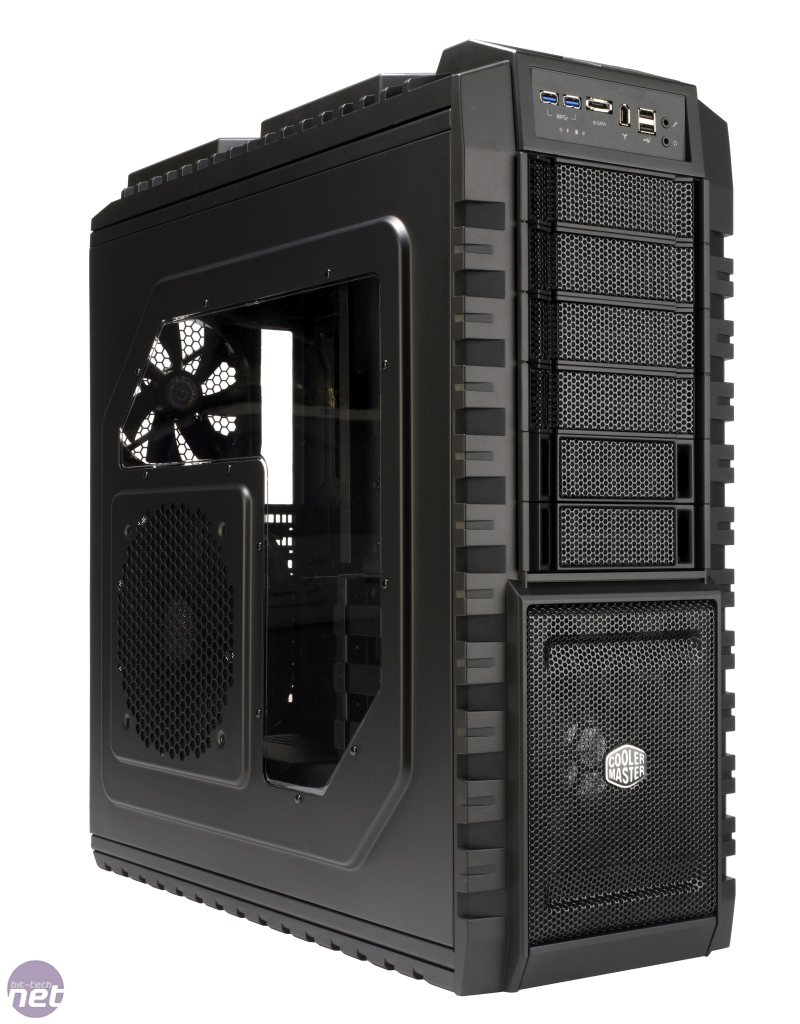
I have the Coolmaster HAF X, it looks bland I would say but its not ugly, does the job looks wise but its performance for cooling is excellent, do check the performance results.
coolermasterhafx2-1280x1024.jpg


http://www.bit-tech.net/hardware/cases/2010/07/26/cooler-master-haf-x-review/2

The only other one that rivals it for performance would be:-

http://www.bit-tech.net/hardware/cases/2010/08/12/silverstone-ft02r-w-review/2
 
A friend needs a video card for his tiny dell computer. It's one of those half-size cases so it needs to be one of those low profile or low profile ready GPUs. He doesn't play anything too taxing, and generally only needs it to be able to play Second Life and some RTS/RPG games (mostly old games)

I have no idea about low-end GPUs, anyone have any advice?
 
wormstrangler said:
What about upgrading? I had a similar system and the in the fastest second hand quad I could find, a new 460 and extra ram.cheapest way to go and a very nice performance boost.

If I can't get a big boost from a $1K new PC, that might be the direction I'd have to go. Really wanted to get a simple little pre-fab. My Coolermaster case is too big and noisy.

I see new PCs out there, but I have no idea how much faster they would be. I'm outside the loop on performance versus my E6750 and 8800 GT. The HP Elites and Dell XLS systems look nice and friendly -- it's the performance improvement that I don't understand.
 
sh4mike said:
If I can't get a big boost from a $1K new PC, that might be the direction I'd have to go. Really wanted to get a simple little pre-fab. My Coolermaster case is too big and noisy.

I see new PCs out there, but I have no idea how much faster they would be. I'm outside the loop on performance versus my E6750 and 8800 GT. The HP Elites and Dell XLS systems look nice and friendly -- it's the performance improvement that I don't understand.

Mind posting a link to some of the these pre-builts you're looking at? A $1,000 system (even a Dell or HP) will be a great improvement over your current rig. I was just giving an alternative (upgrade) option that wouldn't cost half that.
 
I switched from an Antec 120 (I think) to a Coolermaster 690-II, had the first version of the Antec which has zero cable management. Temps seem about the same and I prefer how the 690 looks, no window and you can turn the fan light on/off. It does have an external 3.5" which seems a little useless.

Edit: I can't really comment on the temps as I didn't really check them before upgrading, and the last time I checked was in my old flat that was freezing. Did just open the case up and it felt pretty cool inside.
 
Zaraki_Kenpachi said:
Since they are the same in essentially every way, unless you care a lot about power consumption where the GTX 570 uses more, I'd get that over the 6970. Nvidia has always had much better drivers so I usually lean towards them if performance is the same but that's just me.

the whole drivers argument never did much to me...
nvidia drivers gave me my fair amount of weird problems back when i had an 8800 GT, something that i've never experienced as much with catalyst. to be fair i think i've had way less drivers issues with ati.

:)
 
Dr.Acula said:
What's your vid card?

Check your mobo manual, are you sure these are dupes, can you check them in the control panel under General and Resources and make sure they're on different IRQs and Bus locations? Cause if they are unique entries their being reinstalled on reboot because they're still part of your system and are being auto-detected.

XFX 5750. All of the PCI Express Standard Root Ports have different IRQs, but shouldn't there only be one (my motherboard only has one PCI Express slot)? And the graphics card is also listed 3 times in Catalyst Control Center.
 
Manp said:
the whole drivers argument never did much to me...
nvidia drivers gave me my fair amount of weird problems back when i had an 8800 GT, something that i've never experienced as much with catalyst. to be fair i think i've had way less drivers issues with ati.

:)

Dunno, you're essentially coming down to that, power usewage, and physx. Everything is the same except if you already use multiple monitors to take advantage of eyefinity. Things like oddworld and other games that had performance issues were again from a newer version of catalyst breaking something that worked before. It almost comes down to personal preference unless you value one of the things I stated before.
 
Any laptop users out there on gaf? My mom bought her first pc today and it seems that the mouse pad for the cursor is extremely over sensitive to touch, primarily with the tapping that stands in for mouse clicks. Are there any settings that can make it less sensitive to touch? Right now, you barely need to touch it all (sometimes) for it to register, which of course happens when you don't want it to, like when you're trying to line up a shot in Peggle :lol It's causing a bit too much distress for a basically first time user (at least with laptops) :(
 
Minamu said:
Any laptop users out there on gaf? My mom bought her first pc today and it seems that the mouse pad for the cursor is extremely over sensitive to touch, primarily with the tapping that stands in for mouse clicks. Are there any settings that can make it less sensitive to touch? Right now, you barely need to touch it all (sometimes) for it to register, which of course happens when you don't want it to, like when you're trying to line up a shot in Peggle :lol It's causing a bit too much distress for a basically first time user (at least with laptops) :(

Eh, depending on who makes the trackpad there are trackpad setting either under control panel or a utility running in your system tray. Usually made by synaptics but doesn't have to be that brand. If nothing works, buy her a cheapy usb mouse to use.
 
Yeah, I saw something about Synapsis among the other 70 programs that started at bootup :lol Thanks, I'll check it out. Buying laptops at an equivalent to K-Mart (if K-Mart is lame :P) is not a good idea :P
 
wormstrangler said:
Mind posting a link to some of the these pre-builts you're looking at? A $1,000 system (even a Dell or HP) will be a great improvement over your current rig. I was just giving an alternative (upgrade) option that wouldn't cost half that.

Tiger HP refurb (i7-860, 8GB RAM, and HD 5570):
http://www.tigerdirect.com/applications/SearchTools/item-details.asp?EdpNo=6825707&CatId=2628

Tiger Gateway refurb (i7-860, 8GB RAM, HD 5770):
http://www.tigerdirect.com/applications/SearchTools/item-details.asp?EdpNo=6655831&CatId=2628
 
If I want a game to run properly, I have to restart my PC first, then the game pretty much has to be the first thing I launch. If I exit that game and try to launch another, whether it be 5 minutes or 5 hours later, it barely runs. As long as I do this 'trick', I can pretty much run everything nearly maxed out. Any ideas on why this would be happening?

Specs
q9300
EVGA GTX 465
4GB DDR2
Win7 64 bit.
 
SilverLunar said:
does having an i5 750 or i5 760 make a difference in preformance?

Do you mean compared to each other? The performance difference would be slight at stock clock speeds. I believe they typically overclock about the same. They are pretty much the same chip. The i5 760 is just a slightly overclocked i5 750.
 
Vik_Vaughn said:
If I want a game to run properly, I have to restart my PC first, then the game pretty much has to be the first thing I launch. If I exit that game and try to launch another, whether it be 5 minutes or 5 hours later, it barely runs. As long as I do this 'trick', I can pretty much run everything nearly maxed out. Any ideas on why this would be happening?

Specs
q9300
EVGA GTX 465
4GB DDR2
Win7 64 bit.

What exactly does it do? Bad framerates? Won't Load? What? Are you up-to-date with all your drivers? Do you notice any programs in your system processes that is taking up a lot of system usage?
 
Vik_Vaughn said:
If I want a game to run properly, I have to restart my PC first, then the game pretty much has to be the first thing I launch. If I exit that game and try to launch another, whether it be 5 minutes or 5 hours later, it barely runs. As long as I do this 'trick', I can pretty much run everything nearly maxed out. Any ideas on why this would be happening?

Specs
q9300
EVGA GTX 465
4GB DDR2
Win7 64 bit.


How are your temperatures? Is something being throttled?
 
Zaraki_Kenpachi said:
What exactly does it do? Bad framerates? Won't Load? What? Are you up-to-date with all your drivers? Do you notice any programs in your system processes that is taking up a lot of system usage?
Framerate for the most part. Mass Effect 2, for example, will take like 30 seconds to get past the 'Bioware' logo. Even shit like Winterbottom is stuttery as shit. I've checked my processes and can't ever find anything out of the ordinary. Drivers are up to date, Win7 freshly installed just before steam sale. Defrag regularly.

edit: temps seem fine. Not sure how to determine the throttling. I mean if i reboot, launch a game (test it for a minute to see that it runs ok), quit, then start a different game, its brutal. As long as I dont try a different game, I can quit and launch the 'first' game and its ok.
 
Felix Lighter said:
Do you mean compared to each other? The performance difference would be slight at stock clock speeds. I believe they typically overclock about the same. They are pretty much the same chip. The i5 760 is just a slightly overclocked i5 750.
yes i mean compared to each other, both have the same price on newegg and have the same info, so i was wondering if getting a 760 is better performance wise for gaming than a 750.
 
SilverLunar said:
yes i mean compared to each other, both have the same price on newegg and have the same info, so i was wondering if getting a 760 is better performance wise for gaming than a 750.

At the exact same price, you might as well go with a 760.
 
I've got a x4 955 and a GTX 460. Currently I have 4GB of DDR3 RAM. Is there any reason to upgrade the RAM? Will it give me any performance boost with games?
 
squicken said:
I've got a x4 955 and a GTX 460. Currently I have 4GB of DDR3 RAM. Is there any reason to upgrade the RAM? Will it give me any performance boost with games?
no

*Almost 20k posts :lol
Expert timing for the 2011 thread. Better get started on the thing. Who wants to whip up a banner with all the PC exclusives? :D
 
Hazaro said:
no

*Almost 20k posts :lol
Expert timing for the 2011 thread. Better get started on the thing. Who wants to whip up a banner with all the PC exclusives? :D

Thanks for the quick reply! RAM is cheap, but no use spending $60 if it won't help anything. That's money I can spend on games I'll never play
 
Ok here's what I'm looking at so far:
Needs:
- Case stuff
- Radeon Pro / nHancer / that other nVidia program
- ??? Tell me
_______________________________________

4E2bH.png


The 2011 high-res PC screenshot thread!
???
Triple buffering: "Why we love it" Update or new thread for nHancer / RadeonPro / etc.?
http://www.neogaf.com/forum/showthread.php?t=366413
PC games blog list
http://adrianwerner.wordpress.com

If you want help with a build fill this out AND try making one of your own from the resources in the OP :)
Basic Desktop Questions
Budget: Price Range + Country
Main Use: Light Gaming, Gaming, Emulation (PS2/Wii), Video Editing, 3D work, general usage (Word, Web, 1080p playback)
Monitor Resolution: What resolution will you be playing your games at? Are you going to upgrade later?
List SPECIFIC games that you MUST be able to play: Self Explanatory

15 minute video how-to: http://vimeo.com/5685229 / 40 minute how-to

Prospective laptop buyers please fill this out and ask their forum as well.
http://forum.notebookreview.com/wha...ould-i-buy-form-must-read-before-posting.html
GAF notebook / laptop thread: http://www.neogaf.com/forum/showthread.php?t=386622


The General updated information Guide: http://tinyurl.com/FalconGuide – This is a general UPDATED guide and nothing is the end all perfect guide at any time. Lite Version

The Builds: $600, $900, $1,200 – Remember a lot of parts are good and combos do pop up on newegg.com so take advantage of them.

The Damn Capable Build: $600 - AMD x4 640, 4GB DDR3, 500GB or 1TB HDD, GTX 460 768MB, Cooler Master 3xx Series Case, Seasonic 520W, MSI 870-G45 motherboard, DVD Burner. < Click for wishlist
TrCjQ.png

The Get a Little More Build: $900 – On hold for Sandy Bridge
The Spend a Little More Build: $1,200 – On hold for Sandy Bridge

Choosing a case: Exodus5’s territory here. Lots of thumbnails and pros/cons in the image possible?


2010 Thread
http://www.neogaf.com/forum/showthread.php?t=383771
2009 Thread
http://www.neogaf.com/forum/showthread.php?t=346008
2008 Thread
http://www.neogaf.com/forum/showthread.php?t=242699

2r7283m.png


141i1j.png


Newegg (Parts)
Chief Value (Parts)
Micro Center (Parts)
NCIXUS (Parts, Assembly)
Performance-PCs (Parts)
Tiger Direct (Parts, Bing Cashback)
ZipZoomfly (Parts)
AVADirect (Custom Built)
Falcon Northwest (Custom Built)
MAINGEAR (Custom Built)

d677l.png


NCIX (Parts, Assembly, Price Match)
Canada Computers (Parts)
DirectCanada (Parts)
Memory Express (Parts, Assembly, Price Match)
Newegg (Parts)
Tiger Direct (Parts)
PriceBat (Price Comparison)
PriceCanada (Price Comparison)
Shopbot (Price Comparison)

25yulx5.png


Novatech (Parts)
Aria PC (Parts)
Ebuyer (Parts, Custom Built)
Microdirect (Parts)
Misco (Parts)
Scan (Parts)
Dino PC (Custom Built)
YoYoTech (Custom Built)

312uvpl.png


PC Case Gear (Parts)
MSY (Parts)
Scorpion Technology (Parts)
Umart (Parts)
staticICE (Product Finder)

eYVDS.png
96clex.png

AnandTech
The Tech Report
Guru3D
HardOCP
Hardware Canucks
Overclockers
Tom's Hardware
X-bit labs

6ShKl.png
dnkimc.png

CPU-Z gathers information on your CPU, FSB, VCORE voltage and memory timings.
GPU-Z gathers information on your video card and GPU.
Real Temp / Core Temp allows you to monitor the temperature of your CPU core(s).
SpeedFan allows you to monitor fan speed, temperature, voltage and can access S.M.A.R.T. data.
Piriform Speccy overall computer hardware monitoring
RivaTuner allows you to manage GPU overclocking, fan speed and monitor many things.

EVGA Precision allows you to overclock your NVIDIA GPU.
FURMark allows you to stress test your video card.
Fraps allows you to record real time video, take screen captures and display your FPS.
Memtest86+ allows you to run a full memory scan to deal with the blue screen of death and system errors.
MemtestG80 allows you to test for soft errors in GPU memory for NVIDIA CUDA-enabled GPUs.
nHancer allows you to optimize the display, improve the performance and fully utilize your NVIDIA graphics card.
OCCT / Prime95 allows you to stress test your CPU and GPU. allows you to stress test the stability of your computer.
 
The only thing that should fluctuate in price is the GTX 460 and that should have mail in rebates until it stops production. Even for $30 over $600 I'd still get it over a 5770. You could cutback on the PSU as well, but I'll try to push better PSU's this year.
Note that it doesn't even have a combo as well.
 
Someone Help!

I installed everything in my Cooler Master HAF X case. However the fans all seem to just connect to the power supply, not the motherboard as I was used to in the past - although if I disconnect the power all 4 fans have a 3 pin connector. Do I just connect everything to the PS directly? Does that provide 100% on all the time? I turned the case on and my i5 is running at 63C which is high (and I'm only in the BIOS no load...) but I'm using the stock cooler which I thought would be fine since I hadn't planned on OCing.
 
Simple question.

Best place to buy a new desk? My current one is fucking fall apart. LITERALLY. Don't want my new battle station falling on the floor...
 
Shuusui said:
Simple question.

Best place to buy a new desk? My current one is fucking fall apart. LITERALLY. Don't want my new battle station falling on the floor...

Probably IKEA imo. They have some pretty good desks that fit all needs.
 
Sanjay said:
I have the Coolmaster HAF X, it looks bland I would say but its not ugly, does the job looks wise but its performance for cooling is excellent, do check the performance results.
http://images.bit-tech.net/content_...-haf-x-review/coolermasterhafx2-1280x1024.jpg

http://www.bit-tech.net/hardware/cases/2010/07/26/cooler-master-haf-x-review/2

The only other one that rivals it for performance would be:-

http://www.bit-tech.net/hardware/cases/2010/08/12/silverstone-ft02r-w-review/2
Speaking of cases, I just bought the CORSAIR 600T for 100 bucks during the boxing day sale.

Now I'm regretting it, even though I got a good deal. I'm thinking of pocketing 20 bucks and go with the CoolerMaster 690-II or the NZXT Phantom. Help me decide!
 
I didn't know the HAF series had a model with USB 3.0 up front. Might consider that instead of the 932 I was going to get for my next build :lol Seriously though, my brothers HAF 932 is so damn quiet I can't tell if it is on or off now, where before I could hear it through walls. Haven't pushed it yet with overclocking since he doesn't even have a mobo that supports it right now, but when he gets his sandy bridge stuff we shall see.
 
Looks good Hazaro, do it.

Should migrate and put this thread to rest ASAP. Its already kinda devolved into a "just wait a few weeks for the new chips" anyway. Not a lots going to happen until the hard launch.


On the flip side I hope 2011 is a good year for cases. There were some kick ass cases this year. 600t, HAFX, 700D, the CM690 revision to the CM690IIAdvanced, and others. Just a good year. I hope that continues, that and the falling prices of ram.

Hari Seldon said:
What is the easiest way to determine if Crossfire is working? The windows score is the same with it enabled or disabled.


Spinning fuzzy donut probably.
 
Top Bottom