• Hey Guest. Check out your NeoGAF Wrapped 2025 results here!

"I need a new PC!" 2010 Edition

I don't have any optical outs on the back of the case.

I also though the video card would have some way to carry the sound as it is a Radeon 4870 but there are only two DVI ports on the back of my PC.
 
a little help please. This is what i'm planning on ordering this week

Updated List:

COOLER MASTER Storm Scout SGC-2000-KKN1-GP Black Steel / Plastic ATX Mid Tower Computer Case ($79.99)
http://www.newegg.com/Product/Product.aspx?Item=N82E16811119196


GIGABYTE GA-MA790GPT-UD3H AM3 AMD 790GX HDMI ATX AMD Motherboard ($119.99)
http://www.newegg.com/Product/Product.aspx?Item=N82E16813128398

CORSAIR CMPSU-650TX 650W ATX12V / EPS12V SLI Ready CrossFire Ready 80 PLUS Certified Active PFC Compatible with Core i7 Power Supply ($94.99)
http://www.newegg.com/Product/Product.aspx?Item=N82E16817139005


G.SKILL 4GB (2 x 2GB) 240-Pin DDR3 SDRAM DDR3 1600 (PC3 12800) Dual Channel Kit Desktop Memory Model F3-12800CL9D-4GBNQ ($109.99)
http://www.newegg.com/Product/Product.aspx?Item=N82E16820231193


AMD Phenom II X4 965 Black Edition Deneb 3.4GHz 4 x 512KB L2 Cache 6MB L3 Cache Socket AM3 125W Quad-Core Processor ($183.99)
http://www.newegg.com/Product/Product.aspx?Item=N82E16819103727


GIGABYTE GV-R577UD-1GD Radeon HD 5770 1GB 128-bit GDDR5 PCI Express 2.0 x16 HDCP Ready CrossFireX Support Video Card ($154.99)
http://www.newegg.com/Product/Product.aspx?Item=N82E16814125309


Total: $765.92 including shipping, instant discounts and promo code

$45 in rebate post purchase.

i'm getting different opinions on the video card though.. some are saying the HD 5770 is the way to go, others say the 4890. the difference to me is just 10 or 20 dollars but which card is actually better?

the ati 4890 is going for $169 at tigerdirect
 
^ I just built a rig that has the same memory and and PSU you have. But I saved some money and got a X4 955 instead. I'm easily overclocking it to 3.6ghz with a slight undervolt. I'm not even using stock voltage. I almost bought the 965, but after doing some research, the 955 is a better value.

As far as the 5770 vs 4890, but 4890 is faster, but it's not DX11 capable and power and consumption and efficiency are not up to 5770 standards. I chose the 5770, myself. Then a month later got a 2nd one and am Crossfiring them. Not disappointed at all.
 
From China with love :lol

Phenom II X6

AMD_1055T_CPU_01.jpg


AMD_1055T_CPU_02.jpg


AMD_1055T_CPU_03.jpg


AMD_1055T_CPU_04.jpg


http://en.expreview.com/2010/04/10/amd-phenom-ii-x6-1055t-processor-hits-retail-in-china/7035.html


Expected US price:
X6 1055T 2.8Ghz $199
X6 1090T 3.2Ghz $289


Raoh
I would change that mobo with the Asus M4A89GTD PRO
 
mm04 said:
^ I just built a rig that has the same memory and and PSU you have. But I saved some money and got a X4 955 instead. I'm easily overclocking it to 3.6ghz with a slight undervolt. I'm not even using stock voltage. I almost bought the 965, but after doing some research, the 955 is a better value.


i havent built anything in almost ten years.. so pardon any basic questions


would i then need to get a better cooling solution if i overclock?


Ryoma-Echizen said:
From China with love :lol

I would change that mobo with the Asus M4A89GTD PRO

for the usb 3.0?
 
BudokaiMR2 said:
I don't have any optical outs on the back of the case.

I also though the video card would have some way to carry the sound as it is a Radeon 4870 but there are only two DVI ports on the back of my PC.

You'll need a DVI -> HDMI cord/adapter. The 4870 does output audio over DVI -> HDMI
 
Raoh said:
i havent built anything in almost ten years.. so pardon any basic questions
would i then need to get a better cooling solution if i overclock?

I had read that the AMD stock fans were pretty loud, but a solution like THIS, isn't very expensive but is effective.

I was sort of in the same boat as you. I had not built a PC from the ground up in ages and got the itch and did, this year. This thread was very helpful and I'm glad I did it.
 
mm04 said:
I had read that the AMD stock fans were pretty loud, but a solution like THIS, isn't very expensive but is effective.

I was sort of in the same boat as you. I had not built a PC from the ground up in ages and got the itch and did, this year. This thread was very helpful and I'm glad I did it.

CM Hyper 212+ for it's price rivals with more expensive top dogs, specially with a 2nd fan attached.

A bit expensive on newegg. Even in my country (Perú) with all vendor markup I can find it for $35.
 
Posting from my new PC (minus the GPU) :D

Getting a 7.3 in the Windows hardware test for my CPU is a great geeky feeling. Can't wait to shove a 5850 in here and see that jump up, too. I'm going to have Crysis, Crysis: Warhead and Metro 2033 installed ready for it, to name but a few. :lol
 
Moobabe said:
Thanks for the help guys, I've gone back and added a Quad core so now the final (?) build looks like this:

aze3i8.jpg
I'd grab a 640GB WD or a 500GB single platter HDD if you need one.
Raoh said:
a little help please. This is what i'm planning on ordering this week


i'm getting different opinions on the video card though.. some are saying the HD 5770 is the way to go, others say the 4890. the difference to me is just 10 or 20 dollars but which card is actually better?

the ati 4890 is going for $169 at tigerdirect
Well the 5770 has DX11 and uses less power so kind of up to you. I'd probably go for the 5770. The 4890 is slightly faster but not a deal breaker.

*Sub in the mobo Ryoma said too.
 
I'll be getting a new notebook this summer so I was wondering if any one has any feedback or experience regarding the following brands/models.

Toshiba Satellite A505-S6020. I've had great experience with the Satellite series in the past. Never had any big issues with them and they used to be the most compatible with different linux distros (not a big deal now a days).

Samsun R580. Never used their notebooks before so I don't have any experience with them at all and don't know how reliable they are. It looks good though.

Asus K52-Jr. I'm familiar with their PC products and used to love their motherboards but never used their notebooks. I've heard good things about them online but was wondering if there are any issues I should be aware of.

I'll be using this as my main PC for about 12 months or so otherwise I would have considered an mx11 (they look cool and I like the small size but as a main PC... I don't know). So what do you guys think? If there are any other models/manufacturers that you think I should look at then please point me to them (not buying a Mac so forget about that one). I don't need a very powerful device since it will be used for web, office and multimedia mostly with the occasional PC game here and there. I'm going for an i5 because I'll probably hand it down to some one else after a year of use and would like to give them some thing that's still OK by then.

Edit:
Grammar.
 
ok, i've got it down this build now.. any thoughts? should i downgrade the processor and overclock it like suggested above? if i go with the x4 955 and overclock to 3.6 i would save $30.. is it worth the savings? how long will that chip last me?


35hohkw.png

14y8mz9.png
 
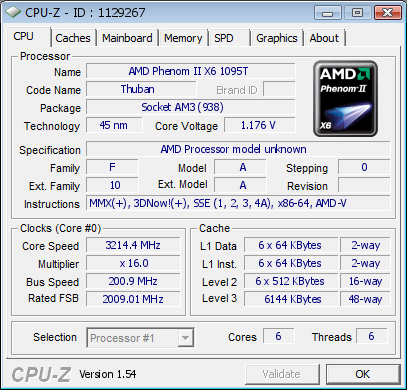
Phenom II X6 in all it's glory.

Less voltage and more overclock room than X4 deneb (in quad mode). X6 overclock still not tested.


CPU:AMD Phenom II X6 1090T BE @ 3.2GHz
MB:MSI 790GX-G65 BIOS:4.0
RAM:A-data DDR3 1333 2GB*2
Winchip DDR3 1333 2GB*2
PSU:acbel 300w


sb56wMun5D-vO3tKXTwrxj2G4wxo7uQB


8MFy-EFstT_0Ty2aT7LlOTzUvb5K22-T


ZJT2IJaiwT9UFN74W6TXabgfULrzVlsQ


1129267.png


Cinebench 10 32bit
1 cpu --> 2920
x cpu --> 14381
x cpu (4 cores @ 4.2Ghz) --> 13735


Cinebench 11.5 32bit
X6 1090T 3.2Ghz
CPU --> 5.29pts

i7 960
CPU --> 5.48pts

i7 870
CPU --> 5.06pts

http://forum.coolaler.com/showthread.php?t=235891&page=3
http://www.xtremesystems.org/forums/showthread.php?t=249159&page=5
http://valid.canardpc.com/show_oc.php?id=1129267

happy.jpg
 
So I have been tooling around with my new PC (specced thanks to this thread's advice - and I'm thrilled - thanks guys!!) and I have a question.

On the weekend I installed the ATI 10.3 drivers for my 5850 which all went fine, then I installed a couple of older games. Somehow along the way one of these games seemed to install DX9 over the DX11 which was originally there - is this possible? I'm going off a pop-up which appeared when I installed KOTOR, telling me I needed a minimum of DX8something somthing and I actually had DX9 something something.

Now is KOTOR only detecting DX9 because it can't recognise anything newer? Have I somehow installed the older version over the newer? If so, what's the easiest way to reinstall DX11?

thanks guys
 
Shambles said:
You'll need a DVI -> HDMI cord/adapter. The 4870 does output audio over DVI -> HDMI

Okay well I am trying to figure this out now. So at the moment I have the DVI>HDMI cable hooked up to my tv and then an optical cord running from the tv to my surround sound.

What sound settings am I looking for? I have something called ATI DP output in the sound settings but it says its not hooked up...
 
Okay I figured it out. It seems that I was using some generic DVI>HDMI cable but I have to use the adapter that they gave me with the PC.

But now I am running into a new problem. Even though it is sending audio now, it says the max channels are 2 and none of the setups(windows or realtek) are showing 5.1 as an option.
 
I'm good with my desktop right now but my laptop will need to be replaced pretty soon here. Plus I need an excuse to buy Windows 7.

I'm posting here because I want to know the minimum I would need in order to comfortably run Left 4 Dead 2 and Team Fortress 2.
 
Yeah I really don't know what to do with this sound. I am thinking I might just buy a sound card with optical out and just say fuck it to ATIs drivers.

I am getting sound, but its not giving me the option for 5.1

I can't imagine what it could be, but a quick search shows that there seem to be plenty of people with the same problem on Radeon 4870s.

:(

I LEFT THE CONSOLE GAMING GHETTO JUST TO GET STUCK IN THE AUDIO QUALITY GHETTO.
 
Ryoma-Echizen said:
Phenom II X6 in all it's glory.

Less voltage and more overclock room than X4 deneb (in quad mode). X6 overclock still not tested.


CPU:AMD Phenom II X6 1090T BE @ 3.2GHz
MB:MSI 790GX-G65 BIOS:4.0
RAM:A-data DDR3 1333 2GB*2
Winchip DDR3 1333 2GB*2
PSU:acbel 300w

Cinebench 10 32bit
1 cpu --> 2920
x cpu --> 14381
x cpu (4 cores @ 4.2Ghz) --> 13735


Cinebench 11.5 32bit
X6 1090T 3.2Ghz
CPU --> 5.29pts

i7 960
CPU --> 5.48pts

i7 870
CPU --> 5.06pts

This should probably be in the hardware thread, but interesting to see some performance results. I expect gaming results to show next to no benefit.

So a 4-core, overclocked i7 920 beats a stock 6-core, X6 1090t, at heavily threaded apps I assume, not bad. I imagine clock for clock, core for core the i7s still destroy the Phenoms at single/dual core aware apps.

Will be interesting to see how intels 6-core solution compares against this, by those results, it looks like it will blow it away, but obviously the price point of the 1090t is very attractive. Intel did announce a non EE 6-core chip though, so it should be in the ballpark price wise.

Are these thing hyper-threaded (doubled cores)? Would think so, but never really read about them yet. I'll be reading a couple reviews when they come out.
 
question for you guys,

I'm having a hard time deciding which RAM to go with. Originally I had planned to go with Corsair Dominators, but everyone that I've spoken too have said, too expensive for not so great performance so go with [insert favorable RAM]. I've been suggested these three
  1. G.SKILL 6GB (3 x 2GB) 240-Pin DDR3 SDRAM DDR3 1600 (PC3 12800) Triple Channel Kit Desktop Memory Model F3-12800CL9T-6GBNQ
  2. G.SKILL Ripjaws Series 6GB (3 x 2GB) 240-Pin DDR3 SDRAM DDR3 2000 (PC3 16000) Desktop Memory Model F3-16000CL9T-6GBRH - Retail
  3. G.SKILL PI Series 6GB (3 x 2GB) 240-Pin DDR3 SDRAM DDR3 1600 (PC3 12800) Desktop Memory Model F3-12800CL7T-6GBPI - Retail

Here are my specs so far

=======HOME DESKTOP=======

+ Intel Core i7 930 2.8 GHz
+ MoBo -ASUS P6X58D
+ HSF - CPU HEATSINK COOLER MASTER RR-UV8-XBU1-GP
+ SSD -Intel X25-M Mainstream SSD
+ GPU - Sapphire Radeon HD 5850
+ HDD1 - Western Digital Caviar Internal Hard Drive
+ RAM - ?
+ PSU - CORSAIR CMPSU-850TX
+ SAMSUNG Spinpoint F3 HD103SJ 1TB
+ DVD DRIVE - DVD±/CD-RW: Samsung SH-S223F
+ Chassis - Thermaltake Element T
+ Logitech Keyboard illuminated
+ ASUS VW246H Glossy Black 24
+ A30 Headset
 
Posting this here, because I've only ever seen it come up in this thread, but Benchmark Reviews.com did a SSD test of IDE vs AHCI, and the conclusion was a little surprising... in nearly every test with every controller, the SSDs work faster in IDE than they do in AHCI mode, and by a decent margin.

I think this is contrary to pretty much all advice previously given in this thread.

Unquestionably, the best operational IOPS performance between AHCI and IDE configurations was IDE-mode. IOPS results were always more consistent and usually much higher when the SATA controller was set to IDE-mode instead of AHCI.
 
Hey guys I need a little help and I thought this would be a great place to pick some brains.

Couple weeks back I decided to get back into PC gaming (having run a MacBook Pro for the better part of 3 years) and I was looking to go for a budget machine. I've been blessed with 3 Dell E521s and figured I would convert one of them into a simple gaming machine.

This is what I did:

- added a Wireless Networking Card (Tenda 11N Wireless PCI Adapter)
- added 2 GBs of RAM (2 Crucial 1 GB sticks in a set)
- added Nvidia GeForce 9500GT (1GB -- via Zotac)

Machine is playing games nicely at medium settings... and I'm very happy. What I'm not happy with is the fact that on ALL games... I'll receive a random .5-1 second delay in the graphics. Meaning... the game will freeze for a half second... and then catch up. I'm baffled as to what the issue could be. If anyone has any ideas as to how to fix it... or... and suggestions on how to make my system better (within cost effective means)... I'd love to hear them.

Thanks!
 
I'm still having problems with my pc. I've been getting stuttering and crashes in source engine games, as well as in bad company 2. By stuttering I mean that the fps is fine, but I seem to be missing frames when moving.

This issue is obvious in TF2, I've been stuttering and have had 2 crashes recently. The stuttering has been occuring for a month or so now, but it seems to vary in its severity. Recently, the game has crashed twice.

Here is a video of the issue, which doesn't make it clear but you can see the kind of thing that's happening at 0:15. Also included in this video is what I presume to be a tf2 bug, I was not moving in the vertical direction unless I jumped, but I don't think this is a problem my side. Below this is a picture of windows resource monitor while I was taking the video, not sure if this is any help.

http://www.youtube.com/watch?v=HANZfWoc_mw


I've also had a blue screen crash in half life:source, and I think the error message was something to do with memory management.

I'm leaning towards this being a hardware problem, but I'm not sure what in particular. Any help would be great.
 
Minsc said:
Posting this here, because I've only ever seen it come up in this thread, but Benchmark Reviews.com did a SSD test of IDE vs AHCI, and the conclusion was a little surprising... in nearly every test with every controller, the SSDs work faster in IDE than they do in AHCI mode, and by a decent margin.

I think this is contrary to pretty much all advice previously given in this thread.
I've seen that mentioned on various sites, and I think OCZ recommends using IDE mode. Mine is set up in AHCI mode, mainly because I'm running two HDDs and I don't think my motherboard allows me to mix and match.

I've also heard that TRIM is only supported over AHCI, but this article says it works in either mode, so maybe it's time for me to switch.
 
rohlfinator said:
I've seen that mentioned on various sites, and I think OCZ recommends using IDE mode. Mine is set up in AHCI mode, mainly because I'm running two HDDs and I don't think my motherboard allows me to mix and match.

I've also heard that TRIM is only supported over AHCI, but this article says it works in either mode, so maybe it's time for me to switch.

Yea, I was surprised to see the TRIM supported over IDE, but I read it does work. I'll just leave mine at AHCI, it's not like it's slow... i personally doubt I'd notice any difference, even though numerically there is one according to the charts.
 
hobart said:
Hey guys I need a little help and I thought this would be a great place to pick some brains.

Couple weeks back I decided to get back into PC gaming (having run a MacBook Pro for the better part of 3 years) and I was looking to go for a budget machine. I've been blessed with 3 Dell E521s and figured I would convert one of them into a simple gaming machine.

This is what I did:

- added a Wireless Networking Card (Tenda 11N Wireless PCI Adapter)
- added 2 GBs of RAM (2 Crucial 1 GB sticks in a set)
- added Nvidia GeForce 9500GT (1GB -- via Zotac)

Machine is playing games nicely at medium settings... and I'm very happy. What I'm not happy with is the fact that on ALL games... I'll receive a random .5-1 second delay in the graphics. Meaning... the game will freeze for a half second... and then catch up. I'm baffled as to what the issue could be. If anyone has any ideas as to how to fix it... or... and suggestions on how to make my system better (within cost effective means)... I'd love to hear them.

Thanks!
Make sure you download and install the latest drivers for all of your components (graphics card, memory, cpu). To me it sounds like a memory bottleneck. What type of ram did you put in there? DDR2 or DDR3 and at what speed?
 
BudokaiMR2 said:
Yeah I really don't know what to do with this sound. I am thinking I might just buy a sound card with optical out and just say fuck it to ATIs drivers.

I am getting sound, but its not giving me the option for 5.1

I can't imagine what it could be, but a quick search shows that there seem to be plenty of people with the same problem on Radeon 4870s.

:(

I LEFT THE CONSOLE GAMING GHETTO JUST TO GET STUCK IN THE AUDIO QUALITY GHETTO.

I'm trying to remember how it went for me the brief period I tried it until I realized that my HT receiver distorted the video over HDMI horrible on a non 1080P signal. I used the adapter that came with the card and it only worked in one of the two DVI ports. It should be working for you, do you have any other HDMI devices going through your receiver that are sending 5.1 PCM without a problem?

Edit: Download and install the ATI HDMI Audio Device. For some reason they don't include the audio driver as part of the normal catalyst package.

Minsc said:
Yea, I was surprised to see the TRIM supported over IDE, but I read it does work. I'll just leave mine at AHCI, it's not like it's slow... i personally doubt I'd notice any difference, even though numerically there is one according to the charts.

I am confused. Despite the glaring evidence of the superiority you are not going to switch into IDE mode? What other advantages does AHCI offer? (My drives are all running AHCI)

hobartMachine said:
is playing games nicely at medium settings... and I'm very happy. What I'm not happy with is the fact that on ALL games... I'll receive a random .5-1 second delay in the graphics. Meaning... the game will freeze for a half second... and then catch up. I'm baffled as to what the issue could be. If anyone has any ideas as to how to fix it... or... and suggestions on how to make my system better (within cost effective means)... I'd love to hear them.

I'd also run SMART error detection on your hard drives. I've had stuttering issues caused by the computer having problems accessing the HDD whether it was a hardware or software cause. If you haven't noticed the system stutter outside of gaming it probably won't be the cause.
 
Shambles said:
I am confused. Despite the glaring evidence of the superiority you are not going to switch into IDE mode? What other advantages does AHCI offer? (My drives are all running AHCI)
AHCI allows for hot-swapping, and it provides better performance with regular hard drives. IIRC it also supports a few diagnostic commands that IDE doesn't (but I could be wrong on that).

It's also kind of a pain in the ass to switch modes once the OS is installed. There are ways to do it, but if something goes wrong it could pretty easily cause your system to not boot, so I'm kind of hesitant to switch. Maybe next time I reinstall my OS.
 
Minsc said:
Are these thing hyper-threaded (doubled cores)? Would think so, but never really read about them yet. I'll be reading a couple reviews when they come out.

Are you asking like will it show 12 CPU's in taskmanager? I don't think so with the AMD chips. I am pretty sure they are single-threaded cores. I expect next to no benefit in current games, maybe GTAIV, but I expect the frequency increase along with the extra cores will provide a significant enough upgrade from my phenom II X4 920 to justfiy the price. Plus i'll have a new CPU to build another computer with. =)
 
Shambles said:
I am confused. Despite the glaring evidence of the superiority you are not going to switch into IDE mode? What other advantages does AHCI offer? (My drives are all running AHCI)

It's like picking between having your SSD operate at super damned fast speeds and ultra damned fast speeds. They're both damned fast! I just don't think I'll notice any difference, because I'm using the "slower" mode and I can't imagine my system moving any faster.

BravoSuperStar said:
Are you asking like will it show 12 CPU's in taskmanager? I don't think so with the AMD chips. I am pretty sure they are single-threaded cores. I expect next to no benefit in current games, maybe GTAIV, but I expect the frequency increase along with the extra cores will provide a significant enough upgrade from my phenom II X4 920 to justfiy the price. Plus i'll have a new CPU to build another computer with. =)

Yup, that was what I was wondering. Explains a little why a 4-core 8-threaded i7 beats a similarly clocked 6-core 6-threaded Phenom I guess.
 
The 6 core AMD is 300 bucks.

I could get an x58 board and core i7 930 for 350.

I would need new ram but thats not a terribly big deal.

What to do.
 
Minsc said:
Yup, that was what I was wondering. Explains a little why a 4-core 8-threaded i7 beats a similarly clocked 6-core 6-threaded Phenom I guess.

Exactly. Honestly I don't know why Intel doesn't make a bigger deal about hyperthreading. But the price is right on these AMD 6 cores, and I've got a PC ready to go with a 80gb intel SSD and ATI 5850, 4gb ram. It's got a 920 deneb CPU in it right now. I dunno though, if Intel releases a non-EE edition 6 core gulftown chip thats around the $300-400 mark I may just go with that instead....
 
Shaheed79 said:
Make sure you download and install the latest drivers for all of your components (graphics card, memory, cpu). To me it sounds like a memory bottleneck. What type of ram did you put in there? DDR2 or DDR3 and at what speed?

My drivers on my Graphics card are up to date. I wouldn't know where to pick up the drivers for Memory (it's Crucial... so... I guess on Crucial's site?)... CPU... I honestly dunno. I'm sure a lot of updates are backed up. I should prolly take an evening to DL all the updates.

Memory bottleneck FEELS like the issue tho. I'm gonna read off the sticker exactly what I put in:

2GB KIT: 2 - 1GB 240 - PIN DIMM 128Mx64 DDR2 PC2 - 5300 UNBUFF
 
Shambles said:
I'd also run SMART error detection on your hard drives. I've had stuttering issues caused by the computer having problems accessing the HDD whether it was a hardware or software cause. If you haven't noticed the system stutter outside of gaming it probably won't be the cause.

Thing is... I don't use the computer aside from gaming and some web browsing so... I guess it COULD be the issue.

How would I go about running a SMART error detection? The HDD is stock so... it's definitely worth investigating.
 
BravoSuperStar said:
Exactly. Honestly I don't know why Intel doesn't make a bigger deal about hyperthreading. But the price is right on these AMD 6 cores, and I've got a PC ready to go with a 80gb intel SSD and ATI 5850, 4gb ram. It's got a 920 deneb CPU in it right now. I dunno though, if Intel releases a non-EE edition 6 core gulftown chip thats around the $300-400 mark I may just go with that instead....

I thought I read intel was releasing a non EE part. If so im jumping ship back over to intel. Ive been AMD only for about the last 7 years, but this new 6 core stuff is showing just how much they are lacking currently.
 
Zaraki_Kenpachi said:
So why would you get a 6 core amd? If it doesn't beat an i7, why would you buy it?

If you have an older AM3 chip and you don't want to replace your Mobo/RAM mostly it's a pretty linear upgrade path. There's also an upcoming Bulldozer 6-core with a new architecture also on AM3 socket.
 
mikespit1200 said:
If you have an older AM3 chip and you don't want to replace your Mobo/RAM mostly it's a pretty linear upgrade path. There's also an upcoming Bulldozer 6-core with a new architecture also on AM3 socket.

is it on the 32nm process?
 
Top Bottom