

The Lamonster
Member
So what's the best video card out there these days?

The Lamonster said:So what's the best video card out there these days?

If you're getting an i7-930, you should really have at least 3 sticks because it's tri-channel. It still works with dual channel but optimally works best with 3 sticks or 6Scythesurge said:Ok, so I'm starting to finalize my system and I just wanted to run it by here in case anyone else had some suggestions. I haven't started to look for a hard drive/dvd drive etc. because I'm not that worried about those components.
Processor: i7-930 (purchased)
Video card: Sapphire 5870
Motherboard: ASRock
RAM: Corsair 4 gbs
6 GBs of RAM would be desirable, but for double the cost of 4 GBs it doesn't seem worth it when I can buy two sets of 4 GBs for around the same price. Let me know if there's something wrong with this line of thinking.
Ok thanks, that would help justify the 6 GBs.WalkMan said:If you're getting an i7-930, you should really have at least 3 sticks because it's tri-channel. It still works with dual channel but optimally works best with 3 sticks or 6

Surprised that no one's commented on this or your previous post by now, but that most certainly looks like your graphics card is overheating/dying. I had a Radeon 9800 that died in much the way: Artifacts/odd textures in 3D apps at first followed by the same glitches in Windows/2D apps.devilchicken said:Just an update, I ran furmark again today and the artifacting on this post is still happening.. argh.


What mobo are you using? Do you get BSODs?Tisan said:Hey I've been having crashes to desktop recently with TF2, so I reinstalled it, updated my drivers etc. but it's still been freezing every now and then.
But just in the last hour I've had the video go black for a few seconds before coming back on. My sounds/shooting input is still running away so the game hasn't frozen.
Because it happened quite a few times I'm concerned it may be my video card dying
does that sound like a memory error or something?
I'm running a 4850 with a 3.0 dual core, 4gb ram, Win764 and nothing has been overclocked. My room is quite cool, so it's shouldn't be a general heat issue.
It seems like my video card is dying, but I'd like a second opinion before I look into RMAing it.
Cheers
Should be safe to use (says the official page:http://ati.amd.com/products/catalyst/overdrive.html)Kamaki said:Hi guys, I decided to buy Shattered Horizon from Steam while it was on sale only to find that I don't run it as well as I'd like. I thought maybe now was the time to have a look at this ATI Overdrive thing the card came with.
I have the ATI HD5670. These are the default settings:
Now I don't know the first thing about overclocking a GPU, is it safe for me to just push the sliders to the top like so?:
I played the game with it set like that for a while and it ran perfectly. Stopped after one match as I didn't know whether I'd fry the card or not. :lol
Advice please.
FWIW, the game has apparently suffered quite a large performance hit as of the most recent firepower add-on pack. I assume they are actively working on fixing the issue.Kamaki said:Hi guys, I decided to buy Shattered Horizon from Steam while it was on sale only to find that I don't run it as well as I'd like.
Yes, it's safe. They limit you to such a puny overclock that it's pretty inconceivable that it could do damage over just running at stock speed. If your card dies at those settings, it was going to die anyways.Kamaki said:I played the game with it set like that for a while and it ran perfectly. Stopped after one match as I didn't know whether I'd fry the card or not. :lol
Is it at a bad thing to leave it at 60%? I just tried it on auto for a while and it only sat at 26% fan and let the temp rise to 55 degrees. I know that's not hot for a card but you know.OgTheClever said:I'd just recommend keeping the fan on automatic and not locking it to 67% like in the screenshot. Just have a look at the temperature occasionally whilst in-game. If there are any strange graphical issues or crashing that starts occurring then you should put it back to defaults and work your way up with clocks gradually.
That's good to know! ThanksMoFuzz said:FWIW, the game has apparently suffered quite a large performance hit as of the most recent firepower add-on pack. I assume they are actively working on fixing the issue.
Check some review sites for some modest settings to try. Just be sure to reduce the clock settings if you start getting crashes/errors/etc. Even then, I wouldn't expect the game to run at a blister 60+ fps. It was always a big of a system hog I think.
Since I've got the go ahead on this overclock it's running just fine on settings I like now anyway  At least between 30 and 60 somewhere.
Yeah I thought it was going to be something like that.slidewinder said:Yes, it's safe. They limit you to such a puny overclock that it's pretty inconceivable that it could do damage over just running at stock speed. If your card dies at those settings, it was going to die anyways.
Gravijah said:I was looking for a video card to throw in my shitty system that's cheap and can handle WoW/other games at modest settings and resolution. Not looking to blow my socks off, I just want to be able to play them at a decent framerate with a few bells and whistles.
http://www.newegg.com/Product/Product.aspx?Item=N82E16814102829
How is that card?
BravoSuperStar said:If you can spare a few more bucks I would go with this instead:
http://www.newegg.com/Product/Product.aspx?Item=N82E16814150485
Gravijah said:Thank you, bookmarked for later. That one isn't much more expensive, so I definitely have my eyes on that. Should work fine on a modest PSU, right?
It's a shuttle case, so it's their custom mobo. No BSODs just a black screen for about a second and then back to the game. It's weird, but it happened quite a few times last night :/esc said:What mobo are you using? Do you get BSODs?
Kamaki said:Is it at a bad thing to leave it at 60%? I just tried it on auto for a while and it only sat at 26% fan and let the temp rise to 55 degrees. I know that's not hot for a card but you know.
Could be a GPU problem. Did you run memtest86+ to rule out a memory problem?Tisan said:It's a shuttle case, so it's their custom mobo. No BSODs just a black screen for about a second and then back to the game. It's weird, but it happened quite a few times last night :/
From what I've heard, triple-channel only gives you about 1-3% performance boost in real-world apps and makes pretty much no difference in games. It's probably not worth it unless you need the extra 2GB.Scythesurge said:Ok thanks, that would help justify the 6 GBs.
rohlfinator said:From what I've heard, triple-channel only gives you about 1-3% performance boost in real-world apps and makes pretty much no difference in games. It's probably not worth it unless you need the extra 2GB.
AkIRA_22 said:Quite right. 6GB is very much a generational 'up sell'. 4GB will do just fine.
However if you want that extra 5% then 6GB will get you it.
Here is a nice short article that shows it.
http://www.tomshardware.com/news/corsair-triple-channel-ddr3,6614.html
evil solrac v3.0 said:so what's the consensus about the GTX 480 and 470? are problems with the temperature blown out of proportion?
and number two, what would perform better right now? GTX 260 overclocked in SLI mode or a GTX 470 or 480?
Minsc said:That article is not really a good one, it is done by Corsair and incredibly biased testing conditions from what I read. There's other articles that show basically no difference between 3 & 6GB in most games...

Minsc said:A GTX 260 in SLI should be faster than a GTX 480, temperatures are what they are. The card will hit the upper 80s all the time (at load), unless you use custom cooling. That's not really a problem, unless it is for you.
AkIRA_22 said:I got an extension cable (cheers ·feist·) and rerouted the EPS cable around the back. I can't get the 24 pin to do the same as the HDD caddy gets in the way.
Regardless, I think the whole thing looks much better.
before;
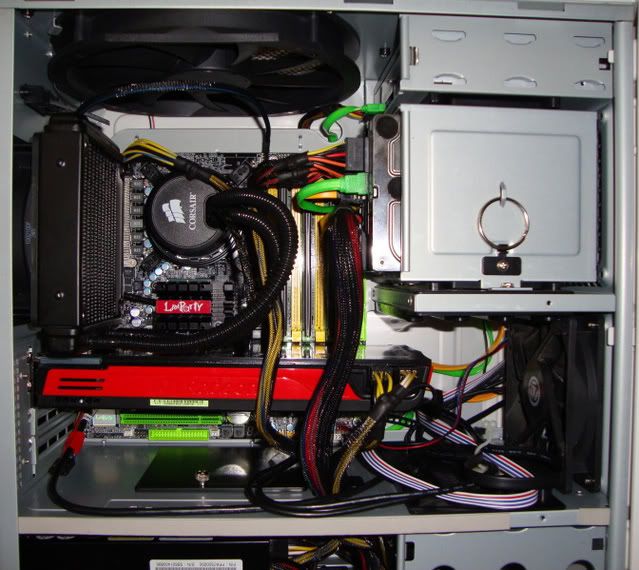
After;

A GTX 260 in SLI should be faster than a GTX 480, temperatures are what they are. The card will hit the upper 80s all the time (at load), unless you use custom cooling. That's not really a problem, unless it is for you.
What about microstutter, this is the main reason I didnt buy a 2nd GTX 260 and instead went with a single GTX 480. Plus it supports DX11
Ive seen my GTX480 hit 88C when playing Crysis and usually around 80-83C with other games. Not a big deal to me especially considering my GTX 260 ran around 81C under load
Yeah ill try the rma route if possible but I think I'm gonna upgrade regardless and just sell the 4870 if/when it gets fixed.MoFuzz said:Surprised that no one's commented on this or your previous post by now, but that most certainly looks like your graphics card is overheating/dying. I had a Radeon 9800 that died in much the way: Artifacts/odd textures in 3D apps at first followed by the same glitches in Windows/2D apps.
Furmark will stress the GPU harder than most games, which is why you don't see it very often during actual games, especially if you're primarily aheathenconsole gamer. It's only gonna get worse as time goes on. If it's still under warranty, I'd look at RMA'ing it.
JRW said:What about microstutter, this is the main reason I didnt buy a 2nd GTX 260 and instead went with a single GTX 480. Plus it supports DX11
Ive seen my GTX480 hit 88C when playing Crysis and usually around 80-83C with other games. Not a big deal to me especially considering my GTX 260 ran around 81C under load.
evil solrac v3.0 said:microstutter is a good point too(and DX11) and i notice the most in crysis. but what i wanted to ask was, will i actually see enough of an increase, say maybe 5-10% improvements in FPS and other things, on games over what i have right now?
even under load and lots of playtime, i've never reached temperatures that high, but i do have an antec 1200 with all the fans going and decently ventilated room.
Minsc said:Yup, there is more than just merely being faster, the microstutter from daisy chaining two cards can be a deal breaker for people, myself included. Much like a 5770 x2 is faster than a 5870 for less money, a 260 x2 is slightly faster than a 480 for less money. A single card system won't have the issues the SLI/XFire cards will though - from profile issues, does physx even work in SLI, to compatibility to micro-stutter and more.
I forget who, I think godhansein (I'm butchering the name, haven't seen him post in a while) said they went from SLI to a single card, and got lower framerates with the single card which felt smoother/higher than the higher framerates from the SLI configuration.
Run Crysis in a window for 10 minutes with the fan set to auto in the drivers, and see what temps you get. Obviously if you manually configure the fan, you can hit lower temps, hell my 5870 flatlines to 75C in Crysis after 10 minutes at just 30% fanspeed. If I raise the fan to like 80 or 90%, besides going deaf, I'd probably be able to play with the temps in the 50s or maybe less.
yeah, i did forget to mention i put the fans to 60%
devilchicken said:So... uhh... I couldnt resist and just went out and bought a 5770 from fry's. Ran furmark on it and so far no artifacting is present, and on top of that it seems I'll be able to get my 4870 rma'd. Now the problem is I'm afraid upgradeitis has hit once again after buying a 1tb hd and a 60gb ssd this week. [OH GOD HELP ME]. The ssd should make win7 stupid fast on bootup though, heh.
Mostly because that was within my budget and my 4870 was/is busted. Like i said earlier I dont really game much on my pc so this is more than adequate for the time being (also DX 11 and blahblah), if anything I'd get a 2nd card in the future and have them both on a crossfire configuration, but that wont happen anytime soon that I can see. As much as a better card was tempting me, i wasn't about to spend $250-$300 on a new card. Id rather get a new cpu first, my x3 720 is starting to look not that great.Mr_Brit said:Why did you go from a 4870 to a 5770 that's hardly an upgrade at all.
Yes.Mr_Brit said:Just got my new motherboard and noticed it didn't come with any screws, are they meant to come with my case?
Ehhh, not to rain on the parade, but the 5770's kind of a waste of money if the 4870 is still under warranty.devilchicken said:Mostly because that was within my budget and my 4870 was/is busted. Like i said earlier I dont really game much on my pc so this is more than adequate for the time being (also DX 11 and blahblah), if anything I'd get a 2nd card in the future and have them both on a crossfire configuration, but that wont happen anytime soon that I can see. As much as a better card was tempting me, i wasn't about to spend $250-$300 on a new card. Id rather get a new cpu first, my x3 720 is starting to look not that great.
Archie said:I am getting ready to pull the trigger within a week or so and I was wondering if I could get my potential build critiqued. My budget is hard capped at $1100, including shipping and Win7.
This is the proposed build. It is basically TechReport's Utility player with a smaller hard drive and a 5850. I was going to get a Phenom II X6, but the reviews make it seem like it is inferior to the Core i5 for gaming and I missed out on TigerDirect's $150 sale of it.
I've thought about it actually, getting the 5770 was more of an impulse buy than anything , to tell you the truth. Another thing I thought about was just selling the 4870 when it comes back and keep the 5770. What would you consider a good upgrade from the 4870 that its not crazy expensive? Something around the $250 range.MoFuzz said:Ehhh, not to rain on the parade, but the 5770's kind of a waste of money if the 4870 is still under warranty.
Are you sure you won't consider returning the Fry's purchase and just go with the replaced 4870? Performance-wise you really aren't going to see a huge difference and it just seems like you're spending $150 when you don't need to. My point is, it's not really an upgrade if you're spending money for very little performance gain. Especially if you feel you are in the market for a CPU upgrade.
Bii said:I'm in the market for a large mouse pad and not a standard size one. What recommendations do you guys have (I'm in the US)? I have a Logitech G5 Laser Wired Mouse if that matters.
Xyphie said:I like Steelpad QcK series, you can get the Qck Heavy (18"x15") if you want something huuuge. Or QPAD CT if you can get those in the US.
have you unlocked your 720?devilchicken said:Mostly because that was within my budget and my 4870 was/is busted. Like i said earlier I dont really game much on my pc so this is more than adequate for the time being (also DX 11 and blahblah), if anything I'd get a 2nd card in the future and have them both on a crossfire configuration, but that wont happen anytime soon that I can see. As much as a better card was tempting me, i wasn't about to spend $250-$300 on a new card. Id rather get a new cpu first, my x3 720 is starting to look not that great.
Yeah, I have its oc'd and running at a modest and super stable 3.2ghz.Lkr said:have you unlocked your 720?