• Hey Guest. Check out your NeoGAF Wrapped 2025 results here!

"I need a new PC!" 2010 Edition

ok just looking to upgrade my current PC(Gateway FX 510) .... BUT I have a BTX case and mobo i do have pci-e x16 and a 450 watt PS.

My current set up is:
2.4 ghz core 2 duo
2gigs of DDR2
X1900 Crossfire edition 512mbs

IF anyone could point me in the right direction i would be most grateful if no one can I understand and ill be back at a later date to after i get more money to build a new build a PC from the ground up

Thanks :)
 
autobzooty said:
Alright, I'll give it a shot tomorrow. But I don't know what you mean when you say that I could try the same settings at 3.7 or 3.8 GHz. What do I actually need to change in order to increase that? I know it has something to do with the BCLK, but could you elaborate on how to do that for me?

Also, do you think I'll really need a new heatsink even with my new motherboard?

http://www.neweditionnews.com/wp-content/uploads/2010/03/Asus_P6X58D_Premium.jpg[IMG]

^That's my board. I figured the built-in heatsinks would be plenty to keep my CPU cool enough, especially if I turn up my fans to medium or high. (Both my case fans are set to low on factory settings and I've never had a problem.)[/QUOTE]
BCLK is the base clock for your CPU. The higher your BCLK, the higher your clock speed. Like JudgeN said, a BCLK of 190 will give you a 3.8 GHz clock. Mine is set at 185 right now.

You'll definitely still need a CPU heatsink + fan. The Noctua cooler I linked to is an excellent choice. The extra fan I mentioned isn't necessary (the Noctua comes with two), I just bought it because my apartment is so stuffy I wanted all the extra airflow I could get.

I wish I had that mobo you're using, as it's essentially the same as my P6T deluxe except for having SATA 3.0 support.
 
what is a bigger benefit for speed on your computer and for games
add another 2gb of ram to make it 6 or buy a SSD thing.
 
Omiee said:
what is a bigger benefit for speed on your computer and for games
add another 2gb of ram to make it 6 or buy a SSD thing.

SSD by a mile. Will improve game loading times and benefit games that stream data (provided you install the game on the SSD).

Going from 4-6GB of ram will make virtually no difference to your gaming performence unless you like to leave other things open when you game.

The problem with them at the moment is the capacity and price. Waiting for them to get bigger and cheaper personally. Oh and for all of them to start actually supporting SATA3.
 
Okay, so, after long deliberation (longer then this should take anybody -_-) I decided to go with a 5770. Specifically, this one:

http://www.newegg.com/Product/Product.aspx?Item=N82E16814131327&cm_re=5770-_-14-131-327-_-Product

Reasoning is thus: After looking at benchmarks, I've come to the conclusion that a 5770 is worth the $50 (in this case, $35 because of the rebate) because I was stupid and forgot to consider one really important thing; Resolution! I have a 23' @ 1920 x 1080, and the 5770 performs significantly better then a 4850 or 5750. I would have loved to go with a 4870, but there actually more expensive then the 5770, despite what board members are saying here.
 
datruth29 said:
Okay, so, after long deliberation (longer then this should take anybody -_-) I decided to go with a 5770. Specifically, this one:

http://www.newegg.com/Product/Product.aspx?Item=N82E16814131327&cm_re=5770-_-14-131-327-_-Product

Reasoning is thus: After looking at benchmarks, I've come to the conclusion that a 5770 is worth the $50 (in this case, $35 because of the rebate) because I was stupid and forgot to consider one really important thing; Resolution! I have a 23' @ 1920 x 1080, and the 5770 performs significantly better then a 4850 or 5750. I would have loved to go with a 4870, but there actually more expensive then the 5770, despite what board members are saying here.

I've been saying this for the last month, but no one seems to believe me either! The 5770 will use much less power/run cooler & quieter than the 4870 as well.

There's only a dozen games where the 4870 significantly beats the 5770, and the rest is pretty irrelevant, or the 5770 is actually faster!

DiRT 2 is a $40 game at normal price at Steam, so the card's like $100 if you plan on playing it (and you should)!
 
nyprimus2 said:
Out of curiosity, how long does it take to rip a DVD using a high end desktop?

About 320fps on a i7 920 (a 90 minute movie in under 7 minutes) using classic legacy settings on Handbrake, no fancy b-frame, super-high searching. Tweaking the settings to be as absolutely crazily high quality as they can get, it drops it down to be about 10x slower (still faster than real time)!

So I guess ymmv depending on CPU and quality settings used.
 
Alienware's M15x gaming notebook has received its first GPU refresh, the Mobility Radeon 5850 GDDR5.

Where's that guy, whom I was trying to convince to wait for this? :lol
 
K.Jack said:
Alienware's M15x gaming notebook has received its first GPU refresh, the Mobility Radeon 5850 GDDR5.

Where's that guy, whom I was trying to convince to wait for this? :lol

What are the chances of them ever getting a quadcore or hexacore in a 11" notebook?
 
GHG said:
SSD by a mile. Will improve game loading times and benefit games that stream data (provided you install the game on the SSD).

Going from 4-6GB of ram will make virtually no difference to your gaming performence unless you like to leave other things open when you game.

The problem with them at the moment is the capacity and price. Waiting for them to get bigger and cheaper personally. Oh and for all of them to start actually supporting SATA3.
SSDs are hit and miss as far as game load times are concerned. I agree that an SSD is the better overall investment, but that one piece of information isn't accurate. In some games it will improve loading, in others it will be worse, and in most it will be essentially the same.

I wouldn't buy one solely for the gaming benefits, because they'll hardly exist (and game installations will quickly eat away at its capacity); instead, buy one knowing your PC will suddenly be charged with the anger of Thor, pumping steroids directly into your OS until it is literally bursting with power.
 
Question?
Regarding Nividia Control Panel

How do I remove games from "Global Setting"?

It seems the only games (Metro/Dirt 2) that are available in Global Setting are the only games not recognizing the Sli configuration and running on Single GPU.

Is there a way to remove them?


Thanks ..
 
Minsc said:
What are the chances of them ever getting a quadcore or hexacore in a 11" notebook?
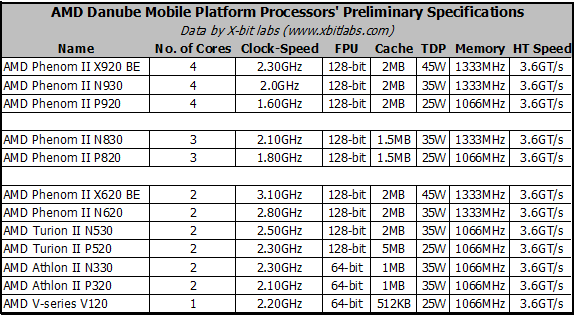
Quad core will come with AMD's 'Llano' and Intel's 'Sandy Bridge', both 32nm processes.

But AMD's new quad and tri cores....

amd_danube_chips_specs.gif


.... could probably make their way into 13" notebooks.

Acer, Dell, and MSI have announcements forthcoming.
 
Crunched said:
BCLK is the base clock for your CPU. The higher your BCLK, the higher your clock speed. Like JudgeN said, a BCLK of 190 will give you a 3.8 GHz clock. Mine is set at 185 right now.

You'll definitely still need a CPU heatsink + fan. The Noctua cooler I linked to is an excellent choice. The extra fan I mentioned isn't necessary (the Noctua comes with two), I just bought it because my apartment is so stuffy I wanted all the extra airflow I could get.

I wish I had that mobo you're using, as it's essentially the same as my P6T deluxe except for having SATA 3.0 support.

I know I need a CPU heatsink + fan, but what I meant was, do I need a NEW one? The one I have is not the one that came with my CPU, but it's pretty similar. The one that came with my CPU had its latches break (cheap piece of crap), so I went and bought one as similar as I could so it'd fit in the same slot. I just cracked open my case and it says it's from Intel, but the only other info on it is a bunch of random numbers and letters.

Will I really need to buy a whole new one in order to overclock?

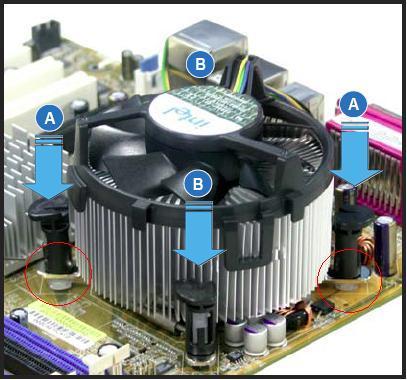
edit: this is more or less my heatsink + fan

Intel%20Stock.2.jpg


combine that with the crazy heatsinks on my MB and I should be able to overclock without any trouble, right?
 
The real question is which kind of temperatures do you get at the moment, under load most importantly, if they're low then no need for a new HSF. You should run something like Prime95 and see what kind of temperatures you get, obviously that will be max load, higher than when currently playing any game, but that will account for possibly having to turn up your CPU voltage.
 
Colkate said:
The real question is which kind of temperatures do you get at the moment, under load most importantly, if they're low then no need for a new HSF. You should run something like Prime95 and see what kind of temperatures you get, obviously that will be max load, higher than when currently playing any game, but that will account for possibly having to turn up your CPU voltage.
This is the best place to start. I've seen people claim they've reached OCs as high as 3.4GHz on stock voltages with i7 920s. Check your temps, report back. I would assume at stock clocks you should be about 35C idle and no more than 65C under load. You may have some headroom for a basic overclock using the heatsink you have right now, but anything over that and you'll need something much better.

Gotta warn you that depending on your case you may have a bit of a hassle installing a new i7 heatsink- most require the installation of a backplate on your motherboard, and unless your case has a hole behind the CPU slot, you'll need to remove your entire mobo to get the sink installed.

I just bought some Shin-Etsu X23-7783D to reseat my heatsink (my idle temps have ballooned recently), and I'm not looking forward to taking my PC apart just to reapply thermal paste (my case is an Antec Twelve Hundred).
autobzooty said:
combine that with the crazy heatsinks on my MB and I should be able to overclock without any trouble, right?
You can overclock it, but not safely. Your temps will likely be dangerously high, especially if you push for 4GHz.
 
VnUsZ.jpg


This is what the window looks like while I'm running Prime95. I'm at all factory settings and all my fans are on low. i.e., this is my computer just being normal. Correct me if I'm wrong, but isn't that temperature ridiculously high? Granted I don't usually work my computer as hard as Prime95 currently is, but still.
 
autobzooty said:
VnUsZ.jpg


This is what the window looks like while I'm running Prime95. I'm at all factory settings and all my fans are on low. i.e., this is my computer just being normal. Correct me if I'm wrong, but isn't that temperature ridiculously high? Granted I don't usually work my computer as hard as Prime95 currently is, but still.
OH GOD STOP LOADING ITTTTTTTTTTTTT

Don't let that fucker get over 70C let alone almost hit 100C.

Reseat and double check thermal paste and if it making good contact.
 
Hazaro said:
OH GOD STOP LOADING ITTTTTTTTTTTTT

Don't let that fucker get over 70C let alone almost hit 100C.

Reseat and double check thermal paste and if it making good contact.

:|


I didn't build this one, some dudes at Fry's Electronics did. I don't wanna try to undo all their work, but apparently they might have fucked it up?

Dammit, what now.
 
Mr_Brit said:
Return it.

Seriously considering it. Not sure what they could have done to make it get so ridiculously hot.

Still, i only get up to 60 degrees playing TF2. The likelihood of my computer ever being worked as hard as prime95 was working it is pretty slim. But at the same time, I'm trying to overclock here. :|
 
autobzooty said:
VnUsZ.jpg


This is what the window looks like while I'm running Prime95. I'm at all factory settings and all my fans are on low. i.e., this is my computer just being normal. Correct me if I'm wrong, but isn't that temperature ridiculously high? Granted I don't usually work my computer as hard as Prime95 currently is, but still.
it could boil water :o
 
autobzooty said:
Seriously considering it. Not sure what they could have done to make it get so ridiculously hot.

Still, i only get up to 60 degrees playing TF2. The likelihood of my computer ever being worked as hard as prime95 was working it is pretty slim. But at the same time, I'm trying to overclock here. :|

tolerable idle combined with crazy load temp is the red hand of a shoddy heatsink installation job.

those intel heatsink plungers are dicks, i wouldn't trust anyone but myself with getting it right.
 
Just bring it in and tell them that under load it gets far too hot and have them remount the heatsink.

You could do it yourself too, just need some thermal paste.
 
I have some thermal paste in my side drawer, funnily enough. I'll try reseating the heatsink a bit later before I throw a hissy fit, but if it happens again, I might just have to shell out for a new heatsink just to have a stable computer. Ugh.
 
Just be careful to make sure the pins on the bottom actually catch and go through the motherboard fully. It's probably 1 or 2 pins that are slightly lifted.
 
Hi gaf I think I'm ready to buy a graphics card, I have an i7 processor and 6gb of DDR3 ram. Could you recommend me a cheap/mid/high end graphics card please so I can choose.

New to pc gaming don't know what I need to play newer games :) Thanks

oh yea I'm UK buyer
 
Hazaro said:
What resolution are you running? Are you looking for 60fps and/or max settings? What games are you looking at?

I have a 23' 1080p monitor, I'd rather it be smooth, but would settle for CONSTANT 30 for max settings. Games? I am looking for pretty ones :D I am shallow like that.

edit: are the rest of my specs good enough?
 
Hello. I am looking at upgrading to a better CPU. My current system specs are below:

AMD Athlon X2 6000+
ASUS M2N-E AM2 NVIDIA nForce 570 Ultra MCP ATX AMD Motherboard
8800GTS 640MB
2GB
Windows Vista Home premium

I'm only looking at a CPU upgrade and I was thinking of the AMD Phenom II X6 1090Tl.
My question is the CPU has a Socket AM3 but my motherboard is AM2, will it be compatible?
 
besiktas1 said:
I have a 23' 1080p monitor, I'd rather it be smooth, but would settle for CONSTANT 30 for max settings. Games? I am looking for pretty ones :D I am shallow like that.

edit: are the rest of my specs good enough?


The rest of your specs are good, personal recommendations in price order would be 5770, 5850, 5970, low to high, 5870 also worth looking into depending on budget, I can't say much for Nvidia at the moment really.
As you say you're in the UK, Overclockers, Ebuyer and Scan are usually where I do my component shopping.


akskiller said:
Hello. I am looking at upgrading to a better CPU. My current system specs are below:

AMD Athlon X2 6000+ @3.0Ghz
ASUS M2N-E AM2 NVIDIA nForce 570 Ultra MCP ATX AMD Motherboard
8800GTS 640MB
2GB
Windows Vista Home premium

I'm only looking at a CPU upgrade and I was thinking of the AMD Phenom II X6 1090Tl.
My question is the CPU has a Socket AM3 but my motherboard is AM2, will it be compatible?


Can I ask why you're looking into a CPU upgrade? With that system a better processor would be seriously bottlenecked, unless of course you're not after a gaming set up. Also, if that motherboard has an AM2 socket as you say, then no Phenom II will be compatible, you'd need a AM2+ or AM3 socket.
 
Hazaro said:
OH GOD STOP LOADING ITTTTTTTTTTTTT

Don't let that fucker get over 70C let alone almost hit 100C.

Reseat and double check thermal paste and if it making good contact.

The i7 line can safely run 24/7 at 80C, over 70C is fine, you just want to stay under 80C.

Obviously 98C is not :lol
 
Ok what If I get:

MSI P55-CD53 LGA 1156 Intel P55 ATX Intel Motherboard
Intel Core i5-750 Lynnfield 2.66GHz LGA 1156 95W Quad-Core Processor
G.SKILL Ripjaws Series 4GB (2 x 2GB) 240-Pin DDR3 SDRAM DDR3 1600 (PC3 12800)

and keep the 8800GTS
 
Christ, for a second there I had a bunch of purple dots all over my screen. I thought maybe my CPU got burned up a bit from that 98 degree work session it had. The dots went away after I changed the resolution and changed it back, but I swear to god, if my CPU is broken because Fry's botched the setup of my machine, I'm going to throw a big hissy fit and demand they pay for the new parts.
 
akskiller said:
Ok what If I get:

MSI P55-CD53 LGA 1156 Intel P55 ATX Intel Motherboard
Intel Core i5-750 Lynnfield 2.66GHz LGA 1156 95W Quad-Core Processor
G.SKILL Ripjaws Series 4GB (2 x 2GB) 240-Pin DDR3 SDRAM DDR3 1600 (PC3 12800)

and keep the 8800GTS
A lot of people have been having problems with that RAM. Cold boot issues on P55 boards. You can RMA for a good set, and G.Skill has excellent customer support, though.
 
Anyone ever Overclocked an i5 750 Lynnfield? Thinking of taking mine up to about 3.2 on Stock air cooling. Need to push performance for Splinter Cell Conviction :lol
 
ghst said:
tolerable idle combined with crazy load temp is the red hand of a shoddy heatsink installation job.

those intel heatsink plungers are dicks, i wouldn't trust anyone but myself with getting it right.

I'll raise you and say those intel heatsinks should just all be thrown in the trash.

I take great care in installing those pieces of crap, but my buddy who's rig I built who moves around his machine a lot (he's big on LANs) brought his PC to my buddy's house once and I noticed it was rather loud. Open the fucker up and the shitty intel heatsink is half falling off.

A real heatsink only runs $20-$30 if you don't need the absolute bee's knees.

Sebulon3k said:
Anyone ever Overclocked an i5 750 Lynnfield? Thinking of taking mine up to about 3.2 on Stock air cooling. Need to push performance for Splinter Cell Conviction :lol

If you're getting shitty performance, it's just your computer trying to save you from the horror.
 
TouchMyBox said:
If you're getting shitty performance, it's just your computer trying to save you from the horror.

I usually have good performance in most games I play at 2.6, just there isn't a benchmark tool for it, and I have money to spend on something.

Looked up some Benchmarks and wanna get a stead 40ish frames, figured it'd be a good excuse to try OCing, or are you referring to the quality of the game?
 
I'm hoping you Computer guys could help me out here. I'm planning on getting a computer that's a refurb/scratch-n-dent due to me spending money on programs rather than saving for the comp.

It should cost me about 700+tax.

The specs are:
Studio XPS 8100
Windows 7 Home Premium
8 GB DDR3 SDRAM 1333MHz
1 TB SATA 3Gb/s Hard Drive (7200RPM) w/ 16MB DataBurst CacheVideo
1 GB ATI Radeon HD 5450 DDR3 (or a 1gb gt220 which I heard sucks but should be fine for me)
Thermal Module Heatsink,73WProcessor
Intel Core i5-650M Processor (3.20GHz,4M cache)
Dell 1525 Wireless-N PCIe Card
16X DVD +/- RW w/dbl layer write capability

2 questions here. Is this a great computer? And more specifically I'm an artist so I'll be using somewhat taxing programs so I should be OK right? Just to give you an idea I have:

Painter 11
Corel Draw X5
Toon Boom Studio
Adobe Production Premium cs3
Adobe Design Premium cs5 (soon acquiring)

edit: I do game so that's important as well - although the newest best looking max settings are not.
 
I suspect my laptop's hard drive is failing as..

  • It goes on and off with clicking sounds.
  • Sometimes my hard drive isn't recognized when I boot up so I have to shut it back down because I get a blank screen and I have to click F9 or whatever it is and manually select my hard drive as opposed to my DVD burner drive.
  • My laptop crashed this week. Apparently when I closed it and then opened it back up 20 minutes later it had shut off so when I booted it back up I got prompted with a Windows thing trying to help me out with my computer crash.
  • Last week I booted up and it took a good 5+ minutes to get going. It usually takes a couple minutes at most to get me to my sign in screen.
  • I had a virus recently that was a real pain in the ass to get rid of. The clicking sounds and having to select my hard drive as opposed to my DVD burner were problems before the virus though.

Here is a picture of my SMART info from DiskCheckup: http://i47.tinypic.com/w7n28w.jpg

Any ideas?
 
autobzooty said:
Mr_Brit said:
Return it.
Seriously considering it. Not sure what they could have done to make it get so ridiculously hot.
autobzooty said:
Christ, for a second there I had a bunch of purple dots all over my screen. I thought maybe my CPU got burned up a bit from that 98 degree work session it had. The dots went away after I changed the resolution and changed it back, but I swear to god, if my CPU is broken because Fry's botched the setup of my machine, I'm going to throw a big hissy fit and demand they pay for the new parts.
I was under the impression that you purchased a second hsf and installed it yourself after the one that came with the build snapped. If so, how would Fry's be accountable if you do in fact have any issues with the CPU?
 
·feist· said:
I was under the impression that you purchased a second hsf and installed it yourself after the one that came with the build snapped. If so, how would Fry's be accountable if you do in fact have any issues with the CPU?

No, I replaced the broken heatsink around a year ago. But just a couple days ago Fry's did a full diagnostic on my broken machine and installed a replacement motherboard and PSU. So they had to put all my old components on the new board, and it seems likely that they didn't put the heatsink on properly.

I'm considering just biting yet another bullet though and just buying the heatsink everyone has been recommending me. I mean, I've come this far.....
 
I see. Like another poster mentioned though, even when installed properly, the pins can come loose a bit or slide out completely. Even if they have no intentions of overclocking, I'd say that most people owe it to their PCs to get a $20-25 HSF, at the minimum.

Also, if the HSF that you're considering uses pushpins, I'd recommend that you look into a screw/spring or bolt kit for a more secure mounting. Likewise, you could buy a simple backplate and then pick up screws and washers from a local hardware store.

http://www.newegg.com/Product/Product.aspx?Item=N82E16835610011
 
Sebulon3k said:
I usually have good performance in most games I play at 2.6, just there isn't a benchmark tool for it, and I have money to spend on something.

Looked up some Benchmarks and wanna get a stead 40ish frames, figured it'd be a good excuse to try OCing, or are you referring to the quality of the game?

Was referring to the game I think. ^^

As for Overclocking a 750, you're in luck because they are very overclockable. I've been looking into them a lot recently and it seems getting them up to 3.8 - 4.2GHz is very doable, how high exactly depends on what temperatures/power consumption you're comfortable with though. This should help.
 
TurtleSnatcher said:
i3 and i5 wont be that big of an upgrade really.

i7's yes.. but now your sacrificing battery life which the m11x was really known and price. Unless they can stick a bigger battery in there.. but Im doubting it.

i7 won't be that big of an upgrade either (if we're saying the i5 isn't), as the ULV i7s only have 2 physical cores (not 4 like normal i7s). The i7s with the Q in their name have 4 cores (8 with the HT)... those would be a more significant upgrade. I got a Dell laptop last year, a 4-core i7, and the battery is fine in it, I can easily get the advertised time... it wasn't one of those 10 hour laptops, so I didn't expect that, but I get my 4+ hours no problem, which is great, as my last laptop didn't even get 2 hours unplugged.
 
Minsc said:
i7 won't be that big of an upgrade either (if we're saying the i5 isn't), as the ULV i7s only have 2 physical cores (not 4 like normal i7s). The i7s with the Q in their name have 4 cores (8 with the HT)... those would be a more significant upgrade. I got a Dell laptop last year, a 4-core i7, and the battery is fine in it, I can easily get the advertised time... it wasn't one of those 10 hour laptops, so I didn't expect that, but I get my 4+ hours no problem, which is great, as my last laptop didn't even get 2 hours unplugged.

How many battery cells do you have? I get like 2.5ish hours on my 6 cell battery with my 720QM. I've been looking a bit into these high density batteries for my laptop i've seen around online but I'm not sure how legit they are.
 
Top Bottom