
• Hey Guest. Check out your NeoGAF Wrapped 2025 results here!

"I need a new PC!" 2010 Edition

·feist· said:
Do you really think that they'll come anywhere close to filling up a 1TB drive? If so, get that same 1TB Samsung F3 for $65 from here:

http://www.microcenter.com/single_product_results.phtml?product_id=0340562


Sounds like a smaller HDD should more than meet all of their needs. The Samsung F3 500GB is $45 here:

http://www.microcenter.com/single_product_results.phtml?product_id=0340804


As for CPU/mobo, you can try what this what this member mentioned:The X4 630 is one of three combo deals that they're running. Theses are the rest:

http://www.microcenter.com/specials/promotions/0720_AMDbundle.html


The board that comes free with the CPU doesn't have HDMI like the Asus that you're considering, though. For pics and reviews check out:

http://www.newegg.com/Product/Product.aspx?Item=N82E16813138182


Arrggh.. Those seem like great combo deals, but in the cart they all say 'in store pickup only' and there is no store near Vegas. Maybe I'll hold out for a couple more days.
 
Ugh, I'm baffled by these results. I'm thinking it's my case space since it's a mid tower but I just recently got the hyper 212+ for my cpu. Thinking I'd be finally able to OC my CPU (Phenom II 940 BE) and I have idle temps of 42C. I'm not sure what it is. I've remounted the 212+ a few times with cleaning off the paste and re-applying. What gives?

Edit: Full load at 65c. Something just doesn't fly. I'm thinking the case. I dunno.
 
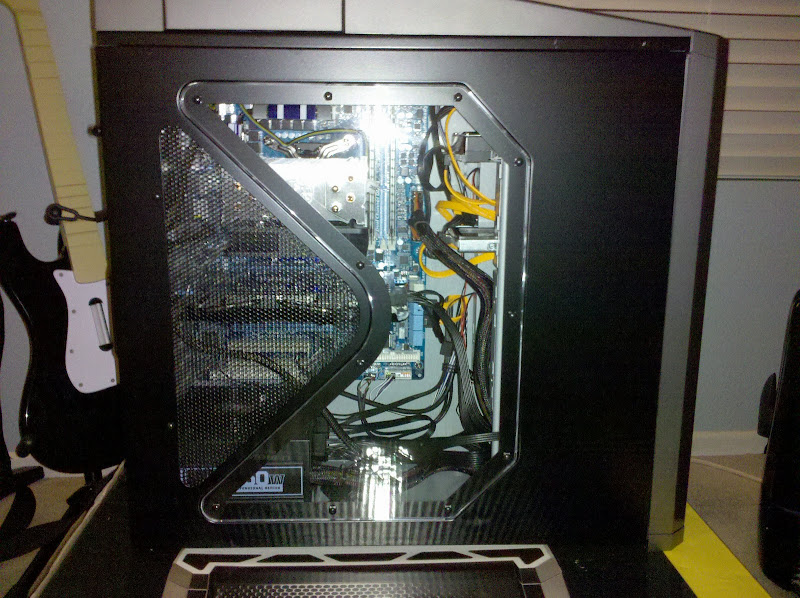
Finally finished! Cabling took forever...definitely not the best job in the world, but it looks worlds better than it did when I first installed everything. :lol

2010-07-21%2023.23.34.jpg
 
I bought a new PSU to replace a failing one, and all my past ones had the intake fan on the bottom of the PSU.

This new one has it on the top. Is it okay if I mount my PSU upside down to allow for intake of air, or can I leave it rightside up?
 
cramcakes said:
Arrggh.. Those seem like great combo deals, but in the cart they all say 'in store pickup only' and there is no store near Vegas. Maybe I'll hold out for a couple more days.
Hmm... I believe those F3 HDD prices should be good online, at least. Do you live near a Fry's? They seem to regularly offer cpu/board combos, so that's always another good source to check out. Their best deals tend to be b&m only.
 
Hazaro said:
If you want CPU upgradability on the same socket AM3 is the best choice. If you don't want AMD get an i5-750 and clock it.
12GB is wasteful unless for some reason you need it. Get 4 or 6 GB.
1000W is far too much. A good 750W will SLi 2 GTX460's. 5970 gross waste of money right now.
WD Blue 128GB a good alternative drive if in stock.
Get a Asus Sonar over an X-Fi.
Swap in a Hyper 212 instead of the H50.

That's £400 saved right there. I'd look at some other cases as well. Shave off another £80.

*Reposting*
1)Basic Desktop Questions
Budget: Price Range + Country
Main Use: Gaming, Video editing, or just general usage
Monitor Resolution: What resolution will you be playing your games at? Are you going to upgrade later?
List SPECIFIC games that you MUST be able to play: Self Explanatory

2)General Guide on what to buy (Summer)
Hazaro's buying guide (July, 2010)
De facto internet standard. Accept no substitutes :D
Tech Report Builders Guide!
A very good basic guide that has been updated for Summer. Has alternative options and many price points.


I updated my cart, following some of your advices:


As for video card, I would like a GPU able to run very very well FFXIV (best specs, if possible). What would you suggest?

Thank you very much.
 
Ciccio_Drink said:
I updated my cart, following some of your advices:


As for video card, I would like a GPU able to run very very well FFXIV (best specs, if possible). What would you suggest?

Thank you very much.
No offense but that cart is filled with way too much stuff you don't need such as that ridiculous motherboard and RAM. Unless you have a specific reason for getting those things then you should cut the amount of money you're spending on those things in half. Also don't get that GPU, get two 1GB GTX 460s. As for the OS unless you need W7 ultimate then get home premium instead. Also shop somewhere like scan or ebuyer, they have much better prices. As it is now I couldn't recommend any of those components except the CPU cooler and CPU, everything else is either complete overkill or horribly overpriced.
 
HAY GUYS

What's the best software for testing a HDD for errors / bad sectors / general shittiness indicating that it needs to be replaced?
 
Sanjay said:

Pretty much everything except for the chassis change. In my personal experience, there is nothing better than that sexy ass 800D.
 
Nightz said:
Finally finished! Cabling took forever...definitely not the best job in the world, but it looks worlds better than it did when I first installed everything. :lol

http://lh4.ggpht.com/_bpt0FkW6sRk/TEfqitTitfI/AAAAAAAAABY/DKGHTxsDyto/s800/2010-07-21%2023.23.34.jpg[IMG][/QUOTE]
Looks rather tidy to me especially that you have cables inside that black netting stuff, my old machine use to have a billion wires sticking out of everything in fruity yellows, reds and blues :lol but my new pc looks a little like yours but no window on the side and of course not as good processor and all that.
 
Nightz said:
Finally finished! Cabling took forever...definitely not the best job in the world, but it looks worlds better than it did when I first installed everything. :lol

2010-07-21%2023.23.34.jpg

It's going to be funny when I finally get my picture up.

1) It will look the EXACT same.
2) I will pretty much say the same thing.
:lol
 
I still think I should be getting better performance from my heat sink. My idle core temperatures are around 35-38C and at full load I'm hitting 68-70C with Prime95. For me, those temperatures are acceptable considering that my chip is overclocked to 3.85Ghz but I'm a little disappointed. I have the Thermalright Ultra 120 Extreme, which always reviews very well, but I think my results are mediocre at best. I reapplied thermal paste and reseated the heatsink but the result are still pretty much the same. Maybe I'll post some pics when I get home and get some advice from you fine folks.

Also, I shouldn't have wasted my money; I absolutely should have gone with the hyper 212+ but I didn't do enough research, unfortunately.
 
Felix Lighter said:
I still think I should be getting better performance from my heat sink. My idle core temperatures are around 35-38C and at full load I'm hitting 68-70C with Prime95. For me, those temperatures are acceptable considering that my chip is overclocked to 3.85Ghz but I'm a little disappointed. I have the Thermalright Ultra 120 Extreme, which always reviews very well, but I think my results are mediocre at best. I reapplied thermal paste and reseated the heatsink but the result are still pretty much the same. Maybe I'll post some pics when I get home and get some advice from you fine folks.

Also, I shouldn't have wasted my money; I absolutely should have gone with the hyper 212+ but I didn't do enough research, unfortunately.

The TRUE is my favorite air cooling heatsink I've ever used. Do you have 2 fans in push/pull on there, or just one? Also, what chip do you have, and how many volts are you running on the v-core? 70C under load is perfectly acceptable.
 
demosthenes said:
Is the best way to get this by just playing a game?
In OP
Felix Lighter said:
I still think I should be getting better performance from my heat sink. My idle core temperatures are around 35-38C and at full load I'm hitting 68-70C with Prime95. For me, those temperatures are acceptable considering that my chip is overclocked to 3.85Ghz but I'm a little disappointed.
I have the Thermalright Ultra 120 Extreme, which always reviews very well, but I think my results are mediocre at best. I reapplied thermal paste and reseated the heatsink but the result are still pretty much the same. Maybe I'll post some pics when I get home and get some advice from you fine folks.

Also, I shouldn't have wasted my money; I absolutely should have gone with the hyper 212+ but I didn't do enough research, unfortunately.
The TRUE should outcool the 212... at least I would think so.
I have a TRUE 120 myself and was planning to buy a socket/adapter kit for AM3/1156 for whatever I chose.

What paste / fans are you using? Do temps drop if you open your case door?
And check in windows if your voltage really is 1.25V.

If none of those are a factor you might simply have a hot running chip.
 
When I was OC'ing my 260 I was using ATItool to push it into high temps but gameplay will always be a little or a lot less, it's a good thing because you can either clock it a little more or know you will always be under your stress temps.
 
Hazaro said:
In OP

The TRUE should outcool the 212... at least I would think so.
I have a TRUE 120 myself and was planning to buy a socket/adapter kit for AM3/1156 for whatever I chose.

What paste / fans are you using? Do temps drop if you open your case door?
And check in windows if your voltage really is 1.25V.

If none of those are a factor you might simply have a hot running chip.

Yeah the TRUE should be better according to reviews but it cost me 3x more than the 212+. I guess if I was getting better temperatures, it wouldn't bother me so much.

I'm using Arctic Silver 5 thermal paste. The voltage reads 1.216v in CPUZ and 1.22 in OCCT (it's set to 1.23 in my BIOS). I haven't run it much with the door off; I can try that when I get home. I'm just using the fans that came with case and the one that came with the TRUE. There is a 140mm front fan, a 120mm fan in the rear, a 140mm fan on the top and a 120mm fan on the heatsink. The case is a CM 690 II.

Maybe my chip isn't as great as I thought.

Mystery said:
The TRUE is my favorite air cooling heatsink I've ever used. Do you have 2 fans in push/pull on there, or just one? Also, what chip do you have, and how many volts are you running on the v-core? 70C under load is perfectly acceptable.

It's an i7 930 and I only have one fan on the heatsink.
 
I had this posted in the M11x thread but I think it should have probably been posted here. My friend has asked me to help him find a laptop for Starcraft 2, and while I've done considerable research for my desktop build I'm in the dark when it comes to laptops.

His budget is ~$800, but the thing is that he has to buy it through AAFES (Army & Air Force Exchange Services). Luckily I found out that they offer the M11x through the site, with a $100 discount even, but I'm not so sure how fond he will be of the small size and no optical drive.

Here's what I've seen so far:

Alienware M11x
Price $799.00
EPP Discount $100.00
Price $699.00


Overclockable Intel® Core™2 Duo SU7300 1.3GHz (3MB Cache)
2GB Dual Channel DDR3 at 800MHz 160GB SATAII 5, 400RPM
Genuine Windows® 7 Home Premium, 64bit, English

With the upgrade option to 4GB RAM (+$50) and a 320 GB HDD (+$75) the total comes to $825

HP Pavilion 17.3" AMD Turion™ II Dual Core P520 320GB Entertainment Notebook

Price...$795.00


Now there’s a notebook PC made for the way you play. In fact, the HP Pavilion dv7 comes with software that lets you start playing right out of the box. With amazing graphics, audio and video, plus a wide array of options, the HP Pavilion dv7 Entertainment series notebook delivers power and performance to match your fast-paced lifestyle. Exclusive HP MediaSmart software gives you instant access to the music and movies you love. Immerse yourself in videos, games and 3D graphics on the high-definition 17.3" diagonal HP BrightView LED display. With the large hard drive, you can store volumes of data, movies and music. Expand your entertainment with a Blu-ray Disc™ optical drive for stunning HD video and digital audio.

Model: HP-dv7-4061NR

Operating System: Microsoft® Windows® 7 Home Premium 64-bit

•VISION Technology from AMD - Premium with AMD Turion II Dual-Core Mobile Processor P520
•2.3GHz processor speed
•2MB L2 Cache
•Up to 3.6 GT/s system bus running at AC/DC mode 25 watt
•4GB DDR3 System Memory (2 DIMM); Max supported = 8GB
•2 accessible memory slots
•ATI Mobility Radeon™ HD 4520 Graphics with 128MB Display Cache Memory with 128MB DDR3 (sideport memory) with up to 2054MB total graphics memory
•320GB (7200 RPM) Hard Drive (SATA) with HP ProtectSmart Hard Drive Protection
•HP TrueVision Webcam with integrated digital microphone
•HP SimplePass with integrated fingerprint reader
•LightScribe Blu-ray ROM with SuperMulti DVD±R/RW Double Layer Support
•17.3" diagonal High Definition+ HP BrightView LED Display (1600 x 900)
•Integrated 10/100/1000 Gigabit Ethernet LAN (RJ-45 connector)
•Wireless LAN 802.11b/g/n WLAN
•5-in-1 integrated Digital Media Reader
•Beats™ Audio and HP Triple Bass Reflex Subwoofer
•101-key compatible with island-style full-size keyboard with integrated numeric keypad
•HP ClickPad with On/Off button
•4 USB 2.0 ports; 4th port shared with eSATA
•HDMI™ port
•eSATA + USB 2.0 port
•VGA (15-pin) port
•RJ-45 (LAN) port
•Headphone-out port
•Microphone-in port
•Kensington® MicroSaver lock slot
•Power-on password
•Accepts 3rd-party security lock devices

Color: Brushed aluminum finish with the stream design in argento

Power: 65W AC Adapter; 9-Cell 93WHr Lithium-Ion Battery; 110-240V (auto adjusts), AC, 50/60Hz

Size: 1 1/4"-1 3/8"H x 16 3/8"W x 10 3/4"D

Toshiba® Satellite 17.3" AMD Phenom™ II Triple Core P820 1.8GHz 500GB Notebook

Price...$795.00


For those seeking a super-size PC with desktop-like performance plus Toshiba quality, style and value, the Satellite L675 laptop is a great choice. Whether you’re working, studying, creating multimedia or just up for widescreen high-definition entertainment, the 17.3" diagonal TruBrite® HD display on this notebook makes it better. And for those thinking about replacing their desktop computer, this PC offers a multi-core processor from AMD, a DVD player, along with all the memory and storage needed to tackle whatever the day may bring. Toshiba "Smart" Features, such as a TouchPad™ with multi-touch control and a PC Health Monitor, mean you can do more and worry less. With Wi-Fi, a webcam and plenty of expansion ports, you’ll have all the freedom you need to do your best.

MODEL: L675D-S7022

OPERATING SYSTEM: Microsoft® Windows® 7 Home Premium (64-bit)

•Energy Star®, EPEAT Gold compliant
•AMD Phenom II Triple Core Processor P820 1.8GHz
•1.5MB L2 cache
•4GB DDR3 RAM (max. 8GB)
•500GB 5400 RPM SATA hard disk drive
•Blu-ray Disc™ ROM and DVD SuperMulti drive w/ Labelflash supporting 12 formats
•17.3" diagonal widescreen TruBrite TFT LCD display at 1600 x 900 native resolution (HD+)
•ATI Mobility Radeon™ HD 4250 Graphics w/ 256MB-1405MB dynamically allocated shared graphics memory
•Webcam and microphone w/ Toshiba Face Recognition software
•5-in-1 memory card reader
•eSATA/USB combo port
•Wi-Fi wireless networking 802.11b/g/n
Includes:

•6-cell rechargeable battery (3-hr., 48-min. battery life)
•AC adapter
•Various Toshiba software and utilities

Color: Fusion™ Finish in Helios Gray

Power: 110-240V (auto adjusts), AC, 50/60Hz

Size: 1 1/2"H x 16 1/4"W x 10 5/8"D

Weight: 6.6 lbs.

MSI C Series 15.6" Intel® Core™ i5-430M 2.26GHz 500GB Notebook

Price...$819.00


MSI’s concise and refined classic cross-hatch design uses high-tech color film print technology for a dazzling look. The sparkling, scratch-resistant enamel provides a high degree of rigidity. Abandoning the stereotype of thick, heavy traditional notebooks, the C Series offers a thinner, lighter solution for more convenient usage. And it’s easier for you to take it on the move.

MODEL: MSMCR620-31US

OPERATING SYSTEM: Microsoft® Windows® 7 Home Premium

•Intel Core i5-430M Processor 2.26GHz
•3MB L2 cache / 1066MHz FSB
•4GB DDR3 system memory
•500GB 5400 RPM SATA hard drive
•DVD SuperMulti drive
•15.6" WXGA LCD display (1366 x 768)
•Intel Graphics Media Accelerator HD graphics card
•Built-in 1.3MP webcam
•4-in-1 card reader
•802.11b/g/n WLAN
Includes:

•6-cell rechargeable battery
•AC adapter
•Microsoft Office 2007 60-day trial
•Owner’s manual
•Warranty information
Color: Black

Power: 110-240V (auto adjusts), AC, 50/60Hz

Size: 3/4" - 1 1/8"H x 14 3/4"W x 9 3/4"D

Weight: 5.46 lbs.

MSI Classic Series 16" Intel® Pentium® Dual Core T4300 2.1GHz 320GB Notebook

Price...$695.00


MSI CR600 combines slim style design and functionality, making it perfect for everyone and every day. Weighing a little more than 5 lbs. with battery, the CR600 is easy to carry and lighter than most 16" notebooks. Open the laptop to find a touchpad that lets you feel the high-quality design. Classic Series brings together luxurious style with practical use.

MODEL: MSMCX600-63US

OPERATING SYSTEM: Microsoft® Windows® 7 Home Premium

•Intel Pentium Dual Core T4300 Processor 2.1GHz
•1MB L2 cache / 800MHz FSB
•4GB system memory
•320GB 5400 RPM SATA hard drive
•SuperMulti drive
•16" WXGA LCD display (1366 x 768)
•ATI Mobility Radeon HD 4330 graphics card
•Built-in 1.3MP webcam
•Built-in Bluetooth® 2.0
•802.11b/g/n WLAN
Includes:

•6-cell rechargeable battery
•AC adapter
•Microsoft Office 2007 60-day trial
•Owner’s manual
•Warranty information
Color: Black

Power: 110-240V (auto adjusts), AC, 50/60Hz

Size: 5/8" - 1 1/8"H x 14 3/4"W x 9 3/4"D

Weight: 5.46 lbs.

Unfortunately I can't post links since the site requires a password. Any graphics cards or brands (or anything else) that I should stay away from? Main brands they seem to offer are Asus, Acer, HP, Toshiba, MSI Ibuypower and Dell.

The good thing about the M11x is that it seems to run SC2 pretty well from a youtube link someone posted earlier in the thread but its downfall is that I know he will want the optical drive and probably a larger screen. I don't think battery life is too big of a concern since he will just be plugging it in where ever he goes. Thanks for the help.
 
Felix Lighter said:
I'm using Arctic Silver 5 thermal paste. The voltage reads 1.216v in CPUZ and 1.22 in OCCT (it's set to 1.23 in my BIOS). I haven't run it much with the door off; I can try that when I get home. I'm just using the fans that came with case and the one that came with the TRUE. There is a 140mm front fan, a 120mm fan in the rear, a 140mm fan on the top and a 120mm fan on the heatsink. The case is a CM 690 II.

Maybe my chip isn't as great as I thought.
Hmm. Once the AS5 sets in you can lose 3-5C, but your voltage is pretty low.

What CFM is your FAN? (Also important is pressure, but not many have that listed)
The TRUE has next to the densest fins of any heatsink which is why push/pull works well with it.

Your clocks and voltage are great, it just seems to run a bit hot. Nothing new to overclocking quirks.

*Oh and what adapter / kit did you get? Is it the black/chrome one?
 
Any links to a place that has the Hyper 212+ in stock and has good but cheap shipping options? I want to go with Amazon Prime but theyre listed at 1-2 months for delivery. A lot of the other places I see on google shopping have none in stock and Im not sure about their reliability.

Newegg is charging 50 bucks for the thing. I dont know what the deal is there.
 
Salaadin said:
Any links to a place that has the Hyper 212+ in stock and has good but cheap shipping options? I want to go with Amazon Prime but theyre listed at 1-2 months for delivery. A lot of the other places I see on google shopping have none in stock and Im not sure about their reliability.

Newegg is charging 50 bucks for the thing. I dont know what the deal is there.
High end HS prices are an easy thing to jack up.

I just checked like 8 sites and they are all sold out.
You can see if any Scythe Mugen II, N520's, Vendetta II's are on sale at a similar price.

eBay is probably your best bet.
 
Hazaro said:
Hmm. Once the AS5 sets in you can lose 3-5C, but your voltage is pretty low.

What CFM is your FAN? (Also important is pressure, but not many have that listed)
The TRUE has next to the densest fins of any heatsink which is why push/pull works well with it.

Your clocks and voltage are great, it just seems to run a bit hot. Nothing new to overclocking quirks.

*Oh and what adapter / kit did you get? Is it the black/chrome one?

Here is the specific TRUE package I bought:

http://www.newegg.com/Product/Product.aspx?Item=N82E16835109021

33css5t.jpg
 
So i've been playing Alien Swarm and noticed that it takes some time to load games after joining/connecting and inbetween maps. I'm running a 3.7 GHz amd quad and an 800Mhz 460 at 1080p. I have the typical samsung 1TB f3. Is this normal? Tabbing out is near-instant but tabbing back to Alien Swarm takes forever (well maybe 6-7 seconds). Do I need more RAM (4GB here) or is this something an SSD would improve?

I've mostly been playing "light" games like WOW and HON so I get very minimal loading times with them and I can run 2 WOW windows while HON is up and can tab between them quickly.
 
Hazaro said:
High end HS prices are an easy thing to jack up.

I just checked like 8 sites and they are all sold out.
You can see if any Scythe Mugen II, N520's, Vendetta II's are on sale at a similar price.

eBay is probably your best bet.

Yeah ebay looks to be it.

I need one that supports 1156 but it seems theyre all sold out. Frostytech has some listed but they can get pricey and the reviews Im seeing vary from good to bad.

The 212+ is my best bet because Ive heard plenty of good about it and I know it fits in my case.
 
Felix Lighter said:
Funny I was looking at cooler reviews and stumbled upon this. :lol
http://coding-forum.com/prime-i7-3.9ghz.jpg

Besides opening the door, how much paste are you using, and are you sure the backplate/screws is completely secure, etc.
I wouldn't worry that much about your chip. If you add a second fan and let AS5 burn in you can drop a few degrees. ICD7 can also reduce your temps by about 3C.

Oh and not sure if you might need these or not. http://www.svc.com/fwc-120-u120.html
kagete said:
So i've been playing Alien Swarm and noticed that it takes some time to load games after joining/connecting and inbetween maps. I'm running a 3.7 GHz amd quad and an 800Mhz 460 at 1080p. I have the typical samsung 1TB f3. Is this normal? Tabbing out is near-instant but tabbing back to Alien Swarm takes forever (well maybe 6-7 seconds). Do I need more RAM (4GB here) or is this something an SSD would improve?

I've mostly been playing "light" games like WOW and HON so I get very minimal loading times with them and I can run 2 WOW windows while HON is up and can tab between them quickly.
Select the game in Steam and go to launch properties
enter: -sw -novid -noborder

It will now run in fullscreen 'windowed' just like HoN can.
 
Hazaro said:
Funny I was looking at cooler reviews and stumbled upon this. :lol
http://coding-forum.com/prime-i7-3.9ghz.jpg

Besides opening the door, how much paste are you using, and are you sure the backplate/screws is completely secure, etc.
I wouldn't worry that much about your chip. If you add a second fan and let AS5 burn in you can drop a few degrees. ICD7 can also reduce your temps by about 3C.

Yeah, those are about the exact results I'm getting. Actually, I get a slightly better results.

I'll check the backplate and screws.

I followed the directions from the Arctic Silver website for an i7. I put a tiny smear on the bottom of the heat sink to "Tint" it and then I put a small vertical line on the top of the CPU. I matched this image as well as I could:

2ps5e8n.jpg


Thanks for the advice, as always, Hazaro. I definitely appreciate it. I'll tinker with it a little more and look into adding a second fan. In the end, the numbers are acceptable but not what I was hoping for.
 
Felix Lighter said:
Yeah, those are about the exact results I'm getting.

I'll check the backplate and screws.

I followed the directions from the Arctic Silver website for an i7. I put a tiny smear on the bottom of the heat sink to "Tint" it and then I put a small vertical line on the top of the CPU. I matched this image as well as I could:

2ps5e8n.jpg


Thanks for the advice, as always, Hazaro. I definitely appreciate it. I'll tinker with it a little more and look into adding a second fan. In the end, the numbers are acceptable but not what I was hoping for.
It shouldn't matter, but I prefer to just put a BB sized ball in the middle.
I'd probably just leave it alone since messing around with a HS (Especially a TRUE) is not fun at all.
 
Hazaro said:
Funny I was looking at cooler reviews and stumbled upon this. :lol
http://coding-forum.com/prime-i7-3.9ghz.jpg

Besides opening the door, how much paste are you using, and are you sure the backplate/screws is completely secure, etc.
I wouldn't worry that much about your chip. If you add a second fan and let AS5 burn in you can drop a few degrees. ICD7 can also reduce your temps by about 3C.

Oh and not sure if you might need these or not. http://www.svc.com/fwc-120-u120.html

Select the game in Steam and go to launch properties
enter: -sw -novid -noborder

It will now run in fullscreen 'windowed' just like HoN can.

Ooh ill try this out later, thanks!
 
Diablohead said:
Looks rather tidy to me especially that you have cables inside that black netting stuff, my old machine use to have a billion wires sticking out of everything in fruity yellows, reds and blues :lol but my new pc looks a little like yours but no window on the side and of course not as good processor and all that.
Yeah that netting stuff was already on the cables for the PSU so they looked clean. :lol

demosthenes said:
It's going to be funny when I finally get my picture up.

1) It will look the EXACT same.
2) I will pretty much say the same thing.
:lol
:lol You got the Antec 900 too? I love how you can shift the drive bays around, since everything was super tight when I left the bays in their original slots. The way I set it up, there's a lot more space at the bottom of the case for cables and such. Unfortunately I can't install a fan on the side panel because the fan on the Hyper 212+ gets in the way.
 
fatty said:
I had this posted in the M11x thread but I think it should have probably been posted here. My friend has asked me to help him find a laptop for Starcraft 2, and while I've done considerable research for my desktop build I'm in the dark when it comes to laptops.

His budget is ~$800, but the thing is that he has to buy it through AAFES (Army & Air Force Exchange Services). Luckily I found out that they offer the M11x through the site, with a $100 discount even, but I'm not so sure how fond he will be of the small size and no optical drive.

All bad/mediocre choices :(. Is there anything on the site that has a Radeon 5650 or even a 4650? Howabout an Nvidia 260M, GT330 or higher? Is portability an issue? Does he have to bring it around with him often? I've seen lots of army kids come through the airport carrying their xboxes with them so maybe even a 17inch laptop might be okay.
 
kagete said:
All bad/mediocre choices :(. Is there anything on the site that has a Radeon 5650 or even a 4650? Howabout an Nvidia 260M, GT330 or higher? Is portability an issue? Does he have to bring it around with him often? I've seen lots of army kids come through the airport carrying their xboxes with them so maybe even a 17inch laptop might be okay.

No portability is not an issue. I think he just wants to have the option of taking it with him if he needs to but he doesn't travel too much (he is now just in the National Guard). When I get time I will search all of the laptops and see if they have any of the following:

Radeon 4650
Radeon 5650
Nvidia 260M
Nvidia GT330

Thanks for the help, I have a hard time telling which laptops have a dedicated card and which ones are just integrated graphics.
 
Rodney McKay said:
I'm looking to make a cheap($600-$700), decently powered PC for myself. My monitor only goes up to 1680x1050, so I don't really need to push the resolution too high. If it's possible with my price point, I would be interested in running the Dolphin emulator.

What I'm looking at right now are:

SAPPHIRE 100284L Radeon HD 5750 1GB 128-bit GDDR5 PCI Express 2.0 x16 HDCP Ready CrossFireX Support Video Card $140

Just a quick comment on your graphics card. For around 140-150 you can probably find a 5770 which should give you a boost for a comparable price.
 
sharkmuncher said:
Quick Question. 23" Asus or 23" Dell monitor, same price ($170). Does it matter?

also, anyone interested use BWMHLGDHF9CP3R at dell.com for 30% off any monitor until next week

For me, the appeal of Dell is in their high-end monitors which have the IPS panels. The lower end Dell TN monitors are still great because of the matte screens, full height/tilt/swivel and ROTATE adjustments and built in USB ports.

The Dell you linked is slower than the Asus, might have better or worse contrast/color reproduction (since they're both TN i'd rate them even without seeing them side by side), doesn't have speakers like the Asus does (specs are unclear as it does say it has audio in but no mention of speakers) and the reviews you see from Dell's site probably aren't as helpful or detailed as the same reviews you'd see from gamers on newegg. Plus it doesn't have the great rotation/height adjustment arm and base that other dell monitors have.
 
Alright guys I need a build for myself. Uses are photoshop and mass photo editing, and running games like Starcraft and Crysis 2 in the future on my 22 inch 1680x1050 monitor.

I'd like to keep it around 750 dollars. I already have a copy of Windows 7. Thanks!

I also have access to a local Microcenter and Frys.

Was thinking of building an i7 with that 200 dollar NVIDIA GPU.
 
I know I asked before but any advise on dvr/tuner card. My bad for asking again. An thanks a lot on the cheaper alternative to the GTX 460
 
The_Inquisitor said:
Alright guys I need a build for myself. Uses are photoshop and mass photo editing, and running games like Starcraft and Crysis 2 in the future on my 22 inch 1680x1050 monitor.

I'd like to keep it around 750 dollars. I already have a copy of Windows 7. Thanks!

I also have access to a local Microcenter and Frys.

Was thinking of building an i7 with that 200 dollar NVIDIA GPU.

I think you'll be able to stay closer to your budget if you go with an i5 750 or the AMD 1055T because you can save quite a bit on your motherboard. The i5 750 appears to be $169 at Micro center.
 
Thinking about a case for my new file server to hold about 6 hard drives. I'm leaning towards the Antec 900 two since it has two intake fans that should keep the drives cool. It seems like that case has lots of ventilation, which would be good.

I'm kinda apprehensive about the noise, though. Perhaps on the low setting, they shouldn't be too bad.

thoughts?
 
blegh hate you guys, I cant find parts / pcs for twice the price of what you get.

A Core 2 duo and Gt 260/280 should suffice for my needs, but damn if I can find it even secondhand for less than 800$
 
Felix Lighter said:
I think you'll be able to stay closer to your budget if you go with an i5 750 or the AMD 1055T because you can save quite a bit on your motherboard. The i5 750 appears to be $169 at Micro center.

Only reason I'd like to go i7 is that I would like this rig to last at least 3 years. I don't mind spending a bit more for it.
 
Got my parts installed and my computer now boots into XP. Sometimes. Before Windows loads, I'll occasionally get a disk read error and be forced to restart using control-alt-delete. Since the motherboard, cpu, memory, video card, and PSU are essentially brand new, that only leaves my clicky hard drive.

What are my options for 1TB drives? I've come across a few in the $70-80 range on Newegg, but the reviews are making it hard to decide on a drive. I suppose this is a case of the unhappy customers being louder than the satisfied ones. I'd still like some advice, though.

I'll also be upgrading to Windows 7. Any particular reason to go for Professional over Home?
 
Hey Gaf. My computer I built 8 years ago somehow set itself on fire. Can't even pin point the exact problem all I know is it passes POST and once it hits the "loading DMI Pool" it continually beeps then the display shuts off... pretty sure part of the motherboard fried (probably due to the fact I didn't clean the dust out) as it made popping noises when I plugged it in, along with smoke. (hadn't even turned it on yet) It might have been because the switch on the back wasn't flipped to the off position when we were moving our stuff across town.

Anyways. I had given it to my fiance to use for her school work and such as her laptop is pretty much nonfunctional. So now she's out a computer. So I was hoping GAF could help me build a new machine.

This machine won't be playing any games though. All I need it for is surfing the internet, playing videos (mostly netflix) have wireless internet, and do some typing to get her schoolwork done.

Now my old machine had the old outdated motherboard. So I'm kind of new to the pci express business. Do they still use the old ribbon style for the hard drive? (I know this is noob but I haven't worked with a pci express motherboard at all) Was really hoping i could plug in my old hard drive into the new computer.

Also, I have the wireless pci card from the old girl to, does that still work with the pci express motherboard slots? (noob again i know)

Any help would be appreciated Gaf.
 
Top Bottom