
Would a nettop with an nvidia ION(so it can play HD video) fit the bill? Obviously if the computer she was using was 8 years old, it was probably using an Athlon XP or something. You can get a nettop for $300-500ish, I'd just go for thatRadicalRad said:Hey Gaf. My computer I built 8 years ago somehow set itself on fire. Can't even pin point the exact problem all I know is it passes POST and once it hits the "loading DMI Pool" it continually beeps then the display shuts off... pretty sure part of the motherboard fried (probably due to the fact I didn't clean the dust out) as it made popping noises when I plugged it in, along with smoke. (hadn't even turned it on yet) It might have been because the switch on the back wasn't flipped to the off position when we were moving our stuff across town.
Anyways. I had given it to my fiance to use for her school work and such as her laptop is pretty much nonfunctional. So now she's out a computer. So I was hoping GAF could help me build a new machine.
This machine won't be playing any games though. All I need it for is surfing the internet, playing videos (mostly netflix) have wireless internet, and do some typing to get her schoolwork done.
Now my old machine had the old outdated motherboard. So I'm kind of new to the pci express business. Do they still use the old ribbon style for the hard drive? (I know this is noob but I haven't worked with a pci express motherboard at all) Was really hoping i could plug in my old hard drive into the new computer.
Also, I have the wireless pci card from the old girl to, does that still work with the pci express motherboard slots? (noob again i know)
Any help would be appreciate Gaf.
-
Hey Guest. Check out your NeoGAF Wrapped 2025 results here!
You are using an out of date browser. It may not display this or other websites correctly.
You should upgrade or use an alternative browser.
You should upgrade or use an alternative browser.
"I need a new PC!" 2010 Edition
- Thread starter Spy
- Start date
RadicalRad said:Hey Gaf. My computer I built 8 years ago somehow set itself on fire. Can't even pin point the exact problem all I know is it passes POST and once it hits the "loading DMI Pool" it continually beeps then the display shuts off... pretty sure part of the motherboard fried (probably due to the fact I didn't clean the dust out) as it made popping noises when I plugged it in, along with smoke. (hadn't even turned it on yet) It might have been because the switch on the back wasn't flipped to the off position when we were moving our stuff across town.
Anyways. I had given it to my fiance to use for her school work and such as her laptop is pretty much nonfunctional. So now she's out a computer. So I was hoping GAF could help me build a new machine.
This machine won't be playing any games though. All I need it for is surfing the internet, playing videos (mostly netflix) have wireless internet, and do some typing to get her schoolwork done.
Now my old machine had the old outdated motherboard. So I'm kind of new to the pci express business. Do they still use the old ribbon style for the hard drive? (I know this is noob but I haven't worked with a pci express motherboard at all) Was really hoping i could plug in my old hard drive into the new computer.
Also, I have the wireless pci card from the old girl to, does that still work with the pci express motherboard slots? (noob again i know)
Any help would be appreciated Gaf.
I would just buy one of those cheapo 299 Sunday ad specials if that's your criteria.
By plugging your hard drive into your new computer, your motivation isn't to have windows and all your stuff installed, is it? You need to do a reformat of Windows. You can't just plop it into different hardware and expect it to work.
RadicalRad said:Hey Gaf. My computer I built 8 years ago somehow set itself on fire. Can't even pin point the exact problem all I know is it passes POST and once it hits the "loading DMI Pool" it continually beeps then the display shuts off... pretty sure part of the motherboard fried (probably due to the fact I didn't clean the dust out) as it made popping noises when I plugged it in, along with smoke. (hadn't even turned it on yet) It might have been because the switch on the back wasn't flipped to the off position when we were moving our stuff across town.
Anyways. I had given it to my fiance to use for her school work and such as her laptop is pretty much nonfunctional. So now she's out a computer. So I was hoping GAF could help me build a new machine.
This machine won't be playing any games though. All I need it for is surfing the internet, playing videos (mostly netflix) have wireless internet, and do some typing to get her schoolwork done.
Now my old machine had the old outdated motherboard. So I'm kind of new to the pci express business. Do they still use the old ribbon style for the hard drive? (I know this is noob but I haven't worked with a pci express motherboard at all) Was really hoping i could plug in my old hard drive into the new computer.
Also, I have the wireless pci card from the old girl to, does that still work with the pci express motherboard slots? (noob again i know)
Any help would be appreciated Gaf.
It's mostly SATA for the hard drives and no, the pci won't work with pci-e.
My own question. Right now I have a Core 2 Duo E8500 (3.16) and the 1GB GTX 460. I only have 4 GBs of ram though. I'm thinking of upgrading my mobo/cpu/psu later this year and would plan on going with DDR3 memory. Do you think it's worth it to grab another 2GB stick of DDR2 for the remainder of that period? It'll probably be around December or so before I get the excess funds for it.
Alucrid said:It's most SATA for the hard drives and no, the pci won't work with pci-e.
My own question. Right now I have a Core 2 Duo E8500 (3.16) and the 1GB GTX 460. I only have 4 GBs of ram though. I'm thinking of upgrading my mobo/cpu/psu later this year and would plan on going with DDR3 memory. Do you think it's worth it to grab another 2GB stick of DDR2 for the remainder of that period? It'll probably be around December or so before I get the excess funds for it.
What's the motivation? I was thinking about riding my computer out another year and not investing in anything (like a 460 GTX). But then somebody posted this link:
http://www.anandtech.com/bench/Product/56?vs=143
Which confirmed my suspicions. We've basically been standing still for the past 3 years with regards to performance in gaming. Seems like a massive waste of money if you're not flush.
RadicalRad
Member
Lkr said:Would a nettop with an nvidia ION(so it can play HD video) fit the bill? Obviously if the computer she was using was 8 years old, it was probably using an Athlon XP or something. You can get a nettop for $300-500ish, I'd just go for that
Nettop? Could I get an example link?
1-D_FTW said:I would just buy one of those cheapo 299 Sunday ad specials if that's your criteria.
By plugging your hard drive into your new computer, your motivation isn't to have windows and all your stuff installed, is it? You need to do a reformat of Windows. You can't just plop it into different hardware and expect it to work.
I'm definitely open to the possibility of just buying a new PC rather than building one. (laziness settles in rather easily) But I don't want to be taken on a ride... I feel like the machine I built myself lasted a lot longer than the crap you get from dell.
I realize I wouldn't be able to boot off the hard drive, mostly I was just hoping I could plug the hard drive in for extra space and to get at all my data on there.
demosthenes
Member
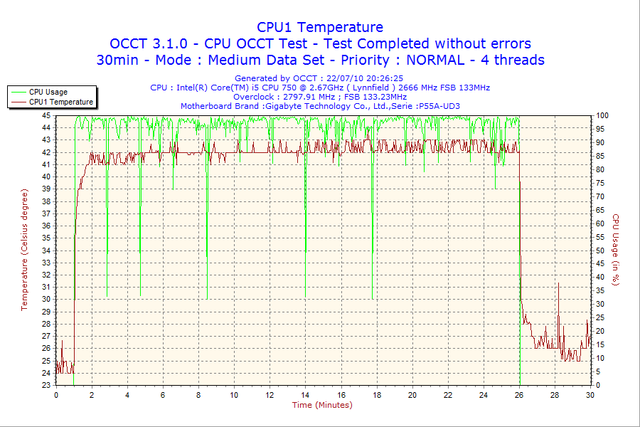
Need some help deciphering this:
CPU core temps @ ~98-99% ~42-44*C
http://i858.photobucket.com/albums/ab145/mpmaley0/2010-07-22-20h26-CPU2.png
http://i858.photobucket.com/albums/ab145/mpmaley0/2010-07-22-20h26-CPU3.png
http://i858.photobucket.com/albums/ab145/mpmaley0/2010-07-22-20h26-CPU4.png
GPU, didn't even know it was going to do this lol:
http://i858.photobucket.com/albums/ab145/mpmaley0/2010-07-22-20h26-GPU1.png
VCore:
http://i858.photobucket.com/albums/ab145/mpmaley0/2010-07-22-20h26-VCore.png
3.3V:
http://i858.photobucket.com/albums/ab145/mpmaley0/2010-07-22-20h26-Volt3.png
5V:
http://i858.photobucket.com/albums/ab145/mpmaley0/2010-07-22-20h26-Volt5.png
edit:
Right now I'm thinking of using this to get to 3.6ghz. :
http://www.tomshardware.com/reviews/core-i5-750-efficiency,2500-3.html
Where do you turn Turbo off? I was looking around in the Bios and didn't think I saw it anywhere.
CPU core temps @ ~98-99% ~42-44*C
http://i858.photobucket.com/albums/ab145/mpmaley0/2010-07-22-20h26-CPU2.png
http://i858.photobucket.com/albums/ab145/mpmaley0/2010-07-22-20h26-CPU3.png
http://i858.photobucket.com/albums/ab145/mpmaley0/2010-07-22-20h26-CPU4.png
GPU, didn't even know it was going to do this lol:
http://i858.photobucket.com/albums/ab145/mpmaley0/2010-07-22-20h26-GPU1.png
VCore:
http://i858.photobucket.com/albums/ab145/mpmaley0/2010-07-22-20h26-VCore.png
3.3V:
http://i858.photobucket.com/albums/ab145/mpmaley0/2010-07-22-20h26-Volt3.png
5V:
http://i858.photobucket.com/albums/ab145/mpmaley0/2010-07-22-20h26-Volt5.png
edit:
Right now I'm thinking of using this to get to 3.6ghz. :
http://www.tomshardware.com/reviews/core-i5-750-efficiency,2500-3.html
Where do you turn Turbo off? I was looking around in the Bios and didn't think I saw it anywhere.
darkiguana
Member
I have a question about thermal paste. This is my first time building a comp. I watched the video from tested.com and he did not use any, nor did he mention it. I have read a how to article and it indicated that you need to use it. Now I am going to be installing an AMD CPU and the tested.com video was using an Intel. My question is do I need it and how necessary is is? Thanks guys.
Im not familiar with the video you watched or AMD CPUs but I do know that my Intel CPU has thermal paste pre-applied on the stock heat sink fan.darkiguana said:I have a question about thermal paste. This is my first time building a comp. I watched the video from tested.com and he did not use any, nor did he mention it. I have read a how to article and it indicated that you need to use it. Now I am going to be installing an AMD CPU and the tested.com video was using an Intel. My question is do I need it and how necessary is is? Thanks guys.
Im assuming that most do.
darkiguana said:I have a question about thermal paste. This is my first time building a comp. I watched the video from tested.com and he did not use any, nor did he mention it. I have read a how to article and it indicated that you need to use it. Now I am going to be installing an AMD CPU and the tested.com video was using an Intel. My question is do I need it and how necessary is is? Thanks guys.
Most retail coolers come with a semi-solid thermal pad attached to the bottom of the cooler. When the cooler is attached the pad makes a better connection to the CPU. If you are using an aftermarket cooler or re-attaching a cooler the old paste needs to be cleaned and new paste attached.
http://www.newegg.com/Product/Product.aspx?Item=N82E16883103228&Tpk=net top ionRadicalRad said:Nettop? Could I get an example link?
compatible with HD video, but keep in mind you'll need an external dvd drive if you need to use discs
BrassMonkey1010
Member
darkiguana said:I have a question about thermal paste. This is my first time building a comp. I watched the video from tested.com and he did not use any, nor did he mention it. I have read a how to article and it indicated that you need to use it. Now I am going to be installing an AMD CPU and the tested.com video was using an Intel. My question is do I need it and how necessary is is? Thanks guys.
The only time you need to apply thermal paste is when you are using a third party heatsink/fan. If you buy a retail amd cpu, a fan with a thermal pad on it will come with it.
Do WD Caviar Green drives make good backup drives? I see newegg has them on sale but isnt green the bottom of the totem pole in WDs system? Is it worth 50 bucks?
http://www.newegg.com/Product/Product.aspx?Item=N82E16822136517
I have the SSD for my OS and some other stuff and a 640GB Caviar Black for everything else. Id like a spare for my lesser used videos/pics and something to record games onto with FRAPs.
http://www.newegg.com/Product/Product.aspx?Item=N82E16822136517
I have the SSD for my OS and some other stuff and a 640GB Caviar Black for everything else. Id like a spare for my lesser used videos/pics and something to record games onto with FRAPs.
darkiguana
Member
Thanks for the help guys. Going to get started in about an hour. Wish me luck
So then i5 won't be an issue since nothing makes i7 better. Also if Intel does do a slight refresh it'll only be priced well on the 1156 socket.The_Inquisitor said:Only reason I'd like to go i7 is that I would like this rig to last at least 3 years. I don't mind spending a bit more for it.
I'm guessing that's the updated 1TB with 2 500GB platters but the Samsung F3 is still $20 cheaper. That's too much of a difference for me to ignore.No_Style said:I'd go with Western Digital Caviar Black 1TB w/ 64MB Cache. That's what I settled with after reading up on "the best 1TB" drive.
I'd just buy a prebuilt for like $300RadicalRad said:This machine won't be playing any games though. All I need it for is surfing the internet, playing videos (mostly netflix) have wireless internet, and do some typing to get her schoolwork done.
Also, I have the wireless pci card from the old girl to, does that still work with the pci express motherboard slots? (noob again i know)
PCI-E and PCI are 2 different things. Almost every motherboard will have at least 1 of each, and usually 3 PCI slots.
Temps look very low. I suppose that is good, but surprising.demosthenes said:Right now I'm thinking of using this to get to 3.6ghz. :
http://www.tomshardware.com/reviews/core-i5-750-efficiency,2500-3.html
Where do you turn Turbo off? I was looking around in the Bios and didn't think I saw it anywhere.
For Turbo look in BIOS, read your manual, google your mobo. Different for different brands. It's also slightly possible you may need to update your BIOS.
Well Green just implies it can go from 5400-7200RPM saving you maybe 0.5-4W when its active. Of course this also means read/write speed suffers.Salaadin said:Do WD Caviar Green drives make good backup drives? I see newegg has them on sale but isnt green the bottom of the totem pole in WDs system? Is it worth 50 bucks?
http://www.newegg.com/Product/Product.aspx?Item=N82E16822136517
I have the SSD for my OS and some other stuff and a 640GB Caviar Black for everything else. Id like a spare for my lesser used videos/pics and something to record games onto with FRAPs.
MiniBossman
Member
I tend to like the WD green drives for backups and data that is going to be a rest.
The_Inquisitor
Member
Hazaro said:So then i5 won't be an issue since nothing makes i7 better. Also if Intel does do a slight refresh it'll only be priced well on the 1156 socket.
I'm guessing that's the updated 1TB with 2 500GB platters but the Samsung F3 is still $20 cheaper. That's too much of a difference for me to ignore.
I'd just buy a prebuilt for like $300
PCI-E and PCI are 2 different things. Almost every motherboard will have at least 1 of each, and usually 3 PCI slots.
Temps look very low. I suppose that is good, but surprising.
For Turbo look in BIOS, read your manual, google your mobo. Different for different brands. It's also slightly possible you may need to update your BIOS.
Well Green just implies it can go from 5400-7200RPM saving you maybe 0.5-4W when its active. Of course this also means read/write speed suffers.
Ok fair enough on the i5. So what would your suggested 750 dollar build look like?
professor_t
Member
I've got a 5850, and I'm never quite sure what to do with the Catalyst AI. It has three settings, I believe (disabled, normal, and advanced), and I can't find a definitive statement of how it works or what configuration to use.
It seems like the effect can vary from one game to the next, but I have no idea why that would be the case. Any thoughts from fellow Radeon owners?
It seems like the effect can vary from one game to the next, but I have no idea why that would be the case. Any thoughts from fellow Radeon owners?
demosthenes
Member
Hazaro said:Temps look very low. I suppose that is good, but surprising.
For Turbo look in BIOS, read your manual, google your mobo. Different for different brands. It's also slightly possible you may need to update your BIOS.
I live in my basement right now. It will be different when I move in to my apartment in 4 weeks :lol
MiniBossman
Member
Ok think I finally have my build. I've found a different solution to my virtualization needs (seperate box), so I am back with the more cost effective i5-750 based build.
Is the fan ok clearance wise in that case?
That said, is there anything in this build that is a money sink or a better option? Anything else I am overlooking?
I would pickup the i5 and fan from Microcenter tomorrow.
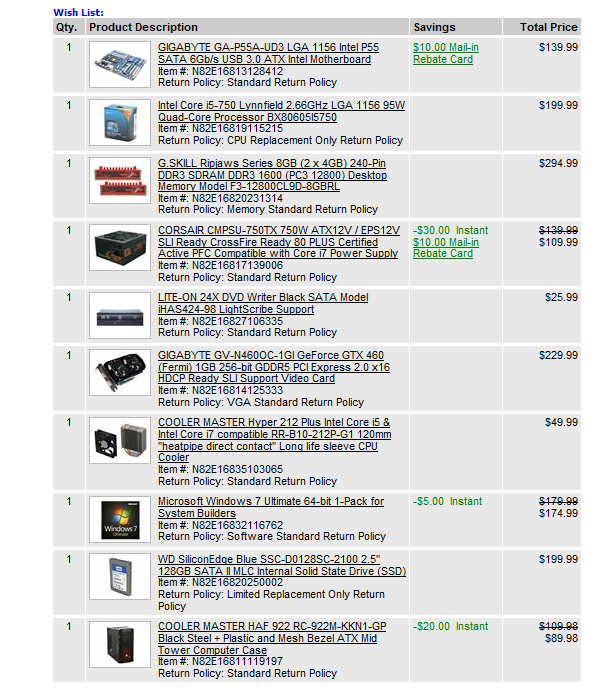
Is the fan ok clearance wise in that case?
That said, is there anything in this build that is a money sink or a better option? Anything else I am overlooking?
I would pickup the i5 and fan from Microcenter tomorrow.
Felix Lighter
Member
The_Inquisitor said:Ok fair enough on the i5. So what would your suggested 750 dollar build look like?
I'm always nervous to make large purchase suggestions like this but this is what I would do with $800:
Add your graphics card of choice and the i5 750 from Micro Center for 169.99 to this:

If you don't care about sata 6b/s, this motherboard would save you a few dollars:
http://www.newegg.com/Product/Product.aspx?Item=N82E16813128425
Anybody see any problems with this build?
See what Felix posted. If you can't get combo deals then below is fine too. I'd add a aftermarket cooler for sure.The_Inquisitor said:Ok fair enough on the i5. So what would your suggested 750 dollar build look like?
Antec Sonata w/ 500W
i5 750
GA-P55-UD3
2x2GB G.Skill DDR3
DVD
500GB / 1TB Samsung F3
5770 or GTX460 1GB [Suggest to stretch to 460]
Some heatsink (Hyper 212+, N520, Vendetta II, etc.)
4GB DDR3 is expensive. 4x2GB is $100 cheaper.MiniBossman said:Ok think I finally have my build. I've found a different solution to my virtualization needs (seperate box), so I am back with the more cost effective i5-750 based build.
Is the fan ok clearance wise in that case?
That said, is there anything in this build that is a money sink or a better option? Anything else I am overlooking?
I would pickup the i5 and fan from Microcenter tomorrow.
http://i269.photobucket.com/albums/jj62/minibossman/build3.png
Do you need 8GB?
lastplayed
Member
OK so I'm trying to install Windows 7 64bit on my newly built computer - the first part goes fine without any issues, but once it reboots and displays the "Starting Windows" screen, it just hangs there. I've tried reinstalling, installing on a partition, installing from a USB... still the same result. I've looked for some answers on the net but they're all over the place.
The Windows I'm using has been installed on a previous computer, so that can't be the cause...
Thoughts?
The Windows I'm using has been installed on a previous computer, so that can't be the cause...
Thoughts?
Shao Kahn Brewing a Stew
Banned
lastplayed said:OK so I'm trying to install Windows 7 64bit on my newly built computer - the first part goes fine without any issues, but once it reboots and displays the "Starting Windows" screen, it just hangs there. I've tried reinstalling, installing on a partition, installing from a USB... still the same result. I've looked for some answers on the net but they're all over the place.
The Windows I'm using has been installed on a previous computer, so that can't be the cause...
Thoughts?
My friend has a similar problem. The answer: keep on restarting and trying. Windows 7 has a bad bad installer. What I did was leave it running during the starting windows for literally an hour. Restarted, it bypassed it but then got stuck during initial setup. Then restarted it and it bypassed the initial setup and then got stuck during username screen. Restart and it finally worked.
And yes, this was after replacing his bad hard drive.
Alright, srs noobie question here, so don't laugh too hard.
I have an i5-750 coming soon, and I want to buy a cooler for it, because I've read that the stock cooler isn't great for overclocking (and I think I want to do that :lol)
So anyway, I've been looking at two coolers...
Zalman 9500A: http://www.newegg.com/Product/Product.aspx?Item=N82E16835118223
Prolimatech Megahalems: http://www.newegg.com/Product/Product.aspx?Item=N82E16835242001
Apparently the latter one is much better (source: http://www.frostytech.com/articleview.cfm?articleid=2481&page=6), but I can't figure out why. It doesn't have a fan! I thought all CPU coolers had to have fans... is it just that this one works so well it doesn't need a fan, or do I still need to buy a fan? >.>
I have an i5-750 coming soon, and I want to buy a cooler for it, because I've read that the stock cooler isn't great for overclocking (and I think I want to do that :lol)
So anyway, I've been looking at two coolers...
Zalman 9500A: http://www.newegg.com/Product/Product.aspx?Item=N82E16835118223
Prolimatech Megahalems: http://www.newegg.com/Product/Product.aspx?Item=N82E16835242001
Apparently the latter one is much better (source: http://www.frostytech.com/articleview.cfm?articleid=2481&page=6), but I can't figure out why. It doesn't have a fan! I thought all CPU coolers had to have fans... is it just that this one works so well it doesn't need a fan, or do I still need to buy a fan? >.>
Casval said:Apparently the latter one is much better (source: http://www.frostytech.com/articleview.cfm?articleid=2481&page=6), but I can't figure out why. It doesn't have a fan! I thought all CPU coolers had to have fans... is it just that this one works so well it doesn't need a fan, or do I still need to buy a fan? >.>
The prolimatech ships without a fan yes, it's one of the better coolers out there in the market but once your in that segment they all ship without fans. It's a pretty expensive affair but that should provide you some great cooling for your i5, heck if you're not overclocking and ambients are OK you might be able to run it without fans (I don't advise that though)
My advise is buying two Noctua P12 fans and set them up in a push/pull configuration and you're all set. Or just a single P12 will do fine as well. If you want to get into OC'ing a Push/Pull setup on that thing is the way to go though!
http://www.newegg.com/Product/Product.aspx?Item=N82E16835608004&Tpk=noctua p12
This one, and dang they're expensive on newegg, but so worth it! (imo)
Win7 hangs at the loading screen for me when it's trying to load incompatible drivers after a hardware change(which is freaking lame, I thought Win7 was supposed to handle this sort of stuff better). Maybe try booting into safe mode and see what you can do from there?lastplayed said:OK so I'm trying to install Windows 7 64bit on my newly built computer - the first part goes fine without any issues, but once it reboots and displays the "Starting Windows" screen, it just hangs there. I've tried reinstalling, installing on a partition, installing from a USB... still the same result. I've looked for some answers on the net but they're all over the place.
The Windows I'm using has been installed on a previous computer, so that can't be the cause...
Thoughts?
Hey guys quick question :
*M4N82 Deluxe MB
*AMD Phenom II x3 720 BE
*6GB RAM
*2 nvidia 250 gts SLI
I've been offered to buy this pc for 399$ ( point of reference : one gts 250 cost 150$ here)
Anywho, what I'd like to know is
1) Is it a goodish deal?( Again, given that where I live a GTX 470 runs for, you guessed it, 470$)
2) I dont know squat about AMD, whats a phenom II x3 720 BE comparable to?
3) Are 2x 250gts running in SLI comparable to lets say 1 gtx 260 ?
4) Last but not least, how will SC2 run on a rig like this?
Answer and I'll make your wildest unadultered wishes come trueeeeeeee
*M4N82 Deluxe MB
*AMD Phenom II x3 720 BE
*6GB RAM
*2 nvidia 250 gts SLI
I've been offered to buy this pc for 399$ ( point of reference : one gts 250 cost 150$ here)
Anywho, what I'd like to know is
1) Is it a goodish deal?( Again, given that where I live a GTX 470 runs for, you guessed it, 470$)
2) I dont know squat about AMD, whats a phenom II x3 720 BE comparable to?
3) Are 2x 250gts running in SLI comparable to lets say 1 gtx 260 ?
4) Last but not least, how will SC2 run on a rig like this?
Answer and I'll make your wildest unadultered wishes come trueeeeeeee
Ciccio_Drink
Member
Mr_Brit said:No offense but that cart is filled with way too much stuff you don't need such as that ridiculous motherboard and RAM. Unless you have a specific reason for getting those things then you should cut the amount of money you're spending on those things in half. Also don't get that GPU, get two 1GB GTX 460s. As for the OS unless you need W7 ultimate then get home premium instead. Also shop somewhere like scan or ebuyer, they have much better prices. As it is now I couldn't recommend any of those components except the CPU cooler and CPU, everything else is either complete overkill or horribly overpriced.
no offense at all. I actually thank you all guys!
Let's say I was shooting very high, to start, and wanted to see where to cut...
I'm no expert in this matter so needed to do so

Corky said:Hey guys quick question :
*M4N82 Deluxe MB
*AMD Phenom II x3 720 BE
*6GB RAM
*2 nvidia 250 gts SLI
I've been offered to buy this pc for 399$ ( point of reference : one gts 250 cost 150$ here)
Anywho, what I'd like to know is
1) Is it a goodish deal?( Again, given that where I live a GTX 470 runs for, you guessed it, 470$)
2) I dont know squat about AMD, whats a phenom II x3 720 BE comparable to?
3) Are 2x 250gts running in SLI comparable to lets say 1 gtx 260 ?
4) Last but not least, how will SC2 run on a rig like this?
Answer and I'll make your wildest unadultered wishes come trueeeeeeee
I don't know... It sounds like a good deal at first but $400 allready gets you on the way for a completely new system tbh.
Might want to have a look at brain_stews awesome $500 budget gaming rig thread.
http://www.neogaf.com/forum/showthread.php?t=366177
Anyway, what you posted sounds like a fair offer.
That's honestly not too bad especially considering the crazy hardware prices where you're from. That rig will run SC2 more than well enough, you mighteven luck out and be a ble to unlock that CPU into a quadcore.Corky said:Hey guys quick question :
*M4N82 Deluxe MB
*AMD Phenom II x3 720 BE
*6GB RAM
*2 nvidia 250 gts SLI
I've been offered to buy this pc for 399$ ( point of reference : one gts 250 cost 150$ here)
Anywho, what I'd like to know is
1) Is it a goodish deal?( Again, given that where I live a GTX 470 runs for, you guessed it, 470$)
2) I dont know squat about AMD, whats a phenom II x3 720 BE comparable to?
3) Are 2x 250gts running in SLI comparable to lets say 1 gtx 260 ?
4) Last but not least, how will SC2 run on a rig like this?
Answer and I'll make your wildest unadultered wishes come trueeeeeeee
Mr_Brit said:That's honestly not too bad especially considering the crazy hardware prices where you're from. That rig will run SC2 more than well enough, you mighteven luck out and be a ble to unlock that CPU into a quadcore.
Don't think the unlocking works on a non AMD chipset, I might be wrong here. But it is a fair/good deal indeed.
I'm just not sure about that 2 x 250GTS performance (2 x 512mb VRAM).
Anyway, deal = good!
Some nvidia chipsets can also unlock, it's called NCC on nvidia boards.koji said:Don't think the unlocking works on a non AMD chipset, I might be wrong here. But it is a fair/good deal indeed.
I'm just not sure about that 2 x 250GTS performance (2 x 512mb VRAM).
Anyway, deal = good!
koji said:I don't know... It sounds like a good deal at first but $400 allready gets you on the way for a completely new system tbh
Yeah you'd think so but let me check the prices really quick :
x3 720 BE : 205$ new
two gts 250s : 300$ <- already 100$ over 400$ now
then we have ram, mb, keyboard,mouse, case, you know the drill.
But what irks me is that I know nothing about buying a PC used. I mean I'm going to have a look at it on place but still thats why I'm asking gaf for help.
Another thing I need to know asap is will I be able to use my TV as a monitor without hassle? I know nothing about nvidia post gefore ti 4200, so all I have to do is to connect one of the GTS 250s to my tv via a DVI - HDMI cable right? RIGHT!?
please halp
koji said:Don't think the unlocking works on a non AMD chipset, I might be wrong here. But it is a fair/good deal indeed.
I'm just not sure about that 2 x 250GTS performance (2 x 512mb VRAM).
Anyway, deal = good!
well I had a look at tomshardware and ( granted they're using a different test-system than mine but.. ) the GTS 250 performed quite well @ 1920x1200 with ultrasettings, something like average fps 45 and min 30 , which given my console background is more than ample.
Mr_Brit said:Some nvidia chipsets can also unlock, it's called NCC on nvidia boards.
K, didn't know that.
Corky said:Yeah you'd think so but let me check the prices really quick :
x3 720 BE : 205$ new
two gts 250s : 300$ <- already 100$ over 400$ now
then we have ram, mb, keyboard,mouse, case, you know the drill.
But what irks me is that I know nothing about buying a PC used. I mean I'm going to have a look at it on place but still thats why I'm asking gaf for help.
Another thing I need to know asap is will I be able to use my TV as a monitor without hassle? I know nothing about nvidia post gefore ti 4200, so all I have to do is to connect one of the GTS 250s to my tv via a DVI - HDMI cable right? RIGHT!?
please halp
Well there are a couple things you should know, you'll have to re-install windows on it for starters, does it come with a hard drive? Otherwise you'll still have to go out and buy that, same for DVD drive etc. Hard to tell really I'ld be amazed if the dude is selling it with his windows installed etc. Not sure how that works in the used PC business.
Yes you'll be able to use your TV as a monitor (if it's a LCD/Plasma HDtv), just get one of those DVI -> HDMI convertor thingys and you should be set. Or a HDMI to DVI cable, that's all pretty common stuff, not too expensive.
About SC2, Starcraft runs on pretty lowish system requirements so you'll have no trouble there. Think an nvidia 6xxx series is the minimum.
Minimum System Requirements*:
PC: Windows XP/Windows Vista/Windows 7 (Latest Service Packs) with DirectX 9.0c
2.6 GHz Pentium IV or equivalent AMD Athlon processor
128 MB PCIe NVIDIA GeForce 6600 GT or ATI Radeon 9800 PRO video card or better
Recommended Specifications:
PC: Windows Vista/Windows 7
Dual Core 2.4Ghz Processor
2 GB RAM
512 MB NVIDIA GeForce 8800 GTX or ATI Radeon HD 3870 or better
koji said:Well there are a couple things you should know, you'll have to re-install windows on it for starters, does it come with a hard drive? Otherwise you'll still have to go out and buy that, same for DVD drive etc. Hard to tell really I'ld be amazed if the dude is selling it with his windows installed etc. Not sure how that works in the used PC business.
Yes you'll be able to use your TV as a monitor (if it's a LCD/Plasma HDtv), just get one of those DVI -> HDMI convertor thingys and you should be set.
About SC2, Starcraft runs on pretty lowish system requirements so you'll have no trouble there. Think an nvidia 6xxx series is the minimum.
Thanks for the replies mang <3
From the looks of it, everything seems to be in order, harddrive, dvd and so on. But now that you mentioned it, I cant find any indication of an OS in the ad. Maybe he forgot to mention it but now I have something to ask him.
Yeap, my TV is a new sony hdtv so hopefully there wont be any problems.
Two questions.
How reliable is Newegg with mail in rebates? And is this a good mouse?
http://www.newegg.com/Product/Product.aspx?Item=N82E16826104318
It's on sale on new egg and at Future shop. Sticker price is cheaper at future shop, but if I'l ACTUALLY get my money with the rebate I'll order from new egg.
How reliable is Newegg with mail in rebates? And is this a good mouse?
http://www.newegg.com/Product/Product.aspx?Item=N82E16826104318
It's on sale on new egg and at Future shop. Sticker price is cheaper at future shop, but if I'l ACTUALLY get my money with the rebate I'll order from new egg.
lastplayed
Member
shagg_187 said:My friend has a similar problem. The answer: keep on restarting and trying. Windows 7 has a bad bad installer. What I did was leave it running during the starting windows for literally an hour. Restarted, it bypassed it but then got stuck during initial setup. Then restarted it and it bypassed the initial setup and then got stuck during username screen. Restart and it finally worked.
And yes, this was after replacing his bad hard drive.
Well it's finally making progress, it's just taking an extremely long time to cycle through the steps. It's now stuck on "Windows is finalizing your settings", but again it might just be taking a long time.
Signs of a faulty HDD or RAM? I think I might take it back tomorrow.

Newegg is not the rebate company. Logitech in this case I believe handles the rebates. Most other companies have a rebate company to it for them.WEGGLES said:Two questions.
How reliable is Newegg with mail in rebates? And is this a good mouse?
http://www.newegg.com/Product/Product.aspx?Item=N82E16826104318
It's on sale on new egg and at Future shop. Sticker price is cheaper at future shop, but if I'l ACTUALLY get my money with the rebate I'll order from new egg.
G500 is a nice mouse. Also I have a new G500 to sell you :lol
*Oh wait you are in Canada :[
Minimize the things that could be impacting it. Unplug all external accessories that aren't needed (mic, printer, etc.), use 1 stick of RAM in the first slot, no DVD drive if you are installing USB, etc.lastplayed said:Well it's finally making progress, it's just taking an extremely long time to cycle through the steps. It's now stuck on "Windows is finalizing your settings", but again it might just be taking a long time.
Signs of a faulty HDD or RAM? I think I might take it back tomorrow.
Because the 9500 is bad. I know, I've had one.Casval said:Alright, srs noobie question here, so don't laugh too hard.
I have an i5-750 coming soon, and I want to buy a cooler for it, because I've read that the stock cooler isn't great for overclocking (and I think I want to do that :lol)
So anyway, I've been looking at two coolers...
Zalman 9500A: http://www.newegg.com/Product/Product.aspx?Item=N82E16835118223
Prolimatech Megahalems: http://www.newegg.com/Product/Product.aspx?Item=N82E16835242001
Apparently the latter one is much better (source: http://www.frostytech.com/articleview.cfm?articleid=2481&page=6), but I can't figure out why. It doesn't have a fan! I thought all CPU coolers had to have fans... is it just that this one works so well it doesn't need a fan, or do I still need to buy a fan? >.>
Also more heatpipes = good.
Get a Hyper 212 +, N520, Vendetta II, or Scythe Mugen (updated rev)
Hey, I am currently using the 9500A and I have found it to be really good. Ok it's a bit loud on the highest setting but that's what the fan controller is there for .I paid £13 for it, and would not pay the $52 newegg asking price, and of course it is a bit outdated, but I love the styling and it cools me Q9400 pretty well.Hazaro said:Newegg is not the rebate company. Logitech in this case I believe handles the rebates. Most other companies have a rebate company to it for them.
G500 is a nice mouse. Also I have a new G500 to sell you :lol
*Oh wait you are in Canada :[
Minimize the things that could be impacting it. Unplug all external accessories that aren't needed (mic, printer, etc.), use 1 stick of RAM in the first slot, no DVD drive if you are installing USB, etc.
Because the 9500 is bad. I know, I've had one.
Also more heatpipes = good.
Get a Hyper 212 +, N520, Vendetta II, or Scythe Mugen (updated rev)
Still, for around $50 there are much newer, better coolers out there. (Like those above, for example).
lastplayed
Member
Hazaro said:Minimize the things that could be impacting it. Unplug all external accessories that aren't needed (mic, printer, etc.), use 1 stick of RAM in the first slot, no DVD drive if you are installing USB, etc.
I managed to get through account creation and entering serial, then it hung, so I restarted... it must have corrupted the password file because now I can't log into my sole account with the password I entered. :lol Can't even created a password disk.
So now I'm reinstalling. Honestly, anything and everything that can go wrong has gone wrong so far.
Those coolers can be found for around $30-$35.Stop It said:Hey, I am currently using the 9500A and I have found it to be really good. Ok it's a bit loud on the highest setting but that's what the fan controller is there for .I paid £13 for it, and would not pay the $52 newegg asking price, and of course it is a bit outdated, but I love the styling and it cools me Q9400 pretty well.
Still, for around $50 there are much newer, better coolers out there. (Like those above, for example).
The 9500 is just bad. Plus it cuts you. Such a terrible cooler :lol
It's fairly quiet and looks nifty though.

Brofist
Member
No need to feel bad, this isn't the budget PC topic, there's already one for that. If you want to go all out with water cooling and all the bells and whistles go for it. Recommendations are one thing, but too many Gaffers have a tendency to talk people down in their purchase, as if it's their own money being spent.Ciccio_Drink said:no offense at all. I actually thank you all guys!
Let's say I was shooting very high, to start, and wanted to see where to cut...
I'm no expert in this matter so needed to do so
WEGGLES said:Two questions.
How reliable is Newegg with mail in rebates? And is this a good mouse?
http://www.newegg.com/Product/Product.aspx?Item=N82E16826104318
It's on sale on new egg and at Future shop. Sticker price is cheaper at future shop, but if I'l ACTUALLY get my money with the rebate I'll order from new egg.
As Hazaro said, Newegg doesn't actually fulfill the rebates. But I've probably fulfilled at least 10 rebates with Newegg purchases and never had a problem. But then again, I've never gotten stiffed on a single rebate from anywhere. Make sure you follow the directions perfectly. The rebate companies look for any technicality to void it.
I've filled out maybe 8 rebates between 5 companies and they always come though.1-D_FTW said:As Hazaro said, Newegg doesn't actually fulfill the rebates. But I've probably fulfilled at least 10 rebates with Newegg purchases and never had a problem. But then again, I've never gotten stiffed on a single rebate from anywhere. Make sure you follow the directions perfectly. The rebate companies look for any technicality to void it.
I'm fairly sure Logitech is quite good with rebates. 3/3 from them. Pretty timely as well.
Alright guys, I'm going to buy that used PC I mentioned a couple of posts above.
Will anyone help me come up with things I should check with the guy/his pc before buying it?
As of yet I'm going for :
* Check that the PC has an OS
* Make sure I get the boxes and warranties
* Make sure I get all the neccessary cables
Dear Gaf, what else should I look out for and check? I mean PCs and the parts nowadays either work or not right? Its not like the 250 gts SLI only work "slightly" good. Or that the proccessor never operates above 50% capacity. Or whatevs
Thanks in advance
Will anyone help me come up with things I should check with the guy/his pc before buying it?
As of yet I'm going for :
* Check that the PC has an OS
* Make sure I get the boxes and warranties
* Make sure I get all the neccessary cables
Dear Gaf, what else should I look out for and check? I mean PCs and the parts nowadays either work or not right? Its not like the 250 gts SLI only work "slightly" good. Or that the proccessor never operates above 50% capacity. Or whatevs
Thanks in advance
If possible put Speccy on a USB and just doublecheck all the parts are what they say they are.Corky said:Alright guys, I'm going to buy that used PC I mentioned a couple of posts above.
Will anyone help me come up with things I should check with the guy/his pc before buying it?
As of yet I'm going for :
* Check that the PC has an OS
* Make sure I get the boxes and warranties
* Make sure I get all the neccessary cables
Dear Gaf, what else should I look out for and check? I mean PCs and the parts nowadays either work or not right? Its not like the 250 gts SLI only work "slightly" good. Or that the proccessor never operates above 50% capacity. Or whatevs
Thanks in advance
Open it to make sure 2 graphics cards.

For stress you can use FURMark and Prime95/OCCT/ORTHOS and run those for a few minutes to see if the PC doesn't freeze/crash/BSOD/overheat.
But you probably won't run into anything.
Hazaro said:If possible put Speccy on a USB and just doublecheck all the parts are what they say they are.
Open it to make sure 2 graphics cards.
For stress you can use FURMark and Prime95/OCCT/ORTHOS and run those for a few minutes to see if the PC doesn't freeze/crash/BSOD/overheat.
But you probably won't run into anything.
You have my humble gratitude
Hypothetically speaking, if the PC turns out to have overheating issues, is it a costly procedure to amend said issues?
Normally no. If it is overheating and the PC is clearly clogged with dust in all the fans and sinks then just clean it.Corky said:You have my humble gratitude
Hypothetically speaking, if the PC turns out to have overheating issues, is it a costly procedure to amend said issues?
However if its something like a GPU hitting 105C/CPU hitting 80C and everything looks ok, there might be an issue.
Just get some fans and a new cheap heatsink for CPU
Hazaro said:Normally no. If it is overheating and the PC is clearly clogged with dust in all the fans and sinks then just clean it.
However if its something like a GPU hitting 105C/CPU hitting 80C and everything looks ok, there might be an issue.
Just get some fans and a new cheap heatsink for CPU
I shower thee with love ;D <3