
I just keep one hand/arm/elbow/whatever on the metal case at all times. Never had any static problems.-COOLIO- said:when putting my computer together, should i use rubber gloves to prevent static shocks?
-
Hey Guest. Check out your NeoGAF Wrapped 2025 results here!
You are using an out of date browser. It may not display this or other websites correctly.
You should upgrade or use an alternative browser.
You should upgrade or use an alternative browser.
"I need a new PC!" 2010 Edition
- Thread starter Spy
- Start date
Just decide on whether you want a 17" or 15", but choose one of these.sonicspear64 said:
Acer Aspire AS7551G-5821 NoteBook AMD Phenom II Quad-Core N930(2.0GHz) 17.3" 4GB Memory DDR3 1066 500GB HDD 5400rpm DVD Super Multi ATI Mobility Radeon HD 5650 Quad-core and 5650 at the expense of battery life and some portability (7+ lbs). After researching a bit, people have been saying that the N930 is comparable to i5, but the N930 trumps it in multi-threaded apps.
HP Pavilion DV6-3050US NoteBook AMD Phenom II Quad-Core N930(2.0GHz) 15.6" 4GB Memory 640GB HDD 5400rpm DVD Super Multi ATI Mobility Radeon HD 5650 Now this one has the same CPU and GPU as the Acer, but battery life might be a problem with the 6-cell battery (Man I wish it was 9-cell!).
So yeah those 3 are my choices. I might just narrow it down to 2 and take out the Acer. Any advice and suggestions for other laptops is appreciated.
Holy crap, posting at 5am gave me some bad engrish.Milpool said:I'll give it a try, did you have the random system lock ups as well?
edit- Tried re-seating, still hangs on the welcome screen. Thanks for the suggestion though.
Anyway, I did have random lockups, the off-chance it got passed win7 welcome screen, it would lock up when I opened up My Computer or a few minutes after browsing the web.
I also tried the beta drivers from guru3d and still had the same symptoms.
Even now I'm not sure how my 460 stopped being an douche. If I had to guess though, it may have been a loose power connector. Make sure that hook on the connector clicks in, and it wouldn't hurt to have more space in between the 460 and other pci devices you may have installed.
Corkys daily noob-question :
- Lets say I recieve a box with an SSD in it. I connect it with a red sata cable, and a relevant powercable. Sooo... what's the next step? Will it be difficult to format my current 7200rpm, install an SSD and then proceed to install windows on the ssd? Where can I read a step by step for someone as stupid as me?
Don't let my curiousity fool ya, I'm still a pc-less castrate ...
- Lets say I recieve a box with an SSD in it. I connect it with a red sata cable, and a relevant powercable. Sooo... what's the next step? Will it be difficult to format my current 7200rpm, install an SSD and then proceed to install windows on the ssd? Where can I read a step by step for someone as stupid as me?
Don't let my curiousity fool ya, I'm still a pc-less castrate ...

Buggy Loop
Gold Member
ARGH
Can someone please help with PSU? I switched the 550W OCZ fatality non sli for the antec EA750 sli ready. Now i read on newegg that the PSU doesnt quite fit for bottom PSU positions in case, CM 690 in particular
Cons: It's large. Some case manufacturers (ironically including Antec) now offer cases that allow you to draw in cool air from the bottom for the power supply, but the size of this power supply and the location of its fan prevent you from doing that, at least with my CM 690.
I have the CM 690 II advanced. Am i fucked?
Also, how's the EA750 rated? H kind of bashed it but it still passed their testing. Also @ 99$, can anyone find something better in canada?
Can someone please help with PSU? I switched the 550W OCZ fatality non sli for the antec EA750 sli ready. Now i read on newegg that the PSU doesnt quite fit for bottom PSU positions in case, CM 690 in particular
Cons: It's large. Some case manufacturers (ironically including Antec) now offer cases that allow you to draw in cool air from the bottom for the power supply, but the size of this power supply and the location of its fan prevent you from doing that, at least with my CM 690.
I have the CM 690 II advanced. Am i fucked?
Also, how's the EA750 rated? H kind of bashed it but it still passed their testing. Also @ 99$, can anyone find something better in canada?

Milpool
Member
Nos_G said:Holy crap, posting at 5am gave me some bad engrish.
Anyway, I did have random lockups, the off-chance it got passed win7 welcome screen, it would lock up when I opened up My Computer or a few minutes after browsing the web.
I also tried the beta drivers from guru3d and still had the same symptoms.
Even now I'm not sure how my 460 stopped being an douche. If I had to guess though, it may have been a loose power connector. Make sure that hook on the connector clicks in, and it wouldn't hurt to have more space in between the 460 and other pci devices you may have installed.
The power connectors are definitely connected snugly, and I only have one pci-e slot so it's the only thing installed. The temps were low when it did work since there's a 180mm fan less than an inch above it. After the last crash I have never got past the welcome screen in about 20-30 boots while you say you managed to get past it sometimes, so I guess that's a bad sign. I sold my spare motherboard on ebay recently so I'm pretty much out of things I can try, hopefully scan.co.uk get the same fault when they test it.
When it comes to SSDs, do they come with the equipment to mount them in a normal sized hard drive bay or are those bought separately?
In total, I'll be upgrading to a GTX 460, putting in a SSD and moving to a new PC case. Just not sure on the size of the SSD...
In total, I'll be upgrading to a GTX 460, putting in a SSD and moving to a new PC case. Just not sure on the size of the SSD...
Hey guys. I decided to join the PC gaming world and looking to build my first PC and decided on these parts.
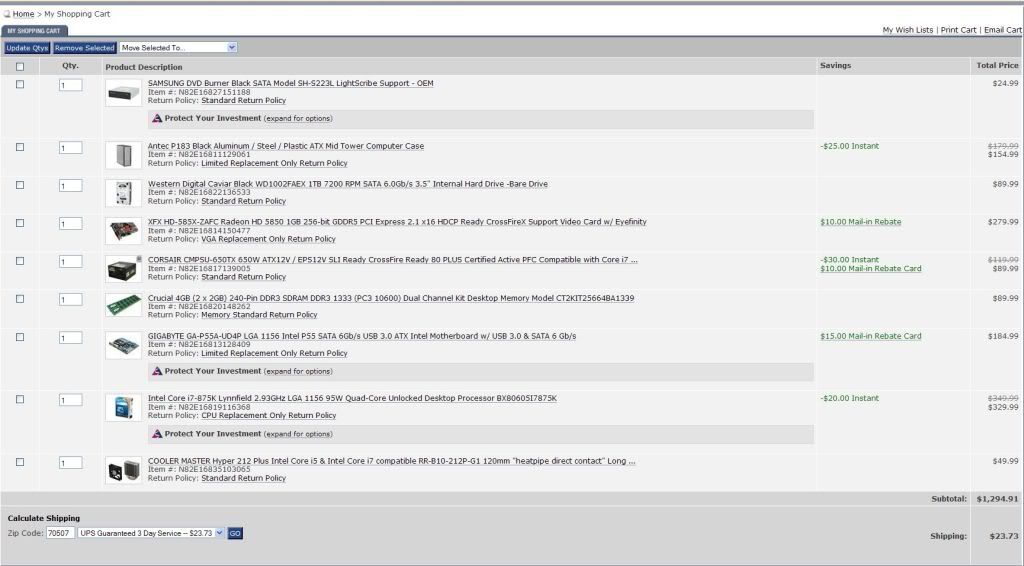
The build is mostly from the Tech reports guide but I would like to see other opinions from guys who know more about this than me. I'm planning to use this for PC gaming (primarily FFXIV) and general use.
I'm also ordering most of the parts from amazon cause of prime so shipping isn't to much of a problem. Any helpful reply would be appreciated before I take the plunge.
The build is mostly from the Tech reports guide but I would like to see other opinions from guys who know more about this than me. I'm planning to use this for PC gaming (primarily FFXIV) and general use.
I'm also ordering most of the parts from amazon cause of prime so shipping isn't to much of a problem. Any helpful reply would be appreciated before I take the plunge.
Made some changes -

Cheaper case and cheaper monitor without losing too much. Also, I thought something seemed a little high about that last one, and it was that I accidentally selected the 2GB 5870 instead of the 1GB, so I fixed that. Almost $300 cheaper overall.
Thinking about that recommendation of the i7 950 instead of the 930, but I guess I'll stop by Microcenter and see if they have it first. I could drop $85 from that total if I go with the 930 at Microcenter, but if I add the 950 on Newegg at an extra $10 I'm still below my target of $2,000.
Cheaper case and cheaper monitor without losing too much. Also, I thought something seemed a little high about that last one, and it was that I accidentally selected the 2GB 5870 instead of the 1GB, so I fixed that. Almost $300 cheaper overall.
Thinking about that recommendation of the i7 950 instead of the 930, but I guess I'll stop by Microcenter and see if they have it first. I could drop $85 from that total if I go with the 930 at Microcenter, but if I add the 950 on Newegg at an extra $10 I'm still below my target of $2,000.
Milpool
Member
Kintaro said:When it comes to SSDs, do they come with the equipment to mount them in a normal sized hard drive bay or are those bought separately?
In total, I'll be upgrading to a GTX 460, putting in a SSD and moving to a new PC case. Just not sure on the size of the SSD...
Some come with an adapter and some don't, and it doesn't always mantion its in the specs. You can get an adapter for a few dollars or whatever that let you mount 2 ssds in a 3.5" bay so even if you don't need to use it right away it could be handy for the future.
vicktormerv said:Not sure what to do here
My motherboard won't detect my hardrive all of the sudden
Just waking up this morning to boot my system and nothing
Ive got an F3 spinmaster and a gigabyte x58 UD3
Whats weird is that it detects my cd rom drive, but wont detect it when I plug in the hardrive right next to it, any ideas?
No ideas anyone? I've tried getting it on a raid, but it takes like 30 seconds to attempt to read the drive and then it says its not there, so Im guessing its a hard drive issue?
MidgarBlowedUp said:damnit I need a better CPU cooler. I can hit 4.0 with my Phenom II X4 965 but, It gets a little hot, near 60+. I'm using an Arctic Cooling Freezer Pro but it's just not cold enough.
Antec 300 case as well.
What can I get that isn't going to cost an arm and a leg?
Will a Hyper Cooler Master 212+ be a significantly better cooler?
I have 965BE and I use Cooler Master V8 and it never gets above 50 under full load.
vicktormerv said:No ideas anyone? I've tried getting it on a raid, but it takes like 30 seconds to attempt to read the drive and then it says its not there, so Im guessing its a hard drive issue?
Tried switching the plugs? otherwise sounds like a dead drive

Swap cables, swap ports, double check connections / power, upgrade your BIOS.vicktormerv said:No ideas anyone? I've tried getting it on a raid, but it takes like 30 seconds to attempt to read the drive and then it says its not there, so Im guessing its a hard drive issue?
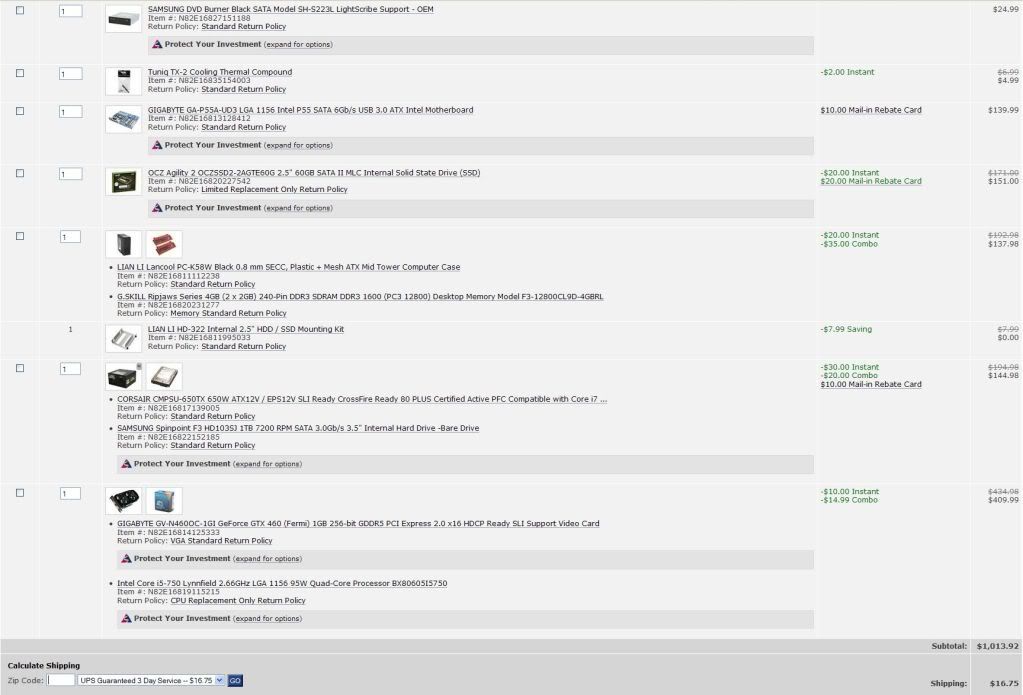
Basically swap almost everything to this: http://i.imgur.com/A55hA.jpgMjunter said:Hey guys. I decided to join the PC gaming world and looking to build my first PC and decided on these parts.
CPU (i5 750), Mobo (UD3), RAM, GPU, one of the Heatsinks, F1 1TB (on sale for $60)
Combo the CPU and motherboard if possible, HDD and PSU, RAM and something.
Save you $20-$60.
The TR parts are fine, but these are also fine, and a bit cheaper.
The inclusion of the 875 is not worth it.
Any reason you need i7 over i5?Monroeski said:Made some changes -
Cheaper case and cheaper monitor without losing too much. Also, I thought something seemed a little high about that last one, and it was that I accidentally selected the 2GB 5870 instead of the 1GB, so I fixed that. Almost $300 cheaper overall.
Thinking about that recommendation of the i7 950 instead of the 930, but I guess I'll stop by Microcenter and see if they have it first. I could drop $85 from that total if I go with the 930 at Microcenter, but if I add the 950 on Newegg at an extra $10 I'm still below my target of $2,000.
The performance difference is not much and since it's a dead socket, you might want to save that extra $ for later. (-$200)
Same thing for 5870, with 6 series looking nice, maybe get a 460 now and spend money to upgrade later. (-$140)
Just more value oriented options. Build is fine.
Vigilant Walrus said:What do you guys think of this case? : Define R3: http://www.fractal-design.com/?view=product&category=2&prod=48
It's from a young swedish company, and it's a mid tower case. I think it's beautiful, but I am worried that big graphics card won't fit! But this is the only non-Apple case I have seen that I think has a slick industrialistic design without ugly logos(silverstone, thermeltake, and so on...), LEDs everywhere, windows(whyyy???).
I'm looking for a case that will look more like a piece of sculptured art.
The Silverstone Fortress FT02 also looks like fun.. I just hate that silverstone logo so much. Who gives a fuck right? I know - But I can't help it!
I got one and posted some pictures a while back.
It´s a great case if you want to have lot´s of HDD´s, I just had 9, but one dies so now I only have 8. If you only intend to have like 2 internal HDD´s, then this case in my opinion is a overkill.

Unicorn said:I'm pulling my hair out trying to figure out why my computer won't start. Its just the power supply and mobo and it won't start. So, narrowing it down it could be 1 of 4 problems: either the PSU is bad, the mbo is bad, the processor is bad, or something is causing it to not be grounded.
Ideas for diagnosing? Tips? I'm feeling like such an idiot
This may sound stupid, did you forget the 4-pin power cord for the CPU on the mainboard?
Second, try disconnecting the switch from the mainboard and all other "external" and unneeded plugs.
I think my Radeon 4850 died. My PC won't POST and it does 1 long beep followed by 2 short beeps which under the IBM and AWARD beep codes is graphic card related. I think mine is AMI but they don't have a code for that. If I do need to get a new card the 2 best 460 models are the Gigabyte followed by the MSi right?
Jin34 said:I think my Radeon 4850 died. My PC won't POST and it does 1 long beep followed by 2 short beeps which under the IBM and AWARD beep codes is graphic card related. I think mine is AMI but they don't have a code for that. If I do need to get a new card the 2 best 460 models are the Gigabyte followed by the MSi right?
You could start by removing the card, and cleaning it up with compressed air and some acetone for the connectors. Then, it just might work again.
so i think my ssd in my rig that i built this past month is busted. for the past week (mind you it's only 2 weeks old) it will either: A) lock up while i'm in windows pretty early after start up and kick out to a bsod with 0x000000F4. then when it restarts it doesn't see the ssd, asks to boot from dvd/cd. takes a few restarts to get it to see it. did some cable management to see if that would help and same stuff. or B) not see it at all at first boot like it does when it restarts from a crash.
it's weird though, when it does work it can run for hours without a crash. sound like the drive to anybody else or ?
it's weird though, when it does work it can run for hours without a crash. sound like the drive to anybody else or ?
Hazaro said:Swap cables, swap ports, double check connections / power, upgrade your BIOS.
.
I did all of the above, still doesn't read it
, do you think the drive died? I can hear it and feel is spin on startup, mobo just isnt reading it. Even when it tried to when I try to switch to raid. Though it reads my dvd-drive at least.MysticX said:You could start by removing the card, and cleaning it up with compressed air and some acetone for the connectors. Then, it just might work again.
Could be, as soon as I boot it starts out with the fan at 100%. I can tell it's at 100% since it sounds like a hair dryer :lol
Ended up grabbing a whole new system, instead of using older parts. Since my budget was $750, and I need that to include the OS, I had to forgo USB 3.0 and SATA 6.0GB/s.
GTX 460 1024MB
AMD Phenom II X4 955
Samsung F3 7200RPM 1TB
OCZ Gold DDR3 4GB
OCZ 550W 80+ Cert Fatal1ty (I can't believe I bought anything named after a pro gamer)
Noob question:
My GPU has 2xDVI and 1xHDMI. What I want to do is hook up both my 23" Syncmaster and my 50" Panasonic to the PC. Can I run the DVI cable to the monitor, and the HDMI cable to the TV? Will the HDMI out from the GPU still carry audio?
I'd use the Monitor for regular computer stuff and the TV for gaming/movies. Will that impact performance, even if I switch the entire desktop to the TV? I've never run two monitors before. I've always just used really big screens.
GTX 460 1024MB
AMD Phenom II X4 955
Samsung F3 7200RPM 1TB
OCZ Gold DDR3 4GB
OCZ 550W 80+ Cert Fatal1ty (I can't believe I bought anything named after a pro gamer)
Noob question:
My GPU has 2xDVI and 1xHDMI. What I want to do is hook up both my 23" Syncmaster and my 50" Panasonic to the PC. Can I run the DVI cable to the monitor, and the HDMI cable to the TV? Will the HDMI out from the GPU still carry audio?
I'd use the Monitor for regular computer stuff and the TV for gaming/movies. Will that impact performance, even if I switch the entire desktop to the TV? I've never run two monitors before. I've always just used really big screens.
Yes.squicken said:My GPU has 2xDVI and 1xHDMI. What I want to do is hook up both my 23" Syncmaster and my 50" Panasonic to the PC. Can I run the DVI cable to the monitor, and the HDMI cable to the TV?
Yes, but if you're using different speakers depending on which display you're using, you will have to switch between the audio outputs when you want to change. This should be as simple as right clicking on your volume control icon in the system tray and choosing "playback devices".squicken said:Will the HDMI out from the GPU still carry audio?
There shouldn't be any noticeable performance impact from running two monitors.squicken said:I'd use the Monitor for regular computer stuff and the TV for gaming/movies. Will that impact performance, even if I switch the entire desktop to the TV? I've never run two monitors before. I've always just used really big screens.
Fredescu said:
Thanks for the quick reply.
Should I bother flashing the motherboard and GPU to the newest available BIOS? And as far as updating drivers, is it necessary to still go through the whole Driver Heaven thing or can I just uninstall/install?
Felix Lighter
Member
A friend of mine asked me to pick out a laptop for him.
His budget is $700-$800. Here's what he's looking for:
This is what I was looking at:
http://www.newegg.com/Product/Product.aspx?Item=N82E16834157298
Any suggestions would be appreciated.
His budget is $700-$800. Here's what he's looking for:
- 17 in
- Decent battery life
- Decent power (possible some gaming)
This is what I was looking at:
http://www.newegg.com/Product/Product.aspx?Item=N82E16834157298
Any suggestions would be appreciated.

brain_stew
Member
Jin34 said:Quick question, does it matter if a GT220 is DDR2 or 3 if its to be used as a Physx card?
A GT 220 isn't really fast a PhysX card, a GT 240 is the bare minimum imo.
drhankmccoyphd
Member
Does anyone have experience with Seasonic's RMA process? My PSU won't allow my PC to POST. I'm just worried I'll have to pay my own shipping which will cost $20-30 and generally not be worth it. Strange though I always read that Seasonic was a trusted brand. I figured my SS-500ES was plenty to power my 1090T x6, 5770, DVD and F3. Not exactly a powerhog. Oh well.

Got an audio related question. I've been using headphones as my sole audio device but I've recently got hold of a subwoofer and speakers I'd like to have plugged in at the same time as my headset as I've heard it's possible to switch between devices within Windows 7.
The problem is that I don't know which audio jacks to use for my subwoofer, it has a black connector which works fine if I put it into the green coloured audio socket, however I need that for my headset audio. The sockets I have are:
Grey | Black | Light Pink
Pink | Green| Blue
So my headset is currently taking up the bottom left two connections. I've tried putting the black subwoofer connector into various sockets but none have given me successful audio output from the speakers, though I'm guessing I need to set it up within Windows, which I don't know how to do. Also, my subwoofer only has two sockets, one for the left and right speakers, so I can't connect my headset to that.
The problem is that I don't know which audio jacks to use for my subwoofer, it has a black connector which works fine if I put it into the green coloured audio socket, however I need that for my headset audio. The sockets I have are:
Grey | Black | Light Pink
Pink | Green| Blue
So my headset is currently taking up the bottom left two connections. I've tried putting the black subwoofer connector into various sockets but none have given me successful audio output from the speakers, though I'm guessing I need to set it up within Windows, which I don't know how to do. Also, my subwoofer only has two sockets, one for the left and right speakers, so I can't connect my headset to that.
PjotrStroganov
Member
-COOLIO- said:so im off to buy the rest of my computer parts, besides the anti-static wristband anything else i should pick up for assembly? should i get a powersupply tester?
You really don't need a wristband. Just touch something that is grounded to get rid of any static charge. I try to do this frequently when handling internal parts.
In the end, you don't need anything extra except for a philips screwdriver, just in case.
I just did the Prime95 test for the first time and after the 4th test one of the cores posted a rounding error? The test was halted for that core but the rest of the cores kept on. What does that mean and should I be worried?
Also the highest the temp has gotten was 59 degrees Celcius and that's ok for a R2 with one case fan and a Hyper 212+ on a i5-760 right?
Also the highest the temp has gotten was 59 degrees Celcius and that's ok for a R2 with one case fan and a Hyper 212+ on a i5-760 right?
sonicspear64
Member
I asked the exact same question yesterday and I have the exact same budget. I picked out this Acer as a possible choice: http://www.newegg.com/Product/Product.aspx?Item=N82E16834115792Felix Lighter said:A friend of mine asked me to pick out a laptop for him.
His budget is $700-$800. Here's what he's looking for:
- 17 in
- Decent battery life
- Decent power (possible some gaming)
This is what I was looking at:
http://www.newegg.com/Product/Product.aspx?Item=N82E16834157298
Any suggestions would be appreciated.
It's got a Quad-Core instead of a Tri-Core, but the other specs are in the HP's favor (7200 rpm HDD, 9-cell battery). The HP one is actually a good alternative if you wanna sacrifice some power for better battery life and a faster HDD.
To be perfectly honest, every time I've built a computer before I've downsized this or that because of dead sockets or because something coming soon looks nice because I can always upgrade later, then I never actually end up upgrading until 3 or 4 years later when I buy an entirely new computer. It's happened on all 3 or 4 comps I've built. One of the reasons I'm going expensive this time, in fact, is because I have basically never upgraded in the past even when I put together a comp with upgrading specifically on the agenda.Hazaro said:Any reason you need i7 over i5?
The performance difference is not much and since it's a dead socket, you might want to save that extra $ for later. (-$200)
Same thing for 5870, with 6 series looking nice, maybe get a 460 now and spend money to upgrade later. (-$140)
Just more value oriented options. Build is fine.
In other words, everything you say makes perfect sense, as it has made perfect sense to me every time I've built my other computers, but in the end it always feels like good sense that doesn't pay off. Like I keep making bets with a 90% chance to win but keep ending up in the 10% loser bracket.
apocalidiot
Banned
So my computer should be coming in either today or tomorrow... and I have no idea how I should transfer my music from this computer (family computer) to my new one. When I throw it on an external harddrive, this (family computer) shits out for some reason and turns off. Which scares me if I'm moving data. Any suggestions on how I should do this?
Felix Lighter
Member
sonicspear64 said:I asked the exact same question yesterday and I have the exact same budget. I picked out this Acer as a possible choice: http://www.newegg.com/Product/Product.aspx?Item=N82E16834115792
It's got a Quad-Core instead of a Tri-Core, but the other specs are in the HP's favor (7200 rpm HDD, 9-cell battery). The HP one is actually a good alternative if you wanna sacrifice some power for better battery life and a faster HDD.
Yeah I was looking at that laptop as well but the short battery life was a deal breaker for my friend.
Mjunter said:Okay I redid my selection thanks to Haz's advice (really appreciated) and I think I did pretty well. What do you guys think?
http://i836.photobucket.com/albums/zz284/Mjhunter10/parts3.jpg
I'm ordering the heatsink from amazon cause of the lower price and after rebates and codes it totals to $1005.67.
Looks good to me, if that means anything to ya.
rossonero said:I just did the Prime95 test for the first time and after the 4th test one of the cores posted a rounding error? The test was halted for that core but the rest of the cores kept on. What does that mean and should I be worried?
Also the highest the temp has gotten was 59 degrees Celcius and that's ok for a R2 with one case fan and a Hyper 212+ on a i5-760 right?
I just ran Prime95 for 1 hour without any problems whatsoever. This is weird, should I maybe try running OCCT instead?
For those potential notebook gamers, who see this thread first, the NDA is up on Nvidia's 400M.
Via Anandtech:
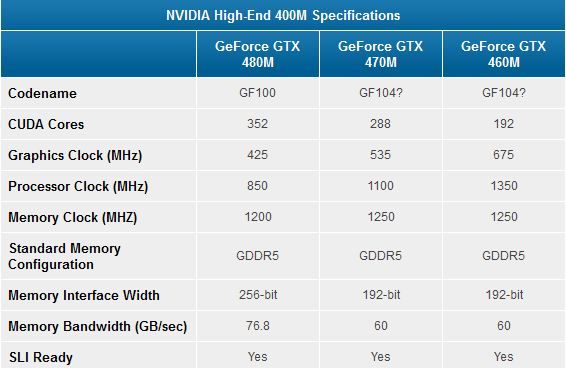
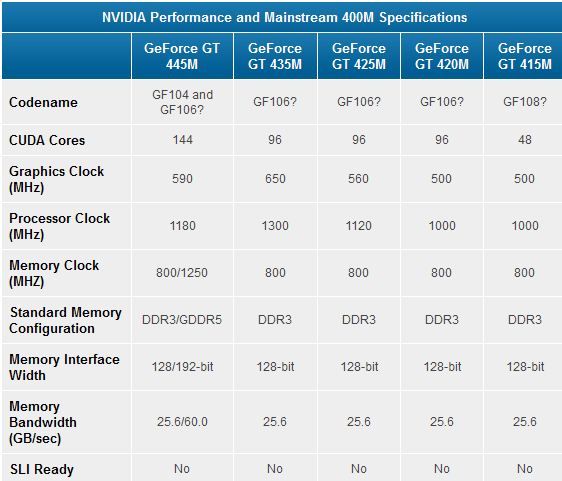
The GT 445M is the mid-range chip to look out for now, while the 460M will become the new GPU of choice for the ~$1k notebook range.
Via Anandtech:
The GT 445M is the mid-range chip to look out for now, while the 460M will become the new GPU of choice for the ~$1k notebook range.
DrForester
Kills Photobucket
For anyone going the ATI route on their VGA cards. I just swapped out the XFX 5870 for the Sapphire 5870 and true to claims their Vapor X cooling system results in amazingly quiet operations.
Nos_G said:Colkate, does your pc have a front panel with audio jacks? If so are the leads plugged into the mobo? Use those for your headset.
If not just buy a splitter, pretty cheap.
Not sure why that never crossed my mind but yes, there are two audio jacks on the front panel of my PC, just trying them now and they seem to be the equivalent of the Pink and Lime Green rear jacks on my mobo, so my headset appears to be working when plugged into the front. The only issue with that is that my system seems to regard the front and rear jacks as the same, giving priority to the front.
So at the moment it looks like I can switch between audio devices simply by removing the audio connection from the front panel. I'll look into getting a splitter though, if that would allow me to switch audio devices within Windows that would be ideal.
EDIT: Oh ho, even better, just turning my subwoofer off (which I'd do whenever it's not in use), switches over to my headset anyway, so no need for anything fancy. Can't believe I didn't think to do that in the first place. :lol Thanks.
Ready to pull the trigger on my comp. Made a couple of changes; went back to a slightly more expensive monitor, for example, and DrForester's post got me to do a little research on different brands of 5870 and I ended up switching that. Grand total is just about $2,050 after shipping, which isn't too bad considering that also includes a monitor and two copies of an operating system; the PC itself comes down at around $1,500.
Would hit buy right now but I want to get home and check on my speakers a little bit. They haven't been putting out any sound recently, but that computer has been having a few random problems so it's not necessarily the speaker's fault. If they end up busted I may have to drop a few other items in price so I can buy some new speakers. Also considering moving from Windows 7 home to professional.
Would hit buy right now but I want to get home and check on my speakers a little bit. They haven't been putting out any sound recently, but that computer has been having a few random problems so it's not necessarily the speaker's fault. If they end up busted I may have to drop a few other items in price so I can buy some new speakers. Also considering moving from Windows 7 home to professional.
apocalidiot
Banned
If this tv has 1:1 pixel mapping, would this be a good choice for a monitor?
http://www.bestbuy.com/site/Insignia%26%23153%3B+-+22%22+Class+/+1080p+/+60Hz+/+LED-LCD+HDTV/9558427.p?id=1218126042413&skuId=9558427
http://www.bestbuy.com/site/Insignia%26%23153%3B+-+22%22+Class+/+1080p+/+60Hz+/+LED-LCD+HDTV/9558427.p?id=1218126042413&skuId=9558427
donkey show
Member
How's the i7-950? I can get one for cheaper than what newegg is listing so I was wondering how comparable it is to the newer i7s on the market.
The Big Rig
Member
Ok, I need some advice on a motherboard. I bought this last week:
http://www.newegg.com/Product/Product.aspx?Item=N82E16813130290&cm_re=msi_870-_-13-130-290-_-Product
I'm building a budget rig, but I'm thinking now that I want to get something that can do SLI/Crossfire. I'm getting an Athlon II X4, so the board would have to fit AM3. Is there something out there, preferably on Newegg, that's better?
I'd rather not spend more than $90 for the board, if only because I'm stretching my budget thin as it is. If I get a board with SLI/Crossfire, can I buy a non-SLI PSU now and wait?
http://www.newegg.com/Product/Product.aspx?Item=N82E16813130290&cm_re=msi_870-_-13-130-290-_-Product
I'm building a budget rig, but I'm thinking now that I want to get something that can do SLI/Crossfire. I'm getting an Athlon II X4, so the board would have to fit AM3. Is there something out there, preferably on Newegg, that's better?
I'd rather not spend more than $90 for the board, if only because I'm stretching my budget thin as it is. If I get a board with SLI/Crossfire, can I buy a non-SLI PSU now and wait?
The Big Rig said:Ok, I need some advice on a motherboard. I bought this last week:
http://www.newegg.com/Product/Product.aspx?Item=N82E16813130290&cm_re=msi_870-_-13-130-290-_-Product
I'm building a budget rig, but I'm thinking now that I want to get something that can do SLI/Crossfire. I'm getting an Athlon II X4, so the board would have to fit AM3. Is there something out there, preferably on Newegg, that's better?
I'd rather not spend more than $90 for the board, if only because I'm stretching my budget thin as it is. If I get a board with SLI/Crossfire, can I buy a non-SLI PSU now and wait?
http://www.newegg.com/Product/Product.aspx?Item=N82E16813128416R <-$92