• Hey Guest. Check out your NeoGAF Wrapped 2025 results here!

"I need a new PC!" 2010 Edition

mrklaw said:
same - I only put that motherboard in because hazaro recommended it - I'm assuming it does bitstreaming audio over HDMI (?) and optical out?

460 I have no idea - are they all the same or are some better than others? Going for a 1GB one.

And lastly, will that setup give me room to grow later. Either upping the RAM, or upgrading the GPU (can it SLI?) etc?
Don't know about bitstream audio (check here: http://www.gigabyte.com/products/product-page.aspx?pid=3439#sp )
But the 460 can output via mini HDMI -> HDMI.

Try to get a brand that has a warranty where you are. Almost all cards are fine.
SLi yes (will run 8x/8x, but that is enough), most modern mobos support 16-32GB.
It's better to run single card and usually when you want to upgrade that is a better option than putting in another older card. However, if later on dual 460's is a good value you can run 2 with your PSU fine.
 
Hazaro said:
HT is really realllllllllllly negligible.
That's Lightroom 2, we're currently up to Lightroom 3.2, and I haven't found anything specific about it's HT use. It's a very component-like piece of software so edits are hardly the only benchmark of note. The Library module itself can be a hog sometimes on my current C2D.
 
Not sure if this is the best place to ask this, and it's a bit random: Any suggestions for a blue tooth dongle that would let me connect up a Wii Remote, PS3 controller, and a wireless Xbox 360 controller?
 
teiresias said:
That's Lightroom 2, we're currently up to Lightroom 3.2, and I haven't found anything specific about it's HT use. It's a very component-like piece of software so edits are hardly the only benchmark of note. The Library module itself can be a hog sometimes on my current C2D.
Righto then.
Servizio said:
Not sure if this is the best place to ask this, and it's a bit random: Any suggestions for a blue tooth dongle that would let me connect up a Wii Remote, PS3 controller, and a wireless Xbox 360 controller?
Wiimote+DS3 should work fine on any dongle.
Wireless 360 pad won't work period iirc (without the MS adapter)
 
If I upgrade from a System Builders version of Vista using a retail Win 7 upgrade, will I still have the OEM restrictions of the previous SB install? I'm probably building a new system early next year but want to jump on the 7 bandwagon like now. :lol
 
so I was thinking about overclocking my cpu and I have a couple of questions :

specs :
i5-760 / gigabyte p55a-ud4 / coolermaster hyper 212+
gigabyte 460 gtx SLI
4gb corsair 1600mhz
Corsair 650W


1) If I choose to OC my cpu, will I run into any kind of PSU issue? Everything is up and running now and I haven't run into any psu-related issue as of yet.


2) Is this guide, http://www.youtube.com/watch?v=Llqhe3N1cJA&feature=channel missing any steps or if are these steps all I need to do in order to OC my cpu? As far as I can se he doesn't touch the cpu voltage, or am I missing something?


thaaanks <3

edit : also I'm not after any monster 4+ ghz frequencies. I'll definitely be happy with "only" 3.6ghz stable. :D

edit 2 : well, looking at this, the powerconsumption goes from 170w to 231w during an OC from 2.66ghz to 3.48ghz, which leeds me to think that this is out of the question for me with my puny 650w psu :(
 
I'm looking for a remote for my old desktop considering all I use it for is BT and watching media. Anyone have any suggestions?
 
Mairu said:
I'm looking for a remote for my old desktop considering all I use it for is BT and watching media. Anyone have any suggestions?
Microsoft's MCE remote is awesome. It's one of the best designed remotes and one of only two Microsoft products I truly really like(the other being MSE). Microsoft doesn't make it anymore but there's plenty unopened copies on eBay.

ogRJ6.jpg


Also be sure to download EventGhost to remap all the buttons on the remote to your liking. So if you want the Media Center button to launch XBMC instead of Windows Media Center then you can do that with EventGhost.
 
Corky said:
so I was thinking about overclocking my cpu and I have a couple of questions :

specs :
i5-760 / gigabyte p55a-ud4 / coolermaster hyper 212+
gigabyte 460 gtx SLI
4gb corsair 1600mhz
Corsair 650W


1) If I choose to OC my cpu, will I run into any kind of PSU issue? Everything is up and running now and I haven't run into any psu-related issue as of yet.


2) Is this guide, http://www.youtube.com/watch?v=Llqhe3N1cJA&feature=channel missing any steps or if are these steps all I need to do in order to OC my cpu? As far as I can se he doesn't touch the cpu voltage, or am I missing something?


thaaanks <3

edit : also I'm not after any monster 4+ ghz frequencies. I'll definitely be happy with "only" 3.6ghz stable. :D

edit 2 : well, looking at this, the powerconsumption goes from 170w to 231w during an OC from 2.66ghz to 3.48ghz, which leeds me to think that this is out of the question for me with my puny 650w psu :(

lol I got a Corsair 650 as well

does 720 watts at a 50 celcius environment lol

you're definitely not PSU limited with a Corsair PSU =]

I haven't done any i5/7 overclocking (yet) but I guess that's a decent guide if you use that board. Voltage control is really needed once you get around 4 ghz as far as I can tell, so keeping it on auto should be ok. Those Intels seem to have plenty of headroom, and the increase in power consumption is mainly related to the voltage

ow and that powerconsumption you're quoting in the 2nd link refers to the entire system, not just the cpu ... then adjust for 85% (at best) PSU efficiency and you can conclude that a 650 Corsair which can actually deliver 700ish is more than plenty for your system =]
 
Corky said:
so I was thinking about overclocking my cpu and I have a couple of questions

1) If I choose to OC my cpu, will I run into any kind of PSU issue? Everything is up and running now and I haven't run into any psu-related issue as of yet.


2) Is this guide, http://www.youtube.com/watch?v=Llqhe3N1cJA&feature=channel missing any steps or if are these steps all I need to do in order to OC my cpu? As far as I can se he doesn't touch the cpu voltage, or am I missing something?

edit 2 : well, looking at this, the powerconsumption goes from 170w to 231w during an OC from 2.66ghz to 3.48ghz, which leeds me to think that this is out of the question for me with my puny 650w psu :(
You'll be fine with the PSU. That power draw increase is expected, but 1.5V is insane for a 3.5Ghz clock. Stick to 1.325V or so abouts. Do not use auto voltage like he does.

Tabbing through NCIX video seems ok, that's basically all there is to it. Set clocks, turn off some power saving, set voltage, make sure RAM runs in specced speeds.

After testing stability, bump it up a bit, then see if you can get the C1E to work as it does save you some energy.
 
Alright, GAF... I am about to make my purchase!

Just one last time, please look this over and help me make sure everything works out! Just want to make sure the case is big enough, all the ports are right, stuff like that!

Thanks!


Disc Drive (Blu-ray)- Samsung SH-B083L 8X BLU-RAY BD-ROM & DVD Writer Combo
http://www.ncixus.com/products/?sku=...g&promoid=1030

Case- Antec Three Hundred Mini Tower Gaming Case
http://www.ncixus.com/products/?sku=...c&promoid=1030

Hard Drive- Samsung Spinpoint F1 1TB
http://www.ncixus.com/products/51234/HD103UJ/Samsung/

Motherboard- ASUS P7P55D-E Pro
http://www.ncixus.com/products/?sku=...nufacture=ASUS

GPU- Gigabyte GeForce GTX 460
http://www.ncixus.com/products/54506...-1GI/Gigabyte/

PSU- Corsair TX650W
http://www.ncixus.com/products/26414...650TX/Corsair/

Memory- G.SKILL F3-12800CL9D-4GBRL Ripjaws
http://www.ncixus.com/products/?sku=...l&promoid=1030

CPU- Intel Core i5 760 Quad Core Processor
http://www.ncixus.com/products/?sku=...l&promoid=1030

Fan- Coolermaster Hyper 212
http://www.ncixus.com/products/41337.../COOLERMASTER/

Oh and any recommendations on a 1080p+ monitor for 150-200?
 
Can video cards that use PCI Express 2.0 be used on a motherboard that just has regular PCI Express (16x)? (i.e. Backwards compatible). So I can upgrade my video card now and then upgrade my motherboard later.
 
ZZMitch said:
Alright, GAF... I am about to make my purchase!

Just one last time, please look this over and help me make sure everything works out! Just want to make sure the case is big enough, all the ports are right, stuff like that!

Thanks!

Oh and any recommendations on a 1080p+ monitor for 150-200?
Looks real nice.
Tabris said:
Can video cards that use PCI Express 2.0 be used on a motherboard that just has regular PCI Express (16x)? (i.e. Backwards compatible). So I can upgrade my video card now and then upgrade my motherboard later.
Yes they will work in any config. You could upgrade your mobo if you wanted it to be 1-3% faster.
PCI-E 2.0 is for future proofing and dual high end cards (on a single PCB) so don't worry about it.
 
vazel said:
Microsoft's MCE remote is awesome. It's one of the best designed remotes and one of only two Microsoft products I truly really like(the other being MSE). Microsoft doesn't make it anymore but there's plenty unopened copies on eBay.

ogRJ6.jpg


Also be sure to download EventGhost to remap all the buttons on the remote to your liking. So if you want the Media Center button to launch XBMC instead of Windows Media Center then you can do that with EventGhost.
I pretty much play everything in media player classic

Is it possible to use one of those remotes for that or would it be easier to just install XBMC?
 
Hey guys,

I am in need of a new graphics card.

I would prefer an ATI graphics card, not sure what the good ones are at the moment. I have £100-£150 and would like to order from eBuyer if possible.

Any suggestions? Thanks!
 
Mairu said:
I pretty much play everything in media player classic

Is it possible to use one of those remotes for that or would it be easier to just install XBMC?
EventGhost has a plugin for MPC. With EventGhost you can control any app you want. EventGhost is easy to learn but if you're wary the MCE remote works with Windows Media Center(obviously) and WMP without having to install EventGhost.
 
mrklaw said:
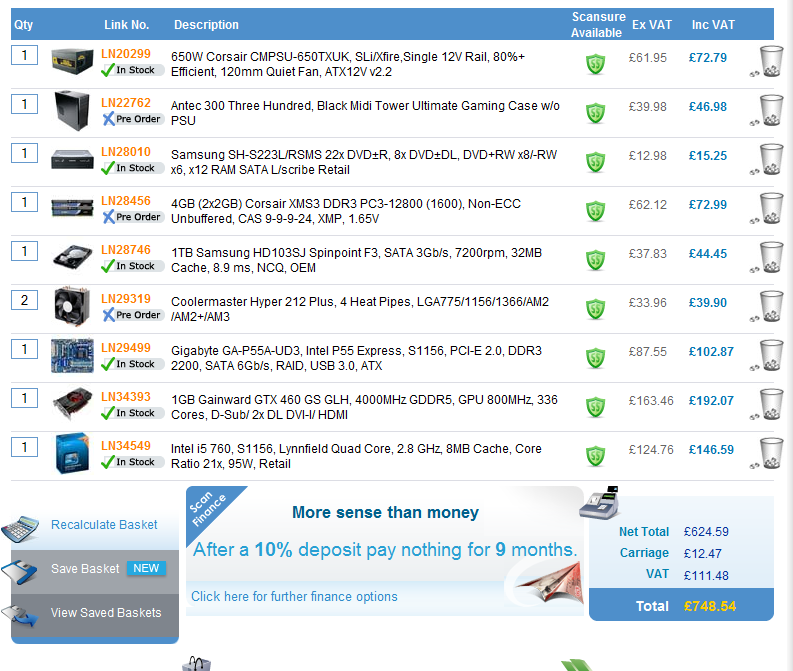
from scan.co.uk:
pc.png


I'd want to upgrade to a bluray drive if you have any recommendations, but does everything else look fine?

where would you save £150 to hit wes' budget - don't know if any other suppliers are significantly cheaper, could shop around.


edit: You can get it down to £680 if you buy the case and PSU from amazon, and opt for an INNO3D 1GB GTX460 (any good) from ebuyer.

I've got it to £755 with Win7 included in that. Think I might have to bite the bullet with that.

My mobo of choice is different (ASUS P7P55D-E LX). Optical drive is Lite-On IHAS124-19 and still not chosen which 460 to go with but they are all around £170.

I haven't checked how well all the components interact yet. I'll probably post the spec later and hope to get some insight from the folks here!
 
Wes said:
I've got it to £755 with Win7 included in that. Think I might have to bite the bullet with that.

My mobo of choice is different (ASUS P7P55D-E LX). Optical drive is Lite-On IHAS124-19 and still not chosen which 460 to go with but they are all around £170.

I haven't checked how well all the components interact yet. I'll probably post the spec later and hope to get some insight from the folks here!

I think thats a decent price, had forgotten about Win7. Yeah, post the spec so other, cleverer people can make sure everything will work together well.

It'll be good to have a decent spec gaming PC for UK gaffers to reference.
 
so is there anything worth upgrading to from a gtx 275?

It seems like the 460 is just marginally better.

Also I have a strange stuttering issue in dead rising 2, and some other games. Not quite sure what thats all about.
 
n0n44m said:
lol I got a Corsair 650 as well

does 720 watts at a 50 celcius environment lol

you're definitely not PSU limited with a Corsair PSU =]

I haven't done any i5/7 overclocking (yet) but I guess that's a decent guide if you use that board. Voltage control is really needed once you get around 4 ghz as far as I can tell, so keeping it on auto should be ok. Those Intels seem to have plenty of headroom, and the increase in power consumption is mainly related to the voltage

ow and that powerconsumption you're quoting in the 2nd link refers to the entire system, not just the cpu ... then adjust for 85% (at best) PSU efficiency and you can conclude that a 650 Corsair which can actually deliver 700ish is more than plenty for your system =]
Hazaro said:
You'll be fine with the PSU. That power draw increase is expected, but 1.5V is insane for a 3.5Ghz clock. Stick to 1.325V or so abouts. Do not use auto voltage like he does.

Tabbing through NCIX video seems ok, that's basically all there is to it. Set clocks, turn off some power saving, set voltage, make sure RAM runs in specced speeds.

After testing stability, bump it up a bit, then see if you can get the C1E to work as it does save you some energy.

Thanks buddies, might give this a go afterall
 
alrighty then here's what I've done :

turned the multiplier to 20 and baseclock to 180 for a goal of 3.6ghz
turned the SPD to x8 for my ram to be below 1600mhz, they're at 1440mhz now.
turned off intelboost/turbo boost
turned off C1E
turned off EIST/speedstep
QPI is set to 32x
and finally Load-line calibration set to enabled.

Cpu-z is showing that the processor is running at the desired 3600mhz

Now I'm going to run prime95 and have a couple of questions :

1) Is there simply a default stresstest to run or should I run somekind of specialized test for my cpu?

2) At what temps should I freak out and stop it ?

3) How long should I run prime95 for?


edit : prime95 is up and running, my temp has peaked at 87 C, what does that tell me? Cpu-z shows a core voltage of 1.376


edit 2 : well I chickened out I aborted the prime95 test after 10min, the temp didnt climb above 87c but reading online people seem to be writing " NEVER EVER LET YOUR CPU GO ABOVE 80 C DURING LOAD , EVER!! "

the idle temp is 40 C now and 87 C was peak temp during load. Is something wrong ? I mean I do realize I'm not on a watercooler system but it feels a tad too high. Maybe it doesn't matter anyways, I only game on the pc not like I'll be using any apps that put my pc in 100% load.
 
Corky said:
alrighty then here's what I've done :

turned the multiplier to 20 and baseclock to 180 for a goal of 3.6ghz
turned the SPD to x8 for my ram to be below 1600mhz, they're at 1440mhz now.
turned off intelboost/turbo boost
turned off C1E
turned off EIST/speedstep
QPI is set to 32x
and finally Load-line calibration set to enabled.

Cpu-z is showing that the processor is running at the desired 3600mhz

Now I'm going to run prime95 and have a couple of questions :

1) Is there simply a default stresstest to run or should I run somekind of specialized test for my cpu?

2) At what temps should I freak out and stop it ?

3) How long should I run prime95 for?


edit : prime95 is up and running, my temp has peaked at 87 C, what does that tell me? Cpu-z shows a core voltage of 1.376

grab this program, run at stresslevel maximum, 20 times (much more stressing than prime95)

if your pc completes it at those settings its stable =]

temperatures shouldn't be an issue with a decent cooler and normal voltage, I'm not really up2date on acceptable max temps for i5's (I think in the upper 70s) but just use Coretemp and see what the difference is between stock and overclock settings

fake edit: 80+ does seem pretty high for those settings .. what cooler?
 
n0n44m said:
grab this program, run at stresslevel maximum, 20 times (much more stressing than prime95)

if your pc completes it at those settings its stable =]

temperatures shouldn't be an issue with a decent cooler and normal voltage, I'm not really up2date on acceptable max temps for i5's (I think in the upper 70s) but just use Coretemp and see what the difference is between stock and overclock settings

fake edit: 80+ does seem pretty high for those settings .. what cooler?

hyper master 212+
 
n0n44m said:
what cpu temps do you get when stressed on the stock settings?

I was stupid enough not to run that I get some reference values :(

though again it could be because my motherboard tends to overvolt ( according to that NCIX video ) and cpuz is telling me it was running around 1.37ish which could indicate why the temps were so high during full load.
 
Corky said:
I was stupid enough not to run that I get some reference values :(

though again it could be because my motherboard tends to overvolt ( according to that NCIX video ) and cpuz is telling me it was running around 1.37ish which could indicate why the temps were so high during full load.

put it a bit lower then and see what it does for temps/stability =]

but yeah get some reference values first
 
n0n44m said:
put it a bit lower then and see what it does for temps/stability =]

but yeah get some reference values first

alright I turned off loadline calibration.
turned the cpu vcore from auto to 1.35v and set QPI to 1.17ish.

Now cpu-z shows a core voltage of around 1.28v and my peak temps went from 88 C down to 72 C during full load hoooray
 
Just got my Asus GTX 460 1GB DirectCU (stock clocked version) and WOW!!!

Without touching any voltages, I'm at 875MHz on the core and 4500MHz on the memory and I haven't even reached the limits yet! The best part is, it was the cheapest 1GB card I could find at £153 delivered. :D
 
ChoklitReign said:
How many months (or years) do you reckon SSD prices will drop to a 2:1 ratio for price-per-gigabyte? The cheapest SSDs on Newegg are almost 3:1.

the price per amount of storage is related to the generation of the memory (chips) that is being produced

every new generation seems to go down in price, and the next gen is supposed to be Intel's new 20something nm line which improves over their current 34nm ... last speculation I read was basically same price for twice the amount of storage (€200 for ~160 gig?) but they got delayed to Q1 2011 AFAIK
 
Outdoor Miner said:
If I upgrade from a System Builders version of Vista using a retail Win 7 upgrade, will I still have the OEM restrictions of the previous SB install? I'm probably building a new system early next year but want to jump on the 7 bandwagon like now. :lol

Once you change motherboards, you pretty much invalidate Windows 7 authentication. You can call MS and use social engineering to sweet talk them into resetting your key, but you will have to call. And you'll need to google the best directions for what to say.
 
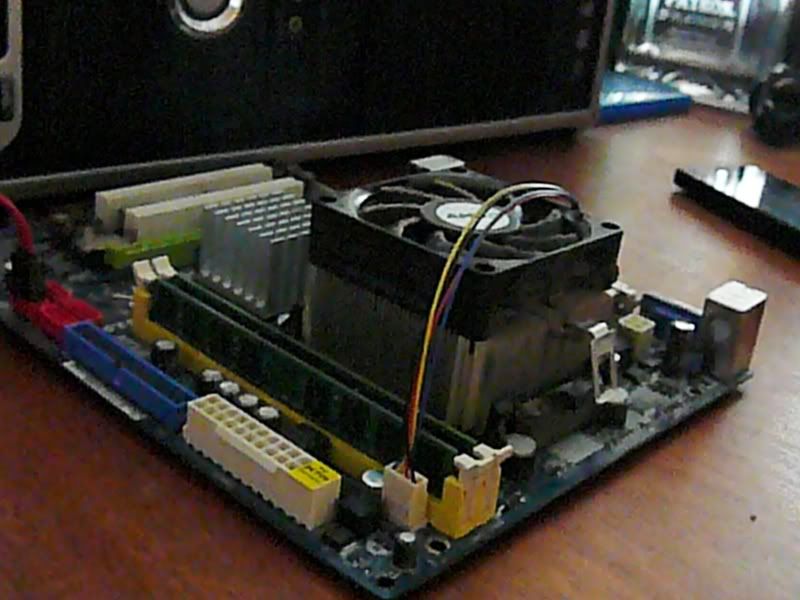
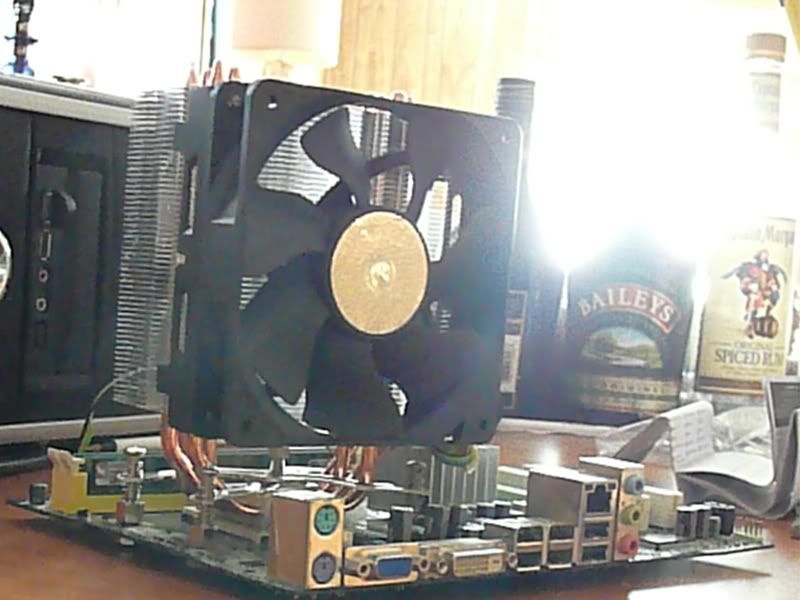
Well got the new cooler on, soo much cooler, lol

Pre Badass Fan
P1040495.jpg

Idle Temp 55 celsius

After installation of the beast
P1040497.jpg

Idle Temp 35 Celsius lol, a whole difference of 20 lol :lol
 
Does anyone here have experience buying from NCIX?

I just bought my parts and entered all my data, and I got an email saying that they were going to verify it by telephone. On the telephone they gave me a 4-digit pin number that I was to enter. I entered it and it came out incorrect a few times, until it said the limit had been reached. I am positive that I had the pin number right. Can I just have them call and verify my info again or what?
 
1-D_FTW said:
Once you change motherboards, you pretty much invalidate Windows 7 authentication.

Really? How about if you were to do a fresh install of Windows? Seems pretty messed up.

I plan on doing a mobo+cpu+RAM upgrade in the next year or so, I'd rather not have to buy a new copy of 7.
 
Did you buy an OEM version? If so, you technically have to buy another OS. OEM versions are cheaper than retail because of the one machine restriction.
 
You can reinstall OEM versions after changing motherboards. I have done it multiple times on my OEM Vista and OEM Windows 7. You can call them to get a new serial if you explain that you are replacing the motherboard. They are happy to give you one.
 
Wallach said:
You can reinstall OEM versions after changing motherboards. I have done it multiple times on my OEM Vista and OEM Windows 7. You can call them to get a new serial if you explain that you are replacing the motherboard. They are happy to give you one.
In addition, you can simply call their fully automated activation service. The entire process takes maybe 5-6 minutes to complete.
 
Fredescu said:
When you're installing an previously used OEM version onto a new motherboard? Are you sure?

Pretty sure yeah. The one machine limit is basically "tied to the motherboard" so that you don't have multiple installs. They will deactivate the old serial and give you a new one in the case that you are exchanging the motherboard on your single installation. I've never had a problem doing so.
 
Fredescu said:
When you're installing an previously used OEM version onto a new motherboard? Are you sure?
Yes. I have a 7 Ultimate OEM and I just had to switch my motherboard. At first I called their normal tech serv located overseas, but I didn't have time to complete the call. You have up to 3 days to authenticate the OS, and I did so with the automated line.
 
Sold my recently bought XPS 8100 for a profit and NOW comes the fun part. Shopping for parts for a kick ass rig as I type. For CPU I'm going with the i7-950 and want to overclock it like crazy w/out needing to go liquid cooling.

Can I push it to 4-4.3GHz with good fan?
 
Top Bottom