
that + an i5 ($176) + 4GB of G.Skill ($50) + a nice case and you are mostly set!zaryn said:Could anyone recommend any deals from Newegg's Black Friday sale? I'm looking to build a new PC from the ground up and would love to score some sweet deals. However, it's been so long since I've built a rig that I have no clue what the average price of components cost these days, and spotting a great deal will be difficult.
So far, this Gigabyte mobo is they only thing that's caught my eye.
http://www.newegg.com/Product/Product.aspx?Item=N82E16813128425
Would I be better off waiting for Cyber Monday?
-
Hey Guest. Check out your NeoGAF Wrapped 2025 results here!
You are using an out of date browser. It may not display this or other websites correctly.
You should upgrade or use an alternative browser.
You should upgrade or use an alternative browser.
"I need a new PC!" 2010 Edition
- Thread starter Spy
- Start date
Metalic Sand
who is Emo-Beas?
Metalic Sand said:
Pretty nice price. Not that insane though as memory prices have come down and 4GB could be had for 50$ for a little while now. Still, it's a little lower than we've ever seen.
they were on sale for a similar price last year iircMetalic Sand said:
STEALTH EDIT: Just realized they were 8GB. I bought the same version of the 4GB pack(2x2GB) last year at a similar price:lol
Need a recommendation on one of the following. I already have regular headphones, these are just for gaming, so I don't care how they perform for music or anything.
http://www.newegg.com/Product/Produ...m_mmc=BFUS-_-707-_-N82E16826158084&nm_mc=BFUS
or
http://www.newegg.com/Product/Produ...6502011&cm_re=earforce-_-26-502-011-_-Product
obviously one is analog and one is digital. I guess the Creative ones would be easier to hook up and unplug since I can just do it right in the front. I prefer quality over ease of use though.
Angelus Errare
Banned
Anyone know if Newegg does price matching? I JUST bought a i5 Quad for my brother from them 2 days ago, and now it's got a reduced price.....ffuuuuuuu
edit: Newegg's Iron Egg guarantee ftw! Crisis averted
edit: Newegg's Iron Egg guarantee ftw! Crisis averted
All I've heard about turtle beach is that they're great, but I wouldn't know first hand.TheExodu5 said:Creative, Logitech, and Turtlebeach all make pretty shitty headphones, but if I had to pick my poison, I'd go creative.
Maybe Creative has gotten better. No glaring issues in user reviews.
Can you output surround sound for blu rays on a PC over analog inputs?
TheExodu5 said:Which SSD? You want to at least make sure your SSD is either an Intel or Crucial C300, or uses a Sandforce controller. Some of the early SSDs were really bad.
http://www.newegg.com/Product/Product.aspx?Item=N82E16820139132
Is it a good SSD? I was going to get this one, and want to know which one is better.
http://www.newegg.com/Product/Product.aspx?Item=N82E16820227550
All the deals and MIR, can get my computer I wanted for well under $1000. with the i7 cpu,

And then on memory should I go with these:
http://www.newegg.com/Product/Product.aspx?Item=N82E16820104118
or with these even though they clock is lower, it's an extra 2gb of ram:
http://www.newegg.com/Product/Product.aspx?Item=N82E16820231311
Angelus Errare
Banned
Gotta love Newegg CS. Spoke with a rep and explained to her about how I bought a bunch of stuff (i5 for my brother and a AMD rig for his wife, their money obviously) anyway, told her about the price difference and how I bought some ram based on the original price and wanted to RMA the ram I bought and get some other ram. The lady price matched me then waived my restocking fee for my RMA.
Fuckin' Ace.
Fuckin' Ace.
caliblue15 said:http://www.newegg.com/Product/Product.aspx?Item=N82E16820139132
Is it a good SSD? I was going to get this one, and want to know which one is better.
http://www.newegg.com/Product/Product.aspx?Item=N82E16820227550
All the deals and MIR, can get my computer I wanted for well under $1000. with the i7 cpu,
The Kingston is really, really, really bad. It has like 0.2MB/s random read speeds. The OCZ on the other hand has around 100MB/s random read speeds. The OCZ is a great drive.
caliblue15 said:And then on memory should I go with these:
http://www.newegg.com/Product/Product.aspx?Item=N82E16820104118
or with these even though they clock is lower, it's an extra 2gb of ram:
http://www.newegg.com/Product/Product.aspx?Item=N82E16820231311
If you've got an i7 you want 3 sticks, so the Kingston RAM, I suppose.
Actually get this:
http://www.newegg.com/Product/Produ...0145222&cm_re=6gb_ddr3-_-20-145-222-_-Product
Corsair is a far more reputable brand.
Baron Aloha
A Shining Example
I finally got all of the parts and put my new PC together today.
The components cost me about $1200.
i7-950
Asus Motherboard
Corsair 6GB DDR3 Memory
EVGA Nvidia GTX470
Corsair 750W Power Supply
LG Bluray Burner
Corsair 120GB SSD
Cooler Master 690II Case
I didn't realize it but the power supply I ordered wasn't modular so I have all of these extra cords tucked into the bottom. I was so worried about the other components that I overlooked this. If it wasn't such a PITA I would send it back. Live and learn I guess.
I haven't tried overclocking it or even finished configuring everything but I got a Windows experience index of 7.8 (due to the SSD) right now so I'm happy with that.
I ended up going with the GTX 470 for the graphics card after seeing it on sale for $199. A 580 would have been nice but after comparing the benchmarks it didn't make much sense to me to spend 2.5 - 3 times as much for a ~20% boost in performance. Heck, for a little more than the price of a 580 I could have purchased 3 470s and put them in SLI since my MB supports up to 3.
Now I have to find some PC games to play on this thing. Nothing is really on my radar except for Diablo 3 (hopefully next year!). Might pick up Oblivion and L4D for the mods. My main reason for this build was so that I could run Visual Studio well and work at home more (since now I will actually be able to compile code) and do some Maya stuff on the side.
The components cost me about $1200.
i7-950
Asus Motherboard
Corsair 6GB DDR3 Memory
EVGA Nvidia GTX470
Corsair 750W Power Supply
LG Bluray Burner
Corsair 120GB SSD
Cooler Master 690II Case
I didn't realize it but the power supply I ordered wasn't modular so I have all of these extra cords tucked into the bottom. I was so worried about the other components that I overlooked this. If it wasn't such a PITA I would send it back. Live and learn I guess.
I haven't tried overclocking it or even finished configuring everything but I got a Windows experience index of 7.8 (due to the SSD) right now so I'm happy with that.
I ended up going with the GTX 470 for the graphics card after seeing it on sale for $199. A 580 would have been nice but after comparing the benchmarks it didn't make much sense to me to spend 2.5 - 3 times as much for a ~20% boost in performance. Heck, for a little more than the price of a 580 I could have purchased 3 470s and put them in SLI since my MB supports up to 3.
Now I have to find some PC games to play on this thing. Nothing is really on my radar except for Diablo 3 (hopefully next year!). Might pick up Oblivion and L4D for the mods. My main reason for this build was so that I could run Visual Studio well and work at home more (since now I will actually be able to compile code) and do some Maya stuff on the side.
Baron Aloha said:I finally got all of the parts and put my new PC together today.
The components cost me about $1200.
i7-950
Asus Motherboard
Corsair 6GB DDR3 Memory
EVGA Nvidia GTX470
Corsair 750W Power Supply
LG Bluray Burner
Corsair 120GB SSD
Cooler Master 690II Case
I didn't realize it but the power supply I ordered wasn't modular so I have all of these extra cords tucked into the bottom. I was so worried about the other components that I overlooked this. If it wasn't such a PITA I would send it back. Live and learn I guess.
I haven't tried overclocking it or even finished configuring everything but I got a Windows experience index of 7.8 (due to the SSD) right now so I'm happy with that.
I ended up going with the GTX 470 for the graphics card after seeing it on sale for $199. A 580 would have been nice but after comparing the benchmarks it didn't make much sense to me to spend 2.5 - 3 times as much for a ~20% boost in performance. Heck, for a little more than the price of a 580 I could have purchased 3 470s and put them in SLI since my MB supports up to 3.
Now I have to find some PC games to play on this thing. Nothing is really on my radar except for Diablo 3 (hopefully next year!). Might pick up Oblivion and L4D for the mods.
Buy some zipties, and put your cables in the back of the case (if there's enough room...not sure how much room there is in the CM 690 II). Zipties will let you clean things up quite a bit.
There should be notches in the back of the motherboard tray to tie stuff down.
Baron Aloha
A Shining Example
TheExodu5 said:Buy some zipties, and put your cables in the back of the case (if there's enough room...not sure how much room there is in the CM 690 II). Zipties will let you clean things up quite a bit.
There should be notches in the back of the motherboard tray to tie stuff down.
I'm gonna have to reopen it and take another look tomorrow. There is a little room behind the MB but not much. I would have liked to have been able to run some cables behind the motherboard and drop them in from the top (like the small atx power cord) but the CM 690 II doesn't have a hole at the top that's big enough to fit the cable through. Right now I've got things sort of tucked away where the hard drive bays are since there is room for up to 6 of those.

Baron Aloha said:I'm gonna have to reopen it and take another look tomorrow. There is a little room behind the MB but not much. I would have liked to have been able to run some cables behind the motherboard and drop them in from the top (like the small atx power cord) but the CM 690 II doesn't have a hole at the top that's big enough to fit the cable through. Right now I've got things sort of tucked away where the hard drive bays are since there is room for up to 6 of those.
The hole really isn't big enough? I passed my 4 pin through the CM 490 (first version) just fine, and that was using a sleeved Enermax cable.
edit: here's a pic from hardforum (ignore the 24 pin hack):

Might be a tad unfair to compare yourself to that, but at least it gives you a benchmark to set yourself again. I could never pull off something that good.
Baron Aloha
A Shining Example
TheExodu5 said:The hole really isn't big enough? I passed my 4 pin through the CM 490 (first version) just fine, and that was using a sleeved Enermax cable.
edit: here's a pic from hardforum (ignore the 24 pin hack):
I tried but I could not get it to fit. That pic looks sick. My cables look a wreck right now. :lol


ChoklitReign
Member
How decent is the Palit GTX 460 1GB? I've got a sweet build with it that's under $600 and it has to be the most powerful card I can afford. Didn't it have hardware issues at launch?
wandering goat
Member
I finally finished setting up my computer and it works, success! Now just installing everything (and trying to get the internet to work again. . .) It was really damn loud at first until I found out that the Hyper 212+ was spinning at it's top RPM and set up a fan profile for it with the Asus software. Thanks for everyone's help in deciding what to buy and setting things up!
My final specs:
Case: Cooler Master HAF 922
CPU: Intel i5-760
Cooler: Cooler Master Hyper 212+
Motherboard: Asus P7P55D-E Pro
Graphics: Asus EAH6850
Ram: 4GB Corsair XMS3 DDR3 1600
Power: Corsair HX 650W
SSD: 80GB Intel X-25M
HDD: 1TB WD Black Caviar
Drive: LG Super Multi Blu-Ray Disc Rewriter
And a pic of my set-up:
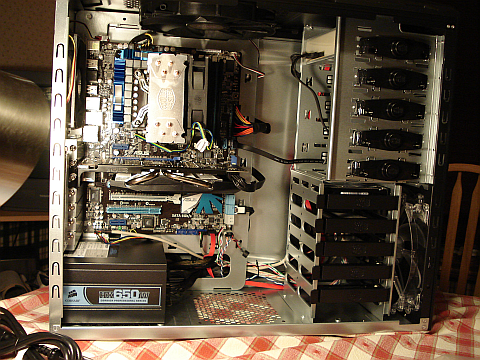
Going to try out some games and possibly set up overclocks for the CPU and video card this weekend. The weird thing is that according to Asus, my CPU's idling at around 30 C while with SpeedFan, the core temps range between around 13-20 C.
My final specs:
Case: Cooler Master HAF 922
CPU: Intel i5-760
Cooler: Cooler Master Hyper 212+
Motherboard: Asus P7P55D-E Pro
Graphics: Asus EAH6850
Ram: 4GB Corsair XMS3 DDR3 1600
Power: Corsair HX 650W
SSD: 80GB Intel X-25M
HDD: 1TB WD Black Caviar
Drive: LG Super Multi Blu-Ray Disc Rewriter
And a pic of my set-up:
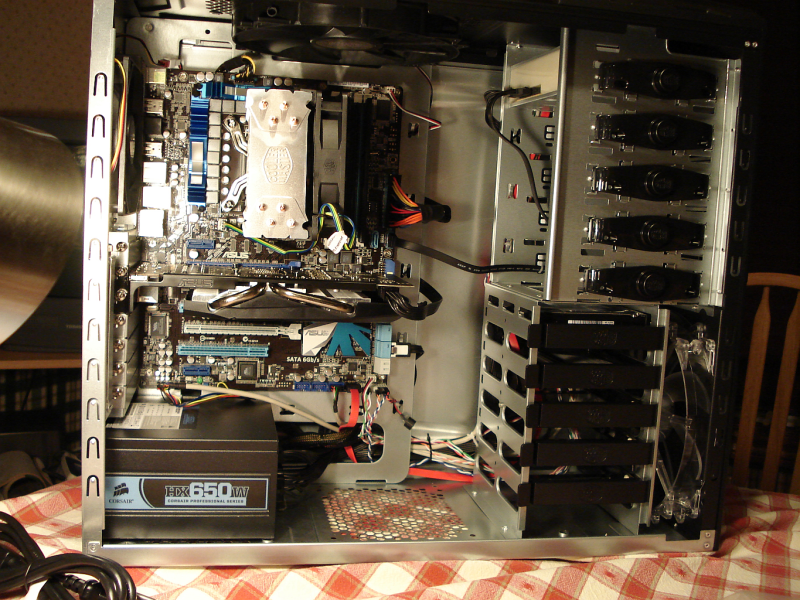
Going to try out some games and possibly set up overclocks for the CPU and video card this weekend. The weird thing is that according to Asus, my CPU's idling at around 30 C while with SpeedFan, the core temps range between around 13-20 C.
^
Nice cable setup. See how easy it is to tuck everything away in that case?
The Palit was missing VRM heatsinks at launch. I assume they've fixed it now.
Nice cable setup. See how easy it is to tuck everything away in that case?
ChoklitReign said:How decent is the Palit GTX 460 1GB? I've got a sweet build with it that's under $600 and it has to be the most powerful card I can afford. Didn't it have hardware issues at launch?
The Palit was missing VRM heatsinks at launch. I assume they've fixed it now.
Angelus Errare
Banned
Kurashima said:I finally finished setting up my computer and it works, success! Now just installing everything (and trying to get the internet to work again. . .) It was really damn loud at first until I found out that the Hyper 212+ was spinning at it's top RPM and set up a fan profile for it with the Asus software. Thanks for everyone's help in deciding what to buy and setting things up!
My final specs:
Case: Cooler Master HAF 922
CPU: Intel i5-760
Cooler: Cooler Master Hyper 212+
Motherboard: Asus P7P55D-E Pro
Graphics: Asus EAH6850
Ram: 4GB Corsair XMS3 DDR3 1600
Power: Corsair HX 650W
SSD: 80GB Intel X-25M
HDD: 1TB WD Black Caviar
Drive: LG Super Multi Blu-Ray Disc Rewriter
And a pic of my set-up:
Going to try out some games and possibly set up overclocks for the CPU and video card this weekend. The weird thing is that according to Asus, my CPU's idling at around 30 C while with SpeedFan, the core temps range between around 13-20 C.
Grats sir
Metalic Sand said:
Damn, if only the price drop happened earlier. I bought the 4GB ones for $68.99 last monday. For $20 more I could've gotten this.
 so pissed I missed the first batch.
spermatic cord
Member
That organized wire set up looks great. I want to throw up every time I take a look at the inside of my case
demosthenes
Member
Quick 2 questions:
1) Getting a PC for my dad for Christmas. Doesn't have to do anything special really, his is 6 years old. All he really does is check stocks on scottrade and play basic games, and stream some music. He has a monitor so all I need is the tower. Buy or Build for something so simple?
2) If I'm going for build, what's the better budget CPU/Mobo combo? Intel or AMD?
1) Getting a PC for my dad for Christmas. Doesn't have to do anything special really, his is 6 years old. All he really does is check stocks on scottrade and play basic games, and stream some music. He has a monitor so all I need is the tower. Buy or Build for something so simple?
2) If I'm going for build, what's the better budget CPU/Mobo combo? Intel or AMD?
Well, seems I have less money then I expected due to some last minute expenses, so I decided to build my self a cheap PC that should be easily upgradeable in the upcoming months. Other then the Video Card being pretty meh (But its still a step up from what I have... In fact, Intel Integrated is a step up from the Radeon X1200), any major problems you see? Since Intel is going to be getting a whole new slot soon, I decided to go with a Mother Board/CPU Combo that is less then on of the Intel i5 Newegg has on sale (Plus, it comes with the AMD Mother Board I wanted).

Like I said above, the idea is to upgrade it over the next few months and such. How good is the CPU?
Like I said above, the idea is to upgrade it over the next few months and such. How good is the CPU?
Nolimit_SS
Banned
Having some problems with HDD. I got 2 of these: http://www.newegg.com/Product/Product.aspx?Item=N82E16822136218
And first one seems to have slowed down, one with windows and programs(other is storage).
Here's scan with 2 programs, it's a bit strange in lower pic it shows a lot slower speed for 1st drive. I tried copying big stuff from 2nd HDD to first and speed varies a lot, one file was ~30mbs, other 60 etc. hmm
What is normal? Anyone got some good program I can test this with?
https://sites.google.com/site/nolimitss/hddtest.jpg
What do I do? Main problem is that WoW loading times got slower a lot so it got me worried :/
Edit: Tested by copying one file from C:\ (problematic drive) to desktop and it took quite a long time, went to 30-40mb/s, then I copied same file from C to other hdd and it did it with over 100mb/s and droping to 80s later
And first one seems to have slowed down, one with windows and programs(other is storage).
Here's scan with 2 programs, it's a bit strange in lower pic it shows a lot slower speed for 1st drive. I tried copying big stuff from 2nd HDD to first and speed varies a lot, one file was ~30mbs, other 60 etc. hmm
What is normal? Anyone got some good program I can test this with?
https://sites.google.com/site/nolimitss/hddtest.jpg
What do I do? Main problem is that WoW loading times got slower a lot so it got me worried :/
Edit: Tested by copying one file from C:\ (problematic drive) to desktop and it took quite a long time, went to 30-40mb/s, then I copied same file from C to other hdd and it did it with over 100mb/s and droping to 80s later
Don't expect to run modern games with that video card.Drkirby said:Well, seems I have less money then I expected due to some last minute expenses, so I decided to build my self a cheap PC that should be easily upgradeable in the upcoming months. Other then the Video Card being pretty meh (But its still a step up from what I have... In fact, Intel Integrated is a step up from the Radeon X1200), any major problems you see? Since Intel is going to be getting a whole new slot soon, I decided to go with a Mother Board/CPU Combo that is less then on of the Intel i5 Newegg has on sale (Plus, it comes with the AMD Mother Board I wanted).
Like I said above, the idea is to upgrade it over the next few months and such. How good is the CPU?
As for the CPU...seems great for the price. I can't say how well it will do Wii emulation, but should be fine for gaming.
BoboBrazil
Member
Is this a good deal? http://www.frys.com/product/6440582
Thinking about getting it tomorrow. My computer now is athlon x2 4000+, 4 gig ram, and 8600gt graphics card. Would my graphics card be better than that integrated ati 4200?
Thinking about getting it tomorrow. My computer now is athlon x2 4000+, 4 gig ram, and 8600gt graphics card. Would my graphics card be better than that integrated ati 4200?
Drkirby said:If they are the same speed, they should run just as well, but with a single 4GB stick it would be easier to upgrade.
Yea, I believe they are the same speed. So theres no advantage to dual channel? Here are the links for reference, thanks for the tip
4gb stick
http://www.jr.com/crucial/pe/CRT_51...are&SiteID=lw9MynSeamY-HotlBFKvbtJSig/aVPQYpw
2x2gb sticks
http://www.jr.com/crucial/pe/CRT_4GKIT25664B/
Amazon currently has the Logitech MX 518 mouse for $25.
http://www.amazon.com/Logitech-Performance-Optical-Gaming-Mouse/dp/B0007Z1M50/ref=sr_1_1?t=slicinc-20&tag=slicinc-20&ie=UTF8&qid=1290672962&sr=8-1
Not sure how long it will last, so I ordered one.
http://www.amazon.com/Logitech-Performance-Optical-Gaming-Mouse/dp/B0007Z1M50/ref=sr_1_1?t=slicinc-20&tag=slicinc-20&ie=UTF8&qid=1290672962&sr=8-1
Not sure how long it will last, so I ordered one.
Yeah, I think I'll have to put off on getting a CPU that can handle Emulation well for a while. I should be able to play Animal Crossing though :lol
And yeah, the video card is just some throw away card for the mean time, I am not even sure the mother board has a integrated video card on it. It will be $20 after the Rebate, Should be good enough to run TF2, and at least it has support for Pixel Shader's higher then 2. Oh god I hate my laptop at moments like these.

But once I get some more money, I'll likely upgrade. What would be a good $100-$150 Graphics card, I think I may ask my family to get me that as a Christmas gift since they keep asking what to get for me.
And yeah, the video card is just some throw away card for the mean time, I am not even sure the mother board has a integrated video card on it. It will be $20 after the Rebate, Should be good enough to run TF2, and at least it has support for Pixel Shader's higher then 2. Oh god I hate my laptop at moments like these.
But once I get some more money, I'll likely upgrade. What would be a good $100-$150 Graphics card, I think I may ask my family to get me that as a Christmas gift since they keep asking what to get for me.
That's not a great deal. Your 8600GT is probably faster than that 4200.BoboBrazil said:Is this a good deal? http://www.frys.com/product/6440582
Thinking about getting it tomorrow. My computer now is athlon x2 4000+, 4 gig ram, and 8600gt graphics card. Would my graphics card be better than that integrated ati 4200?
If you're going for a good, cheap graphics card, get the GTX 460 768MB.Drkirby said:Yeah, I think I'll have to put off on getting a CPU that can handle Emulation well for a while. I should be able to play Animal Crossing though :lol
And yeah, the video card is just some throw away card for the mean time, I am not even sure the mother board has a integrated video card on it. It will be $20 after the Rebate, Should be good enough to run TF2, and at least it has support for Pixel Shader's higher then 2. Oh god I hate my laptop at moments like these.
But once I get some more money, I'll likely upgrade. What would be a good $100-$150 Graphics card, I think I may ask my family to get me that as a Christmas gift since they keep asking what to get for me.
Ashhong said:Yea, I believe they are the same speed. So theres no advantage to dual channel? Here are the links for reference, thanks for the tip
4gb stick
http://www.jr.com/crucial/pe/CRT_51...are&SiteID=lw9MynSeamY-HotlBFKvbtJSig/aVPQYpw
2x2gb sticks
http://www.jr.com/crucial/pe/CRT_4GKIT25664B/
Dual channel memory does provide better performance but your dimm slots are more of a limiting factor. Consider if you ever are going to bother with 8GB of memory with that machine. Even today 4GB is a lot to work with and will likely outlive the usefulness of your laptop. If 8GB is important then use the single stick.
Does it matter who makes it? Such as, would this one be good?TheExodu5 said:If you're going for a good, cheap graphics card, get the GTX 460 768MB.
http://www.newegg.com/Product/Product.aspx?Item=N82E16814162058
Or this one, which comes to $5 more and is made of a company I have at least heard of?
http://www.newegg.com/Product/Product.aspx?Item=N82E16814121390
Shambles said:Dual channel memory does provide better performance but your dimm slots are more of a limiting factor. Consider if you ever are going to bother with 8GB of memory with that machine. Even today 4GB is a lot to work with and will likely outlive the usefulness of your laptop. If 8GB is important then use the single stick.
8GB is probably not in my future. It's just that the 4gb stick is cheaper (and I already accidentally ordered it, thinking it was a kit :lol ) It's going in a Macbook Pro FYI...So are you saying I shouldn't really notice a huge difference?
Wouldn't the top one be better? $10 less and it uses 2 less slots.d[-_-]b said:
Doesn't matter all that much.Drkirby said:Does it matter who makes it? Such as, would this one be good?
http://www.newegg.com/Product/Product.aspx?Item=N82E16814162058
Or this one, which comes to $5 more and is made of a company I have at least heard of?
http://www.newegg.com/Product/Product.aspx?Item=N82E16814121390
First one. No contest.d[-_-]b said:
Ashhong said:8GB is probably not in my future. It's just that the 4gb stick is cheaper (and I already accidentally ordered it, thinking it was a kit :lol ) It's going in a Macbook Pro FYI...So are you saying I shouldn't really notice a huge difference?
Nah, you'll be fine either way for day to day computing. If you were doing some photo/video production work you would care more.
Yes, SLI.Drkirby said:Does Nvidia have anything like Crossfire?
No, but also not with Crossfire. All multi-GPU setups these days use AFR, so if the GPUs don't have approximately the same performance you'll likely get worse results that just running the faster one. (With NV you can use a relatively "crummy" one for physx)Drkirby said:Like if I pluged both the crummy $20 Video card and the $150 one in, would it for some reason run better?