Microsoft introduces "Native NVMe" driver stack

winjer

Member

Modern NVMe devices—like PCIe Gen5 enterprise SSDs capable of 3.3 million IOPS, or HBAs delivering over 10 million IOPS on a single disk—are pushing the boundaries of what storage can do. SCSI-based I/O processing can't keep up because it uses a single-queue model, originally designed for rotational disks, where protocols like SATA support just one queue with up to 32 commands. In contrast, NVMe was designed from the ground up for flash storage and supports up to 64,000 queues, with each queue capable of handling up to 64,000 commands simultaneously.

With Native NVMe in Windows Server 2025, the storage stack is purpose-built for modern hardware—eliminating translation layers and legacy constraints. Here's what that means for you:

  • Massive IOPS Gains: Direct, multi-queue access to NVMe devices means you can finally reach the true limits of your hardware.
  • Lower Latency: Traditional SCSI-based stacks rely on shared locks and synchronization mechanisms in the kernel I/O path to manage resources. Native NVMe enables streamlined, lock-free I/O paths that slash round-trip times for every operation.
  • CPU Efficiency: A leaner, optimized stack frees up compute for your workloads instead of storage overhead.
  • Future-Ready Features: Native support for advanced NVMe capabilities like multi-queue and direct submission ensures you're ready for next-gen storage innovation.
Using DiskSpd.exe, basic performance testing shows that with Native NVMe enabled, WS2025 systems can deliver up to ~80% more IOPS and a ~45% savings in CPU cycles per I/O on 4K random read workloads on NTFS volumes when compared to WS2022. This test ran on a host with Intel Dual Socket CPU (208 logical processors, 128GB RAM) and a Solidigm SB5PH27X038T 3.5TB NVMe device. The test can be recreated by running "diskspd.exe -b4k -r -Su –t8 -L -o32 -W10 -d30" and modifying the parameters as desired. Results may vary.

LqyuxQlc8Ybeli1g.png
pxxLTYaTXY1dp6RG.png


To enable the feature. It also works on Windows Pro and Home. Though this is still a feature only meant for servers.
But please make sure to backup your registry first, in case something goes wrong.
It requires KB5066835 to be installed. But this was released several months ago, and most people should have it.
It also requires Windows 11 24H2 or 25H2.

reg add HKEY_LOCAL_MACHINE\SYSTEM\CurrentControlSet\Policies\Microsoft\FeatureManagement\Overrides /v 1853569164 /t REG_DWORD /d 1 /f
reg add HKEY_LOCAL_MACHINE\SYSTEM\CurrentControlSet\Policies\Microsoft\FeatureManagement\Overrides /v 156965516 /t REG_DWORD /d 1 /f
reg add HKEY_LOCAL_MACHINE\SYSTEM\CurrentControlSet\Policies\Microsoft\FeatureManagement\Overrides /v 735209102 /t REG_DWORD /d 1 /f

My experience:
I didn't do proper benchmarks, just ran a few games to see if there was any difference.
With games that use Direct Storage, such as BF6, Spiderman I didn't notice any changes. With Ratchet and Clank the loading seemed faster, but could be just my impression.

But then I tested games using UE4 and 5. One thing that always happened wit these games is that due to it's streaming system, when I started running in game, performance would drop 10-15 FPS, and CPU utilization would increase a bit.
So I installed Kena, The Forbidden City, High on Life, and Talos Principle Reawakened. These are games where I had previously noticed they would drop performance whenever I started running in game.
With this driver stack, CPU utilization barely moved. And the frame rate was almost stable, only changing a bit due to the scenery moving. But not the drop in performance that UE4 and 5 games usually have.
Also, stutters were fewer. Talos Principle always ran very well. But Kena and The Forbidden City and High on Life, always had a good amount of stutters, even after shader compilation, due to asset streaming.
 
Fourteen years since NVMe was created and only now this piece of crap from Microsoft has started working natively? Without being a workaround for an old protocol? What a filthy and worthless company.

Woidla27
Copper Contributor
Dec 17, 2025


I don't know whether to laugh or cry now. It's 2025 and Microsoft is celebrating the storage revolution.

Linux Kernel supports real nvme for more than 10 years. VMware for 7 years.

Meanwhile Windows customers paied for many Windows Server versions still shipping the old inefficient legacy code.

Microsoft finally get your basics right before adding more and more useless AI stuff on top of that.
 
Last edited:
Is this the first fundamental upgrade that W11 has gotten over W10? What has the Windows team been doing all these years?
Getting more telemetry into Windows. Spyware is hard work! 😉

Edit: This is pretty damn awesome and thanks for digging this up winjer winjer ! Going to try it after work tonight.
 
Last edited:
Don't forget to share your thoughts.
It would be cool having someone confirm these results.
Definitely will. Need to find a good test for it as well.

Edit: Wonder if Dead Space Remake or the Star Wars games would be a good test. Also Outlaws maybe?
 
Last edited:
I thought NVMe discs weren't suitable for server use and long-term storage because they degrade over time. Or at least, degrade over time at a much more rapid pace than traditional hard discs.
 
I thought NVMe discs weren't suitable for server use and long-term storage because they degrade over time. Or at least, degrade over time at a much more rapid pace than traditional hard discs.
If you need IO, need to use NVME. Also, Enterprise NVME have a lot more durability due type of flash memory used (SLC as an example), controllers with lots of cache, and they leave a lot of space reserved for wear and tear.
 
Last edited:
If you need IO, need to use NVME. Also, Enterprise NVME have a lot more durability due type of flash memory used (SLC as an example), controllers with lots of cache, and they leave a lot of space reserved for wear and tear.
OK, that makes sense.

When I was building a NAS a few years ago, I was warned against buying/building one that used NVMe, but that was clearly consumer-grade stuff, not Enterprise.
 
So what does this break? Because everything Microsoft introduces now just completely breaks random things.

This one is for servers, so MS usually takes better care about what they are doing.
That market doesn't have as much tolerance for bugs, as the consumer market.
 
One thing I forgot to mention. Apps that monitor or upgrade an SSD, such as Samsung Magician and the like, will not work with this driver stack.
So if you think you need to do some firmware upgrade, or some other task with these types of softwares, do it before enabling the new driver.
 
One thing I forgot to mention. Apps that monitor or upgrade an SSD, such as Samsung Magician and the like, will not work with this driver stack.
So if you think you need to do some firmware upgrade, or some other task with these types of softwares, do it before enabling the new driver.
To revert to the previous state, I simply need to delete these registry keys ?
Thanks !
 
To revert to the previous state, I simply need to delete these registry keys ?
Thanks !

Yes. And don't forget to backup your registry. Or do a Restore Point.
You can also control it through the Group Policy. It's explained in the article the required steps.

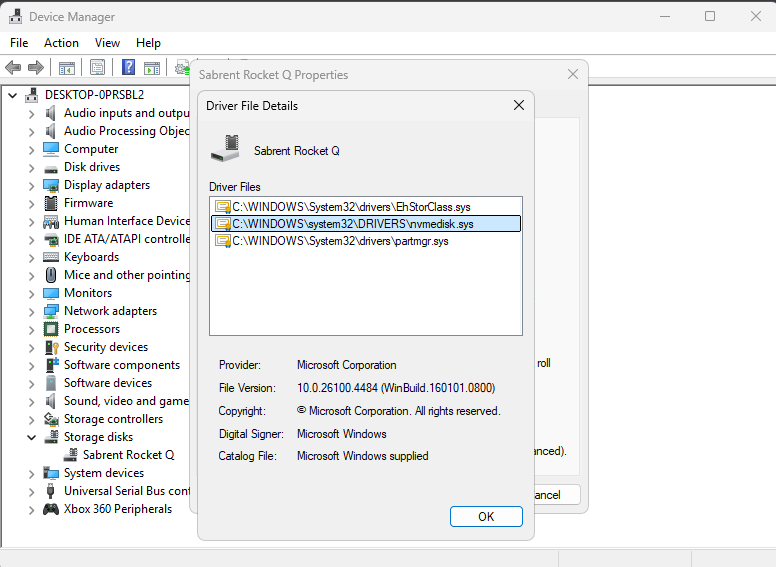
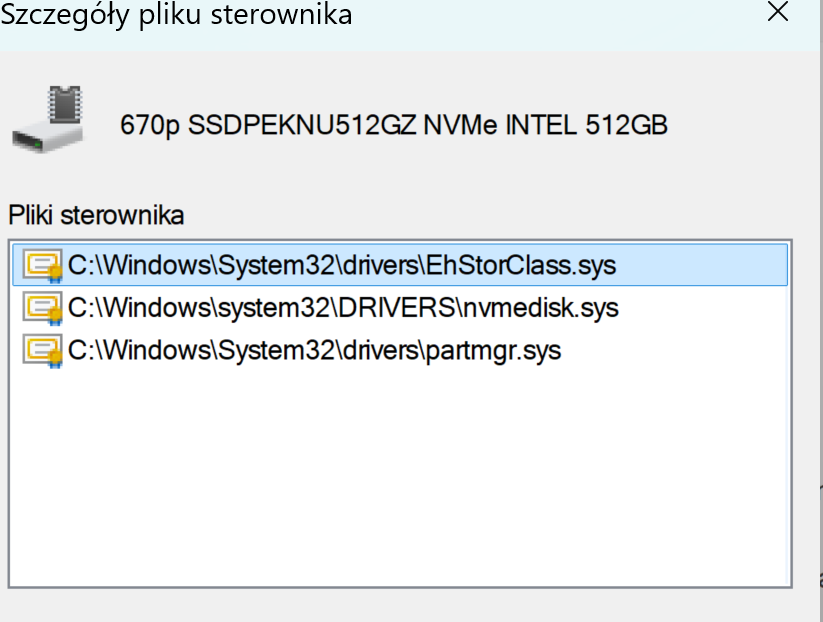
Alternatively, use this Group Policy MSI to add the policy that controls the feature then run the local Group Policy Editor to enable the policy (found under Local Computer Policy > Computer Configuration > Administrative Templates > KB5066835 251014_21251 Feature Preview > Windows 11, version 24H2, 25H2). Once Native NVMe is enabled, open Device Manager and ensure that all attached NVMe devices are displayed under the "Storage disks" section.
 
Last edited:
I did the benchmark using DiskSpd.exe mentioned in the blog post, my disk transfer/sec went from 160 to 770
Music Video Wtf GIF
 
Last edited:
Top Bottom