• Hey Guest. Check out your NeoGAF Wrapped 2025 results here!

Official PSP 1.50 exploit thread (proper loader has arrived)

Status
Not open for further replies.
Lyte Edge said:
What's the best Genesis emu, and does Streets of rage 2 work with sound? :D

I'm messing around with the new PCE emu right now; it definitely has support for CD-ROM games, but no telling how to get them working. I'm taking Dracula X off my Xbox and seeing it will work for now.

The one that I'm using is PSPGenesis. It's a good emulator and runs pretty much at full speed for me. I've tested Street of Rage 3 on it, not 2 though. The emulator's a bit buggy when it comes down to shutting down and stuff though.

Let me know if you got DraculaX working, I have the original here and would like to try it. ;)
 
Awesome, it worked. thanks for the help:)


edit: actually, did i do soemthing wrong? Every other image i change to is displayed as white. But if i select that month again, then the picture will coem on. is this normal?
 
Lyte Edge said:
What's the best Genesis emu, and does Streets of rage 2 work with sound? :D
PSP Genesis v0.12b. Be sure to set the speed at 333 by pressing X at the menu. Streets of Rage 2 works with sound.

jiggle said:
edit: actually, did i do soemthing wrong? Every other image i change to is displayed as white. But if i select that month again, then the picture will coem on. is this normal?

PSP doesn't have enough memory to load the next month so the only way to make it appear is to shut the PSP off then turn it back on again and the wallpaper should display. The wallpaper sizes we are using are huge compared to the 3-4K sizes of the default wallpaper.
 
Defensor said:
PSP Genesis v0.12b. Be sure to set the speed at 333 by pressing X at the menu. Streets of Rage 2 works with sound.


PSP doesn't have enough memory to load the next month so the only way to make it appear is to shut the PSP off then turn it back on again and the wallpaper should display. The wallpaper sizes we are using are huge compared to the 3-4K sizes of the default wallpaper.

Actually you don't even have to power off, if you get a white screen when you choose another month/wallpaper, just hit x again and it will show :D No need to power off/on.
 
Defensor said:
PSP doesn't have enough memory to load the next month so the only way to make it appear is to shut the PSP off then turn it back on again and the wallpaper should display. The wallpaper sizes we are using are huge compared to the 3-4K sizes of the default wallpaper.


thanks:)
 
Defensor said:
PSP Genesis v0.12b. Be sure to set the speed at 333 by pressing X at the menu. Streets of Rage 2 works with sound.

Cool, thanks.

Now can someone tell me how to put emulators on the memory stick? Just copying and pasting the new PCE emu (both folders) didn't work. What do you have to do?

Also why do I have corrupted files showing up? My game folder comes up on the PSP as "SNES9X," "Corrupted File,"PSP Genesis," "Corrupted File," etc.
 
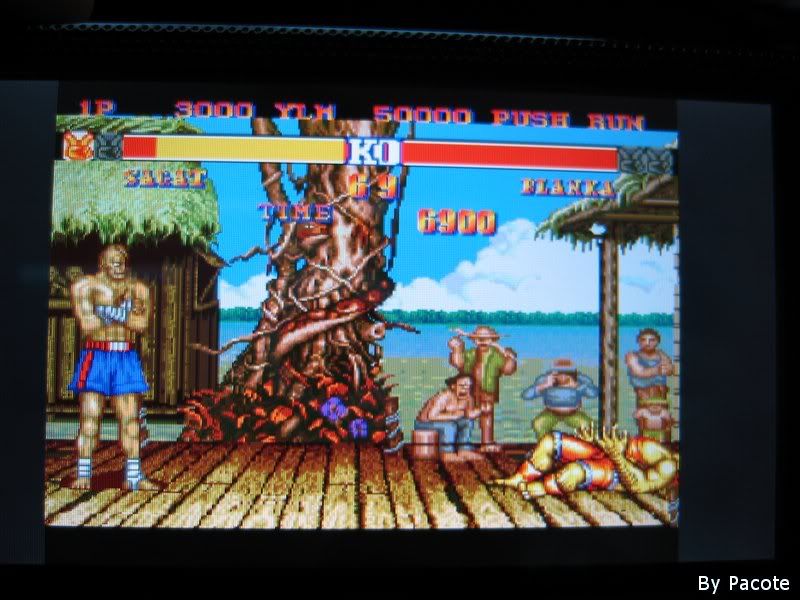
pcengine running sf2:ce

pce7_03.jpg


the guy says it runs with almost full speed with perfect sound
 
What size should the image for the background be? I was thinking about doing it. I've made a few bmps, but they're around 150kb. Is that too much? It's safe to do, right?
 
B.K. said:
What size should the image for the background be? I was thinking about doing it. I've made a few bmps, but they're around 150kb. Is that too much? It's safe to do, right?


300 x 170 max I believe
 
Does anybody even know how were supposed to have the PCE CDrom on the memory stick? I haven't seen any instructions or tutorials anywhere yet so whats the deal?

I've tried iso+mp3 in a folder which didn't work and then I tried iso+mp3 zipped into one .zip and that also didn't work... anybody know what to do?
 
impirius said:
Is there a way to make NesterJ refresh the ROMs list?

(if it was asked earlier in the thread, I missed it... sorry)

I am not sure what you are exactly asking. When I would add roms to the roms folder, turn off USB mode, and restart NesterJ it would pick up all the changes that I did manually.

The only thing I can say is make sure you are using version 1.04 as it does say it fixes some file menu bugs. Also to let anybody know, that same 1.04 version allows you to place pretty much an unlimited amount of files in one folder without the emu crashing. No more putting roms into seperate folders to stop it from crashing anymore. (which happened in 1.01 and 1.02 all the time.)
 
For those waiting for detailed PCE CD PSP instructions, just keep tuning in to your favorite site that hacks PSPs! Instructions should appear shortly! :D
 
duckroll said:
For those waiting for detailed PCE CD PSP instructions, just keep tuning in to your favorite site that hacks PSPs! Instructions should appear shortly! :D
Wow! I would have never expected such news to surface on exploit sites!
 
duckroll said:
For those waiting for detailed PCE CD PSP instructions, just keep tuning in to your favorite site that hacks PSPs! Instructions should appear shortly! :D

Which site would that be? There are several...
 
I'm having some trouble with PSPersonalize. I put a image in I:\PSP on my computer and named it 06.BMP. I ran PSPersonalize, but it didn't do anything.
 
B.K. said:
I'm having some trouble with PSPersonalize. I put a image in I:\PSP on my computer and named it 06.BMP. I ran PSPersonalize, but it didn't do anything.

put the BMP in I:/

no directories
 
*smiles*

So, who wants to trade their 1.50 US for my 1.51 US (with 1.52 downloaded onto the MS but not installed)???

Hmmm??

Anyone????

*smile withers*
 
Yusaku said:
Mejilan, your continued posting is really harshing my buzz.

I could say the same! ;p

Edit - In hindsight... I might even consider trading my 1.51 + 1gb Sandisk MS for a 1.50 without an MS (if it didn't have any dead or stuck pixels)... Hmmm...
 
Mejilan said:
*smiles*

So, who wants to trade their 1.50 US for my 1.51 US (with 1.52 downloaded onto the MS but not installed)???

Hmmm??

Anyone????

*smile withers*
Don't want to throw this thread off course, but if you really want a 1.5, just sell your 1.51 on ebay and buy a 1.5 on ebay. Your loss would be minimal. Of course, there are other ways to swap it for a 1.5 (that would probably be frowned upon here at GAF).
 
Mejilan said:
I could say the same! ;p

Edit - In hindsight... I might even consider trading my 1.51 + 1gb Sandisk MS for a 1.50 without an MS (if it didn't have any dead or stuck pixels)... Hmmm...

When/where did you buy your psp? You may still be able to just go and exchange the damn thing..Some places have a 90-day return period. you'd get a 1.5 for sure then.
 
PanopticBlue said:
When/where did you buy your psp? You may still be able to just go and exchange the damn thing..Some places have a 90-day return period. you'd get a 1.5 for sure then.

EBGames.com, launch preorder (bundle with 5 games.)
 
Mejilan said:
*smiles*

So, who wants to trade their 1.50 US for my 1.51 US (with 1.52 downloaded onto the MS but not installed)???

Hmmm??

Anyone????

*smile withers*
wow, that's deperation... someone with a warranty deal should take tha offer up, then trade in yours for a new one...
 
The Faceless Master said:
wow, that's deperation... someone with a warranty deal should take tha offer up, then trade in yours for a new one...

If they didn't compare serial numbers of the unit when trading it in, I might actually do it, but I'm pretty sure they do.
 
DO NOT PUT YOUR PSP IN SLEEP MODE WHILE RUNNING HOMEBREW

We've heard some rumors, but now I can confirm that you do not want to put your PSP in sleep mode while playing homebrew games. Eventually you will corrupt your memory stick.

I was going in and out of sleep mode fine while playing some Donkey Kong 94. But one time when I went to load my save state my memory card just sat there blinking for 5 minutes. Eventually I just hit the home button and my memory card was now corrupt. A simple format fixed everything, but I lost all my progress in DK94. :(
 
Yusaku said:
DO NOT PUT YOUR PSP IN SLEEP MODE WHILE RUNNING HOMEBREW

We've heard some rumors, but now I can confirm that you do not want to put your PSP in sleep mode while playing homebrew games. Eventually you will corrupt your memory stick.

I was going in and out of sleep mode fine while playing some Donkey Kong 94. But one time when I went to load my save state my memory card just sat there blinking for 5 minutes. Eventually I just hit the home button and my memory card was now corrupt. A simple format fixed everything, but I lost all my progress in DK94. :(

With the no swap trick now I use save states extensively. No sleep mode for me at all. Thanks for the confirmation though.
 
Hotsuma said:
For PSP Genesis, do I have to make a ROMS folder for the games to go in or do I have to to un-rar the games?
No ROMS folder needed, just put them in the same directory as the eboot.pbp. You cannot have any .zip or .BIN files for PSP Genesis so far. All your roms have to have *.smd
 
Status
Not open for further replies.
Top Bottom