• Hey Guest. Check out your NeoGAF Wrapped 2025 results here!

Windows Phone 7 |OT|

Status
Not open for further replies.
The benefit that a full cycle of use has on Lithium-ion batteries is that it calibrates the device's battery meter, making the reported percentage more accurate. Recommended to do monthly (full discharge followed by full charge).

As far as I know there is no physical benefit to the battery (lithium-ion) for doing this.
 
I haven't let mine (the Focus) run out completely but I do notice that the battery life is getting better now than when I first got the phone. Some people were saying that adding SD card to the phone mess with battery life.

On the first few days of full use (at work) phone was about empty by the time I get into my car to go home and have to be recharge. Last night the phone was just barely down to quarter battery. (Or it could be because I mess with the phone less now that it's not new toy)

You can get percentage on Focus by go into dianostic mode

http://wpcentral.com/wpcentral-tip-check-battery-percentage-samsung-focus

Now MS just need to make this part of os and not the silly icon thing.
 
venne said:

Anandtech said:
One issue that I’ve always had with the Focus is that it takes a ridiculous amount of time to fully charge. Over 7 hours. A quick Google search reveals that other Focus owners have had this problem, but not all. Microsoft indicated that the problem might appear with certain USB cables or wall charger combinations, but regardless of what I tried I had the problem. Buyer beware.
0_o that's the reason why I was trying to recalibrate the battery by draining it. The phone arrived with a dead battery and it took so long to charge that I assumed I had been swindled. Then the battery depleted in 4 hours (probably because I had 4 email accounts syncing as fast as possible :lol ). But it's better now; charging seems to take a shorter amount of time and the battery depletes slower...

Anandtech said:
Battery life is pretty straightforward. While the Focus has a very contrasty Super AMOLED screen, it comes at the expense of power consumption, especially when displaying white. Our web browsing test wreaks havoc on Super AMOLED devices as there are a lot of white pixels in the web pages we use to test. As a result the Focus delivers the worst battery life of any Windows Phone we've tested thus far.

Thankfully WP7's default theme is predominantly black. Other than the email and IE mobile apps, the majority of the OS is mostly displaying black pixels. So while the Focus doesn't do well in our web browsing battery life test, in general usage the phone lasts longer than you'd expect. I'd say you can plan on charging the phone at least once a day for moderate usage.

I've been switching between the dark and light backgrounds (my accent color remains blue) and haven't yet decided which one to stick with. I've been fine with black borders on lcd screens but black backgrounds have been problematic. Scientific evidence suggests that black-on-white is better than white-on-black (see this example, some discussion and more here). However blacks look really good on the Super AMOLED display, the Metro UI uses such large fonts, and it blends beautifully into the black panel around the Samsung Focus' screen, that the overall effect is nice on the homescreen. So for those reasons, combined with the positive effect on battery life, I'm sticking with the dark background.

However the dark background becomes a pain when using apps that take their design cue from your theme settings. The WP7 team was wise enough to enforce a light background, whatever the theme, on text heavy apps like Mail and Office. Even the messaging app, despite sticking with the default background, uses the accent color as a backdrop for each individual text message. Many third party apps fail miserably in taking this usability problem into account. GReadie and Wonder Reader are very tiring on the eyes and even GReadie's low contrast mode (i.e. gray text) isn't that helpful. Flux figured this out by using a user configurable wallpaper instead of a dark background on the first screen (more apps should offer this... twitter apps could use your homepage backgrounds from the web browser). Flux also offers the option of skipping the text heavy white-on-dark preview mode to opening each rss post with 'full' in-app browser. This would make one of my favorite rss reading experiences on any mobile platform if IE didn't suck so much.

I've complained about IE before but now I'm going to let it all out now. First you have to realize that 95% of my web browsing (i.e. not using apps for web services like twitter or netflix) on mobile phones consists of sneaking a few minutes here and there for GAF, Hacker News, Reddit, Guardian/Football and then sending interesting links and articles to Instapaper for later perusal. IE fails on each one of those functions. It doesn't display Mobile GAF properly (some trouble with the gradients) and there are little glitches like the page selector button not working. IE doesn't display iCombinator properly either; the 'save to instapaper' button is no where to be seen' and the comments pages are a clusterfuck. Reddit is halfway usable but suffers from the *different font sizes on same page* problem that I've seen a few times. Guardian/Football always defaults to the mobile version of a page, even after I set the cookie with the full desktop mode option. To top if off, bookmarklets can't be easily saved (they don't even work, mind you) so I can't set up my Instapaper bookmarklet nor can I copy and paste links directly to the Instapaper website. IE is thus practically useless to me.

I'm very tempted to pick up an iPod Touch for proper mobile browsing yet... my enthusiasm for the iPod Touch is dampened by the fact that after using the Metro UI (and webOS), iOS feels boring and limiting in comparison. iOS still has the best apps for each task on any platform (and many apps for tasks that are not served on other platforms) but the Metro UI is so much more pleasing to use. On the Tested podcast Will Smith (or Gary Witta, I forget who) had a great insight about how WP7 is about (at-a-glance) data while iOS is about apps and I find this telling in figuring out why despite WP7 apps not being as beautifully crafted as iOS apps they somehow display my data better—which is ultimately more important. webOS might end up being my go to productivity platform (I think the cards metaphor still has the best shot of replacing the desktop metaphor for advanced users) but WP7 is very nice on the mobile...

Anyway, enough rambling, more from the DesignDare series (an actual expert) on Windows Phone 7:
• The Windows Phone 7 Mail Experience
• FB and WP7: Chocolate and Peanut Butter

and
• Back Buttons Are Hard to Get Right (shame he doesn't consider webOS which shits on all the other platforms by getting the back gesture—and forward gesture and advanced 'switching apps' gesture—right)
 
go get the Metro Browser, it's $2 but worth it for orientation locking, landscape browsing controls, unlimited tabs, full screen browsing, and other features.
 
Hey Gaf,

I'll buy a new phone tomorrow, because my iPhone 3G keeps annoying the shit out of me. I thought about getting the HTC HD7, have read a couple of reviews, watched videos, etc. and it seems like something I'd really like. I've tried it today and liked pretty much everything about it. Hoewever, some people say that the Marketplace isn't really great and that I should get an HD Desire HD instead. I really don't know what to do and I thought that maybe you guys could help me making my decision.

I've also heard that the HTC HD7 doesn't support Multitasking; will I even be able to listen to a Podcast while browsing the web? Are there ways to customize the "front page"? It seems like it'd be boring to look at after a while. :/ Thanks in advance and sorry for asking (probably) stupid questions. :-)
 
snap0212 said:
Hey Gaf,

I'll buy a new phone tomorrow, because my iPhone 3G keeps annoying the shit out of me. I thought about getting the HTC HD7, have read a couple of reviews, watched videos, etc. and it seems like something I'd really like. I've tried it today and liked pretty much everything about it. Hoewever, some people say that the Marketplace isn't really great and that I should get an HD Desire HD instead. I really don't know what to do and I thought that maybe you guys could help me making my decision.

I've also heard that the HTC HD7 doesn't support Multitasking; will I even be able to listen to a Podcast while browsing the web? Are there ways to customize the "front page"? It seems like it'd be boring to look at after a while. :/ Thanks in advance and sorry for asking (probably) stupid questions. :-)

The marketplace is young and growing and has tons of great apps, and more to come. It has apps that Android doesn't even have yet, for example Netflix. Plus, the games on this phone are absolutely kick-ass. When I show people the phone, one of the first things I do is show them the games on here. Everyone gets impressed by ilomilo! :D The marketplace is approaching 4,000 apps now and it hasn't been out a month, so it's going to be growing fast!

There isn't true multi-tasking right now, except for the built-in apps. So for your example, you absolutely can listen to a podcast while browsing the web (assuming you're using Zune to play it). However, you couldn't use the Last FM app and browse the web (it's third-party and doesn't support multi-tasking yet).

Yup, you can customize the front page. You can change the theme, move the tiles around, and pin whatever you want to on there. On my start screen I've got the standard phone stuff along with some of my favorite contacts (I actually have about 10 people on the start screen :lol ) along with some apps like twitter. You could also pin websites, music related stuff (artist, album, even radio stations) and I'm sure a ton of other stuff I'm totally blanking on right now. It's really good at letting you customize.

After having the phone for a few days, I have no regrets in getting my Focus. It's easily the best phone I've ever owned (coming from an iPhone 3G). I've heard great things about the HD7, so I'm sure you would love that phone as well.
 
Iced_Eagle said:
The marketplace is young and growing and has tons of great apps, and more to come. It has apps that Android doesn't even have yet, for example Netflix. Plus, the games on this phone are absolutely kick-ass. When I show people the phone, one of the first things I do is show them the games on here. Everyone gets impressed by ilomilo! :D The marketplace is approaching 4,000 apps now and it hasn't been out a month, so it's going to be growing fast!

There isn't true multi-tasking right now, except for the built-in apps. So for your example, you absolutely can listen to a podcast while browsing the web (assuming you're using Zune to play it). However, you couldn't use the Last FM app and browse the web (it's third-party and doesn't support multi-tasking yet).

Yup, you can customize the front page. You can change the theme, move the tiles around, and pin whatever you want to on there. On my start screen I've got the standard phone stuff along with some of my favorite contacts (I actually have about 10 people on the start screen :lol ) along with some apps like twitter. You could also pin websites, music related stuff (artist, album, even radio stations) and I'm sure a ton of other stuff I'm totally blanking on right now. It's really good at letting you customize.

After having the phone for a few days, I have no regrets in getting my Focus. It's easily the best phone I've ever owned (coming from an iPhone 3G). I've heard great things about the HD7, so I'm sure you would love that phone as well.
You're awesome, thanks. I really, really appreciate the fast and detailed response. I think I'll order it now. :-)
 
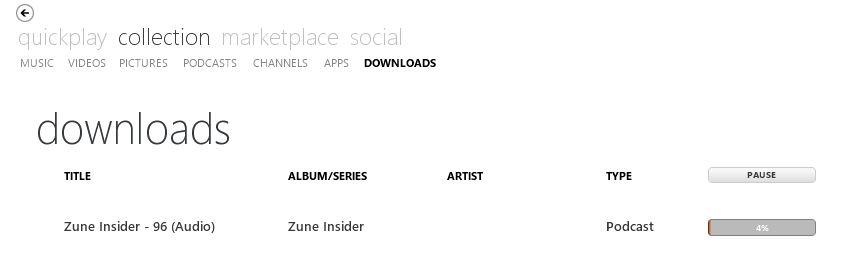
I've now ordered my HTC HD7. :-) It should be here by Wednesday (wohooo!). I've also just downloaded the Zune Software (never used it before, because Zune was never released in Europe) and have to admit that I don't like it as much as iTunes. :( Is it just me or does everything seem a little bit unorganized? Maybe it's just because I'm used to iTunes, which shows me that nice list on the left site (Music, Video, Books, Podcasts, etc.), while this shows nothing like this, right? I'm kind of a Podcast-guy and while iTunes seems perfect for all this, I really did not want to purchase an iPhone again. I am still pretty pissed that iOS 4 basically killed my 3G and Apple just did not care about it.

Anyways; is there any way to "pimp" my Zune Software to make it look more like iTunes? I don't even like iTunes, but it seems so perfectly organized. I won't use the Zune Software to listen to music so it'll basically just be my programm where I download Software and Podcasts. Or is it possible to use another program? I'm sorry if answers to my questions can be found in this Thread, but I've scrolled though a couple of pages and couldn't find anything.
 
snap0212 said:
I've now ordered my HTC HD7. :-) It should be here by Wednesday (wohooo!). I've also just downloaded the Zune Software (never used it before, because Zune was never released in Europe) and have to admit that I don't like it as much as iTunes. :( Is it just me or does everything seem a little bit unorganized? Maybe it's just because I'm used to iTunes, which shows me that nice list on the left site (Music, Video, Books, Podcasts, etc.), while this shows nothing like this, right? I'm kind of a Podcast-guy and while iTunes seems perfect for all this, I really did not want to purchase an iPhone again. I am still pretty pissed that iOS 4 basically killed my 3G and Apple just did not care about it.
Anyways; is there any way to "pimp" my Zune Software to make it look more like iTunes? I don't even like iTunes, but it seems so perfectly organized. I won't use the Zune Software to listen to music so it'll basically just be my programm where I download Software and Podcasts. Or is it possible to use another program? I'm sorry if answers to my questions can be found in this Thread, but I've scrolled though a couple of pages and couldn't find anything.

Go to your "collection" (the top menu) and there are the same listings (music, videos, podcasts, etc) right below that in the collection view. Its just a different layout you need to get used to. Its way better than itunes once you do.
 
there is separate tabs at the top for videos, podcasts music etc.. if that is what you're asking.
 
Hm, personally I find Zune miles ahead of iTunes, but that's just me. It's just a different way of doing things and it takes a bit of getting used to.

The default music page of viewing the artists is very useful imo. Artist list on left, albums in center and songs on the right.

If you click on the left side, you can then type to search the artists which makes navigation pretty fast if you're looking for something specific.

At the upper right you can also change the view to other views (genre, bigger album list, and a song list as well as your playlists).

Old habits die hard, and I'd say just try hard using Zune and with an open mind. Now that I've been using Zune for the better part of 2 or 3 years, I can't go back to iTunes and it honestly just feels like a piece of junk.

Oh, and be sure to check out Mix View which will show you related artists, albums and songs to the one you're listening to (VERY nice in finding new stuff), SmartDJ (auto-generates a playlist based on an artist, also good for finding new music), and the Now Playing screen which is absolutely gorgeous (it's the EQ looking button to the right of the next track in the bottom right).
 
Windu said:
there is separate tabs at the top for videos, podcasts music etc.. if that is what you're asking.
I don't know how you'd miss the tabs. My girlfriend who isn't computer savy at all just said the same thing. Unless we are just missing something in that long post. I mean it separates music, video, podcasts ect... so I'm honestly confused.
 
Iced_Eagle said:
Old habits die hard, and I'd say just try hard using Zune and with an open mind. Now that I've been using Zune for the better part of 2 or 3 years, I can't go back to iTunes and it honestly just feels like a piece of junk.
Yeah, I think that's currently my problem. I'm just so used to how iTunes looks, because I've used it for years. I'll obviously get used to Zune, but I can't stop thinking that some things that should be there are just missing. For example; I have to click through the Podcast section to see if the program is currently downloading a new episode.

Do you know if there's any way to disable the album art completely? I've imported all my music and I really love how (on the left side) there's just a list of all the artist. Feels perfect. In my podcast section, however, there's a cover for every podcast I've subscribed to, but the name of the particular Podcast seems to be to long to be shown so they just show me the cover art. I'd love it to be just a list. Those are things I don't like as much. Maybe I'm just too much into Podcasts. Not good since it seems like I can't look for them here. :D

Anyway; since it doesn't run like crap on my Netbook (like iTunes odes) I'll keep using it! :)

Iced_Eagle said:
and the Now Playing screen which is absolutely gorgeous (it's the EQ looking button to the right of the next track in the bottom right).
It really does. Amazing!

edit: I just found this site: http://social.zune.net/podcasts/ and I can find countless Podcasts here. Why is site not available through the Program? Or is it and I just don't know how to access it? :lol

edit2: Okay, this is getting weird. I can't even access the Podcast section on the Zune Homepage if I tell them that I'm from Germany. They'll list everything but the Podcasts. Maybe that's also the reason why I'm not seeing them in the program. o_O

edit3: Yes, not available in my country. Perfect... -.-
 
snap0212 said:
Yeah, I think that's currently my problem. I'm just so used to how iTunes looks, because I've used it for years. I'll obviously get used to Zune, but I can't stop thinking that some things that should be there are just missing. For example; I have to click through the Podcast section to see if the program is currently downloading a new episode.

Do you know if there's any way to disable the album art completely? I've imported all my music and I really love how (on the left side) there's just a list of all the artist. Feels perfect. In my podcast section, however, there's a cover for every podcast I've subscribed to, but the name of the particular Podcast seems to be to long to be shown so they just show me the cover art. I'd love it to be just a list. Those are things I don't like as much. Maybe I'm just too much into Podcasts. Not good since it seems like I can't look for them here. :D

Anyway; since it doesn't run like crap on my Netbook (like iTunes odes) I'll keep using it! :)

It really does. Amazing!

You don't. If the Zune software is downloading something, a download tab will appear.

boykddnrcntlswn21.jpg
 
thirty said:
go get the Metro Browser, it's $2 but worth it for orientation locking, landscape browsing controls, unlimited tabs, full screen browsing, and other features.
here's a pic comparing the stock browser and the metro browser. the full screen is gorgeous btw. oh, it's an app you can try before you buy too.
metro.PNG
 
I don't typically subscribe to podcasts, so I'm not that fluent on how podcasts work with Zune tbh.

The only feature I've really used is subscribe to one podcast, and just tweaking the podcast section of settings (how many episodes to keep, and the playback order).
 
The way Zune manage podcast is a bit difference than iTunes and probably will take some getting used to. I was pretty confuse at first of how the podcast are keep etc but now that I am accustom to it, I am happy with it. My biggest complain is not able to download podcast without sync and I have the opposite problem, the album art for the podcast doesn't show up on my phone (but it's on Zune) and it's bugging the crap out of me.

I download an app call PODCAST! and it let me stream any podcast though it doesn't save it (as far as I know) but for now it's a solution when I forget to sync my phone and need to find something to listen to at work.
 
antiquegamer said:
My biggest complain is not able to download podcast without sync
you can subscribe to a podcast and then right click on the album art and say, don't sync.
 
Bought a zagg protection kit for my HD7, I can't put this puppy down, whether it's listening to podcasts on the go with Podcast! Or laying down on the bed watching netflix, to browsing Gaf, I'm in love.

I actually got into a fight with my wife as I bought her one too, and she told me to send it back to amazon as she doesn't like how different it is and the lack of a aol messenger on it (she's using a sanyo juno), and by fight I mean heated. I swear this woman is just not right in the head at times.

Oh well I hate to send her phone back, but I'll be damned if I'm spending money on a cancellation fee etc on it.

Edit: I just got metro browser and it is heavenly.
 
trinest said:
I would consider the Metro Browser if its based of Webkit or something better then IE8

From what I understand that will never happen as any 3rd party browsers still have to be based on the same IE kernel.
 
Copy/paste seeded to devs!

http://pocketnow.com/windows-phone/wp7-copy-paste-update-allegedly-hits-developer-device

A user can tap a word in mail, IE, Word, etc and that word is then highlighted with arrows on both sides. One can then drag to the left or right to include more words. An icon appears above the highlighted word(s) (looks very similar to the copy icon in Office 2010) to copy. Open a new document, once the cursor is set/blinking and the soft keyboard appears, a paste icon (again, looks the same as the paste icon in Office 2010) is shown just above the top row of letters. In "Messaging", a user can long press a specific IM which open up the hidden menu that now includes copy. Paste where you wish...
 
Windu said:
you can subscribe to a podcast and then right click on the album art and say, don't sync.

I meant download them via wi-fi from marketplace like you can do on idevice where you can search for other episodes and download them without having to sync the device to zune. If there is a way to do that please tell.
 
Charred Greyface said:
0_o that's the reason why I was trying to recalibrate the battery by draining it. The phone arrived with a dead battery and it took so long to charge that I assumed I had been swindled. Then the battery depleted in 4 hours (probably because I had 4 email accounts syncing as fast as possible :lol ). But it's better now; charging seems to take a shorter amount of time and the battery depletes slower...

This is definitely a Samsung issue, my wife's Captivate phone also takes frickin forever to charge. I don't know what the heck is going on with Samsung and the batteries on these phones. My Nexus One charges at least twice as fast. One slightly useless thing I did find out is that it charges much faster when you power it off. But obviously you wouldn't want to power the phone off just to charge it, lol.
 
Charred Greyface said:
However the dark background becomes a pain when using apps that take their design cue from your theme settings. The WP7 team was wise enough to enforce a light background, whatever the theme, on text heavy apps like Mail and Office. Even the messaging app, despite sticking with the default background, uses the accent color as a backdrop for each individual text message. Many third party apps fail miserably in taking this usability problem into account. GReadie and Wonder Reader are very tiring on the eyes and even GReadie's low contrast mode (i.e. gray text) isn't that helpful. Flux figured this out by using a user configurable wallpaper instead of a dark background on the first screen (more apps should offer this... twitter apps could use your homepage backgrounds from the web browser). Flux also offers the option of skipping the text heavy white-on-dark preview mode to opening each rss post with 'full' in-app browser. This would make one of my favorite rss reading experiences on any mobile platform if IE didn't suck so much.

Completely disagree. I really hope they offer system-wide black backgrounds. I hate black on white. HATE it.
 
antiquegamer said:
I meant download them via wi-fi from marketplace like you can do on idevice where you can search for other episodes and download them without having to sync the device to zune. If there is a way to do that please tell.
I don't have my WP7 yet, but this one wouldn't be that much of a Problem for me. I'm still getting used to the Zune Program and it seems like I'm getting better every day. One thing that really annoys me, though, is that the Podcast Section just doesn't show up on the Marketplace. Seems like it's currently not available in my country (Germany), which is completely surprising. I can understand why I don't have other stuff like the Zune Pass, but there's just no reason for the lack of the Podcast Section. I already asked about this on Microsoft's Forums, but I've yet to get an answer. I really hope they'll fix this soon.

It currently looks like this:
untitled0b51.png


I've also read a couple of things about Audiobooks. Zune doesn't seem to support them, but there's a way to get them on your device nonetheless, it seems. I'll have to try that once my phone shows up.

I also have a question about my "Live ID". I use my @gmail.com address for my Xbox Live Account, which means that whenever I log in into the Xbox Live Marketplace (on the PC) I use my gmail-address and it seems to be perfectly fine. I'm a bit confused since it's talking about the Live ID all the time and I don't have a hotmail or live address (yet). The best thing is to link my Xbox Live account to my Zune Program, isn't it? They already have my credit card information once and I don't really want to create another account. I've also seen that prices for Applications are shown in Euro and not Microsoft Points. Does that mean they'll charge my credit card even though I have enough points on my account?

Thanks in advance (again :p )!
 
You can use any email for a Live ID. Your GMail email should be your Live ID. Not sure how Mail works with it though. I use a Hotmail address myself.
 
snap0212 said:
I don't have my WP7 yet, but this one wouldn't be that much of a Problem for me. I'm still getting used to the Zune Program and it seems like I'm getting better every day. One thing that really annoys me, though, is that the Podcast Section just doesn't show up on the Marketplace. Seems like it's currently not available in my country (Germany), which is completely surprising. I can understand why I don't have other stuff like the Zune Pass, but there's just no reason for the lack of the Podcast Section. I already asked about this on Microsoft's Forums, but I've yet to get an answer. I really hope they'll fix this soon.

It currently looks like this:
untitled0b51.png


I've also read a couple of things about Audiobooks. Zune doesn't seem to support them, but there's a way to get them on your device nonetheless, it seems. I'll have to try that once my phone shows up.

I also have a question about my "Live ID". I use my @gmail.com address for my Xbox Live Account, which means that whenever I log in into the Xbox Live Marketplace (on the PC) I use my gmail-address and it seems to be perfectly fine. I'm a bit confused since it's talking about the Live ID all the time and I don't have a hotmail or live address (yet). The best thing is to link my Xbox Live account to my Zune Program, isn't it? They already have my credit card information once and I don't really want to create another account. I've also seen that prices for Applications are shown in Euro and not Microsoft Points. Does that mean they'll charge my credit card even though I have enough points on my account?

Thanks in advance (again :p )!
Try changing the region of your OS to US. That should completely unlock the Zune software for you.

You get audiobooks on your Zune or WP7 with the Audible software. http://www.audible.com/

On the WP7 marketplace you can't pay with space bucks aka Microsoft Points. Only real money is allowed.
 
brotkasten said:
Try changing the region of you OS to US. That should completely unlock the Zune software for you.
This actually worked, but I guess I'll just have to deal with the previous "problem" since it now won't allow me to buy anything. "The location setting for your LIVE ID doesn't match the setting for your computer (US)" is the error message. Well, I'll just wait.. :/
 
Anyone see this? ASUS E600 maybe coming to ATT...anyone have experience with ASUS phones?

http://www.electronista.com/articles/10/12/06/asus.e600.wp7.phone.shows.at.fcc.reveals.details/

The phone is now known to sport a four-inch touchscreen with at least a 480x800 resolution, a five-megapixel camera with an LED flash and a 1,300mAh battery

When the phone will launch is unknown, and it could be just a testbed for other models from ASUS that run on WP7. The charger of the device in the FCC photos has Garmin branding on it, which is an indication of an earlier, since-ended partnership with Garmin. If the E600 does come to market, it will likely be offered by AT&T, as it was also spotted running on the carrier's 3G network.
pu6nN.jpg
 
Speaking of the 850/1900 band, the HD7 with those bands recently went through the FCC: http://pocketnow.com/windows-phone/htc-hd7-coming-to-att

att_htc_hd7.jpg


HTC has submitted a Windows Phone 7 handset for FCC approval whose model number, label, and 3G band support suggest that it is a version of the HD7 suitable for use on AT&T. Packing the WCDMA Band V and II radios required for AT&T HSPA connectivity, this device goes by the model number PD29130 -- just one digit off from the PD29110, a WCDMA Band IV-compliant Windows Phone from HTC which passed the FCC on October 4th and is almost certainly T-Mobile's HD7. What's more, the two devices sport FCC ID labels which are the exact same size and shape, highly suggestive of the fact that they are the same phone with different cellular radios.

So does this mean that the HD7 will definitely find its way into AT&T's lineup? It would certainly make sense from both the carrier's and manufacturer's points of view, as the lone HTC Windows Phone 7 on that network, the HTC Surround, doesn't have nearly the buzz that the company's 4.3-inch flagship does. However, it's also possible that this is an overseas variant destined for either Canadian or South American carriers, and simply passing the FCC as these models sometimes do. Less likely is the possibility that HTC plans to sell an AT&T-compatible unlocked HD7 in the US, but hey, stranger things have happened.
 
Mr. Snrub said:
Anyone see this? ASUS E600 maybe coming to ATT...anyone have experience with ASUS phones?

Not sure with phones, but when it comes to general computers/parts, they are one of the best in the industry.
 
On a more important note:

Pandora not interested in WP7 anymore?
In a recent Tweet, the developer said that "they don't have any plans for a WP7 app" which is sort of strange since they were announced as a launch partner. One would think that no-background play may be an issue, but they certainly had no problem kowtowing to Apple over that one. We also know Microsoft often offers to pay for the development of high-demand apps, so we don't know what went wrong here.
Pandora gets cold feet: no plans for a Windows Phone 7 client [Updated]

I wonder what's the reason for that.
 
My sister returned her focus for an iphone 4, but I loved my short time playing with the os. I'm looking to get into the platform as cheaply as possible, without using up my contact upgrade. I think the lg phone might be the cheapest one on the market right now, based on ebay auctions I've looked at (~$325). Any other ideas as to how to get into the platform without spending a lot?

If any lurkers wan't to unload their phone, let me know.
 
Ive always been a last.fm guy for internet radio myself.


So is anyone else worried that if this doesn't take off on quite the level MS wants it to, it won't receive the greatest support? Im basically worried that MS will be great with it for a little bit, then largely ignore it (a la Zune HD or Kin). I'm almost thinking if it doesn't seem like things are panning out in 6 months or so to go for an android.
 
I came from android.. I'd like to see this do better than it seems to be doing.. but I have no intention of jumping ship unless Microsoft does.
 
Zerokku said:
So is anyone else worried that if this doesn't take off on quite the level MS wants it to, it won't receive the greatest support? Im basically worried that MS will be great with it for a little bit, then largely ignore it (a la Zune HD or Kin). I'm almost thinking if it doesn't seem like things are panning out in 6 months or so to go for an android.

I think Microsoft has far too much invested in this product and its success is far too important to Microsoft as a whole for them to walk away. Whether it catches on with all of the application developers is going to be a different story.
 
Zerokku said:
Ive always been a last.fm guy for internet radio myself.


So is anyone else worried that if this doesn't take off on quite the level MS wants it to, it won't receive the greatest support? Im basically worried that MS will be great with it for a little bit, then largely ignore it (a la Zune HD or Kin). I'm almost thinking if it doesn't seem like things are panning out in 6 months or so to go for an android.
Shareholders would kill Ballmer if they drop WP7 like the Zune or KIN and isn't it a bit too early for talk like that? WP7 is out for like what? 2 months? It's a completely new phone platform and we already have over 3000 applications in the marketplace and the first OS update will be out next month. Is it that bad? Besides, you don't give something a huge marketing budget ($400M or $500M, afaik) if you don't wanna support it. Zune never got any marketing support and the KIN was sent to die.
 
Zerokku said:
Ive always been a last.fm guy for internet radio myself.


So is anyone else worried that if this doesn't take off on quite the level MS wants it to, it won't receive the greatest support? Im basically worried that MS will be great with it for a little bit, then largely ignore it (a la Zune HD or Kin). I'm almost thinking if it doesn't seem like things are panning out in 6 months or so to go for an android.

I personally I think Microsoft will throw as much money as it takes towards this until it becomes successful. Similar to what they did with Xbox.
 
Can anyone here verify something for me?

Can you manage and sync a Windows 7 phone without having Windows Live Sign-in Assistant installed on your computer? If that program is already on your computer (check in your installed programs in the control panel), try uninstalling it, downloading/syncing an app from the computer, and making sure it works? If you don't have it installed to begin with, excellent, everything must work fine, just let me know?

A friend of mine is looking to buy a W7 phone, but uses an Apple TV with his HTPC, and Windows Live Sign-in Assistant breaks file sharing so this could cause him some troubles.
 
Stumpokapow said:
Can anyone here verify something for me?

Can you manage and sync a Windows 7 phone without having Windows Live Sign-in Assistant installed on your computer? If that program is already on your computer (check in your installed programs in the control panel), try uninstalling it, downloading/syncing an app from the computer, and making sure it works? If you don't have it installed to begin with, excellent, everything must work fine, just let me know?

A friend of mine is looking to buy a W7 phone, but uses an Apple TV with his HTPC, and Windows Live Sign-in Assistant breaks file sharing so this could cause him some troubles.

I don't have that program I had windows live essentials which I just uninstalled just to be sure. Plugged in both mine and my wife's hd7, Zune started up and everything is fine.

Am I doing it wrong?
 
Stumpokapow said:
Can anyone here verify something for me?

Can you manage and sync a Windows 7 phone without having Windows Live Sign-in Assistant installed on your computer? If that program is already on your computer (check in your installed programs in the control panel), try uninstalling it, downloading/syncing an app from the computer, and making sure it works? If you don't have it installed to begin with, excellent, everything must work fine, just let me know?

A friend of mine is looking to buy a W7 phone, but uses an Apple TV with his HTPC, and Windows Live Sign-in Assistant breaks file sharing so this could cause him some troubles.

I don't THINK it's required...not at home now, but I don't ever remember installing it.
 
brotkasten said:
Shareholders would kill Ballmer if they drop WP7 like the Zune or KIN and isn't it a bit too early for talk like that? WP7 is out for like what? 2 months? It's a completely new phone platform and we already have over 3000 applications in the marketplace and the first OS update will be out next month. Is it that bad? Besides, you don't give something a huge marketing budget ($400M or $500M, afaik) if you don't wanna support it. Zune never got any marketing support and the KIN was sent to die.


They have ignored the zune? They have continued to release new hardware for it updated the software over and over and built it into the 360.. I do not think they have jumped ship on it by any means. Now the Kin... needed to die.

Oh and I am starting to lean towards the LG phone.. I really think I would enjoy the pull out keypad.
 
Yeah I don't think it's required at all. Seeing that it only connects to Zune and nothing else. I just downloaded a bunch of free apps to my wife's phone without a hitch. Stump I'd say that friend of yours is good to go.
 
Status
Not open for further replies.
Top Bottom
